Critical SSRF on Evernote
A URL parameter that was base64-decoded and used to fetch a file allowed the attacker to make the server request arbitrary URLs, including the GCP metadata service, and read the response. This exposed a GCP access token and also allowed reading local files.

In this article I will talk about a critical vulnerability on Evernote : it was a SSRF that allowed me to access GCP credentials from fetch GCP metadata webserver .
The full write-up lives on its author's site
It belongs to its author, so we link to it rather than copy it. The other two tabs are our own rewrites, checked against it.
Context
Evernote is a note-taking service with a web application at www.evernote.com. The write-up describes a server-side request forgery (SSRF) in a feature that fetches resources referenced by a base64-encoded value in the URL path. The researcher, Neolex (@NeolexSecurity), found that the endpoint would fetch the decoded value and return its content inside the response, which allowed him to reach the Google Cloud metadata server and read a service account access token. Evernote paid a 5,000 USD bounty, which the author describes as their critical bounty.
Setup
The report does not describe any special accounts, roles or tooling. The researcher was simply using the Evernote web application in a browser, watching the requests it made. No versions, headers or authentication details are given.
Finding it
The first day of hunting on Evernote produced nothing after two hours, so the researcher stopped. The next day, on opening Evernote, a request stood out:
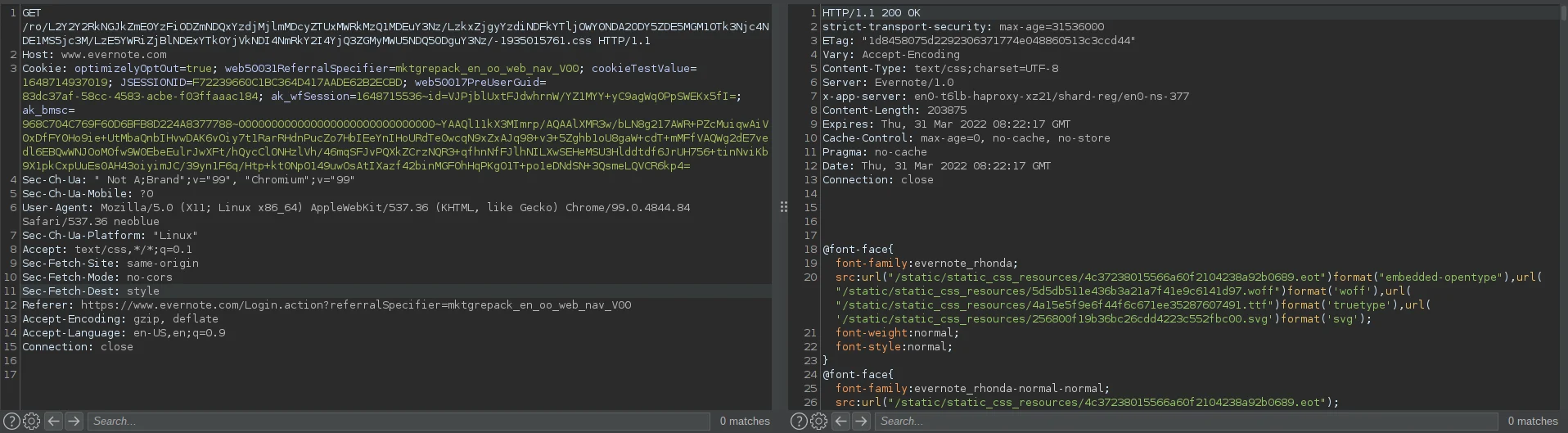
The request carried a base64 value in the URL. Decoding it:
[redacted]
gives:
/[redacted].css
The content of [redacted].css was returned inside the response. A server that takes a value from the URL, fetches it and reflects the body back is exactly the shape of an SSRF, so that was the immediate suspicion.
Exploitation
Step 1: confirm the fetch and probe the metadata address
The first attempt was to base64-encode http://[redacted], the usual link-local metadata address, and use it in place of the CSS path. That did not work. After some trial and error the researcher concluded that a whitelist applied to the URL or file path, and that the value had to end in .css or .js.
Step 2: satisfy the extension check with a fragment
The payload used was:
https://www.evernote.com/ro/[redacted]/-1430533899.js
The base64 part decodes to:
http://metadata.[redacted]/computeMetadata/v1beta1/instance/service-accounts/default/token#.js
The trick is the #.js at the end. Everything after # is a fragment, so it is not sent to the server, but the string still ends in .js and therefore passes the extension whitelist. The string ends in .js for the whitelist, while the fragment is not sent to the target.
Step 3: read the token
The response contained the access token:
{"access_token":"ya29.c.Ko4B_gd-ROPkMva4XDYr-U2r-[redacted]-Yuy6-innnpf-[redacted]-[redacted]","expires_in":2298,"token_type":"Bearer"};
The response contained an access token of type Bearer.
Step 4: local file read
The researcher then found that local files could be read the same way, by base64-encoding:
file:///etc/passwd#.js
The researcher found that local files could be read via the base64-encoded value of file:///etc/passwd#.js.
Root cause
The endpoint accepts a base64-encoded value from the URL, decodes it and fetches it server-side, returning the body to the client. The only control observed was a check that the value ends with .css or .js. That check is a string suffix test, not a restriction on scheme, host or resolved address, so it can be satisfied by appending a fragment such as #.js. Because the fragment is never sent to the target, the fetch goes to whatever host and path precede it, including the GCP metadata service and file:// URLs. The only control the researcher observed was a check that the value ends with .css or .js. The report does not show the server-side code, so the exact implementation is not stated.
Impact
An attacker who can reach the endpoint can make the Evernote server issue requests to internal addresses and return the responses. In this case that yielded a GCP service account access token from the metadata service, and the researcher also demonstrated reading local files such as /etc/passwd. The token's scope and what it granted access to are not described in the report. The bounty was 5,000 USD, which the author says is Evernote's critical bounty.
Fix
Based on the behaviour described, the suffix check on the decoded value should be replaced by a strict allowlist of permitted hosts and schemes, with the fetch restricted to those origins, and requests to link-local, metadata and file:// targets rejected. The report does not confirm which of these was applied.
Variants to test
- Extension whitelists on fetch parameters: append a fragment such as
#.jsor#.cssto an internal URL and see whether the response body comes back. A positive result is the internal resource's content reflected in the response. - Base64 or otherwise encoded URL parameters: decode and re-encode an internal address, keeping the required suffix. A positive result is a response from the internal host rather than an error.
- Cloud metadata endpoints: try the GCP metadata host and path shown here, and the equivalent metadata addresses of other providers, with the suffix trick. A positive result is a token or instance metadata in the body.
- Local file schemes: submit
file:///etc/passwd#.jsstyle values. A positive result is file content in the response. - Redirect-based bypasses: point an allowed host at an internal address via a redirect, if the fetcher follows redirects. A positive result is the internal response after the redirect.
What happened, in plain words
Evernote is a service for taking notes, and it has a website at www.evernote.com where you can read and write those notes in a browser. Somewhere on that website there is a feature that takes a value from the address bar, decodes it, and then goes and fetches whatever that value points to. The server does the fetching, not your browser, and it hands the result back to you inside the page response.
That feature had a serious flaw. Because the server fetched addresses supplied in the URL, a researcher called Neolex (@NeolexSecurity) was able to make Evernote's server request a Google Cloud internal service and return a credential. He could also make the server read files sitting on its own disk. Evernote paid a 5,000 USD bounty for it, which the author describes as their critical bounty.
The class of bug here is called server-side request forgery, usually shortened to SSRF. The everyday comparison: imagine a hotel concierge who will fetch anything you ask for. You are not allowed into the staff-only corridor, but the concierge is. If you can talk the concierge into walking down that corridor and reading a notice off the wall for you, you have effectively been down the corridor yourself. In an SSRF, the website's server is the concierge, and the staff-only corridor is the network and files that only the server can reach.
The pieces you need to know first
A few ideas come up again and again below, so here they are from zero.
Base64 is a way of writing any data using only ordinary letters, digits and a couple of symbols. It exists so that data which might contain awkward characters (slashes, spaces, binary bytes) can travel safely inside a URL or an email. It is not encryption: anyone can decode it, and it hides nothing. Think of it as spelling a word out letter by letter over the phone so nothing gets misheard.
A URL is the address you see in the browser bar. It has parts. The scheme is the bit before ://, such as http, https or file. The host is the machine name, such as www.evernote.com. The path is what comes after the host, such as /ro/.... The fragment is anything after a # sign. The important thing about the fragment is that browsers never send it to the server: it is only used by the browser itself, for example to jump to a section of a page.
A server is the computer that runs the website. When you load a page, your browser sends a request to that computer and it sends back a response. Some of the work happens on the server, out of your sight.
An API is a way for one piece of software to ask another piece of software for something, in a fixed format. It is like a service counter: you hand over a request in the expected form and get back an answer in the expected form. Google Cloud, the platform Evernote runs on, exposes an API that lets a program ask questions about the machine it is running on.
A token is a short string of characters that acts as proof that you are allowed to do something, a bit like a cloakroom ticket: whoever holds it can collect the coat, no questions asked. A bearer token is exactly that: whoever bears (carries) it is treated as authorised. That is why leaking one is serious.
A service account is a non-human account, used by a program rather than a person, so that the program can talk to cloud services. Its token is the key to whatever that program is allowed to do.
The metadata server is a special address that cloud machines can reach from inside. It tells the machine about itself, and on Google Cloud it can hand out credentials for the machine's service account. The address [redacted] is the usual one on many cloud providers, and metadata.[redacted] is Google's name for it. It is meant to be reachable only from the machine itself, never from the internet.
A whitelist is a list of things that are allowed. Anything not on the list is refused. A whitelist that only checks how a string ends is weak, as you will see.
Setting up
The report does not describe any special accounts, roles or tools. The researcher was simply using the Evernote web application in a browser and watching the requests it made. No versions, headers or login details are given.
Finding it
The first day of hunting on Evernote produced nothing after two hours, so the researcher stopped. The next day, on opening Evernote, one request stood out:
The request that caught his eye: It carried a long base64 value in the URL. Decoding that value:
[redacted]
gives:
/[redacted].css
Line by line: the first block is the scrambled-looking string exactly as it appeared in the request. The second block is what you get when you decode it, and it is an ordinary file path ending in .css, which is the file extension for a stylesheet, the file that tells a browser how a page should look.
The content of [redacted].css was returned inside the response. That is the clue. Normally a website would just serve you a file from its own storage. Here the server was taking a value out of the URL, going and fetching it, and echoing the body back. A server that fetches an address you supply and shows you the result is exactly the shape of an SSRF, so that was the immediate suspicion. The reasoning is: if I can control what it fetches, maybe I can point it at things I am not supposed to reach.
Exploitation
Step 1: confirm the fetch and probe the metadata address
The first attempt was to base64-encode http://[redacted], the usual link-local metadata address, and use it in place of the CSS path. That did not work. After some trial and error the researcher concluded that a whitelist applied to the URL or file path, and that the value had to end in .css or .js. In other words, the server checked the last few characters of the decoded value and refused anything that did not look like a stylesheet or a script file.
Step 2: satisfy the extension check with a fragment
The payload used was:
https://www.evernote.com/ro/[redacted]/-1430533899.js
Reading it in parts: https://www.evernote.com/ro/ is the Evernote address and the feature that does the fetching. The long middle chunk is base64. The trailing /-1430533899.js is part of the path and also ends in .js.
The base64 part decodes to:
http://metadata.[redacted]/computeMetadata/v1beta1/instance/service-accounts/default/token#.js
Line by line: http:// is the scheme, so the server will make a plain web request. metadata.[redacted] is Google's internal name for the metadata service. The path /computeMetadata/v1beta1/instance/service-accounts/default/token is the API endpoint that hands out the token for the machine's default service account. And #.js is the trick.
The trick is the #.js at the end. Everything after # is a fragment, so it is not sent to the server, but the string still ends in .js and therefore passes the extension whitelist. The string ends in .js for the whitelist, while the fragment is not sent to the target. The comparison: a bouncer checks that your invitation ends with the word "guest", so you write "guest" on the back of a card that says "staff only" and hand it over. The bouncer reads the last word and waves you through; the door you actually walk through is the staff one.
Step 3: read the token
The response contained the access token:
{"access_token":"ya29.c.Ko4B_gd-ROPkMva4XDYr-U2r-[redacted]-Yuy6-innnpf-[redacted]-[redacted]","expires_in":2298,"token_type":"Bearer"};
Line by line: access_token is the secret string itself, the cloakroom ticket. expires_in is how many seconds it stays valid, here 2298, which is a little over 38 minutes. token_type says Bearer, meaning whoever holds the string is treated as authorised. The response contained an access token of type Bearer. The report does not describe what that account was allowed to do.
Step 4: local file read
The researcher then found that local files could be read the same way, by base64-encoding:
file:///etc/passwd#.js
Line by line: file:// is a scheme that means "a file on this computer" rather than a web address. /etc/passwd is a standard file on Linux systems that lists the user accounts. #.js is the same fragment trick again: the path ends in .js for the whitelist, while the scheme is file:// and the target is a local file. The researcher found that local files could be read via the base64-encoded value of file:///etc/passwd#.js.
Root cause
The endpoint accepts a base64-encoded value from the URL, decodes it and fetches it server-side, returning the body to the client. The only control observed was a check that the value ends with .css or .js. That check is a string suffix test, not a restriction on scheme, host or resolved address, so it can be satisfied by appending a fragment such as #.js. Because the fragment is never sent to the target, the fetch goes to whatever host and path precede it, including the GCP metadata service and file:// URLs. The only control the researcher observed was a check that the value ends with .css or .js.
Impact
An attacker who can reach the endpoint can make the Evernote server issue requests to internal addresses and return the responses. In this case that yielded a GCP service account access token from the metadata service, and the researcher also demonstrated reading local files such as /etc/passwd. The token's scope and what it granted access to are not described in the report. The bounty was 5,000 USD, which the author says is Evernote's critical bounty.
Fix
Based on the behaviour described, the suffix check on the decoded value should be replaced by a strict allowlist of permitted hosts and schemes, with the fetch restricted to those origins, and requests to link-local, metadata and file:// targets rejected. The report does not confirm which of these was applied.
Variants to test
- Extension whitelists on fetch parameters: append a fragment such as
#.jsor#.cssto an internal URL and see whether the response body comes back. A positive result is the internal resource's content reflected in the response. - Base64 or otherwise encoded URL parameters: decode and re-encode an internal address, keeping the required suffix. A positive result is a response from the internal host rather than an error.
- Cloud metadata endpoints: try the GCP metadata host and path shown here, and the equivalent metadata addresses of other providers, with the suffix trick. A positive result is a token or instance metadata in the body.
- Local file schemes: submit
file:///etc/passwd#.jsstyle values. A positive result is file content in the response. - Redirect-based bypasses: point an allowed host at an internal address via a redirect, if the fetcher follows redirects. A positive result is the internal response after the redirect.
Glossary
- API: a fixed way for one program to ask another program for something and get an answer back.
- Base64: a way of writing any data using only ordinary letters, digits and a few symbols, so it can travel safely in a URL; it is not encryption and hides nothing.
- Bearer token: a secret string where whoever holds it is treated as authorised, like a cloakroom ticket.
- Bounty: a payment a company makes to someone who reports a security flaw to them.
- CSS: the file format that tells a browser how a page should look; such files end in
.css. - Endpoint: a specific address on a server that performs a specific job when you request it.
- Evernote: a service for taking and reading notes, with a website at
www.evernote.com. - Fragment: the part of a URL after a
#sign; browsers never send it to the server. - GCP (Google Cloud Platform): Google's cloud service, where customers rent machines and services.
- Host: the machine name part of a URL, such as
www.evernote.com. - JavaScript (
.js): a file format for code that runs in the browser; such files end in.js. - Link-local address: an address such as
[redacted]that is only reachable from the machine itself, not from the internet. - Metadata server: a special internal address on a cloud machine that tells the machine about itself and can hand out its credentials.
- Path: the part of a URL after the host, such as
/ro/.... - Payload: the crafted value an attacker sends to try to trigger a flaw.
- Scheme: the part of a URL before
://, such ashttp,httpsorfile. - Server: the computer that runs a website and answers requests from browsers.
- Service account: a non-human account used by a program to talk to cloud services.
- SSRF (server-side request forgery): a flaw where a server can be made to fetch an address chosen by an attacker, reaching things the attacker cannot reach directly.
- Suffix test: a check that only looks at the last few characters of a string.
- Token: a short string that proves you are allowed to do something.
- URL: the address you see in the browser bar, made of scheme, host, path and optionally a fragment.
- Whitelist: a list of things that are allowed, with everything else refused.



