1000$ for Open redirect via unknown technique [BugBounty writeup]
The GitLab Web IDE previewed user-written JavaScript inside an iframe that lacked a sandbox attribute, so the script could navigate the top-level window. An attacker could use this to redirect a victim from a GitLab page to an arbitrary external site, enabling phishing.

Long time no updates, so here is a little story that you probably will find useful and maybe earn a bit money with this little trick.
The full write-up lives on its author's site
It belongs to its author, so we link to it rather than copy it. The other two tabs are our own rewrites, checked against it.
Context
This is a story about an open redirect that paid 1000 USD in the GitLab bug bounty programme. The vulnerability class is not new: it is a known behaviour for web developers, but it is rarely considered from a security perspective and the author had not seen it mentioned on any security paper. The report was disclosed on 5 November 2020.
The specific issue in GitLab was in the WEB IDE. Any developer could write JavaScript code and preview it inside an iframe. That iframe exists to prevent XSS attacks, because running user-supplied code in a sandboxed frame keeps it away from the main application. The problem was that the preview iframe did not contain a sandbox attribute, which allowed malicious JavaScript to perform a top-level redirect. The issue was fixed in GitLab 11.8.0.
Setup
No accounts, roles, tools or special versions are described beyond the GitLab WEB IDE feature itself. The precondition is simply that a developer can write JavaScript in the WEB IDE and preview it in the iframe. The author also used two of his own hosts for the demonstration: http://avtohanter.ru/poc.html as the parent page and http://ruvlolmail.temp.swtest.ru/toplevel.html as the child page.
Finding it
The reasoning starts from what an open redirect is. A remote attacker can set an arbitrary value as a redirect destination. Consider the following legitimate redirect chain:
https://example.com/login?redirectUrl=https://app.example.com
which in the end leads to app.example.com. If someone malforms the URL into the following:
https://example.com/login?redirectUrl=https://evil.com
the end destination changes from app.example.com to evil.com. If the web application allows that URL change and the user ends up redirected to https://evil.com, then it is an open redirect vulnerability. This behaviour may be used to perform phishing attacks, to steal access tokens from authentication flows, or to be combined with other vulnerabilities such as SSRF.
The trick the author describes is based on iframes. Same origin policy applies to iframes: if an iframe points to another origin, its value cannot be read using JavaScript. Consider the following HTML page on our website:
<iframe src="https://example.com" id="child"></iframe><script>var a = document.getElementById("child").contentWindow.document;console.log(a.body.innerHTML);</script>
The console shows an empty string instead of the iframe content. That is what SOP is about: JavaScript must be restricted from reading or manipulating objects in a cross-origin context. There are plenty of legal SOP bypasses such as postMessages and CORS, but they do not relate to this issue.
By default, SOP allows top-level navigation, which by design leads to open redirect. Consider the following parent window HTML page, hosted on http://avtohanter.ru/poc.html:
<iframe src="http://ruvlolmail.temp.swtest.ru/toplevel.html">
Due to SOP, the parent page cannot get access to the child page and vice versa. But if the child page at http://ruvlolmail.temp.swtest.ru/toplevel.html contains the following script:
<html><head></head><body><script>top.window.location = "https://www.google.com"</script></body></html>
the child window has access to the top.window.location property and can manipulate its value. The result is that visiting avtohanter.ru/poc.html immediately redirects the visitor to www.google.com.
Exploitation
Step 1: Write JavaScript in the WEB IDE
In GitLab's WEB IDE, any developer could write JavaScript code and preview it inside an iframe. The preview is required to prevent XSS attacks, so the frame is meant to isolate the code from the application.
Step 2: Observe the missing sandbox attribute
The preview iframe did not contain a sandbox attribute. Without that attribute, the JavaScript running inside the frame was allowed to perform a top-level redirect, navigating the whole page rather than just the frame.
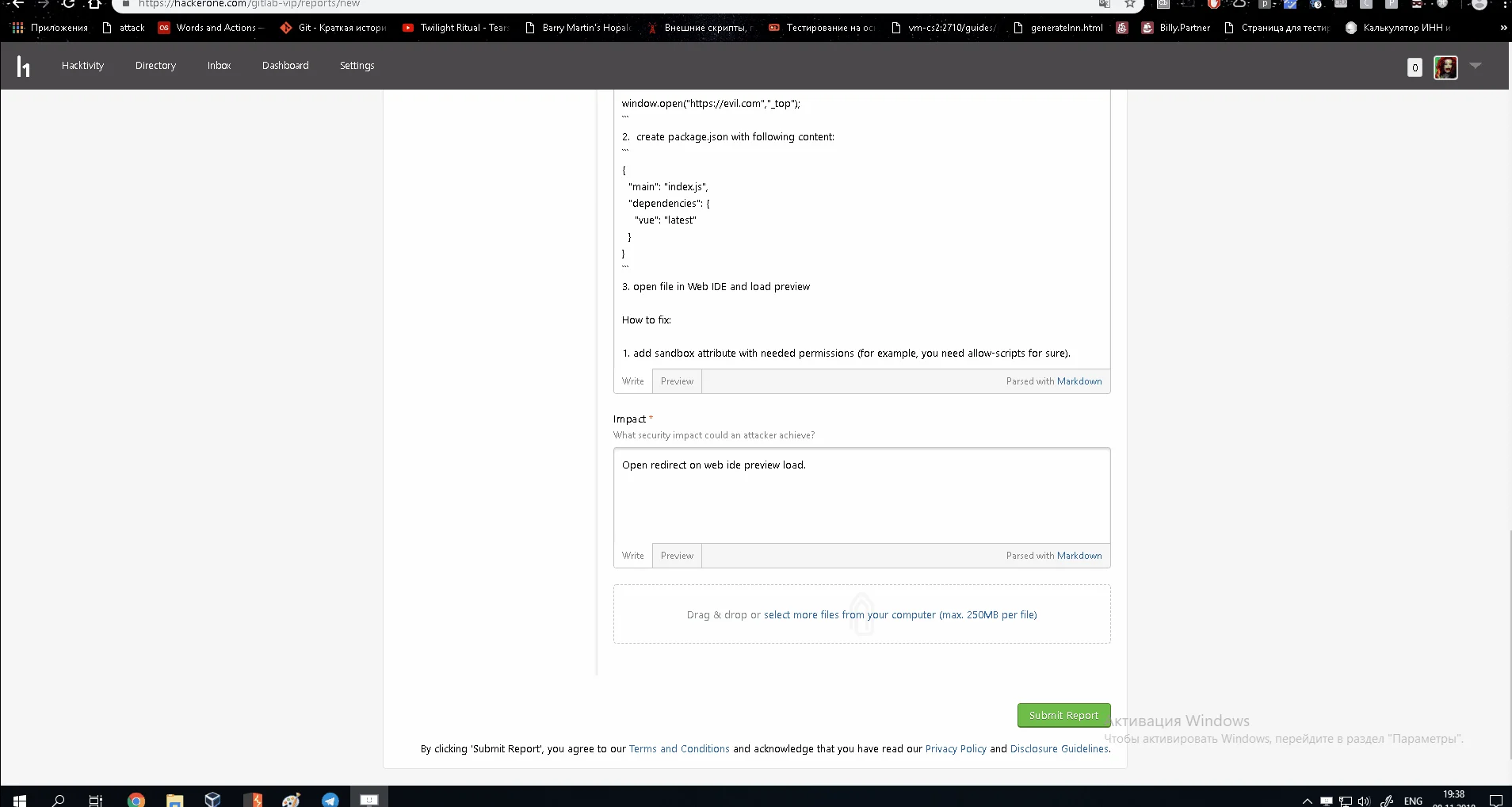
The report includes a screenshot at this point.
Step 3: Get paid
The author was awarded 1000 USD for the issue and credits the GitLab security team.
Root cause
The mistake is in the design of the preview iframe: it was created to isolate user-supplied JavaScript, but it lacked the sandbox attribute. SOP does not prevent a child frame from setting top.window.location, so the frame could navigate the top-level window to an arbitrary destination. Adding a sandbox attribute without the allow-top-navigation directive fixes this behaviour. For example, the following would prevent the redirect:
<iframe sandbox="allow-scripts allow-same-origin" src="http://ruvlolmail.temp.swtest.ru/toplevel.html">
Impact
An attacker who can run JavaScript inside such an iframe can force a top-level redirect to an arbitrary destination. In the GitLab case, any developer could write JavaScript in the WEB IDE and preview it inside the iframe. As with any open redirect, the behaviour may be used for phishing, for stealing access tokens from authentication flows, or combined with other vulnerabilities such as SSRF.
Fix
GitLab fixed the issue in 11.8.0. The general fix is to add a sandbox attribute to the iframe without the allow-top-navigation directive, as shown above.
Variants to test
The author suggests paying attention to the following cases:
- If you have a possibility to run JavaScript inside an iframe used as a sandbox to prevent XSS, check whether it allows top-level navigation. A positive result is that the frame can navigate the parent page to an external site.
- If you can insert an iframe with an arbitrary URL value, for example on a forum, check whether it has a
sandboxattribute and whether it allows top-level navigation. A positive result is the same: the embedded page can redirect the top-level window. - If there is an iframe pointing to an expired domain, you could try to claim it and place your script there. A positive result is that the claimed domain serves a script that performs a top-level redirect.
What happened, in plain words
A security researcher found a way to make a GitLab page send visitors to a website of the attacker's choosing. GitLab paid him 1000 USD for it, and the report was disclosed on 5 November 2020. The trick is not a new programming mistake: it is a normal browser behaviour that web developers use every day, but it is rarely looked at from a security angle. The author says he had not seen it described in any security paper before, which is why he wrote it up.
The type of bug is called an open redirect. In plain words: a website has a feature that sends you somewhere else, and an attacker can choose that somewhere else. The GitLab case was in the WEB IDE, a feature where a developer can write code in the browser and preview it. The preview runs inside a small embedded window called an iframe. That iframe existed to keep the code away from the rest of GitLab, but it was missing one setting that would have stopped the code from moving the whole page. GitLab fixed it in version 11.8.0.
Background: what an open redirect is
Many websites have a feature that forwards you to another page. A common example is a login page: you arrive at a link, log in, and the site sends you on to the page you originally wanted. To know where to send you, the site puts the destination in the address, usually as a parameter, which is the part of a URL after a question mark. A parameter is just a named value, like a label on a form field.
Here is a legitimate redirect chain, as the author describes it:
https://example.com/login?redirectUrl=https://app.example.com
Line by line:
https://example.com/loginis the page you visit, the login page ofexample.com.?starts the list of parameters.redirectUrl=https://app.example.comsays: after login, send the user toapp.example.com.
So the site reads the redirectUrl value and forwards you there. That is useful and normal. The problem starts when the site trusts that value without checking it. The author changes the destination:
https://example.com/login?redirectUrl=https://evil.com
Line by line:
- The page is still
example.com/login. - The only change is the value after
redirectUrl=: it now points toevil.cominstead ofapp.example.com.
If the application accepts that change and the visitor really ends up on https://evil.com, that is an open redirect. The word "open" means the destination is open to anyone, not restricted to the site's own pages.
Why does this matter? The author lists three consequences:
- Phishing. The link a victim clicks starts with the real, trusted domain, so it looks safe, but it lands on a fake login page.
- Stealing access tokens from authentication flows. A token is a short piece of text that proves you are logged in, a bit like a wristband at an event: show it and you get in. If a login flow passes such a token along in a redirect, an attacker who controls the destination can receive it.
- Combining with other bugs such as SSRF. SSRF (server-side request forgery) is when an attacker makes a server fetch a URL of the attacker's choice. An open redirect can sometimes be a stepping stone for that.
Background: iframes and the same origin policy
The trick the author describes is built on iframes. An iframe is a window inside a window: one web page can embed another page inside a rectangular area. Think of it as a picture frame on a wall, where the picture is itself a live web page.
Browsers have a rule called the same origin policy, or SOP. An origin is the combination of protocol, host and port, roughly "which site this is". The SOP says that a page from one origin may not read or change the contents of a page from another origin using JavaScript. The reason is privacy and safety: without it, any website could open your bank's site in a hidden frame and read what is there.
The author demonstrates this with a page on his own website:
<iframe src="https://example.com" id="child"></iframe><script>var a = document.getElementById("child").contentWindow.document;console.log(a.body.innerHTML);</script>
Line by line:
<iframe src="https://example.com" id="child"></iframe>embeds the pagehttps://example.comin a frame and gives the frame the namechildso the script can find it.<script>starts a piece of JavaScript that the browser runs.var a = document.getElementById("child").contentWindow.document;finds the frame calledchild, reaches into its window, and tries to grab its document, meaning its page content.console.log(a.body.innerHTML);prints the body of that page into the browser's console, a text panel developers use to see messages.
Because the outer page and example.com are different origins, the browser blocks the read. The console shows an empty string instead of the iframe content. That is exactly what the SOP is for: JavaScript must be restricted from reading or manipulating objects in a cross-origin context.
The author notes that there are many legitimate ways around the SOP, such as postMessages (a way for two frames to send each other messages on purpose) and CORS (a way for a server to say which other sites may read its responses). Those are not relevant to this bug.
The trick: a child frame can move the whole page
Here is the key point. The SOP stops a frame from reading another origin's content, but by default it still allows top-level navigation. Top-level navigation means changing the address of the whole browser tab, not just the inside of the frame. The browser allows this on purpose, because otherwise a link inside a frame could never work normally. But it also means a frame can send the visitor somewhere else.
The author sets up a parent page, hosted on http://avtohanter.ru/poc.html:
<iframe src="http://ruvlolmail.temp.swtest.ru/toplevel.html">
Line by line:
<iframe src="...">embeds another page inside this one.- The embedded page is
http://ruvlolmail.temp.swtest.ru/toplevel.html, a page the author controls.
Because of the SOP, the parent page cannot reach into the child page, and the child page cannot reach into the parent. So far, so safe. But the child page contains this:
<html><head></head><body><script>top.window.location = "https://www.google.com"</script></body></html>
Line by line:
<html><head></head><body>is the ordinary skeleton of a web page, with an empty head and a body.<script>starts JavaScript.top.window.location = "https://www.google.com"sets the address of the top window, meaning the outermost browser tab, to Google.toprefers to the very top of the frame hierarchy, no matter how deep the current frame sits.</script></body></html>closes the script and the page.
The child window is allowed to touch top.window.location even though it belongs to another origin. The result: when someone visits avtohanter.ru/poc.html, the browser immediately redirects them to www.google.com. The visitor never sees the parent page. That is an open redirect created purely with frames.
The fix in general
The cure is a setting on the iframe called the sandbox attribute. A sandbox is a restricted play area: the page inside can do only what you explicitly allow. Adding sandbox without the allow-top-navigation permission stops the frame from moving the whole tab. The author gives this example:
<iframe sandbox="allow-scripts allow-same-origin" src="http://ruvlolmail.temp.swtest.ru/toplevel.html">
Line by line:
<iframe sandbox="...">turns the sandbox on for this frame.allow-scriptspermits JavaScript inside the frame to run, which the preview needs.allow-same-originlets the frame keep its normal origin instead of being treated as a unique, opaque one.src="http://ruvlolmail.temp.swtest.ru/toplevel.html"is the page being embedded.- Because
allow-top-navigationis not in the list, the frame may not change the top-level address, and the redirect no longer happens.
The 1000 USD bug in GitLab
The author then shows a real case in GitLab, fixed in 11.8.0. The original disclosed report is at:
https://hackerone.com/reports/437142
The issue was in the WEB IDE. In that feature, any developer could write JavaScript code and preview it inside an iframe. The preview exists to prevent XSS attacks. XSS, cross-site scripting, is when an attacker gets their own JavaScript to run inside someone else's page, where it can act with that page's permissions. Running user code in a separate frame keeps it away from the main application, so the frame is a deliberate safety measure.
The problem was that the preview iframe did not contain a sandbox attribute. Without it, the JavaScript inside the frame was allowed to perform a top-level redirect, navigating the whole page rather than just the frame. Here is how it looked:
The report includes a screenshot at this point.
So the chain is: a developer writes JavaScript in the WEB IDE, the IDE previews it in a frame, the frame is not sandboxed, and the code sets the top-level address to an arbitrary site. The author was awarded 1000 USD for the report and gives credit to the GitLab security team.
Why it worked
The mistake is in the design of the preview iframe. It was created to isolate user-supplied JavaScript, but it lacked the sandbox attribute. The SOP does not stop a child frame from setting top.window.location, so the frame could navigate the top-level window anywhere. Adding sandbox without allow-top-navigation fixes the behaviour, as the example above shows.
What the impact is
Anyone who can run JavaScript inside such an iframe can force a top-level redirect to a destination of their choice. In the GitLab case, any developer could write JavaScript in the WEB IDE and preview it inside the iframe. As with any open redirect, the behaviour can be used for phishing, for stealing access tokens from authentication flows, or combined with other vulnerabilities such as SSRF.
How to find it yourself
The author says GitLab is not the only programme he reported this issue to, and suggests looking for these situations:
- If you can run JavaScript inside an iframe that is used as a sandbox to prevent XSS, check whether it allows top-level navigation. If it does, the frame can send the parent page to an external site.
- If you can insert an iframe with an arbitrary URL value, for example on a forum, check whether it has a
sandboxattribute and whether it allows top-level navigation. The same positive result applies: the embedded page can redirect the top-level window. - If there is an iframe pointing to an expired domain, you could try to claim that domain and place your script there. If you succeed, the claimed domain serves a script that performs a top-level redirect.
Glossary
- Open redirect: a bug where a website forwards visitors to a destination an attacker can choose.
- Parameter: a named value in a URL, after the question mark, such as
redirectUrl=.... - Token: a short piece of text that proves a user is logged in, like a wristband at an event.
- Phishing: tricking someone into entering details on a fake site that looks real.
- SSRF (server-side request forgery): making a server fetch a URL chosen by the attacker.
- Iframe: a web page embedded inside another web page, a window within a window.
- Origin: the combination of protocol, host and port that identifies which site a page belongs to.
- Same origin policy (SOP): the browser rule that one origin may not read or change another origin's page with JavaScript.
- Cross-origin: belonging to a different origin than the page you are on.
- postMessage: a browser feature that lets frames of different origins send each other messages on purpose.
- CORS: a way for a server to declare which other sites are allowed to read its responses.
- Top-level navigation: changing the address of the whole browser tab, not just the inside of a frame.
top: in JavaScript, a reference to the outermost window of the frame hierarchy.window.location: the address of a window; setting it makes the browser navigate there.- Sandbox attribute: an iframe setting that restricts what the embedded page may do.
allow-top-navigation: the sandbox permission that lets a frame change the top-level address; leaving it out blocks the redirect.allow-scripts: the sandbox permission that lets JavaScript run inside the frame.allow-same-origin: the sandbox permission that lets the frame keep its normal origin.- WEB IDE: GitLab's in-browser editor where developers write code and preview it.
- XSS (cross-site scripting): getting attacker JavaScript to run inside someone else's page with that page's permissions.
- Console: the browser's text panel where developers see messages printed by JavaScript.
- Expired domain: a domain name that is no longer registered, so someone else can claim it.





