Denial of Service using multiple labels with arbitrarily large descriptions
GitLab labels accepted arbitrarily long descriptions, and the project labels page could be made to display many such labels at once by using the Prioritized Labels feature to bypass the 20-label limit. An attacker could then repeatedly load the labels page to exhaust server resources, causing out-of-memory errors and 500/502 responses for other users.

GitLab
Originally disclosed on GitLab
- Fixed in 3 months
- Disclosed after 3 months
⚠️ Please read the process on how to fix security issues before starting to work on the issue. Vulnerabilities must be fixed in a security mirror.
HackerOne report #1869839 by cryptopone on 2023-02-10, assigned to @cmaxim:
Report | Attachments | How To Reproduce
Report
Summary
Other reports that have attacked arbitrary long descriptions include #1685995 and #1544507.
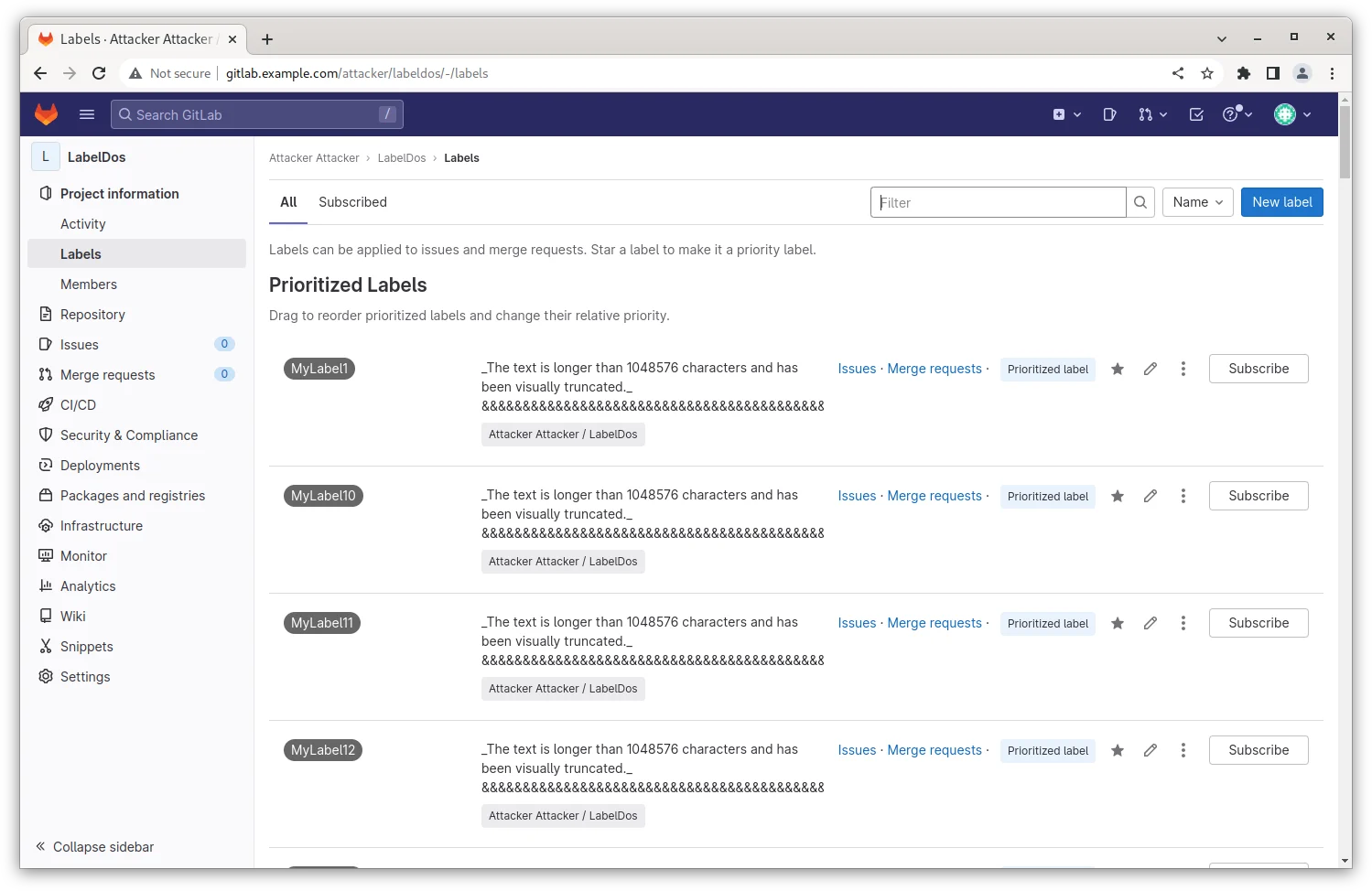
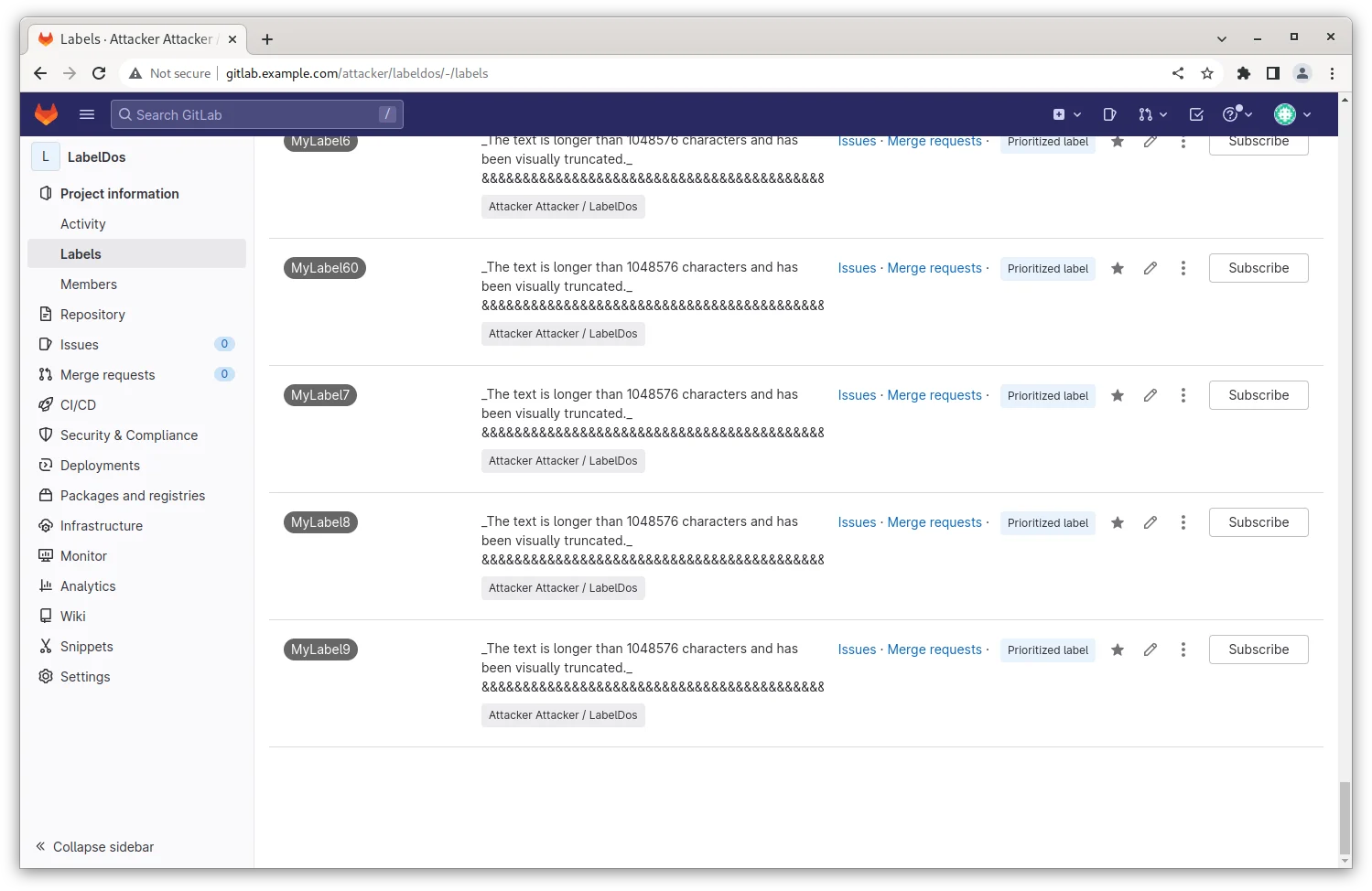
After reviewing the fix for #1685995 it appears most features using description_html now limit the amount of text in the description field to 1MB. However, labels were missed and are still able to accept arbitrarily long description text. Additionally, the group and project labels pages display multiple labels along with their descriptions and can be leveraged as a new attack vector. Both group and project labels pages normally limit the number of labels displayed to 20 per page, however this limit could be bypassed for project labels by using the "Prioritized Labels" feature (by calling /:namespace/:project/-/labels/set_priorities with a list of ids) which will help apply additional stress on the GitLab instance when rendering the project labels page.
The end result is an attacker is able to load long description payloads into multiple labels, prioritize the affected labels on a project labels page, and then load the labels page N+1 times (GitLab worker threads + 1) to trigger server instability including out of memory errors and cpu resource exhaustion forcing the bundle processes to timeout. This action will negatively impact availability to other users accessing the GitLab instance resulting in 500/502 errors.
Note: In addition to the info above, opening the labels drop down inside of an issue/merge request is also a way to inadvertently trigger long server processing when labels contain long descriptions. Finally, exporting a project containing large label descriptions also pins a worker process with high cpu and memory consumption for a longer duration of time (bypassing the 60 second timeout limit for a single thread).
Steps to reproduce
To run the Python 3 scripts in the steps provided you will require two additional libraries from pip.
python3 -m pip install requests
python3 -m pip install urllib3
(Optional) Administrator - Apply Server Rate Limiting
- Log into the GitLab instance as root.
- Navigate to http://gitlab.example.com/admin/application_settings/network
- Enable rate limits under "User and IP rate limits" and "Deprecated API rate limits" to demonstrate this attack is not affected by these configurable limits.
Attacker Setup:
- Signin to GitLab using the attacker's credentials.
- Navigate to https://gitlab.example.com/projects/new and create a new blank project using the attacker's namespace (ex. attacker/labeldos). Set the visibility to Public for ease of reproduction when using retrieve_label.py.
- Generate an API token via (http://gitlab.example.com/-/profile/personal_access_tokens) or obtain _gitlab_session from your web session and a csrf-token from a web page containing a form (such as the new project page from the previous step).
- Run the python script "store_label_graphql.py" store_label_graphql.py supplying the project path and prefix when creating the labels. Running the script without arguments will prompt for each parameter before running the script.
python3 store_label_graphql.py --hostname http://gitlab.example.com --payload '&' --num-attempts 60 --post-size-mb 40 --delay 3 --tagPrefix MyLabel --projectPath attacker/labeldos --threadpool 3
It will take some time for this command to complete as the script will be limited by both the threadpool variable and ultimately the number of worker processes available on the GitLab instance. Using 3 threads expect it to take about 10 mins.
If the request is processed successfully the response will contain a gid link to the new label. Large payloads may result in a response that returns an error, if the graphQL error comes back with "Timeout on BaseMutation.errors" it's possible the label was still created successfully. Failures to create a label typically result in a response with a 500/502 status code.
Please Note: I have only found it possible to "promote" a label via a call to /:namespace/:project/-/labels/set_priorities, as a result, it's only possible to automate this with the script when using _gitlab_session and X-CSRF-Token params (ie. Not an Personal Access Token/API key) and the script will attempt to output a list of label ids to promote manually.
Promote labels to bypass the 20 display limit (manually):
Note: This step should only be required if a personal access token was used to run "store_label_graphql.py".
- Using a web browser proxying to burpsuite, navigate to the labels page (http://gitlab.example.com/attacker/labeldos/-/labels).
- Turn on Intercept in BurpSuite -> Proxy -> Intercept tabs.
- On the project labels page, click the star next to one of the labels.
- Update the payload of the post request to "/attacker/labeldos/-/labels/set_priorities" with a list of all the label ids. If you used store_label_graphql.py with a personal access token, the list of id's will be in the output from the script. Ensure "label_ids" has double quotes around it to avoid a 400 Bad Request error. It is also possible to substitute a comma delimited list of ids that covers all ids between the first and last label id generated (invalid ids will be removed by the server automatically).
- Load the labels page again (ie. http://gitlab.example.com/attacker/labeldos/-/labels). If more than 20 labels were prioritized, note they will now appear on a single page (instead of only displaying 20 per page).
Note: A video demonstrating this stage is provided
Attacker Reproduction:
- Confirm the number of worker threads used by GitLab (Omnibus and docker installs default to 4). When logged into an instance console the following command can be used:
cat /etc/gitlab/gitlab.rb | grep thread
And output on a GitLab supplied docker container shows these config commands are commented out suggesting threads are still set to 4:
root@gitlab:/# cat /etc/gitlab/gitlab.rb | grep thread
###  puma['min_threads'] = 4
###  puma['max_threads'] = 4
##### ! Redis threaded I/O
###  redis['io_threads'] = 4
###  redis['io_threads_do_reads'] = true
####  ! { "pack" => ["threads = 1"] }
###    { 'section': 'pack', 'key': 'threads', 'value': '4' }
- Navigate to http://gitlab.example.com/:namespace/:project/edit (ex. https://gitlab.example.com/attacker/labeldos/edit)
- Expand the Advanced section and press the "Export Project" button or "Generate new export" to apply additional stress to the server to assist with reproducing this report.
- Run the retrieve_label.py script retrieve_label.py. Below are the arguments arguments I used for this report:
python3 retrieve_label.py --hostname http://gitlab.example.com --num-attempts 15 --delay 4 --projectPath attacker/labeldos --threadpool 4
Note: This "retrieve_label.py" script makes consistent calls to http://gitlab.example.com/attacker/labeldos/-/labels to aid in reproduction which could be reproduced manually using multiple browser tabs.
Victim Reproduction:
- Log into victim user account in a separate browser instance.
- Perform actions (click a project to navigate to it, navigate between "Project information" and "Issues" pages, select user profile, etc) during the attack and wait for a response.
- If a page completes loading successfully, initiate a new action (while the attack is ongoing) to try reproducing the server error.
- Note the delays in server response, and if the Attacker is successful, the resulting error (500 or 502) or complete loss of server connection for connected clients.
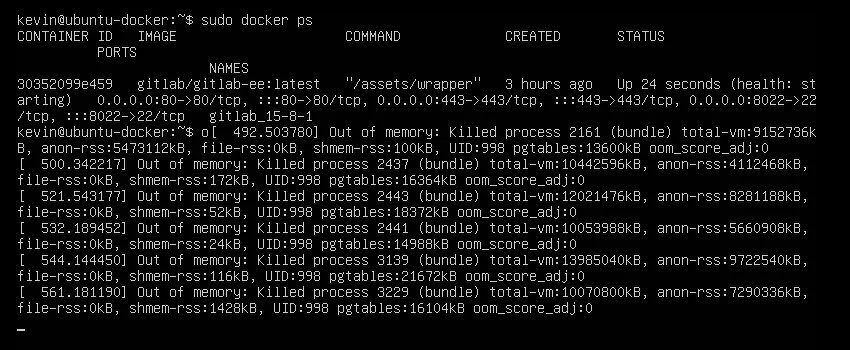
Note: If possible, have an observer ssh into the server and review system resources via the "top" command. Note the high memory usage during the attack which could lead to bundle processes crashing as a result of "Out of Memory" errors. There is a chance one of the bundle threads crashing will result in immediate 500/502 errors for connected clients until the server is able to recover.
A video reproducing this report is provided
Impact
Multiple requests to view a project's label page containing multiple labels with long description payloads can exhaust server resources, preventing unrelated users from completing requests or accessing the server instance.
Exporting a project containing multiple labels with large descriptions is an additional method to apply stress to a GitLab instance and can help create additional instability that can crash bundle processes on the server as a result of out of memory errors.
Examples
Sample Project
I exported an example project containing 60 labels with a 40MB payload of '&' characters (totals 2.4GB raw text). The export results in a 22MB tar.gz file that when extracted results in a 15.1GB labels.ndjson file (over 6x the size of the original payload). This attack can be scaled up or down as needed to overwhelm different hardware configurations.
attacker_labeldos_export.tar.gz
Note: GitLab will not import this project successfully due to the high compression of labels.nsjson.
Demonstrating use of store_label_graphql.py
Attached is a reproduction video demonstrating the script loading 5 labels with a Personal Access Token and then the attacker manually promotes these labels using the script output along with BurpSuite repeater.
Repro using retrieve_labels.py and project export
Attached is a reproduction video demonstrating how an attacker can overwhelm a GitLab instance using multiple labels with a large description payload. The high resource consumption during this attack renders a 502 response for a victum user.
GitLab.com accepts labels with large descriptions
I verified GitLab.com will create labels with large descriptions (40MB payload using store_label_graphql.py). Only one label was uploaded and nothing else was done to avoid creating a DOS scenario.
The label is contained within a Private project - https://gitlab.com/Cryptopone/jan2023testing/-/labels
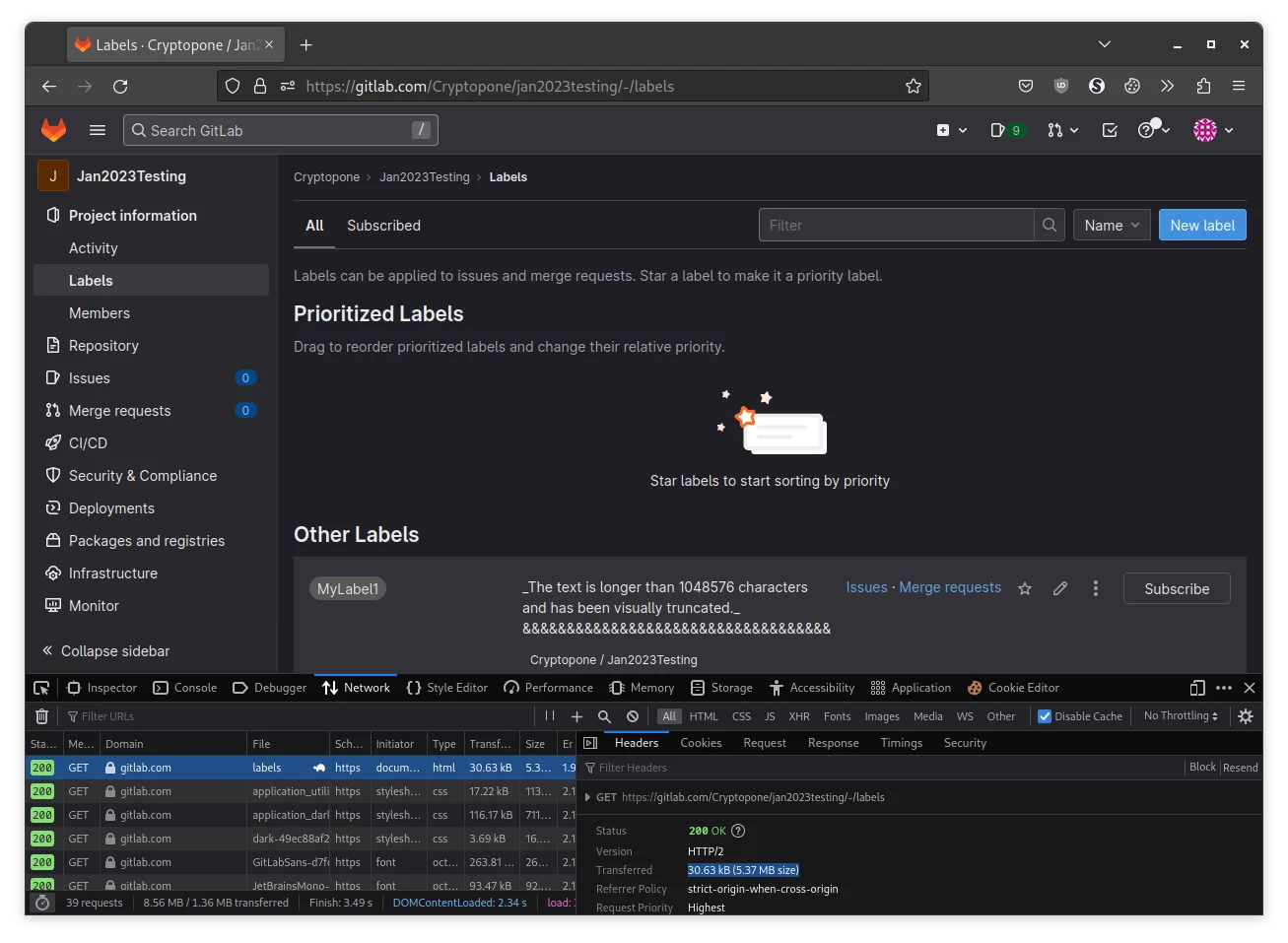
What is the current bug behavior?
The GitLab instance accepts and processes labels with arbitrarily long description payloads. When rendering the project labels page, the process generating the response will continue to run on the server until the timeout threshold is hit (defaults to 60 seconds on self-hosted) or crashes due to out of memory errors.
During this time other users attempting to access a GitLab instance could be negatively impacted and receive error responses from the server for valid requests.
What is the expected correct behavior?
Users accessing a GitLab instance should not be negatively impacted by malicious actors abusing label description sizes.
Relevant logs and/or screenshots
Demonstrating how Prioritized Labels bypass the 20 per page limit for labels on http://gitlab.example.com/:namespace/:project/-/labels
These screenshots show 60 labels displayed on the page.
Screenshot demonstrating bundle processes crashing due to out of memory errors during reproduction.
Output of checks
This bug happens on GitLab.com
Note: Only verified that a single label could be created, no DOS testing was performed.
Results of GitLab environment info
GitLab 15.8.1 docker container running within a 4 core cpu / 16 GB vm.
root@gitlab:/# gitlab-rake gitlab:env:info

System information
System:
Proxy:		no
Current User:	git
Using RVM:	no
Ruby Version:	2.7.7p221
Gem Version:	3.1.6
Bundler Version:2.3.15
Rake Version:	13.0.6
Redis Version:	6.2.8
Sidekiq Version:6.5.7
Go Version:	unknown

GitLab information
Version:	15.8.1-ee
Revision:	c49deff6e37
Directory:	/opt/gitlab/embedded/service/gitlab-rails
DB Adapter:	PostgreSQL
DB Version:	13.8
URL:		http://gitlab.example.com
HTTP Clone URL:	http://gitlab.example.com/some-group/some-project.git
SSH Clone URL:	[email protected]:some-group/some-project.git
Elasticsearch:	no
Geo:		no
Using LDAP:	no
Using Omniauth:	yes
Omniauth Providers:

GitLab Shell
Version:	14.15.0
Repository storages:
- default: 	unix:/var/opt/gitlab/gitaly/gitaly.socket
GitLab Shell path:		/opt/gitlab/embedded/service/gitlab-shell
Impact
Multiple requests to view a project's label page containing multiple labels with long description payloads can exhaust server resources, preventing unrelated users from completing requests or accessing the server instance.
Exporting a project containing multiple labels with large descriptions is an additional method to apply stress to a GitLab instance and can help create additional instability that can crash bundle processes on the server as a result of out of memory errors.
Attachments
Warning: Attachments received through HackerOne, please exercise caution!
- Demo_using_store_label_graphql_script_with_PAT_and_manual_label_promote.mp4
- Demo_repro_using_retrieve_label_and_project_export.mp4
- large_label_description_on_gitlab-com.png
- Project_With_60_Prioritized_Labels_One_Page_-_top.png
- Project_With_60_Prioritized_Labels_One_Page_-_bottom.png
- attacker_labeldos_export.tar.gz
- crashing_bundle_processes.png
- store_label_graphql.py
- retrieve_label.py
How To Reproduce
Please add reproducibility information to this section:
Not written yet. The AI write-up for this report has not been written yet. The Original tab links to the source.
How it worked
Impact
Multiple requests to view a project's label page containing multiple labels with long description payloads can exhaust server resources, preventing unrelated users from completing requests or accessing the server instance.
What the attacker needed
A GitLab account; ability to create a project; ability to create labels; ability to send many requests
How it was found
- Create a new blank public project.
- Generate an API token or obtain a session cookie and CSRF token.
- Run a script to create multiple labels with large descriptions via GraphQL.
- Manually promote the labels using the set_priorities endpoint to bypass the 20-label display limit.
- Run a script to repeatedly request the project labels page.
- Optionally trigger a project export to add further load.
Explained by bugbounty.wiki with AI from the original and checked against quotes from it; it can still be wrong. Read the original before relying on a detail.
Not written yet. The AI write-up for this report has not been written yet. The Original tab links to the source.
A label is a tag used to organise issues in GitLab. The report found that labels could have extremely long descriptions, and that a feature meant to show only 20 labels per page could be tricked into showing many more. By loading the page over and over, an attacker could use up the server's memory and processing power, making the site slow or unavailable for everyone else.
What is DoS?
A request that exhausts resources or crashes a component. Many programs forbid testing it; reports usually show it from code, not by attacking.


