Devfile file write vulnerability in GitLab
GitLab's devfile handling could be tricked into writing files outside the intended working directory. An attacker with the ability to create a workspace could use a crafted devfile to write arbitrary files on the GitLab server, which could then be abused to run commands.
 Published on gitlab-com.gitlab.io
This post is a extensive walkthrough of the process of identifying and exploiting CVE-2024-0402.
The full write-up lives on its author's site
It belongs to its author, so we link to it rather than copy it. The other two tabs are our own rewrites, checked against it.
Context
GitLab's Workspaces feature deploys isolated, web-based development environments into Kubernetes clusters. The environments are described by Devfiles: YAML files that specify what a workspace should look like. GitLab's main Rails application depends on the in-house devfile Gem, which parses Devfiles by shelling out to a Go helper binary built from Go code in the same repository. The Ruby side calls that binary through Open3.capture3.
The vulnerability described here is CVE-2024-0402, an arbitrary file write while creating a workspace. It was fixed on 25 January 2024 in a Critical Security Release (GitLab 16.8.1). The exploit chains two underlying issues: a YAML parser differential between Ruby and Go, and a path traversal in the Devfile registry library's archive extraction. The file write can then be further abused to run arbitrary commands on a GitLab instance. The author deliberately omits the full end-to-end exploit for a patched vulnerability and focuses on the techniques.
Setup
To reach the vulnerable code path, the Workspaces feature has to be functional. That requires a Kubernetes cluster, a GitLab Agent connected to it, and the configuration projects that tie the two together. The author's test setup ran everything locally: GitLab in Docker and the Kubernetes side on minikube. The minikube cluster was connected via the GitLab Agent to a project in a group on the GitLab instance. In another project within the same group, a .devfile.yaml was created, and creating a workspace for that project triggers Devfile parsing.
The investigation itself needed little more than the Go binary shipped inside the Gem, which could be fed YAML directly from the command line.
Finding it
The starting point was the dependency list of the GitLab main project. The devfile Gem stood out because it calls an external helper binary via Open3.capture3. External binaries are a classic red flag: command or argument injection, surprising features of the called binary, or vulnerabilities in the binary and its own dependencies.
A review of the Ruby code calling the Go binary showed no shell involved and no argument injection opportunity, so simple command injection was out. The next step was to feed the binary some YAML by hand. Reading the Devfile documentation led to the parent feature, which lets one Devfile specify another Devfile as its base. Using the documented example with a uri parent:
joern@host2:~/projects/deps/ruby/3.2.0/gems/devfile-0.0.25.pre.alpha1-x86_64-linux/bin$ ls
devfile
joern@host2:~/projects/deps/ruby/3.2.0/gems/devfile-0.0.25.pre.alpha1-x86_64-linux/bin$ ./devfile flatten 'schemaVersion: 2.2.0
metadata:
  name: my-project-dev
parent:
  uri: https://raw.githubusercontent.com/devfile/registry/main/stacks/nodejs/devfile.yaml'
failed to populateAndParseDevfile: error getting devfile info from url: failed to retrieve https://raw.githubusercontent.com/devfile/registry/main/stacks/nodejs/devfile.yaml, 404: Not Foundjoern@host2:~/projects/deps/ruby/3.2.0/gems/devfile-0.0.25.pre.alpha1-x86_64-linux/bin$
The command failed with a 404, but a subsequent ls in the same directory showed something unexpected:
joern@host2:~/projects/deps/ruby/3.2.0/gems/devfile-0.0.25.pre.alpha1-x86_64-linux/bin$ ls
2.1.1  2.2.0  devfile  OWNERS  stack.yaml
A directory from the devfile/registry repository had been copied into the working directory where the binary ran. The parser was writing files from the Internet into the current working directory. That looked like a promising route to an arbitrary file write, provided the code path could be triggered from within GitLab and the write could be pushed out of the working directory.
Exploitation
Step 1: bypass the parent validation
Reading the GitLab Rails codebase showed a validation that blocks the parent feature outright:
return err(_("Inheriting from 'parent' is not yet supported")) if devfile['parent']
The author had prepared for this. In May 2023, inspired by Jake Miller's work on parser differentials in JSON parsers, the author had looked at YAML from the same angle and crafted a YAML file that parses differently in Ruby and Python. That file parsed the same in Ruby and Go, so a new differential between Ruby and Go was needed. The original Ruby/Go versus Python file:
joern@host2:~/projects/devfile$ cat 1.yaml
test: python
!!binary dGVzdA==: ruby & go
joern@host2:~/projects/devfile$ python -c 'import yaml;x = yaml.safe_load(open("1.yaml"));print(x["test"])'
python
joern@host2:~/projects/devfile$ ruby -ryaml -e 'x = YAML.safe_load(File.read("1.yaml"));puts x["test"]'
ruby & go
The trick is the !!binary notation, which introduces a Base64-encoded key:
test: python
!!binary dGVzdA==: ruby & go
The Base64 string dGVzdA== decodes to test. In Ruby and Go this overwrites the earlier test: python value. In Python, the !!binary notation creates a binary sequence (b'test'), which is a different key from the string test:
python -c 'import yaml;y = yaml.safe_load(open("1.yaml"));print(y)'
{'test': 'python', b'test': 'ruby & go'}
That differential was not usable against GitLab, which is Ruby with a Go backend. Reading about YAML tags, the author noticed that local tags start with ! and tried !binary instead of !!binary:
joern@host2:~/projects/devfile$ cat 2.yaml
test: non-binary
!binary dGVzdA==: binary
joern@host2:~/projects/devfile$ ruby -ryaml -e 'x = YAML.safe_load(File.read("2.yaml"));puts x'
{"test"=>"binary"}
joern@host2:~/projects/devfile$ go run g.go 2.yaml
dGVzdA==: binary
test: non-binary

joern@host2:~/projects/devfile$
Ruby decodes the !binary value into a binary key, while Go silently drops the tag and keeps the literal key dGVzdA==. Applied to the parent key:
whatever: is here
!binary parent: hehehe injected
Ruby sees a binary key and no parent key:
joern@host2:~/projects/devfile$ ruby -ryaml -e 'x = YAML.safe_load(File.read("what.yaml"));puts x'
{"whatever"=>"is here", "\xA5\xAA\xDE\x9E"=>"hehehe injected"}
Go sees parent:
joern@host2:~/projects/devfile$ go run g.go what.yaml
parent: hehehe injected
whatever: is here
That is enough to sneak the parent key past the Ruby validation and into the Go parser.
Step 2: trigger the write from GitLab
With the parent key smuggled through, the next question was where the working directory sits on a real GitLab instance. The test setup described above was used, and the following .devfile.yaml was committed to the project:
schemaVersion: 2.2.0
!binary parent:
    uri: https://raw.githubusercontent.com/devfile/registry/main/stacks/nodejs/devfile.yaml'
Creating a workspace for that project triggers the parsing:
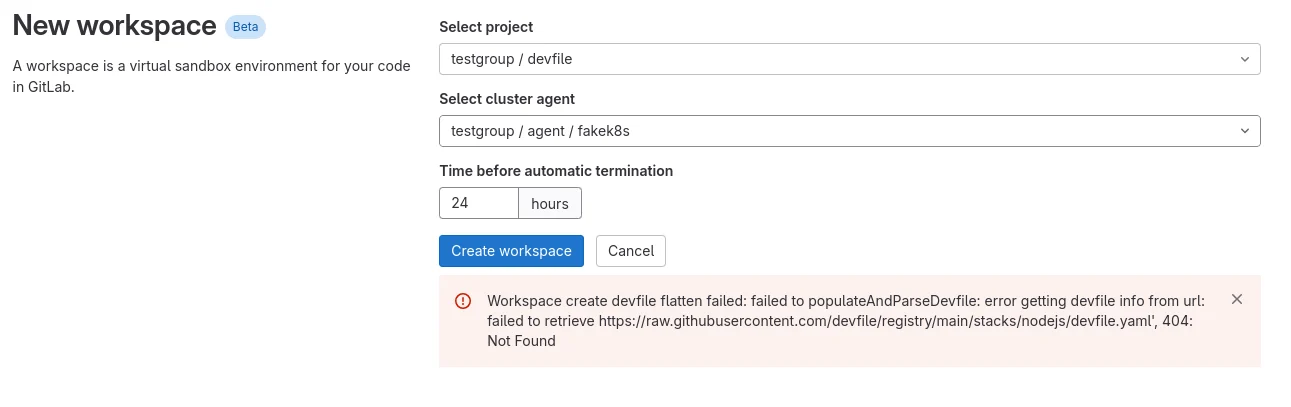
Afterwards, logging into the GitLab Docker container and searching for stack.yaml, which had appeared during the earlier local test, gave:
root@localhost:/# find . -name stack.yaml 2> /dev/null
./var/opt/gitlab/gitlab-rails/working/stack.yaml
root@localhost:/# cd /var/opt/gitlab/gitlab-rails/working/
root@localhost:/var/opt/gitlab/gitlab-rails/working# ls -lart
total 46
drwxr-xr-x 9 git root  12 Apr 11 12:59 ..
-rw-r--r-- 1 git git  283 Apr 12 13:09 stack.yaml
-rw-r--r-- 1 git git   73 Apr 12 13:09 OWNERS
drwxr-xr-x 2 git git    2 Apr 12 13:09 2.2.0
drwxr-xr-x 2 git git    2 Apr 12 13:09 2.1.1
drwx------ 4 git root   6 Apr 12 13:09 .
The working directory was otherwise empty, so writing into it was not directly useful. The author considered racing other parts of GitLab that use temporary directories but decided against that route and went deeper into the Devfile library instead.
Step 3: read the parent parsing code
The logic for the parent key starts in parseParentAndPlugin(). The same function handles the plugin feature, which has comparable logic. The switch for parent:
switch {
case parent.Uri != "":
    parentDevfileObj, err = parseFromURI(parent.ImportReference, d.Ctx, resolveCtx, tool)
case parent.Id != "":
    parentDevfileObj, err = parseFromRegistry(parent.ImportReference, resolveCtx, tool)
case parent.Kubernetes != nil:
    parentDevfileObj, err = parseFromKubeCRD(parent.ImportReference, resolveCtx, tool)
default:
    return fmt.Errorf("devfile parent does not define any resources")
}
parseFromURI turned out to be more involved than expected, with logic for local and remote URLs. The interesting part:
if tool.downloadGitResources {
    destDir := path.Dir(curDevfileCtx.GetAbsPath())
    err = tool.devfileUtilsClient.DownloadGitRepoResources(newUri, destDir, token)
    if err != nil {
        return DevfileObj{}, err
    }
At the time, the author did not know about CVE-2023-49569, a path traversal in go-git versions before v5.11 that allows creating and amending files across the filesystem, with remote code execution in the worst case. It was published on 12 January, after this code was examined, and the Devfile library uses go-git for its Git operations. The author notes it might have been found by digging into the Git operations, but that did not happen.
What the code did show is that a URL pointing at gitlab.com, github.com, raw.githubusercontent.com or bitbucket.org makes the library git clone the repository. The relevant implementation in pkg/devfile/parser/util/utils.go:
// DownloadGitRepoResources downloads the git repository resources
func (c DevfileUtilsClient) DownloadGitRepoResources(url string, destDir string, token string) error {
    var returnedErr error
    if util.IsGitProviderRepo(url) {
        gitUrl, err := util.NewGitURL(url, token)
        if err != nil {
            return err
        }

        if !gitUrl.IsFile || gitUrl.Revision == "" || !ValidateDevfileExistence((gitUrl.Path)) {
            return fmt.Errorf("error getting devfile from url: failed to retrieve %s", url)
        }

        stackDir, err := os.MkdirTemp("", "git-resources")
        if err != nil {
            return fmt.Errorf("failed to create dir: %s, error: %v", stackDir, err)
        }

        defer func(path string) {
            err := os.RemoveAll(path)
            if err != nil {
                returnedErr = multierror.Append(returnedErr, err)
            }
        }(stackDir)

        gitUrl.Token = token

        err = gitUrl.CloneGitRepo(stackDir)
        if err != nil {
            returnedErr = multierror.Append(returnedErr, err)
            return returnedErr
        }

        dir := path.Dir(path.Join(stackDir, gitUrl.Path))
        err = util.CopyAllDirFiles(dir, destDir)
        if err != nil {
            returnedErr = multierror.Append(returnedErr, err)
            return returnedErr
        }
    } else {
        return fmt.Errorf("failed to download resources from parent devfile.  Unsupported Git Provider for %s ", url)
    }

    return nil
}
And in /pkg/util/util.go:
// IsGitProviderRepo checks if the url matches a repo from a supported git provider
func IsGitProviderRepo(url string) bool {
    if strings.Contains(url, RawGitHubHost) || strings.Contains(url, GitHubHost) ||
        strings.Contains(url, GitLabHost) || strings.Contains(url, BitbucketHost) {
        return true
    }
    return false
}
Simple checks with symbolic links in repositories did not lead anywhere, so the author moved on to parseFromRegistry.
Step 4: the registry path traversal
A Devfile registry is based on the Open Container Initiative (OCI) specification and behaves much like a Docker registry. parseFromRegistry calls getResourcesFromRegistry, which delegates to registryLibrary, part of the registry-support project. Following the flow leads to PullStackFromRegistry, which calls decompress, which extracts a tar.gz archive from the registry:
// decompress extracts the archive file
func decompress(targetDir string, tarFile string, excludeFiles []string) error {
    var returnedErr error

    reader, err := os.Open(filepath.Clean(tarFile))
...
    gzReader, err := gzip.NewReader(reader)
...
    tarReader := tar.NewReader(gzReader)
    for {
...

        target := path.Join(targetDir, filepath.Clean(header.Name))
        switch header.Typeflag {
...
        case tar.TypeReg:
            /* #nosec G304 -- target is produced using path.Join which cleans the dir path */
            w, err := os.OpenFile(target, os.O_CREATE|os.O_RDWR, os.FileMode(header.Mode))
            if err != nil {
                returnedErr = multierror.Append(returnedErr, err)
                return returnedErr
            }
            /* #nosec G110 -- starter projects are vetted before they are added to a registry.  Their contents can be seen before they are downloaded */
            _, err = io.Copy(w, tarReader)
            if err != nil {
                returnedErr = multierror.Append(returnedErr, err)
                return returnedErr
            }
            err = w.Close()
            if err != nil {
                returnedErr = multierror.Append(returnedErr, err)
                return returnedErr
            }
        default:
            log.Printf("Unsupported type: %v", header.Typeflag)
        }
    }

    return nil
}
The gosec rule 304 (File path provided as taint input) had fired on the os.OpenFile call, and the developer suppressed it with the comment that target is produced using path.Join which cleans the dir path, referring to the earlier filepath.Clean(header.Name). But filepath.Clean does not behave as assumed: when given a relative path, the cleaned path stays relative. The author's demonstration:
package main

import (
    "fmt"
    "path/filepath"
)

func main() {
    fmt.Println(filepath.Clean("/../../../../../../../tmp/test")) // absolute path
    fmt.Println(filepath.Clean("../../../../../../../tmp/test"))  // relative path
}
Output:
/tmp/test
../../../../../../../tmp/test
Tar entry names can contain / and ., so a crafted archive traverses out of the intended directory and writes files to arbitrary locations on disk. Combined with the parent key pointing at a registry entry, this gives the arbitrary file write. A substantial amount of the roughly two working days spent on the vulnerability went into setting up a fake registry server and delivering a proper payload, alongside setting up the Workspaces feature.
Root cause
Two mistakes combine. First, the Ruby validation of the parent key and the Go parser that consumes the same YAML disagree on how !binary is handled: Ruby decodes the tag into a binary key, Go drops the tag and keeps the literal key. The validation therefore sees a document without parent, while the parser sees one with it. Second, the registry extraction trusts filepath.Clean to neutralise traversal in tar entry names, but Clean preserves relative paths, so ../ sequences survive and path.Join does not confine the write to targetDir. The gosec warning that would have caught the second issue was explicitly suppressed based on that incorrect assumption.
Impact
The chain yields an arbitrary file write on a GitLab instance, which can be further abused to run arbitrary commands. The author hedges that the full end-to-end exploit is not published because the vulnerability is patched.
Fix
GitLab fixed the vulnerability on 25 January 2024 in the Critical Security Release for GitLab 16.8.1, listed as arbitrary file write while creating a workspace. The report does not describe the code changes themselves.
Variants to test
- Other YAML tag differentials. Feed documents using local tags such as
!binaryto both the validating language and the consuming parser and compare the resulting keys. A positive result is a key that the validator does not see but the parser does. - Other validation bypasses for blocked keys. Wherever a YAML or JSON document is validated in one language and parsed in another, try type-confusion and duplicate-key tricks. A positive result is a blocked feature (like
parent) reaching the backend. - Archive extraction with relative entry names. Submit tar or tar.gz archives whose entry names contain
../sequences to any registry or package import feature. A positive result is a file appearing outside the extraction directory. filepath.Cleanassumptions in Go code. Search for#nosec G304suppressions and comments claiming thatpath.Joinorfilepath.Cleansanitises input. A positive result is a path that stays relative after cleaning and escapes the target directory.- Git-based resource fetching. Point parent or import URLs at supported Git providers and check whether cloned content lands in a predictable working directory. A positive result is attacker-controlled files written outside a temporary directory, or interaction with known
go-gittraversal issues (CVE-2023-49569).
What happened, in plain words
GitLab is a website where teams keep their source code and run automated tools around it. One of its features, called Workspaces, lets a user start a small development environment in the cloud, in a container cluster, straight from the browser. To describe what such an environment should contain, GitLab uses a text file called a Devfile. A Devfile is written in YAML, a simple format where you write key: value lines, a bit like a shopping list with indented sub-items.
A security researcher found that a specially crafted Devfile could make the GitLab server write files to places on its disk where they do not belong. That kind of bug is called an arbitrary file write: an attacker gets to choose a file name and content, and the server saves it. Once you can write files on a server, you can often go further and make the server run commands of your choosing, which is called remote code execution (RCE).
The bug got the identifier CVE-2024-0402. "CVE" is a public catalogue number for a known security flaw, so people can talk about the same bug unambiguously. GitLab fixed it on 25 January 2024 in what it called a Critical Security Release, version 16.8.1.
The interesting part is that the exploit is built from two smaller mistakes stacked on top of each other, like layers of an onion. The first is a disagreement between two programs about what a YAML file means. The second is a mistake in how a downloaded archive of files is unpacked. Neither alone would be enough; together they allow an arbitrary file write on the server.
The author chose not to publish the complete ready-to-run exploit, because the bug is already fixed and the techniques matter more than a weaponised script. What follows is the full story of how the two mistakes were found and combined.
Starting point: dependencies
Every large software project is built on top of many smaller pieces of software written by others. Those pieces are called dependencies. In the Ruby world, a dependency is packaged as a Gem, which is roughly what a "library" or "package" is in other languages. Ruby is the programming language GitLab's main application is written in.
The researcher began by reading the list of dependencies of the main GitLab project, looking for something easy to attack. One dependency stood out: a Gem called devfile. This Gem does not parse Devfiles itself. Instead it calls a separate helper program, a binary, written in the Go programming language, and hands the YAML text to it. The call is made with a Ruby function called Open3.capture3, whose job is to start another program and collect its output.
Why is calling an external program a red flag? Because whenever one program passes text to another program, there is a risk that the text is interpreted as instructions rather than as data. If the text is passed through a shell (the command interpreter of the operating system), an attacker might sneak in extra commands. That class of bug is called command injection. Even without a shell, an attacker might be able to add extra arguments to the call, which is argument injection. And the called program may have bugs of its own, or its own dependencies may.
The devfile Gem is written by GitLab itself, and its repository contains the Go source code from which the helper binary is built. At this point the researcher knew little about Devfiles, only that they are YAML files describing the environments for GitLab's Workspaces feature. Workspaces are isolated, browser-based development environments that GitLab deploys into Kubernetes, a system for running containers (small packaged programs) across a cluster of machines.
So the picture was:
- Devfiles: YAML files describing Workspaces in Kubernetes.
- A Ruby library that parses those Devfiles by calling a Go helper binary.
A quick look at the Ruby code that calls the Go binary showed no shell involved: the binary is started directly, so simple command injection was not possible. The Go binary also gave no opportunity to inject extra arguments. That door was closed, so the researcher went one level deeper.
Digging deeper
Sometimes the fastest way to understand a program is to play with it. The design of the devfile Gem made that easy: the Go binary is shipped inside the Gem, so it can be run by hand and fed any YAML you like.
Reading the Devfile documentation and looking for sample files, the researcher found a feature called parent. A Devfile can name another Devfile as its base, and the parser then fetches that other file and merges it in. The documentation example refers to the parent by a uri, that is, a web address. The researcher ran the binary with that example:
joern@host2:~/projects/deps/ruby/3.2.0/gems/devfile-0.0.25.pre.alpha1-x86_64-linux/bin$ ls
devfile
joern@host2:~/projects/deps/ruby/3.2.0/gems/devfile-0.0.25.pre.alpha1-x86_64-linux/bin$ ./devfile flatten 'schemaVersion: 2.2.0
metadata:
  name: my-project-dev
parent:
  uri: https://raw.githubusercontent.com/devfile/registry/main/stacks/nodejs/devfile.yaml'
failed to populateAndParseDevfile: error getting devfile info from url: failed to retrieve https://raw.githubusercontent.com/devfile/registry/main/stacks/nodejs/devfile.yaml, 404: Not Foundjoern@host2:~/projects/deps/ruby/3.2.0/gems/devfile-0.0.25.pre.alpha1-x86_64-linux/bin$
Line by line:
lslists the files in the current directory. It shows one file,devfile, the helper binary../devfile flatten '...'runs that binary with the sub-commandflattenand a YAML document as its argument. The document says: schema version 2.2.0, a metadata name, and aparentwhoseuripoints at a Devfile in the publicdevfile/registryrepository on GitHub.- The binary answers with an error: it could not retrieve the URL, and the server returned
404: Not Found. A 404 is the standard web answer for "this address does not exist".
So the command failed. But then the researcher listed the directory again:
joern@host2:~/projects/deps/ruby/3.2.0/gems/devfile-0.0.25.pre.alpha1-x86_64-linux/bin$ ls
2.1.1  2.2.0  devfile  OWNERS  stack.yaml
This is the surprise. Besides the binary, there are now new entries: two directories named 2.1.1 and 2.2.0, a file OWNERS and a file stack.yaml. They come from the devfile/registry repository on GitHub. In other words, even though the command reported an error, the parser had copied files from the Internet into the working directory, the folder from which the program was started.
That is a very promising starting point. If a program copies files from the Internet into a folder, and an attacker can influence which files and where they land, the attacker may be able to write files of their choosing. The open questions were: can this be triggered from inside GitLab, and can the write be pushed out of the working directory into a more useful location?
One step back and three steps forward
The behaviour the researcher had just seen can be summarised as: "I'll copy some stuff from the Internet into your working directory when you parse a devfile". That looked like a route to an arbitrary file write. To use it, the researcher needed to find the path inside GitLab that makes the dependency parse a Devfile they control. And possibly a way to escape the working directory, depending on where that directory sits on a real GitLab server and which files the attacker can control.
So the researcher read the main Ruby on Rails codebase of GitLab. Ruby on Rails is a widely used framework for building web applications in Ruby; GitLab's web application is built with it. There, a validation was found that blocks the parent feature entirely:
return err(_("Inheriting from 'parent' is not yet supported")) if devfile['parent']
In plain words: if the parsed Devfile contains a key called parent, return an error saying that inheriting from a parent is not supported yet. A validation is a check that rejects input before it is used. This one was inconvenient: it seemed to close the whole route.
But the researcher was prepared. In May 2023 they had been experimenting with YAML files, inspired by a blog post by Jake Miller about parser differentials in JSON parsers. A parser differential is a situation where two programs read the same text and come to different conclusions about what it means. JSON and YAML are similar in purpose, but YAML is more complex, so it seemed worth looking at YAML from the same angle. Back then the researcher had managed to craft a YAML file that Ruby and Python read differently. However, Ruby and Go read that file the same way, so a new differential between Ruby and Go was needed.
Here is the original file, aimed at Ruby and Go on one side and Python on the other:
joern@host2:~/projects/devfile$ cat 1.yaml
test: python
!!binary dGVzdA==: ruby & go
joern@host2:~/projects/devfile$ python -c 'import yaml;x = yaml.safe_load(open("1.yaml"));print(x["test"])'
python
joern@host2:~/projects/devfile$ ruby -ryaml -e 'x = YAML.safe_load(File.read("1.yaml"));puts x["test"]'
ruby & go
Line by line:
cat 1.yamlprints the content of the file. It has two lines. The first sets the keytestto the valuepython. The second uses the notation!!binaryfollowed bydGVzdA==as the key, with the valueruby & go.- The Python command loads the file with a YAML library and prints the value stored under the key
test. It printspython. - The Ruby command does the same and prints
ruby & go.
So the two languages disagree about which value belongs to test. The trick is the !!binary notation, which marks a value as Base64-encoded data. Base64 is a way of writing arbitrary bytes using only ordinary letters, digits and a few symbols, so they can travel safely through text channels. The string dGVzdA== is Base64 for the four letters test.
test: python
!!binary dGVzdA==: ruby & go
In Ruby and Go, the Base64 string is decoded, so the second line defines the key test again and overwrites the earlier value. In Python, the !!binary notation produces a binary sequence, written b'test', which Python treats as a different key from the ordinary text test. So Python ends up with two separate keys instead of one overwriting the other:
python -c 'import yaml;y = yaml.safe_load(open("1.yaml"));print(y)'
{'test': 'python', b'test': 'ruby & go'}
That differential was not usable against GitLab, because GitLab is Ruby on the front and Go in the parser, and those two agreed. So the researcher read about tags in YAML. A tag is a marker that tells the parser how to interpret a value, and the YAML specification says that local tags start with a single !. The idea: try !binary with one exclamation mark instead of two.
joern@host2:~/projects/devfile$ cat 2.yaml
test: non-binary
!binary dGVzdA==: binary
joern@host2:~/projects/devfile$ ruby -ryaml -e 'x = YAML.safe_load(File.read("2.yaml"));puts x'
{"test"=>"binary"}
joern@host2:~/projects/devfile$ go run g.go 2.yaml
dGVzdA==: binary
test: non-binary

joern@host2:~/projects/devfile$
Line by line:
cat 2.yamlshows the test file: the keytestwith valuenon-binary, and a second line whose key is!binary dGVzdA==with valuebinary.- Ruby loads the file and prints the whole result:
{"test"=>"binary"}. Ruby decoded the!binaryvalue into a binary key, and that key, once decoded, istest, so it overwrote the first value. go run g.go 2.yamlruns a small Go program (shown further below in the original research) that reads the same file. Go printsdGVzdA==: binaryandtest: non-binary. Go silently dropped the!binarytag and kept the literal textdGVzdA==as the key.
So with a single !, the two languages disagree in a very useful way: Ruby turns the key into something else, while Go keeps the text as written. Applied to the parent key:
whatever: is here
!binary parent: hehehe injected
Ruby sees a binary key and therefore no key called parent:
joern@host2:~/projects/devfile$ ruby -ryaml -e 'x = YAML.safe_load(File.read("what.yaml"));puts x'
{"whatever"=>"is here", "\xA5\xAA\xDE\x9E"=>"hehehe injected"}
Go sees parent:
joern@host2:~/projects/devfile$ go run g.go what.yaml
parent: hehehe injected
whatever: is here
That is exactly what was needed. The Ruby validation looks for a key called parent and does not find one, so it lets the document through. The Go parser then reads the same document and does find parent, so it processes the parent feature. The check and the user of the data disagree about the same file.
Writing files where they don't belong
Now that the parent key could be smuggled past Ruby into the Go code, the next question was where the working directory sits when the binary is called on a real GitLab instance. If that directory were somewhere interesting, the file write could be turned into something more.
To find out, the researcher followed the documentation for setting up GitLab Workspaces. That setup has quite a few requirements: a Kubernetes cluster, a GitLab Agent that connects GitLab to the cluster, and certain configuration projects on the GitLab instance that tie everything together. The short version of the test setup was to run everything locally: GitLab in Docker (a tool that runs software in isolated containers on one machine) and the Kubernetes side with minikube (a tool that runs a small single-machine Kubernetes cluster).
With those two pieces in place, the minikube cluster was connected through the GitLab Agent to a project in a group on the GitLab instance. In another project within the same group, a .devfile.yaml was created with this content:
schemaVersion: 2.2.0
!binary parent:
    uri: https://raw.githubusercontent.com/devfile/registry/main/stacks/nodejs/devfile.yaml'
This is the smuggled parent key in action: the Ruby validation does not see a parent key, the Go parser does, and the uri points at a Devfile in the public registry. To trigger the parsing, a workspace is created for that project:
After that step, the researcher logged into the GitLab Docker container and searched the filesystem for stack.yaml, the file that had appeared during the earlier local experiment:
root@localhost:/# find . -name stack.yaml 2> /dev/null
./var/opt/gitlab/gitlab-rails/working/stack.yaml
root@localhost:/# cd /var/opt/gitlab/gitlab-rails/working/
root@localhost:/var/opt/gitlab/gitlab-rails/working# ls -lart
total 46
drwxr-xr-x 9 git root  12 Apr 11 12:59 ..
-rw-r--r-- 1 git git  283 Apr 12 13:09 stack.yaml
-rw-r--r-- 1 git git   73 Apr 12 13:09 OWNERS
drwxr-xr-x 2 git git    2 Apr 12 13:09 2.2.0
drwxr-xr-x 2 git git    2 Apr 12 13:09 2.1.1
drwx------ 4 git root   6 Apr 12 13:09 .
Line by line:
find . -name stack.yamlsearches the whole filesystem, starting at the root, for files namedstack.yaml.2> /dev/nullthrows away error messages, so only real hits are shown. The hit is./var/opt/gitlab/gitlab-rails/working/stack.yaml.cd /var/opt/gitlab/gitlab-rails/working/moves into that directory.ls -lartlists its contents with details. Besidesstack.yamlthere areOWNERS, and the directories2.2.0and2.1.1, all written by the Devfile parser. The directory is otherwise empty.
So the working directory on a real GitLab instance is /var/opt/gitlab/gitlab-rails/working/, and it contains nothing but the files the parser wrote. Writing there is not directly useful. The researcher considered racing other parts of GitLab that use temporary directories, but decided against that route and went deeper into the Devfile library instead.
Reading the parent parsing code
The main logic that handles the parent key was quickly found, in a function called parseParentAndPlugin(). The name already hints that the same function also handles a similar feature called plugin, which lets a Devfile pull in components from elsewhere. Both features share the same underlying logic, in a switch statement. A switch statement is a way of choosing one branch out of several, depending on which condition is true. For parent it looks like this:
switch {
case parent.Uri != "":
    parentDevfileObj, err = parseFromURI(parent.ImportReference, d.Ctx, resolveCtx, tool)
case parent.Id != "":
    parentDevfileObj, err = parseFromRegistry(parent.ImportReference, resolveCtx, tool)
case parent.Kubernetes != nil:
    parentDevfileObj, err = parseFromKubeCRD(parent.ImportReference, resolveCtx, tool)
default:
    return fmt.Errorf("devfile parent does not define any resources")
}
Line by line:
- If the parent has a
Uri(a web address), fetch it withparseFromURI. - Otherwise, if it has an
Id(an identifier in a registry), fetch it withparseFromRegistry. - Otherwise, if it has a
Kubernetesfield, fetch it from a Kubernetes resource withparseFromKubeCRD. - If none of these is set, return an error saying the parent does not define any resources.
So there are three ways to make the parser fetch something from outside. The researcher first looked at parseFromURI, expecting a simple download. It turned out to be more involved, with logic for local and remote URLs. The interesting part was this:
if tool.downloadGitResources {
    destDir := path.Dir(curDevfileCtx.GetAbsPath())
    err = tool.devfileUtilsClient.DownloadGitRepoResources(newUri, destDir, token)
    if err != nil {
        return DevfileObj{}, err
    }
Line by line:
- If the tool is configured to download Git resources, continue.
destDiris set to the directory of the current Devfile, that is, the folder the parser is working in.DownloadGitRepoResourcesis called with the URL, that destination directory and a token.- If that call fails, return the error.
At the time, the researcher did not know about CVE-2023-49569. That is a path traversal vulnerability in go-git, a Go library for working with Git repositories, in versions before v5.11. Path traversal means using ../ sequences in a file path to climb out of the intended folder and reach other folders. The CVE description says it allows an attacker to create and amend files across the filesystem, and in the worst case to achieve remote code execution. It was published on 12 January, after this code had been examined, and the Devfile library uses go-git for its Git operations. The researcher notes that digging into the Git operations might have uncovered it, but that did not happen.
What the code did show is that a URL pointing at one of gitlab.com, github.com, raw.githubusercontent.com or bitbucket.org makes the library clone the repository, that is, download a copy of it. The relevant implementation in pkg/devfile/parser/util/utils.go:
// DownloadGitRepoResources downloads the git repository resources
func (c DevfileUtilsClient) DownloadGitRepoResources(url string, destDir string, token string) error {
    var returnedErr error
    if util.IsGitProviderRepo(url) {
        gitUrl, err := util.NewGitURL(url, token)
        if err != nil {
            return err
        }

        if !gitUrl.IsFile || gitUrl.Revision == "" || !ValidateDevfileExistence((gitUrl.Path)) {
            return fmt.Errorf("error getting devfile from url: failed to retrieve %s", url)
        }

        stackDir, err := os.MkdirTemp("", "git-resources")
        if err != nil {
            return fmt.Errorf("failed to create dir: %s, error: %v", stackDir, err)
        }

        defer func(path string) {
            err := os.RemoveAll(path)
            if err != nil {
                returnedErr = multierror.Append(returnedErr, err)
            }
        }(stackDir)

        gitUrl.Token = token

        err = gitUrl.CloneGitRepo(stackDir)
        if err != nil {
            returnedErr = multierror.Append(returnedErr, err)
            return returnedErr
        }

        dir := path.Dir(path.Join(stackDir, gitUrl.Path))
        err = util.CopyAllDirFiles(dir, destDir)
        if err != nil {
            returnedErr = multierror.Append(returnedErr, err)
            return returnedErr
        }
    } else {
        return fmt.Errorf("failed to download resources from parent devfile.  Unsupported Git Provider for %s ", url)
    }

    return nil
}
Line by line:
- The function takes a URL, a destination directory and a token. A token here is a credential, like a password, that lets the code access private repositories.
IsGitProviderRepo(url)checks whether the URL belongs to a supported Git provider. If not, the function returns an error saying the provider is unsupported.NewGitURLparses the URL into a structured form.- The next check requires that the URL points at a file, that a revision (a branch or commit) is given, and that the Devfile exists at that path. Otherwise it returns an error.
os.MkdirTempcreates a fresh temporary directory, named with the prefixgit-resources.- The
deferblock schedules the removal of that temporary directory when the function ends, so it does not pile up. - The token is attached to the URL object, and
CloneGitRepoclones the repository into the temporary directory. diris computed as the directory of the requested file inside the clone, andCopyAllDirFilescopies everything from there intodestDir, the working directory of the parser.
And in /pkg/util/util.go:
// IsGitProviderRepo checks if the url matches a repo from a supported git provider
func IsGitProviderRepo(url string) bool {
    if strings.Contains(url, RawGitHubHost) || strings.Contains(url, GitHubHost) ||
        strings.Contains(url, GitLabHost) || strings.Contains(url, BitbucketHost) {
        return true
    }
    return false
}
Line by line: the function simply checks whether the URL text contains one of four known host names. If it does, the URL is treated as a supported Git provider. This is a plain text check, not a careful analysis of the address.
Simple experiments with symbolic links inside repositories did not lead anywhere. A symbolic link is a file that acts as a shortcut to another file or folder. So the researcher moved on to the second branch, parseFromRegistry.
The registry path traversal
A Devfile registry is a server that stores and serves Devfiles. It is based on the Open Container Initiative (OCI) specification, which is the same standard that Docker registries follow, so it behaves much like a Docker registry: you ask for an item by name and get a packaged archive back.
parseFromRegistry calls getResourcesFromRegistry, which hands the heavy lifting to registryLibrary, part of a project called registry-support, also developed by the Devfile project. Following the code leads to PullStackFromRegistry, which calls decompress. That function takes a tar.gz archive from the registry and extracts the files inside it. A tar archive is a single file that bundles many files and folders together, and gz means it is compressed to save space, like a zip file.
// decompress extracts the archive file
func decompress(targetDir string, tarFile string, excludeFiles []string) error {
    var returnedErr error

    reader, err := os.Open(filepath.Clean(tarFile))
...
    gzReader, err := gzip.NewReader(reader)
...
    tarReader := tar.NewReader(gzReader)
    for {
...

        target := path.Join(targetDir, filepath.Clean(header.Name))
        switch header.Typeflag {
...
        case tar.TypeReg:
            /* #nosec G304 -- target is produced using path.Join which cleans the dir path */
            w, err := os.OpenFile(target, os.O_CREATE|os.O_RDWR, os.FileMode(header.Mode))
            if err != nil {
                returnedErr = multierror.Append(returnedErr, err)
                return returnedErr
            }
            /* #nosec G110 -- starter projects are vetted before they are added to a registry.  Their contents can be seen before they are downloaded */
            _, err = io.Copy(w, tarReader)
            if err != nil {
                returnedErr = multierror.Append(returnedErr, err)
                return returnedErr
            }
            err = w.Close()
            if err != nil {
                returnedErr = multierror.Append(returnedErr, err)
                return returnedErr
            }
        default:
            log.Printf("Unsupported type: %v", header.Typeflag)
        }
    }

    return nil
}
Line by line:
- The function receives a target directory, the archive file and a list of files to exclude.
- It opens the archive file, then wraps it in a gzip reader to decompress it, then in a tar reader to walk through the entries inside.
- For each entry,
targetis computed by joining the target directory with the entry's name, after passing the name throughfilepath.Clean.filepath.Cleanis a standard Go function meant to tidy up a path, for example by removing redundant slashes and resolving.and..parts. - The switch looks at the type of the entry. For a regular file (
tar.TypeReg), it opens the target path for writing, creating the file if needed. - The comment
#nosec G304tells a security scanner called gosec to ignore a warning on this line. gosec is a tool that reads source code and flags suspicious patterns; rule 304 is "File path provided as taint input", meaning a file path that may come from an attacker. The comment explains why the warning was ignored: the author believedpath.Joincleans the directory path. io.Copywrites the content of the archive entry into the opened file, and the file is closed.- Any other entry type is logged as unsupported.
This looked promising. The scanner had flagged the risky line, and the developer had silenced it with the reasoning that filepath.Clean makes the path safe. But filepath.Clean does not work as assumed here. It is not obvious from the documentation either: when you give Clean a relative path, one that does not start at the root of the filesystem, the cleaned path stays relative. The .. parts are not removed, because from a relative starting point they are meaningful.
The researcher demonstrated it with a small program:
package main

import (
    "fmt"
    "path/filepath"
)

func main() {
    fmt.Println(filepath.Clean("/../../../../../../../tmp/test")) // absolute path
    fmt.Println(filepath.Clean("../../../../../../../tmp/test"))  // relative path
}
Line by line:
- The program imports
fmtfor printing andpath/filepathfor theCleanfunction. - The first call cleans an absolute path, one that starts with
/. Because it starts at the root, the..parts cannot go above the root, so they are collapsed and the result is/tmp/test. - The second call cleans a relative path. There is no root to stop at, so the
..parts are kept.
The output:
/tmp/test
../../../../../../../tmp/test
That was the missing piece. Tar entry names can contain / and . characters, so a crafted archive can contain entries whose names climb out of the intended directory with ../. When such an entry is extracted, the file is written to an arbitrary location on disk. Combined with a parent key that points at a registry entry, this gives the arbitrary file write.
After the path traversal was identified, a lot of time went into setting up a fake registry server and delivering a proper payload. In total, from starting to look at the Devfile Gem to having a working exploit ready took about two working days, much of it spent setting up both the Workspaces feature and the fake registry.
Conclusions
There are several takeaways hidden between the lines of this story.
Parser differentials
Parser differentials can be a very powerful tool for exploitation. They are very context dependent, though, and hard to generalise: whether a disagreement between two parsers helps you depends entirely on what each side does with the data.
For once, the security scanner was right. The path traversal was not stopped by filepath.Clean, but the author of the comment thought it was, and explicitly turned off the gosec warning. The whole point of exploitation is to make software do what its authors did not intend. So when you read comments in source code, treat them as an invitation to ask: how can I prove this comment wrong?
../ keeps on giving
The character sequence ../ is a gift that keeps on giving. Path traversals are usually simple and reliable to exploit. They have been around for more than 30 years, and this class of vulnerability has still not been solved.
Can't find all the bugs
The go-git vulnerability, CVE-2023-49569, was disclosed only a few days after the file write issue based on the registry parser was reported internally. Used together with the parser differential, it would have been another way to write files where they do not belong. The message is twofold: you may not be able to find every bug, but in a sufficiently large codebase there are often enough bugs to reach your goal.
Keep digging everyone
Finally, to find vulnerabilities it is always worth digging into source code, reading it and trying to understand the assumptions under which it was written. The really hard part is knowing where to look and when to stop looking.
Glossary
- Arbitrary file write: a vulnerability where an attacker can make a program save a file with a name and content of the attacker's choosing, anywhere the program has permission to write.
- Argument injection: a vulnerability where an attacker can add extra arguments to a command that a program runs, changing what the command does.
- Base64: a way of encoding arbitrary bytes as ordinary text characters, so the data can travel through text-only channels.
- Binary (helper binary): a program already compiled into machine code that the computer can run directly, as opposed to source code that must be interpreted or compiled first.
- Binary sequence: in Python, a value made of raw bytes, written like
b'test', which is a different type from ordinary text. - Command injection: a vulnerability where an attacker can make a program run extra operating system commands, usually by sneaking text into a shell command.
- Container: a packaged program together with everything it needs to run, isolated from the rest of the machine.
- CVE: a public catalogue number for a known security vulnerability, so people can refer to the same bug unambiguously.
- Dependency: a piece of software that a project relies on, written and maintained by someone else.
- Devfile: a YAML file that describes the environment for a GitLab Workspace.
- Docker: a tool for building and running software in containers.
- Gem: the packaging format for Ruby libraries.
- Git clone: making a local copy of a Git repository, including its files and history.
- go-git: a Go library for working with Git repositories.
- gosec: a tool that scans Go source code for suspicious patterns and reports warnings with rule numbers.
- Kubernetes: a system for running and managing containers across a cluster of machines.
- minikube: a tool that runs a small Kubernetes cluster on a single machine, used for testing.
- OCI specification: a standard for packaging and distributing container images and related artefacts, followed by Docker registries and Devfile registries.
- Parser: a program that reads text in a structured format and turns it into data the program can use.
- Parser differential: a situation where two parsers read the same input and come to different conclusions about its meaning.
- Path traversal: using
../sequences in a file path to climb out of the intended folder and reach other locations on disk. - Payload: the actual malicious input or data an attacker delivers to trigger a vulnerability.
- Registry (Devfile): a server that stores and serves Devfiles, based on the OCI specification.
- Relative path: a file path that does not start at the root of the filesystem, so its meaning depends on the current directory.
- Remote code execution (RCE): a vulnerability where an attacker can make a remote server run commands of their choosing.
- Ruby: the programming language GitLab's main web application is written in.
- Ruby on Rails: a widely used framework for building web applications in Ruby.
- Switch statement: a programming construct that chooses one branch out of several based on which condition is true.
- Symbolic link: a file that acts as a shortcut pointing to another file or folder.
- Tag (YAML): a marker in YAML that tells the parser how to interpret a value, such as
!!binaryfor Base64 data. - Tar archive: a single file that bundles many files and folders together;
tar.gzmeans it is also compressed. - Token: a credential, like a password, used by software to access a service or repository.
- Validation: a check that rejects input before it is used, for example because a feature is not supported.
- Working directory: the folder from which a program is started, and relative to which relative paths are resolved.
- YAML: a human-readable text format for structured data, written as indented
key: valuelines.