Framing of arbitrary content (leading to open redirects) on any page allowing user controlled markdown
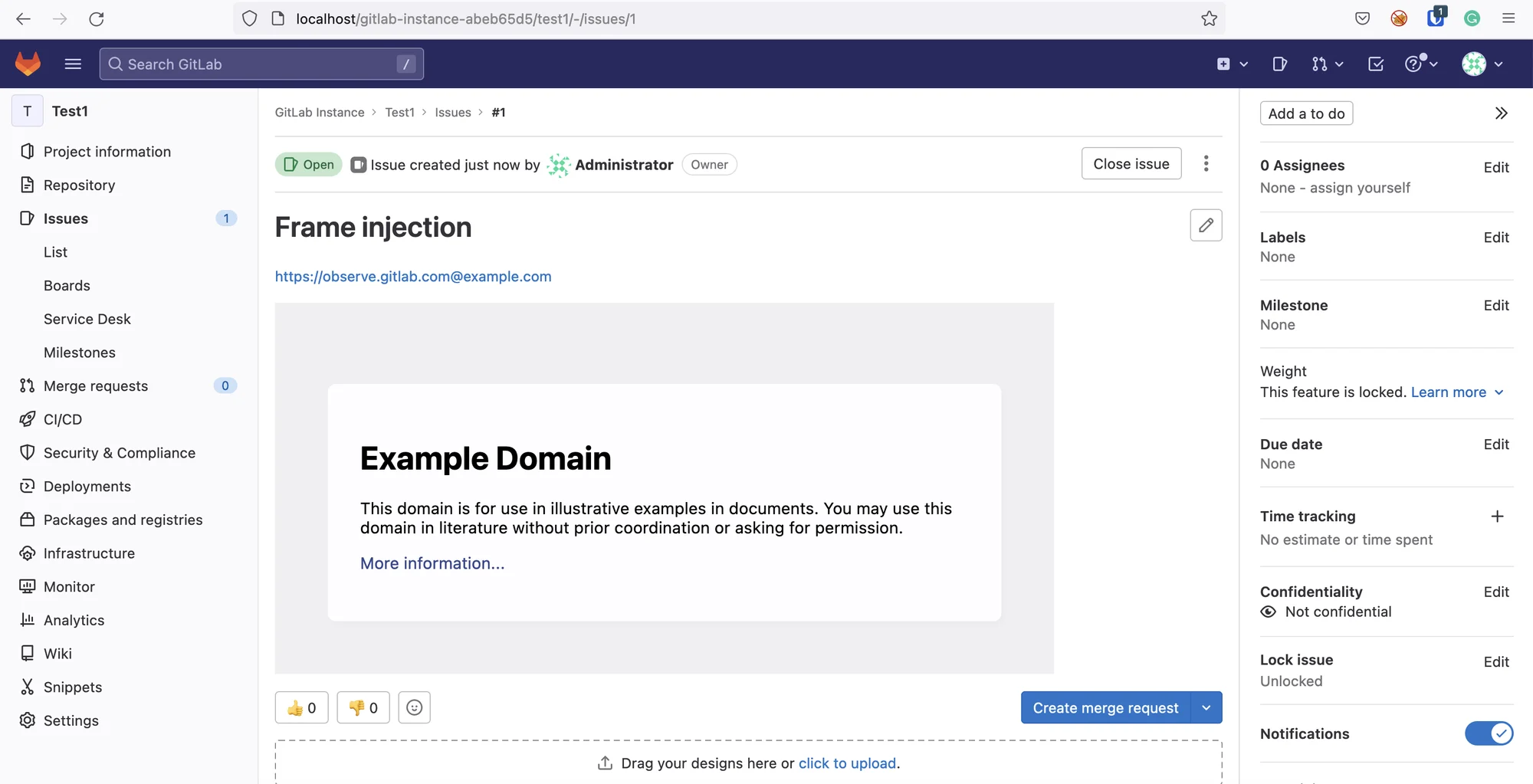
GitLab's markdown renderer embedded an iframe for any link starting with 'https://observe.gitlab.com', but the prefix check did not require a trailing slash, so attacker-controlled domains like 'https://observe.gitlab.com.example.com' were also framed. The unsandboxed iframe allowed the framed page to navigate the top window, enabling open redirects and denial of service on any page rendering markdown.

GitLab
Originally disclosed on GitLab
- Fixed in 3 months
- Disclosed after 3 months
HackerOne report #1817250 by joaxcar on 2022-12-26, assigned to Ottilia Westerlund:
Report | Attachments | How To Reproduce
Report
Summary
In the latest GitLab release 15.7.0 there was an MR added that allows users to embed links to https://observe.gitlab.com into any rendered markdown content. The MR is here https://gitlab.com/gitlab-org/gitlab/-/merge_requests/104081
This does not seem to be a feature that GitLab is actively pushing at the moment as it is not mentioned in the 15.7 release notes. But it is not behind a feature flag and is thus active both on Gitlab.com and on self-hosted instances.
The new feature takes any link starting with https://observe.gitlab.com and embeds an iframe with the link as the src attribute in the rendered markdown. Using this Vue code in app/assets/javascripts/behaviors/markdown/render_observability.js
 return new Vue({
    el: element,
    render(h) {
      return h('iframe', {
        style: {
          height: '366px',
          width: '768px',
        },
        attrs: {
          src: getFrameSrc(url),
          frameBorder: '0',
        },
      });
    },
  });
};
This iframe is not sandboxed and framed pages can thus behave in unintended ways. The framed page can use popups, run javascript and also navigate the top window (causing a sort of open redirect that can be injected at arbitrary locations in GitLab).
The code responsible for finding observe links in markdown is this line from lib/banzai/filter/inline_observability_filter.rb
def xpath_search
   "descendant-or-self::a[starts-with([@]href, '#{Gitlab::Observability.observability_url}')]"
end
As you can see here the selector only looks for anchor tags that have a href attribute that starts with the value in Gitlab::Observability.observability_url. This variable is at the moment a hardcoded value from lib/gitlab/observability.rb namely https://observe.gitlab.com. The problem here is that the value in the variable does not end in a slash. This makes the selector also match these examples
- https://observe.gitlab.com.example.com
- https://[email protected] (Firefox and Safari only)
Both of which can be attacker-controlled. This allows an attacker to link arbitrary content that will be added as an iframe anywhere in GitLab where markdown is rendered.
There are some mitigating factors here. On Gitlab.com there is a CSP in place that restricts what pages can be framed under the domain. This makes it hard for an attacker to cause any serious harm with the described attack (even if there are some phishing issues that can be abused).
The impact is much more severe if this is used on a self-hosted instance without proper CSP in place. If an attacker has the option to frame arbitrary pages the attacker can launch DoS / open redirect attacks where the attacker frames a page that navigates the top page to an attacker-controlled page. This will turn any issue, merge request, code preview, wiki, or any other page containing markdown into an open redirect that will also work as a local DoS, as any page could be made unreachable.
Steps to reproduce
Do these steps in Firefox. See later in my report for a discussion of this
- Start up a self-hosted instance of GitLab
- Log in as the attacker
- Go to any project and create an
issue(or go to an existingissue) - In the description field type
https://[email protected]/poc/gitlab/redir.html
- Click create/save
- You will now be redirected to
https://example.com - Try to visit the
issuepage again, you will be redirected again
Impact
Framing of arbitrary content on ANY page rendering markdown. Allowing for phishing and/or DoS of pages by having arbitrary GitLab pages redirect to attacker-controlled content. The redirect will also work as DoS by not allowing users to access issues, MRs, wikis, project and group pages, and so on.
What is the current bug behavior?
GitLab ads an iframe to any link starting with https://observe.gitlab.com in any markdown content, including https://[email protected] and https://observe.gitlab.com.example.com
What is the expected correct behavior?
Only links that point to the actual https://observe.gitlab.com domain should get rendered
Relevant logs and/or screenshots
Output of checks
This bug happens on GitLab.com
Note on browser compatibility
Browsers have different mitigations when it comes to securing content in iframes. Chrome will for example not allow frames of links containing basic auth, meaning username:password. And thus Chrome will not allow the https://[email protected] attack. All browsers allow framing of https://observe.gitlab.com.example.com. But this requires the attacker to issue a valid certificate for the domain as normal wildcard certificates will not work on multi-level subdomains. This is not an issue and is easy to do, but for the sake of simplicity, I required to use Firefox in my PoC. I will get back as soon as I have registered a valid cert for the Chrome attack.
Impact
Framing of arbitrary content on ANY page rendering markdown. Allowing for phishing and/or DoS of pages by having arbitrary GitLab pages redirect to attacker-controlled content. The redirect will also work as DoS by not allowing users to access issues, MRs, wikis, project and group pages, and so on.
Attachments
Warning: Attachments received through HackerOne, please exercise caution!
How To Reproduce
Please add reproducibility information to this section:
Not written yet. The AI write-up for this report has not been written yet. The Original tab links to the source.
How it worked
Root cause
Likely the prefix check for the observability URL did not require a trailing slash, so it matched attacker-controlled domains that began with the same string.
Impact
On GitLab.com a CSP limited the harm to phishing, but on self-hosted instances without a proper CSP an attacker could turn any markdown page into an open redirect and cause a local denial of service.
What the attacker needed
Self-hosted GitLab without proper CSP; attacker can create or edit markdown content; victim visits the affected page
How it was found
- Start a self-hosted GitLab instance.
- Log in as the attacker.
- Create or open an issue.
- In the description, enter a link to an attacker-controlled domain that starts with the observability URL.
- Save the issue.
- The page redirects to the attacker's site, and revisiting the issue redirects again.
Explained by bugbounty.wiki with AI from the original and checked against quotes from it; it can still be wrong. Read the original before relying on a detail.
Not written yet. The AI write-up for this report has not been written yet. The Original tab links to the source.
GitLab added a feature that turns links to a specific observability service into embedded frames (iframes) on the page. The check for which links to embed was too loose: it matched any link that merely started with the service's address, so an attacker could use a lookalike domain. Because the embedded frame was not sandboxed, the attacker's page could redirect the whole GitLab page to another site.
What is Open redirect?
A trusted site forwards users to any address an attacker picks; rarely paid alone, often the missing link in a chain.



