Regex backtracking vulnerability with `commit_trailers_filter.rb` allows an attacker to exploit ReDoS through the `Commit message` field
A regular expression used to parse commit trailers in GitLab suffers from catastrophic backtracking, allowing an attacker to cause a denial of service by committing a crafted commit message. The attack can be stored and retriggered via unauthenticated GET requests, and can be embedded in Markdown fields to force other users to trigger the ReDoS.

GitLab
Originally disclosed on GitLab
- Fixed in 3 months
- Disclosed after 3 months
HackerOne report #1584156 by ryhmnlfj on 2022-05-28, assigned to @cmaxim:
Report | Attachments | How To Reproduce
Report
Summary
I found server-side ReDoS vulnerability on commit trailer.
This ReDoS vulnerability can be persisted as Stored ReDoS that can be retriggered by requesting to GET endpoint(/[PROJECT_NAMESPACE]/-/commits/[BRANCH_CONTAINING_REDOS]).
Normally, CSRFs to GET endpoint do not pose a security risk, but CSRF to Stored ReDoS allows an attacker to expand the attackable scopes and force other users to attack the GitLab instance.
Steps to reproduce
- Sign in to GitLab instance.
- Create a new public project.
- Click the "
+" button on the top page of the created project and select "New file".
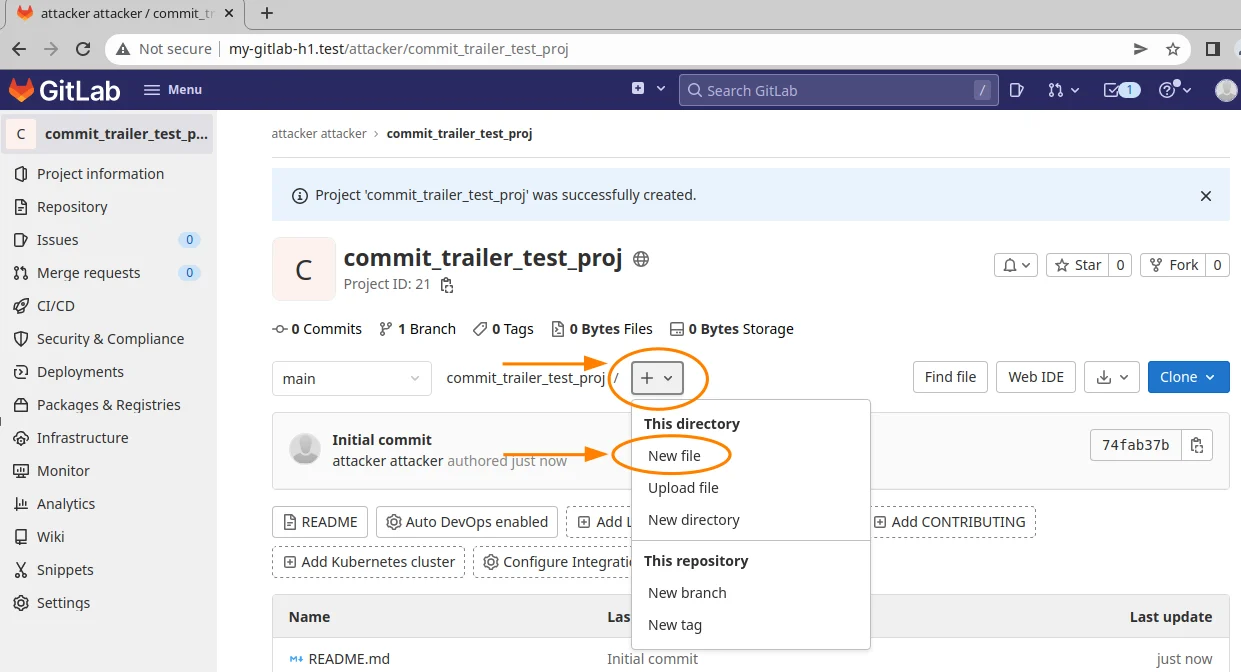
- Add and commit the file with the following contents to the repository in the created project.
- File name:
new_file - Commit message: Copy and paste the contents of the attached file "commit_trailers_ReDoS_payload.txt".
- Target Branch:
redos
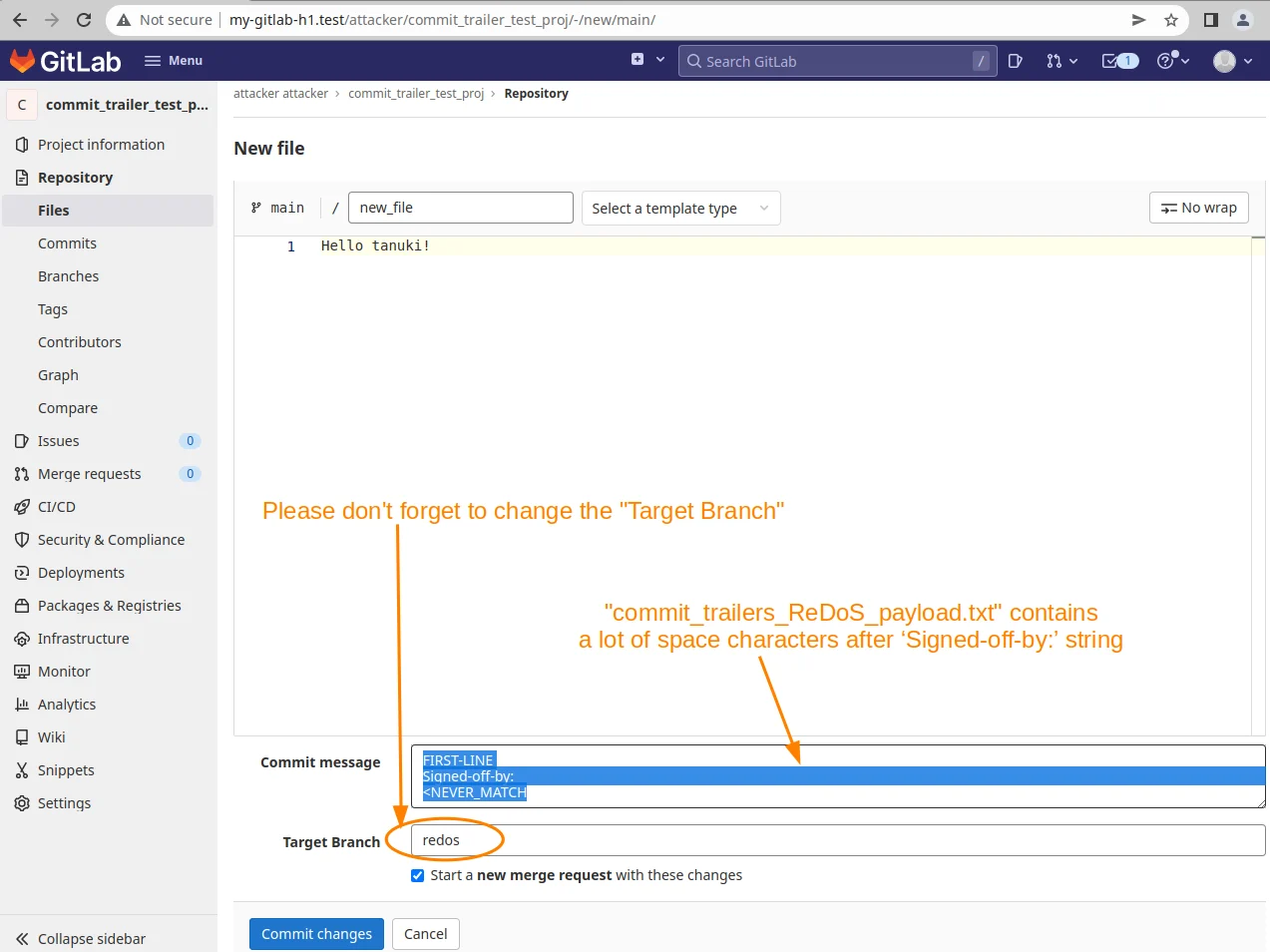
NOTE: The important input items for reproducing the bug are the "Commit message" and the "Target Branch". You can set the "File name" and the contents of the file as you like.
- After you commit the file, confirm the CPU usage of the server hosting the instance rise to 100%.

NOTE: For each 1 request that triggers the ReDoS, the usage of 1 CPU core rises to 100% until 60 seconds timeout. Though it looks like a slightly unsatisfactory load, it is a sufficient load for 1 request. In the first place, similar ReDoS vulnerabilities on GitLab in the past can only give the same load per 1 request.
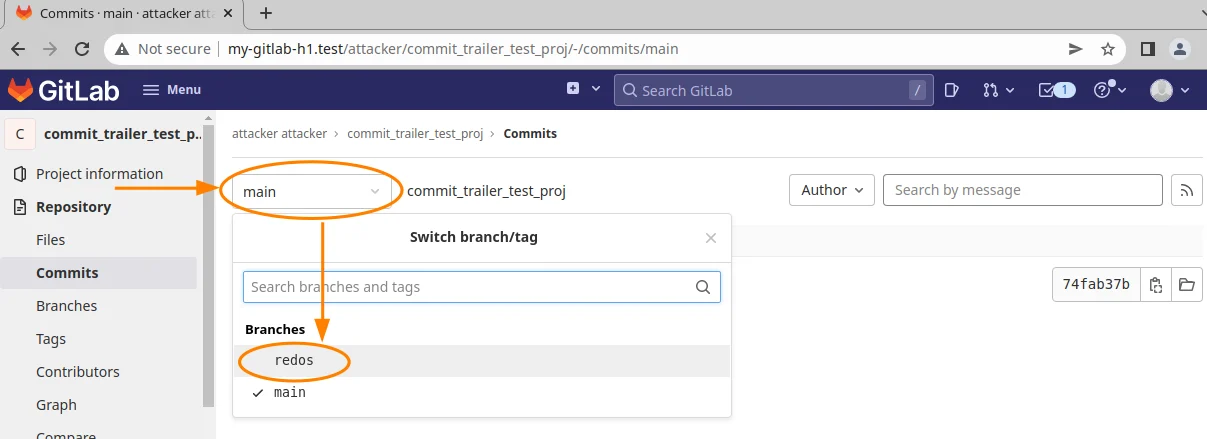
- After confirming for 500 or 502 error, go back to the project top page and go to the "Repository > Commits" page from the left side menu.
- Select
redosfrom the "Switch branch/tag" drop-down menu to confirm that theredosbranch you created works as the stored ReDoS.
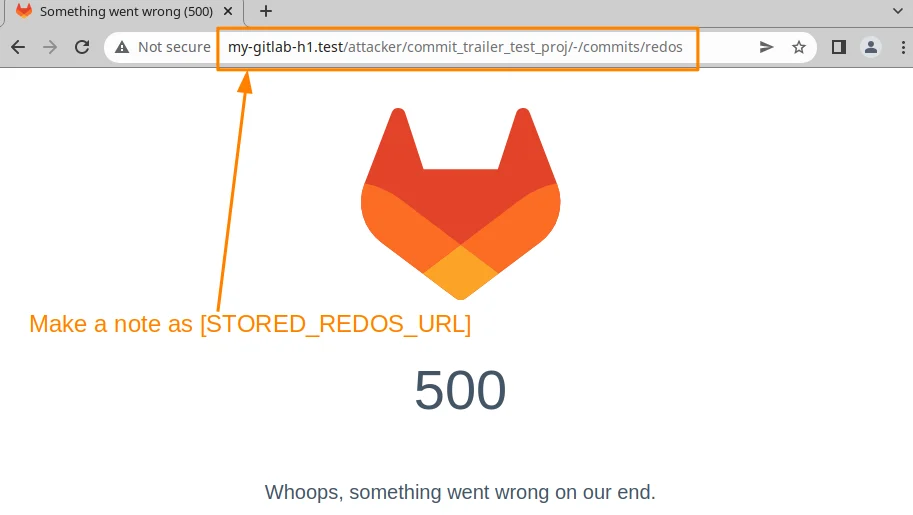
- After confirming for 500 or 502 error, make a note of
[STORED_REDOS_URL]from the address bar of browser.
-
Go back to the top page of the project again and go to the "Issues" page from the left side menu.
-
Prepare the description of new issue by replacing the string below.
Replace [STORED_REDOS_URL] with the values you got in step 8.
{{media:7}}
After replacing, create a new issue with this description.
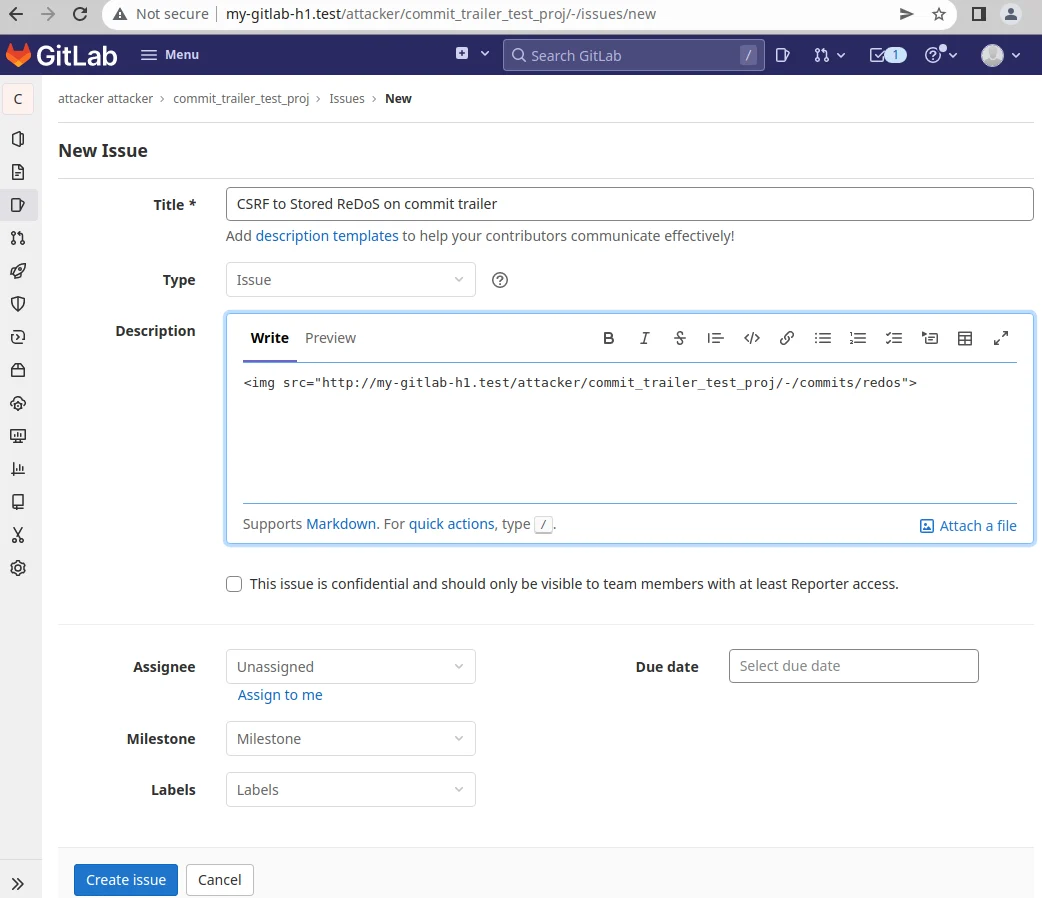
- Confirm that the new issue you created also works as CSRF to stored ReDoS.
The use of "Issue" feature is just one example, and this CSRF works in any markdown field in your GitLab instance or in other external websites.
- Each time a
GETrequest is sent to the endpoint created in step 8, the CPU resources of the server are wasted significantly.
If you send two requests, the usage of the two CPU cores will be 100%.
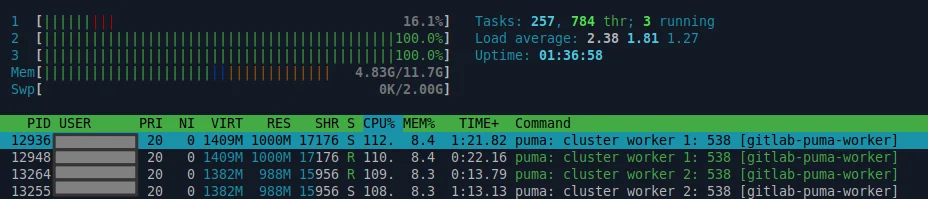
The GitLab instance can easily be taken down with repeated requests about once every few seconds.
What is the current bug behavior?
The vulnerable code location is as follows.
TRAILER_REGEXP = /(?<label>[[:alpha:]-]+-by:)/i.freeze
AUTHOR_REGEXP = /(?<author_name>.+)/.freeze
# Devise.email_regexp wouldn't work here since its designed to match
# against strings that only contains email addresses; the \A and \z
# around the expression will only match if the string being matched
# contains just the email nothing else.
MAIL_REGEXP = /<(?<author_email>[^@\s]+@[^@\s]+)>/.freeze
FILTER_REGEXP = /(?<trailer>^\s*#{TRAILER_REGEXP}\s*#{AUTHOR_REGEXP}\s+#{MAIL_REGEXP}$)/mi.freeze
The matching FILTER_REGEXP with the crafted string such as contents of "commit_trailers_ReDoS_payload.txt" will cause catastrophic backtracking.
The AUTHOR_REGEXP and its surroundings make up the dangerous regex \s*(.+)\s+.
What is the expected correct behavior?
The FILTER_REGEXP should be fixed so as not to cause catastrophic backtracking.
Relevant logs and/or screenshots
I put references to the screenshots at the appropriate places in this report.
Output of checks
This bug happens on the official Docker installation of GitLab Enterprise Edition 15.0.0-ee.
I used Chromium 101 and Firefox 100 on Xubuntu 20.04 LTS to verify this bug.
Results of GitLab environment info
Output of sudo gitlab-rake gitlab:env:info:
System information
System:
Proxy:		no
Current User:	git
Using RVM:	no
Ruby Version:	2.7.5p203
Gem Version:	3.1.4
Bundler Version:2.2.33
Rake Version:	13.0.6
Redis Version:	6.2.6
Sidekiq Version:6.4.0
Go Version:	unknown

GitLab information
Version:	15.0.0-ee
Revision:	3b397c17532
Directory:	/opt/gitlab/embedded/service/gitlab-rails
DB Adapter:	PostgreSQL
DB Version:	12.10
URL:		http://my-gitlab-h1.test
HTTP Clone URL:	http://my-gitlab-h1.test/some-group/some-project.git
SSH Clone URL:	[email protected]:some-group/some-project.git
Elasticsearch:	no
Geo:		no
Using LDAP:	no
Using Omniauth:	yes
Omniauth Providers:

GitLab Shell
Version:	14.3.0
Repository storage paths:
- default: 	/var/opt/gitlab/git-data/repositories
GitLab Shell path:		/opt/gitlab/embedded/service/gitlab-shell
Impact
This Stored ReDoS can be retriggered by simply sending the unauthenticated GET requests.
Since an attacker can exploit this to significantly impact the availability of the GitLab instance, the CVSS scores except Scope (AV:N/AC:L/PR:L/UI:N/C:N/I:N/A:H) are the same as the scores of the most recently ReDoS (CVE-2022-1510).
In addition, an attacker can use CSRF together to expand the attackable scope beyond the vulnerable endpoints.
Scope is Changed (S:C) because this CSRF allows to trigger the ReDoS from any Markdown field or from other external websites.
When calculated by combining the above, the CVSS score is as follows:
CVSS:3.1/AV:N/AC:L/PR:L/UI:N/S:C/C:N/I:N/A:H
7.7 (High)
This CVSS score is same as CVE-2021-39877, which could be triggered by the unauthenticated GET requests.
Attachments
Warning: Attachments received through HackerOne, please exercise caution!
- commit_trailers_ReDoS_payload.txt
- plus_new_file_on_top_page.png
- add_and_commit_new_file.png
- htop_1_core_exhausted.png
- select_branch_on_commits_page.png
- error_on_redos_branch.png
- create_new_issue.png
- htop_2_cores_exhausted.png
How To Reproduce
Please add reproducibility information to this section:
Not written yet. The AI write-up for this report has not been written yet. The Original tab links to the source.
How it worked
Root cause
The regular expression FILTER_REGEXP contains nested quantifiers that cause catastrophic backtracking when matching certain crafted strings.
Impact
An attacker could cause a denial of service by exhausting CPU resources, potentially taking down the GitLab instance, and could use CSRF to expand the attack to other users and external sites.
What the attacker needed
A GitLab account; ability to create a public project
The fix
The FILTER_REGEXP should be fixed to avoid catastrophic backtracking.
How it was found
- Sign in to GitLab and create a new public project.
- Create a new file with a commit message containing the ReDoS payload and target branch 'redos'.
- Commit the file and observe CPU usage rise to 100%.
- After a 500 or 502 error, go to Repository > Commits and select the 'redos' branch to confirm stored ReDoS.
- Note the URL of the error page as [STORED_REDOS_URL].
- Create a new issue with description containing an image tag pointing to [STORED_REDOS_URL] to demonstrate CSRF to stored ReDoS.
Explained by bugbounty.wiki with AI from the original and checked against quotes from it; it can still be wrong. Read the original before relying on a detail.
Not written yet. The AI write-up for this report has not been written yet. The Original tab links to the source.
A regular expression (regex) is a pattern used to search text. Some regex patterns can take a very long time to process certain inputs, a problem called ReDoS (Regular Expression Denial of Service). Here, a specially crafted commit message makes the server's regex engine work extremely hard, using up CPU and potentially making the GitLab instance unavailable.
What is DoS?
A request that exhausts resources or crashes a component. Many programs forbid testing it; reports usually show it from code, not by attacking.


