Regex DoS in Harbor Registry search
The search parameter validation regex in GitLab's Harbor integration is vulnerable to catastrophic backtracking. An attacker can send a crafted search query to cause high CPU usage, leading to a denial of service.

GitLab
Originally disclosed on GitLab
- Fixed in 6 months
- Disclosed after 6 months
HackerOne report #1852677 by joaxcar on 2023-01-30, assigned to @greg:
Report | Attachments | How To Reproduce
Report
Summary
There is a new Harbor registry integration that allows users of GitLab to connect their groups and projects to Harbor. When going to https://gitlab.com/GROUP/PROJECT/-/harbor/repositories any user with access can search for repositories in the configured instance.
When a search query is made the request is handled in https://gitlab.com/gitlab-org/gitlab/-/blob/master/lib/gitlab/harbor/query.rb . This file contains some validation that is run on each query parameter. The validation regexp for the search parameter is vulnerable to catastrophic backtracking. The code looks like this
 validates :search, format: {
        with: /\A([a-z\_]*=[a-zA-Z0-9\- :]*,*)*\z/,
        message: 'params invalid'
      }, allow_blank: true
You can test the regexp /\A([a-z\_]*=[a-zA-Z0-9\- :]*,*)*\z/ on https://regex101.com/ and enter the payload =a=a=a=a=a=a=a=a=a=a=a=a=a=a=a=a; The page will warn for catastrophic backtracking
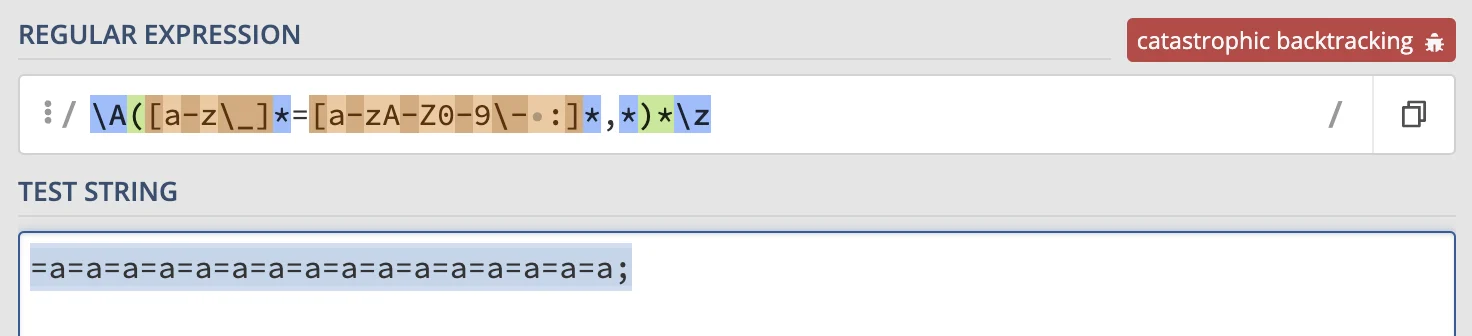
To get the backend to burn 100% CPU any attacker just needs to enter =a=a=a=a=a=a=a=a=a=a=a=a=a=a=a=a=a=a=a=a=a=a=a=a=a=a=a=a=a=a=; (the longer the =a pattern the "better") into the search field and click search a bunch of times. It can of course also be automated.
Steps to reproduce
On a local instances, this feature is behind a feature flag. So first enable it
- Start a local instance of GitLab (you can use a docker image for this) see https://docs.gitlab.com/ee/install/docker.html
- Access the docker terminal with
sudo docker exec -it gitlab /bin/bash(gitlab here is your container name) - Start a rails console with
gitlab-rails console - Activate Harbor integration with
Feature.enable(:harbor_registry_integration) - Exit the console by typing exit
- Install
htopwithapt-get update && apt-get install htop - start
htopwithhtop
Now log in to your instance
- Log in
- Create a project
- Go to https://gitlab.com/GROUP/PROJECT/-/settings/integrations/harbor/edit
- Enter
https://example.comas the URL, and random data as username and password. It does not matter - Now go to https://gitlab.com/GROUP/PROJECT/-/harbor/repositories
- Enter this into the search bar and click
search10 times
=a=a=a=a=a=a=a=a=a=a=a=a=a=a=a=a=a=a=a=a=a=a=a=a=a=a=a=a=a=a=;
Open the terminal window again and look at htop, all CPUs will be running at 100%

Impact
ReDoS hogging up CPU and causing resource consumption by low amount of requests
What is the current bug behavior?
The regexp used to validate search is vulnerable to backtracking issues
What is the expected correct behavior?
The regexp needs to be rewritten to avoid backtracking
Output of checks
This bug happens on GitLab.com)
Results of GitLab environment info
System information
System:
Current User:	git
Using RVM:	no
Ruby Version:	2.7.7p221
Gem Version:	3.1.6
Bundler Version:2.3.15
Rake Version:	13.0.6
Redis Version:	6.2.8
Sidekiq Version:6.5.7
Go Version:	unknown

GitLab information
Version:	15.8.0
Revision:	c052f86b6b4
Directory:	/opt/gitlab/embedded/service/gitlab-rails
DB Adapter:	PostgreSQL
DB Version:	13.8
URL:		http://gitlab.example.com
HTTP Clone URL:	http://gitlab.example.com/some-group/some-project.git
SSH Clone URL:	[email protected]:some-group/some-project.git
Using LDAP:	no
Using Omniauth:	yes
Omniauth Providers:

GitLab Shell
Version:	14.15.0
Repository storages:
- default: 	unix:/var/opt/gitlab/gitaly/gitaly.socket
GitLab Shell path:		/opt/gitlab/embedded/service/gitlab-shell
Impact
ReDoS hogging up CPU and causing resource consumption by low amount of requests
Attachments
Warning: Attachments received through HackerOne, please exercise caution!
How To Reproduce
Please add reproducibility information to this section:
Proposed solution
See https://gitlab.com/gitlab-org/gitlab/-/issues/390148#note_1267898287 for a proposed solution.
Not written yet. The AI write-up for this report has not been written yet. The Original tab links to the source.
How it worked
Root cause
The regex used to validate the search parameter contains nested quantifiers that allow catastrophic backtracking on crafted input.
Impact
An attacker could cause high CPU usage and resource consumption with a low number of requests, potentially leading to denial of service.
What the attacker needed
Access to a GitLab instance with Harbor integration enabled; ability to configure Harbor integration for a project
The fix
The regex should be rewritten to avoid backtracking, as suggested in the linked issue.
How it was found
- Enable the Harbor integration feature flag in a local GitLab instance.
- Log in and create a project.
- Configure the Harbor integration with any URL and credentials.
- Go to the Harbor repositories page for the project.
- Enter a crafted search string and click search multiple times.
- Observe CPU usage spike to 100% using htop.
Explained by bugbounty.wiki with AI from the original and checked against quotes from it; it can still be wrong. Read the original before relying on a detail.
Not written yet. The AI write-up for this report has not been written yet. The Original tab links to the source.
A regular expression (regex) is a pattern used to check text. Some regex patterns can take a very long time to process certain inputs, a problem called catastrophic backtracking. Here, a specially crafted search query makes the server's CPU work extremely hard, slowing down or stopping the service for others.
What is DoS?
A request that exhausts resources or crashes a component. Many programs forbid testing it; reports usually show it from code, not by attacking.


