Bypass rate limit to enumeration users through Google Drive
The Google Drive sharing feature returned the first and last name and profile picture link of any email address, and the rate limit on this lookup could be bypassed by distributing requests across many folders. An attacker could enumerate a large number of email addresses to harvest personal information.
 Published on 3bodymo.medium.com
Hi everyone, today I’m gonna took about vulnerability that I found it in Google. In fact, when I sent the report to Google, it wasn’t a vulnerability, but I will tell you how I escalated the risk and bypass rate limit.
The full write-up lives on its author's site
It belongs to its author, so we link to it rather than copy it. The other two tabs are our own rewrites, checked against it.
Context
Google Drive lets you share a folder or other content with one person or several people by sending an invitation via e-mail. The researcher browsed Drive looking for a feature that could be misused and settled on this sharing flow.
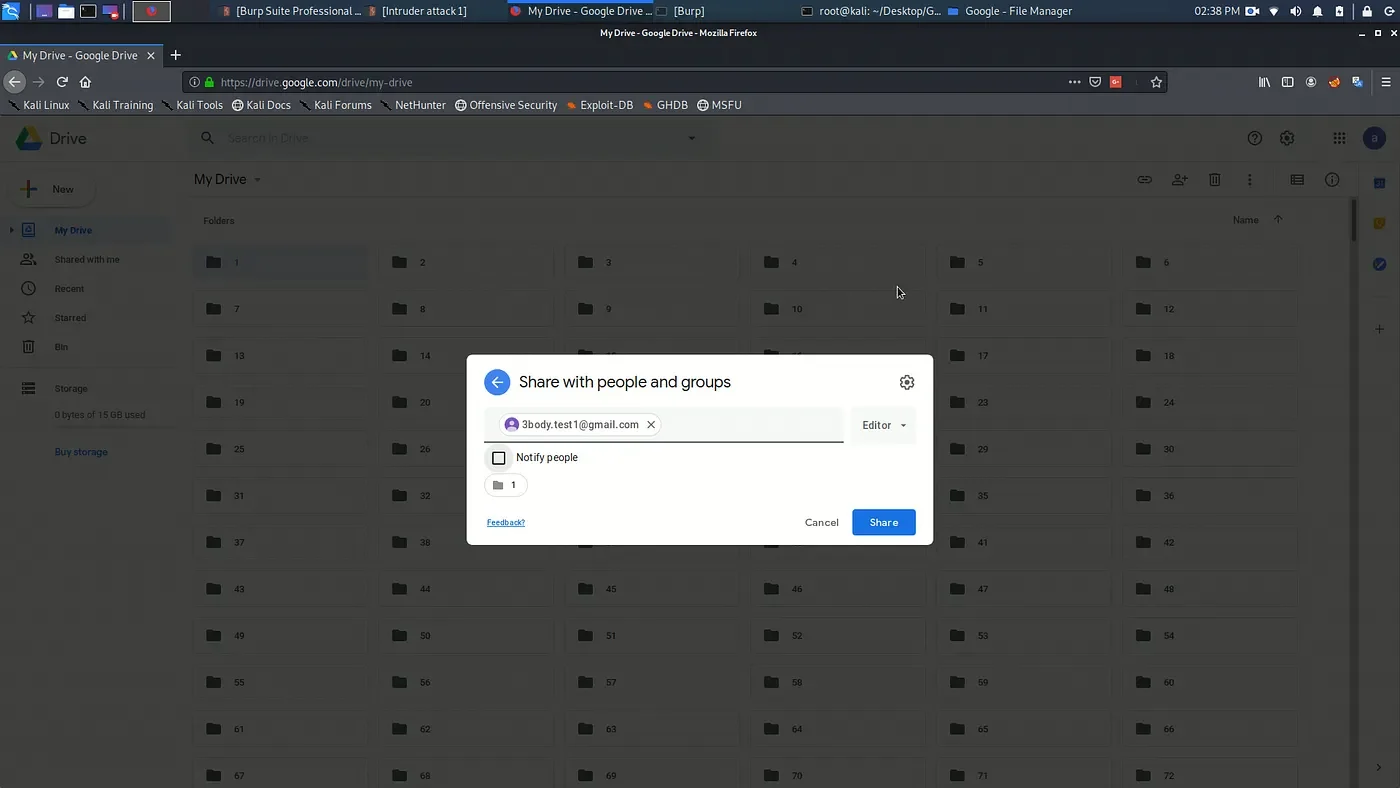
The feature that allows you to share files.
The interesting part is what the invitation request returns. When an invitation is sent to an e-mail address, the response contains the first and last name of the owner of that address and a link to their profile picture. On its own, Google's policy did not treat that as a vulnerability. The researcher's argument was that the real issue is the ability to bypass the rate limit on this lookup, which turns the feature into a user enumeration primitive.
Setup
The work was done with a browser against Google Drive and Burp Suite, using the Intruder tool for the automated parts. The researcher used a file of usernames as a payload list and a small Perl one-liner to prepare the second payload list. No special role or account setup is described beyond having access to the sharing feature and being able to send invitations.
Finding it
The researcher entered an e-mail address in the sharing dialog and ran Burp Suite to see what happens when an invitation is sent. The captured request was the invitation request.
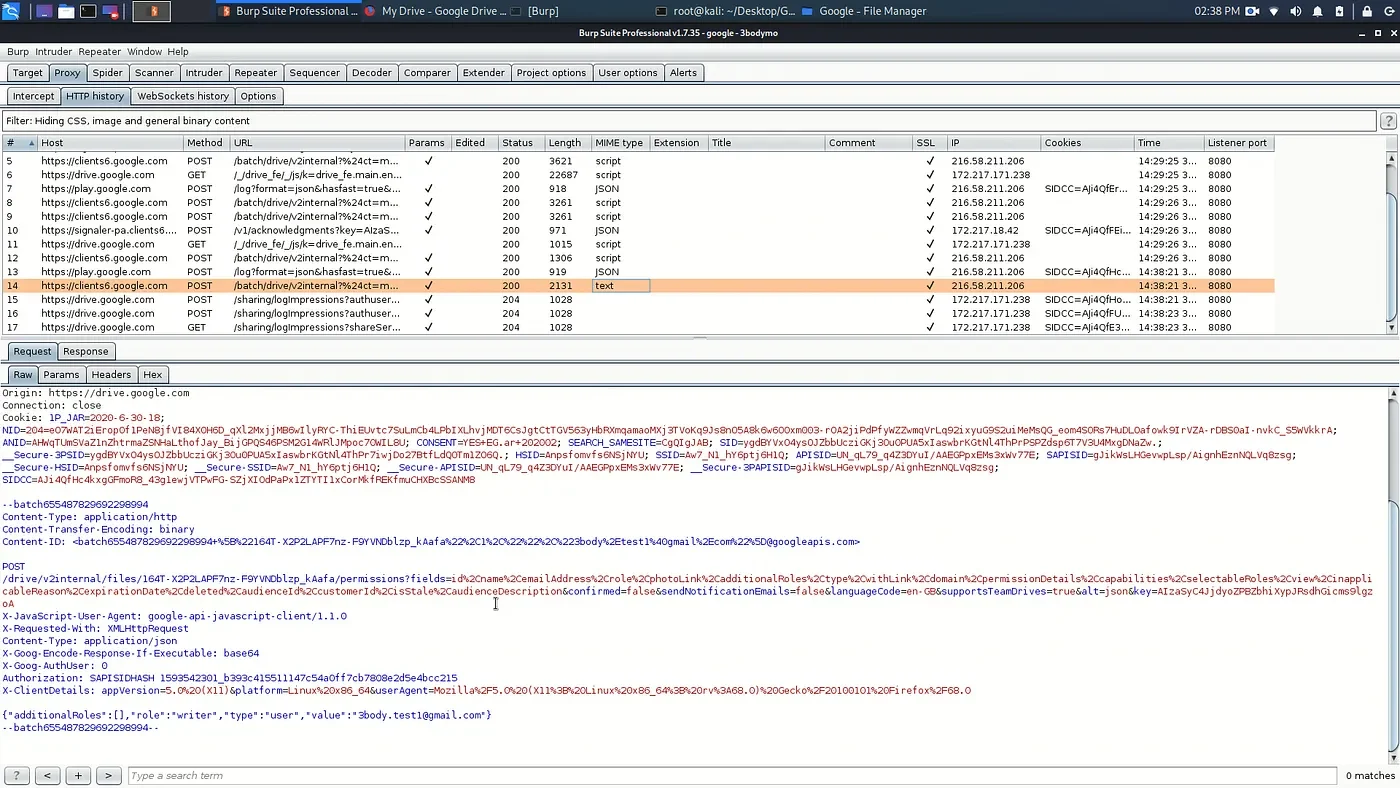
At the bottom of the request is the e-mail address that was sent.
Looking at the response, the researcher found the first and last name of the owner of the e-mail address and the link to their profile picture.
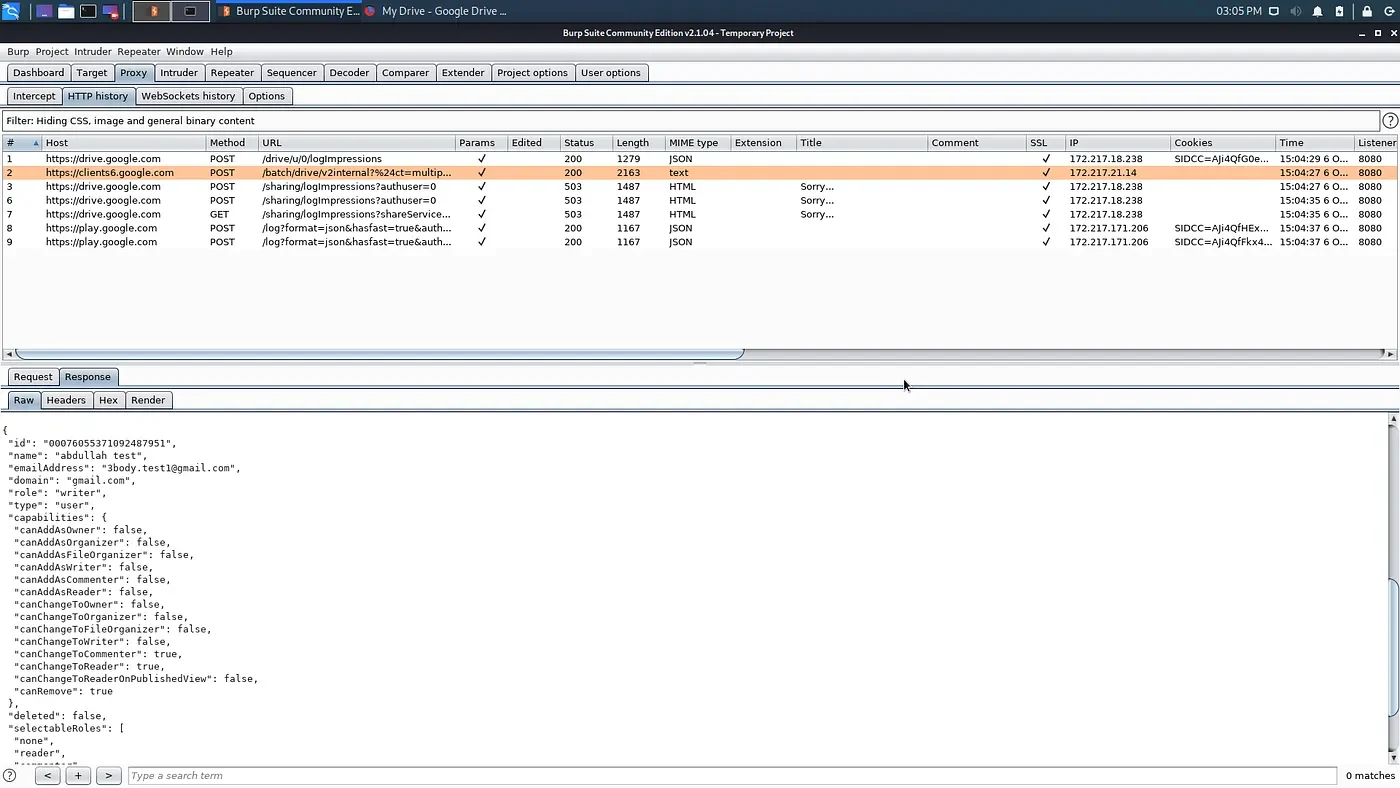
Personal information about the owner of the e-mail.
This is the enumeration primitive: the response to an invitation contains the first and last name and profile picture link of the owner of the e-mail address. Because Google policy did not consider the disclosure itself a vulnerability, the researcher focused on the rate limit. If the endpoint can be queried without a meaningful limit, the disclosure becomes a practical enumeration tool.
Exploitation
Step 1: probe the rate limit with 500 usernames
The researcher created a file containing 500 usernames and sent the invitation request to Intruder to find out whether a rate limit existed. The attack succeeded, and the report was sent to Google. The report was accepted, but the researcher was told that 500 requests were not enough to prove a vulnerability.
Step 2: find the actual limit with 2000 usernames
A file containing 2000 usernames was prepared and run. The researcher reached request number 845, after which the server started returning a message that the rate limit had been exceeded.
Step 3: the idea of splitting the attack across folders
The researcher's idea was to split the attack across more than one folder: send 845 requests, then create another folder and send 845 more. This was tried and it worked. Doing it by hand is impractical, and the researcher considered writing a small program that creates a folder, sends 845 requests, creates another folder and sends another 845, but did not feel able to write it.
The alternative was to create 1000 folders up front, save their names, and send 500 usernames per folder. 500 rather than 845 was chosen to avoid any possible error, and 1000 folders times 500 usernames gives 500K requests. The researcher's guess was that the process can be done indefinitely as long as the requests are spread over folders, and that the server did not stop it.
A comment describing this idea was posted on the report before the researcher knew how to exploit it. Within less than 24 hours the security team replied asking for a PoC for the described scenario and stating that it should not be possible at all.

Security team comment.
Step 4: get the folder names from the create-folder response
Google's server does not use the name you give a folder, so the folder name has to be obtained another way. The researcher first planned to create a folder, check its invitation link and read the name from there, but that would take a lot of time. Instead the researcher inspected the request that creates a folder. Sending that request to Burp showed that the response contains the name of the folder.
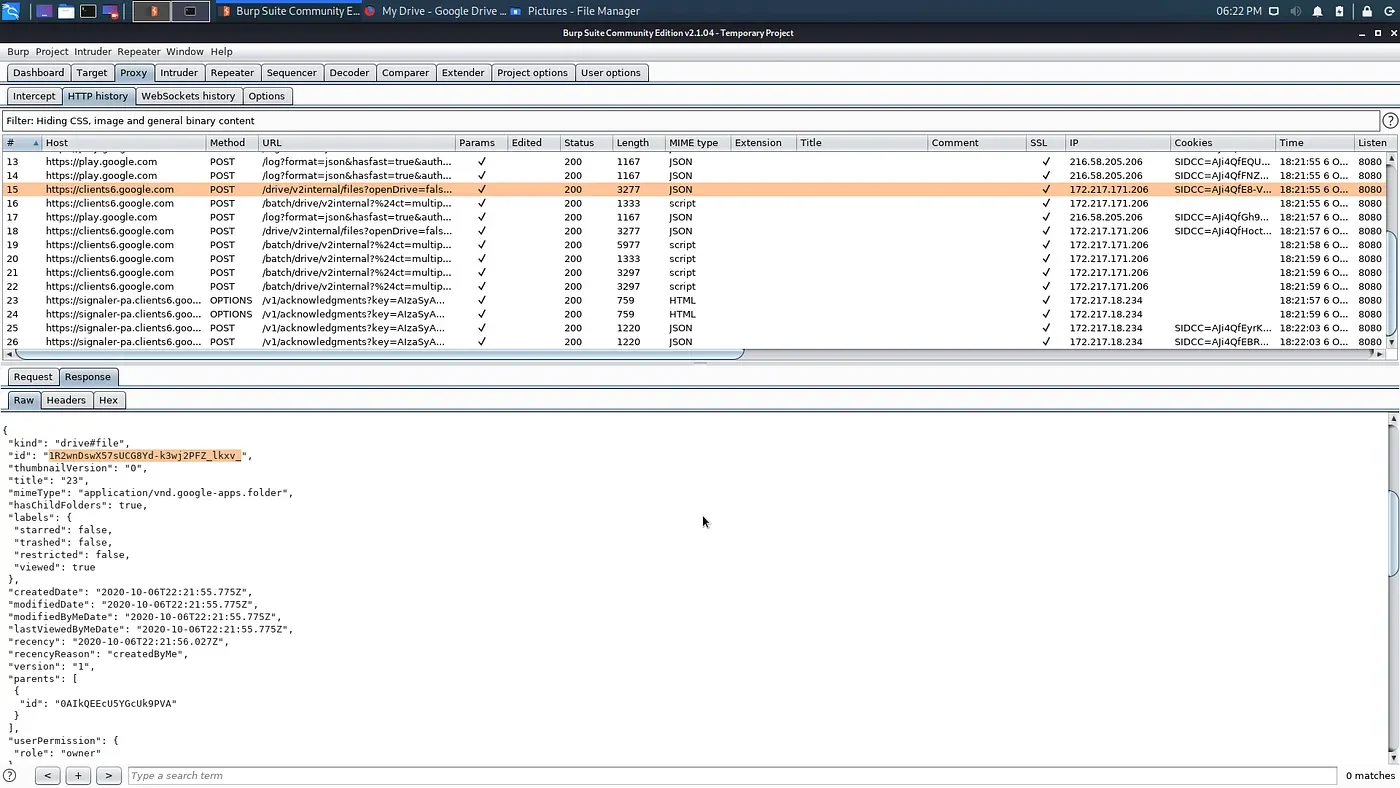
Folder name in response.
Step 5: create 1000 folders with Intruder
The request that makes a new folder was sent to Intruder.
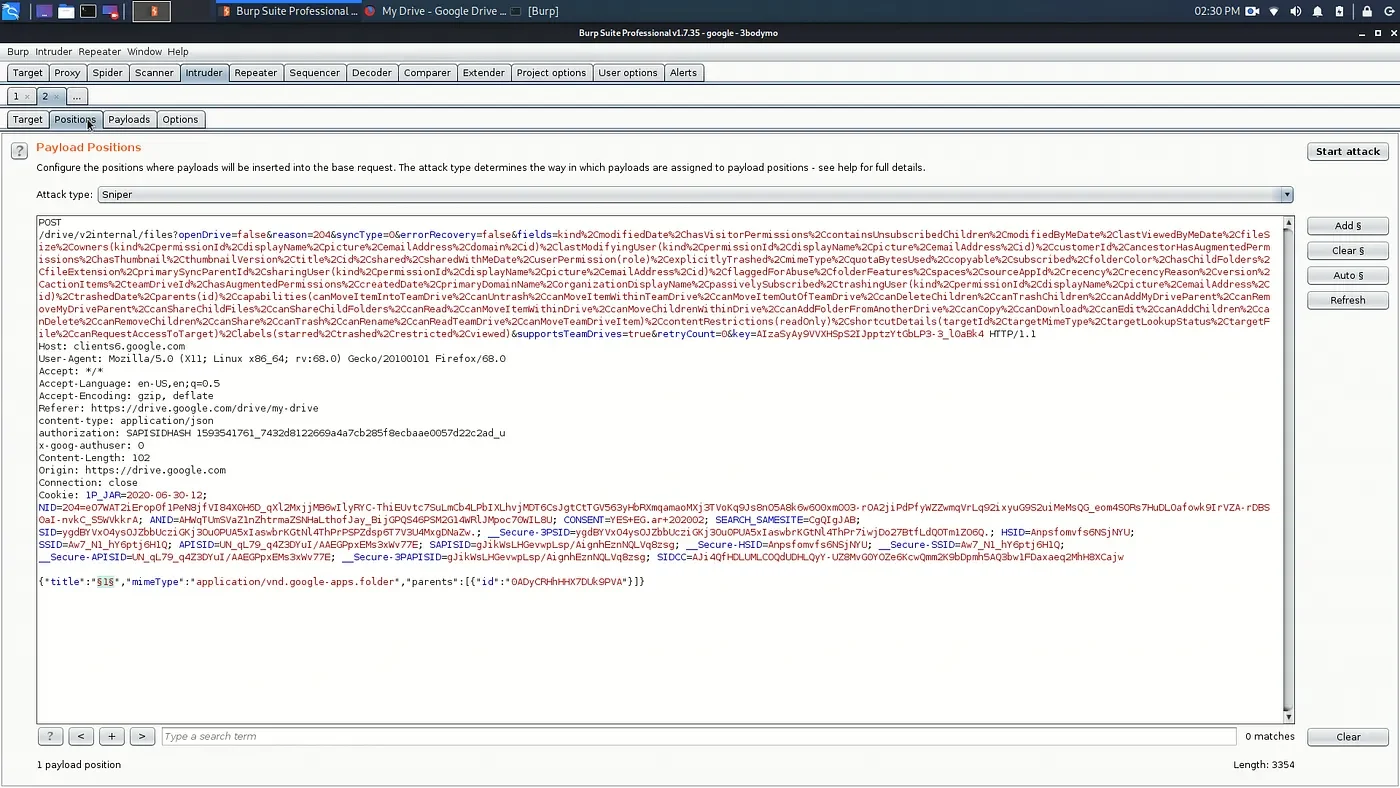
The request of make a new folder.
The payload was set to 2-1000.
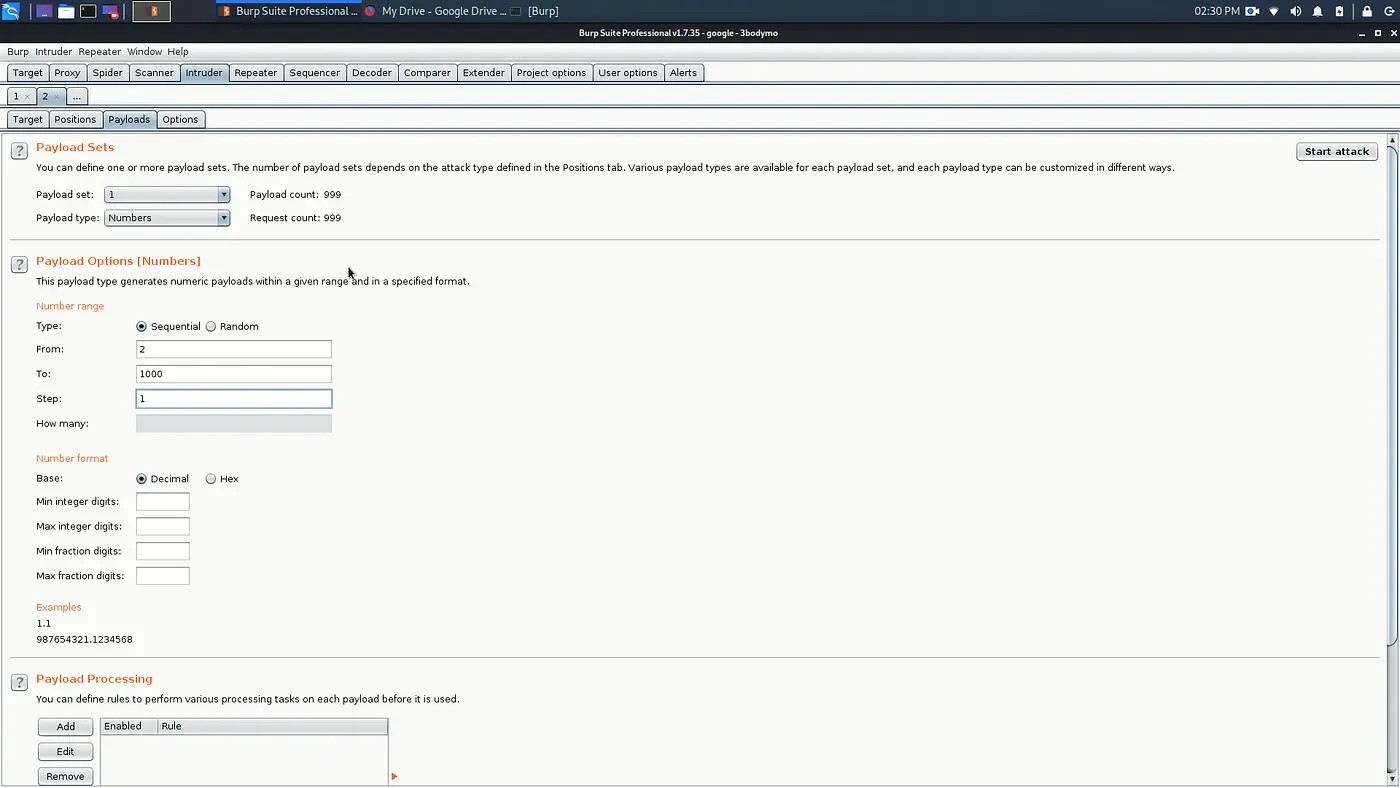
Payload setting.
The researcher notes that 1000 folders were created only to prove the vulnerability, and that more folders and more than 500K requests are possible.
Step 6: extract the folder names with Grep Extract
To capture the folder names from the responses, the researcher used Options tab - Grep Extract - Add and chose the value of id, so that folder names are captured from all the requests sent.
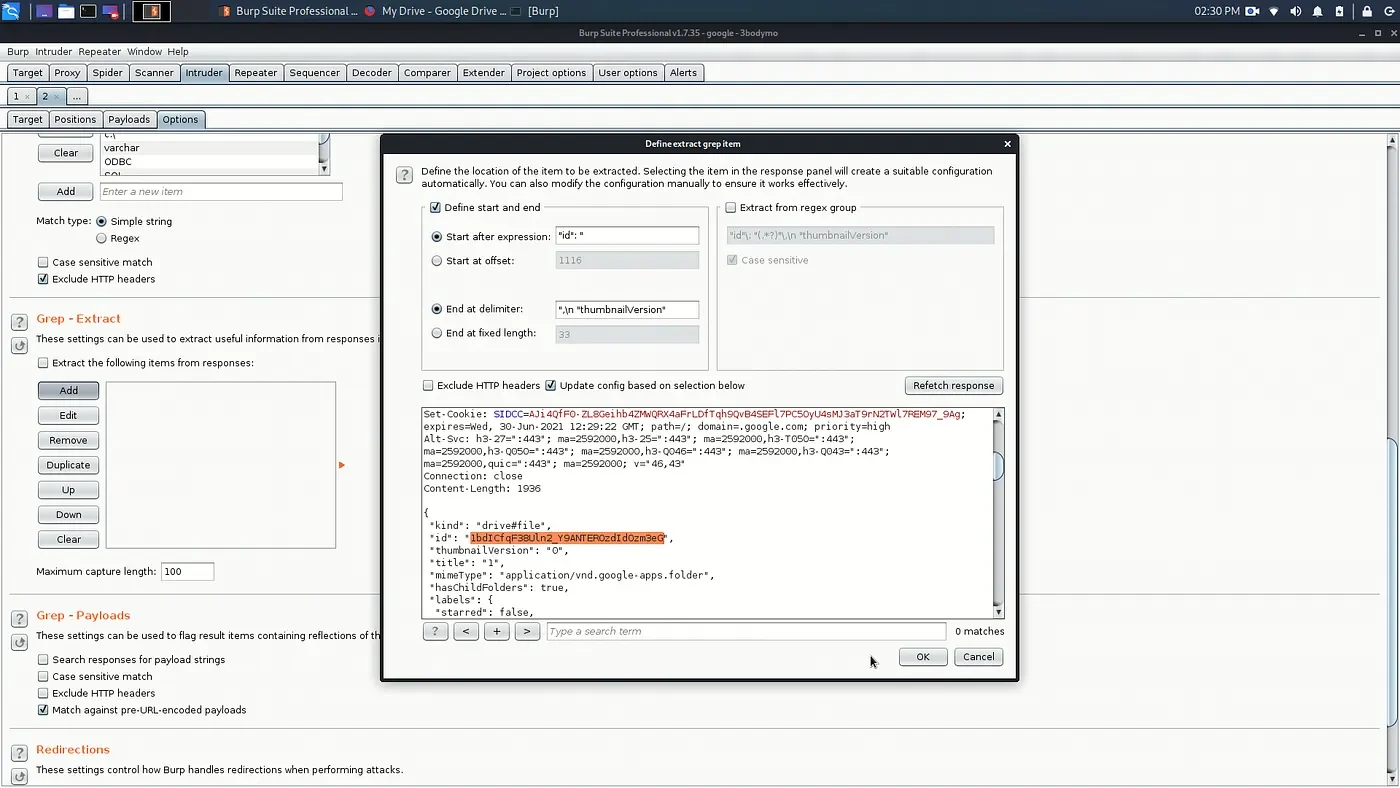
Grep Extract setting.
After running Intruder there are 1000 filenames, which are put into a txt file.
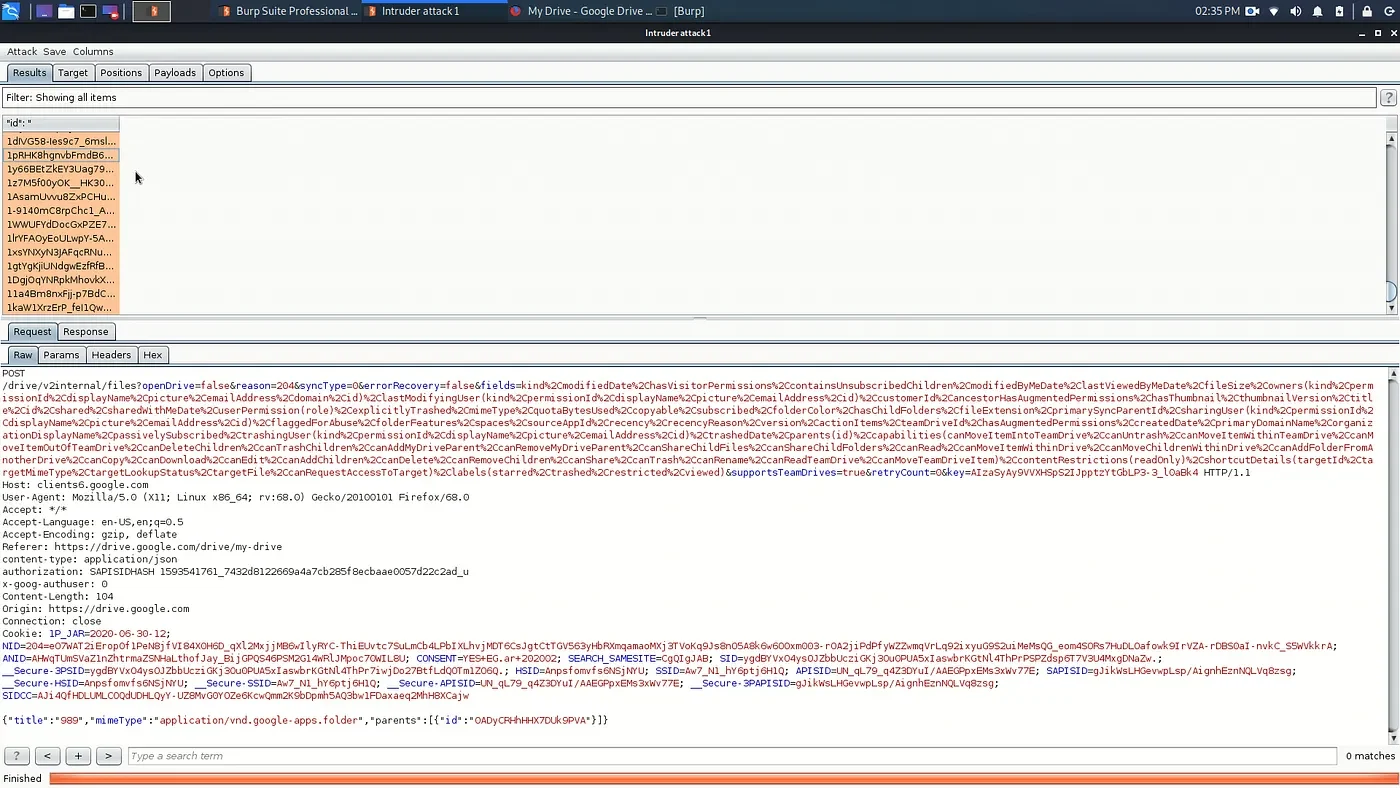
The id column contains the names of the folders. Click anywhere in the white space next to the column, press Ctrl + A to select all, then Ctrl + C to copy them.
Step 7: repeat each folder name 500 times
Each folder name has to appear 500 times, once per username to be sent with that folder. The researcher found this command line to repeat each line of a text file a certain number of times:
perl -ne ‘for$i(1..500){print}’filename.txt | tee output.txt
This reads each line of filename.txt and prints it 500 times, writing the result to output.txt through tee.
Step 8: run the invitation attack with two payloads
The invitation request was sent to Intruder again. The folder name was chosen as payload number one and the username as payload number two.
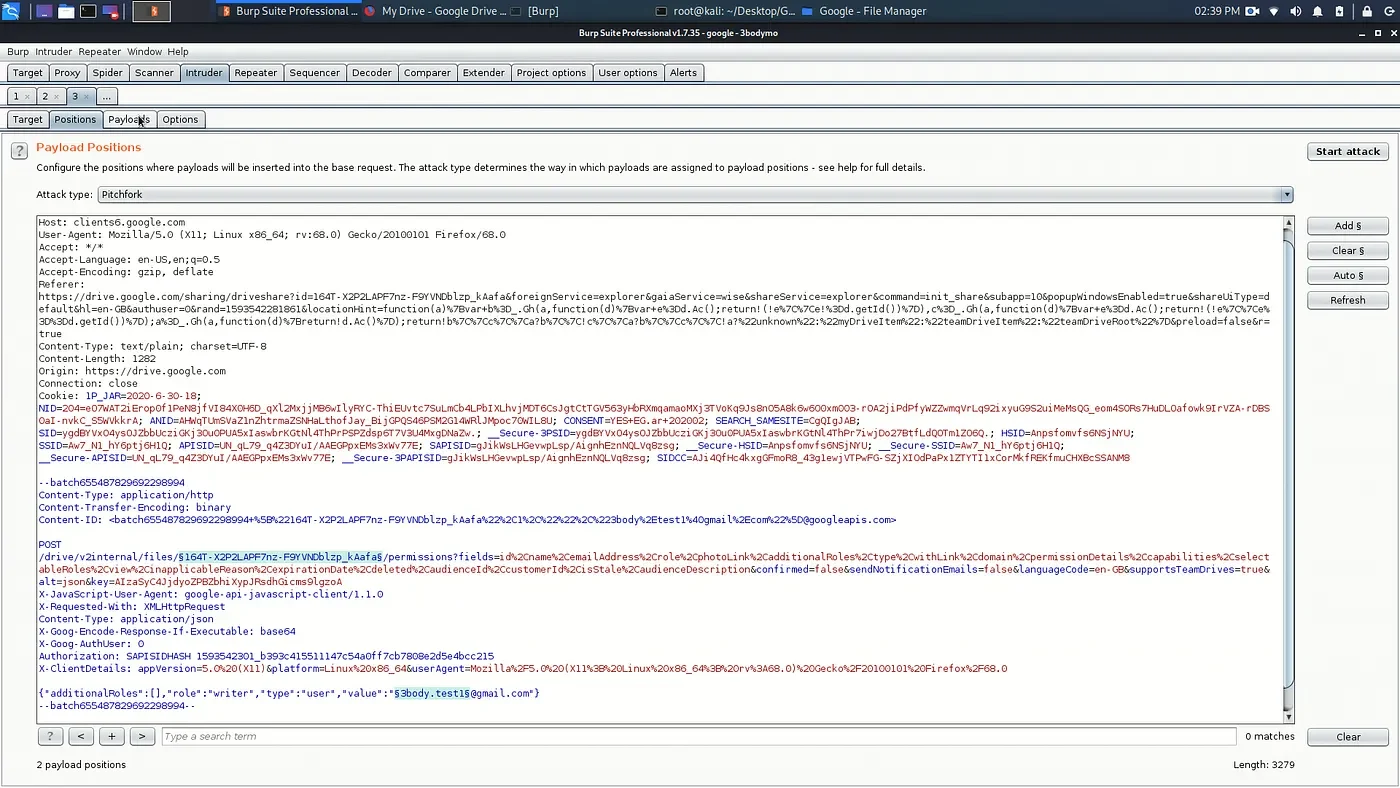
The request of invite person via e-mail.
The attack succeeded. The PoC was submitted to Google and received a Nice catch! Three weeks later the researcher was told the report was ineligible for bounty, but was added to the Hall of Fame.
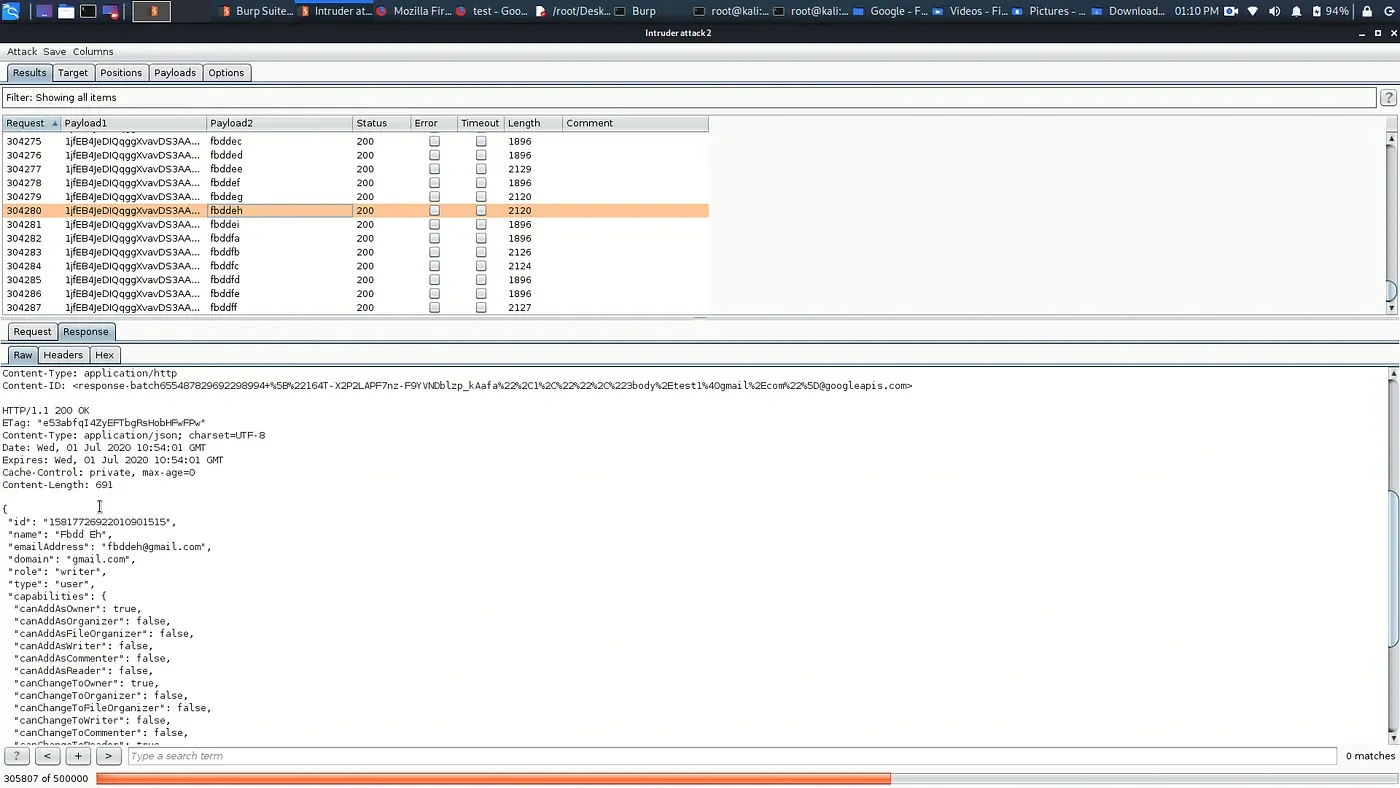
Attack operation.
Root cause
The rate limit was hit after 845 requests for one folder, but creating another folder allowed further requests. The invitation endpoint accepts 845 requests for a given folder before returning the limit message, but creating a new folder resets the counter, so the effective limit is 845 multiplied by the number of folders the attacker creates. 1000 folders were created in one Intruder run, and the researcher guessed the process could continue indefinitely. The enumeration itself comes from the response returning the first and last name and profile picture link for the owner of the e-mail address. The report does not describe the server-side implementation, so the exact reason the counter is scoped to the folder is likely a design choice rather than a stated fact.
Impact
An attacker who can send invitations can query the endpoint with a list of e-mail addresses and obtain the owner's first and last name and profile picture link. By spreading the requests over many folders, the per-folder limit is bypassed and the volume can reach 500K requests, with the researcher's guess that the process can continue indefinitely. The report does not state any further consequence beyond this disclosure and the rate limit bypass.
Fix
The timeline records the report as Won't Fix on Feb 23, 2021. A fix would need to scope the rate limit to the account or client rather than to the folder, so that creating new folders does not reset the counter, and to limit folder creation itself.
Variants to test
- Per-object rate limits on invitation or sharing endpoints. Send the same invitation request repeatedly against one object until the limit message appears, then create a new object and repeat. A positive result is that the counter resets with each new object and the total number of requests keeps growing.
- Enumeration through response bodies. Send an invitation to an address you control and to an address that does not exist, and compare the responses. A positive result is that the response for a real account contains profile data such as a name or picture link that the other response lacks.
- Bulk object creation. Send the create-object request to an Intruder run with a large payload range. A positive result is that the server creates the objects without a limit and returns their identifiers in the response.
- Identifier extraction from creation responses. Inspect the response to the create-object request. A positive result is that the server-generated identifier is present in the response, so a list of objects can be built without visiting each one.
- Two-payload Intruder runs. Combine the object identifier and the target value as two payload positions. A positive result is that the full cross-product of objects and values is accepted without the per-object limit being hit.
What happened, in plain words
A security researcher found a way to make Google Drive tell you personal information about the owner of any e-mail address: their first and last name and a link to their profile picture. On its own, Google did not consider that a security bug. So the researcher looked for a way to make the same feature do something worse: send the request over and over, far more times than the server normally allows, and collect the answers in bulk. That is called bypassing a rate limit.
A rate limit is a cap a server puts on how many times you can do something in a period of time. It is like a shop that only lets you ask the assistant five questions per visit: after the fifth, they stop answering. The researcher found that after hitting the cap on one folder, creating a new folder allowed more requests. So by creating many folders, the researcher could keep asking questions indefinitely. The report was triaged, then marked as a nice catch, and later closed as Won't Fix, with the researcher added to the Hall of Fame but not paid a bounty.
This article walks through the whole story from zero, explaining every term as it appears.
The feature that was misused
Google Drive is Google's online storage service. You can upload files and organise them into folders. One of its features lets you share a folder, or other content you uploaded, with one person or several people by sending them an invitation by e-mail.
The screenshot shows the sharing dialog: the feature that allows you to share files.
To understand why this matters, you need to know what happens behind the scenes when you click a button in a web page. Your browser sends a request to a Google server. The server sends back a response. A request is a message like "please invite this e-mail address to this folder". A response is the server's reply, which can contain data as well as a simple success or failure.
A tool called Burp Suite sits between your browser and the server and lets you read, pause, change and replay those messages. It is like a recording device on a phone line: you can hear exactly what was said and say it again as many times as you like. One of its features, Intruder, sends the same request many times with different values filled in each time. That is how you test something at scale instead of by hand.
The interesting request
The researcher browsed Google Drive looking for a feature that could be misused, and settled on this sharing flow. The researcher typed an e-mail address into the sharing dialog and ran Burp Suite to see what happens when an invitation is sent. Burp captured the request.
At the bottom of the request is the e-mail address that was sent.
A request like this is made of several parts. The first line says which action is being performed and at which address (the URL). Below that are headers, which are extra pieces of information such as what kind of data is being sent. The body is the actual content, and in this case it contains the e-mail address of the person being invited. The screenshot shows that address at the bottom.
When the researcher looked at the response, it contained the first and last name of the owner of that e-mail address and a link to their profile picture.
Personal information about the owner of the e-mail.
This is the core of the finding. You give the server an e-mail address, and the response contains the first and last name and profile picture link of its owner. In security language this is called user enumeration: using a system to work out which accounts exist and to gather details about them, one address at a time. It is like a receptionist who, when asked "does John work here?", not only says yes but also hands you John's photo and full name.
Google's policy did not treat that disclosure on its own as a vulnerability. The researcher's argument was that the real problem is the ability to do it at scale. If the server lets you ask the question without a meaningful limit, the feature becomes a practical tool for collecting personal data about many people.
Probing the rate limit
A rate limit is a cap on how many requests a server will accept in a period of time. It exists to stop automated abuse: if a normal person sends a handful of invitations a day, a script sending thousands is suspicious. The researcher wanted to know whether this invitation request had such a cap.
To test it, the researcher created a file containing 500 usernames and sent the invitation request to Intruder, so the same request would be repeated 500 times with a different username each time.
The attack succeeded, meaning all 500 requests went through without the server complaining. The researcher sent the report to Google. The report was accepted, but the researcher was told that 500 requests were not enough to prove a vulnerability. In other words, the team wanted to see the limit actually being hit and then bypassed, not just a large number of requests that happened to work.
Finding the real limit
The researcher prepared a file containing 2000 usernames and ran the same test. This time the server did push back. The researcher reached request number 845, and after that the server started returning a message that the rate limit had been exceeded.
So the picture was now clear: the server allows 845 requests, then blocks further ones. That is the cap. The question became how to get around it.
The idea: split the attack across folders
The researcher's idea was to split the attack across more than one folder. Send 845 requests, then create another folder and send 845 more. This was tried and it worked. Doing it by hand is impractical, because each folder means repeating the whole process manually. The researcher considered writing a small program that creates a folder, sends 845 requests, creates another folder and sends another 845, but did not feel able to write it.
The alternative was to create 1000 folders up front, save their names, and send 500 usernames per folder. Why 500 and not 845? To leave a margin and avoid any possible error. 1000 folders times 500 usernames gives 500K requests, that is 500,000 requests. The researcher's guess was that the process can be done indefinitely as long as the requests are spread over folders, and that the server did not stop it.
A comment describing this idea was posted on the report before the researcher knew how to exploit it. Within less than 24 hours the security team replied asking for a PoC for the described scenario and stating that it should not be possible at all. A PoC, or proof of concept, is a working demonstration that shows the problem is real rather than theoretical.
Security team comment.
Getting the folder names
There was a practical obstacle. Google's server does not use the name you give a folder, so the folder name has to be obtained another way. The researcher first planned to create a folder, check its invitation link and read the name from there, but that would take a lot of time for 1000 folders.
Instead the researcher inspected the request that creates a folder. Sending that request to Burp showed that the response contains the name of the folder. That solved the problem: the server tells you the name it assigned, so you can collect all the names automatically.
Folder name in response.
Creating 1000 folders with Intruder
The request that makes a new folder was sent to Intruder.
The request of make a new folder.
Intruder works by taking a request and marking a part of it as a payload position, a slot that will be filled with a different value on each run. The payload is the list of values to insert. The researcher set the payload to 2-1000, a numeric range, so Intruder would send the request once for each number from 2 to 1000.
Payload setting.
The researcher notes that 1000 folders were created only to prove the vulnerability, and that more folders and more than 500K requests are possible.
Extracting the folder names with Grep Extract
To capture the folder names from the responses, the researcher used Options tab - Grep Extract - Add and chose the value of id, so that folder names are captured from all the requests sent. Grep Extract is a Burp feature that searches each response for a pattern and copies the matching value into a results column. It is like a highlighter that runs over every reply and pulls out the one piece you care about.
Grep Extract setting.
After running Intruder there are 1000 filenames, which are put into a txt file.
The id column contains the names of the folders. Click anywhere in the white space next to the column, press Ctrl + A to select all, then Ctrl + C to copy them.
Repeating each folder name 500 times
Each folder name has to appear 500 times, once per username to be sent with that folder. The researcher found this command line to repeat each line of a text file a certain number of times:
perl -ne ‘for$i(1..500){print}’filename.txt | tee output.txt
Line by line, in plain words:
perlis a programming language and also the name of the program that runs it. Here it is used as a small text-processing tool.-ntells Perl to read the input one line at a time and run the code on each line.-emeans the code to run comes next on the command line, rather than from a file.‘for$i(1..500){print}’is the code.for$i(1..500)means "repeat the following 500 times, counting from 1 to 500".{print}means "print the current line". So each line is printed 500 times.filename.txtis the input file, the list of folder names.|is a pipe. It takes the output of the command on the left and feeds it as input to the command on the right.tee output.txtwrites what it receives both to the screen and to a file calledoutput.txt.
So the whole command reads every folder name from filename.txt, prints it 500 times, and saves the result in output.txt. That file is now the list of folder names, each repeated 500 times, ready to be paired with usernames.
Running the invitation attack with two payloads
The invitation request was sent to Intruder again. This time there were two payload positions. The folder name was chosen as payload number one and the username as payload number two. Intruder then sends one request for every combination of the two lists: each folder name paired with each username. That is how 1000 folders times 500 usernames becomes 500,000 requests.
The request of invite person via e-mail.
The attack succeeded. The PoC was submitted to Google and received a Nice catch! Three weeks later the researcher was told the report was ineligible for bounty, but was added to the Hall of Fame. The Hall of Fame is a public list of researchers who reported valid issues, separate from any payment.
Attack operation.
Why it worked
The rate limit was hit after 845 requests for one folder, but creating another folder allowed further requests. The invitation endpoint accepts 845 requests for a given folder before returning the limit message, but creating a new folder resets the counter, so the effective limit is 845 multiplied by the number of folders the attacker creates. 1000 folders were created in one Intruder run, and the researcher guessed the process could continue indefinitely. The enumeration itself comes from the response returning the first and last name and profile picture link for the owner of the e-mail address. The report does not describe the server-side implementation, so the exact reason the counter is scoped to the folder is likely a design choice rather than a stated fact.
What an attacker could do with it
An attacker who can send invitations can query the endpoint with a list of e-mail addresses and obtain the owner's first and last name and profile picture link. By spreading the requests over many folders, the per-folder limit is bypassed and the volume can reach 500K requests, with the researcher's guess that the process can continue indefinitely. The report does not state any further consequence beyond this disclosure and the rate limit bypass.
How it was fixed
The timeline records the report as Won't Fix on Feb 23, 2021. A fix would need to scope the rate limit to the account or client rather than to the folder, so that creating new folders does not reset the counter, and to limit folder creation itself.
Similar things to test
- Per-object rate limits on invitation or sharing endpoints. Send the same invitation request repeatedly against one object until the limit message appears, then create a new object and repeat. A positive result is that the counter resets with each new object and the total number of requests keeps growing.
- Enumeration through response bodies. Send an invitation to an address you control and to an address that does not exist, and compare the responses. A positive result is that the response for a real account contains profile data such as a name or picture link that the other response lacks.
- Bulk object creation. Send the create-object request to an Intruder run with a large payload range. A positive result is that the server creates the objects without a limit and returns their identifiers in the response.
- Identifier extraction from creation responses. Inspect the response to the create-object request. A positive result is that the server-generated identifier is present in the response, so a list of objects can be built without visiting each one.
- Two-payload Intruder runs. Combine the object identifier and the target value as two payload positions. A positive result is that the full cross-product of objects and values is accepted without the per-object limit being hit.
Timeline
| Date | Event |
|---|---|
| Jun 27, 2020 | Bug reported |
| Jun 29, 2020 | Triaged |
| Sep 15, 2020 | Nice catch! |
| Feb 23, 2021 | Won't Fix |
Glossary
- API: a way for one piece of software to talk to another by sending structured requests and receiving structured responses, like a waiter taking your order to the kitchen.
- Body (of a request): the part of a request that carries the actual data being sent, such as an e-mail address.
- Burp Suite: a tool that sits between your browser and a server so you can read, pause, change and replay the messages they exchange.
- Bypass: getting around a protection, such as a limit, without the server noticing.
- Enumeration: using a system to work out which accounts or items exist, one at a time, and often to gather details about them.
- Grep Extract: a Burp feature that searches each response for a pattern and copies the matching value into a results column.
- Hall of Fame (HOF): a public list of researchers who reported valid issues, separate from any payment.
- Headers: extra pieces of information attached to a request or response, such as what kind of data is being sent.
- Intruder: a Burp feature that sends the same request many times with different values filled into marked slots.
- Payload: the list of values that Intruder inserts into a marked slot, one per request.
- Payload position: the part of a request that Intruder marks so it can be replaced with each payload value.
- Perl: a programming language, and the program that runs it, often used for small text-processing tasks.
- Pipe (
|): a shell symbol that takes the output of one command and feeds it as input to the next. - PoC (proof of concept): a working demonstration that shows a problem is real rather than theoretical.
- Rate limit: a cap on how many requests a server will accept in a period of time.
- Request: a message your browser or tool sends to a server asking it to do something.
- Response: the server's reply to a request, which can contain data as well as a success or failure.
tee: a command that writes what it receives both to the screen and to a file.- Triaged: reviewed by the security team and confirmed as a valid issue worth investigating.
- URL: the address of a resource on the web, such as the address a request is sent to.
- User enumeration: using a system to work out which accounts exist and to gather details about them, one address at a time.
- Username: the part of an e-mail address before the @ sign, or simply a list of addresses to try.
- Vulnerability: a weakness in software that can be misused to cause harm or break a security rule.
- Won't Fix: a status meaning the team has decided not to change the software in response to the report.