How I hacked IBM and got full access on many services?
An internet-exposed Tomcat server hosted by IBM had a publicly reachable logs directory containing employee log files with tokens, credentials and internal service URLs. The author used a still-valid token and default admin credentials found in those logs to access employee information and internal DevOps, GitLab and Jenkins services.
 Published on medium.com
Hi everyone, today I’m gonna talk about vulnerability that I found it in IBM that allowed me to get full access on many services.
The full write-up lives on its author's site
It belongs to its author, so we link to it rather than copy it. The other two tabs are our own rewrites, checked against it.
Context
This is a story about an IBM asset found through internet-wide scanning, a Tomcat server whose logs directory was left exposed. The exposed logs contained employee tokens, employee email addresses and, eventually, credentials for internal services. The report was filed on the IBM programme on HackerOne and was triaged; the timeline lists a fix on 8 December 2020.
Nothing in the report describes the application behind the server beyond the fact that it exposed a logs endpoint and an admin control panel that required a token header. The asset listed for the report is medium.com, which is where the write-up was published, not the scanned host.
Setup
The researcher used two tools: Shodan for discovery and ffuf for content discovery on the host that looked interesting. No accounts, roles or versions are given. The only precondition was that the Tomcat server be reachable from the internet and indexed by Shodan under IBM's organisation.
Finding it
The starting query was a Shodan search for Tomcat instances belonging to IBM:
Org:'ibm' tomcat
Browsing the results produced nothing interesting until one server, referred to in the write-up as x.x.x.x, stood out. Running ffuf against it revealed an exposed endpoint called logs. Visiting that endpoint in a browser showed more than one folder containing log files for employees.
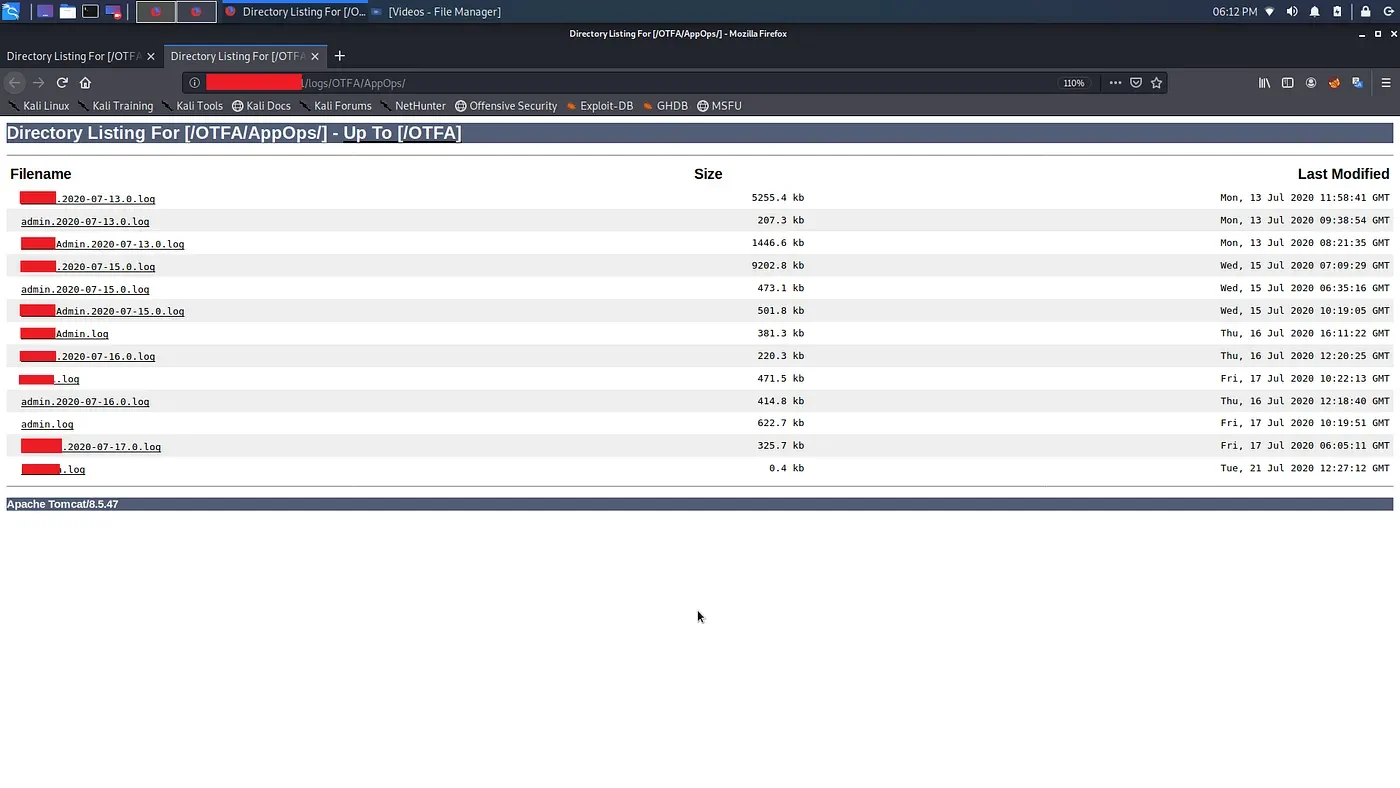
Opening some of the files confirmed they held information worth reporting: tokens and email addresses belonging to IBM employees. The tokens the researcher checked at this stage were expired. Even so, log files of this kind should never be publicly reachable, so the issue was reported to the IBM programme on HackerOne.
Less than a day later the reply came back asking for real exploitation based on the data in the logs before the report could be triaged.

Exploitation
Step 1: Collect the logs and extract tokens
The logs for the current day were present. The researcher pulled all the log files together into a single text file and used grep to extract every token from it, then tried them.
Step 2: Work out how to test a token
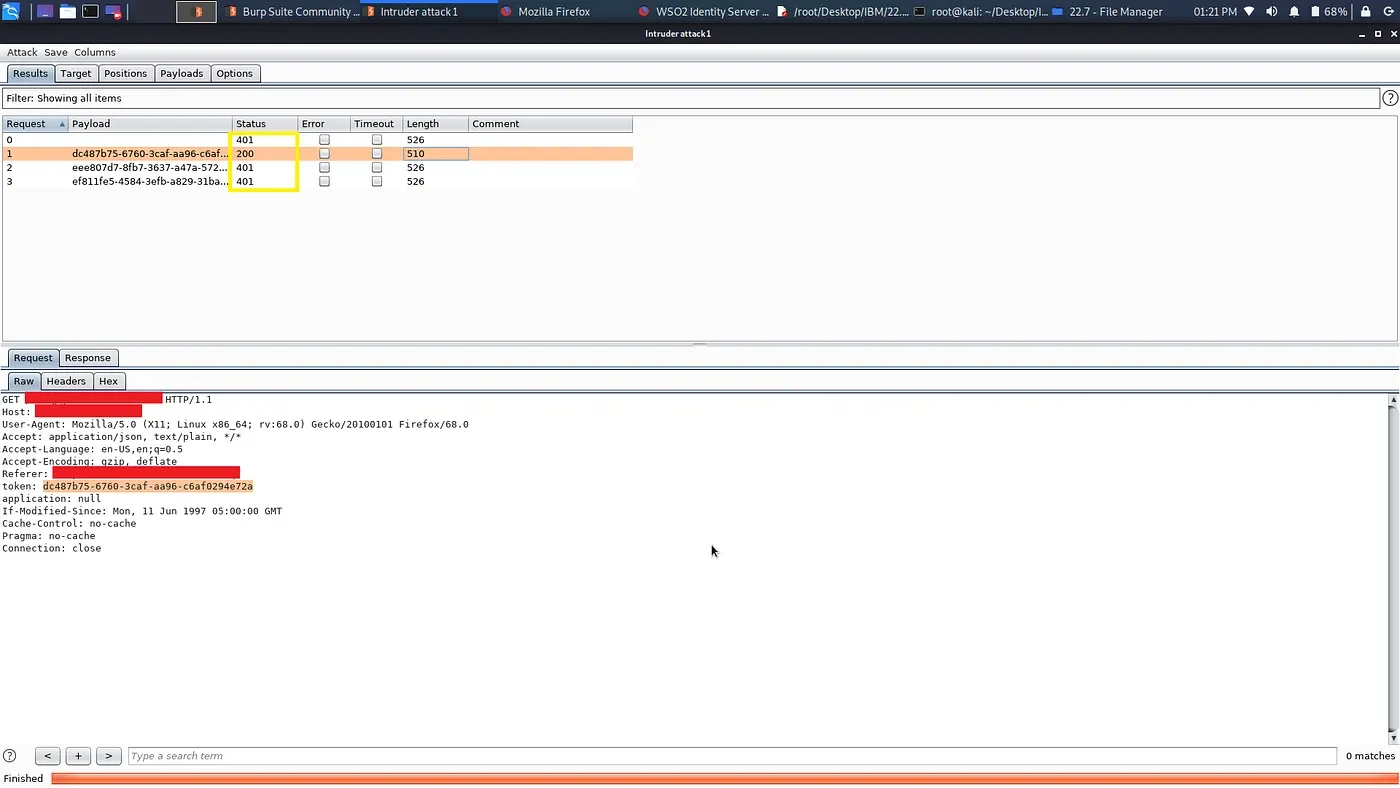
While reading the logs the researcher found the URL of an admin control panel. Opening it returned a message saying that a token was missing. The request was sent to Burp and a header named token was added with a random value. The response then changed to say that the token was invalid or expired. The researcher notes this is how to check whether the tokens are working.
Step 3: Use a valid token
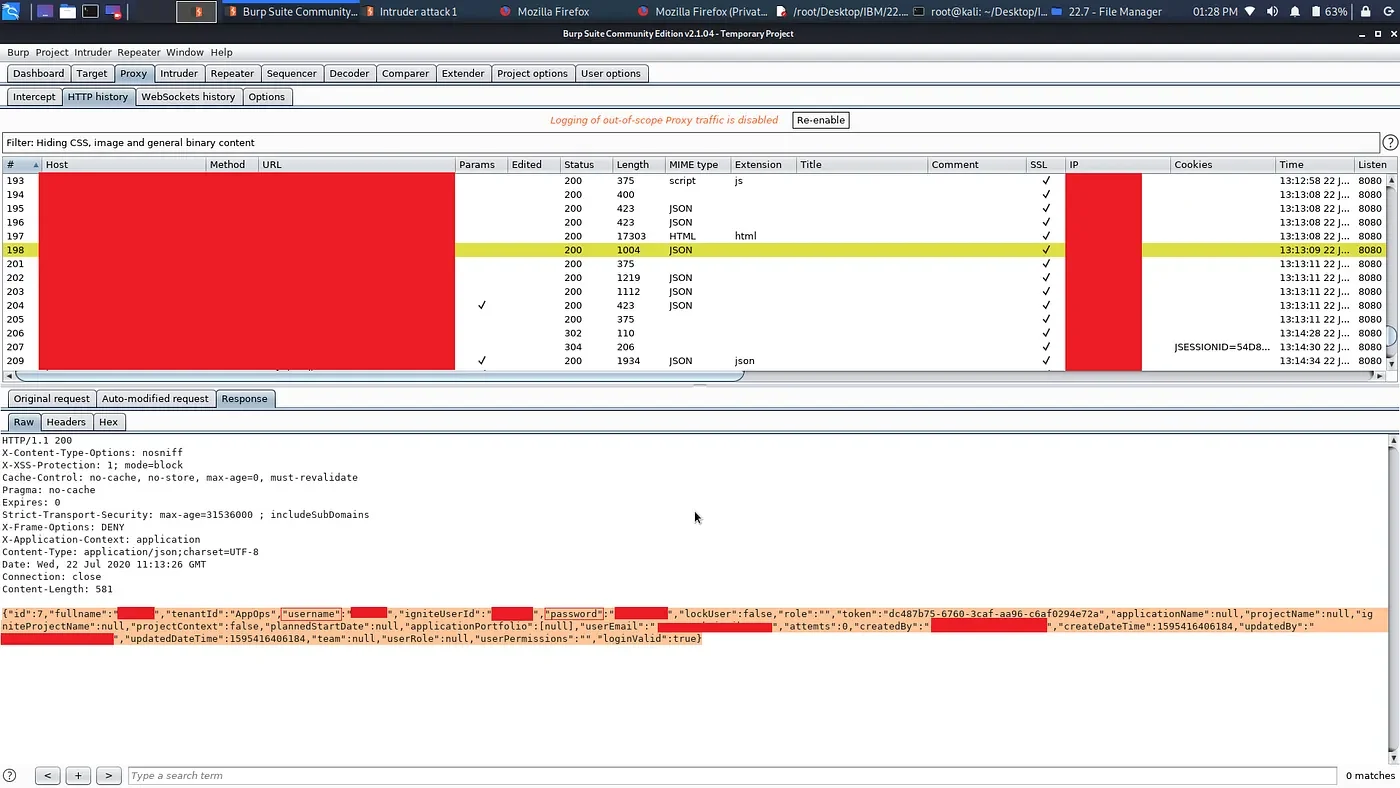
One of the extracted tokens was still valid. With it, the researcher retrieved information about an employee.
Step 4: Cloud credentials in the same logs
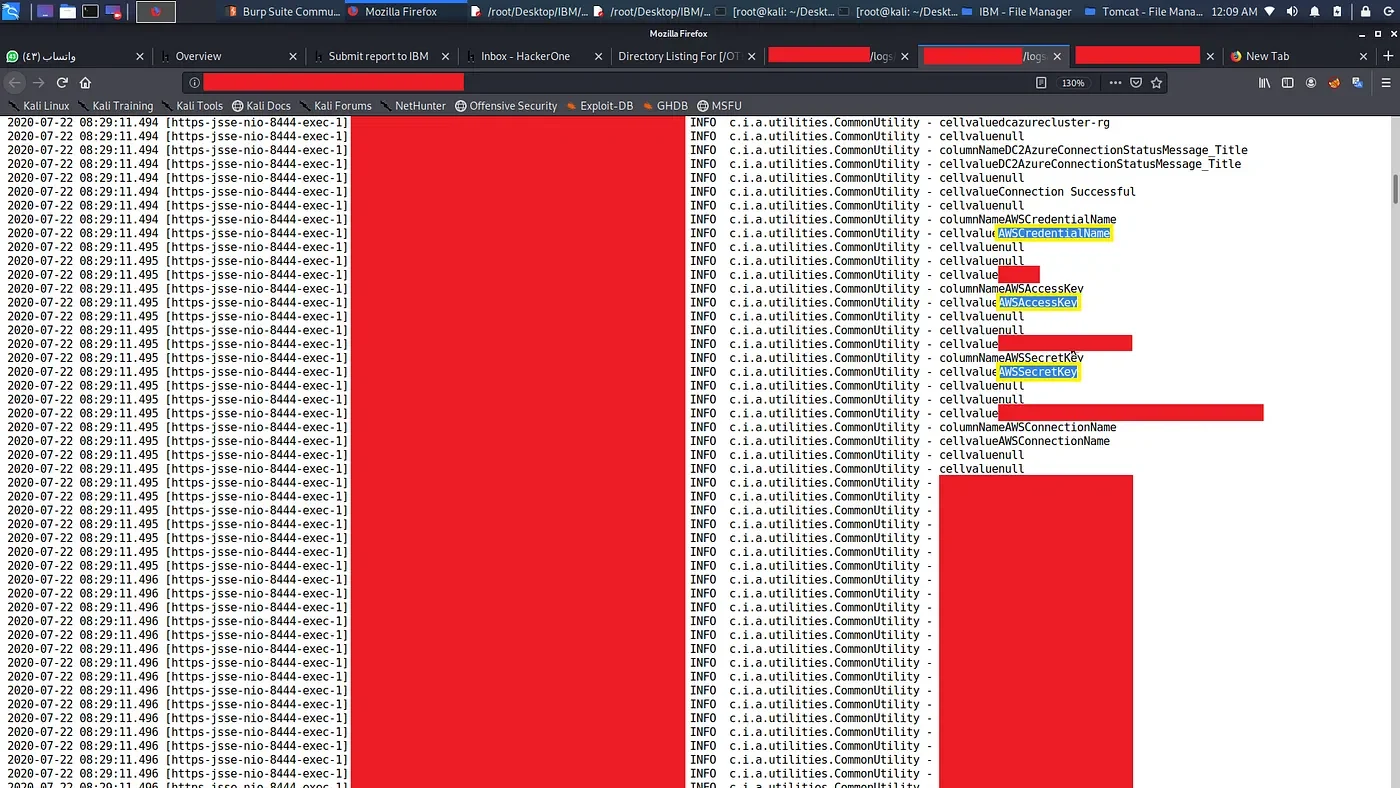
The logs also contained credentials for AWS and Azure.
At this point an interim update was posted to the report with these findings, and the report was triaged.
Step 5: A second finding in the same logs
The researcher went back into the logs to look for something that deserved a separate report. Among the entries was the URL of a service called Services DevOps Commander. Opening it presented a login form, and the credentials admin / pass were accepted, giving access to the panel.
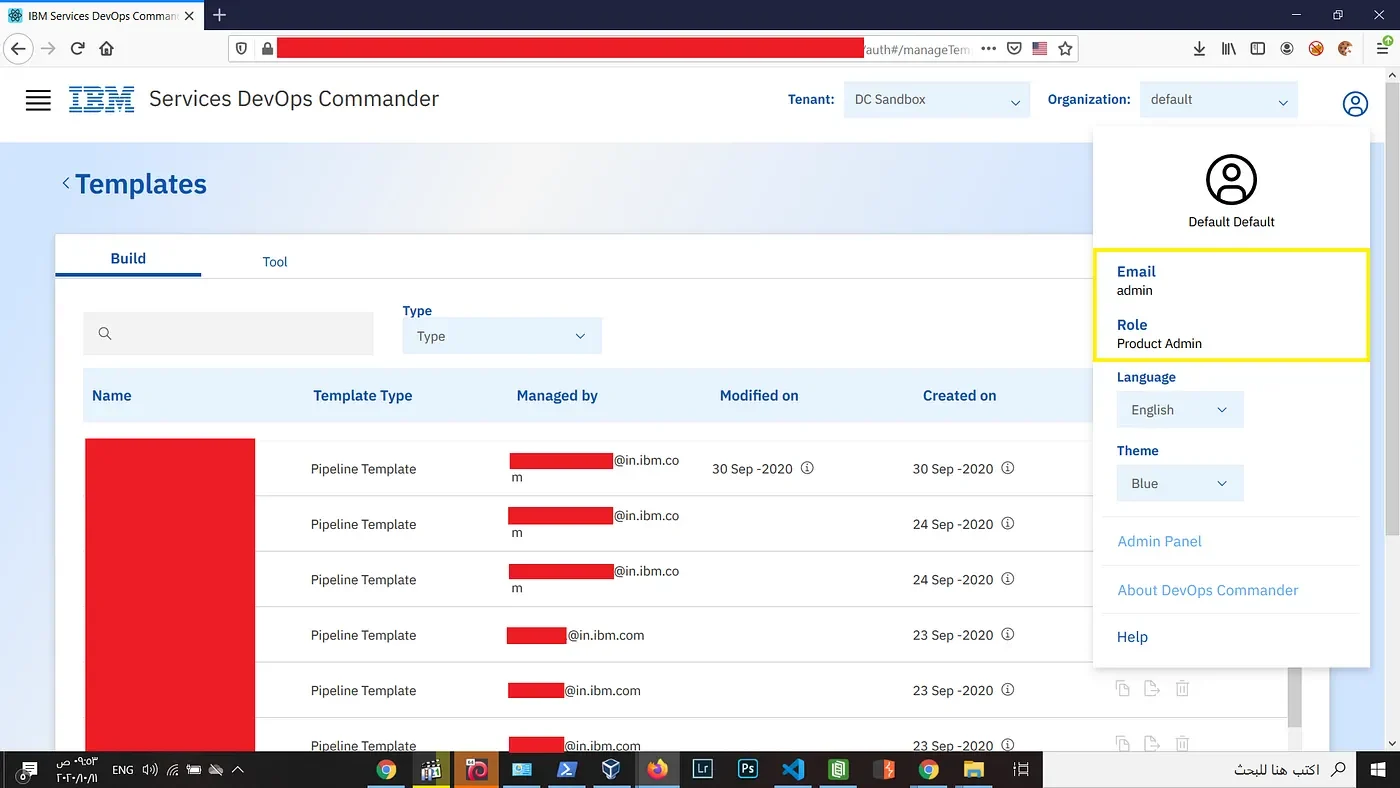
A note in the write-up records that these credentials were being leaked in the log file as clear text.
Step 6: Pivot through the control panel
Browsing the control panel revealed credentials for services including GitLab, Jenkins and many others.
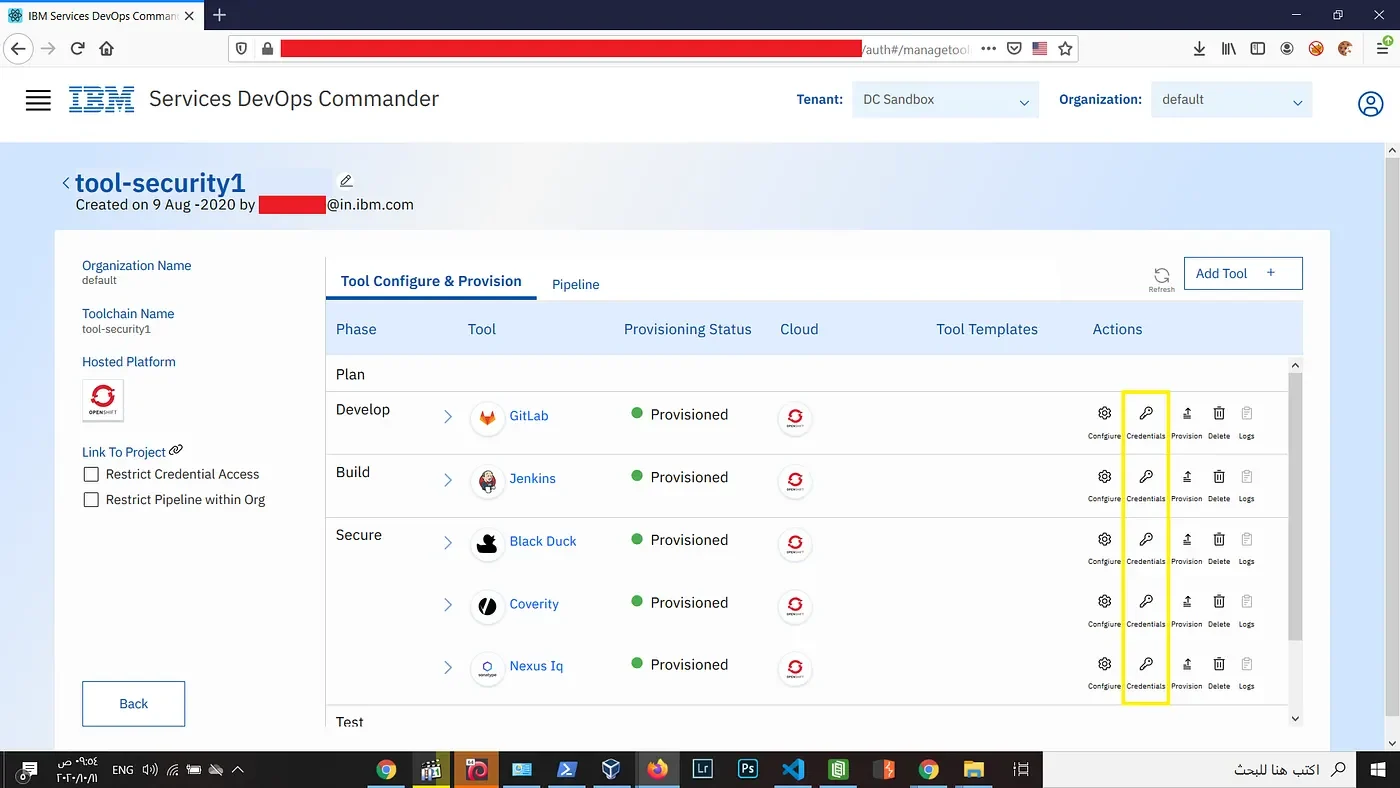
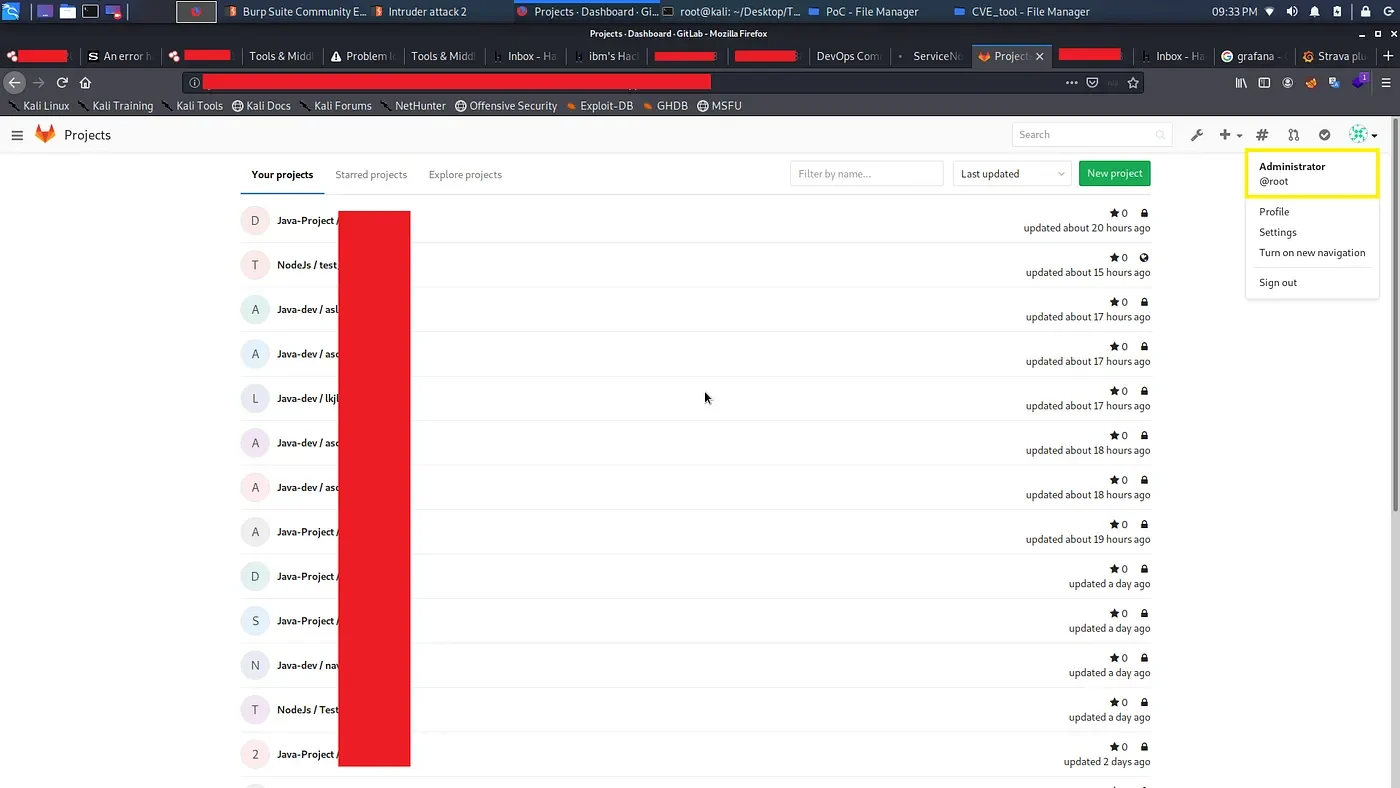
The researcher stopped there and filed this as a separate report, which was also triaged.
Root cause
The logs directory was reachable on the host and anyone who found the path could read the files. The logs themselves were written with sensitive material in clear text, including employee tokens, employee email addresses, AWS and Azure credentials, and the credentials for Services DevOps Commander. Because the admin panel distinguished a missing token from an invalid one, an attacker could confirm which leaked tokens were still live without guessing blindly.
Impact
With a valid token from the logs, an attacker could read information about an employee. The logs also contained credentials for AWS and Azure; the report does not state their scope or whether they worked. The DevOps Commander panel contained credentials for GitLab, Jenkins and many other services. The researcher describes the outcome as full access on many services. All of this depends on the logs being reachable and on the credentials in them still being valid, which was true for at least one token and for the panel login.
Fix
The timeline lists a fix on 8 December 2020; the report does not say what change was made. The obvious fixes are to stop serving the logs directory publicly and to stop writing tokens and credentials into logs in clear text.
Variants to test
- Search Shodan for other Tomcat instances under the same organisation and run ffuf against them looking for
logs,log,backupand similar paths. A positive result is a directory listing or a directly downloadable log file. - On any exposed log directory, check whether today's log is present. Current logs are far more likely to contain live tokens than old ones.
- For each token found, locate the endpoint that consumes it and compare the response for a missing token against the response for a random token. A distinct message for each case gives you a reliable oracle for testing validity.
- Grep collected logs for cloud key patterns and for internal service URLs, then check whether the credentials still work. A positive result is a successful API call with the key or a successful login to the internal service.
- Try default credentials such as
admin/passon any internal panel URL found in logs. A positive result is a session in the panel, from which further credentials for services like GitLab and Jenkins may be readable.
What happened, in plain words
A security researcher found an IBM web server that was accidentally letting anyone on the internet read its log files. Log files are the diaries that programs keep: they record what happened, who logged in, and sometimes secret values the program used along the way. Because these particular logs were public, the researcher could read employee email addresses, login tokens and even passwords for other internal systems.
At first the researcher reported only that the logs were exposed. The IBM team replied that they needed real exploitation from the data in the logs before they would triage the report. So the researcher went back, read the logs more carefully, and found that some of the secrets inside still worked. One token let them read information about an employee. The logs also contained cloud credentials for AWS and Azure, and the username and password for an internal control panel called Services DevOps Commander. That panel in turn held credentials for GitLab, Jenkins and other services. The researcher filed a second report for the panel access, and both reports were triaged.
This walkthrough explains every step from zero, including the tools and the jargon.
Background concepts you will need
Before the steps, here is the vocabulary the story relies on. Each term is explained again where it first appears, but a quick pass helps.
- Server: a computer somewhere on the internet whose job is to answer requests from other computers. When you open a website, your browser asks a server for a page and the server sends it back.
- Tomcat: a piece of software that runs Java web applications on a server. Many companies use it. It is not a website itself; it is the engine that serves one.
- Shodan: a search engine, but not for web pages. It searches for devices and servers connected to the internet. You can ask it things like "show me all servers running Tomcat that belong to this company".
- Endpoint: a specific address or path on a server that does something. If a website is a building, an endpoint is a particular door or counter inside it, such as
/logsor/admin. - ffuf: a command-line tool that tries many possible endpoint names against a server very quickly, to discover ones that exist but are not linked anywhere. Think of it as trying every door handle in a building to see which ones open.
- Log file: a text file a program writes to record events. Like a shop's till roll or a building's visitor book.
- Token: a short string of characters that acts like a temporary key or wristband. If you present the right token, the server treats you as logged in or authorised. Tokens usually expire after a while, which is why an old one stops working.
- Header: extra information sent alongside a web request, like the label on an envelope. Headers carry things such as what browser you use, or, in this story, a token.
- Burp (Burp Suite): a tool that sits between your browser and a server so you can look at and change requests before they are sent. Useful for adding or editing headers by hand.
- grep: a command-line tool that searches text for a pattern and prints matching lines. Like using Ctrl+F in a document, but for many files at once.
- AWS and Azure: Amazon Web Services and Microsoft Azure, two large cloud platforms. Companies rent computers and services from them. Access is controlled by credentials (keys), and leaked keys can give an attacker access to whatever those keys are allowed to do.
- Clear text (plaintext): information stored or sent without any encryption or masking, so anyone who can read the file can read the secret directly.
- Triaged: when a bug bounty programme has looked at a report and confirmed it is a real, valid issue worth working on. It is the step between "we received your report" and "we fixed it".
- Bug bounty programme: a scheme where a company invites outside researchers to report security problems, usually through a platform such as HackerOne, sometimes with a reward.
The setup
The researcher used two tools: Shodan to find candidate servers, and ffuf to look for hidden endpoints on the one that looked interesting. No special accounts or versions are mentioned. The only precondition was that the Tomcat server could be reached from the internet and was indexed by Shodan under IBM's organisation.
Finding the exposed logs
The starting point was a Shodan search for Tomcat servers belonging to IBM:
Org:'ibm' tomcat
Line by line: Org:'ibm' tells Shodan to restrict results to devices registered to the organisation IBM. tomcat asks for servers that appear to be running Tomcat. Together the query means "show me IBM's Tomcat servers that Shodan can see".
Browsing the results turned up nothing interesting until one server stood out. The write-up calls it x.x.x.x to hide its real address. Running ffuf against that server revealed an exposed endpoint called logs. Visiting that endpoint in a browser showed more than one folder containing log files for employees.
The screenshot shows the exposed logs endpoint in a browser, with folders containing log files for employees.
Opening some of the files confirmed they held information worth reporting: tokens and email addresses belonging to IBM employees. The tokens the researcher checked at this stage had expired. Even so, log files of this kind should never be publicly reachable, so the issue was reported to the IBM programme on HackerOne.
Less than a day later the reply came back asking for real exploitation based on the data in the logs before the report could be triaged.
The screenshot shows the reply from the programme asking for real exploitation from the data in the logs.
Exploitation
Step 1: Collect the logs and extract tokens
The logs for the current day were present, which made the data current rather than historical. The researcher pulled all the log files together into a single text file and used grep to extract every token from it, then tried them.
Why this matters: an old log is a museum piece. A log written today is likely to contain tokens that were issued today and have not yet expired. Gathering everything into one file and using grep is simply a way to find every token in one pass instead of reading each file by eye.
Step 2: Work out how to test a token
While reading the logs the researcher found the URL of an admin control panel. Opening it returned a message saying that a token was missing. The request was sent to Burp and a header named token was added with a random value. The response then changed to say that the token was invalid or expired. That difference is what makes it possible to tell a working token from a dead one: a missing token and a bad token produce different messages.
The screenshot relates to the token header test described above. This is the trick that turns a pile of unknown tokens into a testable list. If the server answered the same way for every token, you would learn nothing. Because it answers differently, you can feed it a token and read the reply to know whether it is alive.
Step 3: Use a valid token
One of the extracted tokens was still valid. With it, the researcher retrieved information about an employee.
The screenshot relates to the valid token and the employee information retrieved. This is the "real exploitation" the programme had asked for. The token was not just sitting in a file; it still opened a door.
Step 4: Cloud credentials in the same logs
The logs also contained credentials for AWS and Azure.
The screenshot relates to the AWS and Azure credentials found in the logs. Cloud credentials are like keys to a rented warehouse: whoever holds them can use whatever the owner has stored there, within the limits the key was given. The report does not say how much access these particular keys had.
At this point an interim update was posted to the report with these findings, and the report was triaged.
Step 5: A second finding in the same logs
The researcher went back into the logs to look for something that deserved a separate report. Among the entries was the URL of a service called Services DevOps Commander. Opening it presented a login form, and the credentials admin / pass were accepted, giving access to the panel.
The screenshot relates to the successful login to Services DevOps Commander. admin / pass is about as weak as a username and password can be, which is why it is worth trying on internal panels: people often leave the default or a placeholder in place.
A note in the write-up records that these credentials were being leaked in the log file as clear text. In other words, the panel's own password was written into a log file that anyone could read, with no masking at all.
Step 6: Pivot through the control panel
Browsing the control panel revealed credentials for services including GitLab, Jenkins and many others.
The screenshots relate to the credentials for GitLab, Jenkins and other services found in the panel. This is what people call a pivot: one weak point leads to another, and that one leads to more. The panel was effectively a key cabinet, and the key to the cabinet had been left in a public log.
The researcher stopped there and filed this as a separate report, which was also triaged.
Why this happened
The logs directory was reachable on the host and anyone who found the path could read the files. The logs themselves were written with sensitive material in clear text, including employee tokens, employee email addresses, AWS and Azure credentials, and the credentials for Services DevOps Commander. Because the admin panel distinguished a missing token from an invalid one, an attacker could confirm which leaked tokens were still live without guessing blindly.
What an attacker could have done
With a valid token from the logs, an attacker could read information about an employee. The logs also contained credentials for AWS and Azure; the report does not state their scope or whether they worked. The DevOps Commander panel contained credentials for GitLab, Jenkins and many other services. The researcher describes the outcome as full access on many services. All of this depends on the logs being reachable and on the credentials in them still being valid, which was true for at least one token and for the panel login.
How it was fixed
The obvious fixes are to stop serving the logs directory publicly and to stop writing tokens and credentials into logs in clear text.
Things you could try yourself, safely
These are the same ideas the researcher used, written so a beginner can follow them on systems they are allowed to test. Never point these at a system you do not own or have written permission to test.
- Search Shodan for other Tomcat instances under the same organisation and run ffuf against them looking for
logs,log,backupand similar paths. A positive result is a directory listing or a directly downloadable log file. - On any exposed log directory, check whether today's log is present. Current logs are far more likely to contain live tokens than old ones.
- For each token found, locate the endpoint that consumes it and compare the response for a missing token against the response for a random token. A distinct message for each case gives you a reliable oracle for testing validity.
- Grep collected logs for cloud key patterns and for internal service URLs, then check whether the credentials still work. A positive result is a successful API call with the key or a successful login to the internal service.
- Try default credentials such as
admin/passon any internal panel URL found in logs. A positive result is a session in the panel, from which further credentials for services like GitLab and Jenkins may be readable.
Timeline
| Date | Event |
|---|---|
| 21 July 2020 | Bug reported |
| 22 July 2020 | Triaged |
| 8 December 2020 | Bug fixed |
Glossary
- Server: a computer on the internet that answers requests from other computers, such as sending web pages to your browser.
- Tomcat: software that runs Java web applications on a server.
- Shodan: a search engine for internet-connected devices and servers rather than web pages.
- Endpoint: a specific address or path on a server that performs a function, such as
/logs. - ffuf: a command-line tool that tries many possible endpoint names against a server to find ones that exist.
- Log file: a text file a program writes to record events and sometimes sensitive values.
- Token: a short string that acts as a temporary key proving you are authorised; tokens usually expire.
- Header: extra information sent with a web request, such as a token or browser type.
- Burp (Burp Suite): a tool that lets you inspect and modify web requests between your browser and a server.
- AWS and Azure: Amazon Web Services and Microsoft Azure, cloud platforms where companies rent computers and services, accessed with credentials.
- Clear text (plaintext): information stored or sent without encryption or masking, readable by anyone with access to the file.
- Triaged: confirmed by a bug bounty programme as a real, valid issue worth working on.
- Bug bounty programme: a scheme where a company invites outside researchers to report security problems, often via a platform such as HackerOne.
- Pivot: using one weak point or set of credentials to reach another, deeper system.
- Oracle: any behaviour of a system that lets you tell whether a guess was right, such as two different error messages for a missing token and a bad token.