How I earned $$$$ by Amazon S3 Bucket misconfigurations?
Several Amazon S3 buckets belonging to a company were misconfigured, allowing public listing of files including invoices containing customer PII, and some buckets allowed full write/delete permissions. An attacker could access sensitive customer data and potentially modify or delete files in the writable buckets.
 Published on 3bodymo.medium.com
Hi all, in this story I will talk about several misconfiguration that I found related to the Amazon S3 Buckets.
The full write-up lives on its author's site
It belongs to its author, so we link to it rather than copy it. The other two tabs are our own rewrites, checked against it.
Context
This is a story about several misconfigurations I found in Amazon S3 buckets belonging to a single company, plus a subdomain takeover that came out of the same reconnaissance. The buckets held the static assets of the company's web properties: images and JavaScript files were uploaded to S3 rather than served from the web servers themselves. That is the normal, intended use of the feature: a bucket stores and serves public assets, and the bucket policy decides who may list, read, write or delete objects inside it.
When a bucket is configured correctly, an unauthenticated caller who tries to list it gets an AccessDenied error. When it is not, the caller can enumerate the contents, and in the worst case can also write to or delete from it. The same naming convention that makes buckets predictable also makes them brute-forceable, and a bucket name that a subdomain points at but that nobody has registered is a subdomain takeover waiting to happen.
Setup
The first prerequisite is awscli, installed and configured with AWS credentials, before any other tool is used. The report links to Amazon's installation guide for the CLI and to a video tutorial for the configuration step.
If you prefer an automatic scan over a manual one, the report recommends one of two tools:
- S3Scanner
- s3-buckets-finder
Beyond that I used ffuf for bucket-name brute force, dnscan for subdomain brute force, and amass during the earlier subdomain collection stage. A wordlist of numbers from 0 to 100 was created by hand for the first brute-force run, and a public subdomains wordlist was downloaded for the later one.
Finding it
I was browsing one of the company's subdomains and noticed that all images and JavaScript files were uploaded to an S3 bucket. I will call the first bucket I found qa-media.company, and I checked it through awscli.
Surprisingly, I was not given an AccessDenied message and I could list the files. I then checked the bucket manually with awscli, trying copy, move and delete, but the bucket seemed to be set correctly: I had no permission to do any of those. So the bucket was listable but not writable.
Listing an S3 bucket is treated as a vulnerability by some companies and paid for, but it is not a high or critical issue, and the company I was working on accepts only high and critical vulnerabilities. I could not report it on its own, so I had no choice but to look for sensitive files inside the bucket.
Exploitation
Step 1: confirm what the bucket allows
I checked the bucket manually with awscli using the following commands.
List all directories of the bucket:
aws s3 ls s3://qa-media.company/
Upload a file from my computer to the bucket:
aws s3 cp fileName.txt s3://qa-media.company/
Move a file into the images directory:
aws s3 mv s3://qa-media.company/files/fileName.txt s3://qa-media.company/images/
Rename a file to PoC.txt:
aws s3 mv s3://qa-media.company/fileName.txt s3://qa-media.company/PoC.txt
Delete a file:
aws s3 rm s3://qa-media.company/fileName.txt
The ls command listed the bucket's directories. The copy, move and delete attempts did not work, which told me the write side of the policy was set correctly.
Step 2: find sensitive data in the listing
I walked through the files to see whether anything interesting was worth reporting. I found a directory called invoices, and when I browsed it I found some PDF files. I copied one of the PDFs and opened it through the browser to see the content. The response was 200, and as I expected the file contained an invoice for a customer with his name, number and home address. That is PII data, and worth reporting.

The screenshot shows the number of exposed invoices in the bucket.
Step 3: brute force sibling bucket names
Next I wanted to find more buckets belonging to the company. I created a wordlist.txt file containing numbers from 0 to 100 and ran ffuf with the following command:
ffuf -u https://qaFUZZ-media.company.s3.amazonaws.com/ -w wordlist.txt
The FUZZ keyword is replaced by each entry of the wordlist, so each request targets a different bucket name. Surprisingly, there was another bucket called qa2-media.company. When I checked it I found no important files, but I found that I had all the permissions on it, so I reported it.
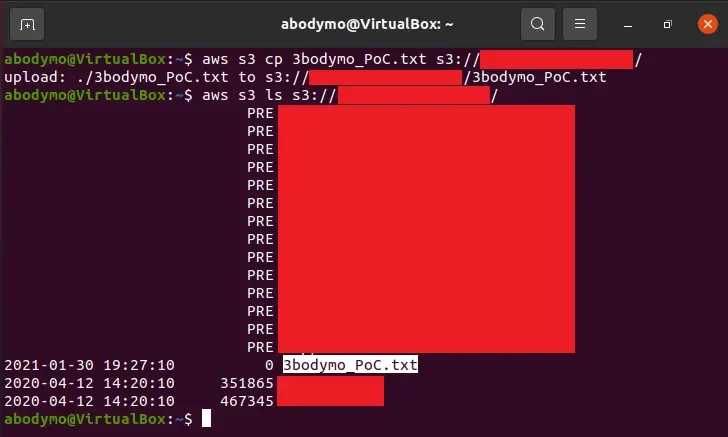
The screenshot shows the qa2-media.company bucket.
Step 4: check the production bucket
After reporting those two issues, I went back to the company's main website to see where its files were uploaded. As I expected, all site files were uploaded to a bucket called prod-media.company.
As usual I tried copy, move and delete, but I did not have permission. I found almost the same files as in the first bucket, so I decided to go to the invoices directory again. The big surprise came when I counted the PDF files with the wc -l command: the number was 314,642, and the directory was public.

The screenshot shows the number of exposed invoices.
My conclusion was that the first bucket I found had contained customer data, but only for a temporary period, until this bucket was created and the data became stored in it.
Step 5: brute force with a real subdomain wordlist
After finding the three previous buckets I understood how the company chooses its bucket names, so I downloaded a subdomains wordlist and ran ffuf again with the following command:
ffuf -u https://FUZZ-media.company.s3.amazonaws.com/ -w wordlist.txt
The result was two more buckets: the first called preprod-media.company and the other dev-media.company. The first bucket contained no important files and I had no permissions on it, so I did not report it. On the second bucket I had all the permissions, so I reported it.

The screenshot shows the dev-media.company bucket.
Step 6: subdomain takeover
I also want to mention how I found a subdomain takeover in this company using brute force, but not random brute force. After the stage of collecting subdomains by common methods, such as using amass, I found subdomains like these:
- qa-api.company.com
- prod-api.company.com
- api.company.com
- media.company.com
So I used dnscan to find subdomains by brute force with the following command:
python3 dnscan.py -d %%-media.company.com -w wordlist.txt -n
There were many results, and going through all of them I found the subdomain qa-media.company.com, which showed me this error.
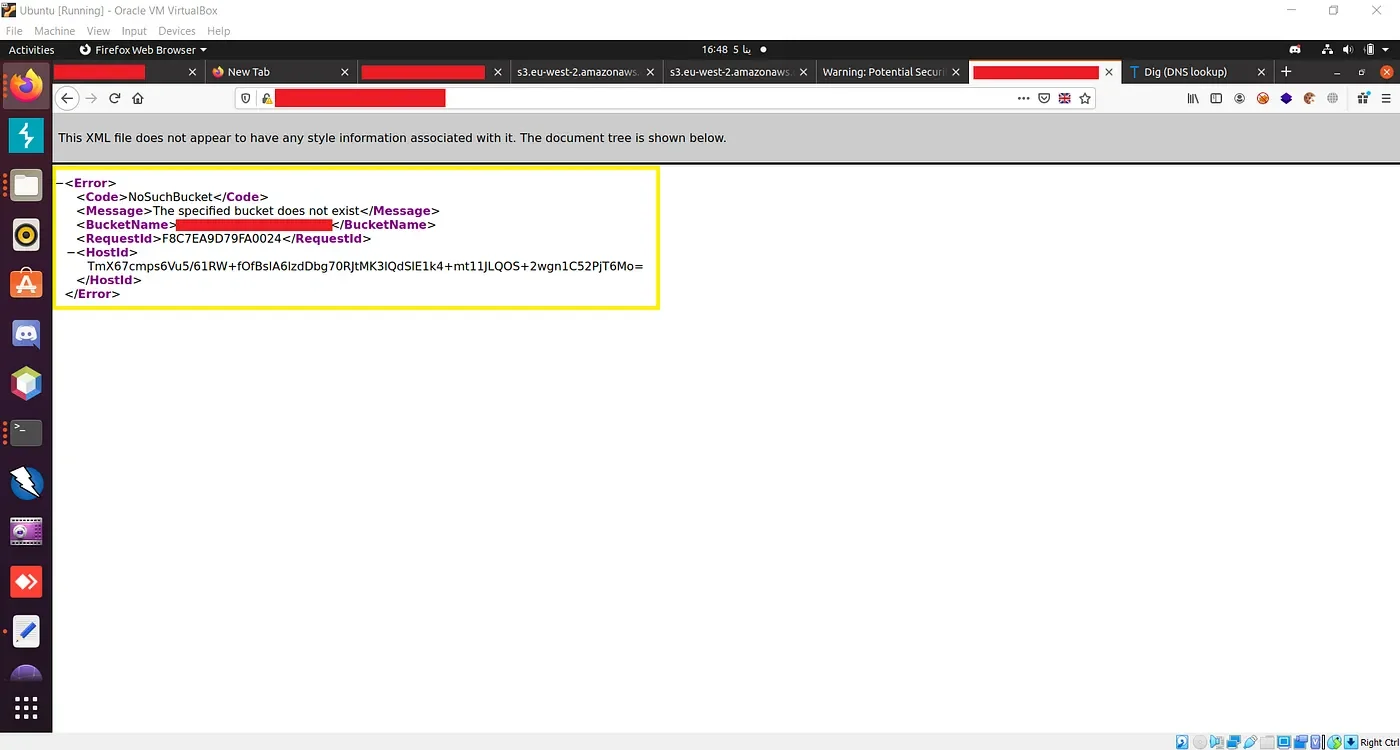
The screenshot shows the subdomain before I took it over.
It looked like a subdomain takeover. I quickly opened my AWS account to register the bucket, and when I went back to the subdomain I found that its status code had changed to AccessDenied. I had got it.
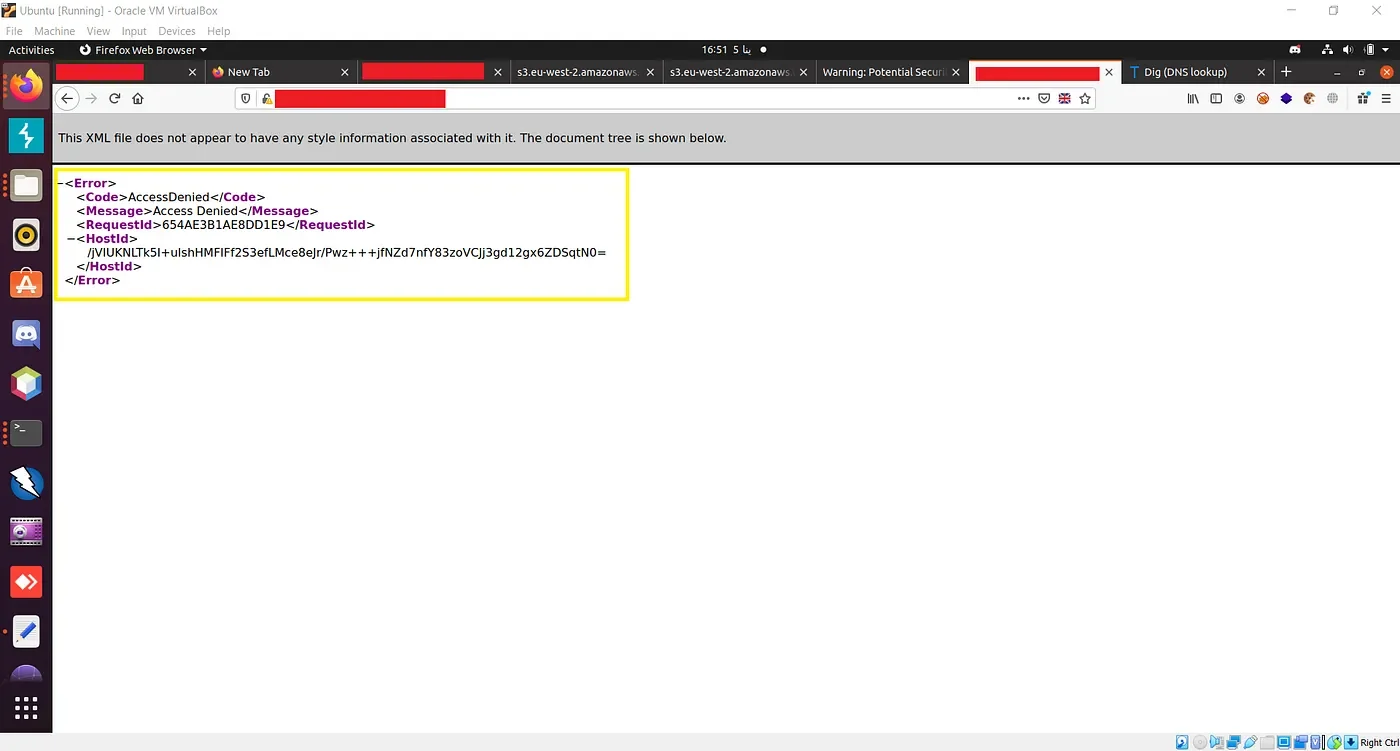
The screenshot shows the subdomain after I took it over.
A video tutorial accompanies the write-up.
Root cause
Two separate mistakes sit behind these findings.
On the bucket side, the bucket policies were inconsistent. Some buckets allowed anonymous listing of their contents, which exposed the object names and, through the invoices directory, the invoices themselves. Others granted all permissions to anonymous callers, which is far worse than listing. The company's own defence, a policy that returns AccessDenied for writes on the first and third buckets, was present on some buckets and absent on others, so the protection depended on whoever configured each bucket getting it right.
My conclusion was that the first bucket had held customer data for a temporary period, until prod-media.company was created and the data was stored there, where the invoices directory was public with 314,642 PDFs.
On the subdomain side, qa-media.company.com pointed at an S3 bucket that did not exist. Because S3 bucket names are global and first-come-first-served, anyone who registers the missing name controls what the subdomain serves. The subdomain pointed at an S3 bucket that did not exist.
Impact
For the listable buckets, an unauthenticated attacker could enumerate every object name in the bucket. Where an invoices directory was present, that meant downloading customer invoices containing names, phone numbers and home addresses, which is PII. The prod-media.company bucket exposed 314,642 such PDFs. For the buckets where I had all permissions, an attacker could have modified or deleted the stored assets.
For the subdomain takeover, an attacker who registers the missing bucket name controls the content served on qa-media.company.com, which can be used to host malicious content under the company's domain. The report does not describe any further exploitation beyond registering the bucket and observing the status code change.
Fix
For the buckets, the fix is to remove anonymous list and write permissions from every bucket that does not need them, and to keep the policy consistent across environments so that a bucket created later does not silently inherit a looser configuration. The report does not say what the company changed in response.
For the subdomain, the fix would be to remove or repoint the DNS record for qa-media.company.com so that it no longer references a bucket that does not exist, and to check the other subdomains found during reconnaissance for the same pattern.
Variants to test
- Number-suffixed bucket names. Take a bucket name you have already found and brute force numeric prefixes or suffixes, as with
qaFUZZ-media.company. A positive result is a new bucket that responds without AccessDenied. - Environment-prefixed bucket names. Once you know the naming convention, try
dev,preprod,prod,qaand similar prefixes against the same base name. A positive result is a bucket that lists or, worse, grants write permissions. - Permission checks on every bucket you find. Run the
ls,cp,mvandrmcommands against each one. A positive result is a successful upload, rename or delete, which turns a listing issue into a full write primitive. - Directory names that suggest sensitive data. Look for directories such as
invoices,backupsorexportsin the listing and fetch a sample object. A positive result is a200response containing PII. - Dangling subdomains pointing at S3. After collecting subdomains with
amassand brute forcing withdnscan, request each one and look for the S3 error page. A positive result is a subdomain whose status code changes to AccessDenied once you register the matching bucket name in your own AWS account.
What happened, in plain words
A security researcher was looking at a company's website and noticed something ordinary: the pictures and the little programs that make the site work (JavaScript files) were not stored on the company's own web servers. They were stored somewhere else, in an Amazon S3 bucket.
Think of an S3 bucket as a public storage locker rented from Amazon. Anyone can rent one, give it a name, and put files in it. The owner decides, through a set of rules called a bucket policy, who is allowed to look inside, who is allowed to add files, and who is allowed to delete them. If the rules are set correctly, a stranger who tries to look inside gets a polite refusal: an AccessDenied error. If the rules are set badly, the stranger can see the file names, or read the files, or even change them.
The researcher found several buckets belonging to the same company, and the rules were inconsistent. Some let anyone list the files inside. Two let him do anything at all. And inside some of them was a folder called invoices full of PDF invoices for real customers, containing names, phone numbers and home addresses. That kind of personal information is called PII (personally identifiable information).
Separately, the researcher found a company subdomain, qa-media.company.com, that was pointing at a bucket which did not exist. Because bucket names on Amazon are unique across the whole world and given out on a first-come-first-served basis, anyone who registers that missing name controls what the subdomain shows. That trick is called a subdomain takeover, and the researcher did exactly that: registered the name in his own Amazon account and watched the subdomain change.
This article walks through the same steps in the same order, explaining every tool and every command from scratch, for someone who has only ever used a browser.
The tools you need first
Before anything else, the researcher installed a program called awscli. The AWS CLI (Amazon Web Services Command Line Interface) is a text-based control panel for Amazon's cloud. Instead of clicking around a website, you type commands into a terminal window and Amazon answers. It is the difference between ordering food through an app and phoning the restaurant and reading out your order: same kitchen, different way of talking to it.
To use it, you also need an AWS account and credentials. Credentials are the username-and-password equivalent for programs: a pair of long codes that prove to Amazon who you are. The report links to Amazon's own installation guide and to a video tutorial for the configuration step, and says to do this before using any other tool.
If you would rather have a tool scan automatically instead of typing commands by hand, the report recommends one of these two:
- S3Scanner
- s3-buckets-finder
The report recommends either of them if you want an automatic scan instead of a manual one.
Later in the story the researcher also used three more tools:
- ffuf, which takes a web address containing a placeholder and tries every word from a list in that placeholder. It is like a door-to-door salesman with a list of names, knocking on every door in a street.
- dnscan, which does the same thing for subdomains: it tries many possible subdomain names against a domain to see which ones exist.
- amass, which gathers subdomains from public sources rather than by guessing.
A wordlist is simply a text file with one candidate per line. For the first brute-force run the researcher made one by hand, containing the numbers from 0 to 100. For a later run he downloaded a public list of common subdomain names.
Finding the first bucket
The researcher was browsing one of the company's subdomains, just as any visitor would, and noticed where the images and JavaScript files came from: an S3 bucket. He calls the first bucket he found qa-media.company and checked it with awscli.
To his surprise, he was not given an AccessDenied message. He could list the files. That means the bucket policy allowed anonymous listing: anyone on the internet, with no account and no password, could ask Amazon "what is in this bucket?" and get an answer.
He then checked the bucket manually with awscli, trying to copy, move and delete files. None of those worked. The bucket seemed to be set correctly on the writing side: he could look, but not touch. So the bucket was listable but not writable.
Why does that matter? Listing an S3 bucket is treated as a vulnerability by some companies and paid for, but it is not a high or critical issue, and the company he was working with accepts only high and critical vulnerabilities. He could not report it on its own, so he had no choice but to look for sensitive files inside the bucket. That is the reason for the next section: a listing is only a starting point, and the real question is what the listing reveals.
Step 1: confirm what the bucket allows
He checked the bucket manually with awscli using the following commands.
List all directories of the bucket:
aws s3 ls s3://qa-media.company/
Line by line: aws is the program, s3 says which Amazon service you are talking to (the storage service), ls means list, and s3://qa-media.company/ is the address of the bucket. The s3:// part is like https:// but for storage. If the bucket policy allows anonymous listing, this prints the folder and file names inside. If it does not, it prints an AccessDenied error.
Upload a file from my computer to the bucket:
aws s3 cp fileName.txt s3://qa-media.company/
cp means copy. Here it copies a file called fileName.txt from the local computer into the bucket. If this succeeds, a stranger can add files to the bucket, which is much worse than being able to read them.
Move a file into the images directory:
aws s3 mv s3://qa-media.company/files/fileName.txt s3://qa-media.company/images/
mv means move. This takes a file from the files folder inside the bucket and puts it in the images folder. If it works, a stranger can rearrange the bucket's contents.
Rename a file to PoC.txt:
aws s3 mv s3://qa-media.company/fileName.txt s3://qa-media.company/PoC.txt
Same command, different destination: the file keeps its place but gets a new name. PoC stands for proof of concept, a small harmless change that proves the problem is real without damaging anything.
Delete a file:
aws s3 rm s3://qa-media.company/fileName.txt
rm means remove. If this works, a stranger can destroy the company's files.
The ls command returned the directory listing, which confirmed the bucket was publicly listable. The copy, move and delete commands did not succeed, which told him the write side of the policy was set correctly.
Step 2: find sensitive data in the listing
He walked through the files to see whether anything interesting was worth reporting. He found a directory called invoices, and when he browsed it he found some PDF files. He copied one of the PDFs and opened it through the browser to see the content. The response was 200, and as he expected the file contained an invoice for a customer with his name, number and home address. That is PII data, and worth reporting.
A 200 response is the standard web code for "here is the page you asked for". In this context it means the invoice was served to him without any login, exactly as if it were a public web page.
The screenshot shows the number of exposed invoices in the bucket.
Step 3: brute force sibling bucket names
Next he wanted to find more buckets belonging to the company. Companies tend to name buckets in patterns, and once you know one name you can guess its neighbours. He created a wordlist.txt file containing numbers from 0 to 100 and ran ffuf with the following command:
ffuf -u https://qaFUZZ-media.company.s3.amazonaws.com/ -w wordlist.txt
Line by line: ffuf is the tool. -u gives the address to test, and the word FUZZ inside it is a placeholder. -w wordlist.txt says which list of words to try in that placeholder. For every line in the file, ffuf replaces FUZZ with that line and sends a request. So each request goes to a different bucket name, with FUZZ replaced by the next line of the wordlist. The s3.amazonaws.com part is Amazon's standard address for buckets, and the bucket name sits in front of it.
Surprisingly, there was another bucket called qa2-media.company. When he checked it he found no important files, but he found that he had all the permissions on it, so he reported it. "All the permissions" means the bucket policy let an anonymous stranger list, read, write and delete: the whole set, not just the viewing part.
The screenshot shows the qa2-media.company bucket.
Step 4: check the production bucket
After reporting those two issues, he went back to the company's main website to see where its files were uploaded. As he expected, all site files were uploaded to a bucket called prod-media.company. The prefix prod is short for production, the live version of a site that real customers use, as opposed to qa (quality assurance, the testing version).
As usual he tried copy, move and delete, but he did not have permission. He found almost the same files as in the first bucket, so he decided to go to the invoices directory again. The big surprise came when he counted the PDF files with the wc -l command: the number was 314,642, and the directory was public.
wc -l is a small Unix program that counts lines. wc stands for word count, and -l tells it to count lines only. If you feed it a list of file names, one per line, it tells you how many there are. That is how the figure of 314,642 was obtained: by counting the lines of the file listing.
The screenshot shows the number of exposed invoices.
His conclusion was that the first bucket he found had contained customer data, but only for a temporary period, until this bucket was created and the data became stored in it. In other words, the invoices had moved from one bucket to another, and the new home was just as public as the old one.
Step 5: brute force with a real subdomain wordlist
After finding the three previous buckets he understood how the company chooses its bucket names, so he downloaded a subdomains wordlist and ran ffuf again with the following command:
ffuf -u https://FUZZ-media.company.s3.amazonaws.com/ -w wordlist.txt
This is the same command as before, but the placeholder now sits at the very start of the name instead of after qa. So instead of trying numbers after qa, it tries every word from the downloaded list in front of -media.company, such as dev-media.company and preprod-media.company. The logic is the same; only the guessing pattern changed, because the researcher had learned the company's naming habits.
The result was two more buckets: the first called preprod-media.company and the other dev-media.company. The first bucket contained no important files and he had no permissions on it, so he did not report it. On the second bucket he had all the permissions, so he reported it. preprod means pre-production, the stage just before the live site, and dev means development, where programmers build things.
The screenshot shows the dev-media.company bucket.
Step 6: subdomain takeover
He also wants to mention how he found a subdomain takeover in this company using brute force, but not random brute force. A subdomain is a name that sits in front of a domain: in mail.example.com, mail is the subdomain and example.com is the domain. Companies often have many of them: one for the shop, one for support, one for testing.
After the stage of collecting subdomains by common methods, such as using amass, he found subdomains like these:
- qa-api.company.com
- prod-api.company.com
- api.company.com
- media.company.com
These names reveal a pattern: environment prefixes (qa, prod) in front of a service name (api, media). So he used dnscan to find subdomains by brute force with the following command:
python3 dnscan.py -d %%-media.company.com -w wordlist.txt -n
Line by line: python3 runs a Python program, and dnscan.py is that program. -d gives the domain pattern to test, where %% is the placeholder that gets replaced by each word from the list. -w wordlist.txt is the list of candidate words. -n tells dnscan to look up the names in the DNS, the internet's address book that translates names like qa-media.company.com into the servers behind them. So for each word in the list, dnscan asks the DNS "does word-media.company.com exist, and where does it point?".
There were many results, and going through all of them he found the subdomain qa-media.company.com, which showed him this error.
The screenshot shows the subdomain before he took it over.
The error page was the giveaway. It looked like a subdomain takeover. A subdomain takeover happens when a subdomain points at something that no longer exists, and that something can be claimed by anyone. Here the subdomain pointed at an S3 bucket that had been deleted or never created. Because S3 bucket names are unique worldwide and handed out first come, first served, whoever registers the missing name gets to decide what the subdomain shows. It is like a forwarding address on a letter: if the flat is empty and the landlord will rent it to anyone, the next tenant receives the mail.
He quickly opened his AWS account to register the bucket, and when he went back to the subdomain he found that its status code had changed to AccessDenied. He had got it. The status code changed to AccessDenied after he registered the bucket in his own AWS account.
The screenshot shows the subdomain after he took it over.
A video tutorial accompanies the write-up.
Why it worked
Two separate mistakes sit behind these findings.
On the bucket side, the bucket policies were inconsistent. Some buckets allowed anonymous listing of their contents, which exposed the object names and, through the invoices directory, the invoices themselves. Others granted all permissions to anonymous callers, which is far worse than listing. The company's own defence, a policy that returns AccessDenied for writes on the first and third buckets, was present on some buckets and absent on others, so the protection depended on whoever configured each bucket getting it right.
His conclusion was that the first bucket had held customer data for a temporary period, until prod-media.company was created and the data was stored there, where the invoices directory was public with 314,642 PDFs.
On the subdomain side, qa-media.company.com pointed at an S3 bucket that did not exist. Because S3 bucket names are global and first-come-first-served, anyone who registers the missing name controls what the subdomain serves. The subdomain pointed at an S3 bucket that did not exist.
What an attacker could have done
For the listable buckets, an unauthenticated attacker could enumerate every object name in the bucket. Where an invoices directory was present, that meant downloading customer invoices containing names, phone numbers and home addresses, which is PII. The prod-media.company bucket exposed 314,642 such PDFs. For the buckets where he had all permissions, an attacker could have modified or deleted the stored assets.
For the subdomain takeover, an attacker who registers the missing bucket name controls the content served on qa-media.company.com, which can be used to host malicious content under the company's domain. The report does not describe any further exploitation beyond registering the bucket and observing the status code change.
How to fix it
For the buckets, the fix is to remove anonymous list and write permissions from every bucket that does not need them, and to keep the policy consistent across environments so that a bucket created later does not silently inherit a looser configuration. The report does not say what the company changed in response.
For the subdomain, the fix would be to remove or repoint the DNS record for qa-media.company.com so that it no longer references a bucket that does not exist, and to check the other subdomains found during reconnaissance for the same pattern.
Things to try yourself
- Number-suffixed bucket names. Take a bucket name you have already found and brute force numeric prefixes or suffixes, as with
qaFUZZ-media.company. A positive result is a new bucket that responds without AccessDenied. - Environment-prefixed bucket names. Once you know the naming convention, try
dev,preprod,prod,qaand similar prefixes against the same base name. A positive result is a bucket that lists or, worse, grants write permissions. - Permission checks on every bucket you find. Run the
ls,cp,mvandrmcommands against each one. A positive result is a successful upload, rename or delete, which turns a listing issue into a full write primitive. - Directory names that suggest sensitive data. Look for directories such as
invoices,backupsorexportsin the listing and fetch a sample object. A positive result is a200response containing PII. - Dangling subdomains pointing at S3. After collecting subdomains with
amassand brute forcing withdnscan, request each one and look for the S3 error page. A positive result is a subdomain whose status code changes to AccessDenied once you register the matching bucket name in your own AWS account.
Lessons learned
- Amazon S3 buckets may contain a lot of misconfiguration, so do not ignore them.
- Always check where the images and JavaScript files are uploaded. The company may be using an Amazon S3 bucket.
- Understand how the subdomains or buckets are named so that you can use brute force in an orderly manner. That will give you more subdomains or more buckets to check.
Glossary
- AccessDenied: the error Amazon returns when a request is not allowed by the bucket policy. Seeing it is usually good news for the owner.
- amass: a tool that collects subdomains from public sources rather than by guessing.
- API: an interface that lets one program talk to another. The
apisubdomains in the report are the addresses where the company's programs talk to its servers. - AWS: Amazon Web Services, Amazon's cloud platform, where S3 buckets live.
- AWS CLI (
awscli): a program that lets you control Amazon's services by typing commands instead of clicking on a website. - Bucket policy: the set of rules attached to an S3 bucket that decides who may list, read, write or delete its contents.
- Brute force: trying many candidates from a list, one after another, until one works.
- Credentials: the codes that prove to a service who you are, the program equivalent of a username and password.
- DNS: the internet's address book, which translates names like
qa-media.company.cominto the servers behind them. - dnscan: a tool that brute forces subdomain names against a domain and looks them up in DNS.
- ffuf: a tool that sends a request for every word in a list, replacing a placeholder such as
FUZZin the address. - JavaScript: the programming language that runs small programs inside web pages, usually delivered as
.jsfiles. - PII (personally identifiable information): data that identifies a real person, such as a name, phone number or home address.
- PoC (proof of concept): a small, harmless demonstration that a vulnerability is real.
- preprod / prod / qa / dev: common environment prefixes.
prodis the live site,preprodthe stage just before it,qatesting,devdevelopment. - S3 bucket: a storage locker rented from Amazon that holds files and serves them over the web.
- S3Scanner / s3-buckets-finder: tools that check a list of bucket names automatically and report what a stranger can do with each.
- Status code: the three-digit number a web server sends with every response.
200means success, and AccessDenied is an error response. - Subdomain: a name in front of a domain, as
qais inqa-media.company.com. - Subdomain takeover: claiming a subdomain that points at a resource nobody owns any more, such as a deleted S3 bucket, and thereby controlling what it serves.
wc -l: a Unix command that counts the lines in its input, used here to count how many PDF files were listed.- Wordlist: a text file with one candidate per line, used as input for brute-force tools.