Hacking HackerOne: How computer vision helped uncover hidden vulnerabilities?
Disclosed HackerOne report videos sometimes showed undisclosed report titles in the sidebar, leaking private report information. An attacker could use computer vision to scan all disclosed videos and identify these leaked titles.
 Published on 3bodymo.medium.com
Hello everyone! Today, I would like to share my experience using artificial intelligence to scan all the disclosed videos on HackerOne.
The full write-up lives on its author's site
It belongs to its author, so we link to it rather than copy it. The other two tabs are our own rewrites, checked against it.
Context
HackerOne is a bug bounty platform. Each report on the platform has a page under https://hackerone.com/reports/<number>, and researchers can attach proof-of-concept material, including screen recordings, to those reports. When a report is disclosed, its page and its attachments become public.
The feature at the centre of this story is the disclosed report page and its video attachments. In the example report, the researcher's dashboard listed reports that were still undisclosed. If such a recording is attached to a report that later gets disclosed, the video can expose the titles of reports that were never meant to be public. HackerOne was accepting reports about exactly this: undisclosed reports visible in the videos of disclosed reports.

Setup
The work was done by Abdullah Mohamed (@3bodymo_). The tooling was a Python environment with requests, labelImg for annotation, a YOLOv7 object detection model, and ffmpeg for video conversion. Two HackerOne accounts were used for collecting screenshots: the researcher's own account and a friend's account. A public GitHub repository, reddelexc/hackerone-reports, supplied a CSV of disclosed report numbers and a script to keep it updated.
The exercise assumes disclosed reports exist with video attachments that may show undisclosed reports.
Finding it
The starting example is disclosed report #1294767. Its page contains a recorded video that the bug hunter made as a PoC. In that video, undisclosed reports are visible on the left side of the frame.
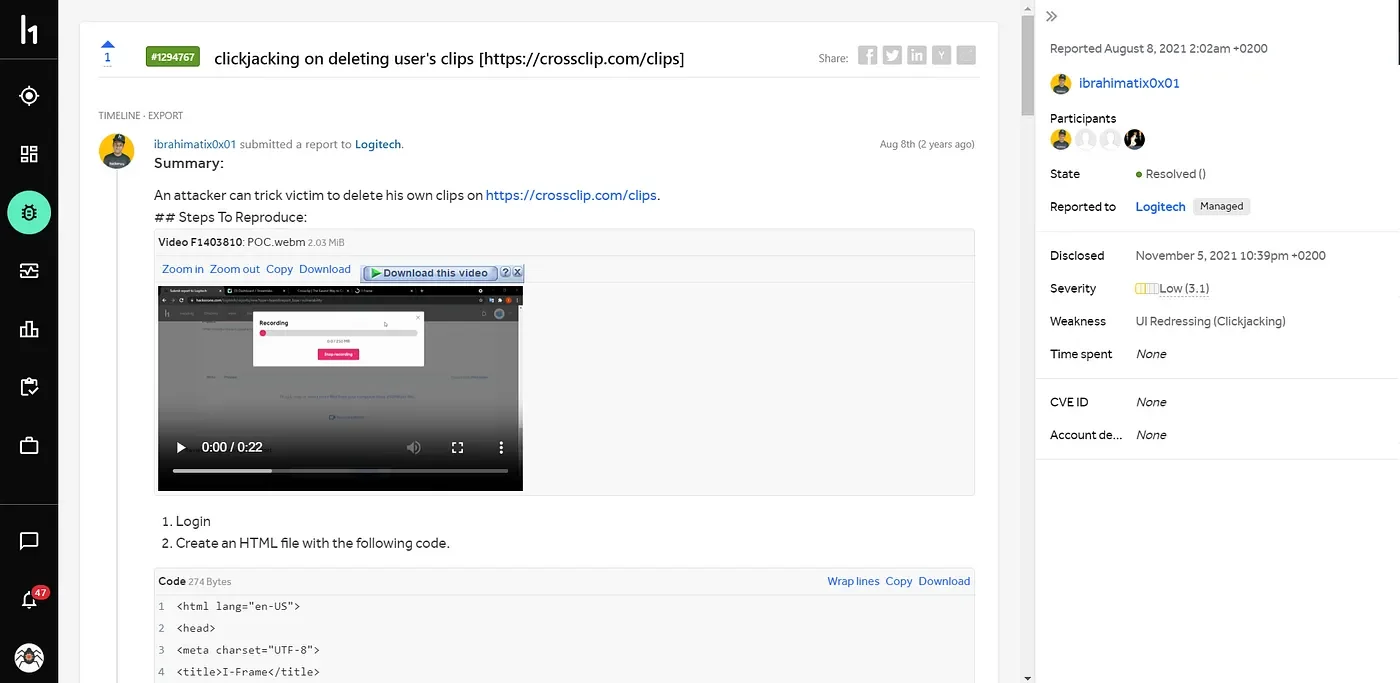
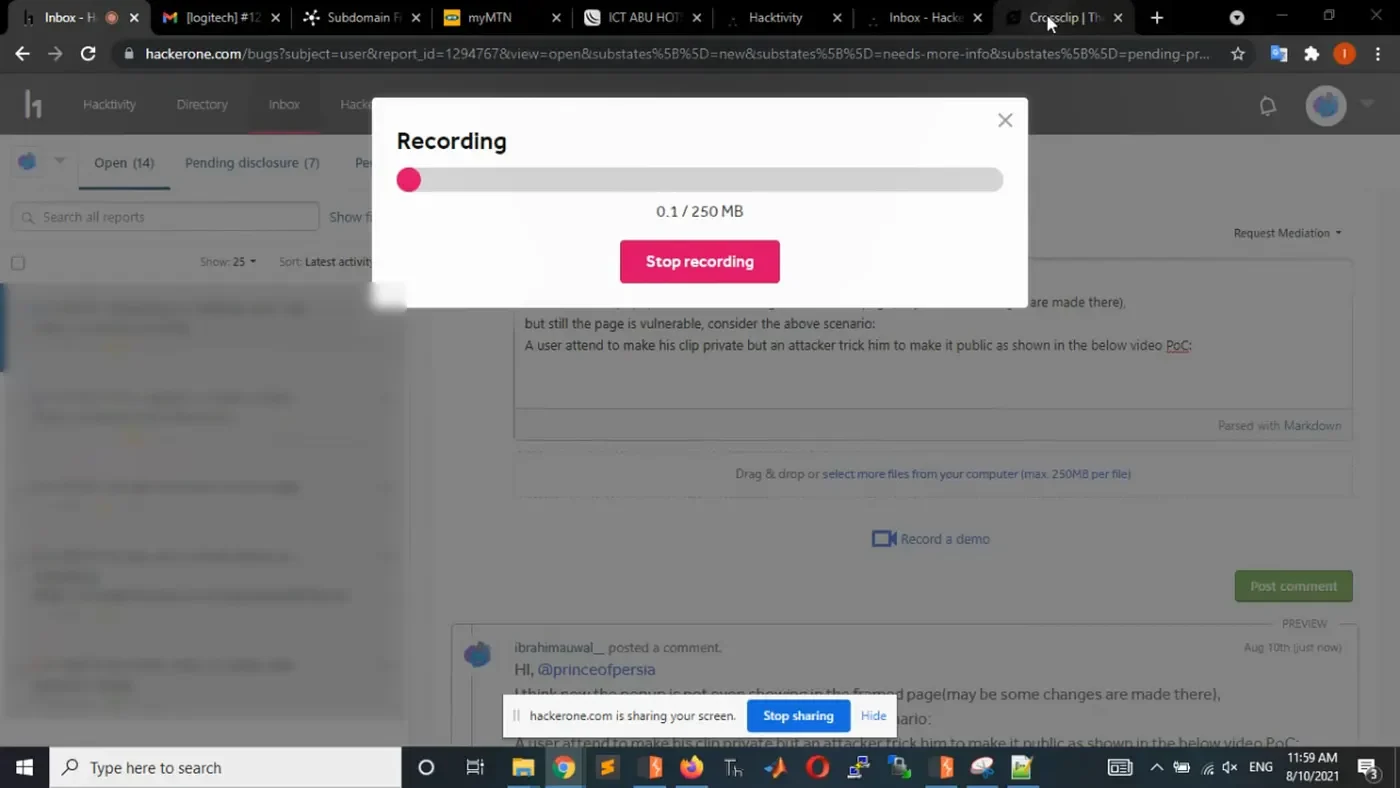
Doing this by hand, opening every video in every disclosed report, would take weeks. The researcher's idea was to automate the scan with computer vision, so the first design question was how to train the model.
Exploitation
Step 1: choose an object detection model over image classification
An image classification model would take a video frame as input and classify it as containing undisclosed reports or not. The researcher rejected this because collecting enough of the "NOT" class, frames without undisclosed reports, is difficult, and that scarcity would hinder training and hurt performance.
An object detection model instead analyses a frame and localises specific objects it has been trained on, rather than classifying the frame as a whole. That is the approach that was chosen.
Step 2: build the dataset
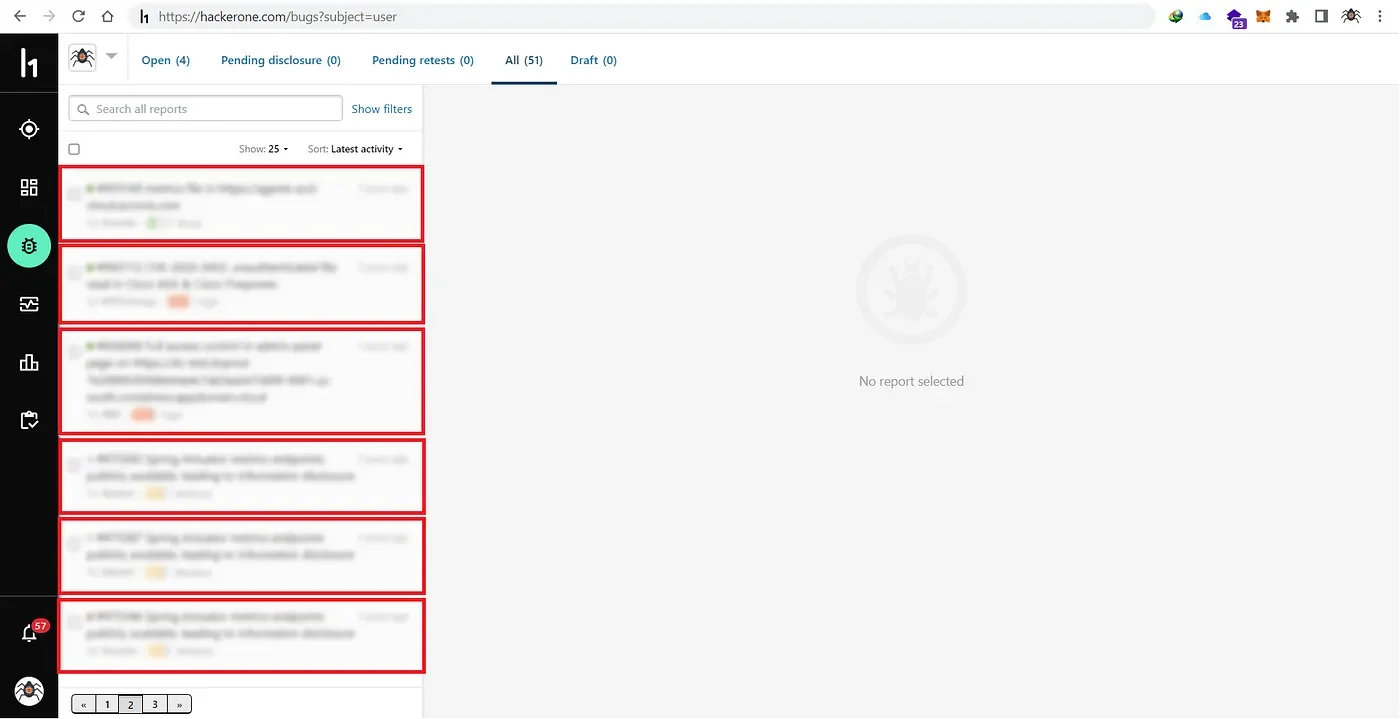
The researcher collected 250 screenshots, taken from the two HackerOne accounts. The region of interest is marked with a red rectangle in the screenshots and chosen as the object to detect. The model is trained to detect that region.
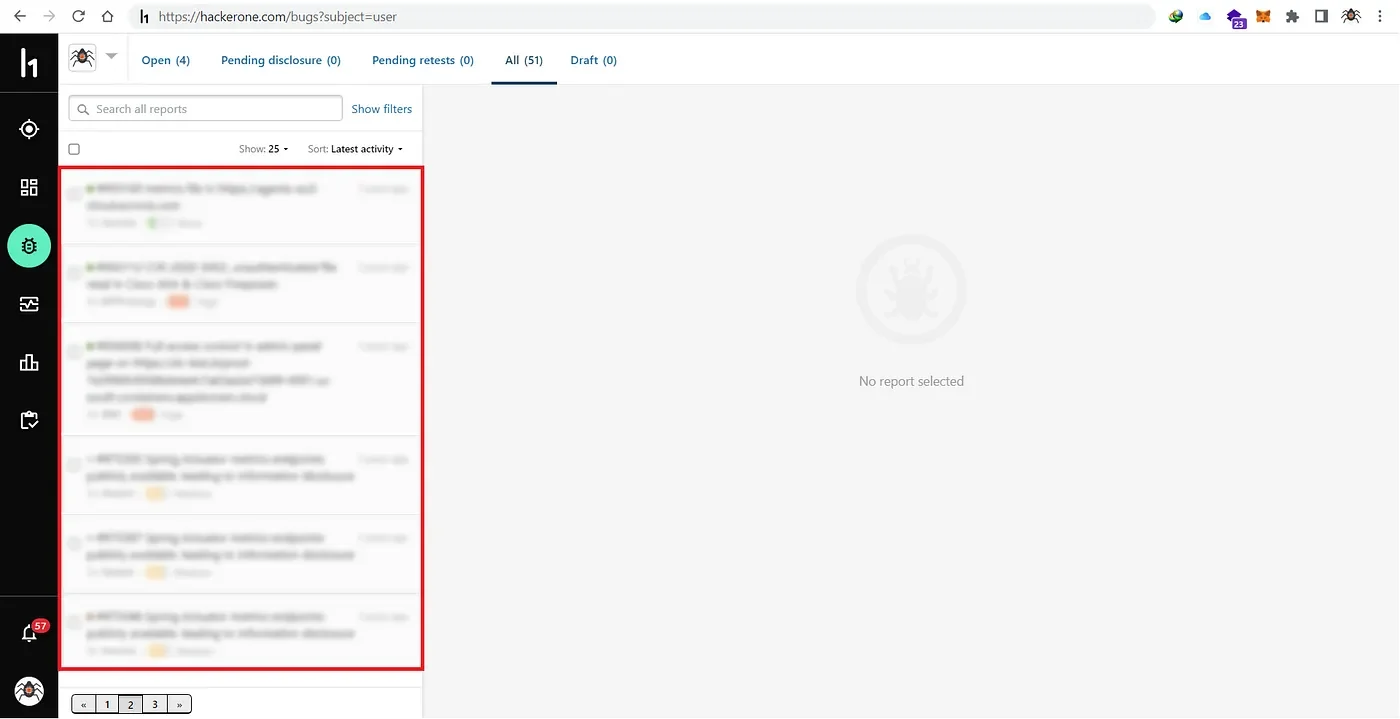
Because every screenshot is taken the same way and the screen does not change, the annotation box coordinates are identical in all images. So only one image was labelled in labelImg, a Python tool for annotating objects, and a small script copied that annotation to every image:
import osimage_folder_path = './images'text_folder_path = './train/labels'image_file_list = os.listdir(image_folder_path)coordinates = "0 0.170047 0.550314 0.254717 0.798742"for image_file_name in image_file_list: file_basename = os.path.splitext(image_file_name)[0] text_file_name = file_basename + '.txt' text_file_path = os.path.join(text_folder_path, text_file_name) with open(text_file_path, 'w') as text_file: text_file.write(coordinates)
The bounding box is five values, [object-class, x_center, y_center, width, height]. object-class is the integer class label of the object in the box. x_center and y_center are the normalised coordinates of the box centre: the pixel value of x divided by the image width, and the pixel value of y divided by the image height. width and height are the normalised size of the box. labelImg writes one text file per image holding the box coordinates, so the script puts the coordinate string in a variable, reads each image name, and writes a text file named after the image containing those coordinates.
Step 3: train YOLOv7 and observe false positives
The model was trained with an object detection algorithm based on YOLO principles, specifically YOLOv7. YOLOv7 is a real-time object detector developed by the Academia Sinica AI Lab in Taiwan, the seventh version of You Only Look Once, and a single-stage detector: it detects objects in a single pass through an image, which makes it much faster than two-stage detectors such as Faster R-CNN, and it has been shown to outperform other detectors on a variety of datasets.
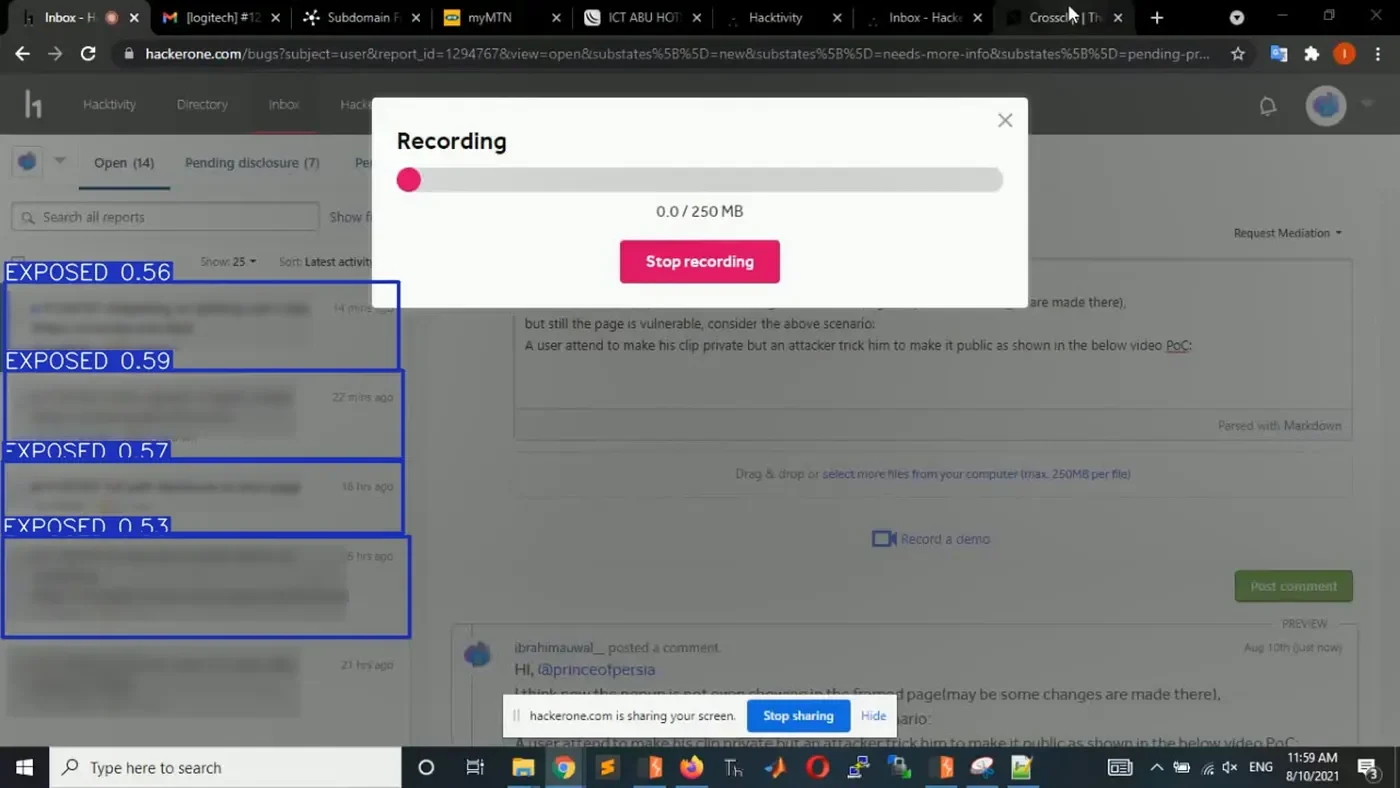
The model performed well in training and testing, but it produced many false positives on other videos that do not contain disclosed reports, and it did not perform well at detecting vulnerable videos.
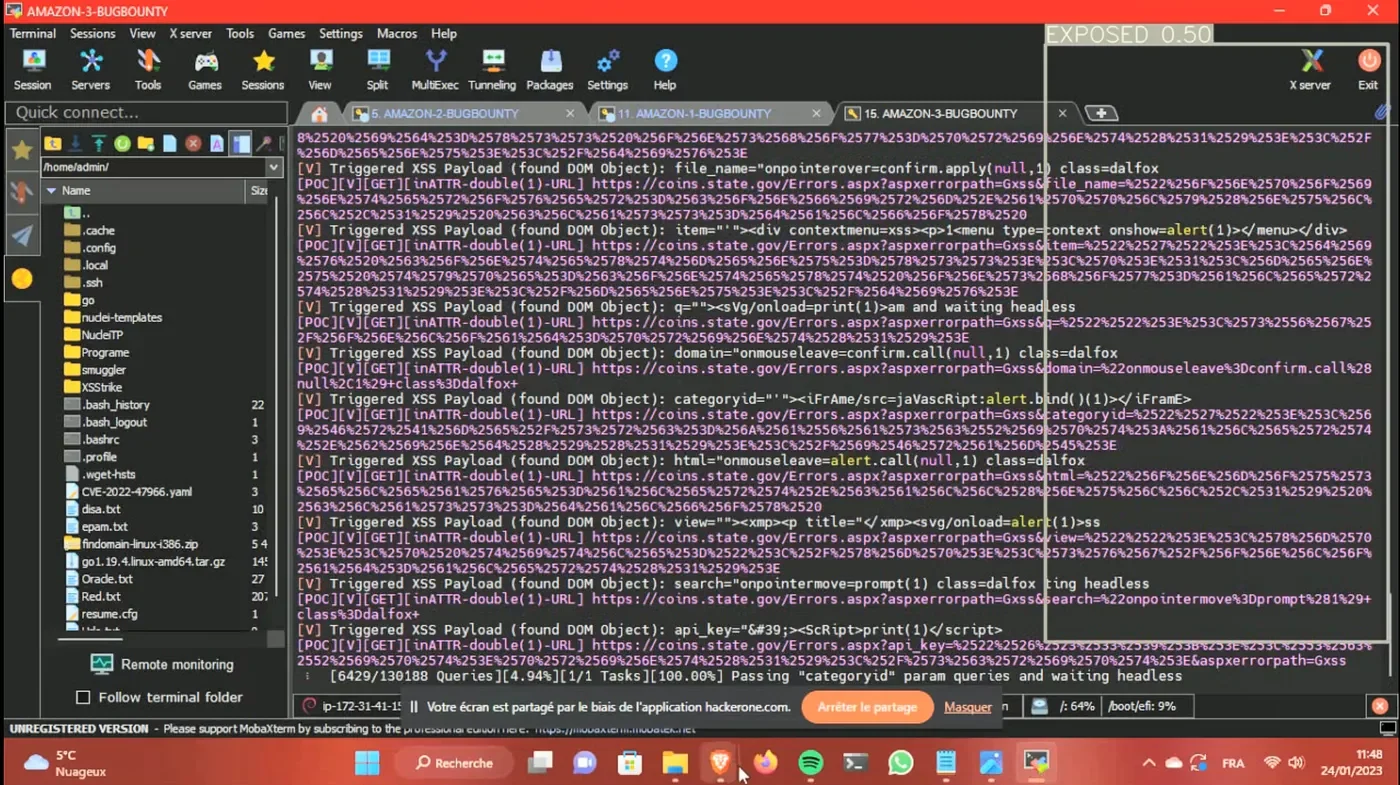
In the example above, the model treats that part of the frame as an exposed report with high confidence. The annotation scheme had to change.
Step 4: re-annotate with per-object boxes
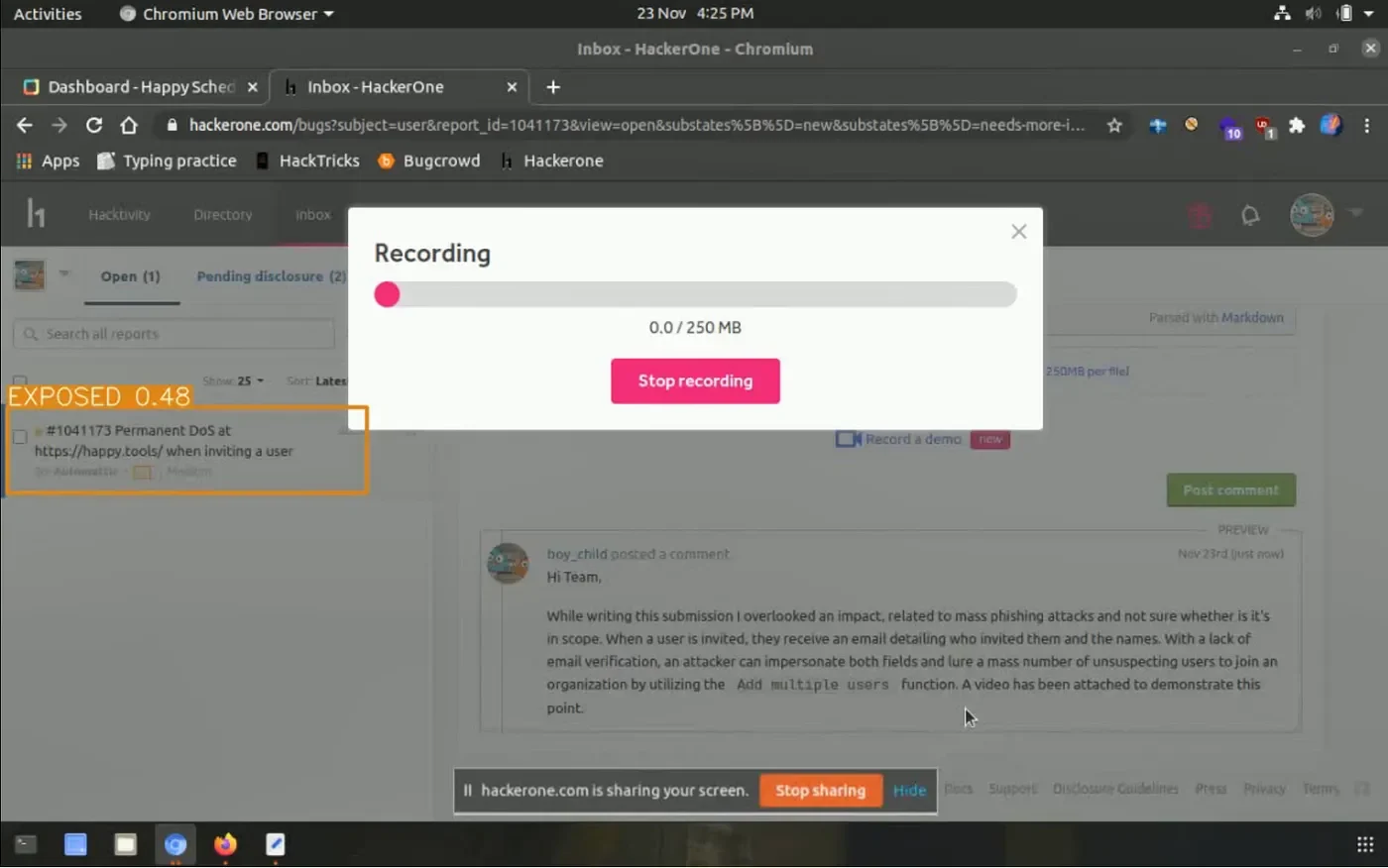
The annotation was changed so that boxes have different sizes and locations. This has to be done manually, because every box has a different size and a different location.
After retraining, false positive detection was lower and the model detected better.
Step 5: find a machine-readable report format
The next problem was downloading every video from every disclosed report. The researcher looked for a JSON representation of a report. The export feature on the report page offers pdf, zip and raw text, not JSON, so pdf was chosen first, and the resulting URL simply appends .pdf to the report number:
https://hackerone.com/reports/1294767.pdf
Changing .pdf to .json returned the report in JSON format.
Step 6: collect disclosed report numbers
The public repository mentioned above was used to obtain the list of disclosed report numbers, along with its script for updated reports. A first script extracts the numbers from the repository's CSV and writes them to a text file:
import csvcsv_file = 'data.csv' # The csv file in the repooutput_file = 'report_numbers.txt'with open(csv_file, 'r') as file: reader = csv.reader(file) next(reader) numbers = [row[2].split('/')[-1] for row in reader if int(row[2].split('/')[-1])]numbers.sort(reverse=True)with open(output_file, 'w') as file: file.write('\n'.join(numbers))
It skips the header row, takes the third column, splits on / and keeps the last segment as the report number, sorts the numbers in descending order, and writes one per line.
Step 7: download the videos
A second script fetches each report's JSON and downloads its video attachments:
import requestsimport jsonimport osif not os.path.exists('videos'): os.makedirs('videos')with open('report_numbers.txt', 'r') as file: report_numbers = file.readlines()i = 0for report_number in report_numbers: i = i + 1 report_number = report_number.strip() endpoint = f"https://hackerone.com/reports/{report_number}.json" response = requests.get(endpoint) print(f"{i}/{len(report_numbers)}") if response.status_code == 404: continue if response.status_code == 200: data = response.json() if 'attachments' in data: attachments = data['attachments'] for attachment in attachments: if 'video' in attachment['type']: file_name_temp = attachment['file_name'] file_name = file_name_temp.split('.')[0] file_ext = file_name_temp.split('.')[-1] new_file_name = f"{report_number}__{file_name}.{file_ext}" video_url = attachment['expiring_url'] video_response = requests.get(video_url) if video_response.status_code == 200: print("Video has been downloaded!") video_path = os.path.join('videos', new_file_name) with open(video_path, 'wb') as video_file: video_file.write(video_response.content) if 'activities' in data: activities = data['activities'] for activity in activities: if 'attachments' in activity: attachments = activity['attachments'] for attachment in attachments: if 'video' in attachment['type']: file_name_temp = attachment['filename'] file_name = file_name_temp.split('.')[0] file_ext = file_name_temp.split('.')[-1] new_file_name = f"{report_number}__{file_name}.{file_ext}" video_url = attachment['url'] video_response = requests.get(video_url) if video_response.status_code == 200: print("Video has been downloaded!") video_path = os.path.join('videos', new_file_name) with open(video_path, 'wb') as video_file: video_file.write(video_response.content)
There are two kinds of video. A video uploaded while writing the report appears in data['attachments']['expiring_url']. A video uploaded in a comment appears in data['activities']['attachments']['url']. data is the whole JSON response. Each downloaded file is renamed to {report number}__{original video name}.{video extension} so it stays linked to its report. A 404 response is skipped.
Step 8: reduce frame rate and convert formats
Scanning every frame of every video would take too long. The researcher reduced each video to three frames per second, judged enough to detect whether an undisclosed report appears. Assuming an average of 30 frames per second, that saves about ten times the processing time.
YOLOv7 cannot handle webm videos, so those are converted to mp4 with ffmpeg. One script does both jobs:
import osimport subprocessfolder_path = "./videos"def reduce_frames(input_file, output_file): subprocess.call(['ffmpeg', '-i', input_file, '-r', '3', output_file])def convert_folder_videos(folder_path): i = 0 total = len(os.listdir(folder_path)) for filename in os.listdir(folder_path): i = i + 1 print(f"{i}/{total}") if filename.endswith(".webm"): try: input_file = os.path.join(folder_path, filename) output_file = os.path.join(folder_path, os.path.splitext(filename)[0] + ".mp4") reduce_frames(input_file, output_file) print(f"Converted {input_file} to {output_file}") os.remove(input_file) except: continue else: try: input_file = os.path.join(folder_path, filename) output_file = os.path.join(folder_path, os.path.splitext(filename)[0] + "__reduced" + os.path.splitext(filename)[-1]) reduce_frames(input_file, output_file) print(f"Converted {input_file} to {output_file}") os.remove(input_file) except: continueconvert_folder_videos(folder_path)
For webm files the output is an mp4 with the same base name and the original is removed. For other files the output gets a __reduced suffix and the original is removed.
Step 9: run detection
The model is run over the downloaded videos with the YOLOv7 detection script:
python detect.py --weights best.pt --conf 0.50 --img-size 640 --source ./video-scan/videos/ --name new-scan
This uses the trained weights best.pt, a confidence threshold of 0.50, an image size of 640, the video folder as source, and writes results under the name new-scan. The model saves the videos in which it detected objects, meaning candidate undisclosed reports. Because false positives remain, those videos have to be watched manually to confirm whether they really contain undisclosed reports.
Step 10: review and report
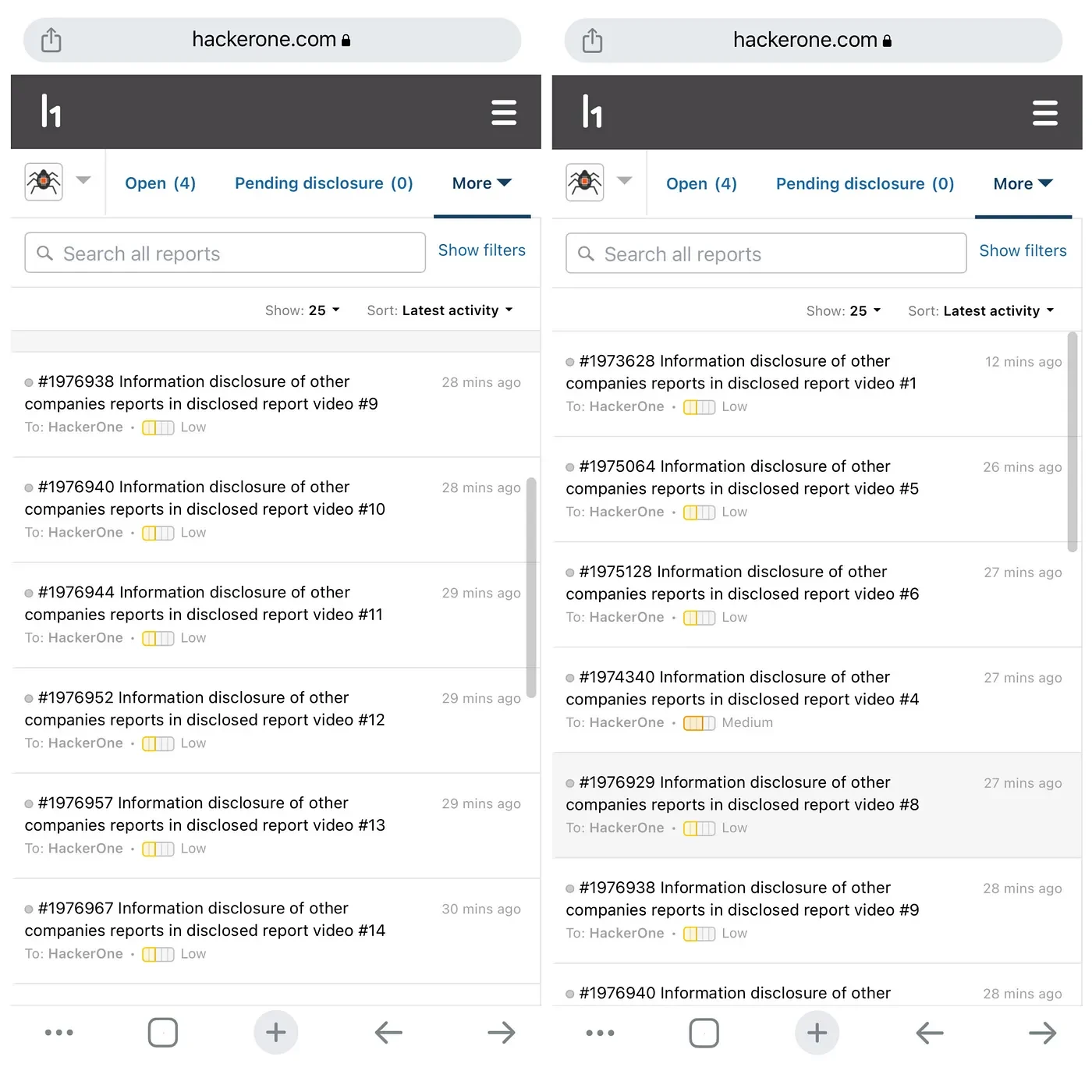
The model detected tens of videos. Some of them did not contain undisclosed reports at all: the only report shown was the disclosed report the video was downloaded from. One such example is shown below.
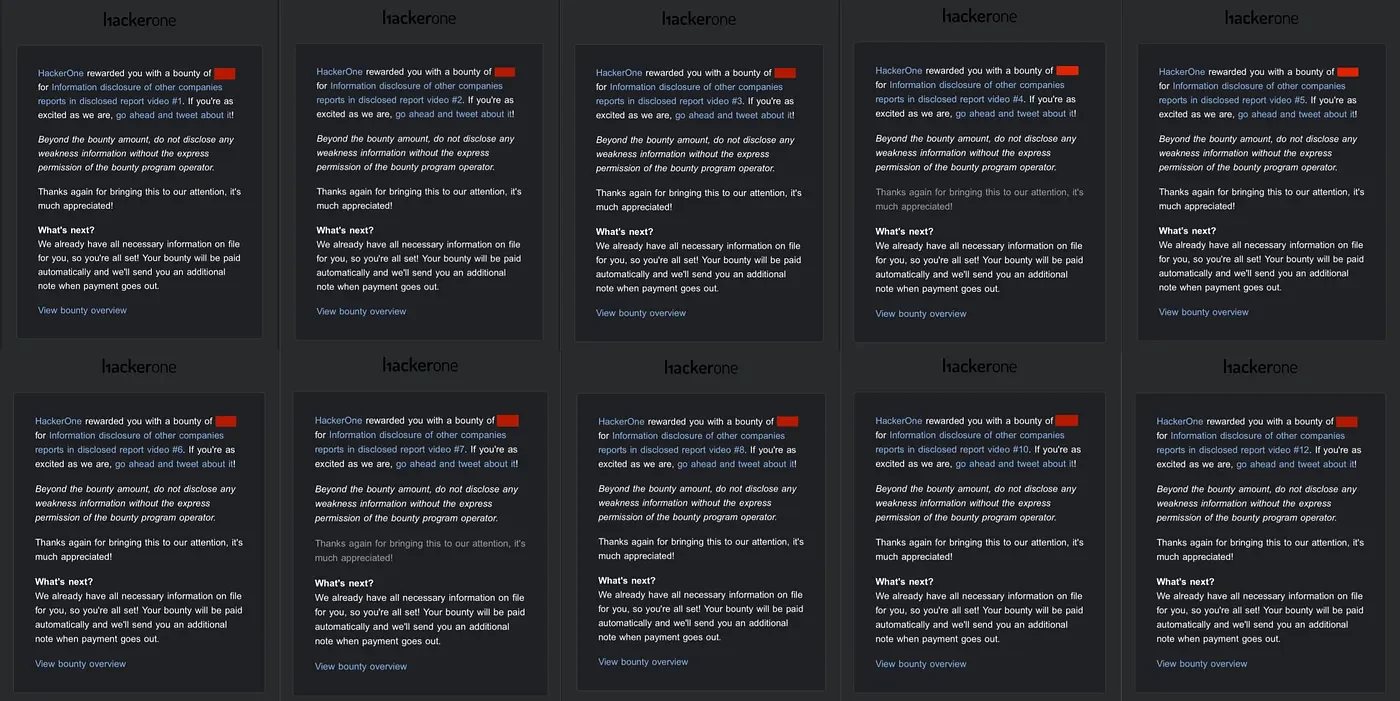
The researcher submitted nearly 15 reports to HackerOne. HackerOne decided not to pay for them, declared this type of report out of scope, and closed all of them as informative. They also said they had mistakenly paid for previous reports with a similar concept.
The case was escalated to Jobert Abma, co-founder of HackerOne, and HackerOne decided to pay for all the reports.
Root cause
The exposure comes from the content of PoC videos, not from an injection flaw. A researcher records a PoC with the HackerOne dashboard visible, and the dashboard lists report titles, including undisclosed ones. The video is attached to a report that is later disclosed, so the recording becomes public while the reports visible inside it are still private. The video is attached to a report that is later disclosed, so the recording becomes public.
The researcher's own difficulty is a separate, practical one: the signal is a small region of a frame, so a classifier trained on whole frames is a poor fit, and even an object detector trained on a fixed box produced false positives until each report entry was boxed individually.
Impact
Anyone who can view a disclosed report can watch its videos, so undisclosed report titles shown in those videos are exposed to the public. The exposure is limited to what is visible in the frame. The researcher's automated scan found tens of candidate videos, and after manual review nearly 15 reports were submitted. HackerOne initially treated the class as out of scope and closed the submissions as informative, then reversed that decision and paid for all of them after escalation.
Fix
HackerOne's response, as described, was procedural rather than technical: they declared this type of report out of scope and closed the submissions, then, after escalation, decided to pay for all of them. The report does not describe any change to the platform itself.
Variants to test
- A positive result is an undisclosed report title visible in a disclosed report's attachment.
- Comment attachments: the download script treats videos in
data['activities']['attachments']['url']separately from report attachments. Check whether comment media on disclosed reports is subject to the same review. - Other dashboard views: the researcher boxed the report list region. Try other regions of the HackerOne UI, such as notifications or programme pages, that may show undisclosed report identifiers.
- The JSON export itself:
https://hackerone.com/reports/<number>.jsonreturned the report in JSON format, includingattachmentswithexpiring_urlandactivities. Check what other fields that representation exposes on reports you are authorised to view. - Reuse the pipeline on other platforms with public disclosure and video PoCs: collect disclosed items, download media, reduce frames, and run an object detector trained on the platform's dashboard region. A positive result is a flagged video whose frames show non-public items.
What happened, in plain words
HackerOne is a website where security researchers report bugs to companies and can earn money for it. Every report on HackerOne has its own page, and the address of that page ends with a number, like https://hackerone.com/reports/1294767. When a researcher writes a report, they can attach files to prove the bug is real, and one common attachment is a screen recording: a video of their screen while they demonstrate the problem.
When a report is disclosed, meaning it is made public, its page and everything attached to it become visible to anyone. That is the feature at the centre of this story: the public report page and the videos attached to it.
The catch is what ends up inside those videos. In the example report, the researcher's dashboard listed reports that were still private. If that recording is attached to a report that later becomes public, the video can show the titles of reports that were never meant to be seen. HackerOne was accepting reports about exactly this problem: private reports visible inside the videos of public reports.
The work was done by Abdullah Mohamed (@3bodymo_). The tools were a Python environment with the requests library, labelImg for marking objects in images, a YOLOv7 object detection model, and ffmpeg for converting video files. Two HackerOne accounts were used to collect screenshots: the researcher's own account and a friend's account. A public GitHub repository, reddelexc/hackerone-reports, supplied a CSV file of disclosed report numbers and a script to keep it updated.
The exercise assumes public reports exist with video attachments that may show private reports.
Finding it
The starting example is disclosed report #1294767. Its page contains a recorded video that the bug hunter made as a proof of concept. In that video, private reports are visible on the left side of the frame.
Doing this by hand, opening every video in every public report, would take weeks. The researcher's idea was to automate the scan with computer vision, so the first design question was how to train the model.
Exploitation
Step 1: choose an object detection model over image classification
An image classification model would take a video frame as input and answer a yes or no question: does this frame contain private reports or not. The researcher rejected this because collecting enough of the "NOT" class, frames without private reports, is difficult, and that scarcity would hinder training and hurt performance. Think of it like teaching someone to recognise a specific dog: if you only ever show them photos of that dog, they never learn what other dogs look like, and they start pointing at every dog they see.
An object detection model instead analyses a frame and finds specific objects it has been trained on, drawing a box around each one, rather than judging the frame as a whole. That is the approach that was chosen.
Step 2: build the dataset
The researcher collected 250 screenshots, taken from the two HackerOne accounts. The region of interest is marked with a red rectangle in the screenshots and chosen as the object to detect. The model is trained to detect that region.
Because every screenshot is taken the same way and the screen does not change, the annotation box coordinates are identical in all images. An annotation box is simply a rectangle drawn around the thing you want the model to learn, plus a note saying what is inside it. So only one image was labelled in labelImg, a Python tool for annotating objects, and a small script copied that annotation to every image:
import osimage_folder_path = './images'text_folder_path = './train/labels'image_file_list = os.listdir(image_folder_path)coordinates = "0 0.170047 0.550314 0.254717 0.798742"for image_file_name in image_file_list: file_basename = os.path.splitext(image_file_name)[0] text_file_name = file_basename + '.txt' text_file_path = os.path.join(text_folder_path, text_file_name) with open(text_file_path, 'w') as text_file: text_file.write(coordinates)
Line by line:
import osloads Python's built-in module for working with files and folders.image_folder_path = './images'says where the screenshots live.text_folder_path = './train/labels'says where the annotation text files should be written.image_file_list = os.listdir(image_folder_path)reads the list of file names in the images folder.coordinates = "0 0.170047 0.550314 0.254717 0.798742"holds the box that was drawn once by hand, as a single line of text.for image_file_name in image_file_list:starts a loop that runs once per screenshot.file_basename = os.path.splitext(image_file_name)[0]takes the file name without its extension, soshot1.pngbecomesshot1.text_file_name = file_basename + '.txt'builds the matching text file name,shot1.txt.text_file_path = os.path.join(text_folder_path, text_file_name)builds the full path to that text file.with open(text_file_path, 'w') as text_file:opens the text file for writing, creating it if needed.text_file.write(coordinates)writes the same box line into it.
The bounding box is five values, [object-class, x_center, y_center, width, height]. object-class is the integer class label of the object in the box, a number that stands for a category. x_center and y_center are the normalised coordinates of the box centre: the pixel value of x divided by the image width, and the pixel value of y divided by the image height. Normalised means expressed as a fraction of the image size, so the numbers stay between 0 and 1 no matter how large the image is. width and height are the normalised size of the box. labelImg writes one text file per image holding the box coordinates, so the script puts the coordinate string in a variable, reads each image name, and writes a text file named after the image containing those coordinates.
Step 3: train YOLOv7 and observe false positives
The model was trained with an object detection algorithm based on YOLO principles, specifically YOLOv7. YOLOv7 is a real-time object detector developed by the Academia Sinica AI Lab in Taiwan, the seventh version of You Only Look Once, and a single-stage detector: it detects objects in a single pass through an image, which makes it much faster than two-stage detectors such as Faster R-CNN, and it has been shown to outperform other detectors on a variety of datasets. A false positive is when the model says "I found it" but it is wrong.
The model performed well in training and testing, but it produced many false positives on other videos that do not contain private reports, and it did not perform well at detecting vulnerable videos.
In the example above, the model treats that part of the frame as an exposed report with high confidence. The annotation scheme had to change.
Step 4: re-annotate with per-object boxes
The annotation was changed so that boxes have different sizes and locations. This has to be done manually, because every box has a different size and a different location.
After retraining, false positive detection was lower and the model detected better.
Step 5: find a machine-readable report format
The next problem was downloading every video from every public report. The researcher looked for a JSON representation of a report. JSON is a plain text format for data, with names and values in curly brackets, easy for a program to read. The export feature on the report page offers pdf, zip and raw text, not JSON, so pdf was chosen first, and the resulting URL simply appends .pdf to the report number:
https://hackerone.com/reports/1294767.pdf
Changing .pdf to .json returned the report in JSON format. This is a common pattern: a web address that ends in a file extension often just tells the server which format to send back, and trying another extension can reveal a format the page never offered.
Step 6: collect disclosed report numbers
The public repository mentioned above was used to obtain the list of public report numbers, along with its script for updated reports. A first script extracts the numbers from the repository's CSV and writes them to a text file. A CSV is a spreadsheet saved as plain text, with one row per line and commas between columns.
import csvcsv_file = 'data.csv' # The csv file in the repooutput_file = 'report_numbers.txt'with open(csv_file, 'r') as file: reader = csv.reader(file) next(reader) numbers = [row[2].split('/')[-1] for row in reader if int(row[2].split('/')[-1])]numbers.sort(reverse=True)with open(output_file, 'w') as file: file.write('\n'.join(numbers))
Line by line:
import csvloads Python's module for reading CSV files.csv_file = 'data.csv'is the input file from the repository.output_file = 'report_numbers.txt'is the file that will hold the numbers.with open(csv_file, 'r') as file:opens the CSV for reading.reader = csv.reader(file)prepares a reader that hands back one row at a time.next(reader)skips the first row, which holds column titles rather than data.numbers = [row[2].split('/')[-1] for row in reader if int(row[2].split('/')[-1])]goes through each remaining row, takes the third column, splits it on/and keeps the last piece, which is the report number, and keeps it only if it converts to a whole number.numbers.sort(reverse=True)sorts the numbers from largest to smallest.with open(output_file, 'w') as file:opens the output file for writing.file.write('\n'.join(numbers))joins the numbers with line breaks and writes them, one per line.
Step 7: download the videos
A second script fetches each report's JSON and downloads its video attachments:
import requestsimport jsonimport osif not os.path.exists('videos'): os.makedirs('videos')with open('report_numbers.txt', 'r') as file: report_numbers = file.readlines()i = 0for report_number in report_numbers: i = i + 1 report_number = report_number.strip() endpoint = f"https://hackerone.com/reports/{report_number}.json" response = requests.get(endpoint) print(f"{i}/{len(report_numbers)}") if response.status_code == 404: continue if response.status_code == 200: data = response.json() if 'attachments' in data: attachments = data['attachments'] for attachment in attachments: if 'video' in attachment['type']: file_name_temp = attachment['file_name'] file_name = file_name_temp.split('.')[0] file_ext = file_name_temp.split('.')[-1] new_file_name = f"{report_number}__{file_name}.{file_ext}" video_url = attachment['expiring_url'] video_response = requests.get(video_url) if video_response.status_code == 200: print("Video has been downloaded!") video_path = os.path.join('videos', new_file_name) with open(video_path, 'wb') as video_file: video_file.write(video_response.content) if 'activities' in data: activities = data['activities'] for activity in activities: if 'attachments' in activity: attachments = activity['attachments'] for attachment in attachments: if 'video' in attachment['type']: file_name_temp = attachment['filename'] file_name = file_name_temp.split('.')[0] file_ext = file_name_temp.split('.')[-1] new_file_name = f"{report_number}__{file_name}.{file_ext}" video_url = attachment['url'] video_response = requests.get(video_url) if video_response.status_code == 200: print("Video has been downloaded!") video_path = os.path.join('videos', new_file_name) with open(video_path, 'wb') as video_file: video_file.write(video_response.content)
Line by line:
import requestsloads the library that makes web requests, the same kind of request your browser makes when you open a page.import jsonloads the module for reading JSON text.import osloads the module for files and folders.if not os.path.exists('videos'):checks whether a folder calledvideosalready exists.os.makedirs('videos')creates it if it does not.with open('report_numbers.txt', 'r') as file:opens the list of report numbers.report_numbers = file.readlines()reads it into a list, one number per line.i = 0sets up a counter for progress messages.for report_number in report_numbers:starts the loop over every report.i = i + 1increases the counter.report_number = report_number.strip()removes the line break from the number.endpoint = f"https://hackerone.com/reports/{report_number}.json"builds the JSON address for this report. An endpoint is simply a web address that a program talks to, the way a browser talks to a page.response = requests.get(endpoint)fetches it.print(f"{i}/{len(report_numbers)}")prints progress, such as3/500.if response.status_code == 404: continueskips the report if the server says 404, meaning not found.if response.status_code == 200:continues only when the server says 200, meaning success.data = response.json()turns the reply into a Python structure.if 'attachments' in data:checks whether the report has attachments.attachments = data['attachments']takes that list.for attachment in attachments:loops over each attachment.if 'video' in attachment['type']:keeps only video attachments.file_name_temp = attachment['file_name']reads the original file name.file_name = file_name_temp.split('.')[0]takes the name without the extension.file_ext = file_name_temp.split('.')[-1]takes the extension.new_file_name = f"{report_number}__{file_name}.{file_ext}"builds a new name that starts with the report number, so the file stays linked to its report.video_url = attachment['expiring_url']reads the temporary download link.video_response = requests.get(video_url)downloads the video.if video_response.status_code == 200:checks the download worked.print("Video has been downloaded!")reports success.video_path = os.path.join('videos', new_file_name)builds the path to save to.with open(video_path, 'wb') as video_file:opens the file for writing binary data, which is what a video is.video_file.write(video_response.content)writes the downloaded bytes.- The second block, starting
if 'activities' in data:, does the same job for videos uploaded in comments, readingattachment['filename']andattachment['url']instead.
There are two kinds of video. A video uploaded while writing the report appears in data['attachments']['expiring_url']. A video uploaded in a comment appears in data['activities']['attachments']['url']. data is the whole JSON response. Each downloaded file is renamed to {report number}__{original video name}.{video extension} so it stays linked to its report. A 404 response is skipped.
Step 8: reduce frame rate and convert formats
Scanning every frame of every video would take too long. A video is a fast sequence of still pictures called frames, and a typical video shows about 30 of them every second. The researcher reduced each video to three frames per second, judged enough to detect whether a private report appears. Assuming an average of 30 frames per second, that saves about ten times the processing time.
YOLOv7 cannot handle webm videos, so those are converted to mp4 with ffmpeg, a free command-line tool for video and audio. One script does both jobs:
import osimport subprocessfolder_path = "./videos"def reduce_frames(input_file, output_file): subprocess.call(['ffmpeg', '-i', input_file, '-r', '3', output_file])def convert_folder_videos(folder_path): i = 0 total = len(os.listdir(folder_path)) for filename in os.listdir(folder_path): i = i + 1 print(f"{i}/{total}") if filename.endswith(".webm"): try: input_file = os.path.join(folder_path, filename) output_file = os.path.join(folder_path, os.path.splitext(filename)[0] + ".mp4") reduce_frames(input_file, output_file) print(f"Converted {input_file} to {output_file}") os.remove(input_file) except: continue else: try: input_file = os.path.join(folder_path, filename) output_file = os.path.join(folder_path, os.path.splitext(filename)[0] + "__reduced" + os.path.splitext(filename)[-1]) reduce_frames(input_file, output_file) print(f"Converted {input_file} to {output_file}") os.remove(input_file) except: continueconvert_folder_videos(folder_path)
Line by line:
import osandimport subprocessload the modules for files and for running other programs.folder_path = "./videos"is the folder holding the downloads.def reduce_frames(input_file, output_file):defines a helper that takes an input and an output file.subprocess.call(['ffmpeg', '-i', input_file, '-r', '3', output_file])runsffmpegwith the input file, a frame rate of 3, and the output file.def convert_folder_videos(folder_path):defines the main function.i = 0andtotal = len(os.listdir(folder_path))set up a progress counter and the total number of files.for filename in os.listdir(folder_path):loops over every file.i = i + 1andprint(f"{i}/{total}")show progress.if filename.endswith(".webm"):handles webm files separately.try:starts a block where errors are caught instead of stopping the script.input_file = os.path.join(folder_path, filename)builds the full input path.output_file = os.path.join(folder_path, os.path.splitext(filename)[0] + ".mp4")builds an mp4 output path with the same base name.reduce_frames(input_file, output_file)converts and reduces frames in one step.print(f"Converted {input_file} to {output_file}")reports it.os.remove(input_file)deletes the original.except: continueskips to the next file if anything fails.- The
else:branch does the same for other formats, adding a__reducedsuffix to the output name. convert_folder_videos(folder_path)finally runs the function.
For webm files the output is an mp4 with the same base name and the original is removed. For other files the output gets a __reduced suffix and the original is removed.
Step 9: run detection
The model is run over the downloaded videos with the YOLOv7 detection script:
python detect.py --weights best.pt --conf 0.50 --img-size 640 --source ./video-scan/videos/ --name new-scan
This uses the trained weights best.pt, the file holding what the model learned, a confidence threshold of 0.50, meaning it only reports a detection when it is at least half sure, an image size of 640, the video folder as source, and writes results under the name new-scan. The model saves the videos in which it detected objects, meaning candidate private reports. Because false positives remain, those videos have to be watched manually to confirm whether they really contain private reports.
Step 10: review and report
The model detected tens of videos. Some of them did not contain private reports at all: the only report shown was the public report the video was downloaded from. One such example is shown below.
The researcher submitted nearly 15 reports to HackerOne. HackerOne decided not to pay for them, declared this type of report out of scope, and closed all of them as informative. They also said they had mistakenly paid for previous reports with a similar concept.
The case was escalated to Jobert Abma, co-founder of HackerOne, and HackerOne decided to pay for all the reports.
Root cause
The exposure comes from the content of proof-of-concept videos, not from an injection flaw. A researcher records a proof with the HackerOne dashboard visible, and the dashboard lists report titles, including private ones. The video is attached to a report that is later made public, so the recording becomes public while the reports visible inside it are still private. The video is attached to a report that is later made public, so the recording becomes public.
The researcher's own difficulty is a separate, practical one: the signal is a small region of a frame, so a classifier trained on whole frames is a poor fit, and even an object detector trained on a fixed box produced false positives until each report entry was boxed individually.
Impact
Anyone who can view a public report can watch its videos, so private report titles shown in those videos are exposed to the public. The exposure is limited to what is visible in the frame. The researcher's automated scan found tens of candidate videos, and after manual review nearly 15 reports were submitted. HackerOne initially treated the class as out of scope and closed the submissions as informative, then reversed that decision and paid for all of them after escalation.
Fix
HackerOne's response, as described, was procedural rather than technical: they declared this type of report out of scope and closed the submissions, then, after escalation, decided to pay for all of them. The report does not describe any change to the platform itself.
Variants to test
- A positive result is a private report title visible in a public report's attachment.
- Comment attachments: the download script treats videos in
data['activities']['attachments']['url']separately from report attachments. Check whether comment media on public reports is subject to the same review. - Other dashboard views: the researcher boxed the report list region. Try other regions of the HackerOne interface, such as notifications or programme pages, that may show private report identifiers.
- The JSON export itself:
https://hackerone.com/reports/<number>.jsonreturned the report in JSON format, includingattachmentswithexpiring_urlandactivities. Check what other fields that representation exposes on reports you are authorised to view. - Reuse the pipeline on other platforms with public disclosure and video proofs: collect public items, download media, reduce frames, and run an object detector trained on the platform's dashboard region. A positive result is a flagged video whose frames show non-public items.
Glossary
- Bug bounty platform: a website where researchers report security bugs to companies and can be paid for valid findings.
- Disclosed report: a report that has been made public, so anyone can read it and see its attachments.
- Undisclosed report: a report that is still private and visible only to the people involved.
- Proof of concept (PoC): evidence, such as a video or screenshots, that a bug really exists.
- Attachment: a file uploaded with a report or a comment, such as a video or image.
- Dashboard: the logged-in home area of a website that lists your items, here your reports.
- Computer vision: the field of making computers interpret images and video.
- AI model: a program trained on examples so it can make predictions about new data.
- Image classification: a model that labels a whole image with one answer, such as yes or no.
- Object detection: a model that finds and boxes individual objects inside an image.
- Annotation: drawing a box around an object in an image and labelling it, to teach a model.
- Bounding box: the rectangle drawn around an object, stored as numbers.
- Normalised coordinates: positions and sizes expressed as fractions of the image size, between 0 and 1.
- Dataset: the collection of examples used to train and test a model.
- Training: the process of letting a model learn from examples.
- False positive: a detection the model reports that is not actually there.
- Confidence: the model's own estimate of how sure it is about a detection.
- YOLO / YOLOv7: a family of fast object detection models; YOLOv7 is its seventh version.
- Single-stage detector: a detector that finds objects in one pass over an image, faster than two-stage detectors.
- Faster R-CNN: an example of a two-stage object detector.
labelImg: a Python tool for drawing annotation boxes on images.ffmpeg: a command-line tool for converting and processing video and audio.- Frame: one still picture in a video; videos are many frames shown quickly.
- Frame rate: how many frames play per second.
- webm / mp4: two video file formats.
- JSON: a plain text format for structured data, with names and values.
- CSV: a spreadsheet saved as plain text, with commas between columns.
- Endpoint: a web address that a program sends requests to.
- API: a way for one program to talk to another over the web, usually returning data instead of a web page.
- HTTP status code: a number in a web reply; 200 means success, 404 means not found.
requests: a Python library for making web requests.- Script: a short program that automates a task.
- Out of scope: a type of report a programme says it will not accept or pay for.
- Informative: a report closed as useful information but not a valid, payable bug.
- Escalation: passing a case to someone more senior to get a decision reviewed.
- Root cause: the underlying reason a problem exists.
- Impact: what an attacker or the public can actually see or do because of the problem.