Interesting Business Logic Error leads to Pre-Account Takeover via Verification bypass on GoogleVRP
The email ownership verification flow could be confused by changing the email address between sending and submitting the OTP, so an attacker could verify a victim's email and gain access to their account. The author demonstrated this by alternating between their own and a victim's email during the OTP process.

As-salamu alaykum everyone, It’s me Mohd Hasan Ansari aka Jerry1319 as you guys knows me well via mine handles ( Reality : Nobody cares 😒 ) .
The full write-up lives on its author's site
It belongs to its author, so we link to it rather than copy it. The other two tabs are our own rewrites, checked against it.
Context
This is a GoogleVRP report about a business logic error in an email ownership verification flow that used one-time passwords (OTPs). The researcher, Mohd Hasan Ansari (Jerry1319), describes a subdomain he found while enumerating subdomains of GoogleVRP targets. He refers to it throughout as learn.jerry.com, which is a placeholder name, not the real host. The subdomain caught his attention because its content length was unusually large.
The feature at the centre of the report is a verification step that confirms a user owns an email address by sending an OTP to that address. Normally the server should tie the OTP to the email it was issued for, so that a code sent to one address cannot be used to verify a different address.

The report does not name the exact endpoint, parameters or HTTP messages involved, so the steps below describe the flow as the researcher narrates it.
Setup
The researcher describes himself as a manual hunter who works mainly from subdomain enumeration and Wayback data rather than a broad recon pipeline. His process was:
- Enumerate subdomains of GoogleVRP targets and review Wayback data.
- Register a normal account on the interesting subdomain, log in, and explore the features and services it offers.
- Run nuclei with his private templates for extra insight while continuing manual analysis.
For the exploitation itself he created several accounts: User A (the attacker's own email), User B (the victim's email), and additional accounts used to study how the OTP handling behaved. He also used multiple browsers, which he numbers as BROWSER 1 and BROWSER 3 in his description.
Finding it
The nuclei scan flagged a technology-based open redirection on the domain. The researcher ignored it for two reasons: GoogleVRP does not accept open redirection on its own, and the domain and its subdomains had no OAuth login he could chain the redirect through to reach account takeover.
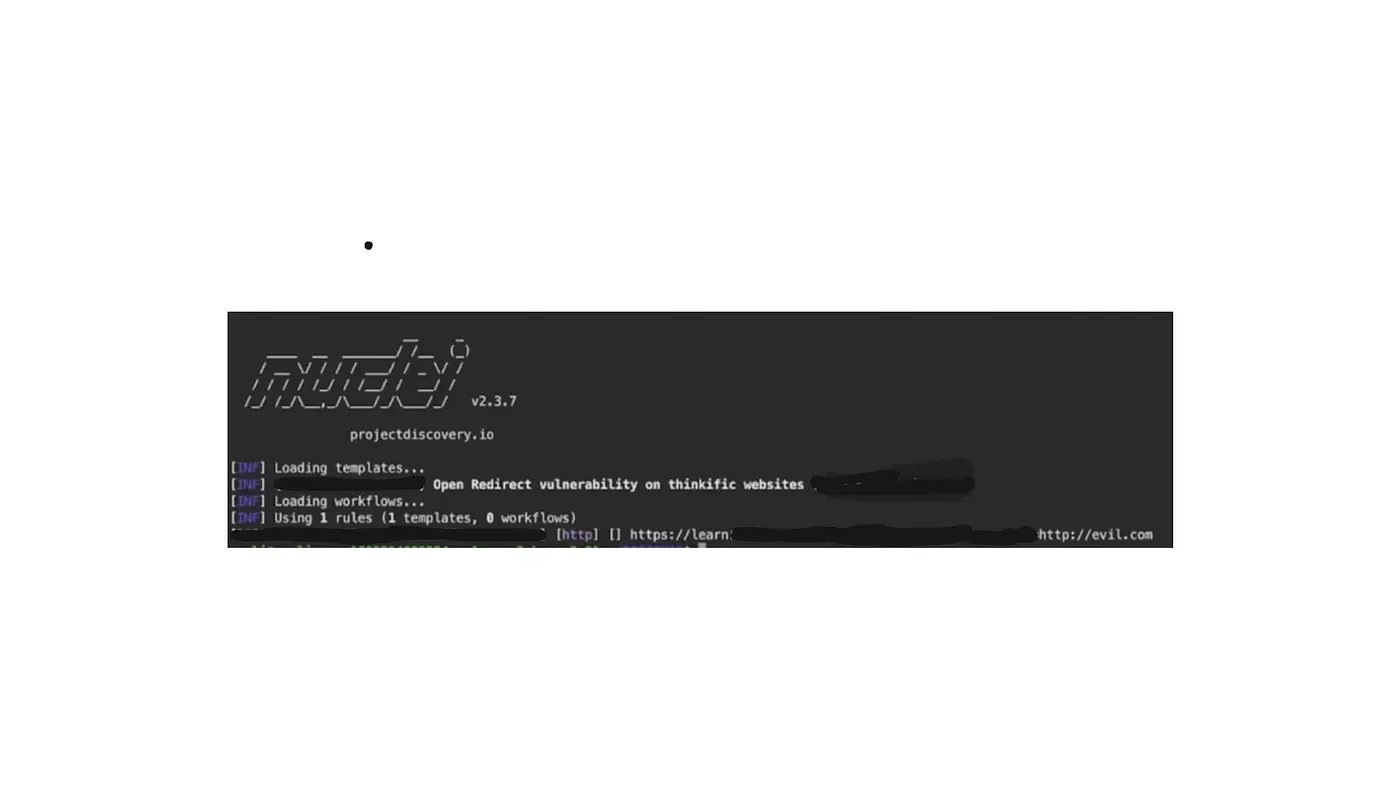
He went back to manual analysis. The feature that verifies ownership of a user's email via OTP drew his attention. After playing with it he noticed odd behaviour, which he took as a signal to dig deeper.

To study the OTP handling he created two more accounts and tried unexpected sequences in the verification process.
Exploitation
Step 1: Cross-account OTP attempt
He created an account with User A's email. An OTP was sent to that email for ownership verification. He captured the OTP, then performed the same steps with User B's email and submitted User A's OTP during User B's verification. This failed: the code issued for User A did not verify User B.
What kept him interested was the processing time the server took, which made him suspect the server was vulnerable and that a more interesting sequence might work.
Step 2: Interleaving email changes across browsers
He opened two browsers and worked through the verification step with User A's email. In BROWSER 1 he went back to the step where the server asks for an email address to send the ownership OTP.
- From BROWSER 1, the server sent an OTP to User A's email.
- He then entered User B's (the victim's) email and clicked send OTP.
- He repeated the steps, changing the email back to User A's (the attacker's) email, and received the OTP in BROWSER 3. He stored this OTP for the next step against the victim's email.
- He changed the email once more to User B's (the victim's) email.
- He submitted the OTP he had obtained for the email change.
At that point the server became confused and gave him access to User B's account, bypassing the ownership verification.
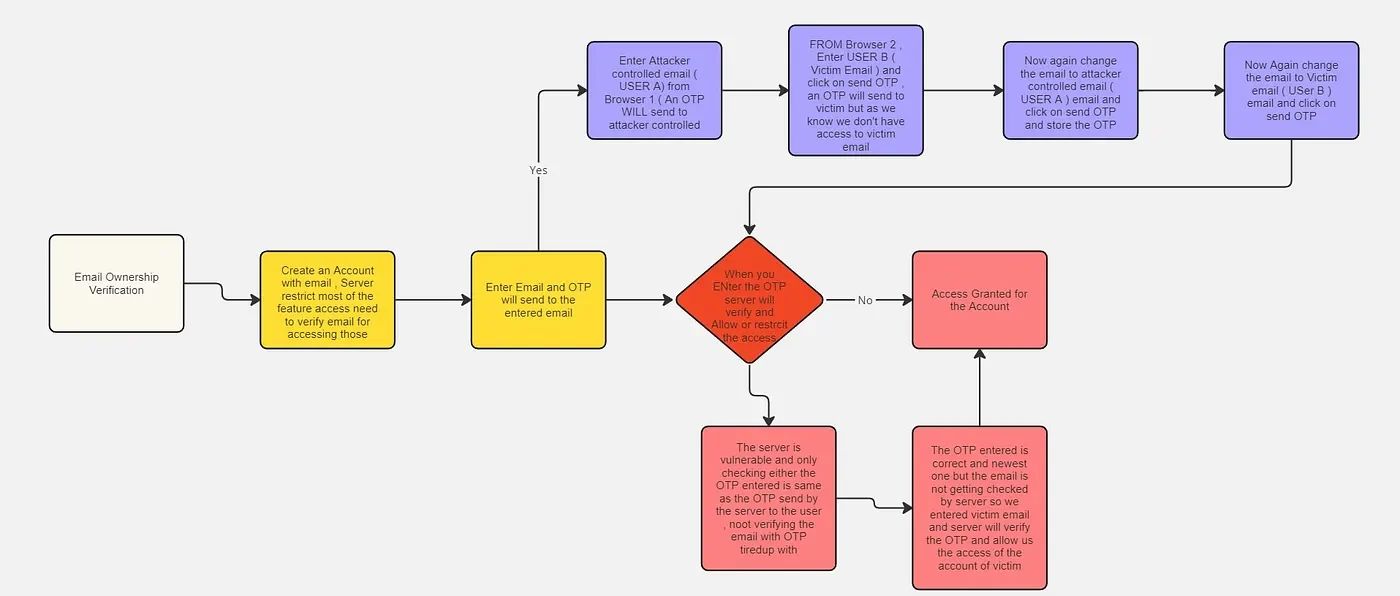
The flow chart above illustrates the sequence for readers who want to follow the state changes visually.
Root cause
The report does not include code or server responses, so the exact defect is not shown. What the sequence demonstrates is that the OTP was not bound to the email address it was issued for at the moment of verification. By alternating the email between the attacker's address and the victim's address within the same verification flow, the researcher got a code issued for his own address accepted while the flow was pointed at the victim's address. The server then treated the victim's account as verified and granted access.
The report does not explain the underlying defect. The earlier cross-account attempt failed.
Impact
In the researcher's test, the sequence gave him access to User B's account using an OTP obtained for his own email.
The researcher describes the result as access to User B's account via bypassing the ownership verification.
Fix
Based on the behaviour, the server should bind each OTP to the exact email address it was issued for and reject it if the email submitted at verification differs, and it should invalidate any earlier OTP when the email in the flow changes.
Variants to test
- Email swap within one flow. Start verification for your own address, request the OTP, then change the email field to the victim's address before submitting your code. A positive result is that the victim's address is marked verified.
- Alternating addresses. Repeat the researcher's sequence: attacker email, victim email, attacker email (capture OTP), victim email, then submit the captured OTP. A positive result is access to the victim's account.
- Multiple concurrent sessions. Run the same flow in two browsers with different accounts and see whether OTPs issued in one session are accepted in the other. A positive result is a code from session A verifying an address in session B.
- Reuse after change. Request an OTP, change the email, then change it back and submit the old code. A positive result is that the old code is still valid after the address changed.
- Response timing. Watch how long the server takes to reject a mismatched OTP; the processing time is what prompted the researcher to keep digging.
Conclusion
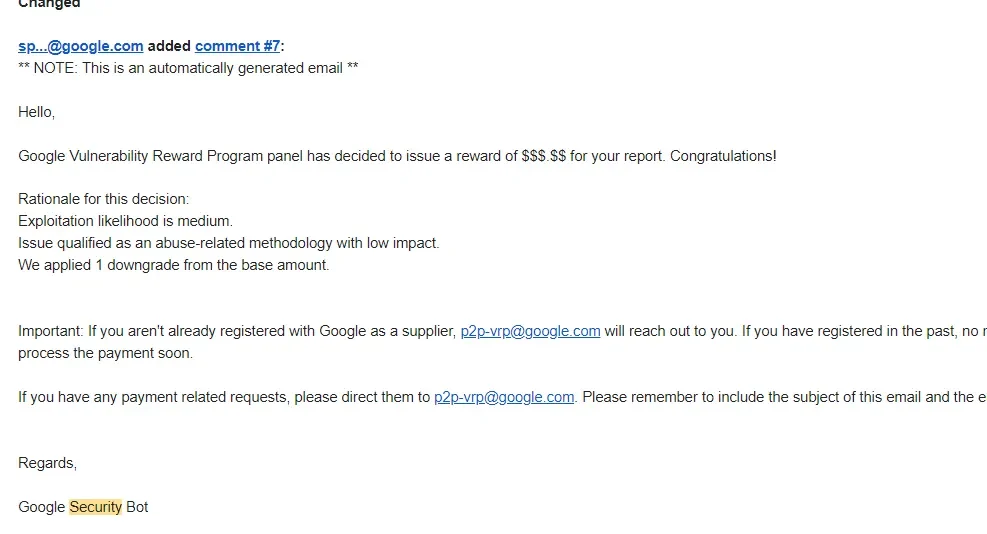
The researcher expected the triager to be unable to reproduce the issue and to close it as not applicable, given how confusing the flow was. Instead the issue was accepted within three days and he received a three-digit bounty through the GoogleVRP panel.
What happened, in plain words
A security researcher found a flaw in the way a website confirmed that an email address belonged to you. The site sent a short numeric code, called a one-time password (OTP), to your email. You typed that code back into the site to prove the address was yours. Normally the site should remember which email each code was sent to, and refuse the code if you try to use it for a different address. In this case the researcher found a sequence of steps that confused the site: by switching the email in the form back and forth between his own address and a victim's address, he got a code sent to his own email accepted as proof that the victim's address belonged to him. That gave him access to the victim's account without ever seeing the victim's inbox. He reported it to Google's bug bounty programme (GoogleVRP), and it was accepted within three days with a three-digit bounty.
This article walks through the same story for someone who has never done security testing. Every term is explained the first time it appears, and there is a glossary at the end.
Some background terms first
Before the story makes sense, a few everyday ideas:
- A subdomain is a smaller section of a larger website. If the main site is
example.com, thenshop.example.comandlearn.example.comare subdomains. Think of the main domain as a building and subdomains as different floors or departments inside it. - Recon (short for reconnaissance) means gathering information about a target before testing it: which subdomains exist, which pages are reachable, what technologies are in use. It is like looking at the outside of a building before trying the doors.
- Wayback data comes from the Internet Archive's Wayback Machine, a service that keeps old copies of web pages. Researchers use it to find pages that used to exist but may have been removed or forgotten.
- Nuclei is a free tool that runs a list of automated checks (called templates) against a website and reports anything that matches. Think of it as a spell-checker, but for known security mistakes instead of spelling.
- An open redirect is a feature where a site will forward you to any address you supply, including one an attacker controls. On its own it is a nuisance; chained with other flaws it can become serious.
- OAuth is a common way to log in to one site using an account from another (the "Log in with Google" button is the familiar example). Researchers often try to chain an open redirect through OAuth to steal a login.
- Account takeover (ATO) means getting into someone else's account without permission.
- A bug bounty programme is a scheme where companies pay researchers for reporting security problems responsibly instead of exploiting them. GoogleVRP is Google's Vulnerability Reward Program. A triager is the person at the company who reads a report, tries to reproduce the problem, and decides whether it is valid.
The researcher and the target
The author introduces himself as Mohd Hasan Ansari, known online as Jerry1319. He says he mostly hunts on GoogleVRP. The report he is writing about was about a month old at the time of writing and had been resolved a few weeks earlier.
He describes himself as a manual hunter: he does not run large automated recon pipelines. His recon is subdomain enumeration plus Wayback data, nothing more. When he says "recon" in the article, that is what he means.
One day, while looking through the subdomains he had enumerated for GoogleVRP targets, he noticed an odd one. He calls it learn.jerry.com throughout the article. That is a made-up placeholder name, not the real host, used so the article can be published without pointing at the live site. What made it stand out was that its content length was unusually large: the page returned a lot of material, which suggested a substantial application rather than a stub page.
Exploring the site like a normal user
His first move was not technical. He signed up for a normal account, logged in, and explored the features and services the site offered, the way any new customer would. This matters because you cannot understand how a feature can be abused until you understand what it is supposed to do.
While he was doing that manual exploration, he also ran nuclei with his own private templates to get quick hints about the target. The scan flagged a technology-based open redirection on the domain.
He ignored that finding, for two reasons. First, GoogleVRP does not accept open redirection reports on their own. Second, the domain and its subdomains had no OAuth login he could chain the redirect through to reach account takeover. In other words, the redirect was real but had no path to anything serious within the rules of this programme.
The feature that caught his eye
He went back to manual analysis. The feature that drew his attention was the one that verifies you own an email address by sending an OTP to it. The idea is simple: if you can read the code that arrived in that inbox, you must control that inbox, so the site can trust that the address is yours.
He played with the feature for a while and noticed behaviour that seemed odd. He describes his "Spidey senses" alerting him that there must be a bug and that he should dig deeper.
To study how the OTP was handled, he created two more accounts and tried unexpected sequences in the verification process: steps in unusual orders, repeated steps, and switching values partway through. The goal was to see whether the server kept track of which code belonged to which email.
The first attempt: using one person's code for another person's email
He created an account with User A's email (his own). An OTP was sent to that email to verify ownership. He captured the OTP, meaning he noted down the code that arrived.
He then performed the same steps with User B's email and submitted User A's OTP during User B's verification. This failed: the code issued for User A did not verify User B. That is the correct behaviour, and it is what you would hope for.
What kept him interested was how long the server took to process the attempt. A server that rejects a wrong code instantly is doing a simple comparison. A server that takes noticeably longer may be doing extra work behind the scenes, which can hint that the logic is more complicated than it looks. That suspicion is what pushed him to try a more interesting sequence.
The second attempt: switching the email back and forth
This is the part that worked. He opened two browsers and worked through the verification step with User A's email. In BROWSER 1 he navigated back to the step where the server asks for an email address so it can send the ownership OTP.
- From BROWSER 1, the server sent an OTP to User A's email.
- He then entered User B's (the victim's) email and clicked send OTP.
- He repeated the steps, changing the email back to User A's (the attacker's) email, and received the OTP in BROWSER 3. He stored this OTP to use in the next step against the victim's email.
- He changed the email once more to User B's (the victim's) email.
- He submitted the OTP he had obtained for the email change.
At that point the server became confused and gave him access to User B's account, bypassing the ownership verification entirely.
The flow chart above shows the sequence visually, so you can follow how the email address in the form and the OTP in the researcher's hand moved out of step with each other.
Why this works
The report does not include code or server responses, so the exact defect is not shown. What the sequence demonstrates is that the OTP was not tied to the email address it was issued for at the moment of verification. By alternating the email between the attacker's address and the victim's address within the same verification flow, the researcher got a code issued for his own address accepted while the flow was pointed at the victim's address. The server then treated the victim's account as verified and granted access.
The report does not explain the underlying defect. The earlier cross-account attempt failed.
What an attacker could do with it
In the researcher's test, the sequence gave him access to User B's account using an OTP obtained for his own email.
The researcher describes the result as access to User B's account via bypassing the ownership verification. The report does not state how many users or which accounts were affected beyond the test accounts.
How it should be fixed
Based on the behaviour, the server should bind each OTP to the exact email address it was issued for and reject it if the email submitted at verification differs. It should also invalidate any earlier OTP when the email in the flow changes.
Variants worth testing
If you ever find yourself looking at a similar verification flow, these are the kinds of sequences to try. Each one is a small experiment with a clear pass or fail.
- Email swap within one flow. Start verification for your own address, request the OTP, then change the email field to the victim's address before submitting your code. A positive result is that the victim's address is marked verified.
- Alternating addresses. Repeat the researcher's sequence: attacker email, victim email, attacker email (capture OTP), victim email, then submit the captured OTP. A positive result is access to the victim's account.
- Multiple concurrent sessions. Run the same flow in two browsers with different accounts and see whether OTPs issued in one session are accepted in the other. A positive result is a code from session A verifying an address in session B.
- Reuse after change. Request an OTP, change the email, then change it back and submit the old code. A positive result is that the old code is still valid after the address changed.
- Response timing. Watch how long the server takes to reject a mismatched OTP; the processing time is what prompted the researcher to keep digging.
How the report was received
The researcher expected the triager to be unable to reproduce the issue and to close it as not applicable, given how confusing the flow was. Instead the issue was accepted within three days and he received a three-digit bounty through the GoogleVRP panel.
Glossary
- Account takeover (ATO): getting into someone else's account without their permission.
- Bug bounty programme: a scheme where companies pay researchers for reporting security problems responsibly.
- Content length: the size of the response a web server sends back; a large value can suggest a substantial application.
- GoogleVRP: Google's Vulnerability Reward Program, the bug bounty programme this report was submitted to.
- Nuclei: a free tool that runs automated security checks (templates) against a website.
- OAuth: a way to log in to one site using an account from another site.
- One-time password (OTP): a short code sent to your email or phone to prove you control it; it should only work once and only for the address it was sent to.
- Open redirect: a feature that forwards you to any address you supply, including one an attacker controls.
- Pre-account takeover: taking over an account during sign-up or verification, before it is fully set up.
- Recon (reconnaissance): gathering information about a target before testing it.
- Subdomain: a smaller section of a larger website, such as
shop.example.comunderexample.com. - Template (nuclei): a saved check that nuclei runs against a target.
- Triager: the person at a bug bounty programme who reads a report, tries to reproduce the problem, and decides whether it is valid.
- Verification bypass: getting past a check (here, proving you own an email address) without actually satisfying it.
- Wayback data: old copies of web pages kept by the Internet Archive's Wayback Machine.




