Reflected XSS on the data.gov (WAF bypass+ Chrome XSS Auditor bypass+ works in all browsers)
A reflected cross-site scripting flaw existed on the data.gov local endpoint, where crafted query parameters were reflected into the pagination block without proper sanitisation. An attacker could craft a link that, when a victim hovered over the page 2 pagination control, executed script in the victim's browser.

- Paid in 12 days
- Disclosed after 13 days
Summary by the researcher
Thanks to the 18F team for the great experience, fast fix, and the bounty!
This case was weird. The XSS worked only with few & chars in certain places (identified by trial-and-error method), and input appeared to be correctly sanitized without it.
It bypassed Chrome XSS auditor, and due to stripping chars function in place (hi FILTER_SANITIZE_STRING) it also bypassed Kona WAF using stripped chars in the payload. It is a curious example, how two different defense mechanisms neutralize each other.
The discovered XSS issue was site-wide and affected 80+ endpoints.
The report
##Description Hello. I discovered Cross-Site scripting issue on the https://www.data.gov/local/ endpoint. The issue can be site-wide, and exploitable in any place, where pagination exist.
##The Impact and Severity I assigned the High severity, because unlike the last #263226 report (that XSS was exploitable in the Firefox only), this XSS works in all browsers (Chrome/IE/Firefox). But, considering that this case requires user interaction (hovering the mouse to the Page 2), the severity can be lowered to the Medium, if you consider so.
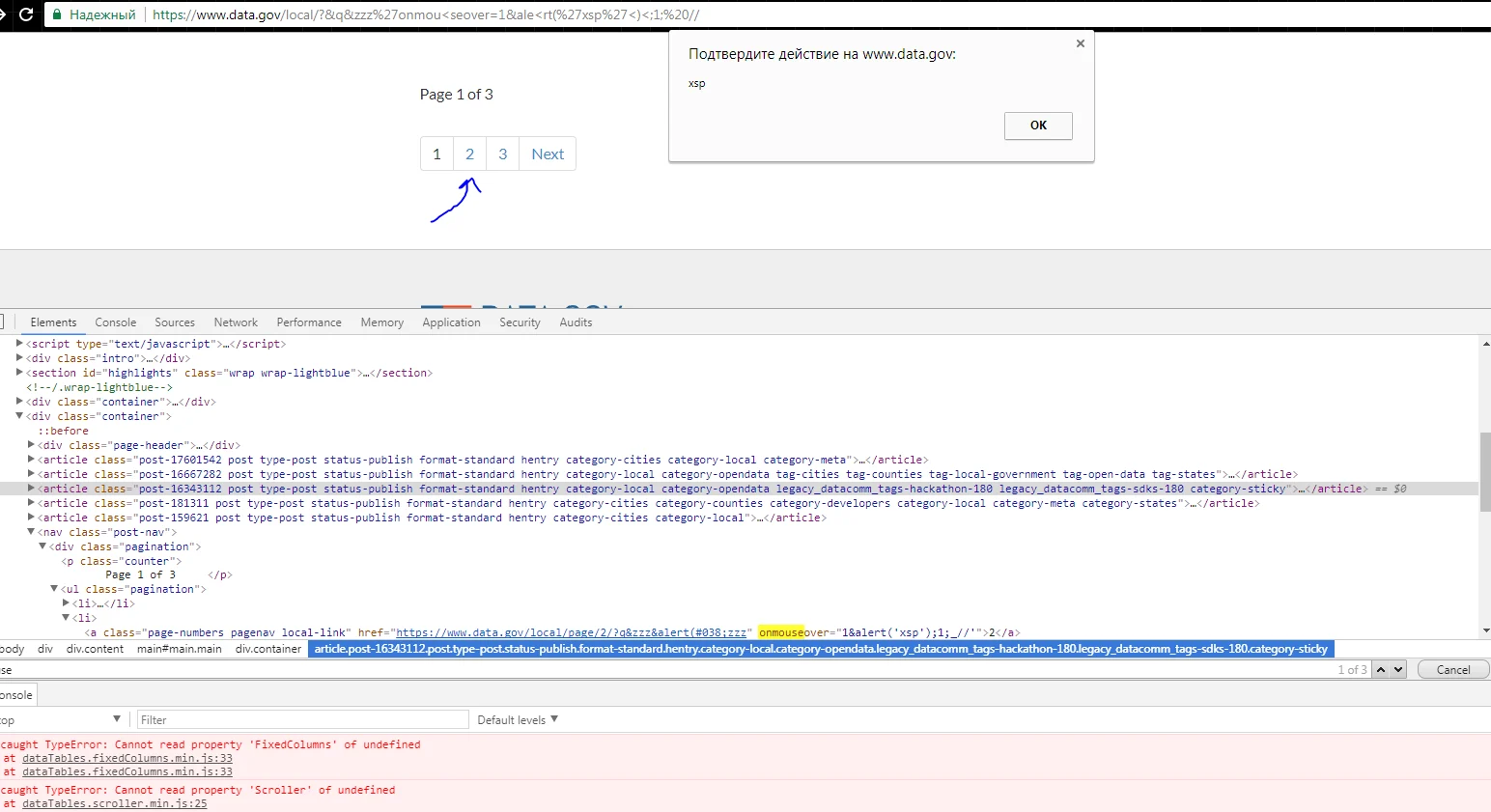
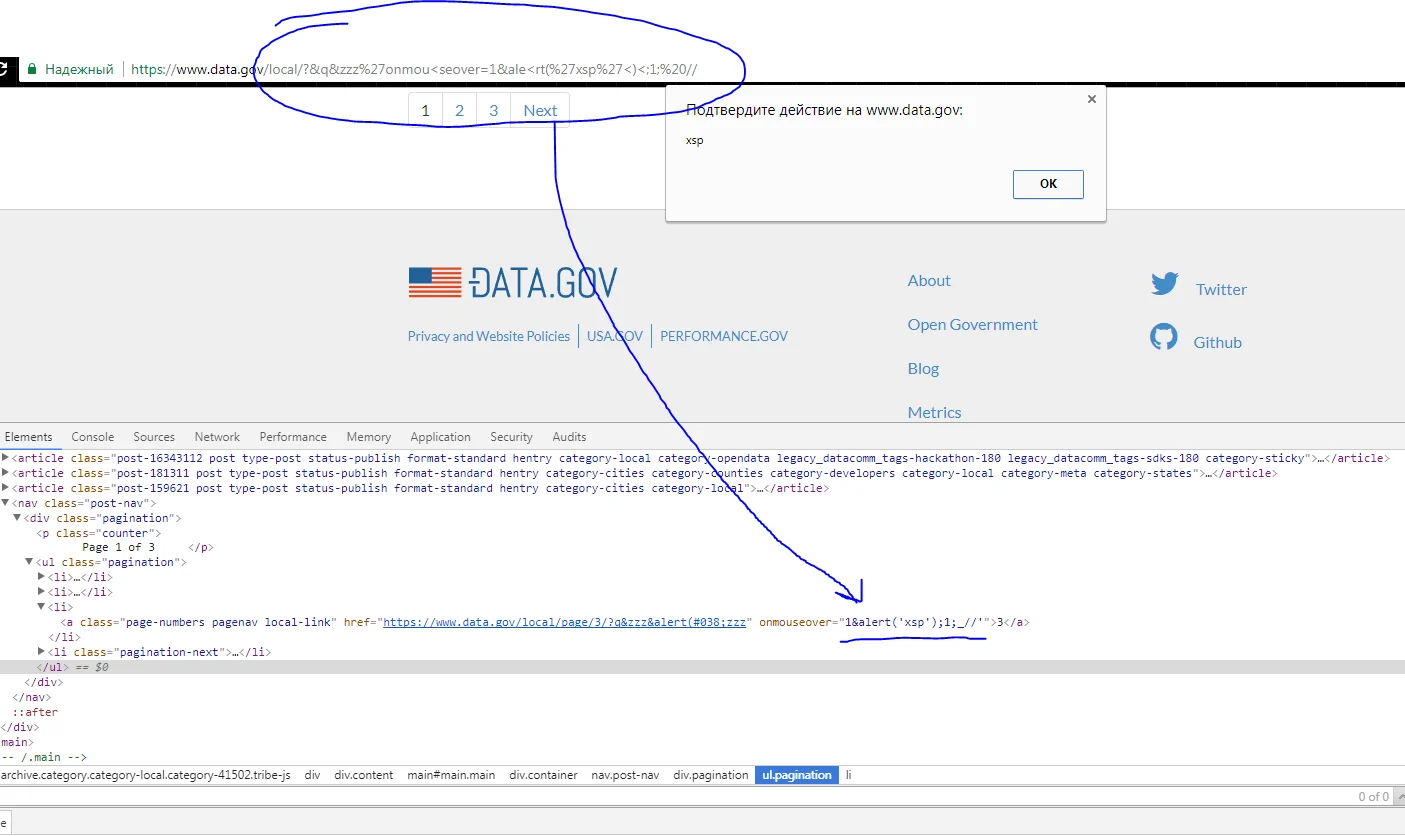
##POC (Reflected XSS) Use this link in the Mozilla Firefox, Chrome or IE https://www.data.gov/local/?&q&zzz%27onmou%3Cseover=1&ale%3Crt(%27xsp%27%3C)%3C;1;%20//
and hover the mouse to the page 2.
##Suggested fix
Sanitize the URLs in the <div class="pagination"> block.
Attachments
Context
The target is www.data.gov, reported under the GSA Bounty programme on HackerOne. The affected feature is the pagination block on listing pages such as the local data section. The suggested fix refers to sanitising the URLs in the <div class="pagination"> block. The researcher found a reflected XSS on the local data endpoint and suggested sanitising the URLs in the pagination block.
The report describes the issue as site-wide: it was exploitable anywhere pagination exists, and the researcher states it affected 80+ endpoints.
Setup
No accounts, roles or special tooling are described. The proof of concept is a single URL opened in Mozilla Firefox, Chrome or Internet Explorer, followed by a mouse hover over the "Page 2" link in the pagination block. The only precondition is that the target page renders pagination.
Finding it
The researcher describes the case as weird. The XSS only worked with a few & characters in certain positions, found by trial and error, while the input appeared to be correctly sanitised without them. Two defence mechanisms were in play: a character-stripping sanitiser (the researcher names FILTER_SANITIZE_STRING) and the Kona WAF. The payload bypassed the Chrome XSS Auditor, and because the stripping function removed characters in place, the WAF saw a payload that no longer matched its rules while the browser still received something executable. The researcher frames this as an example of two different defence mechanisms neutralising each other.
Exploitation
Step 1: open the crafted URL
The following link is used in Mozilla Firefox, Chrome or IE:
https://www.data.gov/local/?&q&zzz%27onmou%3Cseover=1&ale%3Crt(%27xsp%27%3C)%3C;1;%20//
Step 2: hover over Page 2
The payload does not fire on page load. It executes when the user hovers the mouse over the page 2 link. The screenshot below shows the result of the hover.
Root cause
The researcher's suggested fix is to sanitise the URLs in the <div class="pagination"> block. The researcher's suggested fix targets exactly this: sanitise the URLs in the <div class="pagination"> block.
The existing defences did not stop the payload. The researcher notes that a stripping function in place (FILTER_SANITIZE_STRING) let the payload bypass the Kona WAF using stripped characters. The payload bypassed the Chrome XSS Auditor and the Kona WAF. The researcher's summary is that the two mechanisms neutralised each other. The exact interaction is described only at that level; the report does not give the WAF rules or the sanitiser's character list.
Impact
An attacker who convinces a victim to open the crafted link and hover over page 2 can trigger the XSS in the victim's browser. The researcher assigned High severity because, unlike an earlier report (#263226) whose XSS worked only in Firefox, this one works in all browsers (Chrome, IE and Firefox). Because exploitation requires user interaction, specifically hovering the mouse over Page 2, the researcher notes the severity can be lowered to Medium. The researcher states the issue was site-wide and affected 80+ endpoints.
Fix
The researcher's recommendation is to sanitise the URLs in the <div class="pagination"> block. The report does not describe the fix; the summary thanks the 18F team for a fast fix.
- Pagination and paging controls on other listing pages: supply a query string with stray
&characters and encoded quotes and angle brackets, then hover or click the page links. A positive result is markup from the query string appearing inside the pagination link attributes. - Other reflected URL components: test whether the full request URI, not just named parameters, is echoed into links, canonical tags or breadcrumbs. A positive result is the raw query string appearing in an attribute context.
- Sanitiser and WAF interaction: where a stripping sanitiser runs before a WAF, try payloads whose dangerous characters are removed or rearranged by the sanitiser so the WAF sees a benign string. A positive result is a payload that the WAF allows but the browser still executes.
- Browser coverage: verify any candidate in Chrome, Firefox and IE, since the Chrome XSS Auditor and browser-specific parsing can change the outcome.
This kind of bug hides in server-side rendering of the current URL into navigation elements: pagination, sort links, filters and breadcrumbs. During recon, look for pages whose links carry the full query string, and for parameters that are reflected into href or other attributes rather than into text. The signal here was that the input looked correctly sanitised until a few & characters were placed in specific positions, which suggests testing malformed query strings rather than well-formed parameters. The researcher demonstrated impact by showing execution in all three major browsers and by noting the site-wide reach across 80+ endpoints, while being explicit that the hover interaction lowers the practical severity.
Attachments
What happened, in plain words
A security researcher found a way to make www.data.gov run code in a visitor's browser when the visitor opened a crafted link and hovered over page 2. This kind of bug is called Cross-Site Scripting, or XSS for short. The report was filed under the GSA Bounty programme on HackerOne.
The bug lived in the pagination block: the row of "Page 1, Page 2, Page 3..." links you see at the bottom of a list of results. The researcher found a reflected XSS on the local data page and suggested sanitising the URLs in the pagination block. When a victim hovered the mouse over the "Page 2" link, the code ran.
What makes this case interesting is that the site had two separate protections in place, and they accidentally cancelled each other out. One protection removed certain characters from the input; the other was a WAF (a filter that inspects incoming requests and blocks suspicious ones). The researcher notes that a stripping function in place (FILTER_SANITIZE_STRING) let the payload bypass the Kona WAF using stripped characters. The researcher describes this as two defence mechanisms neutralising each other.
The bug was not limited to one page: the researcher says it was site-wide and affected 80+ endpoints. It also worked in Chrome, Internet Explorer and Firefox, which is why the researcher rated it High severity, while noting it could be lowered to Medium because the victim has to hover over page 2.
Context
The target is www.data.gov, the public website of the US government's open data programme. The affected feature is the pagination block on listing pages, such as the local data section. Pagination is the set of links that let you move from one page of results to the next. The suggested fix refers to the <div class="pagination"> block.
<div class="pagination">
The researcher's suggested fix is to sanitise the URLs in the <div class="pagination"> block. That allows script to be injected through the page links.
A quick word on the query string: when you see an address like example.com/search?q=cats, everything from the ? onwards is the query string. It is a list of name and value pairs separated by &, for example ?q=cats&page=2. Websites read these values to decide what to show. If a site copies a value from the query string into its own HTML without cleaning it, an attacker can put HTML or JavaScript in that value and have it appear on the page.
The report describes the issue as site-wide: it was exploitable anywhere pagination exists, and the researcher states it affected 80+ endpoints. An endpoint here simply means a specific address on the site that responds to requests.
Setup
No accounts, roles or special tooling are described. The proof of concept is a single URL opened in Mozilla Firefox, Chrome or Internet Explorer, followed by a mouse hover over the "Page 2" link in the pagination block. The only precondition is that the target page renders pagination.
In other words, you do not need to log in, install anything, or be a programmer to reproduce this. You need a browser and a page that shows page-number links.
Finding it
The researcher describes the case as weird. The XSS only worked with a few & characters in certain positions, found by trial and error, while the input appeared to be correctly sanitised without them. Sanitising means cleaning input so that dangerous characters cannot do harm, for example by removing them or turning them into harmless text.
Two defence mechanisms were in play:
- A character-stripping sanitiser, which the researcher names as
FILTER_SANITIZE_STRING. This is a filter that removes certain characters from a string rather than rejecting the whole input. - The Kona WAF. A WAF (Web Application Firewall) sits in front of a website and inspects incoming requests, blocking ones that look like attacks, a bit like a security guard checking bags at a door.
The payload bypassed the Chrome XSS Auditor. The Chrome XSS Auditor was a built-in Chrome feature that tried to detect reflected XSS and block the page. "Reflected" means the malicious input is sent in the request and immediately echoed back in the response, rather than being stored on the server.
Because the stripping function removed characters in place, the WAF saw a payload that no longer matched its rules, while the browser still received something executable. The researcher frames this as an example of two different defence mechanisms neutralising each other. Think of it as two guards checking the same parcel: the first one removes a label the second one is trained to look for, so the second guard waves it through, but the contents are still dangerous.
Exploitation
Step 1: open the crafted URL
The following link is used in Mozilla Firefox, Chrome or IE:
https://www.data.gov/local/?&q&zzz%27onmou%3Cseover=1&ale%3Crt(%27xsp%27%3C)%3C;1;%20//
https://www.data.gov/local/is the page being visited, the local data listing. Everything after the?is the query string the researcher controls.- The query string is deliberately malformed. It starts with a bare
&, thenq, then a parameter namedzzzwhose value is percent-encoded. A parameter is one name and value pair in the query string. Percent-encoding is the way browsers write special characters in a URL:%27stands for a single quote'and%3Cstands for a less-than sign<. This encoding lets characters that would otherwise be awkward in a URL travel safely. - Decoded, the value of
zzzcontains'onmou<seover=1. The next parameter,ale, carries<rt('xsp'<)<;1; //. - The angle brackets and quotes are percent-encoded so they survive transport, and the
&characters split the input into pieces that the sanitiser and the WAF treat differently from the final string the browser assembles.
The researcher found by trial and error that the XSS only worked with a few & characters in certain places.
Step 2: hover over Page 2
The payload does not fire on page load. It executes when the user hovers the mouse over the page 2 link. An attribute is an extra setting inside an HTML tag, such as the href that holds a link's destination. If attacker-controlled text lands inside an attribute, it can sometimes break out of the attribute and add new HTML, including an event handler such as onmouseover, which runs code when the mouse moves over the element.
The screenshot below shows the result of the hover.
Root cause
"For that context" matters: text placed between HTML tags is treated differently from text placed inside an attribute, so cleaning has to match where the text ends up. The researcher's suggested fix targets exactly this: sanitise the URLs in the <div class="pagination"> block.
The existing defences did not stop the payload. The payload bypassed the Chrome XSS Auditor and the Kona WAF. The researcher's summary is that the two mechanisms neutralised each other. The exact interaction is described only at that level; the report does not give the WAF rules or the sanitiser's character list.
Impact
An attacker who convinces a victim to open the crafted link and hover over page 2 can trigger the XSS in the victim's browser. The origin is the combination of scheme, host and port, here https://www.data.gov; script running on that origin can act as if it came from the site itself, for example reading what the page can read.
The researcher assigned High severity because, unlike an earlier report (#263226) whose XSS worked only in Firefox, this one works in all browsers (Chrome, IE and Firefox). Because exploitation requires user interaction, specifically hovering the mouse over Page 2, the researcher notes the severity can be lowered to Medium. The researcher states the issue was site-wide and affected 80+ endpoints.
Fix
The researcher's recommendation is to sanitise the URLs in the <div class="pagination"> block. The report does not describe the fix; the summary thanks the 18F team for a fast fix.
If you want to look for similar bugs yourself, these are the directions the researcher's findings point to. Each one is a way of asking the same question in a different place: does user-controlled text end up in the page without being cleaned for where it lands?
- Pagination and paging controls on other listing pages: supply a query string with stray
&characters and encoded quotes and angle brackets, then hover or click the page links. A positive result is markup from the query string appearing inside the pagination link attributes. - Other reflected URL components: test whether the full request URI, not just named parameters, is echoed into links, canonical tags or breadcrumbs. A positive result is the raw query string appearing in an attribute context.
- Sanitiser and WAF interaction: where a stripping sanitiser runs before a WAF, try payloads whose dangerous characters are removed or rearranged by the sanitiser so the WAF sees a benign string. A positive result is a payload that the WAF allows but the browser still executes.
- Browser coverage: verify any candidate in Chrome, Firefox and IE, since the Chrome XSS Auditor and browser-specific parsing can change the outcome.
This kind of bug hides in server-side rendering of the current URL into navigation elements: pagination, sort links, filters and breadcrumbs. Server-side rendering means the server builds the HTML before sending it to your browser, rather than the browser building it afterwards with JavaScript. During recon, look for pages whose links carry the full query string, and for parameters that are reflected into href or other attributes rather than into text. Recon is the early phase of exploring a target to see what it is made of.
The signal here was that the input looked correctly sanitised until a few & characters were placed in specific positions, which suggests testing malformed query strings rather than well-formed parameters. In other words, do not only try tidy input; try input that is deliberately broken, because broken input can slip past filters that expect tidy input.
The researcher demonstrated impact by showing execution in all three major browsers and by noting the site-wide reach across 80+ endpoints, while being explicit that the hover interaction lowers the practical severity.
Attachments
Glossary
- XSS (Cross-Site Scripting): a bug where a website lets an attacker's code run in another visitor's browser, as if it came from the site itself.
- Reflected XSS: XSS where the malicious input is sent in a request and echoed straight back in the response, rather than being stored on the server.
- Pagination: the page-number links that let you move through a long list of results.
- URL: the address of a page, such as
https://www.data.gov/local/. - Query string: the part of a URL after the
?, made of name and value pairs separated by&. - Parameter: one name and value pair in a query string, for example
q=cats. - Percent-encoding: writing special characters in a URL as
%plus a code, such as%27for a single quote and%3Cfor<. - Sanitising: cleaning input so dangerous characters cannot do harm, for example by removing them or turning them into harmless text.
FILTER_SANITIZE_STRING: a character-stripping filter named in the report that removes certain characters from a string instead of rejecting the whole input.- WAF (Web Application Firewall): a filter in front of a website that inspects incoming requests and blocks ones that look like attacks.
- Kona WAF: the specific WAF named in the report.
- Chrome XSS Auditor: a built-in Chrome feature that tried to detect reflected XSS and block the page.
- Payload: the piece of input an attacker sends in the hope that it is executed or misinterpreted.
- Attribute: an extra setting inside an HTML tag, such as
hrefon a link oronmouseoverfor a mouse event. - Event handler: code attached to an HTML element that runs when something happens, such as the mouse moving over it.
- HTML: the language that describes the structure of a web page.
- JavaScript: the programming language that browsers run to make pages interactive.
- Origin: the combination of scheme, host and port, such as
https://www.data.gov, which defines what a script is allowed to access. - Endpoint: a specific address on a website that responds to requests.
- Server-side rendering: building the HTML on the server before sending it to the browser.
- Recon: the early phase of exploring a target to understand its structure and features.
- Severity: a rating of how serious a bug is, often High, Medium or Low.
- HackerOne: a platform where organisations run bug bounty programmes and researchers report bugs.
- Bug bounty programme: a scheme where an organisation pays researchers for reporting security bugs.
- GSA Bounty: the programme named in the report under which this bug was found.
- 18F: the team thanked in the report for the fast fix.







