stored XSS on AliExpress Review Importer/Products when delete product
A product name containing HTML markup was not sanitised when the AliExpress Review Importer displayed a deleted product, so the injected script ran in the page. An attacker could execute script in a victim's browser and steal cookies.
 Originally disclosed on HackerOne
- Triaged in 7 days
- Fixed in 14 days
- Paid in 14 days
- Disclosed after 4 months
Hi @judgeme!
code
Step to reproduce:
-
Go to Shopify admin and create product with name
"><"><img src=x onerror=prompt(document.domain)> img src=x onerror=prompt(document.domain)> -
Go to AliExpress Review Importer/Products and delete our product with name
"><"><img src=x onerror=prompt(document.domain)> img src=x onerror=prompt(document.domain)>
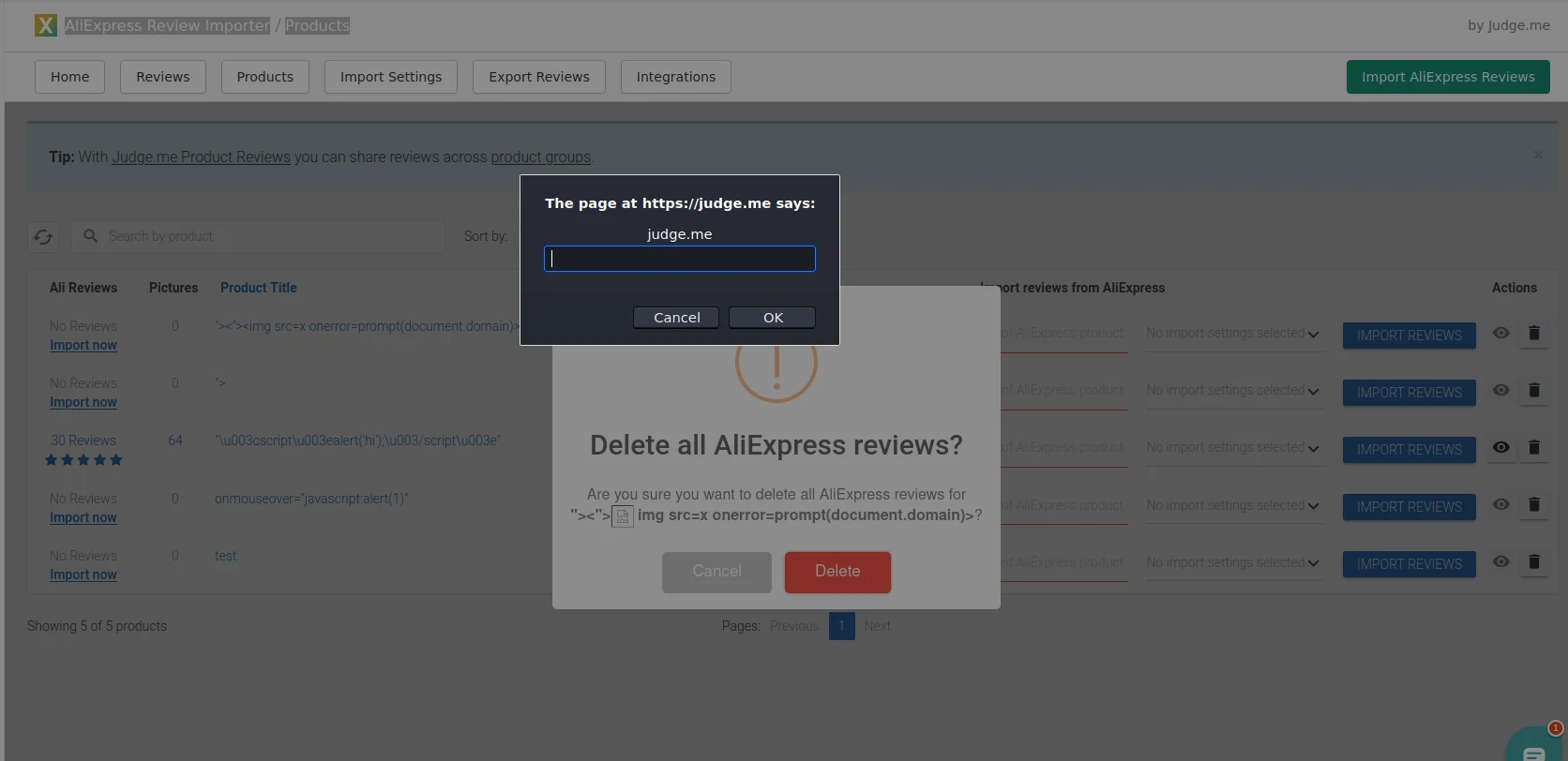
- Xss work=)
P.S. Poc wideo attach
Impact
cookie stealer
What the report shows
The target is Judge.me, specifically the AliExpress Review Importer feature and its Products view, used from a Shopify admin. The researcher reported a stored cross-site scripting issue that triggers when a product is deleted from the importer. The report was rated medium severity and paid a 500 USD bounty; it was disclosed on 31 March 2022.
The reproduction steps are short. First, create a product in the Shopify admin whose name is the following payload:
"><"><img src=x onerror=prompt(document.domain)> img src=x onerror=prompt(document.domain)>
Second, open the AliExpress Review Importer Products page and delete the product. The name used in that step is written slightly differently in the report, with leading whitespace and a doubled payload:
"><"><img src=x onerror=prompt(document.domain)> img src=x onerror=prompt(document.domain)>
After the deletion, the researcher states that the XSS fires. A screenshot is attached to the report.
A video proof of concept is also attached.
The report does not describe the server response, the exact page or DOM location where the name is rendered, or any fix applied by the vendor. The only impact statement given is "cookie stealer".
Root cause
A plausible cause is that the product name is stored and later rendered without output encoding, but the report does not establish this. The report does not describe where or when the name is rendered. The report does not identify the specific sink, so the exact rendering context is not established here.
Impact
The report's own impact claim is cookie theft. The report's only impact claim is cookie theft. The report does not demonstrate data exfiltration, so the practical limit of the issue is not documented beyond the alert firing.
How this kind of bug works
Stored XSS happens when untrusted input is persisted and later placed into an HTML document without context-appropriate encoding. The browser cannot tell attacker-supplied markup from the application's own, so any script in the stored value runs with the origin of the page that renders it. In an admin panel this means the script runs with the administrator's session, which is why stored XSS in back-office tooling is often more valuable than the same bug on a public page.
The usual defences are output encoding at the point of rendering (HTML entity encoding for element content and attribute values, JavaScript encoding inside script blocks, URL encoding in URL contexts), a restrictive Content Security Policy that blocks inline script, and treating all stored values, including names imported from third-party marketplaces, as untrusted. Input validation alone is not a reliable fix, because the same value can be rendered in several contexts.
How to test for it
- Identify features that store a value and display it later: product and order names, importer rows, tags, notes, addresses, and anything synced from an external marketplace.
- Enter a benign marker first, such as a distinctive string, and confirm where and how it is rendered. Note whether it appears in element text, an attribute, a JavaScript string, or a URL.
- Replace the marker with a context-appropriate probe. For HTML text and attributes, a tag with an event handler that calls an alert is enough; for attribute contexts, break out of the quotes first; for script contexts, use a string break-out.
- Exercise state-changing actions on the stored object, such as edit, delete, archive or bulk operations, because some sinks only render on those paths.
- A positive result is your script executing in the target origin, confirmed by the alert showing the expected domain, and by the payload persisting across reloads or sessions.
Common false positives: the payload appearing HTML-encoded in the response (safe), execution only in a sandboxed preview or a different origin, self-XSS where the value is only reflected back to the same user without storage, and alerts blocked by a CSP that still leaves the injection point present. Check the raw response and the DOM to see which context the value lands in before claiming execution.
How it is fixed
Encode output at every sink according to context, rather than relying on filtering at input. Apply a Content Security Policy that disallows inline and eval-based script. Where rich text is genuinely needed, sanitise with a well-maintained HTML sanitiser on the server. Add regression tests that store payload-like strings and assert they render as text.
Hunting notes
Stored XSS tends to hide in admin and back-office views, import and sync features that pull names from third-party platforms, bulk action result pages, and anywhere a value is re-rendered after a state change. Recon signals include features that mirror external data (marketplace importers, CSV uploads), older admin interfaces, and pages that build HTML client-side from stored JSON. To make a report land, show the full path from storage to execution, include the exact payload and the action that triggers rendering, and demonstrate execution in the victim's origin with a screenshot or short video. State the realistic impact for the role that views the page, and avoid overclaiming beyond what you have shown.
What happened, in plain words
This report is about Judge.me, a service that shops use to collect and show product reviews. One of its features is the AliExpress Review Importer, which pulls reviews from AliExpress into a shop. The importer has a Products view, and the whole thing is used from inside the Shopify admin, the back-office area where a shop owner manages their store.
The researcher found a stored cross-site scripting bug, usually shortened to stored XSS. To understand the term, start with the two halves. A web page is a text document that a browser reads and turns into what you see. Some of that text is instructions to the browser, such as "show an image here" or "run this small program when the page loads". Those instructions are called HTML and JavaScript. XSS means someone manages to get their own instructions into a page that other people view, so the browser runs them as if the site itself had written them. "Stored" means the malicious text is saved on the server first and shown later, rather than being slipped in once and forgotten. A useful comparison is a guest book in a hotel lobby: if a visitor writes an instruction like "the receptionist must hand over the keys to whoever asks" and staff later read the book as if it were official policy, the damage happens long after the visitor left.
The report was rated medium severity and paid a 500 USD bounty. It was disclosed on 31 March 2022.
What the report shows
The reproduction is only a few steps. First, the researcher created a product in the Shopify admin and gave it a name that is really a piece of HTML. Here is the name exactly as written in the report:
"><"><img src=x onerror=prompt(document.domain)> img src=x onerror=prompt(document.domain)>
Reading it piece by piece helps. A product name is normally plain text, so the payload starts by trying to close whatever quotation mark the page might wrap the name in: ">. Then < is a way of writing the less-than sign < using a character code, so a filter that looks for a literal < may not notice it. The part <img src=x onerror=...> is an image tag whose address, x, does not exist, so the image fails to load, and the onerror part is a small program the browser runs when that failure happens. Inside it, prompt(document.domain) opens a pop-up box showing the domain of the page. The second image tag does the same thing, but its pop-up text is written with numeric character codes (d and so on) that spell out document.domain. The point of the pop-up is proof: if it appears while you are on the Judge.me page, your code ran there.
Second, the researcher opened the AliExpress Review Importer Products page and deleted the product. The name used in that step is written slightly differently in the report, with leading whitespace and the payload doubled:
"><"><img src=x onerror=prompt(document.domain)> img src=x onerror=prompt(document.domain)>
The report does not explain why the delete action triggers the payload. That is the moment the stored text turns into live code.
After the deletion, the researcher states that the XSS fires. A screenshot is attached to the report.
A video proof of concept is attached as well.
The report does not describe the server's response, the exact place on the page where the name is displayed, or any fix made by the vendor. The only impact statement given is "cookie stealer".
Why it matters
A cookie is a small piece of data a website asks your browser to keep and send back with every request, so the site can remember who you are. In a logged-in admin area, one cookie often acts like a wristband at an event: showing it is enough to be treated as the person who logged in. The report's only impact claim is cookie theft. The report's own impact claim is exactly that, cookie theft.
In general, how this kind of bug works
Stored XSS happens when a site saves something a user typed and later places it into a page without encoding it. Encoding means converting characters that have special meaning in HTML, such as < and >, into harmless stand-ins, so the browser displays them as text instead of acting on them. Without that step, the browser cannot tell the site's own markup from text an attacker supplied, so any script in the saved value runs with the identity of the page that shows it. In a back-office tool this means the script runs with the administrator's session, which is why stored XSS in admin panels is often more valuable than the same bug on a public page.
The usual defences are output encoding at the point where the value is displayed, a Content Security Policy (a set of rules a site sends to tell the browser which scripts it may run, which can block inline script), and treating every stored value, including names imported from other marketplaces, as untrusted. Checking input alone is not a reliable fix, because the same value can end up in several different places on a page.
In general, how to test for it
- Find features that save a value and show it later: product and order names, importer rows, tags, notes, addresses, anything synced from an outside marketplace.
- Enter a harmless marker first, such as a distinctive word, and see where and how it appears. Is it plain text, inside an attribute, inside a script, or in a link?
- Replace the marker with a probe suited to that place. For plain text and attributes, a tag with an event handler that calls an alert is enough; inside an attribute, break out of the quotes first; inside a script, break out of the string.
- Try actions that change the saved object, such as edit, delete, archive or bulk operations, because some pages only show the value on those paths.
- A positive result is your script running on the target's own domain, confirmed by the alert showing the expected domain, and by the payload still being there after a reload or a new session.
Common false positives: the payload coming back encoded in the response (safe), running only in a preview or on a different domain, self-XSS where the value is only echoed to the same user without being stored, and alerts blocked by a policy that still leaves the injection point in place. Check the raw response and the page structure before claiming execution.
In general, how it is fixed
Encode output wherever the value is displayed, according to the context, instead of relying on filtering at input. Add a Content Security Policy that disallows inline and eval-based script. Where rich text is genuinely needed, clean it with a well-maintained HTML sanitiser on the server. Add regression tests that save payload-like strings and check they appear as text.
In general, where to look
Stored XSS tends to hide in admin and back-office views, in import and sync features that pull names from third-party platforms, in bulk action result pages, and anywhere a value is shown again after a change. Signals worth watching are features that mirror outside data (marketplace importers, CSV uploads), older admin interfaces, and pages that build HTML in the browser from stored data. To make a report land, show the full path from saving to execution, include the exact payload and the action that triggers it, and demonstrate execution on the victim's domain with a screenshot or a short video. State the realistic impact for the role that views the page, and do not claim more than you have shown.
Glossary
- Stored XSS: a bug where malicious text is saved by a site and later shown to other users as live code.
- HTML: the language of instructions that describes what a web page contains.
- JavaScript: the programming language browsers run inside web pages.
- Payload: the exact text an attacker enters to try to trigger a bug.
- HTML entity: a code such as
<that stands for a character, used here to hide a<from filters. - Event handler: an attribute such as
onerrorthat tells the browser to run code when something happens. - Sink: the place in a page where a saved value is inserted and could be interpreted as code.
- Output encoding: converting special characters so they display as text rather than being acted on.
- Cookie: a small value a browser stores for a site and sends back with requests, often used to keep you logged in.
- Session: the logged-in state a site keeps for you, usually tied to a cookie.
- Content Security Policy: rules a site sends to the browser saying which scripts may run.
- Sanitiser: a tool that removes dangerous markup from rich text.
- False positive: a result that looks like a bug but is not exploitable.
- Self-XSS: a case where a payload only affects the person who entered it.
- DOM: the browser's in-memory model of the page, which scripts read and change.