Persistent XSS unvalidated open graph embed at linkedin.com
LinkedIn Articles allowed embedding of external content via Open Graph video tags without validating the source, so an attacker could inject a fake login page inside an iframe on linkedin.com. This could be used for phishing to steal LinkedIn credentials.
 Published on medium.com
oEmbed is an open format designed to allow embedding content from a website into another website. Almost all of the media rich platforms support the oEmbed standard.
The full write-up lives on its author's site
It belongs to its author, so we link to it rather than copy it. The other two tabs are our own rewrites, checked against it.
Context
LinkedIn Articles is the publishing feature of LinkedIn: you open it from your news feed with the Write an Article button and get an editor with a headline and body content. Next to the cursor there is an icon that lets you Add images or video for visual impact, and from there a Links button adds visual rich content to the article.
That embed feature is the target. Normally it takes a URL, fetches metadata from the remote site and converts the link into HTML that the editor inserts into the article. The report calls this a variation of the persistent XSS attack, abusing the Open Graph Protocol rather than oEmbed.
Two embedding mechanisms matter here:
- oEmbed, an open format that lets one site embed content from another. A site publishes an oEmbed endpoint, and the embedding platform calls it to obtain the HTML.
- Open Graph, where a page carries meta tags such as
og:imagethat describe what should be shown when the page is embedded. Wikipedia, for example, has anog:imagetag that defines the image displayed when someone embeds the article.
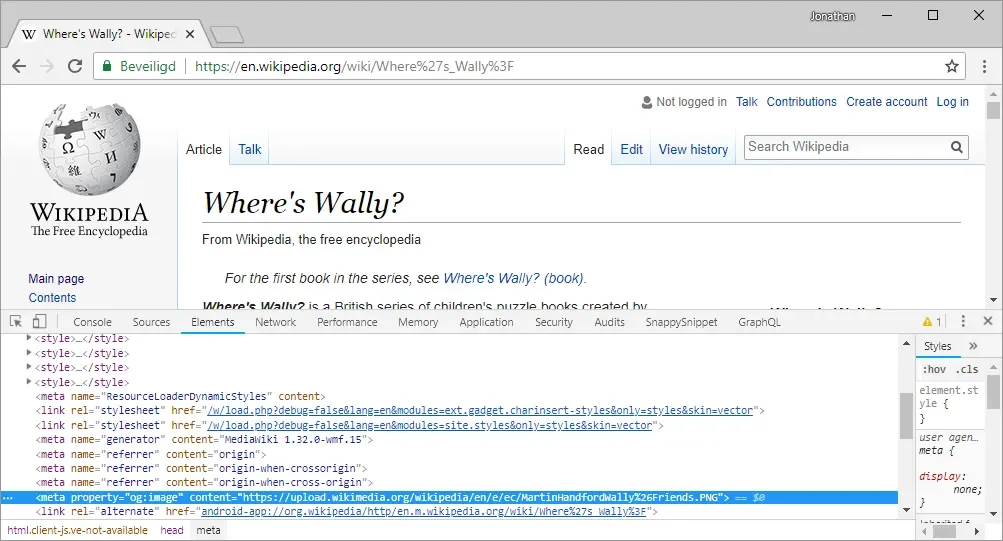
Most platforms check URLs for these tags in a specific order before embedding, and many keep a whitelist of allowed domains, because nobody wants unvalidated HTML injected into their platform. The question the report asks is what happens when that whitelist fails.
Setup
The only tooling named is Burp Suite, used to inspect the network traffic generated by the embed wizard. The researcher used test accounts, and later a personal account for retesting after the fix. No versions are given.
Finding it
The starting point is the embed wizard itself. After pasting a URL, Burp shows the request and response that the editor uses to build the embed.
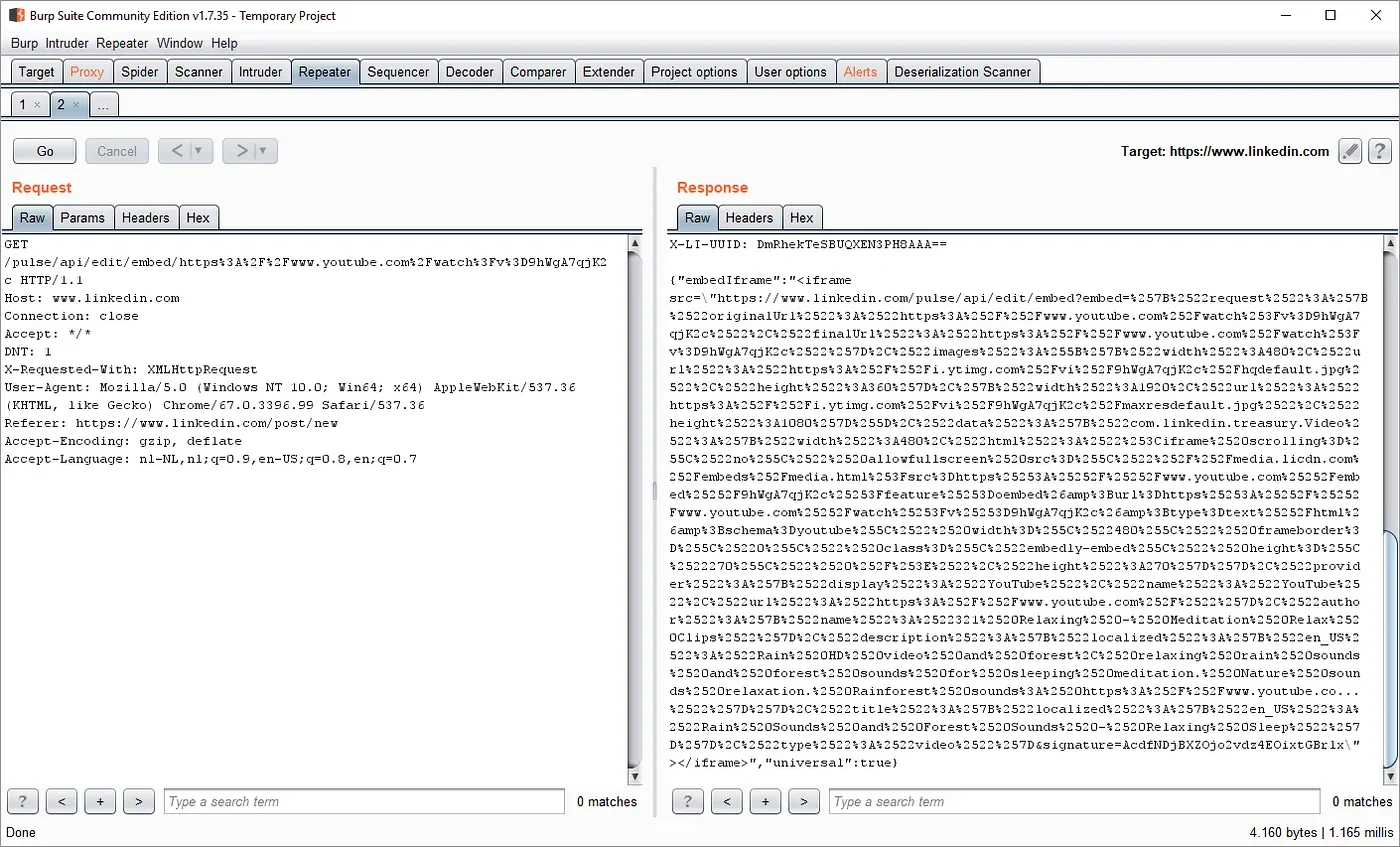
LinkedIn converts the URL into HTML that the article is allowed to embed. The response is URL encoded; decoded, it looks like this:
{“embedIframe”:”<iframe src=\"https://www.linkedin.com/pulse/api/edit/embed?embed={"request":{"originalUrl":"https://www.youtube.com/watch?v=9hWgA7qjK2c","finalUrl":"https://www.youtube.com/watch?v=9hWgA7qjK2c"},"images":[{"width":480,"url":"https://i.ytimg.com/vi/9hWgA7qjK2c/hqdefault.jpg","height":360},{"width":1920,"url":"https://i.ytimg.com/vi/9hWgA7qjK2c/maxresdefault.jpg","height":1080}],"data":{"com.linkedin.treasury.Video":{"width":480,"html":"<iframe scrolling=\"no\" allowfullscreen src=\"//media.licdn.com/embeds/media.html?src=https://www.youtube.com/embed/9hWgA7qjK2c?feature=oembed&url=https://www.youtube.com/watch?v=9hWgA7qjK2c&type=text/html&schema=youtube\" width=\"480\" frameborder=\"0\" class=\"embedly-embed\" height=\"270\" />","height":270}},"provider":{"display":"YouTube","name":"YouTube","url":"https://www.youtube.com/"},"author":{"name":"321 Relaxing — Meditation Relax Clips”},"description":{"localized":{"en_US":"Rain HD video and forest, relaxing rain sounds and forest sounds for sleeping meditation. Nature sounds relaxation. Rainforest sounds: https://www.youtube.co..."}},"title":{"localized":{"en_US":"Rain Sounds and Forest Sounds — Relaxing Sleep”}},"type":"video"}&[redacted]"></iframe>”,”universal”:true}
The editor parses this iframe into the article. The result is three iframes nested inside each other before the video player appears.
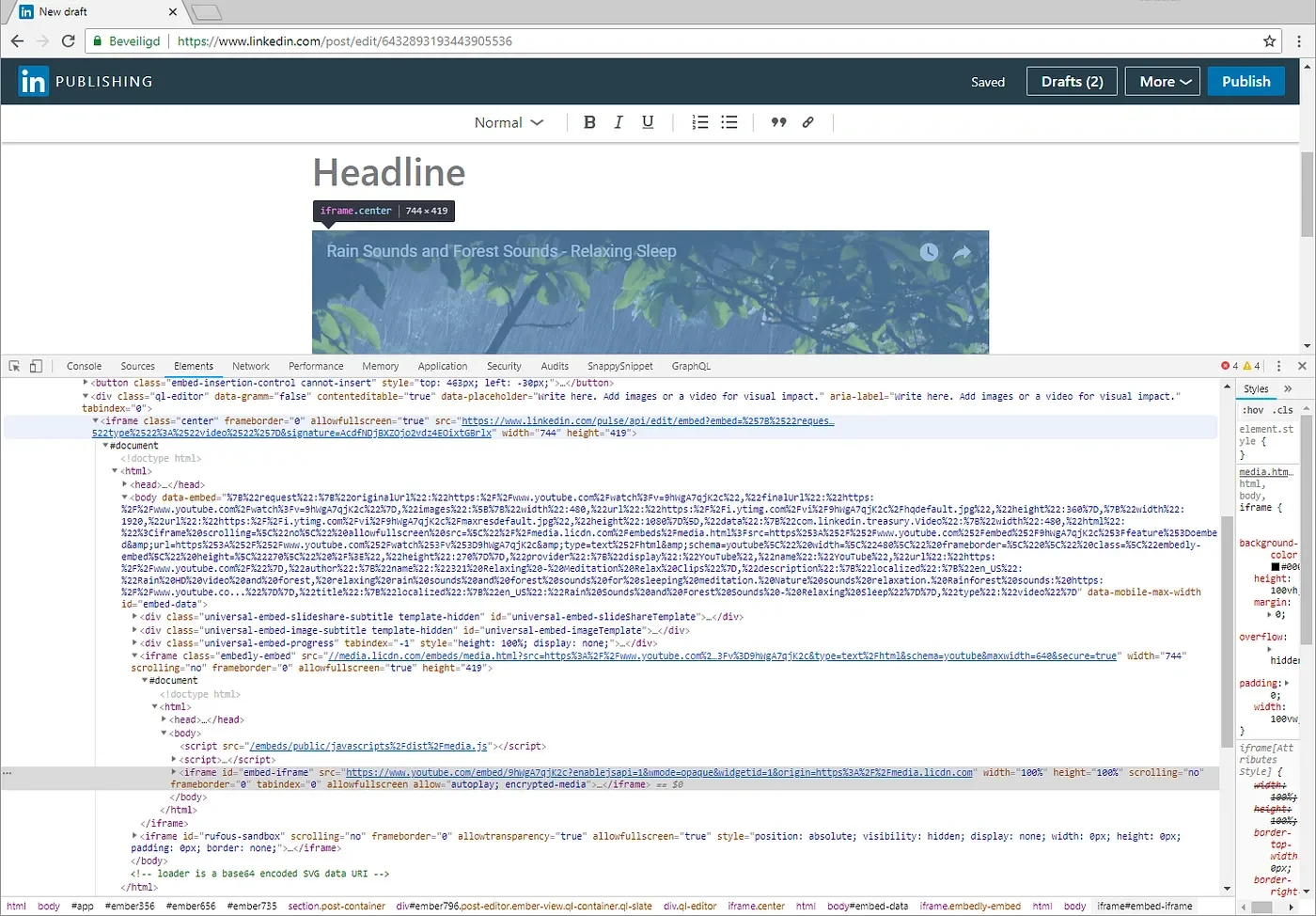
That nesting is the first limit worth noting: even with injected HTML, the payload is isolated in an iframe and has no access to the LinkedIn domain, no access to LinkedIn cookies, and no ability to manipulate HTML outside the iframe. The impact therefore has to come from something else. The report points at the obvious one: a fake LinkedIn login screen that steals passwords. LinkedIn embeds content without any visual hint that it is an embed, just clean borderless boxes, so a visitor cannot distinguish the embed from a real login screen.
Exploitation
Step 1: build a convincing fake login
A javascript alert box is often not enough to convey severity to non-technical readers, so the researcher duplicated the real login markup. The tool used is SnappySnippet, a Chrome extension that lets you select an element on a website and copy it as plain HTML and CSS.
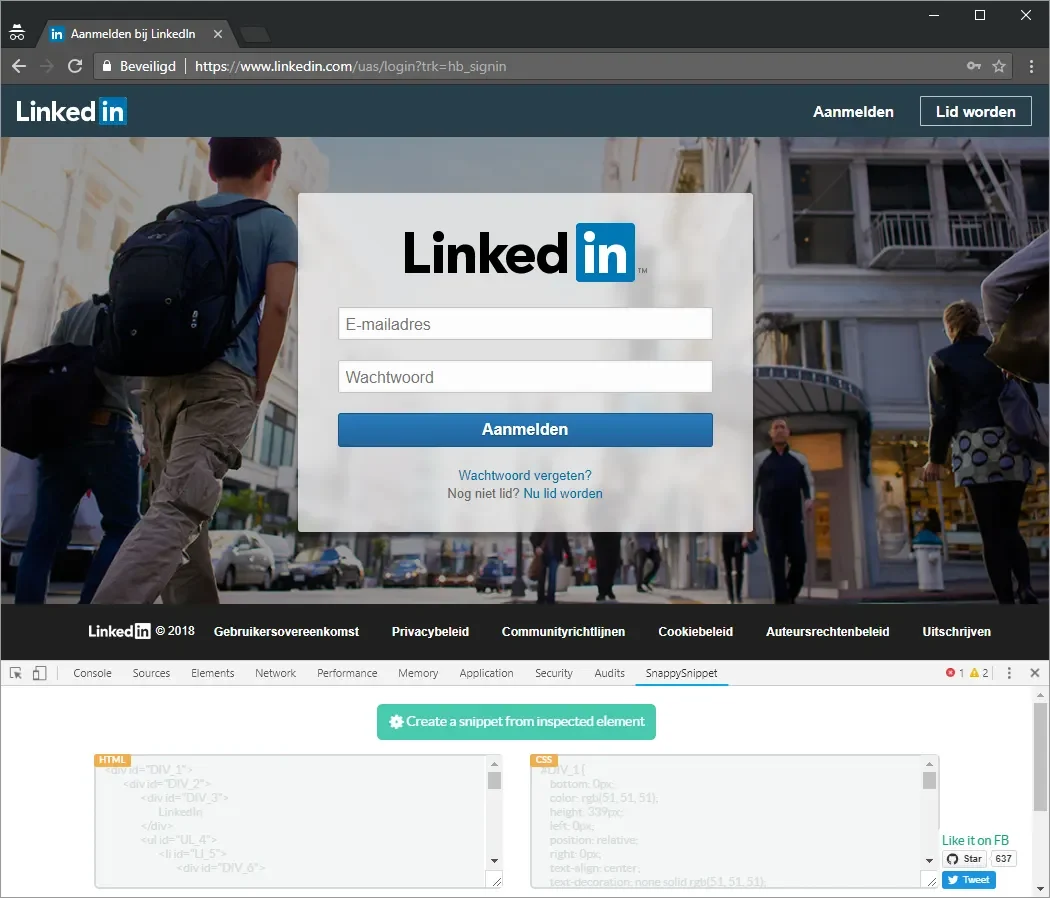
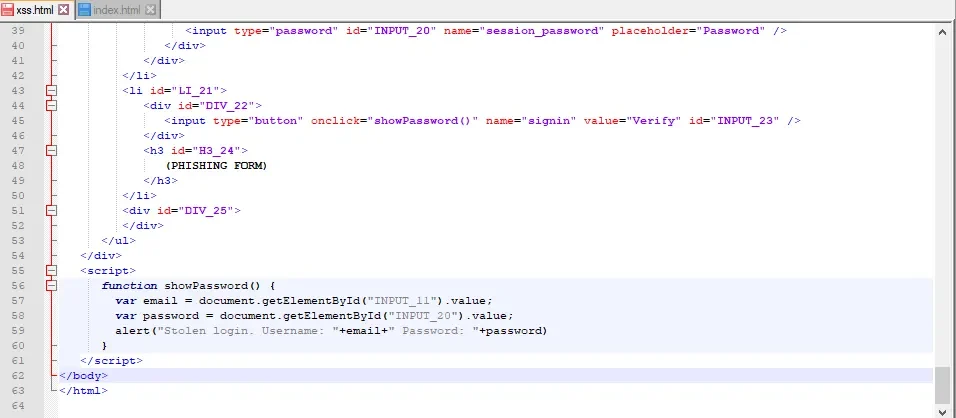
The copied code goes into a new HTML file, is tuned a little, and javascript is added at the end to capture the email and password. On submit, the login details are shown in a javascript alert box as proof of concept.
Step 2: embed it without tags
The fake login HTML is uploaded to the researcher's own server and linked from a LinkedIn article, to see what happens with no oEmbed or Open Graph tags at all.
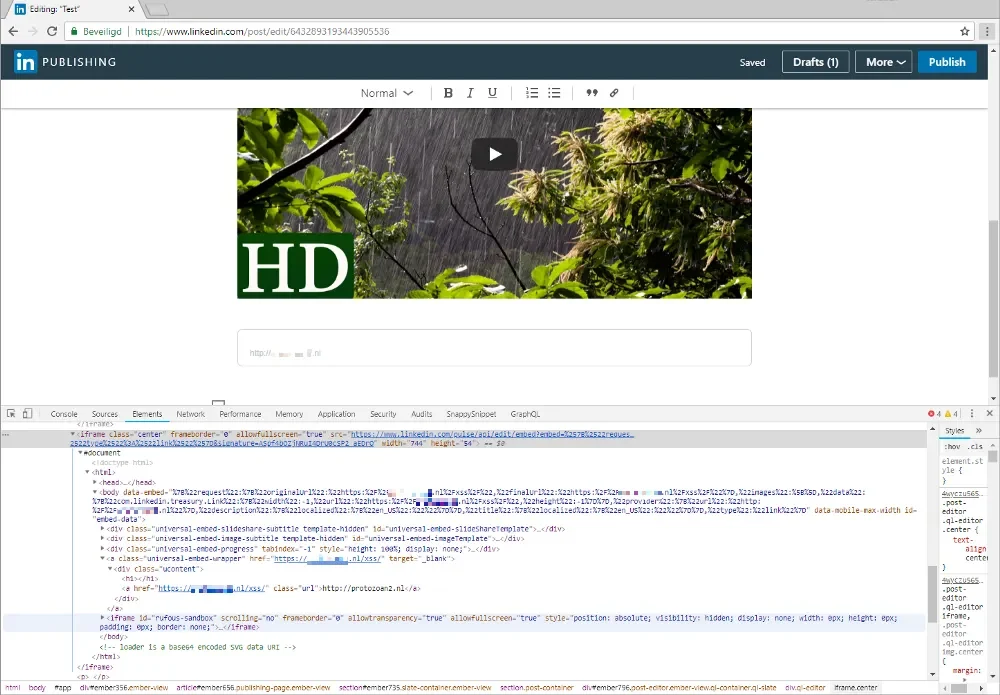
It does not work. LinkedIn falls back to a universal-embed-wrapper that just displays the URL with a little gray border around it.
Step 3: add Open Graph video tags
The Open Graph Protocol specs include a tag named og:video, which defines how a video player should be embedded. Vimeo's page shows an example of these meta tags.
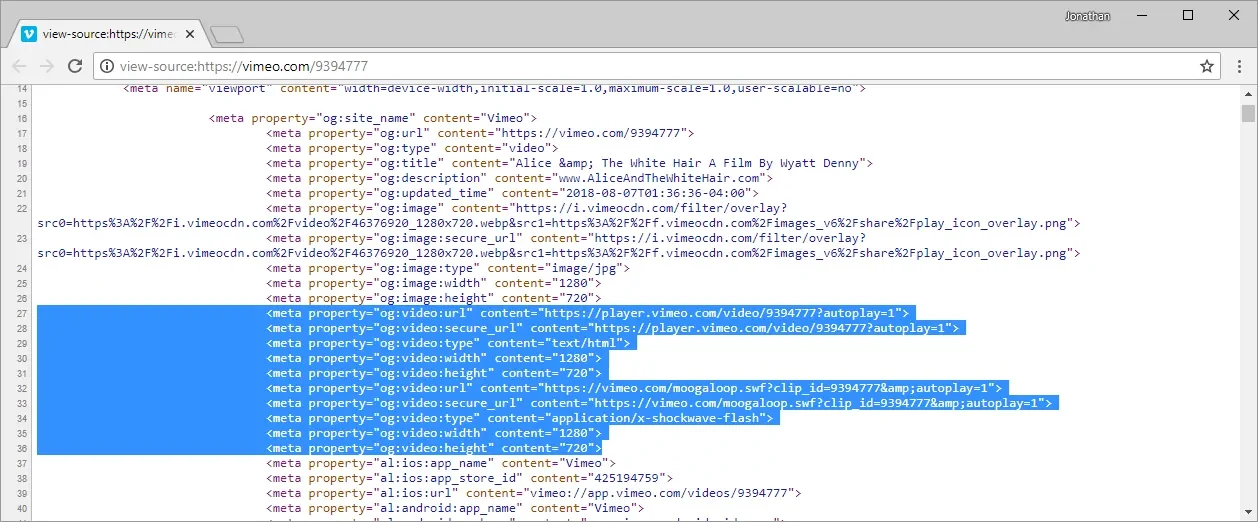
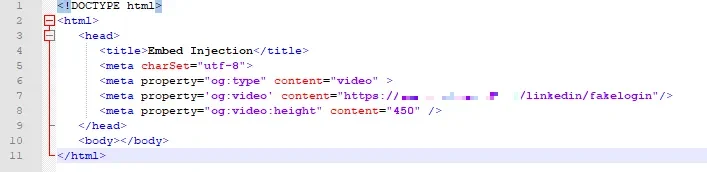
The next step is an HTML file carrying og:video tags that loads the fake login instead of a video player.
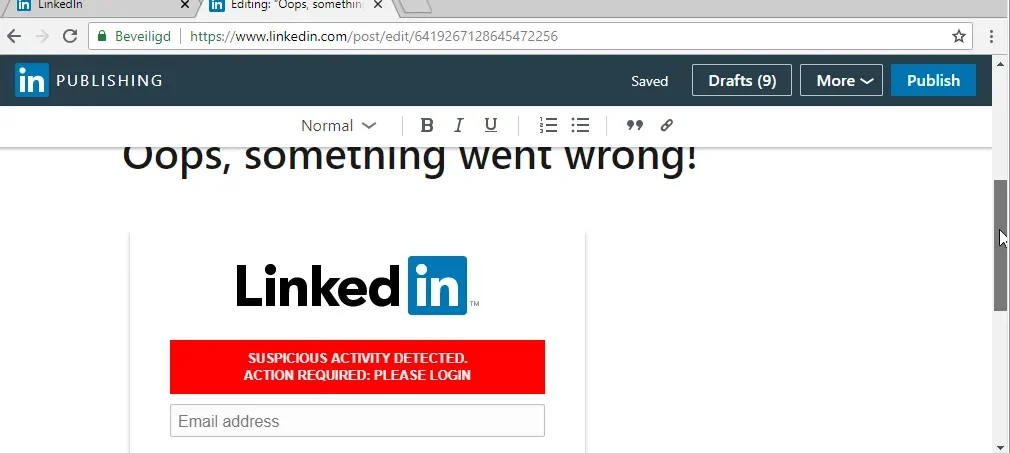
The fake login loads inside the LinkedIn article, and LinkedIn treats it as a genuine video player. The article is named Oops, something went wrong! and is ready to use.
Step 4: deliver it
With the draft in place, the researcher can spear phish other users by sharing a private link to the draft, or simply publish the article on the LinkedIn network and see what happens.
Root cause
The embed pipeline trusts Open Graph tags supplied by an arbitrary remote page. When the page declares og:video, LinkedIn builds an embed around it as if it were a video player, without validating that the target is a known video provider. The report frames the attack as what happens when the embed whitelist fails. The iframe sandbox limits what the injected page can reach, but it does not stop the page from rendering a credential form that looks native to LinkedIn.
Impact
The report describes a perfect situation for (spear) phishing on the linkedin.com domain. Specifically:
- Users may be redirected to another page after entering credentials, using
top.location.href, so the flow does not look suspicious. - Visitors can be attacked by embedding http://beefproject.com/.
- An attacker can perform clickjack attacks.
The limits are the iframe isolation described above: no LinkedIn cookies and no manipulation of HTML outside the iframe. The researcher could share a private draft link or publish the article on the network.
Fix
LinkedIn deployed a fix; the researcher confirmed it on 02-08-2018 using a personal account after the test accounts were blocked. The report does not describe the code change. The general measures it recommends are:
- Never trust Open Graph tags from strangers; use a whitelist for embeds.
- Do not allow iframes to break out, for example by redirecting the top-level window.
The report lists the reward as none. LinkedIn stated it does not offer rewards outside its private bug bounty programme, and added the researcher to a list of researchers for consideration.
- oEmbed endpoint abuse. Point the embed at a page whose oEmbed endpoint returns attacker-controlled HTML. A positive result is your markup rendered inside the embed rather than a provider player.
- Open Graph video injection. Serve a page with
og:videotags that load your own document. A positive result is your document rendered as a video player, as in this report. - Tag combinations. Try
og:image,og:videoand other Open Graph tags on a page that is not a known provider. A positive result is any tag-driven embed that renders your content instead of a link preview. - Whitelist bypass. Test domains that are not on the platform's embed whitelist. A positive result is an embed where the universal-embed-wrapper fallback should have appeared.
- Sandbox escape. From inside the injected iframe, attempt to reach the parent document or navigate the top window. A positive result is access to the host page or a top-level redirect.
Timeline
| Date | Event |
|---|---|
| 01-07-2018 | Bug discovered and reported by email |
| 01-07-2018 | LinkedIn confirmed receipt of the report |
| 20-07-2018 | Update requested |
| 24-07-2018 | LinkedIn replied that the fix was deployed; researcher replied that all test accounts were blocked and the fix could not be confirmed, requested unblocking, no reply |
| 02-08-2018 | Used a personal account for testing, confirmed the fix, asked whether the bug was eligible for a reward or an invite to the private programme, requested unblocking of the test account |
| 04-08-2018 | LinkedIn replied that the researcher is on the review list for an invite; no answer on reward eligibility; accounts still blocked, so no further testing possible (no new accounts due to phone number verification); LinkedIn requested a review of the post before publication |
| 08-08-2018 | Draft of the blog sent to LinkedIn for review, no reply |
| 15-08-2018 | Update requested |
| 21-08-2018 | LinkedIn approved the blog, stated it does not offer rewards outside the private bug bounty programme, and added the researcher to the list of researchers for consideration |
| 07-10-2018 | Blog published, delayed to wait for Medium.com to fix the same sort of bug; published on HackerOne's new open blogging platform |
What happened, in plain words
LinkedIn has a feature called LinkedIn Articles, which is a place where anyone with an account can write and publish blog posts. That editor lets you paste a link to something on the internet, such as a YouTube video, and it turns the link into a small box inside your article that plays the video. This is called an embed: instead of sending the reader to another website, the other website's content is shown inside your page.
The researcher found that this embed feature could be tricked. By putting a few special lines of information on a web page that he controlled, he could make LinkedIn show his page inside a LinkedIn article, styled to look like a LinkedIn login form. A visitor who reached that article would see what looked like a normal LinkedIn sign-in box; the proof of concept displayed submitted credentials in an alert box.
This is a variation of a well-known class of bug called persistent XSS (cross-site scripting). "XSS" means getting your own code to run inside someone else's website. "Persistent" (also called "stored") means the malicious content is saved on the site, so it keeps affecting every visitor who views the page later, rather than only the person who created it. In the researcher's earlier work he had done the same thing to Medium by abusing a mechanism called oEmbed. This time he abused a different mechanism, the Open Graph Protocol.
No money was paid for the report. LinkedIn fixed the bug, and the researcher was added to a list of people being considered for an invitation to LinkedIn's private bug bounty programme.
Background: two ways websites embed each other
Before the attack makes sense, you need to know the two mechanisms that platforms use to turn a pasted link into an embed.
oEmbed
oEmbed is an open format, meaning a publicly documented set of rules that any website can implement. It lets one website ask another website, "I have a link to your content; give me the HTML I should show for it." The second website publishes an address, called an endpoint, that answers this question. The embedding platform calls that endpoint and receives back a snippet of HTML, usually an iframe containing a video player.
An iframe (inline frame) is a way to place one web page inside another web page, like a small window cut into the page. The content inside the iframe comes from a different address, and the browser keeps it separate from the surrounding page for security reasons.
Almost all media-rich platforms support oEmbed. For example, you can add a Vimeo video to a WordPress blog just by pasting the link into the article; WordPress converts the link into HTML that loads Vimeo's player and starts the specific video.
Medium, for instance, will create a nice box with a Twitter profile picture if you paste a link to a Twitter profile into a post. That is oEmbed in action. As the researcher had shown previously, Medium was vulnerable to this and allowed unvalidated oEmbeds, meaning it trusted whatever HTML the remote endpoint returned.
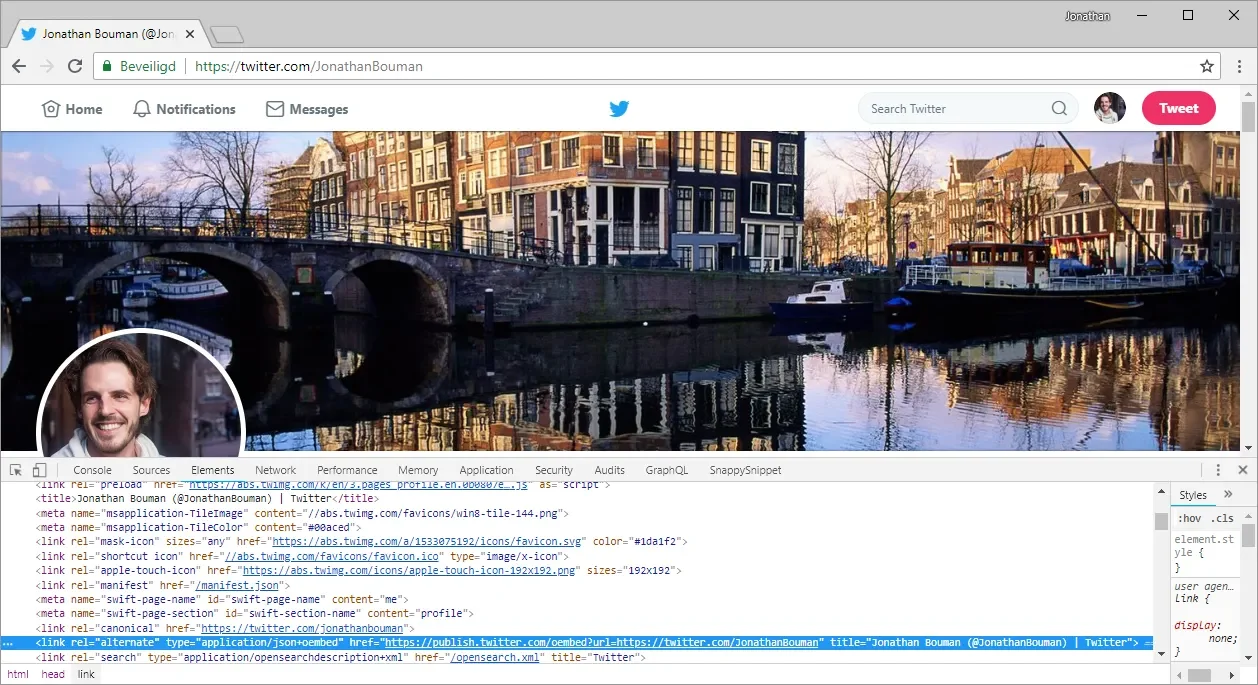
The image shows the oEmbed endpoint that Twitter specifies, which Medium uses when building the embed.
Open Graph
A second way to embed rich content is the Open Graph Protocol. Here the remote page itself carries hidden pieces of information, called meta tags, in its HTML. These tags describe what should be shown when the page is embedded somewhere else. For example, a tag named og:image defines which picture should appear when someone embeds the article.
Wikipedia, for example, has an og:image meta tag that defines the image displayed when someone embeds one of its articles.
Most platforms check the URLs for these oEmbed and Open Graph tags before they embed anything, and they do so in a specific order. After checking all the tags, the platform decides whether and how the link gets embedded.
The big advantage of embeds is convenience: readers do not have to leave a blog to view the media-rich content, such as a video, an image or a presentation. For media platforms such as Vimeo and YouTube, embeds are also a great way to increase exposure and views.
Most platforms that allow embedding of external content keep a whitelist of allowed domains. A whitelist is a list of things that are permitted, and everything not on the list is refused. WordPress, for example, publishes such a list. The reason is simple: you do not want unvalidated HTML injected into your platform, because whoever controls that HTML controls what visitors see.
So the question the researcher asked was: what happens if this whitelist fails, and we are able to inject our own code into the target platform? He had already proved oEmbed to be vulnerable. Now he wanted to see whether he could pull the same trick by manipulating Open Graph tags.
Picking the target
LinkedIn was chosen for a few reasons. It is one of the researcher's favourite places to stay in touch with fellow security researchers. It is also a place where plenty of executives hang around, so when he got stuck reporting bugs elsewhere (for example with a support desk that did not respond), a quick LinkedIn direct message to the right person was often enough to get attention.
LinkedIn also has a responsible disclosure policy and a private bug bounty programme. A bug bounty programme is a scheme where a company pays people for reporting security problems to it, instead of punishing them. A private programme means you can only take part if you are invited. The researcher hoped to get an invitation to the private programme.
Finding the feature to attack
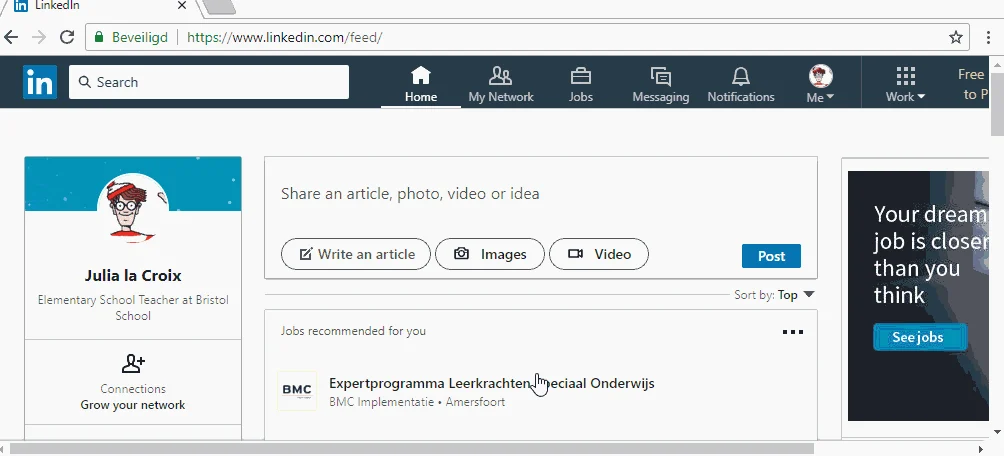
When you think of places that let you embed external content, you think of blogs. LinkedIn has one: LinkedIn Articles. You open it from your news feed by pressing the Write an Article button.
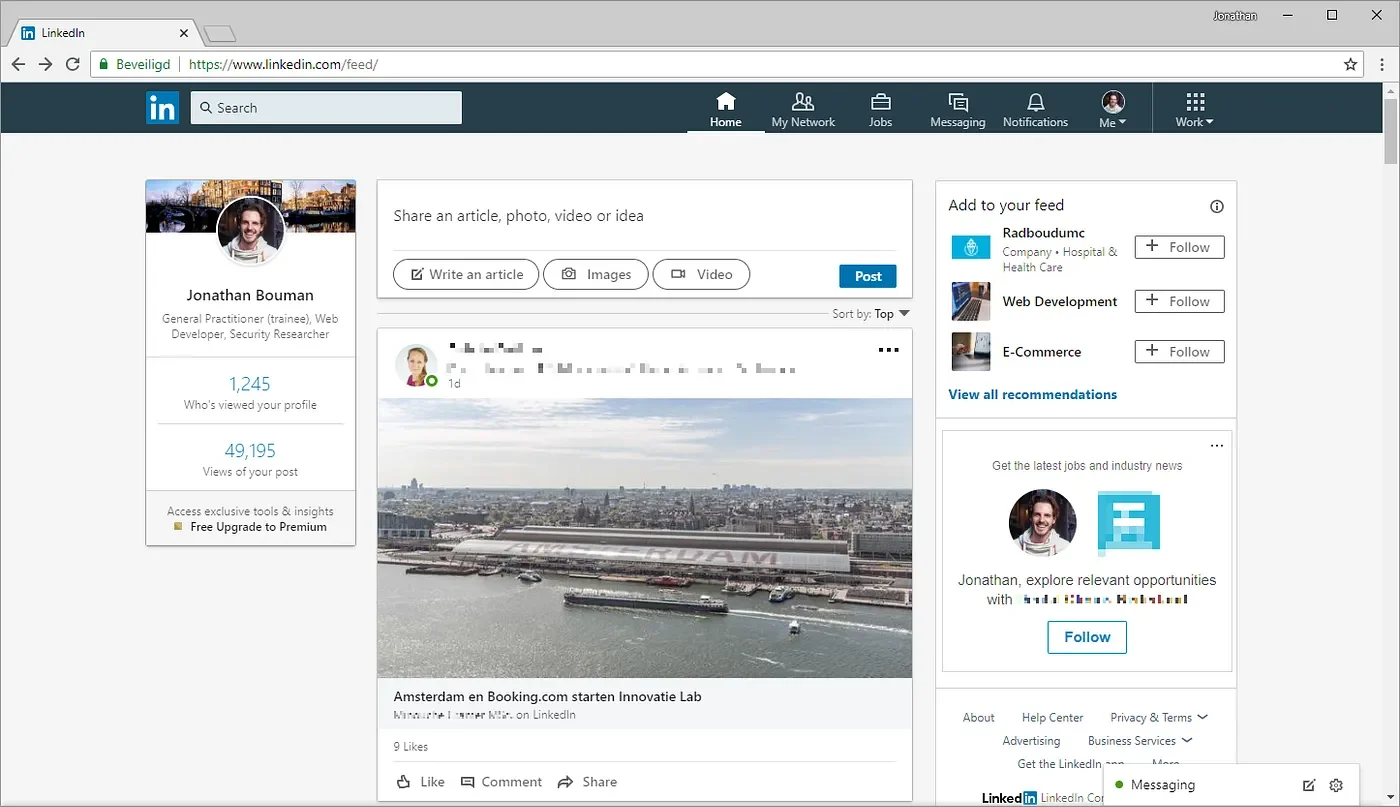
The image shows the Write an Article button in the LinkedIn interface.
You then get a clean editor where you write a headline and some content. Next to the cursor there is a small icon that lets you Add images or video for visual impact.
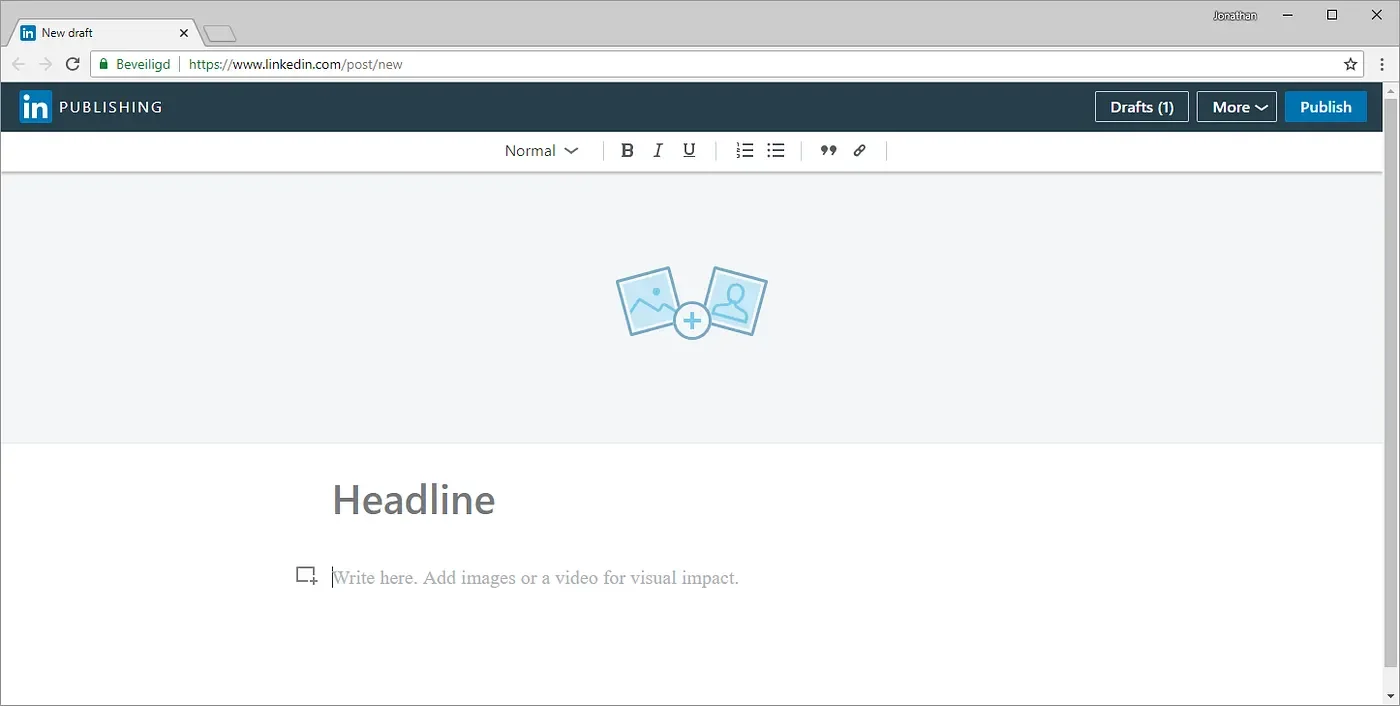
The image shows the blog editor with that icon next to the cursor.
If you press that icon, you can pick the Links button and add visual rich content to your article.
The image shows the embed wizard that opens when you choose Links.
Watching the embed request
Now it was time to look at what actually happens on the network when a URL is pasted into that wizard. The tool used for this is Burp Suite, a program that sits between your browser and the website and lets you read every request and response. A request is the message your browser sends to a server asking for something; a response is the server's answer.
The image shows the link being converted into HTML code that embeds the YouTube player.
LinkedIn converts the pasted URL into HTML code that the article is allowed to embed. The response is URL encoded, which means special characters are replaced by codes such as %20 so they can travel safely inside a URL. Decoded, the response looks like this:
{“embedIframe”:”<iframe src=\"https://www.linkedin.com/pulse/api/edit/embed?embed={"request":{"originalUrl":"https://www.youtube.com/watch?v=9hWgA7qjK2c","finalUrl":"https://www.youtube.com/watch?v=9hWgA7qjK2c"},"images":[{"width":480,"url":"https://i.ytimg.com/vi/9hWgA7qjK2c/hqdefault.jpg","height":360},{"width":1920,"url":"https://i.ytimg.com/vi/9hWgA7qjK2c/maxresdefault.jpg","height":1080}],"data":{"com.linkedin.treasury.Video":{"width":480,"html":"<iframe scrolling=\"no\" allowfullscreen src=\"//media.licdn.com/embeds/media.html?src=https://www.youtube.com/embed/9hWgA7qjK2c?feature=oembed&url=https://www.youtube.com/watch?v=9hWgA7qjK2c&type=text/html&schema=youtube\" width=\"480\" frameborder=\"0\" class=\"embedly-embed\" height=\"270\" />","height":270}},"provider":{"display":"YouTube","name":"YouTube","url":"https://www.youtube.com/"},"author":{"name":"321 Relaxing — Meditation Relax Clips”},"description":{"localized":{"en_US":"Rain HD video and forest, relaxing rain sounds and forest sounds for sleeping meditation. Nature sounds relaxation. Rainforest sounds: https://www.youtube.co..."}},"title":{"localized":{"en_US":"Rain Sounds and Forest Sounds — Relaxing Sleep”}},"type":"video"}&[redacted]"></iframe>”,”universal”:true}
What this block contains, piece by piece:
embedIframeis the name of the field that holds the HTML LinkedIn wants to insert into the article.<iframe src=\"https://www.linkedin.com/pulse/api/edit/embed?embed=...is the outer iframe. Its source is a LinkedIn address, and everything afterembed=is the information about the pasted link, passed along as a parameter."request"holdsoriginalUrlandfinalUrl, both the YouTube address that was pasted."images"lists two thumbnail pictures taken from YouTube, one 480 by 360 pixels and one 1920 by 1080 pixels, with their addresses oni.ytimg.com."data"contains acom.linkedin.treasury.Videoobject. Inside it, thehtmlfield holds the actual player: another iframe pointing atmedia.licdn.com, which in turn loads the YouTube player for that video.widthandheightgive its size."provider"says the content comes from YouTube, with YouTube's name and address."author","description"and"title"carry the video's author, description and title, in alocalizedblock keyed by language (en_US)."type":"video"tells LinkedIn this embed is a video.signature=...at the end is a value LinkedIn attaches to the embed data.
The editor takes this iframe and puts it into the article. The result is three iframes nested inside each other before the video player finally appears.
The image shows the nested iframes: it takes three iframes before the video player is visible.
That nesting is the first important limit. Even if the researcher could inject his own HTML, it would be isolated inside an iframe. It would have no access to the LinkedIn domain, no access to LinkedIn's cookies, and no ability to change the HTML outside the iframe.
A cookie is a small piece of data that a website stores in your browser so it can recognise you on later requests. The most important one is the session cookie, which proves you are logged in. If an attacker can read your LinkedIn cookies, they can often take over your account. The iframe boundary is what stops that here.
So the impact had to come from something else. The obvious candidate is a fake LinkedIn login screen that steals passwords. LinkedIn embeds content without any visual hint that it is an embed, just clean borderless boxes, so a visitor cannot tell the difference between an embed and a real login screen.
Building a convincing fake login
The first job was to design the phishing login screen. Phishing is the practice of showing someone a fake page that imitates a real service in order to collect their credentials. The researcher wanted to show the impact in a way that non-technical people would also understand, because a simple javascript alert box is often not convincing enough.
An alert box is the small pop-up that a browser shows when a page runs the javascript command alert(...). It is a common way to prove that you can run code on a page, but it does not look like a real attack to a manager reading a report.
A good tool for duplicating HTML elements from other websites is SnappySnippet. It is a Chrome extension, meaning a small add-on installed in the Chrome browser. It lets you select an element on a website and copy it as plain HTML and CSS. HTML is the language that describes the structure of a page; CSS is the language that describes how it looks.
The image shows the SnappySnippet extension in use.
The copied code was pasted into a new HTML file, tuned a little, and javascript was added at the end so that it captures the email address and password. If someone submits the form, the login details are displayed in a javascript alert box as a proof of concept.
The image shows the javascript alert displaying the captured login details.
Trying to embed it without any tags
The fake login HTML file was uploaded to the researcher's own server and linked from a LinkedIn article, just to see what happens when the page has no oEmbed or Open Graph tags at all.
The image shows the fake login embed without any tags, and it does not work.
It does not work. LinkedIn falls back to a universal-embed-wrapper, which simply displays the URL with a little grey border around it. In other words, when LinkedIn cannot find any tags telling it how to embed the page, it shows a plain link preview instead of the page itself.
Exploiting the Open Graph tags
Looking closely at the Open Graph Protocol specifications, there is a tag named og:video. It defines how a video player should be embedded. Vimeo's page shows an example of these meta tags.
The image shows Vimeo's example of Open Graph video meta tags.
The idea was then simple: create an HTML file with og:video tags that loads the fake login instead of a video player.
The image shows the document that is being embedded, which loads the fake login as a video player.
The image shows the fake login loading inside LinkedIn, which treats it as a genuine video player.
It worked. The fake login was embedded inside a LinkedIn article. The article was named Oops, something went wrong! and was ready to use.
Delivering the attack
With the draft in place, the researcher could spear phish other users by sharing a private link to the draft of the article. Spear phishing is phishing aimed at specific people rather than a broad audience. Alternatively, he could simply publish the article on the LinkedIn network and see what happens.
The image is the proof of concept.
Everything was ready, so it was time to file a report with LinkedIn security.
Why it worked
The embed pipeline trusted the Open Graph tags supplied by an arbitrary remote page. When the page declared og:video, LinkedIn built an embed around it as if it were a video player, without checking that the target was a known video provider. The report frames the attack as what happens when the embed whitelist fails. The iframe sandbox limits what the injected page can reach, but it does not stop the page from rendering a credential form that looks native to LinkedIn.
Impact
The report describes a perfect situation for (spear) phishing on the linkedin.com domain. Specifically:
- Users may be redirected to another page after they have entered their credentials, so the flow does not look suspicious. This can be done with
top.location.href, a javascript instruction that tells the outermost browser window to navigate to a different address. - Visitors can be attacked by embedding http://beefproject.com/. The BeEF project is a tool for controlling browsers that have been hooked by an attack.
- An attacker can perform clickjack attacks. Clickjacking is tricking a user into clicking something different from what they think they are clicking, usually by placing an invisible or disguised layer over a page.
The limits are the iframe isolation described above: no LinkedIn cookies and no manipulation of HTML outside the iframe. The researcher could share a private draft link or publish the article on the network.
The fix
LinkedIn deployed a fix, and the researcher confirmed it on 02-08-2018 using a personal account after his test accounts had been blocked. The report does not describe the code change. The general measures it recommends are:
- Never trust Open Graph tags from strangers; use a whitelist for embeds.
- Do not allow iframes to break out, for example by redirecting the top-level window.
The report lists the reward as none. LinkedIn stated it does not offer rewards outside its private bug bounty programme, and added the researcher to a list of researchers for consideration.
These are the variants the report suggests testing, in general terms:
- oEmbed endpoint abuse. Point the embed at a page whose oEmbed endpoint returns attacker-controlled HTML. A positive result is your markup rendered inside the embed rather than a provider player.
- Open Graph video injection. Serve a page with
og:videotags that load your own document. A positive result is your document rendered as a video player, as in this report. - Tag combinations. Try
og:image,og:videoand other Open Graph tags on a page that is not a known provider. A positive result is any tag-driven embed that renders your content instead of a link preview. - Whitelist bypass. Test domains that are not on the platform's embed whitelist. A positive result is an embed where the universal-embed-wrapper fallback should have appeared.
- Sandbox escape. From inside the injected iframe, attempt to reach the parent document or navigate the top window. A positive result is access to the host page or a top-level redirect.
Timeline
| Date | Event |
|---|---|
| 01-07-2018 | Bug discovered and reported by email |
| 01-07-2018 | LinkedIn confirmed receipt of the report |
| 20-07-2018 | Update requested |
| 24-07-2018 | LinkedIn replied that the fix was deployed; the researcher replied that all test accounts were blocked and the fix could not be confirmed, requested unblocking, no reply |
| 02-08-2018 | Used a personal account for testing, confirmed the fix, asked whether the bug was eligible for a reward or an invite to the private programme, requested unblocking of the test account |
| 04-08-2018 | LinkedIn replied that the researcher is on the review list for an invite; no answer on reward eligibility; accounts still blocked, so no further testing possible (no new accounts due to phone number verification); LinkedIn requested a review of the post before publication |
| 08-08-2018 | Draft of the blog sent to LinkedIn for review, no reply |
| 15-08-2018 | Update requested |
| 21-08-2018 | LinkedIn approved the blog, stated it does not offer rewards outside the private bug bounty programme, and added the researcher to the list of researchers for consideration |
| 07-10-2018 | Blog published, delayed to wait for Medium.com to fix the same sort of bug; published on HackerOne's new open blogging platform |
Glossary
- Alert box: the small pop-up a browser shows when a page runs the javascript
alert(...)command; often used to prove code execution. - Bug bounty programme: a scheme where a company pays people for reporting security problems to it. A private programme is invitation-only.
- Burp Suite: a program that sits between your browser and a website so you can read and modify every request and response.
- Clickjacking: tricking a user into clicking something different from what they think they are clicking, usually with an invisible or disguised layer over a page.
- Cookie: a small piece of data a website stores in your browser so it can recognise you on later requests; the session cookie is what proves you are logged in.
- CSS: the language that describes how a web page looks.
- Embed: showing content from another website inside a page, instead of sending the reader to that other site.
- Endpoint: a specific address on a server that answers a particular kind of request.
- HTML: the language that describes the structure of a web page.
- Iframe: a way to place one web page inside another; the browser keeps the inner page separate from the surrounding page for security.
- Javascript: the programming language that runs in the browser and makes pages interactive.
- Meta tag: a hidden piece of information in a page's HTML that describes the page, for example which image should represent it.
- oEmbed: an open format that lets one website ask another for the HTML to show when its content is embedded.
- Open Graph Protocol: a set of meta tags (such as
og:imageandog:video) that describe how a page should look when embedded elsewhere. - Persistent XSS (stored XSS): cross-site scripting where the malicious content is saved on the site, so it affects every visitor who views the page later.
- Phishing: showing someone a fake page that imitates a real service in order to collect their credentials.
- Request: the message a browser sends to a server asking for something.
- Response: the server's answer to a request.
- Responsible disclosure: a policy describing how security researchers should report problems to a company.
- Sandbox: an isolated environment that limits what code inside it can do; an iframe is one example.
- SnappySnippet: a Chrome extension that lets you select an element on a website and copy it as plain HTML and CSS.
- Spear phishing: phishing aimed at specific people rather than a broad audience.
- URL encoding: replacing special characters in a URL with codes such as
%20so they can travel safely. - Whitelist: a list of things that are permitted, with everything not on the list refused.
- XSS (cross-site scripting): getting your own code to run inside someone else's website.