Exploiting Activity in medium android app
An exported Android activity in the Medium app accepted a URL from an intent extra and saved it to the user's saved articles list without validation. A malicious app on the same device could launch this activity to add an attacker-controlled article to the victim's saved list.
 Published on mrcyberwarrior.medium.com
Hello friends I am Raju Kumar A.k.a Mrcyberwarrior. Let’s come to the story, I found vulnerabilities in the web as well as android applications of medium but the web vulnerabilities are not fixed yet so here I will discuss one of the bug found on the Andriod application ie.
The full write-up lives on its author's site
It belongs to its author, so we link to it rather than copy it. The other two tabs are our own rewrites, checked against it.
Context
This write-up covers an exported activity in the Medium Android application. The researcher, Raju Kumar (@MrCyberwarrior), decompiled the app and found that SaveToMediumActivity is exported, meaning any app installed on the same device can launch it.
The feature involved is the save button that appears on each article published on Medium. When a user taps save, the article is added to that user's saved list. The researcher's idea was to abuse the same activity to place an attacker-controlled, unpublished article into a victim's saved list.
Setup
The tools used were:
- jadx-gui, described in the report as a command-line and GUI tool for producing Java source code from Android Dex and apk files.
- adb, used to send the crafted intent from a shell.
The report does not list app versions, device models or Android versions. The precondition is simply that the attacker can get a malicious app installed on the same device as the Medium app, or can run adb against the device.
Finding it
The researcher decompiled the application with jadx-gui and inspected AndroidManifest.xml. In that file, SaveToMediumActivity is declared as exported. An exported activity can be launched by arbitrary apps installed on the same device.

The manifest excerpt shows the exported declaration for SaveToMediumActivity.
From there the researcher moved into the code of SaveToMediumActivity to analyse what it does.

The decompiled source of the activity, showing how it handles the incoming intent.
The code saves an article into the saved list. The URL that gets saved is taken straight from the intent:
getIntent().getStringExtra("android.intent.extra.TEXT")
That is the flaw: the activity trusts a string extra supplied by whoever launched it, and the value is not restricted to Medium URLs.
Exploitation
Step 1: Send the intent with adb
The researcher launched the exported activity directly and passed an attacker-controlled URL in the android.intent.extra.TEXT extra:
adb shell am start -n com.medium.reader/com.medium.android.donkey.save.SaveToMediumActivity -e android.intent.extra.TEXT "https://attacker.com"
am start -nstarts an activity by its explicit component name.com.medium.readeris the Medium package andcom.medium.android.donkey.save.SaveToMediumActivityis the exported activity.-e android.intent.extra.TEXTsupplies the string extra that the activity reads withgetStringExtra.- The value
https://attacker.comis the URL that ends up in the saved list.
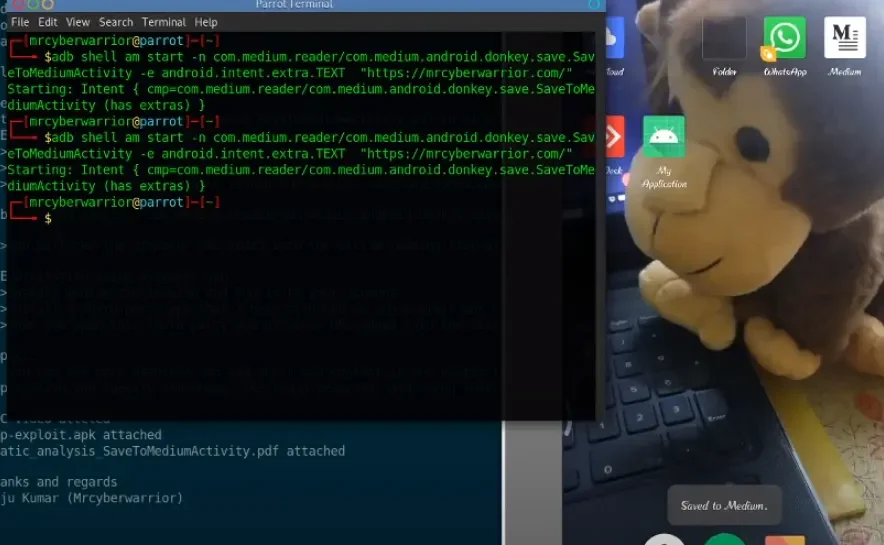
The command starts the exported activity and passes the attacker-controlled URL in the extra.
Step 2: Reproduce from a malicious app
The researcher also wrote a Java proof of concept that builds the same intent from inside an app, then created an application using that code and exploited the bug with it.
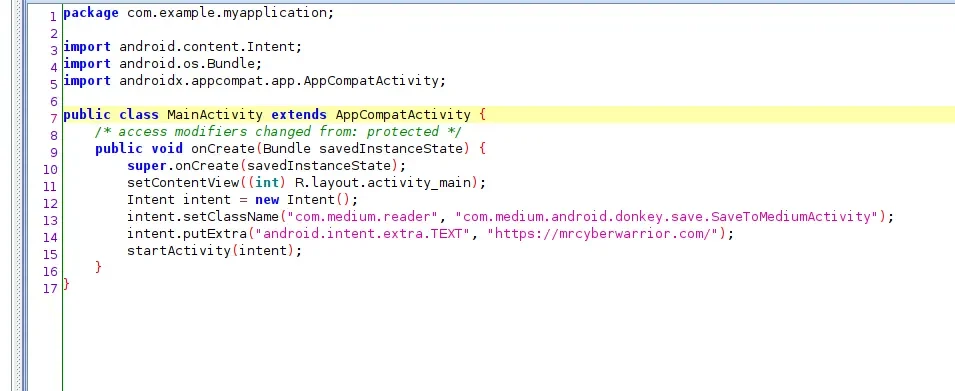
The Java PoC code that constructs and fires the intent at the exported activity.
Root cause
SaveToMediumActivity is exported and reads its input from getIntent().getStringExtra("android.intent.extra.TEXT") without validating that the value is a legitimate Medium article URL. Any app on the device can therefore start the activity and control what gets saved. The report does not describe any additional checks in the activity that would limit this.
Impact
An attacker who can run code on the victim's device, through an installed malicious app or adb, can insert an arbitrary URL into the victim's Medium saved list. In the researcher's scenario the saved item is the attacker's own article, which is not published on Medium. The report does not describe any further consequence beyond the saved-list injection.
Fix
The report states that the bug was reported on 29 September 2020 and fixed, with a bounty rewarded, on 2 October 2020. The obvious fix is to stop exporting the activity, or to validate the incoming extra so that only legitimate Medium URLs are accepted.
Variants to test
- Other exported activities in the same app. Decompile the APK, list every
android:exported="true"component inAndroidManifest.xml, and try launching each one with adb. A positive result is an activity that starts and performs an action using data you supplied. - Other string extras. For each exported activity, look for
getIntent().getStringExtra(...)calls and try supplying each extra name with a test URL. A positive result is your URL being stored, displayed or loaded. - Deep links and intent filters. Check activities with intent filters for browsable schemes and try sending a matching intent with attacker-controlled data. A positive result is the app acting on your data without validation.
- Saved-list and share targets in other apps. Repeat the same pattern on any app with a save or share feature backed by an exported activity. A positive result is an attacker-controlled item appearing in the user's saved or shared content.
What happened, in plain words
Raju Kumar (@MrCyberwarrior) found a bug in the Android app for Medium, the website where people publish articles. The app has a feature: every article has a save button, and tapping it adds that article to your personal saved list so you can read it later.
The problem was that the part of the app responsible for saving an article could be started by any other app on the same phone, not just by the Medium app itself. And when it was started, it took the address (URL) of the article to save from whoever started it, without checking that the address really belonged to Medium. So a malicious app on the phone could quietly push the attacker's own article, which is not even published on Medium, into the victim's saved list.
To understand the rest of this article you only need to know that an Android phone runs many apps side by side, and that apps can talk to each other in limited, defined ways. The bug is about one of those ways being left open when it should have been closed.
Background you need first
The researcher starts by explaining three things. They are worth knowing because the whole bug lives inside them.
jadx is described in the report as a command-line and GUI tool for producing Java source code from Android Dex and apk files. In plain words: an Android app is shipped as a package file (an .apk), and inside it the code is stored in a compact, machine-friendly form. jadx takes that package and turns the code back into something close to the readable source code the developers wrote. Think of it like opening a sealed flat-pack box and spreading the instructions out on the table so you can read them. The "GUI" part means it has a window you can click around in, rather than only a text command.
AndroidManifest.xml is, as the report puts it, a file every app must have. It contains information about the package, including the components of the application such as activities, services, broadcast receivers and content providers. A useful comparison: the manifest is the app's front door sign and list of rooms. It tells the phone which parts of the app exist and which of them outsiders are allowed to walk into.
Activity is one screen of the Android app's user interface, and it is defined in the manifest. When you tap a button and a new screen slides in, that screen is usually an activity. The save feature is one such screen, called SaveToMediumActivity.
The report points readers to the official developer guide at https://developer.android.com/guide/ for more on these ideas.
Detection and exploitation of the vulnerability
Step 1: Open the app and read its manifest
The researcher decompiled the application using jadx-gui, then looked into the AndroidManifest.xml file. This is the natural first move: the manifest is where the app declares which of its rooms have open doors, so reading it tells you where to look next.
In that file, SaveToMediumActivity is declared as exported. Exported means it can be launched by arbitrary apps installed on the same device. Compare it to a shop with a back entrance that anyone on the street can walk through, not just staff.
The screenshot shows the manifest entry where SaveToMediumActivity is declared as exported.
Step 2: Read the activity's code
Next the researcher jumped into the code of SaveToMediumActivity to analyse the static code and see what it actually does. "Static" here simply means reading the code without running it, the way you might read a recipe before cooking rather than tasting the dish.
The screenshot shows the decompiled source of the activity, including how it handles the incoming intent.
Step 3: Understand the feature and form an idea
By using the application, the researcher noticed there is a save button on each article published on Medium, and once the user clicks it the article gets added to the user's saved list. That is the normal, intended behaviour.
The attacker's idea was simple: save my own article, which is not published on Medium, into the victim's saved list. In other words, use the legitimate save feature but feed it an address of the attacker's choosing.
As the code shows, the activity saves the article into the saved list, and that is exactly where the vulnerability exists. The URL the attacker provides is loaded through this call:
getIntent().getStringExtra("android.intent.extra.TEXT")
Line by line, in plain words:
getIntent()asks the activity for the intent that started it. An intent is Android's standard message for "please do this thing". When you tap a button inside an app, the app sends itself an intent; when another app wants to trigger something, it sends an intent too. The activity cannot easily tell who sent it..getStringExtra("android.intent.extra.TEXT")pulls one named piece of text out of that message.android.intent.extra.TEXTis the label of the slot, and the value in that slot is whatever text the sender put there.- The result is used as the article URL to save. Nothing in this line checks that the text is a Medium address.
So the flaw is that the activity trusts a string supplied by whoever launched it, and the value is not restricted to Medium URLs. A comparison: a receptionist who accepts a parcel from anyone at the counter and files it in your pigeonhole without checking the sender.
Step 4: Exploit it with adb
The researcher exploited this using adb. adb (Android Debug Bridge) is a tool that lets a computer send commands to an Android device over a cable or network, normally for development and testing. It is the equivalent of a remote control for the phone.
adb shell am start -n com.medium.reader/com.medium.android.donkey.save.SaveToMediumActivity -e android.intent.extra.TEXT "https://attacker.com"
Line by line:
adb shellopens a command shell on the device, so the rest of the line runs on the phone rather than on your computer.am startis the Android "activity manager" command for starting an activity.-n com.medium.reader/com.medium.android.donkey.save.SaveToMediumActivitynames the exact component to start:com.medium.readeris the Medium package (the app's unique name on the device) andcom.medium.android.donkey.save.SaveToMediumActivityis the exported activity inside it. Using-nmeans "start this specific one", not "find something that matches".-e android.intent.extra.TEXTsupplies a string extra with that name, which is the same slot the activity reads withgetStringExtra."https://attacker.com"is the value placed in that slot, and therefore the URL that ends up in the saved list.
The screenshot shows the adb command being run against the exported activity.
Step 5: Reproduce it from a malicious app
The researcher also wrote a proof of concept in Java, the programming language used for Android apps. A proof of concept (PoC) is a small piece of code that demonstrates the bug works, rather than just describing it.
The screenshot shows the Java PoC code that builds the same intent and fires it at the exported activity.
The researcher then created an application using that code and exploited the bug with it. This matters because it shows the attack can be carried out from an app, not only from adb.
Why it works (root cause)
SaveToMediumActivity is exported and reads its input from getIntent().getStringExtra("android.intent.extra.TEXT") without validating that the value is a legitimate Medium article URL. Any app on the device can therefore start the activity and control what gets saved. The report does not describe any additional checks in the activity that would limit this.
What the impact is
An attacker who can run code on the victim's device, through an installed malicious app or adb, can insert an arbitrary URL into the victim's Medium saved list. In the researcher's scenario the saved item is the attacker's own article, which is not published on Medium. The report does not describe any further consequence beyond the saved-list injection.
How it was fixed
The report states that the bug was reported on 29 September 2020 and fixed, with a bounty rewarded, on 2 October 2020. A bounty here means the company paid the researcher for finding and reporting the problem. The obvious fix is to stop exporting the activity, or to validate the incoming extra so that only legitimate Medium URLs are accepted.
Other places to look for the same pattern
- Other exported activities in the same app. Decompile the APK, list every
android:exported="true"component inAndroidManifest.xml, and try launching each one with adb. A positive result is an activity that starts and performs an action using data you supplied. - Other string extras. For each exported activity, look for
getIntent().getStringExtra(...)calls and try supplying each extra name with a test URL. A positive result is your URL being stored, displayed or loaded. - Deep links and intent filters. Check activities with intent filters for browsable schemes and try sending a matching intent with attacker-controlled data. A positive result is the app acting on your data without validation.
- Saved-list and share targets in other apps. Repeat the same pattern on any app with a save or share feature backed by an exported activity. A positive result is an attacker-controlled item appearing in the user's saved or shared content.
Glossary
- Activity: one screen of an Android app's user interface, declared in the app's manifest.
- adb (Android Debug Bridge): a tool for sending commands from a computer to an Android device, used for development and testing.
- AndroidManifest.xml: the file every Android app must have, listing its components and which of them outsiders may access.
- APK: the package file an Android app is shipped in.
- Bounty: a payment a company makes to someone who reports a security bug to it.
- Component: a building block of an Android app, such as an activity, service, broadcast receiver or content provider.
- Decompile: turn a packaged app back into readable source code.
- Dex: the compact code format stored inside an Android app package.
- Exported: a component that any app on the same device is allowed to launch or access.
- Extra: a named piece of data attached to an intent, such as a string.
- Intent: Android's standard message asking a component to do something, which can carry data such as extras.
- Intent filter: a declaration in the manifest saying which kinds of intents a component will respond to.
- jadx / jadx-gui: a tool that produces Java source code from Android Dex and apk files, with a command-line and a graphical version.
- Java: a programming language commonly used to write Android apps.
- Package: the unique name identifying an app on a device, here
com.medium.reader. - Proof of concept (PoC): a small piece of code that demonstrates a bug actually works.
- Root cause: the underlying reason a vulnerability exists, as opposed to its symptoms.
- Static analysis: reading code without running it to understand what it does.
- URL: the address of a page or resource, such as
https://attacker.com. - Validation: checking that input is acceptable before using it, for example that a URL belongs to Medium.
- Vulnerability: a weakness in software that lets someone make it behave in a way its makers did not intend.

