$25K Instagram Almost XSS Filter Link — Facebook Bug Bounty
A filter name parameter was reflected into meta tags without proper sanitisation, allowing an attacker to inject a meta refresh tag and redirect users to an arbitrary URL. The reporter also found that using a javascript: URL could execute script in some browsers, and Facebook escalated the issue to stored XSS.
 Published on medium.com
Hii, I’m Andres Alonso, Brazilian 14 years old. Today I am going explain how I accidentally found a critical stored XSS when I was making an Instagram integrated app.
The full write-up lives on its author's site
It belongs to its author, so we link to it rather than copy it. The other two tabs are our own rewrites, checked against it.
Context
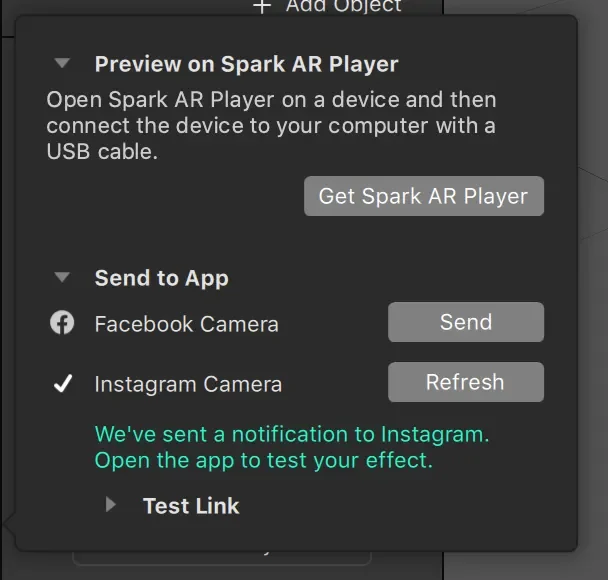
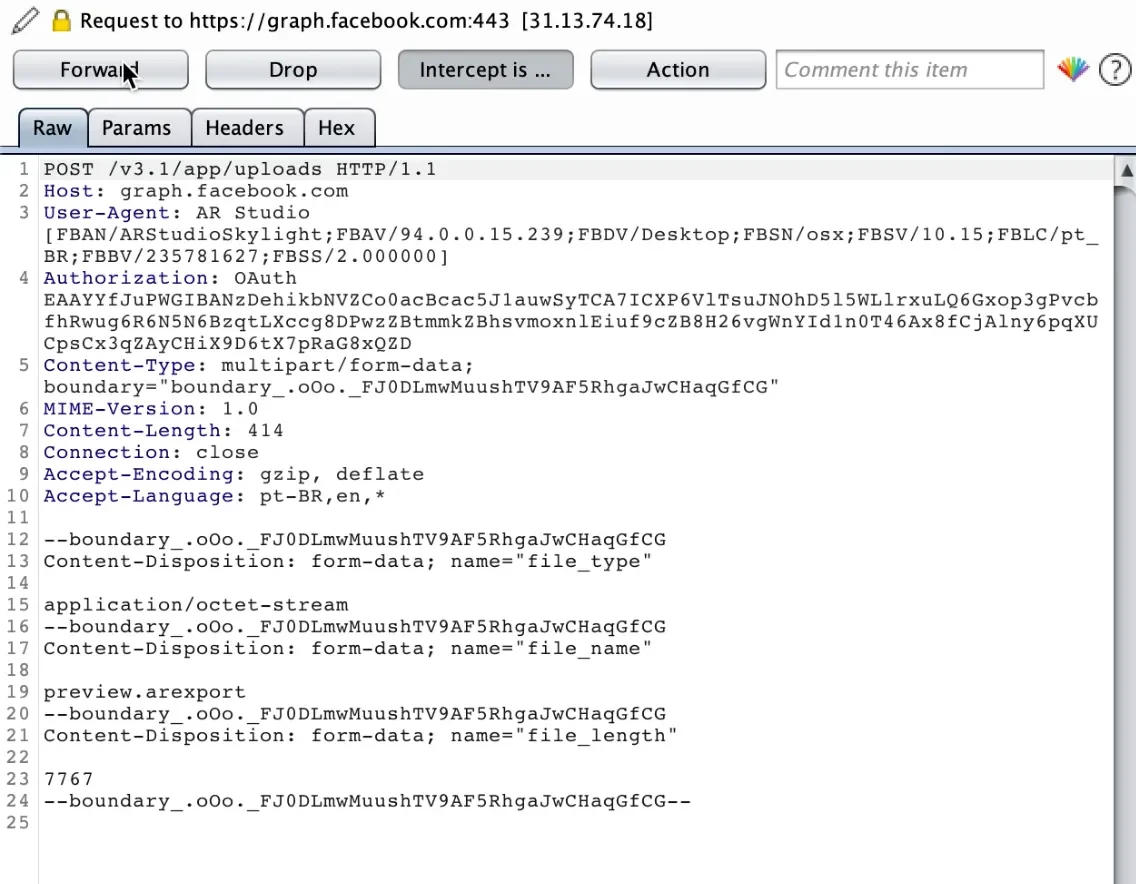
Andres Alonso describes how he accidentally found a stored XSS while building an app that integrates with Instagram. The feature involved is the Spark AR filter creator, the Facebook tool used to build Instagram filters. When a filter is generated, the app produces a link used to test the filter on a smartphone. The first request sent when generating that link sets the name, file type and size of the filter .arexport file.
The default name of the preview is preview.arexport, and according to the author it cannot be changed from the Spark AR app itself. That default, and the fact that the name travels through the link, is what drew his attention.
Setup
The author does not describe any special accounts, roles or tool versions. The work started from his own app development: he needed to understand how the Spark AR filter creator generates filter links so that he could test a filter on a smartphone. The testing moved between the mobile flow and the desktop app, where the filter itself does not load.
Finding it
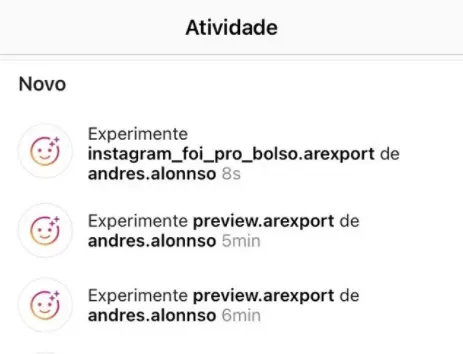
When he changed the filter name, the filter test notification changed too. That suggested the name was being carried through and rendered somewhere downstream, so he tried code injection, an XSS or something similar, in the Instagram app. Those attempts failed.
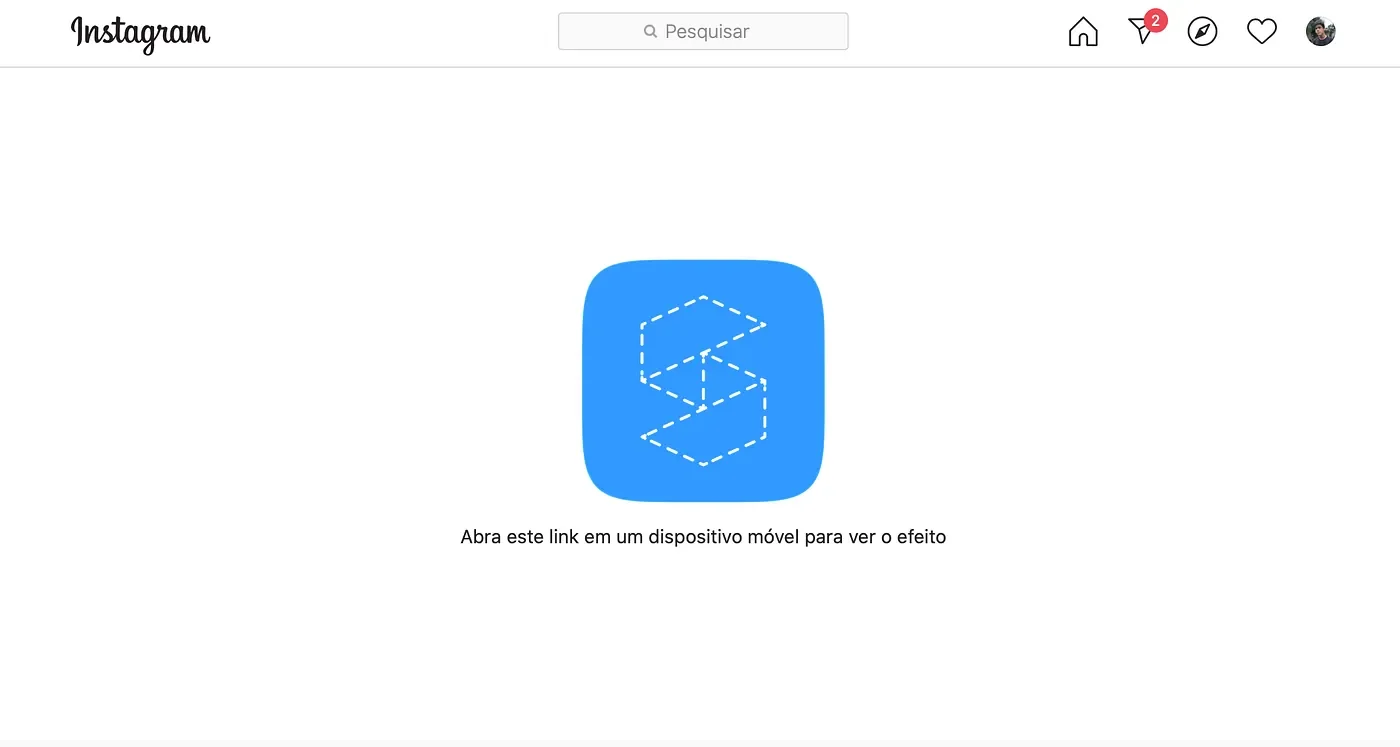
The picture changed when he opened the same flow in the desktop app. The filter does not load there, and the name is not shown on the page. Searching the page source for the filter name, however, revealed two meta tags whose content contained the name.
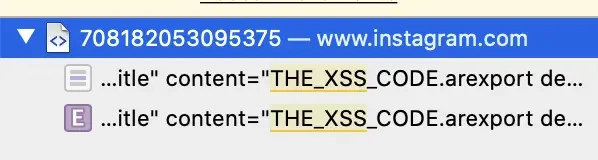
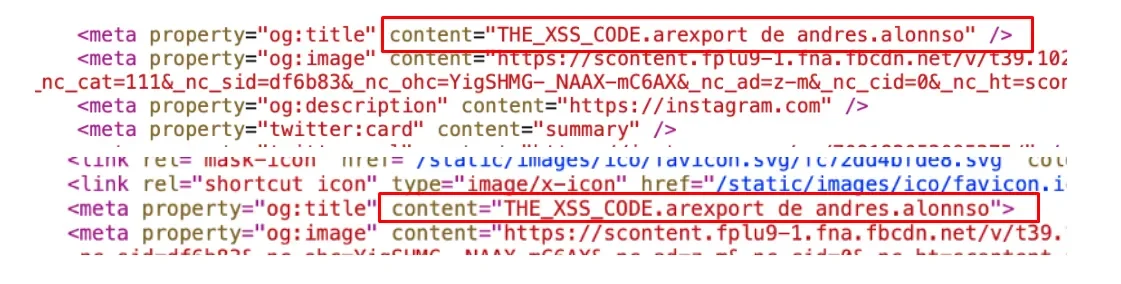
That is the interesting part: the value is not rendered as visible text, it is placed inside a meta tag attribute. He then tried an XSS using only the characters the filter allowed. He could not open an HTML tag, but he could use double quotes to close the content attribute.

Exploitation
Step 1: close the attribute and inject a refresh
Every attempt at a direct XSS failed because the meta tag is so limited: the only thing he could do was close the double quotes. He pivoted to an open redirect. To get past the filter he HTML-encoded the URL:
http://www.evilzone.com
He HTML-encoded the URL to bypass the filter, and the browser decodes the entities back to http://www.evilzone.com. He placed that encoded URL into the following payload, which is used as the filter name:
0;url=http://www.evilzone.com"HTTP-EQUIV="refresh"any=".arexport
The result: the user is redirected to the other page.
Step 2: from redirect to script execution
An open redirect alone does not explain where the XSS is. The author notes that if you use javascript: before the URL, the script will be executed, but only on specific browsers with specific versions. He reported the open redirect and cited the possible XSS in some browsers.

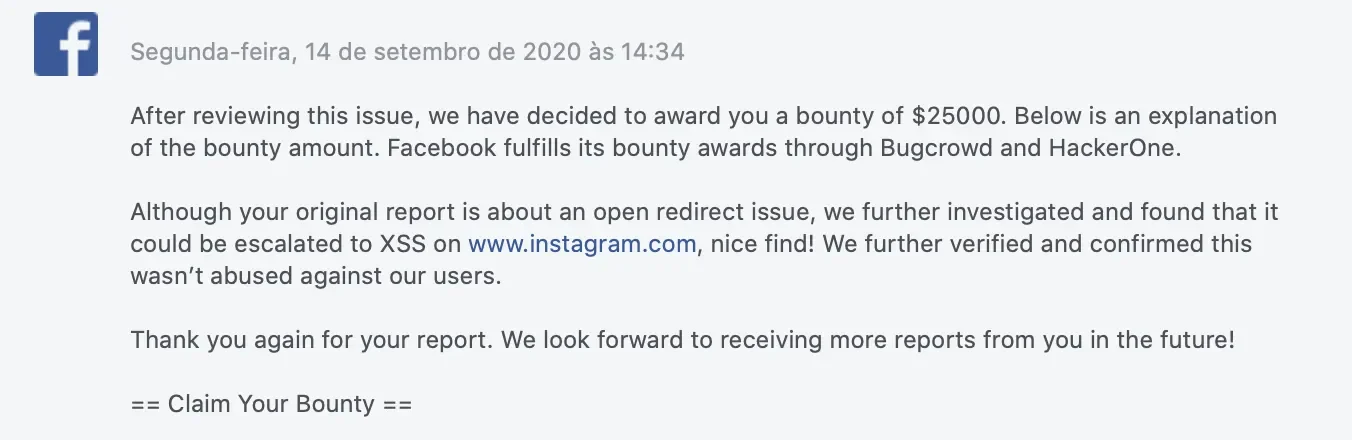
After the report, the Facebook Security Team rated it as something that can be escalated to an XSS.
Step 3: charset switching
He explains his own reading of why this works: he cannot open HTML code, but he can close it. Building on that, he found payloads that change the charset of the page and then add code in another charset, bypassing the filter:
<meta charset="x-imap4-modified-utf7">&ADz&AGn&AG0&AEf&ACA&AHM&AHI&AGO&AD0&AGn&ACA&AG8Abg&[redacted]&ACAAPABi
The payload changes the charset of the page and adds code with another charset type, bypassing the filter.
Root cause
The filter name ends up inside the content of two meta tags, and the author could close the attribute with a double quote. Because the value is placed inside an attribute, the author could not introduce a new tag, but he could terminate the attribute with a double quote and add further attributes, which is enough to inject a refresh and redirect the user. The author HTML-encoded the URL to bypass the filter, and the redirect worked. The charset payload shows the same weakness from another angle: once the attribute can be closed, a new meta charset can be introduced and the interpretation of the rest of the page changed. The report does not show the server-side code or explain the precise escaping mistake.
Impact
The immediate demonstrated effect is an open redirect: a victim who opens the crafted filter link is sent to another page. The author also states that with javascript: before the URL the script will be executed, but only on specific browsers with specific versions, so script execution is browser-dependent rather than universal. The Facebook Security Team rated the report as something that can be escalated to an XSS. The bounty was 25,000 USD.
Fix
The report does not describe the fix that was applied. The change needed is to treat the filter name as an attribute value and escape it correctly for that context, so that double quotes and HTML entities cannot terminate the attribute or introduce new attributes or tags.
Variants to test
- Any feature that reflects a user-controlled name into a meta tag, such as a preview, share card or test notification. A positive result is a double quote in the name that closes the
contentattribute and lets you add a new attribute. - Filters that block plain URLs but not HTML entities. A positive result is an encoded URL such as
http://...that survives the filter and is decoded by the browser. - Meta refresh injection through an attribute you can close. A positive result is a redirect to a domain you control when the link is opened.
- Charset switching after closing an attribute. A positive result is a
meta charsetyou injected changing how the following bytes are interpreted. javascript:in a redirect target across browsers and versions. A positive result is script execution in at least one browser, which the author cited as a possible XSS.
What happened, in plain words
A 14-year-old developer named Andres Alonso was building his own app that works with Instagram. To make one of its features, he needed to understand how Facebook's Spark AR filter creator builds the links it uses to test an Instagram filter on a phone. While poking at that link, he noticed that the name he gave the filter travelled through the link and ended up written into the page. He could not run script directly, but he could break out of the place where the name was written and make the page send the visitor somewhere else. He reported it as an open redirect, and Facebook's security team said it could be escalated to an XSS. The bounty was 25,000 USD.
Before going further, a few words that will come up constantly:
- XSS (cross-site scripting): a bug where someone else's input ends up being treated as code by a page, so the attacker's instructions run in the victim's browser. Think of a comment box that prints what you type as part of the page's own instructions instead of as plain text.
- Stored XSS: the malicious input is saved somewhere (a name, a profile field, a filename) and served back to whoever views it later, rather than being reflected only in the immediate response.
- Open redirect: a link on a trusted site that sends the visitor to a different site chosen by the attacker. The address bar starts at the trusted site, which is what makes it useful to a phisher.
- Meta tag: a line in a page's HTML that gives the browser information about the page rather than showing text to the reader. Two common ones are
charset(which character encoding the page uses) andrefresh(reload the page, or go to another URL after a delay). - Attribute: a setting written inside an HTML tag, such as
content="..."inside a<meta>tag. Values inside attributes need their own kind of escaping, different from text between tags. - HTML entity: a code such as
/that stands for a character (here, the slash/). Browsers decode entities before using the value, so a filter that only looks for plain characters can be walked past. - Charset: the rulebook that says which byte pattern means which character. If a page is told to use a different charset halfway through, the same bytes can be read as different characters.
- API: the set of requests one program can send to another to make it do something, like a waiter taking your order to the kitchen. The Spark AR app talks to Facebook's servers through such requests.
Context
The feature in play is the Spark AR filter creator, Facebook's tool for building Instagram filters. When a filter is generated, the tool produces a link that is used to test the filter on a smartphone. The first request sent when generating that link sets the name, file type and size of the filter .arexport file. In other words, the name of the filter is one of the pieces of information the app sends to the server, and the server uses it when building the test link.
The default name of the preview is preview.arexport, and according to the author it cannot be changed from the Spark AR app itself. That default, and the fact that the name travels through the link, is what drew his attention. If the name is fixed by the app, why does it appear in the link at all? And what happens if it is not the default?
Setup
The author does not describe any special accounts, roles or tool versions. The work started from his own app development: he needed to understand how the Spark AR filter creator generates filter links so that he could test a filter on a smartphone. The testing moved between the mobile flow and the desktop app, where the filter itself does not load. No special tooling is mentioned: a browser and the Spark AR app were enough.
Finding it
When he changed the filter name, the filter test notification changed too. That suggested the name was being carried through and rendered somewhere downstream, so he tried code injection, an XSS or something similar, in the Instagram app. Those attempts failed.
The picture changed when he opened the same flow in the desktop app. The filter does not load there, and the name is not shown on the page. Searching the page source for the filter name, however, revealed two meta tags whose content contained the name.
That is the interesting part: the value is not rendered as visible text, it is placed inside a meta tag attribute. This matters because the rules for escaping text between tags and the rules for escaping a value inside an attribute are different. A page that escapes one correctly can still be broken through the other. He then tried an XSS using only the characters the filter allowed. He could not open an HTML tag, but he could use double quotes to close the content attribute.
Exploitation
Step 1: close the attribute and inject a refresh
Every attempt at a direct XSS failed because the meta tag is so limited: the only thing he could do was close the double quotes. He pivoted to an open redirect. To get past the filter he HTML-encoded the URL:
http://www.evilzone.com
Line by line: http: is the scheme, the part that tells the browser this is a web address. / is the HTML entity for a slash, so the two // stand in for //. www.evilzone.com is the destination host. The filter sees something that does not look like a plain URL, but the browser decodes the entities back to http://www.evilzone.com before using the value. This is the same trick as writing a word in a code the bouncer cannot read but the guest can.
He placed that encoded URL into the following payload, which is used as the filter name:
0;url=http://www.evilzone.com"HTTP-EQUIV="refresh"any=".arexport
The " closes the content attribute of the meta tag, so everything after it is read as new attributes rather than as part of the value. The result: the user is redirected to the other page.
Why this works: the name sits inside the content of a meta tag. By putting a double quote in the name, the attacker ends the value early and starts writing their own attributes. The browser then sees a refresh instruction and follows it.
Step 2: from redirect to script execution
An open redirect alone does not explain where the XSS is. The author notes that if you use javascript: before the URL, the script will be executed, but only on specific browsers with specific versions. He reported the open redirect and cited the possible XSS in some browsers.
After the report, the Facebook Security Team rated it as something that can be escalated to an XSS.
Step 3: charset switching
He explains his own reading of why this works: he cannot open HTML code, but he can close it. Building on that, he found payloads that change the charset of the page and then add code in another charset, bypassing the filter:
<meta charset="x-imap4-modified-utf7">&ADz&AGn&AG0&AEf&ACA&AHM&AHI&AGO&AD0&AGn&ACA&AG8Abg&[redacted]&ACAAPABi
The payload changes the charset of the page and then adds code with another charset type, bypassing the filter. The &A... sequences that follow are the encoded form of the code to be interpreted under that charset. In plain terms, the attacker first changes the rulebook the browser is using to read the rest of the page, then writes instructions that only make sense under the new rulebook. A filter that checks for ordinary script text will not recognise them.
Root cause
The filter name ends up inside the content of two meta tags, and the author could close the attribute with a double quote. Because the value is placed inside an attribute, the author could not introduce a new tag, but he could terminate the attribute with a double quote and add further attributes, which is enough to inject a refresh and redirect the user. The author HTML-encoded the URL to bypass the filter, and the redirect worked. The charset payload shows the same weakness from another angle: once the attribute can be closed, a new meta charset can be introduced and the interpretation of the rest of the page changed. The report does not show the server-side code or explain the precise escaping mistake.
Impact
The immediate demonstrated effect is an open redirect: a victim who opens the crafted filter link is sent to another page. The author also states that with javascript: before the URL the script will be executed, but only on specific browsers with specific versions, so script execution is browser-dependent rather than universal. The Facebook Security Team rated the report as something that can be escalated to an XSS. The bounty was 25,000 USD.
Fix
The report does not describe the fix that was applied. The change needed is to treat the filter name as an attribute value and escape it correctly for that context, so that double quotes and HTML entities cannot terminate the attribute or introduce new attributes or tags.
Variants to test
- Any feature that reflects a user-controlled name into a meta tag, such as a preview, share card or test notification. A positive result is a double quote in the name that closes the
contentattribute and lets you add a new attribute. - Filters that block plain URLs but not HTML entities. A positive result is an encoded URL such as
http://...that survives the filter and is decoded by the browser. - Meta refresh injection through an attribute you can close. A positive result is a redirect to a domain you control when the link is opened.
- Charset switching after closing an attribute. A positive result is a
meta charsetyou injected changing how the following bytes are interpreted. javascript:in a redirect target across browsers and versions. A positive result is script execution in at least one browser, which the author cited as a possible XSS.
Glossary
- Cross-site scripting (XSS): a bug where someone else's input ends up being treated as code by a page, so the attacker's instructions run in the victim's browser.
- Spark AR: Facebook's tool for building Instagram filters.
- Stored XSS: XSS where the malicious input is saved somewhere and served back to whoever views it later.
.arexport: the file type of the filter file whose name, type and size are set by the first request when generating the test link.




