Abusing Facebook’s feature for a permanent account confusion
A logic flaw in Facebook's signup and fuzzy login feature allowed an attacker to create an account with an email nearly identical to a victim's and the same password, causing the victim to be logged into the attacker's account. This could lead to denial of service, phishing, or other attacks.
 Published on medium.com
TLDR; Logic vulnerability on Facebook led to 2FA bypass/denial of service by locking users to login into the attacker’s controlled account forever
The full write-up lives on its author's site
It belongs to its author, so we link to it rather than copy it. The other two tabs are our own rewrites, checked against it.
Context
Facebook's signup functionality behaves in a way that overlaps with login: an existing email address entered at signup is matched against existing accounts rather than rejected outright. Facebook also runs a typo detection feature, documented publicly as "Fuzzy login", that is meant to help users reach their account when they mistype their email address at login. The researcher confirmed the feature is intended by reading Facebook's own page on false positives:
https://m.facebook.com/whitehat/education/false-positives/#fuzzymatch
The fuzzy matching has been in place for years and is well documented. The report describes the target as Facebook's main domain and the signup flow as the entry point.
Setup
The research was done over two days off work, with no special tooling described. The only preconditions the report states are:
- A victim account identified by an email address, for example
[redacted]. - An attacker able to sign up with a nearly identical email address and the same password as the victim.
- The victim later using the signup or login flow with their own email and password.
The report does not list browser versions, HTTP clients or intercepting proxies.
Finding it
While researching the main domain, the researcher noticed that signup acts like a login. After signing up and logging in a few times, the typo detection feature stood out. Signing up with an already used email and a wrong password redirected to the recover password page. That behaviour alone allows enumeration of existing emails attached to accounts, which the report notes as a vulnerability worth mentioning but does not pursue further.
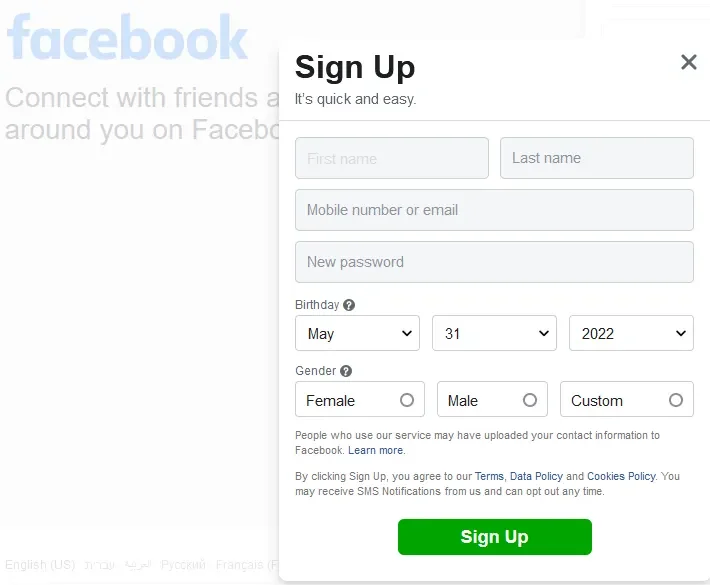
The screenshot shows Facebook's signup form, the page where the behaviour was first observed.
Exploitation
Step 1: probe the email parser
The researcher played with the email parser at signup, adding {}, dots and %20 to the email address, looking for odd behaviour in the fuzzy login logic. The report does not reproduce the individual payloads beyond naming those characters.
Step 2: sign up with two nearly identical emails and identical passwords
The odd result: when signing up an account with two nearly identical emails and identical passwords, one account logs in to the second account because of the fuzzy login. The report then tested which parts of the signup data matter and which do not:
- Date of birth, first name and last name do not affect the behaviour.
- Different emails with the same password were tested through the signup functionality.
With [redacted] simulating the victim, signing up with the following emails produced the account confusion:
The first removes a character from the local part, the second doubles a character. The third changes the mail provider while keeping the local part. The report states the double character scenario works for all scenarios and edge cases, not only for this specific example.
Step 3: let the victim log in
Once the attacker has signed up with a nearly identical email and the same password as the target, every time the victim logs in to their account the account confusion occurs and the victim is logged in to the attacker's account, permanently, until the victim contacts Facebook.
Step 4: turn it into a denial of service
The researcher suspended the attacker's account on purpose and then attacked the victim's test account. With the attacker's account disabled beforehand, the victim is confused into logging in to a disabled account, which fully disables the victim's access and cannot be restored until the victim contacts the Facebook team.
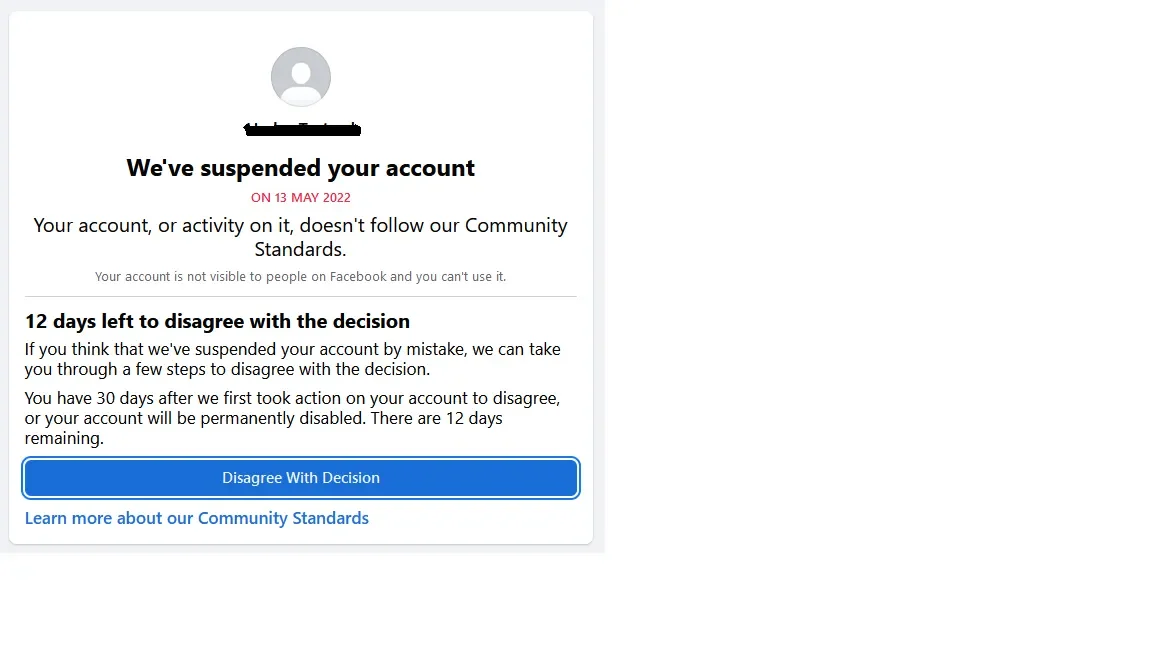
The screenshot shows the attempt against the victim's test account after the attacker's account was suspended on purpose.
Root cause
The report does not describe the server-side code. What it establishes is that the fuzzy login matching is applied to the signup flow as well as to login, and that it matches accounts on a near-identical email plus the same password. Because the match is not exact, an attacker who registers a lookalike address with the victim's password becomes the account the fuzzy logic resolves to. The report does not say whether the matching is on the local part, the domain, or both; the protonmail.com case shows a different domain can still collide, and the removed and doubled character cases show the local part is matched loosely. The feature is intentional and documented, and the signup path reuses it.
Impact
The report lists the following scenarios:
- Denial of service: the attacker disables their own account beforehand and confuses the victim into logging in to that disabled account. The victim's account is fully disabled and cannot be restored until they contact the Facebook team.
- Phishing and surveillance: the attacker creates a mimic of the victim's account, then later logs in to the same account and watches the victim's activity and private data through the activity log, including payment methods added.
- Ransomware-style extortion: the attacker claims the user has been compromised and demands steps 1, 2, 3 to unlock the account.
- Weaponisation of Self XSS, in the same way as login CSRF vulnerabilities.
The report also frames the bug as a privilege escalation technique: an attacker who has compromised an account but cannot pass the 2FA stage can, through this vulnerability, disable the victim from logging in forever.
Fix
Variants to test
- Removed character: sign up with one character removed from the start of the local part and the victim's password. A positive result is that logging in with the victim's exact email and password lands in the attacker's account.
- Doubled character: duplicate a character in the local part, as in
[redacted]. The report says this works across all scenarios and edge cases, so it is the first variant to try on another target. - Different mail provider, same local part: keep the local part and change the domain, as in
[redacted]. A positive result is the same account confusion across providers. - Parser characters: add
{}, dots and%20to the email at signup and observe whether the fuzzy match still resolves to the victim's account. - Disabled attacker account: suspend the attacker's account before the victim logs in. A positive result is that the victim is locked out of their own account entirely.
- Email enumeration: sign up with an existing email and a wrong password. A redirect to the recover password page confirms the address is attached to an account.
Thanks for reading. The researcher can be reached on Twitter at https://twitter.com/terminatorLM.
What happened, in plain words
Facebook lets people create an account with an email address and a password. It also has a helpful feature that tries to guess what you meant when you mistype your email address at login, so you still reach your own account. That feature is called Fuzzy login, and Facebook documents it publicly as a way to reduce false positives.
The researcher found that this same fuzzy matching also runs during signup, not just login. If an attacker signs up with an email address that is nearly the same as the victim's and uses the same password as the victim, then when the victim later logs in with their own exact email and password, Facebook's fuzzy logic can send them into the attacker's account instead of their own. The victim is then stuck in the wrong account, permanently, until they contact Facebook.
That is a logic vulnerability: nothing crashes and no secret is stolen by force. The program simply follows its rules in a way the designers did not intend, and the result is that the wrong person ends up in the wrong account.
This beginner version walks through the same steps as the technical write-up: what the feature is, how the researcher probed it, the exact email addresses used, what happens to the victim, and what damage an attacker could do with it.
Background concepts you need first
Before the steps make sense, here are the ideas the report relies on, explained from zero.
- Signup vs login. Signup is the form where you create a new account. Login is the form where you prove you already have one. Normally these are separate jobs. The report's starting observation is that on Facebook, signup behaves partly like login: it checks the email you type against accounts that already exist.
- Email address structure. An email address has two parts separated by
@. The part before the@is the local part (for examplehunter1231), and the part after is the domain (for examplegmail.com). The report plays with both parts. - Fuzzy matching. A computer usually compares text exactly:
catandcatsare different. Fuzzy matching is looser: it treats near-identical text as "probably the same thing". Everyday comparison: a librarian who, when you ask for "Harry Poter", still hands you "Harry Potter" because they can tell what you meant. Helpful for humans, dangerous when security depends on exact identity. - Typo detection / false positives. Facebook's fuzzy login is meant to catch typos. A false positive is when the system thinks two things match but they are actually different, which is exactly the risk here.
- Enumeration. Working out which email addresses have accounts, usually by observing how the site responds differently. It is a privacy leak: it tells an attacker which addresses are worth attacking.
- 2FA (two-factor authentication). A second proof of identity beyond the password, such as a code from your phone. It is designed so that a stolen password alone is not enough.
- Denial of service (DoS). Making a service unusable for its rightful user. Here it is not a flood of traffic; it is locking the victim out of their own account by confusing the login.
- Privilege escalation. Gaining more access or power than you should have. The report frames the bug as a way to escalate: an attacker who only has a password but cannot pass 2FA can still do serious harm.
- Phishing. Tricking someone into trusting a fake copy of something real, for example a lookalike account, so they hand over information or interact with the attacker.
- Self XSS. Cross-site scripting where the victim themselves pastes or runs malicious code in their own browser. It is normally low impact because the victim has to be tricked into doing it, but it can be weaponised when combined with other tricks.
- Login CSRF. Cross-site request forgery aimed at login: the victim is made to log in as the attacker without realising. The report compares this bug to that class.
The feature the researcher was looking at
The researcher confirmed that fuzzy login is intentional, not a bug by itself, by reading Facebook's own page about false positives:
https://m.facebook.com/whitehat/education/false-positives/#fuzzymatch
This is a single URL, nothing more. It points to Facebook's public explanation of the fuzzy match feature. Reading it told the researcher that the behaviour has existed for years and is documented, so the challenge was not to find the feature but to find a way to abuse it. The report describes the target as Facebook's main domain and the signup flow as the entry point.
Setup: what the researcher needed
The research was done over two days off work. The report does not mention any special tools, browser versions, HTTP clients or intercepting proxies. The only preconditions it states are:
- A victim account identified by an email address, for example
[redacted]. - An attacker able to sign up with a nearly identical email address and the same password as the victim.
- The victim later using the signup or login flow with their own email and password.
In plain terms: the attacker needs to know the victim's email address and password. That sounds like a lot, but the report's point is that even with those, 2FA should normally stop an attacker. This bug gives them a way around that expectation.
Finding it
While looking at Facebook's main domain, the researcher noticed that the signup form acts like a login form. After signing up and logging in a few times, the typo detection feature stood out as interesting.
One early observation: signing up with an email address that is already in use, together with a wrong password, redirected to the recover password page. That alone lets someone work out whether an email address has a Facebook account attached to it. The report notes this as a vulnerability worth mentioning but does not pursue it further.
The screenshot shows Facebook's signup form, the page where the behaviour was first observed.
Exploitation
Step 1: probe the email parser
The researcher experimented with the email parser at signup, adding {}, dots and %20 to the email address, looking for odd behaviour in the fuzzy login logic. The report does not reproduce the individual payloads beyond naming those characters.
Why do this? The parser is the part of the website that reads and interprets what you typed. If it treats unusual characters in surprising ways, two different-looking addresses can end up being treated as the same. The researcher was testing whether the fuzzy logic could be pushed around with these characters.
Step 2: sign up with two nearly identical emails and identical passwords
The odd result: when signing up an account with two nearly identical emails and identical passwords, one account logs in to the second account because of the fuzzy login. The researcher then tested which parts of the signup data matter and which do not:
- Date of birth, first name and last name do not affect the behaviour.
- Different emails with the same password were tested through the signup functionality.
With [redacted] simulating the victim, signing up with the following emails produced the account confusion:
Line by line, in plain words:
[redacted]is the victim's address with characters removed from the local part (hunterbecomeshunt). The domain is unchanged.[redacted]is the victim's address with the first character doubled (hunterbecomeshhunter). The domain is unchanged.[redacted]keeps the victim's exact local part but changes the domain fromgmail.comtoprotonmail.com.
The first two change the local part. The third changes the mail provider while keeping the local part. The report states the double character scenario works for all scenarios and edge cases, not only for this specific example.
Why does this matter? It shows the fuzzy match is loose in more than one direction: a missing or doubled character and a different mail provider both produced the account confusion. That gives an attacker several ways to create a lookalike address.
Step 3: let the victim log in
Once the attacker has signed up with a nearly identical email and the same password as the target, every time the victim logs in to their account the account confusion occurs. The victim is logged in to the attacker's account, permanently, until the victim contacts Facebook.
Why is this so serious? The victim is doing everything right: their own email, their own password. But the fuzzy logic resolves them to the attacker's account. From the victim's point of view, their account appears to have vanished or been replaced. From the attacker's point of view, they now control where the victim lands every time they log in.
Step 4: turn it into a denial of service
The researcher suspended the attacker's account on purpose and then attacked the victim's test account. With the attacker's account disabled beforehand, the victim is confused into logging in to a disabled account. That fully disables the victim's access, and it cannot be restored until the victim contacts the Facebook team.
The screenshot shows the attempt against the victim's test account after the attacker's account was suspended on purpose.
Why do this? It proves the bug is not only confusing but destructive. The attacker sacrifices their own throwaway account to lock the victim out completely. The victim is confused into logging in to a disabled account.
Root cause
The report does not describe the server-side code. What it establishes is that the fuzzy login matching is applied to the signup flow as well as to login, and that it matches accounts on a near-identical email plus the same password. Because the match is not exact, an attacker who registers a lookalike address with the victim's password becomes the account the fuzzy logic resolves to.
The protonmail.com case shows a different domain can still collide, and the leading and doubled character cases show the local part is matched loosely. The feature is intentional and documented, and the signup path reuses it.
In everyday terms: the librarian who forgives typos is also working at the desk where new library cards are issued. If someone registers a card under a name that is almost yours, with your password, the librarian may hand that person's card to you when you ask for yours.
Impact
The report lists the following scenarios:
- Denial of service: the attacker disables their own account beforehand and confuses the victim into logging in to that disabled account. The victim's account is fully disabled and cannot be restored until they contact the Facebook team.
- Phishing and surveillance: the attacker creates a mimic of the victim's account, then later logs in to the same account and watches the victim's activity and private data through the activity log, including payment methods added.
- Ransomware-style extortion: the attacker claims the user has been compromised and demands steps 1, 2, 3 to unlock the account.
- Weaponisation of Self XSS, in the same way as login CSRF vulnerabilities.
The report also frames the bug as a privilege escalation technique: an attacker who has compromised an account but cannot pass the 2FA stage can, through this vulnerability, disable the victim from logging in forever.
Fix
Variants to test
If you want to look for the same kind of bug elsewhere, these are the variations the report suggests trying:
- Removed characters: sign up with characters removed from the start of the local part and the victim's password. A positive result is that logging in with the victim's exact email and password lands in the attacker's account.
- Doubled character: duplicate a character in the local part, as in
[redacted]. The report says this works across all scenarios and edge cases, so it is the first variant to try on another target. - Different mail provider, same local part: keep the local part and change the domain, as in
[redacted]. A positive result is the same account confusion across providers. - Parser characters: add
{}, dots and%20to the email at signup and observe whether the fuzzy match still resolves to the victim's account. - Disabled attacker account: suspend the attacker's account before the victim logs in. A positive result is that the victim is locked out of their own account entirely.
- Email enumeration: sign up with an existing email and a wrong password. A redirect to the recover password page confirms the address is attached to an account.
Thanks for reading. The researcher can be reached on Twitter at https://twitter.com/terminatorLM.
Glossary
- Account confusion: a situation where a user logging in with their own credentials ends up in a different account.
- Cross-site request forgery (CSRF): tricking a logged-in user's browser into sending a request they did not intend.
- CVSS: a standard scoring system for rating the severity of a security vulnerability.
- Domain: the part of an email address after the
@, such asgmail.com. - Email enumeration: working out which email addresses have accounts by observing how a site responds.
- False positive: when a system thinks two things match but they are actually different.
- Fuzzy login / fuzzy matching: a feature that treats near-identical text as probably the same, to forgive typos.
- Local part: the part of an email address before the
@, such ashunter1231. - Logic vulnerability: a flaw in the rules a program follows, rather than in its code crashing or a secret being stolen by force.
- Parser: the part of a website that reads and interprets what you typed.
- Phishing: tricking someone into trusting a fake copy of something real.
- Ransomware-style extortion: demanding something from a victim under the threat of keeping their account locked.
- Self XSS: cross-site scripting where the victim themselves runs malicious code in their own browser.
- Signup: the form where you create a new account.
- Typo detection: a feature that tries to guess what you meant when you mistype something.
- XSS (cross-site scripting): injecting malicious code into a web page so it runs in someone else's browser.




