Bypassing Message Request inbox
A user could bypass the message request inbox by creating a job, contacting themselves via a job application, and then adding any other user to the conversation. The victim would then receive the message directly in their main inbox instead of the message request or spam folder.
 Published on medium.com
Description/Impact Through job contact message a malicious user can bypass message request
The full write-up lives on its author's site
It belongs to its author, so we link to it rather than copy it. The other two tabs are our own rewrites, checked against it.
What the report shows
The report describes a bypass of the message request inbox. The researcher, Abdellah Yaala, found that a job contact message could be used to deliver a message straight into a victim's inbox instead of the message request or spam folder where messages from strangers normally land.
The report describes the impact in one line: through a job contact message, a malicious user can bypass the message request.
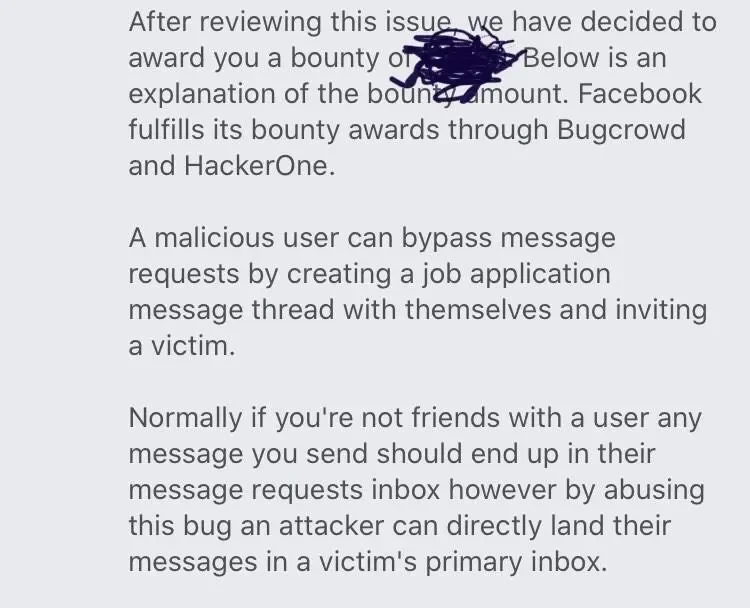
The reproduction has three steps:
- Create a job and select to be contacted via message.
- Via job application, contact yourself, which creates a message thread.
- Add anyone to the conversation. The victim receives the message in their inbox instead of in the message request or in spam.
The report contains no HTTP requests, parameters, headers or payloads, so there is nothing to copy into a code block. The mechanism is described only at the level of the three UI steps above.
The timeline is:
| Date | Event |
|---|---|
| May 1, 2020 | Report sent |
| May 5, 2020 | Acknowledged by Facebook |
| May 14, 2020 | Fixed by Facebook |
| May 21, 2020 | Bounty awarded by Facebook |
The report does not give a severity rating, a CVSS score or a bounty amount.
Root cause
Impact
The impact is that a malicious user can bypass the message request and reach the victim's inbox. The report frames this as a malicious user bypassing the message request, and does not describe further consequences such as spam at scale, phishing or harassment.
How this kind of bug works
Many messaging products separate messages from known contacts from messages from strangers. Strangers' messages go into a request or filtered folder until the recipient accepts them. The classification usually depends on signals such as whether the two users are friends, whether they share a group, whether they have an existing thread, and how many messages the sender has sent recently.
Bypasses appear when the classification is computed once and then cached on the thread, or when a feature creates threads through a path that skips the classification. Adding participants to an existing thread is a common weak point: the thread already exists and is trusted, so the new member inherits that trust. Features that create conversations on the user's behalf, such as job contact, marketplace contact or event invitations, are also common sources of threads that start in a privileged state.
Defences are to evaluate the request decision per recipient at delivery time, to re-evaluate when participants are added, and to apply the same rate limits and stranger checks to feature-generated threads as to ordinary messages.
How to test for it
- Identify features that create message threads on the user's behalf: job contact, marketplace listings, event invites, page contact buttons, group invitations.
- With two accounts, A and B, where B has not accepted anything from A, use the feature to start a thread. Observe where B sees the message: inbox, request folder or spam.
- If the first message is filtered correctly, try to grow the thread. Add a third account C that has no relationship with A, or add B to a thread A created with another account, and check where C sees the message.
- Repeat with variations: add participants after the first reply, add several participants at once, add a participant who has messaging restrictions, and check whether the thread's classification changes.
A positive result is a message from a stranger arriving in the primary inbox, or a thread that was correctly filtered before a participant was added and is no longer filtered afterwards. Common false positives are accounts that already share a friendship, group or prior thread, recipients who have relaxed their message settings, and messages that arrive in the request folder but are surfaced by a notification, which is expected behaviour.
How it is fixed
Hunting notes
This bug class tends to hide in secondary messaging surfaces: job and marketplace contact, event and group invitations, page and business messaging, and any flow that creates a conversation automatically. Recon signals include features that say "contact via message", threads that can be extended with new participants, and any place where the UI shows a thread as existing before the recipient has interacted.
What happened, in plain words
This report is about a messaging feature. The researcher, Abdellah Yaala, found a way to get a message into a stranger's main inbox instead of the folder where messages from unknown people are normally held back.
To understand why that matters, you need to know how most messaging products treat strangers. When someone you do not know sends you a message, the product usually does not drop it straight into your main inbox. It puts it in a separate place, often called a message request or a filtered folder, and waits for you to accept it. This is a simple safety measure: it stops unknown people from filling your inbox with unwanted messages. The bug in this report is a way around that measure, which is why it is called a bypass.
The report describes the impact in one line: through a job contact message, a malicious user can bypass the message request.
The reproduction has three steps:
- Create a job and select to be contacted via message.
- Via job application, contact yourself, which creates a message thread.
- Add anyone to the conversation. The victim receives the message in their inbox instead of in the message request or in spam.
Why each step matters:
The report contains no HTTP requests, parameters, headers or payloads, so there is no code to copy here. The mechanism is described only at the level of the three interface steps above.
The timeline is:
| Date | Event |
|---|---|
| May 1, 2020 | Report sent |
| May 5, 2020 | Acknowledged by Facebook |
| May 14, 2020 | Fixed by Facebook |
| May 21, 2020 | Bounty awarded by Facebook |
The report does not give a severity rating, a CVSS score or a bounty amount.
Root cause
The thread in step 2 is created by the attacker contacting themselves through a job application, so from the platform's point of view the thread starts between parties that already have a legitimate relationship.
Impact
The impact is that a malicious user can bypass the message request and reach the victim's inbox. The report frames this as a malicious user bypassing the message request, and does not describe further consequences such as spam at scale, phishing or harassment.
In general, how this kind of bug works
Many messaging products separate messages from known contacts from messages from strangers. Strangers' messages go into a request or filtered folder until the recipient accepts them. The classification usually depends on signals such as whether the two users are friends, whether they share a group, whether they have an existing thread, and how many messages the sender has sent recently.
Bypasses appear when the classification is computed once and then cached on the thread, or when a feature creates threads through a path that skips the classification. Adding participants to an existing thread is a common weak point: the thread already exists and is trusted, so the new member inherits that trust. Features that create conversations on the user's behalf, such as job contact, marketplace contact or event invitations, are also common sources of threads that start in a privileged state.
Defences are to evaluate the request decision per recipient at delivery time, to re-evaluate when participants are added, and to apply the same rate limits and stranger checks to feature-generated threads as to ordinary messages.
In general, how to test for it
- Identify features that create message threads on the user's behalf: job contact, marketplace listings, event invites, page contact buttons, group invitations.
- With two accounts, A and B, where B has not accepted anything from A, use the feature to start a thread. Observe where B sees the message: inbox, request folder or spam.
- If the first message is filtered correctly, try to grow the thread. Add a third account C that has no relationship with A, or add B to a thread A created with another account, and check where C sees the message.
- Repeat with variations: add participants after the first reply, add several participants at once, add a participant who has messaging restrictions, and check whether the thread's classification changes.
A positive result is a message from a stranger arriving in the primary inbox, or a thread that was correctly filtered before a participant was added and is no longer filtered afterwards. Common false positives are accounts that already share a friendship, group or prior thread, recipients who have relaxed their message settings, and messages that arrive in the request folder but are surfaced by a notification, which is expected behaviour.
In general, how it is fixed
In general, where to look
This bug class tends to hide in secondary messaging surfaces: job and marketplace contact, event and group invitations, page and business messaging, and any flow that creates a conversation automatically. Signals worth watching for include features that say "contact via message", threads that can be extended with new participants, and any place where the interface shows a thread as existing before the recipient has interacted.
Glossary
- Bypass: a way of getting around a security or safety check without breaking it directly, so the check still exists but no longer applies to your action.
- Message request: a holding folder where a messaging product places messages from people you have not accepted, until you choose to accept them.
- Spam folder: a separate place where a product moves messages it considers unwanted or suspicious.
- Inbox: the main list of messages a user sees by default, normally reserved for people they know or have accepted.
- Thread / conversation: a single ongoing exchange of messages between two or more participants.
- Participant: a person who is part of a conversation.
- Root cause: the underlying reason a bug exists, as opposed to the visible symptom.
- Impact: the real-world effect of a bug, such as unwanted messages reaching a user.
- Severity / CVSS score: standard ways of rating how serious a bug is; neither is given in this report.
- Bounty: a payment a company makes to a researcher who reports a valid bug.
- Triager: the person at a company who first reviews a bug report and decides whether it is valid.
- Rate limit: a cap on how many actions, such as sending messages to new people, a user can perform in a period of time.
- False positive: a result that looks like a bug but is actually expected behaviour.
- Recon: the early stage of research where you look for features and behaviours worth testing.
- Reproduction: the set of steps that reliably triggers a bug, so someone else can confirm it.




