Facebook Vulnerability: Non-unfriendable user in /hacked workflow
The account-recovery workflow at facebook.com/hacked reported that a friend had been removed, but the removal silently failed when the attacker's account was deactivated. The victim therefore could not remove the attacker as a friend, leaving the unwanted connection in place once the attacker reactivated.
 Published on medium.com
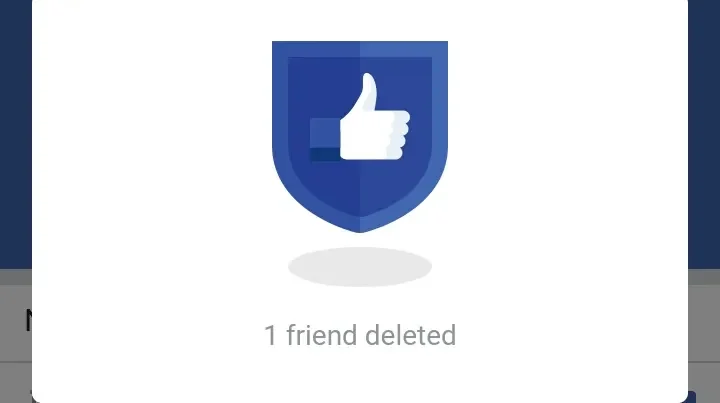
When a victim goes to secure his account at facebook.com/hacked , he has an option to delete the friends which he didn’t add himself. But I noticed that, when the attacker’s account is in "deactivated" state, the removal doesn’t happen even if it shows "1 friend deleted successfully".
The full write-up lives on its author's site
It belongs to its author, so we link to it rather than copy it. The other two tabs are our own rewrites, checked against it.
Context
Facebook's account recovery flow lives at facebook.com/hacked. When a user believes their account has been compromised, they go there to secure it: change the password, review sessions, and remove friends they did not add themselves. The removal feature is the interesting part. It is meant to let a victim cut off an attacker who added themselves as a friend during the compromise.
The report describes a logic flaw in that removal feature. When the friend being removed is in a deactivated state, the removal silently fails while the interface still reports success. The researcher found the bug was present across the domains, and later found it was not patched on touch.facebook.com/hacked, which has a different UI from the other subdomains.
Setup
The setup needs two accounts: a victim account and an attacker account. The precondition is that the two accounts are friends, which in the scenario happens because the victim's account was compromised and the attacker became friends with it. The attacker then deactivates their own account. No special tools are described; the flow is exercised through the normal web interface at facebook.com/hacked.
The researcher notes the issue was present across the domains, listing:
www.facebook.com/hackedmbasic.facebook.com/hackedm.facebook.com/hacked
and so on.
Finding it
The researcher noticed that the removal option at facebook.com/hacked did not actually remove a friend when that friend's account was in the deactivated state. The interface still displayed 1 friend deleted successfully, so the failure was invisible to the victim. The mismatch between the success message and the real state of the friendship is what made it look wrong.
Exploitation
Step 1: Compromise and friendship
The victim's account was compromised and the attacker became friends with the victim.
Step 2: Attacker deactivates
Once the two accounts are friends, the attacker deactivates their Facebook account.
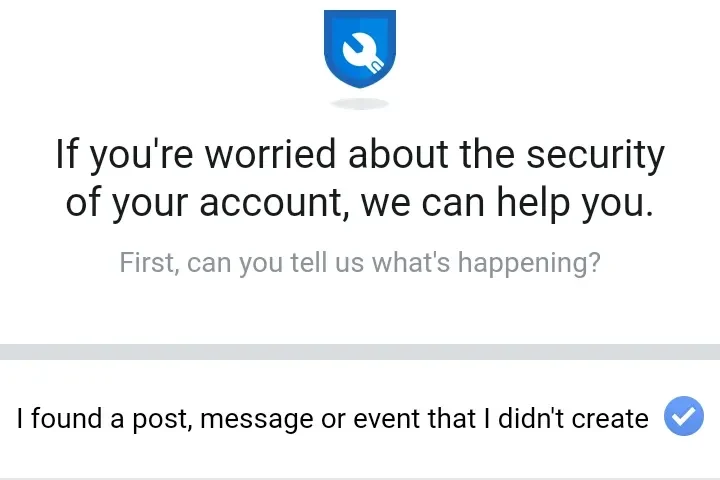
Step 3: Victim opens the recovery flow
The victim goes to facebook.com/hacked to secure the account.
Step 4: Friends and Followers
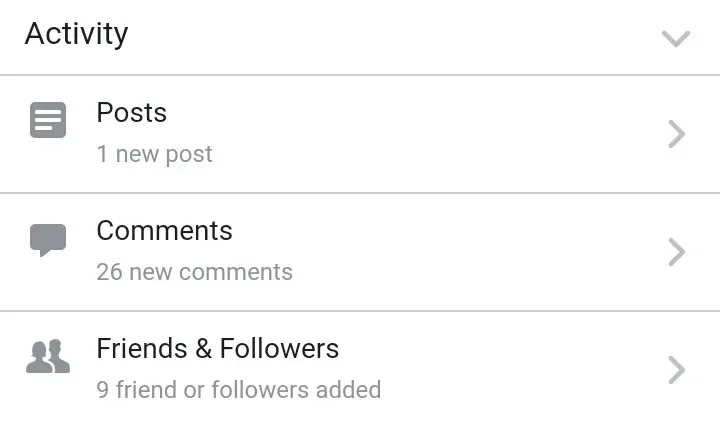
The victim clicks on Friends and Followers.
Step 5: Remove the attacker
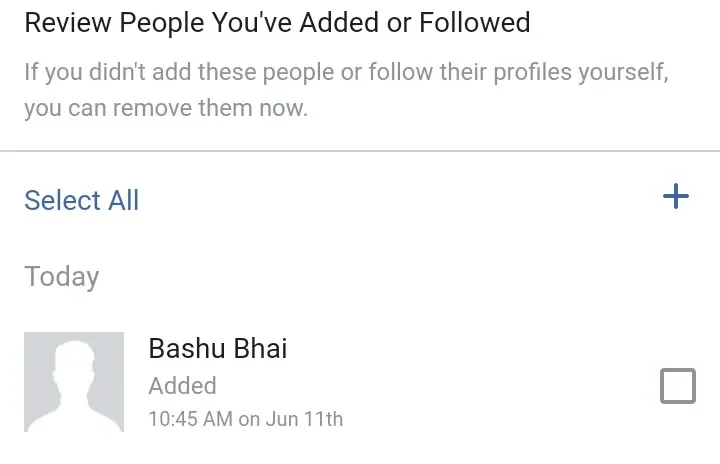
The victim selects the attacker's name and clicks on remove.
Step 6: False success
The interface shows 1 person deleted successfully.
Step 7: Reactivate the attacker
The attacker's account is reactivated and the result is observed.
Step 8: Still friends
The victim and the attacker are still friends. The removal reported in step 6 never took effect.
Root cause
The researcher's conclusion is that all the changes made at facebook.com/hacked were not applied successfully while the attacker's account was in the deactivated state. The removal action appears to be processed against a deactivated account in a way that does not persist the change, yet the UI still reports success. The report does not describe the server-side code, so the exact mechanism is not stated; The report does not describe the server-side code, so the exact mechanism is not stated.
Impact
A victim cannot remove the attacker as a friend at facebook.com/hacked if the attacker has deactivated their account. The researcher frames this as a privacy risk when the victim is unaware of the bug, because the victim believes the attacker has been removed when they have not. The impact depends on the attacker deactivating their account and on the victim relying on the recovery flow to cut the friendship.
Fix
Facebook patched the bug on Mar 07. The researcher then found the bug was not patched on touch.facebook.com/hacked, because it has a different UI compared to the other subdomains, and reported it again on Mar 26. That second report was reproduced on Mar 28 and patched on Apr 08, but the researcher noted that no changes had been made to the affected product (0% changes) and replied about the bad patch on Apr 08. It was triaged again on May 10 and fixed on Jun 11, and the researcher confirmed the fix the same day.
Timeline
| Date | Event |
|---|---|
| Jan 13 | Report sent |
| Jan 16 | Triaged by Fredrick (directly) |
| Mar 07 | Patched by Facebook |
| Mar 26 | Bounty of $500 awarded |
| Mar 26 | Report sent (touch.facebook.com) |
| Mar 28 | Reproduced by Dinesh |
| Mar 28 | Triaged by Stewie |
| Apr 08 | Patched by Facebook |
| Apr 08 | Researcher replied about the bad patch |
| May 10 | Triaged by Stewie |
| Jun 11 | Fixed by Facebook |
| Jun 11 | Researcher confirmed the fix |
| Jun 11 | Bounty of $1000 awarded |
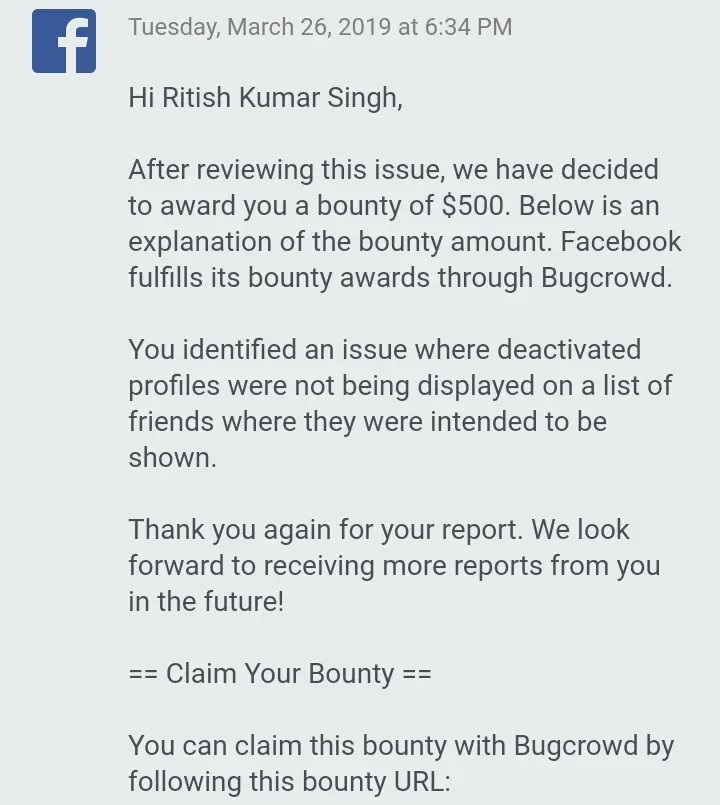
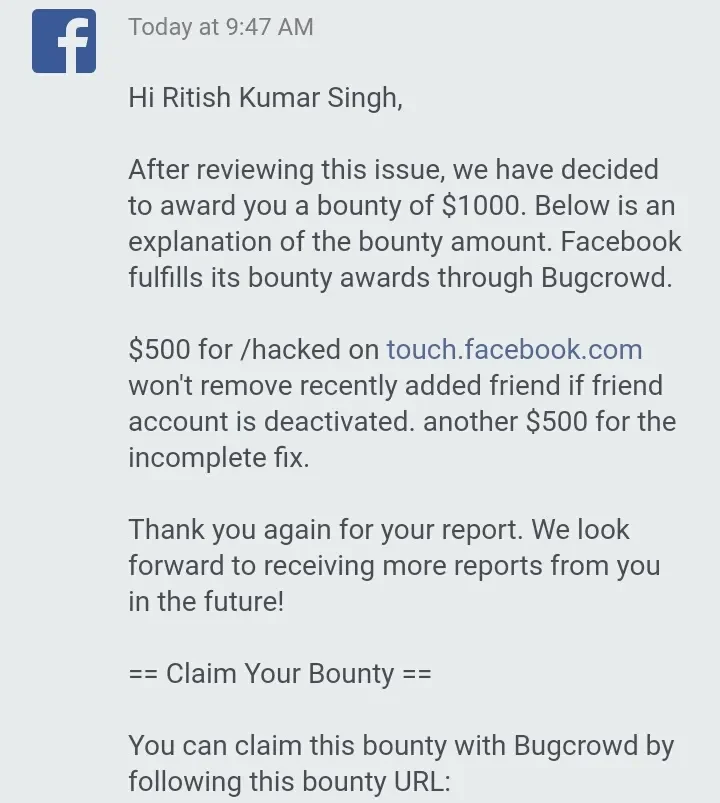
The total bounty for the vulnerability was $500 + $1000 = $1500.
Variants to test
The researcher's own advice is to check for the bug in all subdomains and to try deactivation and blocking in unusual combinations. Concrete things to try:
- Repeat the removal flow on every subdomain that exposes the recovery UI (
www,mbasic,m,touch). A positive result is the success message appearing while the friendship survives after the other account is reactivated. - Try deactivation and blocking in unusual combinations, as the researcher advises.
The researcher's closing message is to think ahead of the developer when testing deactivation and blocking.
What happened, in plain words
Imagine you think someone broke into your Facebook account and added themselves as your friend. Facebook has a special page, facebook.com/hacked, where you can go to secure your account. One of the things you can do there is remove friends you didn't add yourself. That sounds simple: you click remove, Facebook says "1 person deleted successfully", and you expect that person to be gone from your friend list.
But the researcher found a problem. If the attacker's account is deactivated (meaning the attacker has temporarily turned off their account), the removal doesn't actually happen. Facebook still shows the success message, so you think the attacker is gone, but they are not. When the attacker reactivates their account, they are still your friend. This is a logic flaw: the removal does not happen when the friend's account is deactivated, but the interface still says it worked.
The researcher found this on facebook.com/hacked and reported it. Facebook fixed it and paid a $500 bounty. But then the researcher discovered the same bug still existed on touch.facebook.com/hacked, which has a different interface. He reported it again, and after some back-and-forth, Facebook fixed it properly and paid another $1000. Total bounty: $1500.
This is a beginner-friendly explanation of the whole story, including the steps to reproduce, the timeline, and the lessons learned.
Context
Facebook's account recovery flow lives at facebook.com/hacked. When you think your account has been hacked, you go to that page to secure it: you can change your password, review active sessions, and remove friends you didn't add yourself. The removal feature is the interesting part here. It's meant to let a victim cut off an attacker who added themselves as a friend during the compromise.
The report describes a logic flaw in that removal feature. When the friend being removed is in a deactivated state, the removal silently fails while the interface still reports success. The researcher found the bug on www.facebook.com/hacked and later found it was still present on touch.facebook.com/hacked, which has a different UI from the other subdomains.
What is a logic flaw?
A logic flaw (or logic bug) is a mistake in the way a program's rules are implemented, rather than a technical error like a crash. It's like a vending machine that accepts your coin, shows "Thank you", but doesn't drop the snack. The machine's logic is flawed: it should either drop the snack or return the coin, but it does neither and still says thanks. In this case, Facebook's removal feature says "success" but doesn't actually remove the friend when the friend's account is deactivated.
What is a deactivated account?
When you deactivate your Facebook account, your profile becomes invisible to others, but your data is kept so you can reactivate later. Your friends can't see your profile or interact with you. However, the friendship link may still exist in Facebook's database. The report does not describe the code, so the exact mechanism is not stated.
What is a subdomain?
A subdomain is a part of a larger domain name. For example, www.facebook.com, m.facebook.com, and touch.facebook.com are all subdomains of facebook.com. They often serve different versions of the same website: m is for mobile browsers, touch is for touch devices, and www is the main site. Each subdomain can have its own code and interface, which is why a bug fixed on one might still exist on another.
Setup
To reproduce this bug, you need two accounts: a victim account and an attacker account. The precondition is that the two accounts are friends. In the scenario, this happens because the victim's account was compromised and the attacker became friends with it. The attacker then deactivates their own account. No special tools are described; the flow is exercised through the normal web interface at facebook.com/hacked.
The researcher notes the issue was present across the domains, listing:
www.facebook.com/hackedmbasic.facebook.com/hackedm.facebook.com/hacked
and so on.
Why these steps?
The setup is designed to mimic a real attack: an attacker gains access to a victim's account, adds themselves as a friend (so they can see private information), and then deactivates their account to hide. The victim, realizing the compromise, goes to the recovery page to remove the attacker. The bug prevents that removal from working, so the attacker remains a friend.
Finding it
The researcher noticed that the removal option at facebook.com/hacked did not actually remove a friend when that friend's account was in the deactivated state. The interface still displayed 1 friend deleted successfully, so the failure was invisible to the victim. The mismatch between the success message and the real state of the friendship is what made it look wrong.
How did the researcher notice?
This kind of testing is common in security research: you try different states (active, deactivated, blocked) and see if the behaviour changes unexpectedly.
Exploitation
Step 1: Compromise and friendship
The victim's account was compromised and the attacker became friends with the victim.
Step 2: Attacker deactivates
Once the two accounts are friends, the attacker deactivates their Facebook account.
Step 3: Victim opens the recovery flow
The victim goes to facebook.com/hacked to secure the account.
Step 4: Friends and Followers
The victim clicks on Friends and Followers.
Step 5: Remove the attacker
The victim selects the attacker's name and clicks on remove.
Step 6: False success
The interface shows 1 person deleted successfully.
Step 7: Reactivate the attacker
The attacker's account is reactivated and the result is observed.
Step 8: Still friends
The victim and the attacker are still friends. The removal reported in step 6 never took effect.
Why each step?
Each step is taken to set up the condition and then verify the bug:
- Compromise and friendship: This creates the scenario where the victim has an unwanted friend (the attacker). Without this, there's nothing to remove.
- Attacker deactivates: This puts the friend account in the special state that triggers the bug.
- Victim opens recovery flow: This is the normal action a victim would take after a compromise.
- Friends and Followers: This is the section where friend management happens.
- Remove the attacker: The victim attempts to remove the attacker, expecting it to work.
- False success: The UI shows success, which is misleading. The researcher notes this to highlight the discrepancy.
- Reactivate the attacker: This is the test to see if the removal actually happened. If the friendship is gone, the removal worked; if not, the bug is confirmed.
- Still friends: The confirmation that the bug exists.
Root cause
The researcher's conclusion is that all the changes made at facebook.com/hacked were not applied successfully while the attacker's account was in the deactivated state. The removal action appears to be processed against a deactivated account in a way that does not persist the change, yet the UI still reports success. The report does not describe the server-side code, so the exact mechanism is not stated; likely the removal path does not handle deactivated accounts and returns a success response regardless.
What does "not persist the change" mean?
When you perform an action on a website, the change is usually saved in the website's database. "Persist" means to save permanently. Here, the removal action didn't save the change to the database, so the friendship remained. But the code that generates the success message didn't check whether the save actually happened; it just assumed it did.
Why would that happen?
Possibly the code that removes a friend first checks if the friend's account is active. If it's deactivated, the code might skip the actual removal but still return a success response. Or the database query might fail silently for deactivated accounts. Without seeing the code, we can only guess, but the behaviour is clear: the success message is not tied to the actual outcome.
Impact
A victim cannot remove the attacker as a friend at facebook.com/hacked if the attacker has deactivated their account. The researcher frames this as a privacy risk when the victim is unaware of the bug, because the victim believes the attacker has been removed when they have not. The impact depends on the attacker deactivating their account and on the victim relying on the recovery flow to cut the friendship.
Why is this a privacy risk?
If the attacker remains a friend, the victim's belief that they have been removed is wrong. The victim thinks they are safe, so they might not take further action (like blocking the attacker). This false sense of security is the core of the risk.
Fix
Facebook patched the bug on Mar 07. The researcher then found the bug was not patched on touch.facebook.com/hacked, because it has a different UI compared to the other subdomains, and reported it again on Mar 26. That second report was reproduced on Mar 28 and patched on Apr 08, but the researcher noted that no changes had been made to the affected product (0% changes) and replied about the bad patch on Apr 08. It was triaged again on May 10 and fixed on Jun 11, and the researcher confirmed the fix the same day.
What is a patch?
A patch is a fix for a bug, usually a small update to the code. Facebook's first patch fixed the bug on some subdomains but missed touch.facebook.com. The researcher discovered this and reported it again. The Apr 08 patch made no changes to the affected product (0% changes), so the researcher followed up. Finally, a proper fix was deployed on Jun 11.
Why did the researcher check other subdomains?
Because websites often have multiple interfaces for different devices. A fix on one subdomain might not be applied to others if they share code but have separate deployments. The researcher's advice is to always check all subdomains.
Timeline
| Date | Event |
|---|---|
| Jan 13 | Report sent |
| Jan 16 | Triaged by Fredrick (directly) |
| Mar 07 | Patched by Facebook |
| Mar 26 | Bounty of $500 awarded |
| Mar 26 | Report sent (touch.facebook.com) |
| Mar 28 | Reproduced by Dinesh |
| Mar 28 | Triaged by Stewie |
| Apr 08 | Patched by Facebook |
| Apr 08 | Researcher replied about the bad patch |
| May 10 | Triaged by Stewie |
| Jun 11 | Fixed by Facebook |
| Jun 11 | Researcher confirmed the fix |
| Jun 11 | Bounty of $1000 awarded |
The total bounty for the vulnerability was $500 + $1000 = $1500.
What does "triaged" mean?
Triaged means the security team has reviewed the report and confirmed it's a valid issue. They then assign it to the appropriate team to fix. The timeline shows the report was triaged quickly (3 days after the first report), but the fix and bounty took longer.
Variants to test
The researcher's own advice is to check for the bug in all subdomains and to try deactivation and blocking in unusual combinations. Concrete things to try:
- Repeat the removal flow on every subdomain that exposes the recovery UI (
www,mbasic,m,touch). A positive result is the success message appearing while the friendship survives after the other account is reactivated. - Try deactivation and blocking in unusual combinations, as the researcher advises.
The researcher's closing message is to think ahead of the developer when testing deactivation and blocking.
Why these variants?
Because bugs often appear in multiple places or with slight variations. If the removal logic is flawed for deactivated accounts, it might also be flawed for blocked accounts, or on other pages where you can remove friends. Testing these variants helps ensure the fix is complete and might uncover related issues.
Glossary
- Logic flaw: A bug in the rules or logic of a program, where it behaves incorrectly even though it doesn't crash. Example: a success message shown when an action fails.
- Deactivated account: A Facebook account that the owner has temporarily turned off. The profile is hidden, but the account can be reactivated.
- Subdomain: A prefix added to a domain name to create a separate section of a website, like
wwworminwww.facebook.comandm.facebook.com. - Bounty: A reward paid by a company to a security researcher who reports a valid vulnerability.
- Triaged: The process where a security team reviews a report and confirms it's a valid issue.
- Patch: A fix for a bug, usually a code change.
- Persist: To save data permanently, so it remains after the action is complete.
- UI: User interface, the part of a website or app that you see and interact with.
- Recovery flow: The series of pages and actions a user goes through to secure their account after a compromise.
- Compromise: When an attacker gains unauthorised access to an account.
- Privacy risk: A situation where personal information could be exposed to someone who shouldn't have access.
- Blocking: A Facebook feature that prevents another user from interacting with you or seeing your profile.
- API: Application Programming Interface, a set of rules that allows different software to communicate. (Not directly used in this report, but relevant to how websites work.)
- Cookie: A small piece of data stored by a website in your browser to remember you or your preferences. (Not directly used in this report, but relevant to web security.)
- Token: A piece of data used to authenticate a user or a request, often in place of a password.




