Digging Deeper
Facebook Marketplace adverts created via the mobile app exposed the seller's exact pinned latitude and longitude, plus the full postcode, in a public GraphQL API response. An unauthenticated attacker could use this to locate the seller's home almost to the metre.

Whilst investigating the technical feasibility of scraping Facebook Marketplace to aid in the recovery of stolen goods, it was possible to identify sensitive data disclosing the exact location of the sale item.
The full write-up lives on its author's site
It belongs to its author, so we link to it rather than copy it. The other two tabs are our own rewrites, checked against it.
Context
Facebook Marketplace lets a seller list an item and attach a location so that buyers know roughly where it is. The listing flow asks the seller to pin a point, and the interface tells the seller that the location shown to viewers is approximate: the pinning circle suggests the exact point will be fuzzed, and the advert text states that the seller's location is approximate. There is even functionality to pin an exact location using GPS, so the design clearly expects sellers to give a precise point and relies on Facebook to generalise it for anyone viewing the advert.
The investigation started from a different angle: assessing the technical feasibility of scraping Facebook Marketplace to help recover stolen goods. While looking at the data behind adverts, the location information in the JSON responses of adverts made through the Facebook Mobile Application looked more specific than the generalised location shown to the end user.
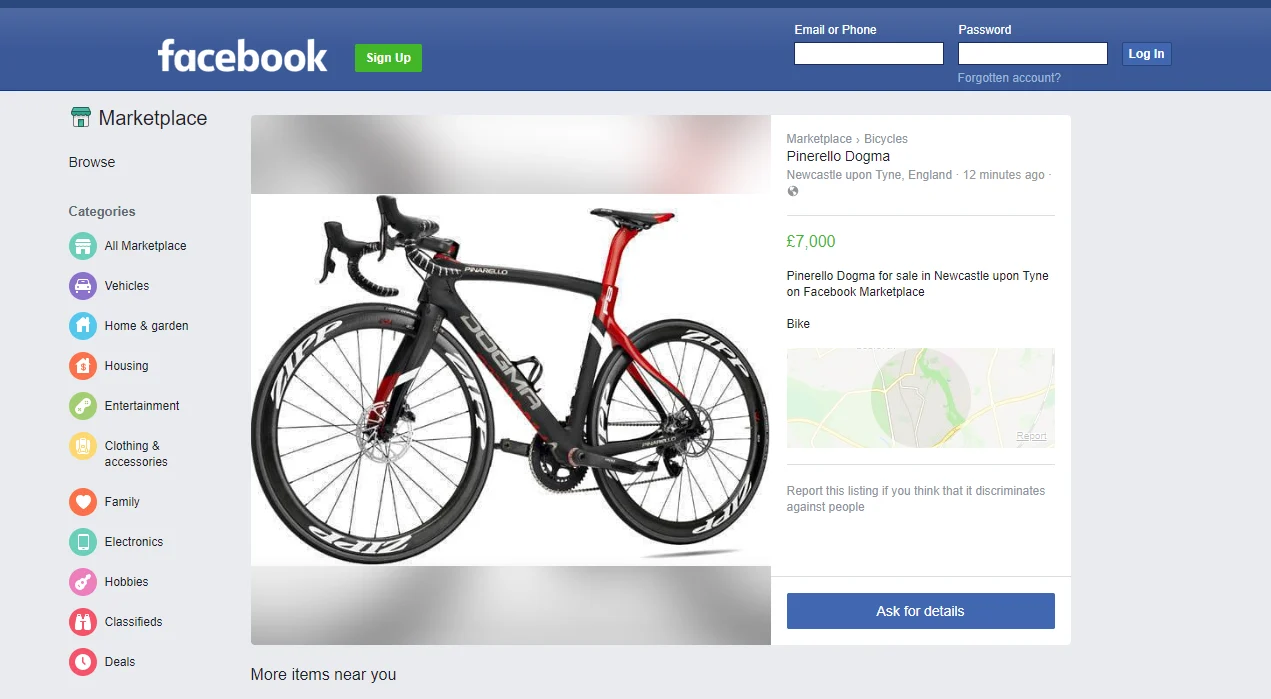
Setup
No special tooling is described. The researcher used:
- The Facebook Mobile Application, to create an advert for a random item and address and to observe the location data returned for adverts.
- The Facebook web application, to inspect the requests generated when viewing an advert, and to try submitting a specific location.
- An unauthenticated session, to view the bicycles advert and confirm what the API returned to a logged-out user.
Finding it
The location data contained within the JSON responses of adverts made through the mobile application seemed a little specific, which goes against the generalised location data displayed to the end user. To verify what was being seen, the researcher made an advert for a random item and address using the mobile application.
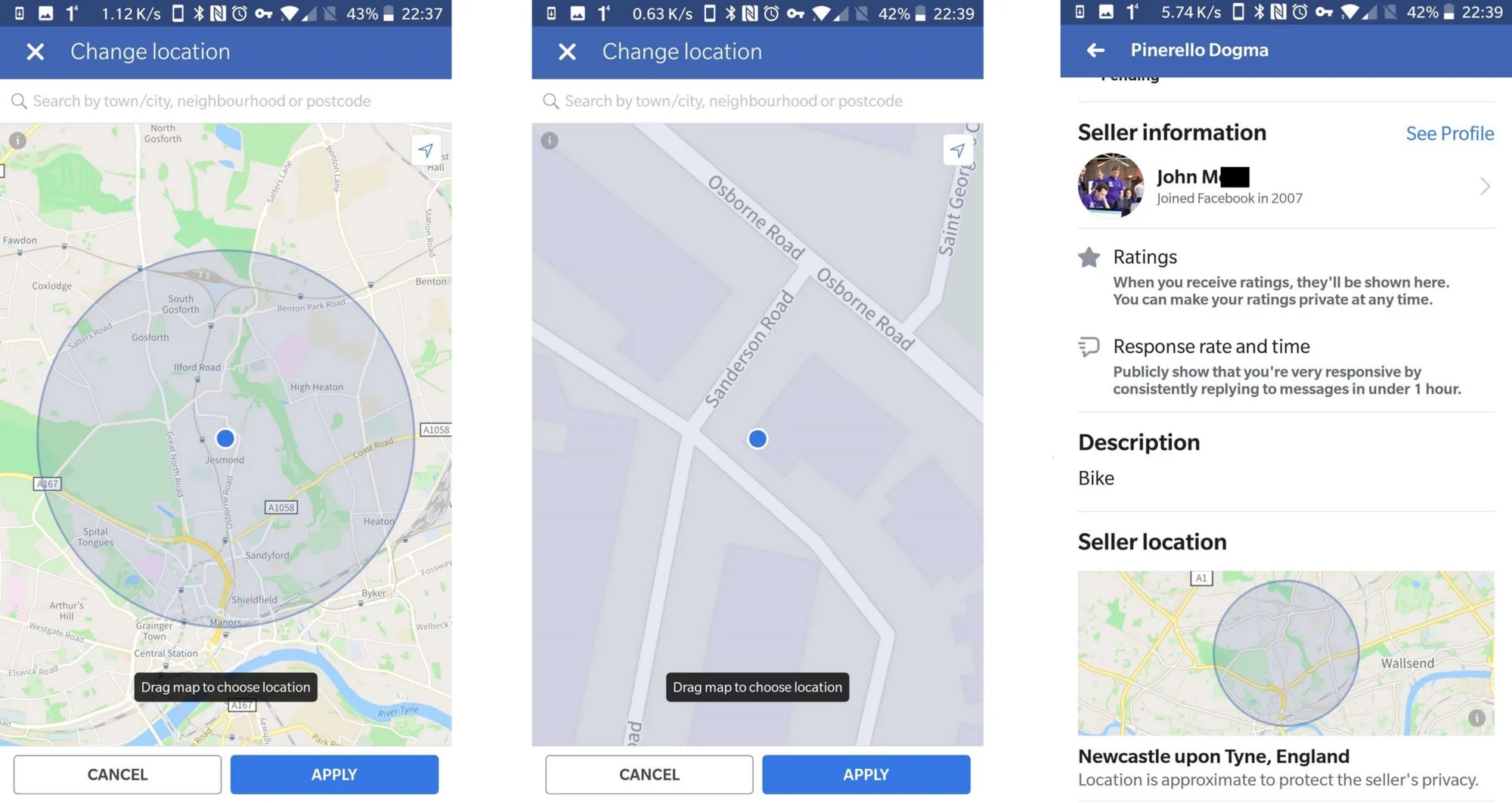
The listing interface states that the location is approximate to protect the seller's privacy. That claim is the premise the rest of the finding tests.
Exploitation
Step 1: Inspect the request behind an advert as an unauthenticated user
Back on the web application, the researcher looked at the requests generated when accessing the bicycles advert while unauthenticated. The request to facebook.com/api/graphql was revealing detailed location information in a JSON response.
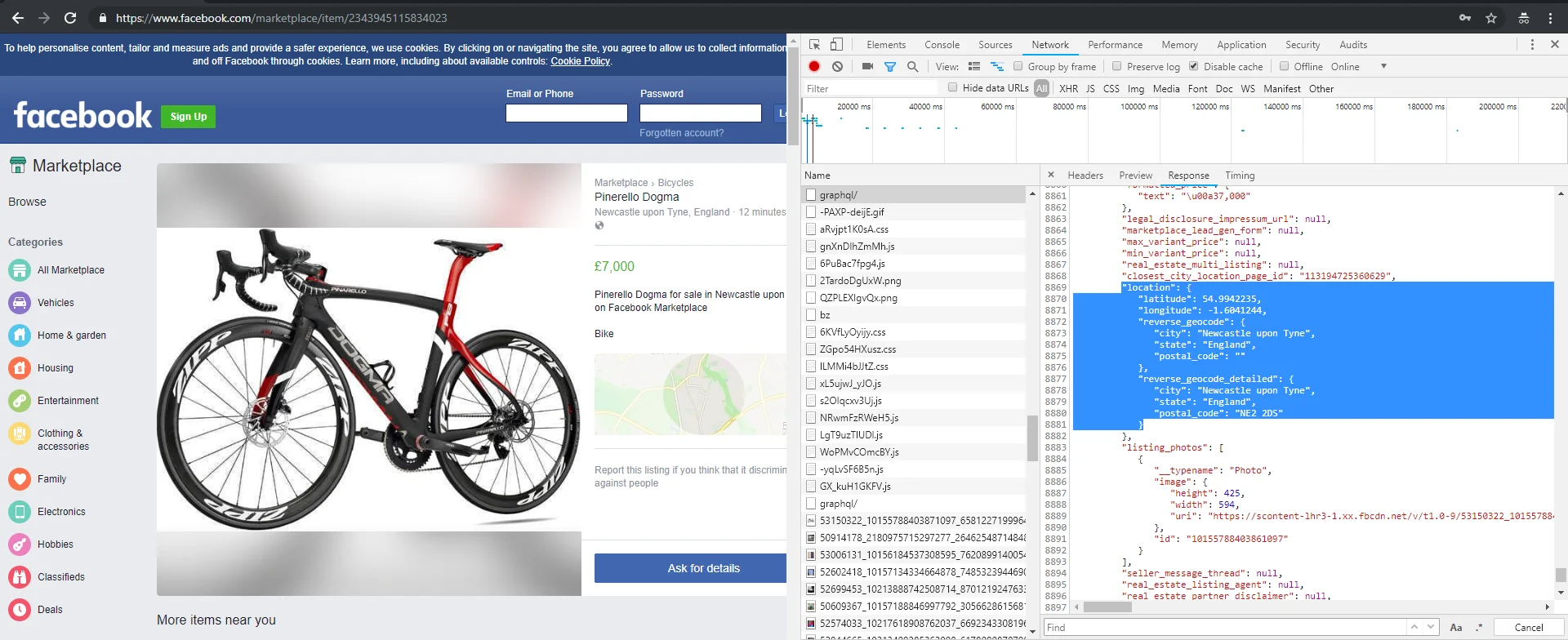
The highlighted JSON section reads:
"location": {
   "latitude": 54.9942235,
   "longitude": -1.6041244,
   "reverse_geocode": {
         "city": "Newcastle upon Tyne",
         "state": "England",
         "postal_code": ""
   },
   "reverse_geocode_detailed": {
      "city": "Newcastle upon Tyne",
      "state": "England",
      "postal_code": "NE2 2DS"
   }
}
The response carries two location objects. reverse_geocode is the generalised view: city and state, with an empty postal_code. reverse_geocode_detailed is the precise view: the same city and state but with the full postcode NE2 2DS. Alongside both, the raw latitude and longitude are returned to the unauthenticated caller.
Step 2: Check the coordinates against the pinned point
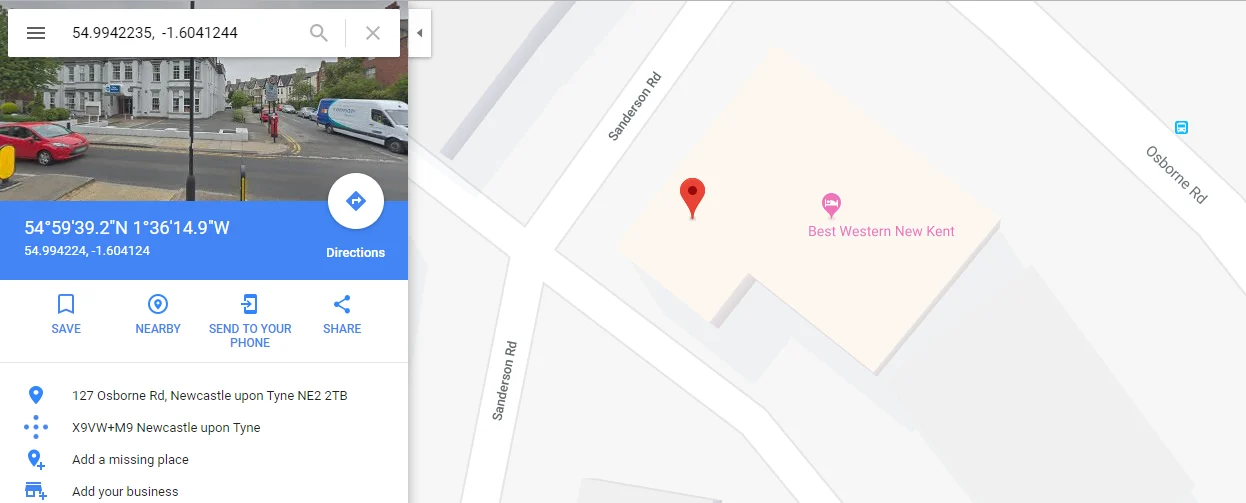
On checking the latitude and longitude on Google, the researcher found they pin pointed the exact location pinned when making the advert. That makes it easy for anyone malicious to identify the location of the advertised item, in the researcher's example a £7,000 bike, almost down to the metre. The full postcode being available publicly is also a problem, because it would not take much to find an address from it combined with the other information available, such as the seller's full name.
Step 3: Compare with what the web application allows a seller to submit
When the researcher tried to submit a specific location using the Facebook web application, it was completely unable to drill down beyond the nearest suburb; trying both postcode and full address did not work.
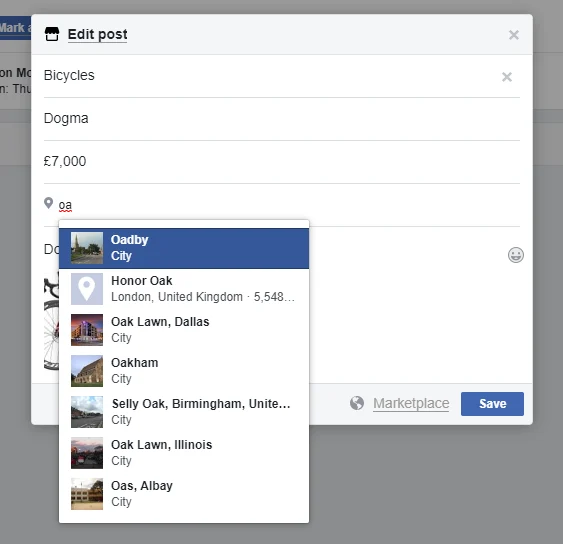
So the web flow cannot produce the precision that the mobile flow produces, yet the API returned precise coordinates and a full postcode for the bicycles advert.
Root cause
Every part of Facebook's UI during the item listing process suggests that pinning an exact address is fine and will be fuzzed for anyone viewing the advert: the circle while pinning suggests the exact point will be fuzzed, the advert text says the seller's location is approximate, and GPS pinning of an exact location is offered. The researcher's view is that it is not intended for the user to fuzz their location manually.
The API response, however, exposes the raw latitude and longitude and a reverse_geocode_detailed object containing the full postcode, to an unauthenticated caller. The generalisation exists in the response (the reverse_geocode object with an empty postcode) but the precise values are shipped alongside it.
Impact
Anyone, including an unauthenticated user, viewing an advert can obtain the exact coordinates of the pinned location and the full postcode, together with the seller's full name and the other information in the listing. In the researcher's test the coordinates matched the pinned point almost down to the metre, which makes it straightforward to identify where the advertised item is. The report frames this in terms of a malicious party locating a high-value item, and notes that the full postcode plus the seller's full name would make finding an address easy.
Fix
Facebook implemented a fix shortly after the report was accepted. The researcher notes that the approach taken appears to match what was expected: when adding an advert after the fix, the location snaps to a local park. The expected behaviour, as stated in the report, was that Facebook would randomise the point to a location within the circle or snap to the nearest generic location like the web application, and would reveal only the first three or four characters of the postcode rather than the full thing.
Challenges of responsible disclosure
The finding was reported to Facebook quickly, originally highlighting the full postcode, and was rejected because it was not believed to be a security vulnerability. After more investigation the researcher found the exact situation in which this occurs along with the long/lat parameters and updated the report; it was again quickly rejected. The researcher then talked to someone they know who works at Facebook, who was able to get someone to take a more in-depth look at what was actually being reported, and the report was accepted. A fix was implemented quickly, after just over a week.
Variants to test
- Compare the mobile and web listing flows for any product that attaches a location to a public object. Create the same listing through each client and diff the API responses. A positive result is a field present in the mobile response (raw coordinates, a detailed address object, a full postcode) that the web flow cannot even submit.
- Request the object as an unauthenticated user. A positive result is that the precise fields are still returned with no session, as with
facebook.com/api/graphqlhere. - Look for paired generalised and detailed objects in the same response, such as
reverse_geocodenext toreverse_geocode_detailed. A positive result is a generalised object that is correctly stripped while the detailed sibling still carries the full value. - Check whether the coordinates match the point the seller pinned rather than a point inside the displayed circle. A positive result is an exact match to the pinned location, which shows the fuzzing is presentation only.
- Test whether the UI's own limits are enforced server-side: submit a full address or postcode through the web flow where the UI only offers the nearest suburb. A positive result is that the server accepts precision the UI does not offer, or returns it for existing objects.
- Check the postcode handling specifically. A positive result is a full postcode where the design implies only the first three or four characters should be exposed.
What happened, in plain words
Facebook Marketplace is a section of Facebook where people list things for sale: a bike, a sofa, a phone. When you create a listing, Facebook asks you to say where the item is, so that buyers know roughly which area to travel to. You drop a pin on a map, and Facebook tells you that the location shown to other people will be approximate, so that strangers cannot work out exactly where you live.
This report is about a gap between that promise and what Facebook's own servers were actually sending out. The researcher found that the data behind a listing, the raw information a browser or phone app receives, contained the exact coordinates of the pin and the seller's full postcode. Anyone at all, even someone who was not logged in to Facebook, could read that data when opening an advert. In the researcher's test, the coordinates matched the pinned point almost down to the metre.
The investigation did not start as a security hunt. It started as an attempt to work out whether Facebook Marketplace could be automatically scanned ("scraped") to help people recover stolen goods. While looking at the data behind adverts, the location values looked far more precise than what the page displayed. That mismatch is the whole finding.
A few ideas come up again and again below, so here they are up front.
- An API (Application Programming Interface) is the set of addresses a website or app uses to ask a server for data. Think of a restaurant: the menu and the waiter are the API, the kitchen is the server. You do not walk into the kitchen yourself; you ask through the waiter. When your browser shows you a Facebook page, it is really asking the Facebook servers for data through these addresses, and the servers answer with structured text.
- JSON (JavaScript Object Notation) is a common format for that structured text. It looks like labelled boxes inside labelled boxes, for example
"city": "Newcastle upon Tyne". It is easy for programs to read and reasonably easy for a person to read too. - GraphQL is a style of API where the client sends a description of exactly which pieces of data it wants, and the server answers with those pieces. The address
facebook.com/api/graphqlin this report is Facebook's GraphQL endpoint, the single door through which many data requests pass. - Latitude and longitude are the two numbers that describe any point on Earth: how far north or south, and how far east or west. A pair of them pinpoints a spot to within a metre or so.
- Reverse geocoding is turning coordinates into human words: given a latitude and longitude, what city, what postcode? Facebook did this twice in the same response, once in a generalised way and once in a detailed way, and that duplication is central to the bug.
- Unauthenticated means "not logged in". A request made without a session, without proving who you are, is unauthenticated. If sensitive data comes back to an unauthenticated request, anyone on the internet can fetch it.
- Information disclosure is the name for this class of problem: the system works as designed, but it hands out data that should have stayed private. Nothing is broken or crashed; the secret simply leaks.
- Fuzzing, in this context, does not mean security fuzzing (throwing random input at software). Here it means deliberately blurring a location: showing a circle instead of a dot, so the viewer knows the neighbourhood but not the house.
The feature being tested
Facebook Marketplace lets a seller list an item and attach a location so buyers know roughly where it is. The listing flow asks the seller to pin a point on a map. The interface then tells the seller that the location shown to viewers is approximate. The circle drawn while pinning suggests the exact point will be blurred for anyone viewing the advert, and the advert text itself states that the seller's location is approximate. There is even a way to pin an exact location using GPS, the phone's satellite positioning. So the design clearly expects sellers to give a precise point and relies on Facebook to generalise it before showing it to anyone else.
That is a sensible design. The seller gives the truth, the platform blurs it. The question the researcher asked was simply: does the blurring actually happen on the server, or only in what the page chooses to display?
How the investigation was set up
No special tooling is described in the report. The researcher used three things:
- The Facebook Mobile Application, to create an advert for a random item and address, and to observe the location data returned for adverts.
- The Facebook web application, to inspect the requests generated when viewing an advert, and to try submitting a specific location.
- An unauthenticated session, meaning a browser with no Facebook login, to view the bicycles advert and confirm what the API returned to a logged-out user.
Why these three? The mobile app and the website are two different clients talking to the same servers. Comparing them is a classic way to find a gap: one client may send or receive more than the other. And checking as a logged-out user answers the most important question of all, namely who can see the leaked data. If it only leaked to logged-in users, the impact would be smaller; if it leaked to anyone, it is open to the whole internet.
Finding it
The location data contained within the JSON responses of adverts made through the mobile application seemed a little specific, which goes against the generalised location data displayed to the end user. In other words, the page showed a vague area, but the data underneath looked like a precise point.
The image shows the JSON behind an advert as seen through the mobile application, with location values that are more specific than the generalised location displayed to the end user. The researcher's comment on it is dry: nice bike, glad Facebook blurs that location, otherwise bad people could do bad things.
To verify what was being seen, rather than trusting a single advert, the researcher made an advert for a random item and address using the mobile application. This is the right instinct: create the thing yourself, with values you chose, so you know exactly what went in and can compare it with what comes out.
The image shows the listing interface with its message that the location is approximate to protect the seller's privacy. That claim is the premise the rest of the finding tests. If the claim is true, the data behind the advert should be blurred too. If it is only true of the screen, the claim is misleading.
Exploitation
Step 1: Inspect the request behind an advert as an unauthenticated user
Back on the web application, the researcher looked at the requests generated when accessing the bicycles advert while unauthenticated. Every modern browser has a developer tools panel, usually opened with F12, with a Network tab that lists every request the page makes and every response it receives. That is how you see the conversation between the page and the server, rather than just the finished page.
The request to facebook.com/api/graphql was revealing detailed location information in a JSON response.
The image shows the GraphQL API request made when the advert is accessed unauthenticated, with the relevant part of the JSON response highlighted. The researcher's note is that if you are feeling lazy, you can just zoom in on the centre of the circle: the point on the map is precise.
The highlighted JSON section reads:
"location": {
   "latitude": 54.9942235,
   "longitude": -1.6041244,
   "reverse_geocode": {
         "city": "Newcastle upon Tyne",
         "state": "England",
         "postal_code": ""
   },
   "reverse_geocode_detailed": {
      "city": "Newcastle upon Tyne",
      "state": "England",
      "postal_code": "NE2 2DS"
   }
}
Line by line, in plain words:
"location": {opens a box called location. Everything indented inside it belongs to the location of the advert."latitude": 54.9942235,is the north-south coordinate of the pinned point, given to seven decimal places. That level of detail is roughly centimetre-scale on paper, far finer than any map pin needs."longitude": -1.6041244,is the east-west coordinate of the same point. The minus sign means west of the Greenwich meridian."reverse_geocode": {opens the first of two address boxes. This one is the generalised view: the version meant for public display."city": "Newcastle upon Tyne",and"state": "England",say which city and country the point falls in. That is the level of detail a buyer needs."postal_code": ""is empty. The generalised view deliberately withholds the postcode. So far, so good."reverse_geocode_detailed": {opens the second address box. The word detailed is the giveaway: this is the precise version."city": "Newcastle upon Tyne",and"state": "England",repeat the same city and country."postal_code": "NE2 2DS"gives the full postcode. A UK postcode of this length narrows an address down to a handful of houses on one street.- The closing braces shut the detailed box, the location box and the response.
So the response carries two location objects side by side. reverse_geocode is the generalised view: city and state, with an empty postal_code. reverse_geocode_detailed is the precise view: the same city and state but with the full postcode. Alongside both, the raw latitude and longitude are returned to the unauthenticated caller.
This is the heart of the bug. The blurring exists in the response, in the shape of that empty postcode in the generalised box, but the sharp values are shipped in the same envelope. It is like a shop that blacks out your address on the receipt but staples the original to the back.
Step 2: Check the coordinates against the pinned point
On checking the latitude and longitude on Google, the researcher found they pin pointed the exact location pinned when making the advert. That is the confirmation step: the numbers were not a rough centre of an area, they were the very point the seller had chosen.
That makes it easy for anyone malicious to identify the location of the advertised item, in the researcher's example a £7,000 bike, almost down to the metre. The full postcode being available publicly is also a problem, because it would not take much to find an address from it combined with the other information available, such as the seller's full name. A postcode plus a name is often enough for a directory search to produce a street address.
The image compares the leaked coordinates with the point pinned in the earlier screenshots, showing that they match: the exact location pinned is the exact location returned.
Step 3: Compare with what the web application allows a seller to submit
When the researcher tried to submit a specific location using the Facebook web application, it was completely unable to drill down beyond the nearest suburb; trying both postcode and full address did not work.
The image shows the web application's location picker, which offers no way to get more specific than the nearest Facebook place, meaning the nearest suburb.
This comparison matters because it shows the two clients are not equal. The web flow cannot even produce the precision that the mobile flow produces, yet the API returned precise coordinates and a full postcode for the bicycles advert. The precision is coming from somewhere the web user cannot reach, and it is being handed out to everyone.
Why this is wrong
Every part of Facebook's interface during the item listing process suggests that pinning an exact address is fine and will be blurred for anyone viewing the advert. The circle while pinning suggests the exact point will be blurred, the advert text says the seller's location is approximate, and GPS pinning of an exact location is offered. The researcher's view is that it is not intended for the user to blur their location manually: the platform is supposed to do it.
The API response, however, exposes the raw latitude and longitude and a reverse_geocode_detailed object containing the full postcode, to an unauthenticated caller. The generalisation exists in the response, in the reverse_geocode object with an empty postcode, but the precise values are shipped alongside it. In everyday terms: the waiter was told to describe the dish vaguely, but the kitchen still handed over the full recipe with every order.
Impact
Anyone, including an unauthenticated user, viewing an advert can obtain the exact coordinates of the pinned location and the full postcode, together with the seller's full name and the other information in the listing. In the researcher's test the coordinates matched the pinned point almost down to the metre, which makes it straightforward to identify where the advertised item is. The report frames this in terms of a malicious party locating a high-value item, and notes that the full postcode plus the seller's full name would make finding an address easy.
For a beginner, the lesson is about who can see the data. The page looked safe because the page showed a circle. But the page is only one view of the response, and anyone can open the developer tools, or write a small script, and read the response directly. If the server sends it, it is public, no matter what the screen chooses to draw.
The fix
Facebook implemented a fix shortly after the report was accepted. The researcher notes that the approach taken appears to match what was expected: when adding an advert after the fix, the location snaps to a local park. The expected behaviour, as stated in the report, was that Facebook would randomise the point to a location within the circle or snap to the nearest generic location like the web application, and would reveal only the first three or four characters of the postcode rather than the full thing.
That is the correct place to fix this kind of problem, because anything the client receives can be read by the person using the client.
Challenges of responsible disclosure
Responsible disclosure is the practice of telling the vendor privately first, giving them time to fix the problem before you tell anyone else. It does not always go smoothly.
The finding was reported to Facebook quickly, originally highlighting the full postcode, and was rejected because it was not believed to be a security vulnerability. After more investigation the researcher found the exact situation in which this occurs, along with the long/lat parameters, and updated the report; it was again quickly rejected. The researcher then talked to someone they know who works at Facebook, who was able to get someone to take a more in-depth look at what was actually being reported, and the report was accepted. A fix was implemented quickly, after just over a week.
Two practical lessons come out of this. First, a rejection is not always a final answer: a clearer report, with the exact conditions and the exact fields, can change the outcome. Second, a personal contact inside the company can move a report past a triage decision that was made too quickly.
Variants to test
If you want to look for similar problems yourself, these are the checks the report suggests. Each one is a small, safe experiment on a site you are allowed to test.
- Compare the mobile and web listing flows for any product that attaches a location to a public object. Create the same listing through each client and diff the API responses. A positive result is a field present in the mobile response (raw coordinates, a detailed address object, a full postcode) that the web flow cannot even submit.
- Request the object as an unauthenticated user. A positive result is that the precise fields are still returned with no session, as with
facebook.com/api/graphqlhere. - Look for paired generalised and detailed objects in the same response, such as
reverse_geocodenext toreverse_geocode_detailed. A positive result is a generalised object that is correctly stripped while the detailed sibling still carries the full value. - Check whether the coordinates match the point the seller pinned rather than a point inside the displayed circle. A positive result is an exact match to the pinned location, which shows the blurring is presentation only.
- Test whether the UI's own limits are enforced server-side: submit a full address or postcode through the web flow where the UI only offers the nearest suburb. A positive result is that the server accepts precision the UI does not offer, or returns it for existing objects.
- Check the postcode handling specifically. A positive result is a full postcode where the design implies only the first three or four characters should be exposed.
Glossary
- API: the set of addresses a website or app uses to ask a server for data, like a menu and waiter between you and the kitchen.
- Client: the program you use to talk to a server, such as a browser or a phone app.
- Server: the computer that holds the data and answers requests.
- Endpoint: a specific address on a server that accepts requests, such as
facebook.com/api/graphql. - Request: a message a client sends to a server asking for something.
- Response: the message the server sends back.
- JSON: a text format for structured data, made of labelled values inside braces.
- GraphQL: a style of API where the client describes exactly which fields it wants and the server returns those fields.
- Latitude: the north-south coordinate of a point on Earth.
- Longitude: the east-west coordinate of a point on Earth.
- Reverse geocoding: turning coordinates into words such as city, state and postcode.
- Postcode: a short code that narrows a UK address down to a small group of houses.
- Unauthenticated: not logged in, with no session proving who you are.
- Session: the state of being logged in, usually held by a cookie or token in your browser.
- Cookie: a small piece of data a site stores in your browser so it can recognise you on later requests.
- Token: a string that proves your identity or permission, similar in role to a cookie.
- Information disclosure: a vulnerability where data that should stay private is handed out to someone who should not have it.
- Fuzzing (location): deliberately blurring a precise point into a circle or a nearby generic place so viewers cannot find the exact spot.
- Developer tools: the panel built into browsers, usually opened with F12, that shows requests, responses and page code.
- Network tab: the part of developer tools that lists every request and response a page makes.
- Scraping: automatically collecting data from a website, often with a script, instead of reading it by hand.
- Responsible disclosure: telling a vendor privately about a security problem and giving them time to fix it before it is made public.
- Triage: the first review a vendor gives a report, deciding whether it is a real security issue.
- GPS: the satellite system a phone uses to determine its exact position.
- Root cause: the underlying reason a bug exists, as opposed to its visible symptom.
- Server-side: happening on the server, where the user cannot tamper with it.
- Client-side: happening in the browser or app, where the user can see and change it.




