How I Accidentally Got My First Bounty From Facebook
Commenting a Messenger Rooms join link on a Facebook post caused an error that prevented the post and its comments from being viewed or moderated. An attacker could post such a link to stop admins or users from moderating comments on posts, pages, groups, and events.
 Published on medium.com
After a very long time I am come back with a new write up. This write up is about how I got my first bounty from Facebook for reporting a functional security issue.
The full write-up lives on its author's site
It belongs to its author, so we link to it rather than copy it. The other two tabs are our own rewrites, checked against it.
Context
This is a write-up of a functional security issue in Facebook's Messenger Rooms, reported through the Facebook bug bounty programme in 2020. Messenger Rooms is Facebook's videoconferencing feature: the author notes that it allows up to 50 people to video chat at a time, that there is no limit to how long you can talk, and that you do not even need a Facebook account to join a room. A room is shared by posting its join link, so anyone with the link can join the meeting.
The flaw the author found is a logic issue in how Facebook handles a comment that contains a Messenger Rooms join link. Once such a link is posted as a comment, the comment section can no longer be opened, and the author could not moderate the post. The author classifies it as a functional security issue rather than a memory-corruption or injection bug.
Setup
The testing needed nothing beyond ordinary Facebook accounts and the two Facebook front ends:
- Two accounts: one acting as the attacker, one acting as the victim.
- Access to Facebook on the web and to FB Lite.
- A Messenger Rooms join link, copied from the Messenger application.
Finding it
The author was planning a meetup for a group using Messenger Rooms. They had already posted a status, and the next day commented the Messenger Rooms join link on it so that everyone could join the meeting through that link. When they then tried to open that post, they got an error and could not view the post.
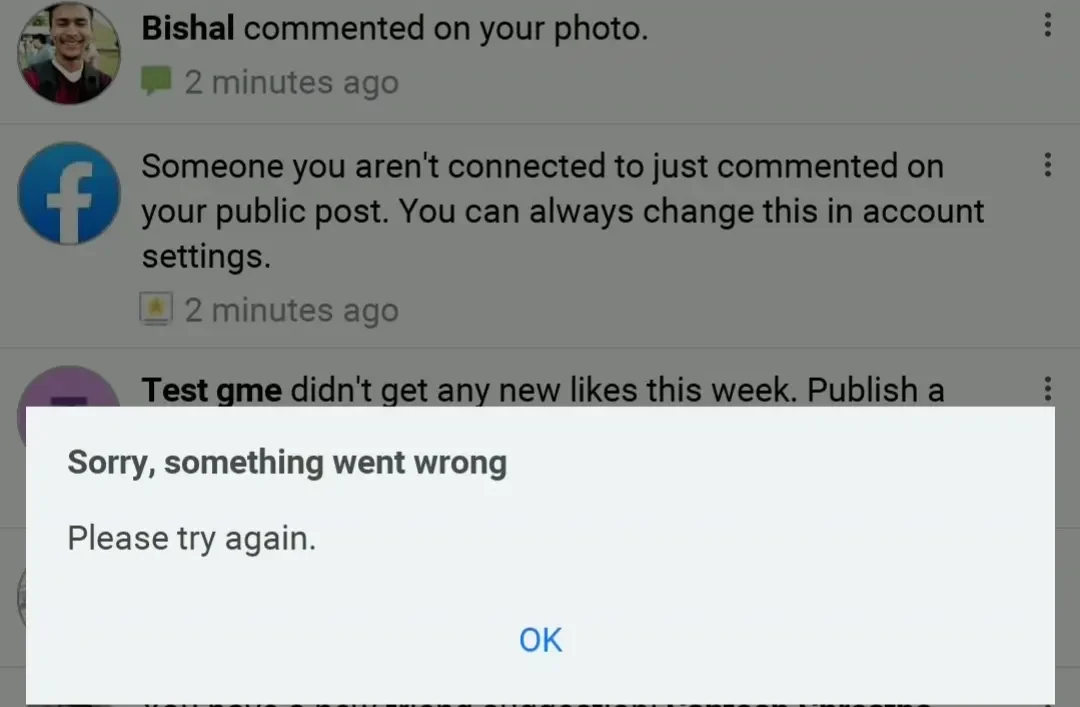
The screenshot shows the error that appeared after opening the comment.
At first the author did not realise this was an issue. The next day they tried again to moderate the post and still could not do anything with it, which made them think it was "something". They asked a friend to view the group post from FB Lite; the friend opened the link there and got the same error. At that point the author decided to report it.
Exploitation
The reproduction uses two accounts, an attacker and a victim, across Facebook and FB Lite.
Step 1: prepare the two accounts
Log on with two accounts, one as the attacker and one as the user (victim), in Facebook and FB Lite respectively.
Step 2: post the room link as a comment
As the attacker, go to the Messenger application, copy the Messenger Rooms join link, then go to the other user's (the victim's) profile picture and comment that link there using Facebook.
Step 3: open the comment as the victim
Open FB Lite as the victim and try to open that comment. The victim gets an error when trying to open that comment, along with the other comments in the same section.
While reporting the issue the author had only found it on FB Lite group comments. Further testing showed it affected every "commentable section", including any user post, page post, event post and so on.
A video proof of concept is linked at the end of the write-up:
https://youtu.be/JP8AnDtO13o
Root cause
The author asked the Facebook security team for the root cause after the issue was fixed. The team replied that "unfortunately we can not provide any further information on the fix or the root cause." So the exact mistake in the code or design is not public. What the behaviour shows is that a comment containing a Messenger Rooms join link could not be opened, and the author could not moderate the post. Why the existing handling of comment content did not prevent this is not stated in the report.
Impact
An attacker can simply comment the Messenger Rooms join link on a profile picture, Facebook page, group or event, and the admin or any user will be unable to moderate that comment. The victim got an error when trying to open that comment along with the other comments in the section. The author found the behaviour on FB Lite group comments first and then on every commentable section, including user posts, page posts and event posts.
Fix
The timeline lists an issue fixed date. The report does not describe what was changed. The timeline given is:
| Event | Date |
|---|---|
| Initial report sent | Monday, July 13, 2020 at 1:38 PM |
| Reproduce | Wednesday, July 15 |
| Triaged | Wednesday, July 15, 2020 |
| Reward awarded | Friday, August 28, 2020 at 3:14 PM |
| Issue fixed | Wednesday, September 2 |
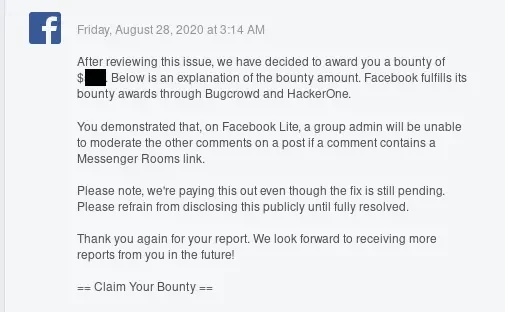
The bounty response from Facebook.
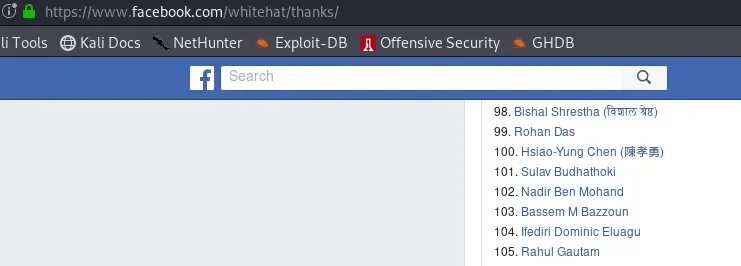
The author was also added to Facebook's Hall of Fame page, at number 98 at the time.
Variants to test
A positive result in each case is a comment section that fails to load or cannot be moderated after the payload is posted.
- Post other special link types as comments (event invites, group invites, live video links, payment requests) and check whether the comment section still opens for the poster, for a second account and for a moderator.
- Repeat the test on every commentable surface: profile pictures, page posts, group posts, event posts, and both the main Facebook front end and FB Lite.
- Test with accounts in different roles (post author, group admin, page admin, ordinary member) to see whether the failure depends on who opens the comment.
- Check whether deleting or editing the offending comment is possible from the moderation interface, since the report says moderation was blocked.
- Try the same link in other content fields that render previews, such as post bodies and messages, and observe whether the rendering failure follows the link or the comment context.
If you find an issue like this, the author points to www.facebook.com/whitehat/report, where you fill in the form with how you found the issue, the steps and its impact, and the Facebook Security Team reviews it and responds.
What happened, in plain words
In 2020, a security researcher found a small but real problem in Facebook. Facebook had just launched a feature called Messenger Rooms, which lets people hold video meetings. You create a room, Facebook gives you a link, and you share that link with the people you want in the meeting. Anyone who has the link can join, and the author notes that up to 50 people can video chat at a time, that there is no limit to how long you can talk, and that you do not even need a Facebook account to join a room.
The researcher was planning a meetup for a group and posted the room link as a comment on their own post so everyone could join. When they then tried to open that post, they got an error and could not view it. The post could not be viewed, and opening the comment gave an error along with the other comments. They asked a friend to look at the same post from FB Lite (Facebook's lighter version, made for slower connections and simpler phones), and the friend got the same error. That is when they decided to report it.
This kind of bug is called a logic flaw. It is not a crash caused by bad memory handling and it is not an injection attack where someone sneaks commands into a database. The report does not say what the programming mistake was; the root cause was not disclosed. Think of a shop till that refuses to open the drawer whenever a receipt has a certain word printed on it: nothing is broken physically, but the normal job cannot be done.
The author reported it through Facebook's bug bounty programme. A bug bounty is a reward a company pays to a researcher who finds and reports a security flaw in its software. Some companies pay money, some give recognition by listing the researcher's name on a thanks page. Facebook does both: it pays a reward and lists names at https://www.facebook.com/whitehat/thanks/.
Setting up the test
The test needed nothing beyond ordinary Facebook accounts and the two Facebook front ends:
- Two accounts: one acting as the attacker, one acting as the victim.
- Access to Facebook on the web and to FB Lite.
- A Messenger Rooms join link, copied from the Messenger application.
Why two accounts? Because you want to see the problem from both sides. The attacker is the person who posts the link. The victim is the person who later tries to read or moderate the comment.
Finding it
The author was planning a meetup for a group using Messenger Rooms. They had already posted a status, and the next day commented the Messenger Rooms join link on it so that everyone could join the meeting through that link. When they then tried to open that post, they got an error and could not view the post.
The screenshot shows the error that appeared after opening the comment.
At first the author did not realise this was an issue. The next day they tried again to moderate the post and still could not do anything with it, which made them think it was "something". Moderate here means the normal housekeeping a post owner or group admin does: reading comments, hiding or deleting bad ones, keeping the discussion in order. If you cannot even open the comment section, none of that is possible.
They asked a friend to view the group post from FB Lite; the friend opened the link there and got the same error. At that point the author decided to report it. Asking a second person is a simple but important habit: it separates "my browser or my account is having a bad day" from "this happens to everyone".
Reproducing it step by step
The reproduction uses two accounts, an attacker and a victim, across Facebook and FB Lite.
Step 1: prepare the two accounts
Log on with two accounts, one as the attacker and one as the user (victim), in Facebook and FB Lite respectively.
Using two different front ends matters because the author first saw the problem on FB Lite.
Step 2: post the room link as a comment
As the attacker, go to the Messenger application, copy the Messenger Rooms join link, then go to the other user's (the victim's) profile picture and comment that link there using Facebook.
The profile picture is a place where people can leave comments, so it is a "commentable section". The attacker is not doing anything clever here: just copying a normal link and pasting it into a normal comment box.
Step 3: open the comment as the victim
Open FB Lite as the victim and try to open that comment. The victim gets an error when trying to open that comment, along with the other comments in the same section.
That last part is the important bit. The failure is not limited to the one comment with the link. Opening the comment gave an error along with the other comments in the section.
While reporting the issue the author had only found it on FB Lite group comments. Further testing showed it affected every "commentable section", including any user post, page post, event post and so on. In other words, anywhere Facebook lets people comment, the same trick seemed to break the comment section.
A video proof of concept is linked at the end of the write-up:
https://youtu.be/JP8AnDtO13o
This block is just the address of the video. A proof of concept (often shortened to PoC) is a recording or set of steps that shows the problem actually happening, so the security team can see it rather than take it on trust. The line above is a URL: the address you would type into a browser to watch the video.
Why it happened
The author asked the Facebook security team for the root cause after the issue was fixed. The team replied that "unfortunately we can not provide any further information on the fix or the root cause." So the exact mistake in the code or design is not public.
What the behaviour shows is that a comment containing a Messenger Rooms join link could not be opened, and the author could not moderate the post. Rendering is simply the browser drawing the page on your screen; if the data needed to draw the comment section never arrives or arrives in a shape the page cannot use, you get an error instead of comments. Why the existing handling of comment content did not prevent this is not stated in the report.
What someone could do with it
An attacker can simply comment the Messenger Rooms join link on a profile picture, Facebook page, group or event, and the admin or any user will be unable to moderate that comment. The victim got an error when trying to open that comment along with the other comments in the section.
The author found the behaviour on FB Lite group comments first and then on every commentable section, including user posts, page posts and event posts. The practical result is a kind of nuisance: a single comment can make a discussion unreadable and unmanageable for the people responsible for it.
The fix and the timeline
The timeline lists an issue fixed date. The report does not describe what was changed. The timeline given is:
| Event | Date |
|---|---|
| Initial report sent | Monday, July 13, 2020 at 1:38 PM |
| Reproduce | Wednesday, July 15 |
| Triaged | Wednesday, July 15, 2020 |
| Reward awarded | Friday, August 28, 2020 at 3:14 PM |
| Issue fixed | Wednesday, September 2 |
Triaged means the security team looked at the report, confirmed the problem is real and put it in their queue to be fixed. It is the moment a report stops being an unread message and becomes a tracked issue.
The bounty response from Facebook.
The author was also added to Facebook's Hall of Fame page, at number 98 at the time. A Hall of Fame in this context is a public page where a company thanks researchers by name; the number is the position on that list.
If you find something like this
If you find an issue related to security or privacy that affects users or directly violates their privacy, the author points to www.facebook.com/whitehat/report. You fill in the form with how you found the issue, the steps to reproduce it and its impact, and the Facebook Security Team reviews it and responds.
A good report is mostly patience and clear writing: what you did, in what order, what you expected, what actually happened, and who is harmed by it. Screenshots and a short video help a lot, as this report shows.
Other things worth trying
A positive result in each case is a comment section that fails to load or cannot be moderated after the payload is posted. Payload here just means the content you put into the comment, in this case the special link.
- Post other special link types as comments (event invites, group invites, live video links, payment requests) and check whether the comment section still opens for the poster, for a second account and for a moderator.
- Repeat the test on every commentable surface: profile pictures, page posts, group posts, event posts, and both the main Facebook front end and FB Lite.
- Test with accounts in different roles (post author, group admin, page admin, ordinary member) to see whether the failure depends on who opens the comment.
- Check whether deleting or editing the offending comment is possible from the moderation interface, since the report says moderation was blocked.
- Try the same link in other content fields that render previews, such as post bodies and messages, and observe whether the rendering failure follows the link or the comment context.
Glossary
- Bug bounty: a reward a company pays to someone who finds and reports a security flaw in its software; it can be money, public recognition, or both.
- Logic flaw: a mistake in the rules or steps a program follows, rather than a crash or an injection attack; the software does what it was told, but the instruction itself is wrong.
- Messenger Rooms: Facebook's videoconferencing feature, where a room is shared through a join link that anyone with the link can use.
- Join link: the web address that lets a person enter a meeting room.
- FB Lite: Facebook's lighter version of the site, made for slower connections and simpler phones.
- Commentable section: any place on Facebook where people can leave comments, such as a profile picture, a page post, a group post or an event post.
- Moderate: to manage a discussion by reading, hiding or deleting comments as its owner or admin.
- Rendering: the process of a browser drawing a page on the screen from the data it receives.
- Proof of concept (PoC): a recording or set of steps that demonstrates a problem actually happening.
- Triaged: the stage at which a security team has reviewed a report, confirmed the problem and queued it for fixing.
- Payload: the content a tester puts into an input, here the special link placed in a comment.
- Hall of Fame: a public page where a company lists and thanks the researchers who reported issues.
- URL: the address of a page or file on the web, the thing you type into a browser's address bar.




