How I was able to get your facebook private friend list
Facebook's People You May Know feature leaked private friend lists. An attacker could register with a victim's phone number, switch verification to their own email, and then query an internal endpoint to see the victim's private friends.
 Published on medium.com
TL;DR: Facebook’s People You May Know feature leaked private friend lists: registering with a victim’s phone number, switching verification to my own email, then querying an internal endpoint exposed their social graph. Reported Oct 2018; Facebook awarded 10000 USD.
The full write-up lives on its author's site
It belongs to its author, so we link to it rather than copy it. The other two tabs are our own rewrites, checked against it.
Context
Facebook's "People You May Know" feature suggests people a user might want to add as friends. According to Facebook's help page, quoted in the report, suggestions come from things like mutual friends (the most common reason), being in the same Facebook group or tagged in the same photo, and shared networks such as a school, university or workplace.
The privacy question sits in the friends list itself. By default the Friends section of a profile is public, but Facebook offers privacy settings (Public, Friends, Only me and so on) to limit who can see it. The report describes a way to bypass that setting: a malicious user could infer a victim's private social graph by entering the victim's confirmed phone number during user registration. The combination of two useful features, friend suggestions and user registration, made the leak possible.
Setup
The attack needs no special tooling beyond a browser and, optionally, curl. The preconditions are:
- The victim's confirmed phone number, which the attacker knows or can obtain.
- The ability to create a new Facebook account, which requires an email address the attacker controls.
- A session cookie for the newly created account, used in the curl request below.
The report does not describe any particular browser, operating system or Facebook version.
Finding it
The researcher's starting point is the privacy model: a user can restrict the friends list to Friends or Only me, and the expectation is that nobody outside that audience can read it. The observation is that the registration flow accepts a phone number as the account identifier and then lets the person completing registration switch verification to an email address they control. Because the account is now tied to the victim's confirmed phone number, the victim's private friends are disclosed to it.
Exploitation
Step 1: register with the victim's mobile number
Create a new Facebook account using the victim's mobile number. After sign-up completes, Facebook redirects to the SMS confirmation page.
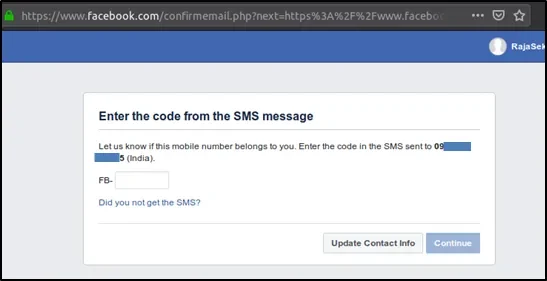
At this point the account exists but is not verified, and the attacker cannot receive the SMS sent to the victim's phone.
Step 2: switch the contact information to the attacker's email
Instead of entering the SMS code, click the "Update Contact info" button and enter an email address the attacker controls, shown in the report as [redacted].
Step 3: verify with the attacker's own email
Complete the account verification by entering the code that arrives at the attacker's email address.
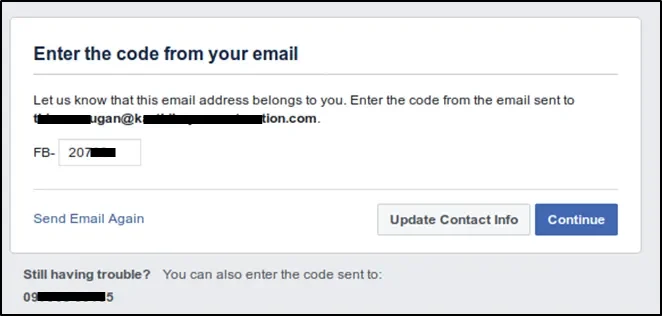
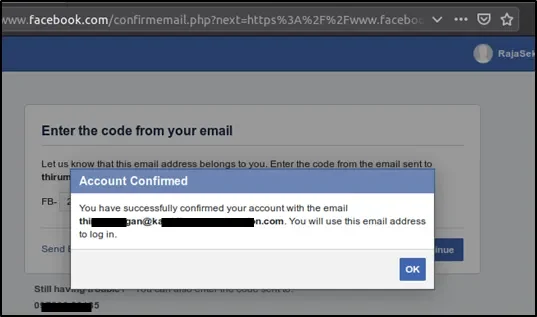
The account is now confirmed, but it was created against the victim's phone number. The verification step that was meant to prove ownership of the phone number has been satisfied with a different channel entirely.
Step 4: read the victim's private friends
With the confirmed account, navigate to the friend requests page:
https://www.facebook.com/friends/requests/?fcref=swpsa
Alternatively, the following request discloses most of the victim's private friends to the attacker:
curl ‘https://www.facebook.com/gettingstarted/?step=friend_requests' -H ‘authority: www.facebook.com' -H ‘referer: https://www.facebook.com/gettingstarted/' -H ‘cookie: xxxx’ — compressed
The request targets the gettingstarted endpoint with the step=friend_requests parameter, sends a referer of the getting started page and the attacker's session cookie, and asks for a compressed response. The cookie value is a placeholder in the report; a real session cookie would go there.
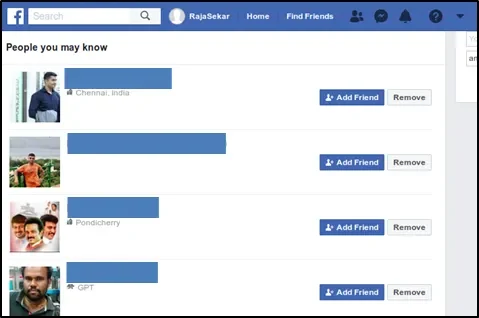
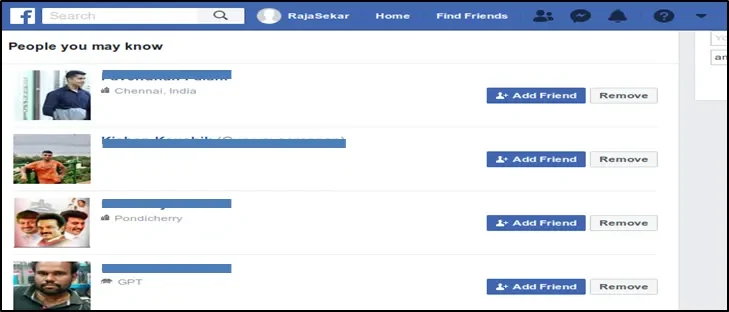
The screenshot shows the result: the victim's private friends appear in the attacker's "People you may know" list, labelled "Disclosed Victim's Friend".
Step 5: other endpoints
The report notes that there are also a couple of other URLs that disclose the private friends list to the attacker, without naming them.
A video proof of concept accompanies the write-up; the researcher credits Sameer Rao for allowing it to be added.
Root cause
The flaw is a mismatch between the identity a new account is anchored to and the channel used to verify it. Registration accepts the victim's phone number as the account's identifier, but verification can be completed through an email address the attacker controls. The account therefore ends up associated with the victim's confirmed phone number without the attacker ever proving control of that number.
Once that association exists, the friend suggestion logic does what it is designed to do: it treats the account as belonging to the phone number's owner and surfaces that person's social connections. The report does not describe which server-side check failed. The report frames this as the combination of two useful features, suggesting friends and user registration, producing the leak; the exact server-side check that should have blocked it is not described.
Impact
An attacker who knows a victim's confirmed phone number can create an account around it, verify through their own email, and read most of the victim's private friends list. The disclosure is of the social graph, not of account credentials. The report hedges the coverage: the request discloses "most of" the victim's private friends, and the additional URLs are described only as "a couple of other URLs".
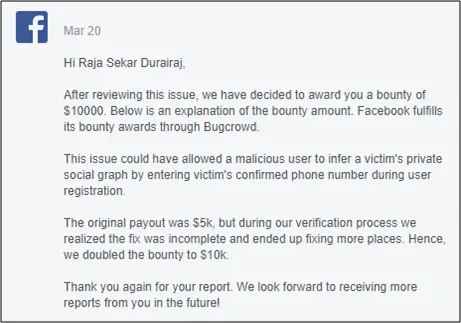
Facebook's award message states that the issue could have allowed a malicious user to infer a victim's private social graph by entering the victim's confirmed phone number during user registration, and that the bounty was doubled from 5,000 USD because the initial fix was incomplete.
Fix
Facebook paid the bounty on 20 March 2019. The award message records that the first fix was incomplete and that the reward was doubled from 5,000 USD to 10,000 USD as a result.
Timeline
| Date | Event |
|---|---|
| 16 October 2018 | First disclosure to Facebook |
| 20 March 2019 | Facebook awarded 10,000 USD |
Variants to test
- Other registration identifiers. Try registering with a victim's confirmed email address instead of a phone number, then switch verification to another channel. A positive result is a new account that is treated as belonging to the victim and receives their private data in suggestions.
- Other suggestion surfaces. The report gives the
friends/requests/?fcref=swpsapage and the curl request togettingstarted, and mentions a couple of other URLs. Enumerate onboarding and suggestion endpoints on a test account and check whether any of them return friends of the identity the account was registered against. A positive result is a response containing names or profile links the account should not be able to see. - Verification channel switching. Walk the contact update flow at each stage (before SMS confirmation, after it, after email confirmation) and check whether the account's association with the original identifier survives the switch. A positive result is the association persisting after verification through a different channel.
- Privacy setting coverage. With a test victim account whose friends list is set to Only me, repeat the flow and compare what the attacker account sees against the setting. A positive result is any friend data returned despite the restriction.
- Partial disclosure measurement. Because the report says "most of" the friends are disclosed, count how many of the victim's friends appear versus the total, and check whether the remainder leak through the other endpoints.
What happened, in plain words
Facebook has a feature called "People You May Know". It looks at who you are connected to and suggests new friends you might want to add. To do that, it has to know something about your social circle: who your friends are, which groups you are in, which school or workplace you list.
Your friends list is normally something you can hide. Facebook lets you set it to Public, Friends, or Only me. The promise of that setting is simple: if you choose Only me, nobody else should be able to read the list.
This report describes a way around that promise. The researcher found that he could create a brand new Facebook account using someone else's phone number, then finish the sign-up by verifying an email address he controlled instead of the phone. The account ended up tied to the victim's phone number, and Facebook's friend suggestion feature then treated that new account as if it belonged to the victim. It started showing the victim's private friends to the attacker.
In security terms this is an information disclosure: private data is exposed to someone who is not allowed to see it. The report calls it a User Data Disclosure, which it defines as personal information held by an organisation being lost or subjected to unauthorised access or disclosure. The data copied, transmitted, viewed or stolen here is the victim's social graph, meaning the map of who is connected to whom.
The report was sent to Facebook in October 2018. Facebook paid a bounty of 10,000 USD in March 2019.
Background: the feature and the privacy setting
The report quotes Facebook's own help page to explain where suggestions come from. "People You May Know" is a feature that can help people find friends on Facebook. Suggestions come from things like:
- having friends in common, or mutual friends, which is the most common reason;
- being in the same Facebook group or being tagged in the same photo;
- your networks, such as your school, university or workplace.
The image above shows what the suggestion list looks like: a row of profile cards, each with an Add Friend button and a Remove button. The names are redacted in the screenshot. This is the surface the attack abuses: a page whose whole job is to show you people connected to an identity.
The privacy question sits in the friends list itself. By default the Friends section of a profile is public, but Facebook offers privacy settings (Public, Friends, Only me and so on) to limit who can see it. The report's point is that those settings should hold no matter how someone reaches the data.
What the attacker needs before starting
The attack needs no special tooling beyond a browser and, optionally, a command-line tool called curl. The preconditions are:
- The victim's confirmed phone number, which the attacker knows or can obtain. "Confirmed" means Facebook has already checked that this number belongs to that account, for example through an SMS code.
- The ability to create a new Facebook account, which requires an email address the attacker controls.
- A session cookie for the newly created account, used in the curl request below.
A session cookie is a small piece of text your browser stores after you log in. It is like the wristband you get at an event: the server checks it on every request to know who you are, so you do not have to type your password again on every page. Anyone who copies that wristband can act as you until it expires. That is why the cookie value is treated as a secret.
The report does not describe any particular browser, operating system or Facebook version.
How the researcher found it
The starting point is the privacy model. A user can restrict the friends list to Friends or Only me, and the expectation is that nobody outside that audience can read it.
The observation is about the registration flow. When you sign up, Facebook accepts a phone number as the account identifier, meaning the thing that says "this account belongs to this person". The flow then lets the person completing registration switch verification to an email address they control. Because the account is now tied to the victim's confirmed phone number, the victim's private friends are disclosed to it.
Step by step: how the attack worked
Step 1: register with the victim's mobile number
Create a new Facebook account using the victim's mobile number. After sign-up completes, Facebook redirects to the SMS confirmation page.
The screenshot shows that page: "Enter the code from the SMS message", asking for the code that was sent to the victim's phone number.
Why this step matters: the phone number is the anchor. By starting registration with it, the attacker makes Facebook believe the new account is being created by the person who owns that number. At this point the account exists but is not verified, and the attacker cannot receive the SMS sent to the victim's phone.
Step 2: switch the contact information to the attacker's email
Instead of entering the SMS code, click the "Update Contact info" button and enter an email address the attacker controls, shown in the report as [redacted].
Why this step matters: the attacker cannot read the victim's text messages, so the SMS route is a dead end. The contact update button offers a different way to finish verification. The account keeps the victim's phone number as its identifier, but the proof of ownership is about to come from somewhere else entirely.
Step 3: verify with the attacker's own email
Complete the account verification by entering the code that arrives at the attacker's email address.
The first screenshot shows the "Enter the code from your email" page with the code filled in. The second shows the "Account Confirmed" dialog, saying the account was successfully confirmed with the attacker's email, which will be used to log in.
Why this step matters: the account is now confirmed, but it was created against the victim's phone number. The verification step that was meant to prove ownership of the phone number has been satisfied with a different channel entirely. Think of it like a bank opening an account in your name, then accepting a utility bill from a stranger as proof that the stranger is you.
Step 4: read the victim's private friends
With the confirmed account, navigate to the friend requests page:
https://www.facebook.com/friends/requests/?fcref=swpsa
This is an ordinary web address. friends/requests is the page that lists friend requests, and ?fcref=swpsa is a parameter, a small piece of extra information appended to the address. Parameters usually tell the server where the request came from or how to shape the response; the report does not explain what fcref=swpsa means.
Alternatively, the following request discloses most of the victim's private friends to the attacker:
curl ‘https://www.facebook.com/gettingstarted/?step=friend_requests' -H ‘authority: www.facebook.com' -H ‘referer: https://www.facebook.com/gettingstarted/' -H ‘cookie: xxxx’ — compressed
Line by line, in plain words:
curlis a command-line program that fetches a web address, like a browser without a window. It is useful because you can see exactly what is sent and received.‘https://www.facebook.com/gettingstarted/?step=friend_requests'is the address being fetched.gettingstartedis an endpoint, meaning a specific address on the server that does a specific job. Thestep=friend_requestsparameter tells that endpoint which step of the getting-started flow to return.-H ‘authority: www.facebook.com'adds a header. Headers are extra lines of information sent with a request, like the address and return address on an envelope. This one names the site the request is for.-H ‘referer: https://www.facebook.com/gettingstarted/'adds another header telling the server which page the request came from. Browsers send this automatically; curl does not, so it is set by hand here.-H ‘cookie: xxxx’sends the session cookie.xxxxis a placeholder in the report; a real session cookie would go there. This is the wristband that tells Facebook which account is asking.— compressedasks for the response to be compressed, so it travels smaller.
Why this step matters: the request targets the gettingstarted endpoint with the step=friend_requests parameter, sends a referer of the getting started page and the attacker's session cookie, and asks for a compressed response. In other words, it asks Facebook, as the newly confirmed account, for the friend request step of the getting-started flow. Because that account is anchored to the victim's phone number, the answer contains the victim's friends.
The screenshot shows the result: the victim's private friends appear in the attacker's "People you may know" list, labelled "Disclosed Victim's Friend".
Step 5: other endpoints
The report notes that there are also a couple of other URLs that disclose the private friends list to the attacker, without naming them.
A video proof of concept accompanies the write-up; the researcher credits Sameer Rao for allowing it to be added.
Why it worked
The flaw is a mismatch between the identity a new account is anchored to and the channel used to verify it. Registration accepts the victim's phone number as the account's identifier, but verification can be completed through an email address the attacker controls. The account therefore ends up associated with the victim's confirmed phone number without the attacker ever proving control of that number.
Once that association exists, the friend suggestion logic does what it is designed to do: it treats the account as belonging to the phone number's owner and surfaces that person's social connections. The report frames this as the combination of two useful features, suggesting friends and user registration, producing the leak; the exact server-side check that should have blocked it is not described.
What the impact was
An attacker who knows a victim's confirmed phone number can create an account around it, verify through their own email, and read most of the victim's private friends list. The disclosure is of the social graph, not of account credentials: the attacker does not get the victim's password or the ability to log in as the victim.
The report hedges the coverage: the request discloses "most of" the victim's private friends, and the additional URLs are described only as "a couple of other URLs".
Facebook's award message states that the issue could have allowed a malicious user to infer a victim's private social graph by entering the victim's confirmed phone number during user registration, and that the bounty was doubled from 5,000 USD because the initial fix was incomplete.
The screenshot shows that message: the 20 March bounty award of 10,000 USD, with the explanation that the first fix was incomplete and the reward was therefore doubled from 5,000 USD.
How it was fixed
Facebook paid the bounty on 20 March 2019. The award message records that the first fix was incomplete and that the reward was doubled from 5,000 USD to 10,000 USD as a result.
Timeline
| Date | Event |
|---|---|
| 16 October 2018 | First disclosure to Facebook |
| 20 March 2019 | Facebook awarded 10,000 USD |
Things worth testing if you find something similar
These are the variants the technical write-up suggests, explained for someone starting out. Each one is a way to check whether the same mistake exists in a slightly different form. Only test on accounts and data you own or are authorised to test.
- Other registration identifiers. Try registering with a victim's confirmed email address instead of a phone number, then switch verification to another channel. A positive result is a new account that is treated as belonging to the victim and receives their private data in suggestions.
- Other suggestion surfaces. The report gives the
friends/requests/?fcref=swpsapage and the curl request togettingstarted, and mentions a couple of other URLs. Enumerate onboarding and suggestion endpoints on a test account and check whether any of them return friends of the identity the account was registered against. A positive result is a response containing names or profile links the account should not be able to see. - Verification channel switching. Walk the contact update flow at each stage (before SMS confirmation, after it, after email confirmation) and check whether the account's association with the original identifier survives the switch. A positive result is the association persisting after verification through a different channel.
- Privacy setting coverage. With a test victim account whose friends list is set to Only me, repeat the flow and compare what the attacker account sees against the setting. A positive result is any friend data returned despite the restriction.
- Partial disclosure measurement. Because the report says "most of" the friends are disclosed, count how many of the victim's friends appear versus the total, and check whether the remainder leak through the other endpoints.
Glossary
- API: a defined way for one piece of software to ask another for data or an action, like a menu of requests a service accepts.
- Bounty: money a company pays a researcher who reports a security problem responsibly.
- Compressed: packed into a smaller form for transmission, then unpacked by the receiver.
- Cookie (session cookie): a small piece of text a browser stores after login and sends with each request so the server knows who is asking.
- curl: a command-line program that fetches web addresses and shows exactly what is sent and received.
- Endpoint: a specific address on a server that performs a specific job.
- Header: an extra line of information sent with a web request or response, such as the site name or the referring page.
- Identifier: the piece of information that says which person or account something belongs to, such as a phone number or email address.
- Information disclosure: a security problem where private data is exposed to someone not allowed to see it.
- Parameter: a small piece of extra information appended to a web address, usually after a
?, that shapes the response. - People You May Know: Facebook's feature that suggests people a user might want to add as friends.
- Referer: a header telling the server which page the request came from.
- Responsible disclosure: reporting a security problem privately to the company so it can be fixed before details are made public.
- Social graph: the map of who is connected to whom, for example a person's friends and their connections.
- SMS confirmation: a verification step where a code is sent by text message to a phone number.
- User Data Disclosure: the report's term for personal information held by an organisation being lost or subjected to unauthorised access or disclosure.
- Verification: proving that you control a phone number, email address or other identifier.



