Instagram photo was present in data backup
A photo the user had deleted was still present in their Instagram data download backup nearly two years later, despite the stated 90-day deletion window. An attacker with access to a user's data backup could recover content the user believed was deleted.
 Published on medium.com
Penetration Testing
The full write-up lives on its author's site
It belongs to its author, so we link to it rather than copy it. The other two tabs are our own rewrites, checked against it.
Context
Instagram's data download feature lets a user request a copy of their personal data, including messages, photos, followers, comments and other items, for future backup. The write-up looks at what happens when content the user has already deleted still appears in that backup.
According to the author, deleting a message or photo should take up to 90 days to be completely removed from the data backup. The issue he found was that a photo he had deleted almost two years earlier was still present in a backup file he requested from his account.
Setup
The write-up does not describe any special tooling, test accounts or roles. The only precondition was an ordinary Instagram account with a photo that had been uploaded and then deleted, plus the ability to request a data download from that account. The author had uploaded a photo during the Covid-19 pandemic period and deleted it immediately afterwards.
Finding it
Nearly two years after deleting the photo, the author requested a backup of his account data and checked the resulting file. The photo he had deleted straight away was still there. It was not a single stray copy either: the same photo was present in three different folders, each with different id names.
That contradicted the stated retention behaviour. Facebook's policy says a photo might take up to 90 days to be completely removed, but in this case around two years had passed. The author treated the discrepancy as a privacy bug and wrote a detailed report to the Facebook Security Team. The team verified that the photo had been deleted and was also present in the data backup.

Exploitation
The write-up does not include any requests, payloads, commands or responses. The steps it describes are:
- Upload a photo to Instagram.
- Delete the photo immediately.
- Wait well beyond the 90-day removal window. In this case, nearly two years passed.
- Request a data download from the account.
- Inspect the backup file. The deleted photo was present, in three different folders with different id names.
- Report the discrepancy to the Facebook Security Team, which verified that the photo was deleted and still present in the backup.
There is no further technical detail in the report about how the backup is generated, how the folders are named, or what the download request looks like.
Root cause
The report does not describe the underlying code or design fault. What it establishes is the observable behaviour: a deleted photo remained in the data backup long after the 90-day removal window, and appeared in three separate folders with different id names. Why the deletion process did not propagate to every copy in the backup is not stated.
Impact
The impact is a privacy issue: content a user believes has been deleted can still be retrieved from a data backup they request. In this case the affected user was the account owner himself, and the exposure was limited to his own backup file.
Fix
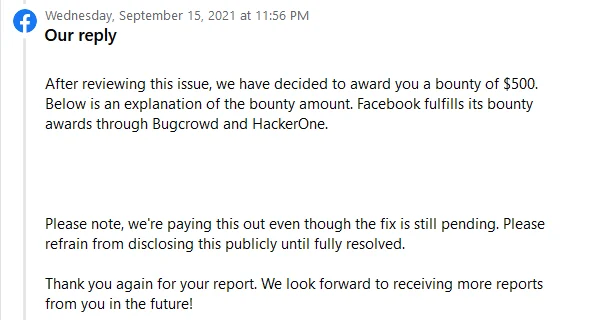
After nearly six months of conversation with the security team, they fixed the issue and paid a bounty of $550.
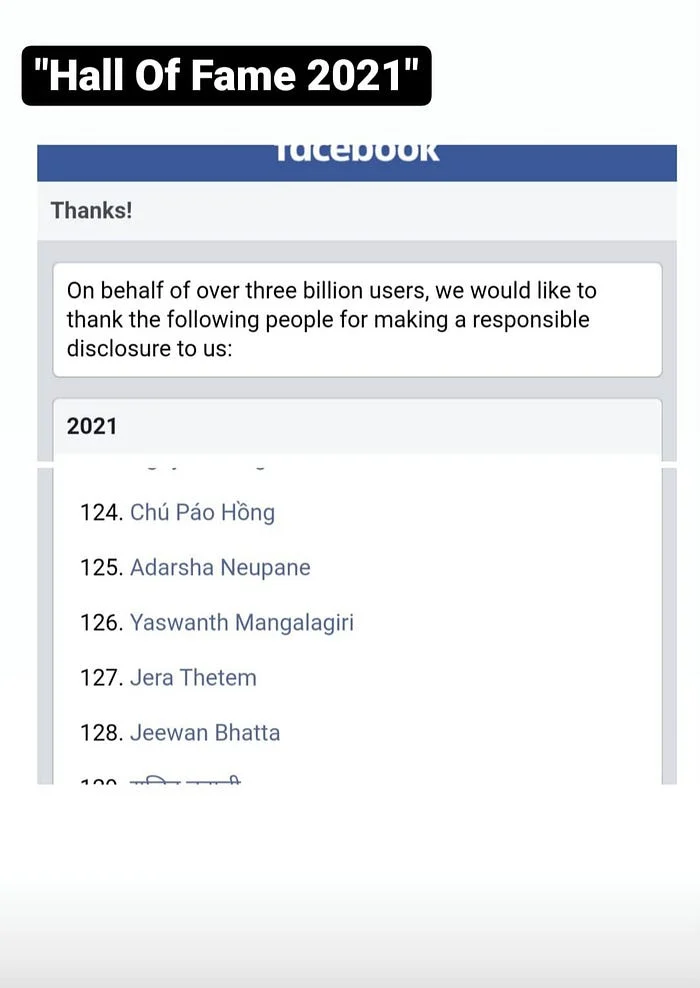
The author also got his name in the "Hall of Fame 2021" at https://m.facebook.com/whitehat/thanks.
Report timeline
| Event | Date |
|---|---|
| Reported | May 25, 2021 |
| Reviewed and asked for more information | May 26, 2021 |
| Bounty awarded | September 15, 2021 |
Bounty amount: $500 plus a $50 delay bonus.
Variants to test
What happened, in plain words
Instagram, like many online services, lets you ask for a copy of everything it holds about you: your messages, your photos, your followers, your comments and more. This is often called a data download or data backup. The idea is that you can keep your own copy of your data for the future.
A security researcher, Jeewan Bhatta, noticed something odd in his own backup. He had uploaded a photo during the Covid-19 pandemic and then deleted it straight away. Nearly two years later he requested a copy of his account data and found that same photo still sitting in the backup. Not just once: it was in three different folders, each with a different id name.
Facebook's own policy says a deleted photo might take up to 90 days to be completely removed. Two years is far beyond 90 days. So the researcher reported it to the Facebook Security Team as a privacy issue. The team confirmed that the photo had been deleted and was still present in the data backup. After nearly six months of conversation, they fixed the issue and paid a bounty of $550.
This is a beginner-friendly walkthrough of that report. You do not need any special tools: a browser and an ordinary Instagram account are enough to follow the idea.
The product and the feature
Instagram is a photo and video sharing service. Every account can hold photos, messages, comments, follower lists and other items.
The feature at the centre of this report is the data download (also called data backup). When you ask for it, Instagram prepares an archive of your personal data and gives it to you to download. Think of it like asking a shop to print out every receipt it has ever kept about you and hand you the pile. The archive is meant to be a faithful copy of what the service holds.
A related idea is retention: how long a service keeps something after you delete it. Deleting is rarely instant. Servers keep copies in several places, and cleaning all of them up takes time. Facebook's policy states that a photo might take up to 90 days to be completely removed. That 90-day window is the promise the researcher measured the behaviour against.
Setting up
The report does not describe any special tooling, test accounts or roles. The only precondition was an ordinary Instagram account with a photo that had been uploaded and then deleted, plus the ability to request a data download from that account. The author had uploaded a photo during the Covid-19 pandemic period and deleted it immediately afterwards.
In plain terms, the setup was:
- Have a normal Instagram account.
- Upload a photo.
- Delete it straight away.
- Wait a long time, in this case nearly two years.
- Ask Instagram for a copy of your data.
No hacking tools, no special access, nothing unusual. That is worth noticing: the researcher was simply using the product the way any user can.
Finding it
Nearly two years after deleting the photo, the author requested a backup of his account data and checked the resulting file. The photo he had deleted straight away was still there. It was not a single stray copy either: the same photo was present in three different folders, each with different id names.
A folder here is just a directory inside the downloaded archive, the same kind of thing you see in your computer's file manager. An id name is an identifier: a label made of letters or numbers that the system uses to tell one item apart from another. If the same photo appears under three different identifiers, that suggests the backup holds three separate records of it rather than one.
That contradicted the stated retention behaviour. Facebook's policy says a photo might take up to 90 days to be completely removed, but in this case around two years had passed. The author treated the discrepancy as a privacy bug and wrote a detailed report to the Facebook Security Team. The team verified that the photo had been deleted and was also present in the data backup.
Why does this matter? A privacy issue is a problem where data is kept, shown or shared in a way the user did not expect. Here the user expected the photo to be gone. The service's own policy said it should be gone within 90 days. Finding it in the backup meant the deletion had not fully happened, at least not everywhere.
Walking through the steps
The write-up does not include any requests, payloads, commands or responses. The steps it describes are:
- Upload a photo to Instagram.
- Delete the photo immediately.
- Wait well beyond the 90-day removal window. In this case, nearly two years passed.
- Request a data download from the account.
- Inspect the backup file. The deleted photo was present, in three different folders with different id names.
- Report the discrepancy to the Facebook Security Team, which verified that the photo was deleted and still present in the backup.
Each step has a reason:
- Upload and delete immediately. This creates the exact situation the researcher wants to test: content the user has clearly asked to be removed. Deleting straight away removes any doubt about whether the user meant to keep it.
- Wait well beyond the window. The policy allows up to 90 days. Waiting nearly two years means the result cannot be explained by normal cleanup still being in progress. This is the key to the finding: the gap between the promise and the reality.
- Request the download. This is the only way to see what the service still holds. The backup is the window into the stored data.
- Inspect the file. The researcher looked through the archive and found the photo in three folders. Checking more than one place matters, because a single copy could be a leftover in one spot, while three copies suggest a broader problem.
- Report it. The finding is only useful if the provider can act on it. The security team then verified the behaviour independently.
There is no further technical detail in the report about how the backup is generated, how the folders are named, or what the download request looks like.
Why it happened
The report does not describe the underlying code or design fault. What it establishes is the observable behaviour: a deleted photo remained in the data backup long after the 90-day removal window, and appeared in three separate folders with different id names.
Why the deletion process did not propagate to every copy in the backup is not stated. For a beginner, the useful lesson is the difference between what a service promises and what it actually does. The promise lives in a policy document; the behaviour lives in the data. Comparing the two is a legitimate and often productive way to find bugs.
Impact
The impact is a privacy issue: content a user believes has been deleted can still be retrieved from a data backup they request. In this case the affected user was the account owner himself, and the exposure was limited to his own backup file.
That last point matters for judging severity. If a stranger could pull someone else's deleted photo, the problem would be much more serious. Here the deleted content surfaced only in the owner's own download, which is still a broken promise about deletion, but a narrower one.
The fix and the reward
After nearly six months of conversation with the security team, they fixed the issue and paid a bounty of $550.
A bug bounty is a programme where a company pays people for reporting security or privacy problems responsibly, instead of punishing them. The payment here was $500 plus a $50 delay bonus, which the timeline below explains.
The author also got his name in the "Hall of Fame 2021" at https://m.facebook.com/whitehat/thanks. A Hall of Fame is a public list where a company thanks researchers who reported valid issues. It is recognition rather than money.
Report timeline
| Event | Date |
|---|---|
| Reported | May 25, 2021 |
| Reviewed and asked for more information | May 26, 2021 |
| Bounty awarded | September 15, 2021 |
Bounty amount: $500 plus a $50 delay bonus.
The timeline is worth reading carefully. The report was acknowledged the next day, but the bounty was awarded in September, nearly four months later. The bounty amount was $500 plus a $50 delay bonus.
Variants to test
Each one is something you can do with a browser and your own account.
A word of caution before you try any of this: only test on your own account and your own data. Do not try to reach anyone else's content. If you find something, report it through the provider's official security channel rather than publishing it first.
Glossary
- Data download / data backup: a feature that lets you request an archive of the personal data a service holds about you.
- Retention: how long a service keeps data after you delete it, before removing it completely.
- 90-day removal window: the period Facebook's policy says a deleted photo might take to be completely removed.
- Archive: the file or bundle of files you receive when you request a data download.
- Folder: a directory inside the archive, used to group files.
- id name: an identifier, a label made of letters or numbers, used to tell one stored item apart from another.
- Privacy issue: a problem where data is kept, shown or shared in a way the user did not expect.
- Bug bounty: a programme that pays people for responsibly reporting security or privacy problems.
- Delay bonus: an extra payment added because a bounty process took longer than expected.
- Hall of Fame: a public list where a company thanks researchers who reported valid issues.
- Payload: the part of a request that carries the data you are sending. This report contains no payloads.
- Request: a message your browser sends to a server asking for something, such as a page or a file. This report contains no captured requests.
- Server: a computer that stores data and answers requests from browsers.
- Security team: the group inside a company that receives and investigates reports of security or privacy problems.




