Page Admin Disclosure when Posting a Reel
When a user switched their voice to act as a page in a Facebook group and published a Reel, the Reel was posted under the admin's personal profile instead of the page. This is a voice confusion issue where the identity under which the admin is acting is unclear, potentially exposing the admin's personal identity.
 Published on zerocode-ph.medium.com
It was just a normal day and I was checking in on my Facebook account watching random videos. It came up on my mind to check if there is a new feature in FB4A (Facebook for Android).
The full write-up lives on its author's site
It belongs to its author, so we link to it rather than copy it. The other two tabs are our own rewrites, checked against it.
Context
Facebook Reels is a short video format that Meta introduced on 29 September 2021 in the US alone, and later launched globally in 150 countries. Reels can contain music, audio and effects, and appear in the News Feed and in Groups. When viewing a reel you can follow the creator from the video, like and comment on it, or share it with friends.
The finding here is not in the reel content itself but in the identity under which a reel is published. Facebook Groups let a member who has linked pages choose how to interact: either as their personal admin profile or as the page. That choice is made with a voice switcher, a floating button in the group. The bug is that the voice chosen for a reel was not honoured at publish time.
The researcher classifies this as a voice confusion issue, which he describes as a situation where the identity under which the admin is acting is unclear. Meta paid 1000 USD for the report.
Setup
The work was done against the Facebook for Android app (FB4A), where the researcher first noticed the Reels feature, and with Burp Suite on a laptop for endpoint inspection. The precondition that mattered most was access to the feature: Reels was present in one of the researcher's test groups, and when he checked with another account the feature was not present there, which he took to mean it was limited to a small market at the time.
No special tooling, versions or configuration beyond that is described. The report does not describe any further preconditions beyond having Reels available in a group.
Finding it
The researcher was browsing videos on his own Facebook account when he noticed the new Reels feature in FB4A. He opened Burp Suite and started looking for an endpoint that would leak the admin id of a page. He found nothing that way, but did not stop.
What redirected him was the programme's stance at the time: Meta paid for voice confusion issues, where the identity under which an admin is acting is unclear. That made the voice switcher itself the interesting surface rather than a page-id leak. He then confirmed that one of his test groups had Reels enabled, and proceeded to exercise the publish flow while acting as a page.
Exploitation
Step 1: Navigate to your group
Open the Facebook group in which the account is a member and in which Reels is available. The account must have a linked page, otherwise there is no second voice to switch to.
Step 2: Switch your voice as page using the voice switcher floating button
Use the floating voice switcher to change the acting identity from the personal admin profile to the page. This is the state the rest of the flow depends on: everything published from here should be attributed to the page.
Step 3: Open the composer then reel
From the group, open the composer and choose the reel option.
Step 4: Create a 3 seconds reel or more then click "share reel"
Record a reel of at least three seconds and publish it with the share action. The length is only what the researcher used; nothing in the report suggests it affects the outcome.
Step 5: Observe the published identity
After publishing, the reel appears as posted by the admin profile instead of the page, even though the voice was set to the page before composing.
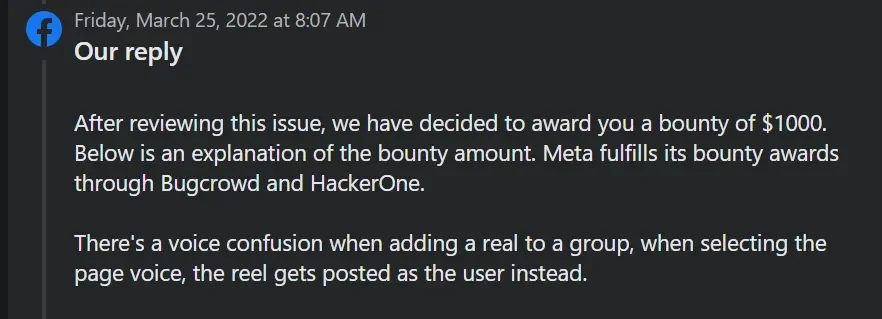
The screenshot above is captioned by the researcher as a sweet message from Meta.
No HTTP requests, responses, endpoints or parameters are reproduced in the report, so the exact request that drops the page voice cannot be shown here.
Root cause
The report does not describe the server-side implementation. What it establishes is the behaviour: the voice selected through the group voice switcher is not applied when a reel is published, so the publish path falls back to the personal admin voice.
Impact
A group member with linked pages who deliberately acts as a page can end up publishing a reel as their personal admin profile. The content is then attributed to the wrong identity, which is the voice confusion the programme was paying for: readers of the group see the reel under the person rather than the page. The report does not go beyond this attribution error; it describes no data exposure, no privilege escalation and no effect on other users' accounts.
The researcher also notes the programme conditions. Voice related issues were eligible at the time of the report, and today Meta will no longer reward such an issue. He found multiple voice related issues, but Meta closed them as informative because they were no longer eligible.
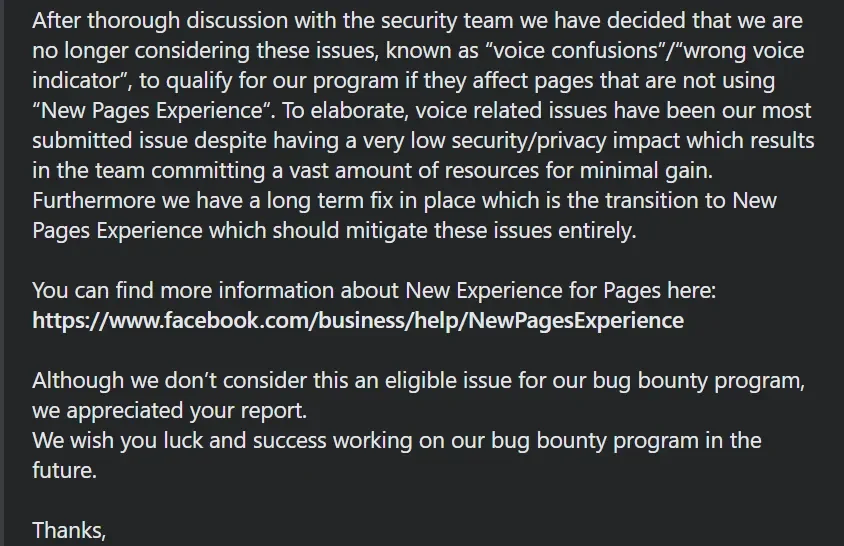
The second screenshot accompanies that note about the change in eligibility.
Fix
Variants to test
- Other content types in a group: switch to the page voice and publish a normal post, a photo, a live video or a comment. A positive result is content attributed to the personal admin profile despite the page voice being selected.
- Other entry points to the reel composer: open it from the News Feed or from a page rather than from the group, with the page voice active. A positive result is the same mismatch between the selected voice and the published identity.
- Voice switcher state persistence: switch to the page voice, leave the composer, return and publish. A positive result is the voice silently reverting to the personal profile at publish time.
- Multiple linked pages: switch between two pages and publish after each switch. A positive result is the reel appearing under the wrong page or under the personal profile.
- Editing and scheduling: schedule a reel or edit a published one while acting as the page. A positive result is the identity changing on the scheduled or edited item.
Each of these is worth checking wherever a product lets one account act as several identities, since the failure mode is always the same: the identity chosen in the interface is not the identity the backend records.
What happened, in plain words
Syd Ricafort, a security researcher from the Philippines, found a bug in Facebook's Reels feature. Reels is a short video format that Facebook (now Meta) introduced on 29 September 2021 in the US alone, and later launched globally in 150 countries. Reels can contain music, audio and effects, and appear in the News Feed and in Groups. When viewing a reel you can follow the creator from the video, like and comment on it, or share it with friends.
The bug is about identity: when you post something in a Facebook Group, you can choose to act either as your personal profile or as a page you manage. That choice is made with a voice switcher, a floating button in the group. The bug is that when you publish a reel, the voice you selected is not respected: the reel appears as posted by your personal profile instead of the page. The researcher calls this a voice confusion issue, which he describes as a situation where the identity under which the admin is acting is unclear. Meta paid 1000 USD for the report.
This article explains the finding in simple terms, assuming you know how to use a browser and a computer but nothing about security.
Setup
The researcher did his testing on the Facebook for Android app (FB4A), where he first noticed the Reels feature, and used Burp Suite on a laptop to inspect network traffic. Burp Suite is a tool that lets you see and modify the requests your browser or app sends to a server. The most important precondition was access to the feature: Reels was present in one of his test groups, but when he checked with another account, the feature was not there. He took that to mean it was limited to a small market at the time.
The report does not mention any special tooling, versions or configuration beyond that. To test, you need a group where your account is a member and has at least one linked page, so that the voice switcher offers both voices.
Finding it
The researcher was browsing videos on his own Facebook account when he noticed the new Reels feature in the Android app. He opened Burp Suite and started looking for an endpoint that would leak the admin id of a page. An endpoint is a specific URL that an app or website uses to send or receive data. He found nothing that way, but did not stop.
What redirected him was the bug bounty programme's stance at the time: Meta paid for voice confusion issues, where the identity under which an admin is acting is unclear. That made the voice switcher itself the interesting surface rather than a page-id leak. He then confirmed that one of his test groups had Reels enabled, and proceeded to exercise the publish flow while acting as a page.
Exploitation
Step 1: Navigate to your group
Open the Facebook group in which your account is a member and in which Reels is available. Your account must have a linked page, otherwise there is no second voice to switch to.
Step 2: Switch your voice as page using the voice switcher floating button
Use the floating voice switcher to change the acting identity from your personal admin profile to the page. This is the state the rest of the flow depends on: everything published from here should be attributed to the page.
Step 3: Open the composer then reel
From the group, open the composer and choose the reel option. The composer is the interface where you create a new post.
Step 4: Create a 3 seconds reel or more then click "share reel"
Record a reel of at least three seconds and publish it with the share action. The length is only what the researcher used; nothing in the report suggests it affects the outcome.
Step 5: Observe the published identity
After publishing, the reel appears as posted by the admin profile instead of the page, even though the voice was set to the page before composing.
The screenshot above is captioned by the researcher as a sweet message from Meta.
No HTTP requests, responses, endpoints or parameters are reproduced in the report, so the exact request that drops the page voice cannot be shown here.
Root cause
The report does not describe the server-side implementation. What it establishes is the behaviour: the voice selected through the group voice switcher is not applied when a reel is published, so the publish path falls back to the personal admin voice.
Impact
A group member with linked pages who deliberately acts as a page can end up publishing a reel as their personal admin profile. The content is then attributed to the wrong identity, which is the voice confusion the programme was paying for: readers of the group see the reel under the person rather than the page. The report does not go beyond this attribution error; it describes no data exposure, no privilege escalation and no effect on other users' accounts.
The researcher also notes the programme conditions. Voice related issues were eligible at the time of the report, and today Meta will no longer reward such an issue. He found multiple voice related issues, but Meta closed them as informative because they were no longer eligible.
The second screenshot accompanies that note about the change in eligibility.
Fix
Variants to test
- Other content types in a group: switch to the page voice and publish a normal post, a photo, a live video or a comment. A positive result is content attributed to the personal admin profile despite the page voice being selected.
- Other entry points to the reel composer: open it from the News Feed or from a page rather than from the group, with the page voice active. A positive result is the same mismatch between the selected voice and the published identity.
- Voice switcher state persistence: switch to the page voice, leave the composer, return and publish. A positive result is the voice silently reverting to the personal profile at publish time.
- Multiple linked pages: switch between two pages and publish after each switch. A positive result is the reel appearing under the wrong page or under the personal profile.
- Editing and scheduling: schedule a reel or edit a published one while acting as the page. A positive result is the identity changing on the scheduled or edited item.
Each of these is worth checking wherever a product lets one account act as several identities, since the failure mode is always the same: the identity chosen in the interface is not the identity the backend records.
Glossary
- API: Application Programming Interface; a set of rules that lets different software talk to each other.
- Endpoint: A specific URL where an API receives requests.
- Burp Suite: A tool for intercepting and modifying HTTP traffic between a browser or app and a server.
- FB4A: Facebook for Android, the mobile app.
- Reels: A short video format on Facebook.
- Voice switcher: A control that lets you choose whether to act as your personal profile or as a page you manage.
- Voice confusion: A situation where the identity under which an admin is acting is unclear or incorrect.
- Admin profile: The personal Facebook profile that manages a page.
- Page: A public profile for a business, brand or organisation on Facebook.
- Composer: The interface for creating a new post.
- Triage: The process where a security team reviews a report and decides if it is valid.
- Bug bounty programme: A programme that rewards researchers for finding and reporting security bugs.
- Privilege escalation: Gaining higher access rights than intended.
- Data exposure: Unauthorised access to sensitive information.




