The 2.5mins or 2.5k$ hawk-eye bug – A Facebook Pages Admins Disclosure Vulnerability!
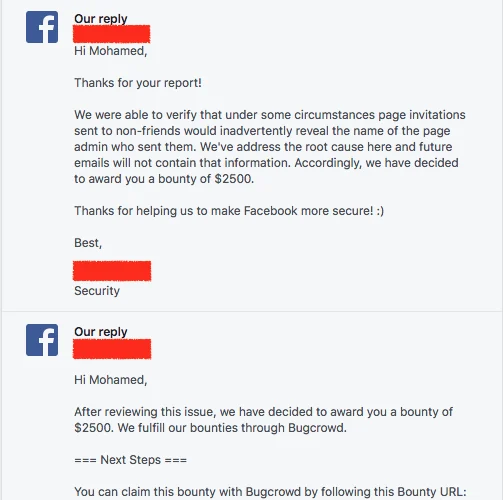
An invitation email sent by Facebook to users who had liked a page's post but not the page itself included the page admin's numeric ID in the email's original headers. An attacker who received such an invitation could read the admin's ID from the headers, disclosing the identity of the page admin.
 Published on seekurity.com
Hi Guys, How are you doing? Well i’ll consider and hope the answer is “Fine”… Today i will show you a bug i found in Facebook without even using any kind of testing tools BUT those kind of bugs requires what’s more than tools, it requires a hawk-eye, A platform-aware bug hunter mentality, a poet and an awesome morning…
The full write-up lives on its author's site
It belongs to its author, so we link to it rather than copy it. The other two tabs are our own rewrites, checked against it.
Context
Facebook Pages have a feature that lets page admins target the audience who liked a specific post of their page but did not like the page itself. The aim is to convert those users into page followers. The feature is reached by showing who interacted with a specific post; in the lightbox of the interactions there is a small button captioned "Invite", which invites the interacted users, but only those who are not liking the page itself. The invited user receives an email notification from Facebook.
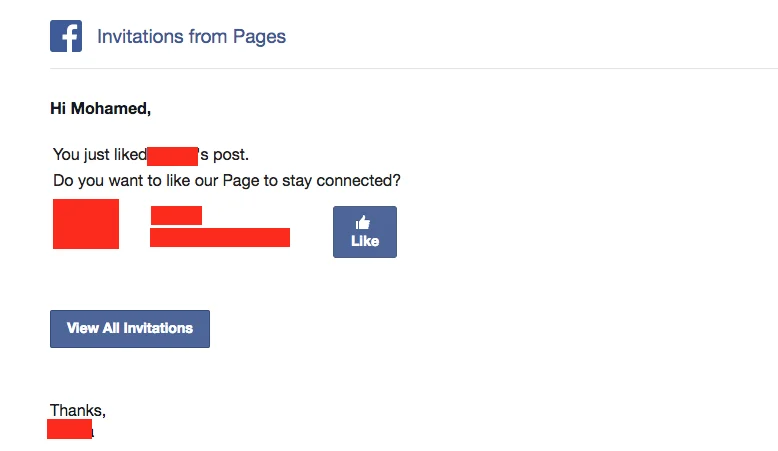
The image shows the "Invite" button in the interactions lightbox and the invitation message the invited user receives.
Setup
No testing tools were used. The researcher describes the finding as requiring a hawk-eye and a platform-aware bug hunter mentality rather than technical tooling, and notes this was only the second time a report was sent to the Facebook Security Team without writing a piece of code. The only artefacts involved are a Facebook account that had liked a post of a page without liking the page, the resulting invitation email, and the mail client's ability to show the original of a message.
Finding it
The researcher liked one of the posts of a specific page but did not like or follow the page itself. A few days later an email notification arrived from Facebook regarding an invitation to like the page whose post had already been liked. The feature targets non-fans, and the question raised was what could go wrong with a new feature like this.
The reasoning was that there is nothing obvious to attack in the feature itself, but there is a piece of evidence: the email notification. The next step was to investigate that email. In the fraud and phishing email investigations done in the office, the researcher always shows the "Original" of the message, which is achieved by clicking the little drop-down menu arrow beside the message reply button.
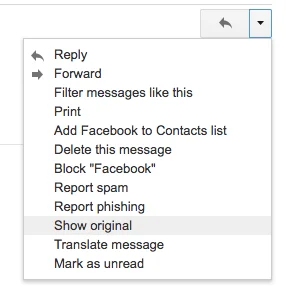
The image shows the drop-down menu beside the reply button, with the option used to display the original of the message.
Exploitation
Step 1: Receive the invitation email
After liking a post without liking the page, the researcher received an email notification from Facebook titled "You have an invitation from {FACEBOOK_PAGE_NAME}".
Step 2: Open the email
The email was opened in the mail client.
Step 3: Show the original of the message
Using the drop-down menu arrow beside the message reply button, the researcher navigated to "Show Original" to check the detailed information of the email.
Step 4: Read the original headers
In the original email headers, the Facebook admin id was found. The report does not reproduce the headers themselves, so the exact header field carrying the id is not shown here.
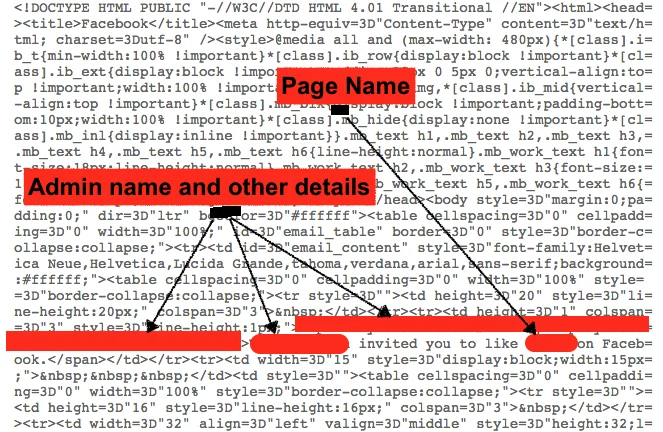
The image shows the result of displaying the original of the invitation email.
Step 5: Report
The finding was reported to the Facebook Security Team.
Root cause
The invitation email sent to a user who liked a post but not the page carried the Facebook admin id in its original headers. The report does not describe the server-side code or the template that produced the header, so the precise mistake is not stated;
Impact
The disclosure exposes the Facebook admin id of the person who sent the invitation to the invited user. The researcher notes that the effect can be found retroactively: searching the mailbox for the string "You have an invitation from" and following the reproduction steps reveals the admin name. The report does not state which further actions, if any, the admin id enables, and no severity or CVSS score is given.
Fix
Variants to test
- Positive result: the original headers contain an internal identifier of the acting admin that is not visible in the message body.
- Positive result: the same admin identifier appears regardless of how the recipient interacted.
Timeline
- 09:15 AM: arrived at the office.
- 09:30 AM: took the Mac out, got the cup of coffee and started working by checking morning messages, emails, Facebook notifications and similar.
- 09:35 AM: received a new email notification from Facebook titled "You have an invitation from {FACEBOOK_PAGE_NAME}".
- 09:36 AM: opened the email.
- 09:37 AM: navigated to "Show Original" to check the detailed information of the email.
- 09:37:18 AM: found the Facebook admin id in the email original headers.
- 09:38 AM: report sent to Facebook Security Team.
Takeaways
The researcher's own tips: always check the original headers and details of every email message, since even when nothing important is found the check is worthwhile; the disclosure has a retroactive effect, so searching the inbox for "You have an invitation from" and following the reproduction steps reveals the admin name; studying Facebook first pays off on the whitehat list; and attacking the logic of anything that acts logically is worthwhile, because it is written by a human.
What happened, in plain words
Facebook Pages have a feature that lets page admins target people who liked a specific post on their page but did not like the page itself. The goal is to turn those people into followers of the page. To use the feature, an admin opens the list of people who interacted with a post. In the lightbox (the pop-up window that shows the interactions) there is a small button labelled "Invite". Clicking it invites those users, but only the ones who are not already liking the page. The invited person then gets an email notification from Facebook.
The image shows the "Invite" button in the interactions lightbox and the invitation message that the invited user receives.
The researcher found that this invitation email contained the Facebook admin id of the person who sent the invitation, hidden in the email's original headers. Anyone who received such an email could open it, choose "Show Original" in their mail client, and read the admin id. No special tools were used: the whole finding came from reading an email carefully.
The feature, explained from zero
A Facebook Page is a public profile for a business, brand or public figure. People can "like" the page to follow its updates. A page admin is someone who manages the page: writes posts, replies to messages and sees statistics.
When a page publishes a post, people can interact with it (like, comment, share). Some of those people may not have liked the page itself. Facebook added a feature to help admins convert those people: the admin can invite them to like the page. The invitation arrives as an email notification.
This is a normal product feature, not a bug. The bug is in what the email carries behind the scenes.
Setup: no tools, just an email
No testing tools were used. The researcher says the finding required a "hawk-eye" and a platform-aware bug hunter mentality rather than technical tooling. This was only the second time a report was sent to the Facebook Security Team without writing a piece of code.
The only things involved were:
- a Facebook account that had liked a post of a page without liking the page itself;
- the invitation email that arrived as a result;
- the mail client's ability to show the original of a message.
Finding it: the story
The researcher liked one of the posts of a specific page but did not like or follow the page itself. A few days later, an email notification arrived from Facebook about an invitation to like the page whose post had already been liked. The feature targets non-fans, and the question raised was: what could go wrong with a new feature like this?
The reasoning was that there is nothing obvious to attack in the feature itself, but there is a piece of evidence: the email notification. The next step was to investigate that email. In the fraud and phishing email investigations done in the office, the researcher always shows the "Original" of the message. This is done by clicking the little drop-down menu arrow beside the message reply button.
The image shows the drop-down menu beside the reply button, with the option used to display the original of the message.
Why look at the original of an email?
Every email has two parts that a normal reader sees as one:
- the visible message: the subject, the sender name, the body text and any buttons;
- the technical envelope: a set of headers that tell mail servers and mail clients how the message travelled, who it came from, what it is about and how to display it.
When you click "Show Original" (or "View Source", "Show details"), your mail client shows you that technical envelope. It is the same message, but with all the hidden labels visible. Security analysts look at it because attackers often hide information there, and because automated systems sometimes add identifiers that were never meant for the recipient.
A useful comparison: the visible email is like the outside of a parcel, with the address and a nice label. The original headers are like the shipping paperwork inside the parcel, listing every depot it passed through and every internal code used to route it. Most recipients never open the paperwork, but it is there.
Exploitation, step by step
Step 1: Receive the invitation email
After liking a post without liking the page, the researcher received an email notification from Facebook titled "You have an invitation from {FACEBOOK_PAGE_NAME}".
Why this step matters: the email is the evidence. Without receiving it, there is nothing to inspect. The title itself is a clue: it says an invitation came from a page, but it does not say who sent it.
Step 2: Open the email
The email was opened in the mail client.
Step 3: Show the original of the message
Using the drop-down menu arrow beside the message reply button, the researcher navigated to "Show Original" to check the detailed information of the email.
Step 4: Read the original headers
In the original email headers, the Facebook admin id was found. The report does not reproduce the headers themselves, so the exact header field carrying the id is not shown here.
The image shows the result of displaying the original of the invitation email.
Why this step matters: an id is a unique label that a system uses to recognise a person or an object. If the id belongs to the admin who sent the invitation, then the recipient can learn which admin sent it, even if the visible email never says so.
Step 5: Report
The finding was reported to the Facebook Security Team.
Root cause
The invitation email sent to a user who liked a post but not the page carried the Facebook admin id in its original headers. The report does not describe the server-side code or the template that produced the header, so the precise mistake is not stated.
A comparison: a letter whose envelope is blank but whose back carries a stamp with the sender's employee number.
Impact
The disclosure exposes the Facebook admin id of the person who sent the invitation to the invited user. The researcher notes that the effect can be found retroactively: searching the mailbox for the string "You have an invitation from" and following the reproduction steps reveals the admin name.
Why this matters to a beginner: an id is not a password. It does not by itself let someone log in as the admin. Privacy leaks of this kind are still bugs, and platforms pay for them.
Fix
Variants to test
These are follow-up ideas in the same spirit. They are written as tests you could try if you were doing this kind of research, with the sign that tells you the test found something.
- Positive result: the original headers contain an internal identifier of the acting admin that is not visible in the message body.
- Positive result: the same admin identifier appears regardless of how the recipient interacted.
Timeline
- 09:15 AM: arrived at the office.
- 09:30 AM: took the Mac out, got the cup of coffee and started working by checking morning messages, emails, Facebook notifications and similar.
- 09:35 AM: received a new email notification from Facebook titled "You have an invitation from {FACEBOOK_PAGE_NAME}".
- 09:36 AM: opened the email.
- 09:37 AM: navigated to "Show Original" to check the detailed information of the email.
- 09:37:18 AM: found the Facebook admin id in the email original headers.
- 09:38 AM: report sent to Facebook Security Team.
Takeaways
The researcher's own tips:
- Always check the original headers and details of every email message, since even when nothing important is found the check is worthwhile.
- The disclosure has a retroactive effect, so searching the inbox for "You have an invitation from" and following the reproduction steps reveals the admin name.
- Studying Facebook first pays off on the whitehat list.
- Attacking the logic of anything that acts logically is worthwhile, because it is written by a human.
Glossary
- Admin: a person who manages a Facebook Page, with rights to post, reply and see statistics.
- Bounty: a reward paid by a company to someone who reports a security bug responsibly.
- Bug: a mistake in software that produces an unintended result.
- CVSS: a standard scoring system for the severity of a security vulnerability; the report gives no score.
- Email headers: the technical lines at the top of an email that describe its origin, route and metadata, separate from the visible body.
- Facebook admin id: a unique identifier that Facebook uses internally to recognise an admin account.
- Feature: a deliberate product capability, as opposed to a bug.
- Headers: see email headers.
- Id: a unique label used by a system to identify a person or object.
- Impact: the harm that a bug can cause.
- Lightbox: a pop-up window that appears over the page, here showing who interacted with a post.
- Mail client: the program or website you use to read and send email.
- Metadata: data about data; here, the technical information attached to an email rather than its visible text.
- Non-fan: a person who has not liked a page.
- Page: a public profile on Facebook for a business, brand or public figure.
- Phishing: a fraudulent message that pretends to be from a trusted party to trick the recipient.
- Root cause: the underlying reason a bug exists.
- Severity: how serious a bug is, often expressed with a score such as CVSS.
- Show Original: a mail client command that displays the raw message, including all headers.
- Whitehat list: a public list of researchers who reported valid security bugs to a company.