Unlimited report user in Instagram (Facebook) leads to abuse risk.
The Instagram user-report feature lacked rate limiting, allowing an attacker to submit unlimited reports against any user. This could flood the reporting system and potentially lead to account suspension or deletion if reports were counted without individual review.
 Published on infosecwriteups.com
This is my first bug report at Instagram. As a noob bug hunter, I tried various hunting methods to find a bug in Facebook.
The full write-up lives on its author's site
It belongs to its author, so we link to it rather than copy it. The other two tabs are our own rewrites, checked against it.
Hello, it's Mano Prasanth here. This write-up is about a simple rate-limiting bug which I found on Instagram. It was my first bug report at Instagram, and it is a low-level bug rather than a severe one, but it has an interesting abuse angle.

Photo by Alexander Shatov on Unsplash
Context
The target is Instagram, part of Meta / Facebook. The feature in question is the user account report feature: the flow any Instagram user goes through to report another account. Normally, when you submit a report, the client sends a POST request and the server answers with a confirmation. The report is then queued for Facebook's internal review process.
Most large platforms protect a feature like this with rate limiting on the POST requests, or with a WAF, a CAPTCHA, or similar controls. The researcher's finding is that Instagram had not implemented any rate limit on the report user feature, so the same account could be reported an unlimited number of times.
Setup
As a new bug hunter, the researcher first tried various hunting methods against Facebook, starting with authentication and moving on to other bug types. Authentication looked secure to his knowledge. Before this report he had been hunting on Bugcrowd, where his previous reports were duplicated, then moved to private programs and found some valid bugs. He then decided to hunt GAFAM targets and specifically Facebook's acquisitions, which is how he arrived at Instagram.
The tooling for the attack was Burp Suite, used to manipulate the request-response cycle.
Finding it
While testing the report flow, the researcher intercepted the report submission POST request and sent it to Intruder. Manually repeating the action is impractical: doing it by hand would leave you frustrated or waste a day. That gap between what the feature should tolerate and what it actually accepted is what made the missing rate limit worth reporting.
Exploitation
Step 1: Intercept the report submission
In Instagram, before the report is submitted, the client sends a POST request. The researcher intercepted that particular POST request in Burp Suite and forwarded it to the Intruder to make the repetition easier.
Step 2: Choose a payload position
He then selected a position for the payload. His reasoning was that the chosen position should not have any effect on the response. Instead of a NULL payload he chose a position in a header:
Accept-Language: en-US,en;q=0.$5$
The $5$ marks the insertion point Burp fills with each payload. Putting it inside the Accept-Language header means the request body, and therefore the report itself, stays identical across every attempt; only a header value that should be irrelevant to the outcome changes.
Step 3: Run the attack
He started the attack with 100 payloads. Every request returned HTTP 200 OK, and every response contained the same confirmation that the report had been submitted:
"text":"Thank you, we received your report"
Normally you would expect a rate limit exceeded response after four or five POST requests. Here none came: all 100 reports went through.
Step 4: Confirm at a larger scale
To be sure, he reported his close friend from four Instagram demo accounts, each sending 100 reports, and everything worked perfectly. He did not complete these attacks and terminated them immediately in order to report the issue to Facebook.
Root cause
The report user endpoint accepted repeated POST submissions from the same account without any throttling. The cause is the absence of a rate limit on the report user feature. The payload position was placed in a header, which the researcher expected would not affect the response.
Impact
As submitted to Facebook: there is no rate limiting in the user account report feature, which leads to a large number of report submissions. These stack up in the reports queue, causing inconvenience when working with the report feature. You may not know whether the reports are true or not unless you check each one individually, and the feature can be used for spam.
Rate-limit bugs usually do not qualify for bounties, and the researcher acknowledges this is not a severe bug. The interesting part is what the volume of reports could mean for the reported account. There are two possibilities: Facebook may filter reports arising from the same accounts, or it may not inspect every report and only look at the count. If the latter is true, there is a chance the reported account could be considered for deletion. Facebook admitted that they will not look into each report, but that if an account reaches enough reports they will examine some reports and take action against it. Facebook has internal protocols to deal with an account before deleting a user, so this bug could have allowed anyone to spam Instagram users and Facebook's internal infrastructure.
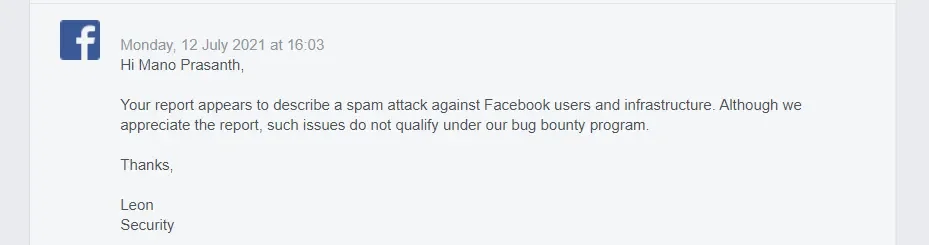
Acknowledgment from Facebook
Fix
The report does not describe any fix that was applied. The researcher notes that most tech giants limit such bugs by rate limiting their POST requests or by using WAF, CAPTCHA and similar controls.
Variants to test
- Other report and abuse flows. A positive result is a long run of HTTP 200 responses carrying the normal confirmation instead of a rate limit error after the first few attempts.
- Header-based payload positions. Place the payload marker in a header the server should ignore, as done here with
Accept-Language, so the body stays constant. A positive result is that changing only the header value never changes the outcome and never triggers throttling. - Per-target versus per-source limits. Repeat the same report from one account against one target, then from several accounts against the same target.
- Invitation and messaging endpoints. The researcher notes a separate case where a misconfigured rate limit on the landing page of Glance let him send 179 invitation messages within five minutes. Look for similar invitation, follow or message actions where the limit is absent or misconfigured; a positive result is a burst of accepted actions far above what the UI would allow by hand.
Happy Hunting.
What happened, in plain words
Mano Prasanth found a bug on Instagram: the button you press to report another account had no limit on how many times you could press it. Normally a website stops you after a few tries, the way a shop assistant might say "you've already asked that three times, come back tomorrow". Instagram did not. One person could send 100 reports about the same account, and every one of them was accepted.
This is called a rate-limiting bug. "Rate limiting" simply means a rule that says "no more than X actions per minute from the same person". When that rule is missing, a feature can be used far more often than it was designed for. The researcher calls it a low-level bug rather than a severe one, but it has an interesting abuse angle: if enough reports pile up against an account, there is a chance Facebook might consider that account for deletion.
Photo by Alexander Shatov on Unsplash
The background you need
Before the details, a few ideas that come up again and again.
Instagram and Meta. Instagram is a photo and video sharing app. It is owned by Meta, the company formerly known as Facebook. When a researcher finds a bug in an app owned by a big company, the report usually goes to the parent company's security team, which is why this write-up is filed under Meta / Facebook even though the bug is in Instagram.
The report feature. Instagram lets you tell the company that an account or a post breaks the rules. You tap through a few screens, choose a reason, and press submit. Behind the scenes, your phone or browser sends a message to Instagram's computers saying "this user reported that user, here is the reason". Instagram replies "thank you, we received your report" and puts the report in a queue for its staff to look at.
Requests and responses. Every time you click something on a website, your browser sends a request to a server (a computer owned by the website) and the server sends back a response. Think of it as posting a letter and getting a reply. The request contains the address (the URL), some extra information called headers, and sometimes a body with data in it.
Headers. Headers are small labelled lines attached to a request, a bit like the "From", "To" and "Subject" lines on an envelope. One common header is Accept-Language, which tells the server which language you prefer, for example English. It should not change what the server does with your report; it only affects things like which language the reply comes back in.
POST requests. There are different types of request. A GET request is like asking to see a page. A POST request is like sending information to be stored, for example submitting a form. Reporting a user is a POST request, because you are sending data (the report) that the server needs to save.
HTTP status codes. Every response starts with a number. 200 OK means "everything went fine, here is your answer". A rate-limit error would be a different number, often in the 400s, meaning "you are doing that too often, slow down".
Rate limiting, WAF and CAPTCHA. These are the three common ways a big website stops abuse. Rate limiting is the counting rule described above. A WAF (Web Application Firewall) is a filter that sits in front of the website and blocks requests that look automated or malicious. A CAPTCHA is the puzzle where you tick a box or pick out traffic lights, designed to prove a human is present. Most large tech companies use at least one of these on features that could be abused.
Burp Suite and Intruder. Burp Suite is a tool used by security researchers. It sits between your browser and the website, so you can see every request your browser sends and change it before it goes out. Intruder is one part of Burp Suite that takes a single request and sends it again and again, each time with a slightly different value in one spot. That spot is called the payload position, and the values it fills in are called payloads. This is how a researcher turns "press the button once" into "press it a hundred times automatically".
Bug bounty programmes and Bugcrowd. Companies pay researchers for finding bugs through bug bounty programmes. Bugcrowd is a platform that hosts many of these programmes. A duplicate is a report of a bug that someone else already reported, which usually earns nothing. Private programmes are ones you can only join by invitation. GAFAM is shorthand for Google, Apple, Facebook, Amazon and Microsoft, the five biggest American tech companies.
Acquisitions. When a big company buys a smaller one, the smaller one's products become part of the big company. Instagram is an acquisition of Facebook, which is why a researcher hunting for Facebook bugs might end up testing Instagram.
How the researcher got here
As someone new to bug hunting, Mano Prasanth tried several approaches against Facebook. He started with authentication, which is the part of a website that handles logging in: passwords, sessions, password resets and so on. To his knowledge, authentication looked secure. He notes, half joking, that nothing is completely secure anyway.
Before this report he had been hunting on Bugcrowd, but his previous reports there turned out to be duplicates. He then moved to private programmes and found some valid bugs. After that he decided to look at GAFAM targets, and specifically at Facebook's acquisitions. That path led him to Instagram.
Finding the gap
While testing the report flow, he intercepted the report submission POST request and sent it to Intruder. Doing it by hand is impractical: clicking through the report screens over and over would leave you frustrated or waste a whole day. That gap between what the feature should tolerate and what it actually accepted is what made the missing limit worth reporting.
The attack, step by step
Step 1: Catch the report request
When you submit a report in Instagram, your app sends a POST request. The researcher set up Burp Suite so that this particular POST request was intercepted: paused on its way out, so he could look at it and change it before it reached Instagram. He then sent it to Intruder, the part of Burp that repeats a request many times. The reason for this step is simple: you cannot send a hundred reports by hand in a reasonable time, but a tool can.
Step 2: Pick a spot for the payload
Next he chose where Intruder should insert its changing values. His reasoning was that the chosen spot should not affect the response at all. If the changing value altered the report itself, the test would be muddied: you would not know whether a failure came from the rate limit or from a malformed report. So instead of a NULL payload (a payload that inserts nothing), he chose a spot inside a header:
Accept-Language: en-US,en;q=0.$5$
Line by line:
Accept-Language:is the name of the header. It tells the server which language the user prefers.en-USmeans English as used in the United States.en;q=0.is the start of a quality value, a number that says how strongly that language is preferred.$5$is the marker Burp uses to show where it will insert each payload. It is not sent to the server; Burp replaces it with the payload value on each attempt.
Putting the marker inside Accept-Language means the body of the request, and therefore the report itself, stays exactly the same on every attempt. Only a header value that should be irrelevant to the outcome changes. If Instagram still accepts every request, the missing limit is confirmed and it is not caused by the report content.
Step 3: Run the attack
He started the attack with 100 payloads, meaning Intruder sent the same report request 100 times, each with a different value in the Accept-Language header. Every request came back with HTTP 200 OK, and every response contained the same confirmation:
"text":"Thank you, we received your report"
This is a fragment of the response, in the format the server uses to send data back to the app. "text" is the name of the field, and the part in quotes after the colon is the message shown to the user. Seeing it 100 times means all 100 reports were accepted.
Normally you would expect a rate limit exceeded response after four or five POST requests. Here none came.
Step 4: Check at a larger scale
To be sure, he reported his close friend from four Instagram demo accounts, each sending 100 reports, and everything worked perfectly. He did not finish these attacks; he stopped them immediately so he could report the issue to Facebook. Stopping early matters: the point was to prove the bug, not to actually flood a real person's account.
Why it worked
The report endpoint accepted repeated POST submissions from the same account without any throttling. The cause is that Instagram had not implemented any rate limit on the report user feature. The changing value was placed in a header, which the researcher expected would not affect the response.
What the impact was
This is the impact exactly as the researcher submitted it to Facebook: there is no rate limiting in the user account report feature, which leads to a large number of report submissions. These stack up in the reports queue, causing inconvenience when working with the report feature. You may not know whether the reports are true or not unless you check each one individually, and the feature can be used for spam.
Rate-limit bugs usually do not qualify for bounties, and the researcher acknowledges this is not a severe bug. The interesting part is what the volume of reports could mean for the reported account. There are two possibilities: Facebook may filter reports that come from the same accounts, or it may not inspect every report and only look at the count. If the second is true, there is a chance the reported account could be considered for deletion. Facebook admitted that they will not look into each report, but that if an account reaches enough reports they will examine some reports and take action against it. Facebook has internal protocols to deal with an account before deleting a user, so this bug could have allowed anyone to spam Instagram users and Facebook's internal infrastructure.
Acknowledgment from Facebook
Was it fixed?
The report does not describe any fix that was applied. The researcher notes that most tech giants limit such bugs by rate limiting their POST requests or by using WAF, CAPTCHA and similar controls.
Similar things to try
- Other report and abuse flows. A positive result is a long run of HTTP 200 responses carrying the normal confirmation instead of a rate limit error after the first few attempts.
- Header-based payload positions. Place the payload marker in a header the server should ignore, as done here with
Accept-Language, so the body stays constant. A positive result is that changing only the header value never changes the outcome and never triggers throttling. - Per-target versus per-source limits. Repeat the same report from one account against one target, then from several accounts against the same target.
- Invitation and messaging endpoints. The researcher notes a separate case where a misconfigured rate limit on the landing page of Glance let him send 179 invitation messages within five minutes. Look for similar invitation, follow or message actions where the limit is absent or misconfigured; a positive result is a burst of accepted actions far above what the interface would allow by hand.
Happy Hunting.
Glossary
- API: the set of addresses and rules a website's app uses to talk to its servers, like a menu of things you can ask for.
- Authentication: the part of a website that handles logging in and proving who you are.
- Body: the part of a request that carries the actual data, such as the contents of a form.
- Bug bounty programme: a scheme where a company pays researchers for reporting security bugs.
- Bugcrowd: a platform that hosts bug bounty programmes for many companies.
- Burp Suite: a tool that sits between your browser and a website so you can inspect and change requests.
- CAPTCHA: a puzzle designed to prove a human, not a program, is making the request.
- Duplicate: a bug report for something someone else already reported.
- Endpoint: the specific address on a server that handles one action, such as submitting a report.
- GAFAM: shorthand for Google, Apple, Facebook, Amazon and Microsoft.
- GET request: a request that asks to see something, without sending data to be stored.
- Header: a labelled line of extra information attached to a request or response, like the lines on an envelope.
- HTTP status code: the number at the start of a response saying how it went, such as 200 OK.
- Intruder: the part of Burp Suite that repeats one request many times with changing values.
- Intercept: to pause a request on its way out so it can be inspected or changed.
- Meta: the company that owns Facebook and Instagram.
- NULL payload: a payload that inserts nothing, used when you only want to repeat a request unchanged.
- Payload: the value a tool inserts into a request on each attempt.
- Payload position: the marked spot in a request where the tool inserts each payload.
- POST request: a request that sends data to the server to be stored or acted on, such as a form submission.
- Private programme: a bug bounty programme you can only join by invitation.
- Rate limiting: a rule that caps how many actions can be taken in a given time, such as a number of requests per minute.
- Request: the message your browser sends to a server.
- Response: the message the server sends back.
- Server: a computer owned by a website that receives requests and answers them.
- Session: the state of being logged in, remembered by the website across requests.
- WAF (Web Application Firewall): a filter in front of a website that blocks requests that look automated or malicious.




