Instagram Live setting bug
The Instagram Live archive setting turned itself back on after a user ended a live video, even though the user had previously turned it off. This meant ended live videos were saved and visible to other Facebook page users in Creator Studio's calendar, contrary to the user's expectation.
 Published on infosecwriteups.com
hackerone.com](https://hackerone.com/kamikaze?type=user&source=postpage-----d2d076b3f8bb------------------------------------------)
The full write-up lives on its author's site
It belongs to its author, so we link to it rather than copy it. The other two tabs are our own rewrites, checked against it.
Context
Instagram Live lets a creator broadcast from the mobile app. The app has a setting, Save Live to Archive, which decides whether a finished live video is kept. When it is on, the ended live is stored and becomes visible in the calendar of Facebook Creator Studio to anyone who has access to the connected Instagram account, for example a page advertiser. When it is off, the ended live is not kept, so it does not appear there.
The report is about that setting changing on its own. An Instagram creator or business account connected to a Facebook business page turns the archive setting off, goes live, ends and deletes the live, and repeats the live. After that, the setting is back on without the user touching it. The consequence is that a later live is archived and shows up in Creator Studio for other Facebook users who can reach the Instagram account.
Setup
The researcher lists the following prepared set:
- Tested device: iOS 14.4 and iPadOS 14.4
- Tested app: Instagram iOS version 177.0
- One Instagram creator/business account (the victim user) connected to a Facebook business page
- One Facebook account (the attacker user) who can access the Instagram account, for example as a page advertiser, in Facebook Creator Studio
The precondition is the shared access model: the victim owns the Instagram account, and a second Facebook user has been given access to it through Creator Studio. That second user is the one who can later browse the calendar.
Finding it
The researcher frames the issue around consent and expectation. If an Instagram user turns off the live archive setting during one live, they reasonably assume the next live will behave the same way, and that an ended live will not be kept. Instead, the app turns the archive setting back on when the user ends a live and starts another one.
The problem is not only that a video is stored. It is who can see it. In the Creator Studio calendar, other users who can access the Instagram account, such as a page advertiser, can see public Instagram content and archived content, but not deleted content. So a live the user believed was deleted can end up visible to those other users.
The researcher puts the design question directly: should an Instagram user have to turn off the live archive setting every time they end a live? And why does the app turn the setting on without the user's consent, when the user may assume the second live's archive setting is still off?
Exploitation
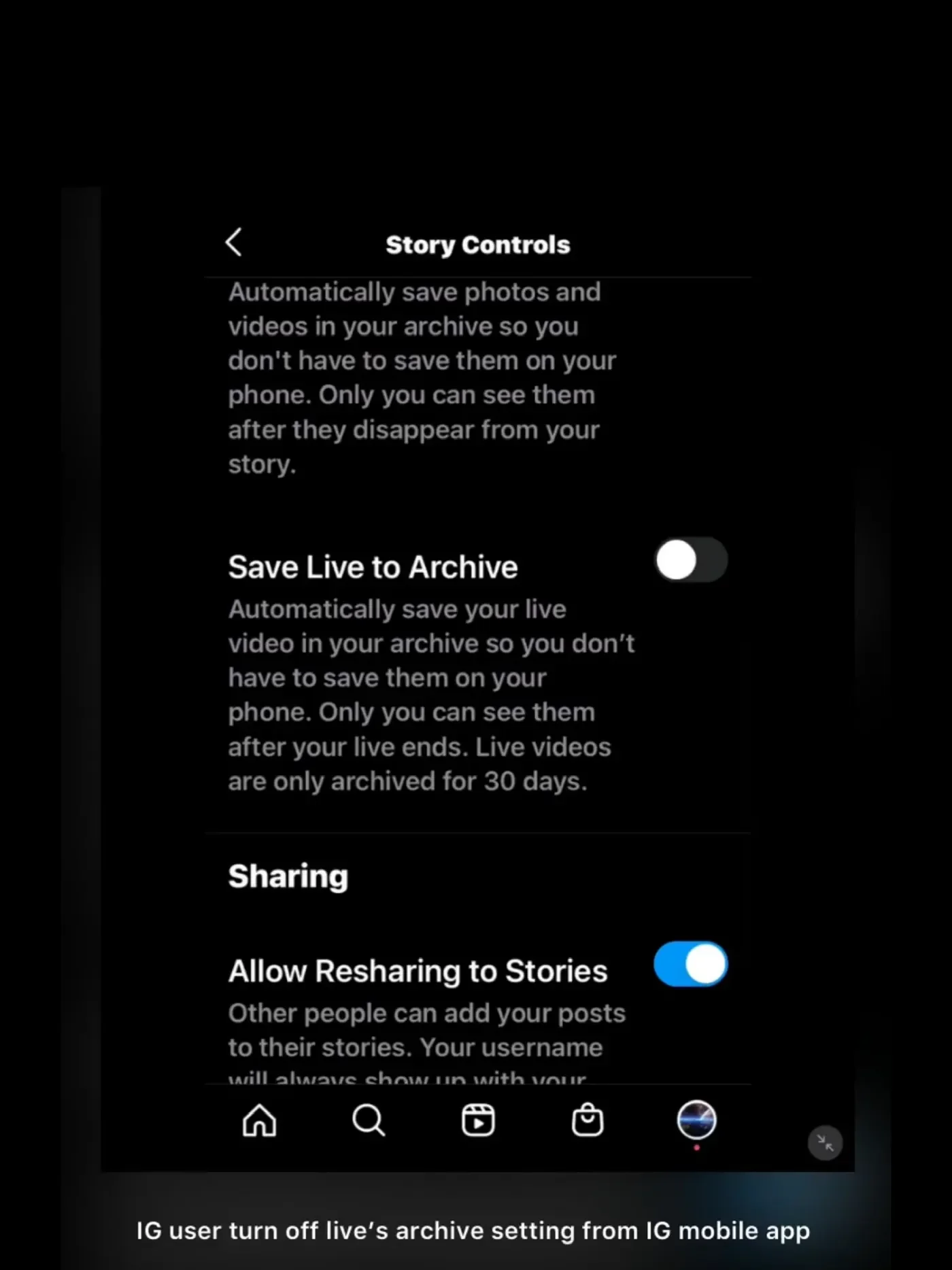
Step 1: turn the archive setting off
The victim turns off the live archive setting in the Instagram mobile app, under Settings -> Privacy -> Story -> Save Live to Archive.
Step 2: start a live
The victim starts an Instagram live.
Step 3: end and delete the live
The victim ends the live and deletes it.
Step 4: repeat the live
The victim repeats Step 2 and Step 3: starts another live, ends it and deletes it.
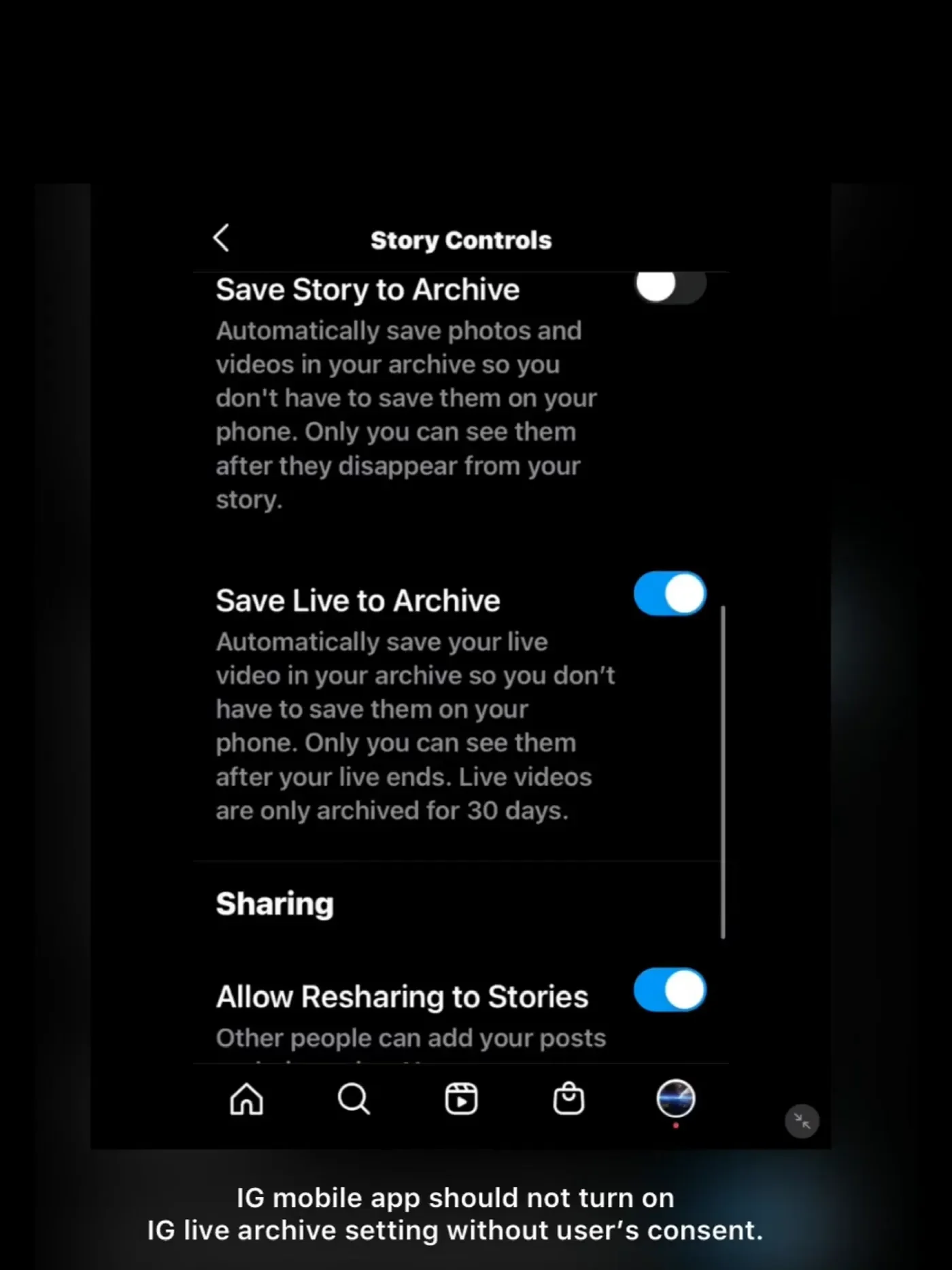
Step 5: check the setting again
The victim repeats Step 1 and looks at the setting. Save Live to Archive has been turned on automatically.
Step 6: view the calendar as the other user
The attacker, a Facebook user with access to the Instagram account, opens the calendar page in Creator Studio.
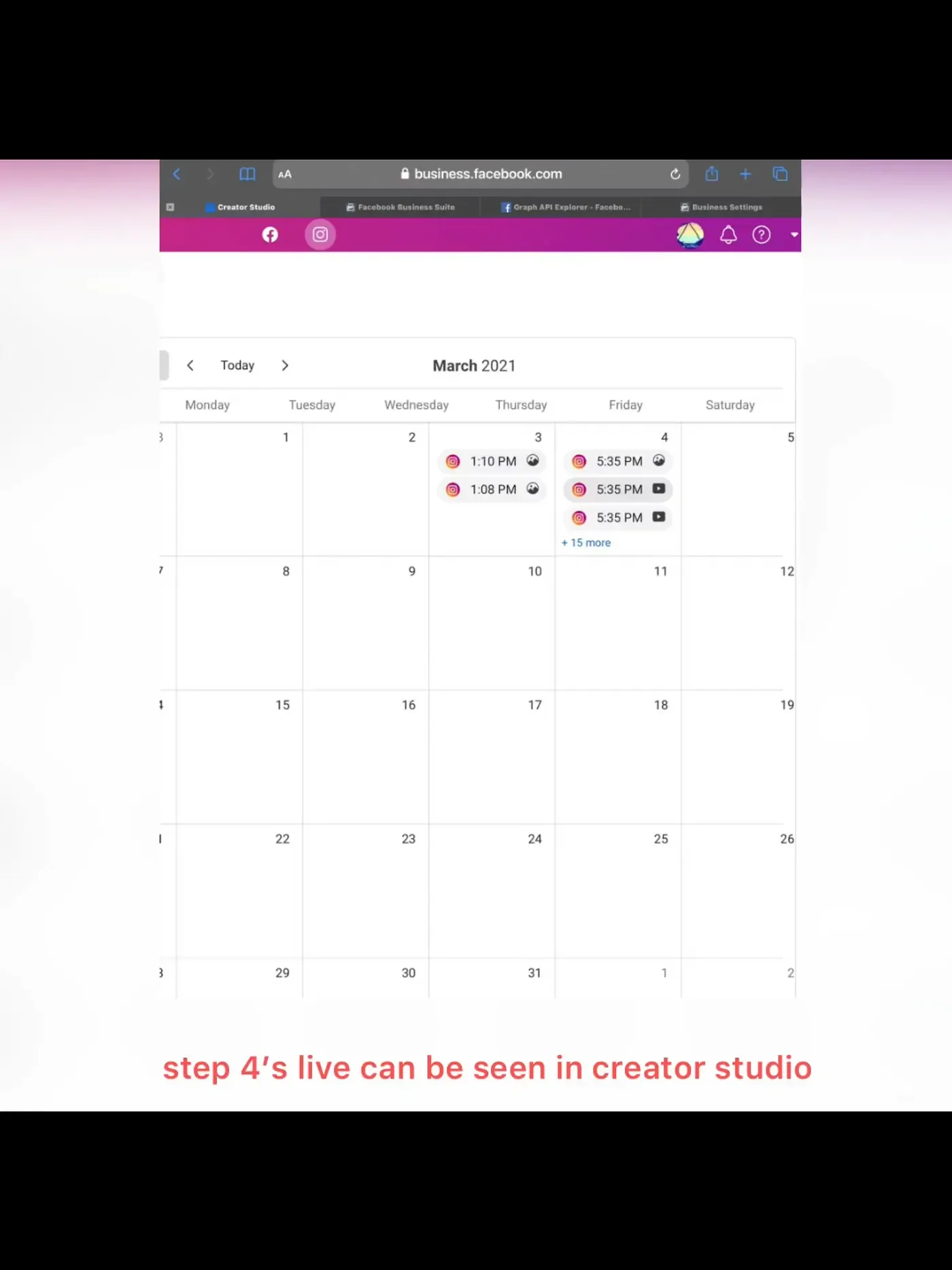
Result
The live video is archived even though the Instagram user turned off live archiving in Step 1, because the archive setting was turned on automatically. The archived live is then visible in the Creator Studio calendar to the other Facebook user who can access the Instagram account.
Expected result
When an Instagram user ends a live, the mobile app should not turn on the live archive setting without the user's consent, because another Facebook user who can access the Instagram account in Creator Studio can see the ended live video.
Root cause
The report describes the behaviour rather than the code behind it. What it establishes is that ending a live and starting another one resets the archive setting to on, overriding the choice the user made earlier. The report does not identify the component or the code path responsible.
The existing control, the privacy setting itself, did not stop the outcome because the setting was silently changed after the user had set it.
Impact
Under the conditions in the report, an Instagram creator or business account connected to a Facebook business page, with a second Facebook user granted access to the Instagram account, can have a live video archived and shown in Creator Studio even after the owner turned archiving off and deleted the live. The exposure is to users who can access the Instagram account in Creator Studio, such as a page advertiser. Deleted content is not shown there, so the issue is specifically about content the user believed was deleted being retained and visible.
The report does not describe any further access, such as public exposure of the video, and does not assign a severity or CVSS score.
Fix
The timeline lists a fixed date of March 12, 2021. The report does not describe the change that was made. The behaviour the fix has to prevent is the app turning the archive setting on without the user's consent when a live ends and another begins; the setting should keep the value the user chose.
Timeline
| Event | Date |
|---|---|
| Reported | March 4, 2021 |
| Triaged | March 6, 2021 |
| Fixed | March 12, 2021 |
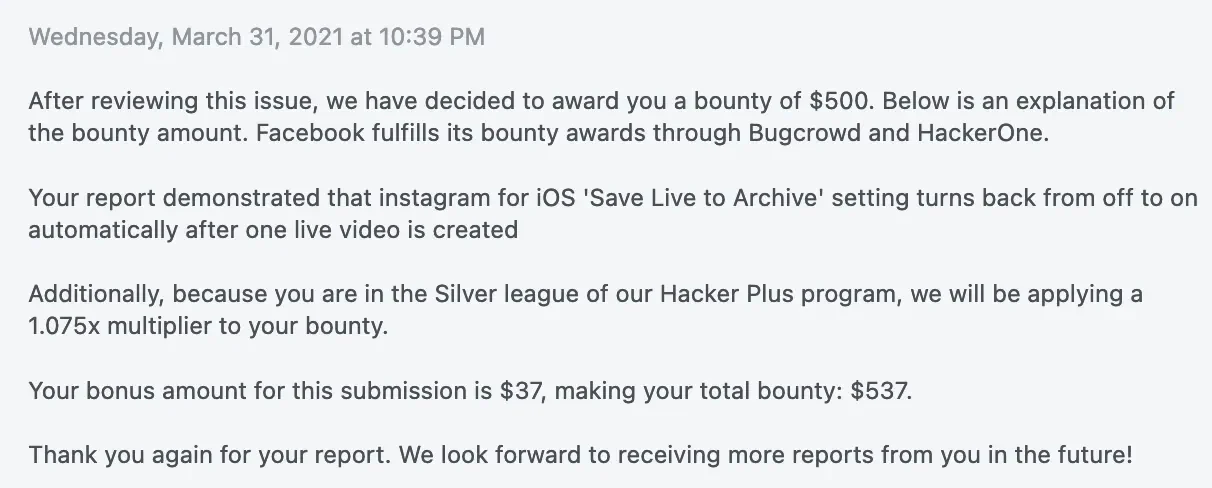
| Bounty awarded | March 31, 2021 |
Variants to test
- Other per-broadcast privacy toggles. Check settings that apply to a single live or upload, such as archive, audience or comment controls, and see whether ending and restarting a broadcast resets them. A positive result is the setting reverting to its default after a second broadcast without the user changing it.
- Delete then re-broadcast. Turn a retention setting off, broadcast, delete, broadcast again, then inspect the setting and any shared dashboard. A positive result is the deleted item's category reappearing in a surface visible to another account with delegated access.
- Delegated access surfaces. For accounts shared through a business dashboard, compare what a delegated user sees against what the owner expects after deletion. A positive result is content the owner deleted or chose not to retain appearing in the delegated user's calendar or library.
- Cross-app state sync. Change a setting in the mobile app and check the same setting in the web dashboard and vice versa, especially after a broadcast cycle. A positive result is the two surfaces disagreeing, with the more permissive value winning.
- Repeat cycles. Run several broadcast and delete cycles rather than one, since the report's reproduction relies on repetition. A positive result is the setting flipping only after the second or later cycle, which suggests state is reset at the end of a session rather than at account setup.
What happened, in plain words
Instagram has a feature called Instagram Live. It lets someone with an Instagram account broadcast video to their followers straight from the phone app, like a live television show that only exists while it is being filmed.
When a live broadcast ends, the app has to decide what to do with the recording. There is a setting called Save Live to Archive. If it is on, the finished video is kept. If it is off, the finished video is not kept.
Keeping the video matters because of a second product, Facebook Creator Studio. Creator Studio is a website where people who manage a Facebook business page can look at the content of the Instagram account connected to that page. It has a calendar page that lists content. Anyone who has been given access to the Instagram account through Creator Studio, for example a page advertiser (someone who runs ads for the page), can see the public Instagram content and the archived content there. They cannot see content that was deleted.
So the archive setting is really a privacy control. It decides whether a finished live video stays around and becomes visible to other people who share access to the account.
The bug is that this setting changes by itself. A user turns Save Live to Archive off, goes live, ends the live, deletes it, and then goes live a second time. After that, the setting is back on, even though the user never touched it. The result is that the second live gets archived and appears in the Creator Studio calendar for the other Facebook users who can reach the Instagram account. The user believed the video was deleted and gone, but it was kept and shown to other people.
This kind of bug is called a logic flaw. It is not a broken lock or a crashed program. Every piece of the app works as designed; the problem is in the rules the app follows. Think of a gym locker with a correct keypad: the keypad works, the door opens, but the rule that says "the locker relocks after you close it" was written wrong, so it stays open. Nothing is broken, yet the outcome is wrong.
The setup the researcher used
Before reproducing anything, the researcher wrote down the exact environment, so that anyone else can try the same thing and get the same result. This list is called the prepared set:
- Tested device: iOS 14.4 and iPadOS 14.4 (an iPhone and an iPad running those versions of Apple's mobile operating system)
- Tested app: Instagram iOS version 177.0
- One Instagram creator/business account (the victim user) connected to a Facebook business page
- One Facebook account (the attacker user) who can access the Instagram account, for example as a page advertiser, in Facebook Creator Studio
Two roles matter here. The victim is the person who owns the Instagram account and makes the live videos. The attacker is not a stranger who broke in; it is a second Facebook user who was legitimately given access to the Instagram account through Creator Studio. The whole issue depends on that shared access: the victim owns the account, and someone else has been allowed to look at it through the business dashboard.
Why the researcher thought this was a problem
The researcher framed the issue around consent and expectation. If you turn a setting off once, you reasonably expect it to stay off. You expect the next live to behave the same way, and you expect a live you deleted to be gone.
Instead, the app turns the archive setting back on when a live ends and another one starts. The problem is not only that a video is stored. It is who can see it. In the Creator Studio calendar, other users who can access the Instagram account, such as a page advertiser, can see public Instagram content and archived content, but not deleted content. So a live the user believed was deleted can end up visible to those other users.
The researcher put the design question directly: should an Instagram user have to turn off the live archive setting every time they end a live? And why does the app turn the setting on without the user's consent, when the user may assume the second live's archive setting is still off?
Reproducing it, step by step
Step 1: turn the archive setting off
The victim opens the Instagram mobile app and turns off the live archive setting. The path in the app is Settings -> Privacy -> Story -> Save Live to Archive. The researcher took this step first so that the starting state is known: the user has clearly said "do not keep my live videos".
This is the control the user is about to switch off.
Step 2: start a live
The victim starts an Instagram live. This is an ordinary broadcast; nothing unusual is done here. The point is simply to run the live feature once with the setting off.
Step 3: end and delete the live
The victim ends the live and deletes it. Ending the live is what triggers the app to decide whether to archive the recording. Deleting it is what the user does to make sure the video is gone. The researcher did both so that the user's intention is unambiguous: the video should not exist anywhere afterwards.
Step 4: repeat the live
The victim repeats Step 2 and Step 3: starts another live, ends it and deletes it. The repetition is the key to the bug. The researcher repeated the live cycle before checking the setting again.
Step 5: check the setting again
The victim repeats Step 1 and looks at the setting. Save Live to Archive has been turned on automatically. Nobody switched it on. The app did it on its own.
Step 6: view the calendar as the other user
The attacker, a Facebook user with access to the Instagram account, opens the calendar page in Creator Studio. This step is what turns the setting change into a real exposure. The victim does not necessarily look at Creator Studio, so the only place the result becomes visible is the calendar that the other user can open.
The result
The live video is archived even though the Instagram user turned off live archiving in Step 1, because the archive setting was turned on automatically. The archived live is then visible in the Creator Studio calendar to the other Facebook user who can access the Instagram account.
What should have happened instead
When an Instagram user ends a live, the mobile app should not turn on the live archive setting without the user's consent, because another Facebook user who can access the Instagram account in Creator Studio can see the ended live video. The setting should keep the value the user chose.
Why it happened
The report describes the behaviour rather than the code behind it. What it establishes is that ending a live and starting another one resets the archive setting to on, overriding the choice the user made earlier. The report does not identify the component or the code path responsible.
The existing control, the privacy setting itself, did not stop the outcome because the setting was silently changed after the user had set it.
Who was affected
Under the conditions in the report, an Instagram creator or business account connected to a Facebook business page, with a second Facebook user granted access to the Instagram account, can have a live video archived and shown in Creator Studio even after the owner turned archiving off and deleted the live. The exposure is to users who can access the Instagram account in Creator Studio, such as a page advertiser. Deleted content is not shown there, so the issue is specifically about content the user believed was deleted being retained and visible.
The report does not describe any further access, such as public exposure of the video, and does not assign a severity or CVSS score.
The fix
The timeline lists a fixed date of March 12, 2021. The report does not describe the change that was made. The behaviour the fix has to prevent is the app turning the archive setting on without the user's consent when a live ends and another begins; the setting should keep the value the user chose.
Timeline
| Event | Date |
|---|---|
| Reported | March 4, 2021 |
| Triaged | March 6, 2021 |
| Fixed | March 12, 2021 |
| Bounty awarded | March 31, 2021 |
Other places to look for the same kind of bug
These are ideas for testing similar features, not things the report itself tested.
- Other per-broadcast privacy toggles. Check settings that apply to a single live or upload, such as archive, audience or comment controls, and see whether ending and restarting a broadcast resets them. A positive result is the setting reverting to its default after a second broadcast without the user changing it.
- Delete then re-broadcast. Turn a retention setting off, broadcast, delete, broadcast again, then inspect the setting and any shared dashboard. A positive result is the deleted item's category reappearing in a surface visible to another account with delegated access.
- Delegated access surfaces. For accounts shared through a business dashboard, compare what a delegated user sees against what the owner expects after deletion. A positive result is content the owner deleted or chose not to retain appearing in the delegated user's calendar or library.
- Cross-app state sync. Change a setting in the mobile app and check the same setting in the web dashboard and vice versa, especially after a broadcast cycle. A positive result is the two surfaces disagreeing, with the more permissive value winning.
- Repeat cycles. Run several broadcast and delete cycles rather than one, since the report's reproduction relies on repetition. A positive result is the setting flipping only after the second or later cycle, which suggests state is reset at the end of a session rather than at account setup.
Glossary
- Instagram Live: a feature in the Instagram mobile app that lets a user broadcast video to followers while it is happening.
- Save Live to Archive: an Instagram setting that decides whether a finished live video is kept after the broadcast ends.
- Archive: the stored copy of a finished live video that the app keeps when the archive setting is on.
- Facebook Creator Studio: a website where people who manage a Facebook business page can view and manage the content of the connected Instagram account, including a calendar of content.
- Page advertiser: a Facebook user who has been given access to a business page, for example to run ads, and can therefore see content through Creator Studio.
- Creator/business account: an Instagram account type intended for people and organisations that manage a brand, which can be connected to a Facebook business page.
- Victim user: in this report, the person who owns the Instagram account and makes the live videos.
- Attacker user: in this report, the second Facebook user who has been given access to the Instagram account through Creator Studio.
- Consent: a user's explicit choice about what happens to their data; here, whether their live videos are kept.
- Expectation: what a user reasonably assumes will happen based on a setting they changed; here, that the setting stays off.
- Logic flaw: a bug where the app follows the wrong rule rather than crashing or breaking; every part works, but the outcome is wrong.
- Precondition: a situation that must already be true for a bug to be reproducible, such as a second user having access to the account.
- Reproduce: to follow a set of steps and get the same result the researcher got.
- Prepared set: the exact devices, app versions and accounts used in a test, written down so others can repeat it.
- Triaged: the stage where the security team has reviewed a report and confirmed it is a real issue.
- Bounty: a payment made by a company to a researcher who reports a valid security issue.
- Severity: a rating of how serious a security issue is.
- CVSS: a standard scoring system for measuring the severity of security issues.
- Root cause: the underlying reason a bug happens, as opposed to its visible symptom.
- Delegated access: access to an account or page that the owner has granted to another person.
- State: the stored values that describe a user's choices and the current situation, such as whether a setting is on or off.
- Reinitialise: to reset a value back to its starting default, discarding whatever the user had chosen.
- Per-broadcast setting: a setting that applies to a single live or upload rather than to the whole account.
- Cross-app state sync: keeping the same setting consistent between the mobile app and the web dashboard.
- Dashboard: a web page that shows an overview of content and settings for an account or page.




