XSS in microsoft Subdomain
A cross-site scripting vulnerability existed in the 'insert link' feature of a Microsoft forum, allowing an attacker to inject a payload into the link, title, or tooltip fields. The attacker could execute arbitrary JavaScript in a victim's browser when the content was viewed.
 Published on medium.com
Security
The full write-up lives on its author's site
It belongs to its author, so we link to it rather than copy it. The other two tabs are our own rewrites, checked against it.
Context
This is the story of a first cross-site scripting finding, made against Microsoft during a school summer holiday. The target was the Microsoft forums: the researcher started from the forum home page at https://social.microsoft.com/Forums/en-US/home, and later found the same behaviour on social.msdn.microsoft.com. The feature involved is the forum's Ask Question form. That form is where a user writes a new forum post, and its body field offers editor options such as insert link, insert HTML and insert image, which build markup for the post.
The report does not name the vulnerable parameter, the server-side component, or the exact version of any software involved.
Setup
No accounts, roles, tools or versions are described. The researcher worked from a browser against the public forum pages, reading around 30 XSS proof-of-concept videos and some write-ups beforehand and noting down the reproduction steps. The only precondition visible in the report is access to the Ask Question form on the forum.
Finding it
The researcher first tried every input field visible on the forum home page, looking for XSS, and nothing worked. The next step was the Ask Question button. Inside the body field the editor offered insert link, insert HTML and insert image, so the payload was placed into those fields in the hope that script would execute.
Exploitation
Step 1: Open the Ask Question form
From https://social.microsoft.com/Forums/en-US/home, click Ask Question to reach the post editor with its body field and its insert link, insert HTML and insert image options.
Step 2: Put the payload into the insert link fields
On the first attempt, the payload was placed in the insert link dialog, in the link, title and tooltip fields. The report does not reproduce the payload string itself, so the exact value used is not available here.
Step 3: Observe execution
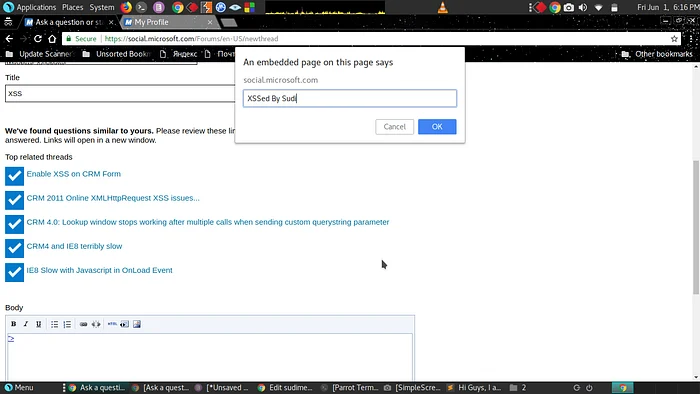
The report places a screenshot right after the description of the insert link attempt.
Step 4: Repeat on the second host
The researcher then looked for other Microsoft sites with the same bug and found the same behaviour on social.msdn.microsoft.com. Both were reported.
A proof-of-concept video is referenced in the report but is not included in the text available here.
Root cause
The report does not analyse the code. What it shows is that content entered through the insert link dialog, in the link, title and tooltip fields, was not neutralised, so the browser executed it. The likely cause is that the editor's link markup was built without adequate output encoding or sanitisation of those attribute values. The report does not say which defence, if any, was present and failed.
Impact
Both affected hosts, social.microsoft.com and social.msdn.microsoft.com, were reported.
Fix
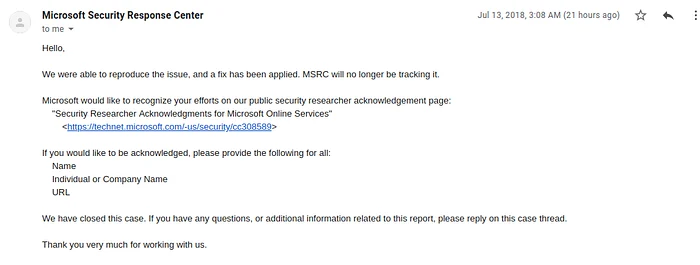
The report records only that the bug was fixed on 13 July 2018.
Timeline
| Date | Event |
|---|---|
| 01 June 2018 | Bug reported to Microsoft |
| 09 June 2018 | Reply received stating the report had been sent to the team |
| 13 July 2018 | Fixed |
Variants to test
- Other rich-text editors with a link dialog. Enter a payload in the link URL, title and tooltip fields and preview or submit the post. A positive result is script executing when the post is rendered.
- The same dialog fields on sibling forum hosts. The researcher found the same behaviour on a second Microsoft forum host, so testing other hosts that share the editor is worthwhile. A positive result is the same execution on the second host.
- The other editor options. The report mentions insert HTML and insert image alongside insert link; trying payloads through those paths and checking the rendered output is a natural extension. A positive result is execution from any of those fields.
What happened, in plain words
A student on summer holiday decided to try bug hunting: looking for security mistakes in websites, usually to report them to the company so they can be fixed. He picked Microsoft as his target. He started on a Microsoft forum, a public website where people post questions and answers. On the page where you write a new question, there is a text editor with buttons such as insert link, insert HTML and insert image. He typed a small piece of code, called a payload, into the fields of the insert link dialog. The browser ran that code. He then found the same behaviour on a second Microsoft forum site and reported both.
This kind of mistake is called cross-site scripting, usually shortened to XSS. In plain terms: a website lets a visitor's text be treated as code by other visitors' browsers. Imagine a noticeboard where anyone can pin a note. If the board does not check what is written, someone can pin a note that says "tear down the board" and the next person who reads it does exactly that. XSS is the web version: text that should be shown as text is instead run as a program.
The target and the feature
The starting page was the Microsoft forums home page:
https://social.microsoft.com/Forums/en-US/home
This is a public web address. social.microsoft.com is the name of the server (the host), and the part after it is the path to the forum's home page. Anyone with a browser can open it.
The feature involved is the Ask Question form. A form is the part of a page where you type things and press a button to send them. This one is where a user writes a new forum post. Its body field is the big text box for the post, and it offers editor options: insert link, insert HTML and insert image. These buttons build markup for the post, meaning they add the formatting instructions that a browser reads to display a link, an image or formatted text.
The report does not name the vulnerable parameter, the server-side component, or the exact version of any software involved.
Getting ready
No accounts, roles, tools or versions are described. The researcher worked from a browser against the public forum pages. Before starting, he watched around 30 XSS proof-of-concept videos and read some write-ups, and noted down the reproduction steps: the exact sequence of clicks and inputs that makes a bug appear. A proof of concept (PoC) is simply a demonstration that the bug is real, usually the smallest set of steps that triggers it.
The only precondition visible in the report is access to the Ask Question form on the forum.
Finding it
The researcher first tried every input field visible on the forum home page, looking for XSS, and nothing worked. An input field is any box on a page where you can type, such as a search box. The idea behind trying them all is that any place accepting text might later show that text back to other people without checking it.
The next step was the Ask Question button. Inside the body field the editor offered insert link, insert HTML and insert image, so the payload was placed into those fields in the hope that script would execute. Script here means JavaScript, the programming language browsers run; if a page runs script that the site did not intend, that is the bug.
Exploitation
Step 1: Open the Ask Question form
From https://social.microsoft.com/Forums/en-US/home, click Ask Question to reach the post editor with its body field and its insert link, insert HTML and insert image options.
Why this step: the home page fields had produced nothing, so the next place a visitor can put text is the post editor. A post is content that the site stores and shows to other people, which is exactly where unchecked text can reach other browsers.
Step 2: Put the payload into the insert link fields
On the first attempt, the payload was placed in the insert link dialog, in the link, title and tooltip fields. A dialog is the small pop-up window with boxes to fill in. The link field holds the address the link points to; the title and tooltip fields hold the text shown when a reader hovers over the link. The report does not reproduce the payload string itself, so the exact value used is not available here.
Why these fields: each of them ends up inside the HTML that makes the link. If the site builds that HTML by pasting in whatever was typed, without neutralising it, the typed text becomes part of the page's instructions rather than part of its visible text.
Step 3: Observe execution
The report places a screenshot right after the description of the insert link attempt.
Step 4: Repeat on the second host
The researcher then looked for other Microsoft sites with the same bug and found the same behaviour on social.msdn.microsoft.com. Both were reported.
A proof-of-concept video is referenced in the report but is not included in the text available here.
Root cause
The report does not analyse the code. What it shows is that content entered through the insert link dialog, in the link, title and tooltip fields, was not neutralised, so the browser executed it. Rendered means turned into the page you actually see. The likely cause is that the editor's link markup was built without adequate output encoding or sanitisation of those attribute values. Encoding means converting special characters into harmless text so the browser shows them instead of acting on them; sanitisation means stripping out anything dangerous before it is stored or shown. The report does not say which defence, if any, was present and failed.
Impact
Persisted would mean the payload is saved on the server and runs for everyone who later opens the post, rather than only in the author's own browser. Both affected hosts, social.microsoft.com and social.msdn.microsoft.com, were reported.
Fix
The report records only that the bug was fixed on 13 July 2018.
Timeline
| Date | Event |
|---|---|
| 01 June 2018 | Bug reported to Microsoft |
| 09 June 2018 | Reply received stating the report had been sent to the team |
| 13 July 2018 | Fixed |
Variants to test
- Other rich-text editors with a link dialog. A rich-text editor is a text box that lets you add formatting such as bold or links. Enter a payload in the link URL, title and tooltip fields and preview or submit the post. A positive result is script executing when the post is rendered.
- The same dialog fields on sibling forum hosts. The researcher found the same behaviour on a second Microsoft forum host, so testing other hosts that share the editor is worthwhile. A positive result is the same execution on the second host.
- The other editor options. The report mentions insert HTML and insert image alongside insert link; trying payloads through those paths and checking the rendered output is a natural extension. A positive result is execution from any of those fields.
Glossary
- XSS (cross-site scripting): a bug where a site shows a visitor's text as code, so another visitor's browser runs it.
- Payload: the small piece of code or text crafted to trigger a bug.
- Host: the server name in a web address, such as
social.microsoft.com. - Path: the part of a web address after the host that points to a page, such as
/Forums/en-US/home. - Form: the part of a page where you type information and submit it.
- Input field: any box on a page where you can type text.
- Body field: the large text box where a forum post is written.
- Markup / HTML: the instructions a browser reads to display a page, including links, images and formatting.
- Editor options: buttons in a text box that add formatting, such as insert link, insert HTML and insert image.
- Dialog: a small pop-up window with boxes to fill in.
- Link, title and tooltip fields: the boxes in the insert link dialog for the address, the link text and the hover text.
- Script / JavaScript: the programming language browsers run to make pages interactive.
- Execute / fire: when the browser runs the script.
- Proof of concept (PoC): a demonstration, often a video or a short list of steps, that proves a bug is real.
- Reproduction steps: the exact sequence of actions that makes a bug appear.
- Rendered: turned into the page you actually see in the browser.
- Encoding: converting special characters into harmless text so the browser displays them instead of acting on them.
- Sanitisation: removing anything dangerous from input before it is stored or shown.
- Persisted: saved on the server so it affects everyone who later opens the page, not just the author.
- Sibling host: another server name belonging to the same organisation, often running the same software.