XSS Vulnerability in Netflix

Today I wanted to share with you my first vulnerability found in the bugbounty programs.
The full write-up lives on its author's site
It belongs to its author, so we link to it rather than copy it. The other two tabs are our own rewrites, checked against it.
What the report shows
The researcher picked Netflix from the public Bugcrowd list of bug bounty programs and began by studying how the web page behaved, capturing requests and checking the responses with several tools.
The whole of the technical detail is a single payload, sent while probing the page:
</script><script>alert(1);</script>
The researcher reports that this worked ("and bingo"). The screenshots below accompany the test.


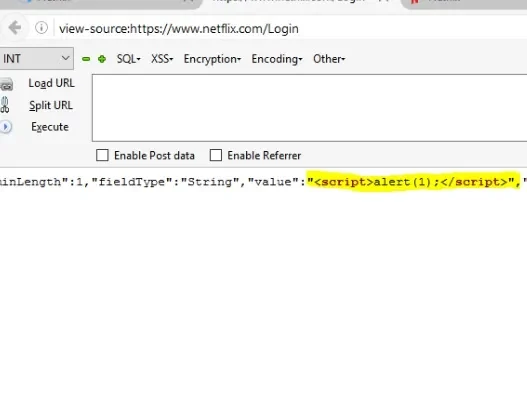
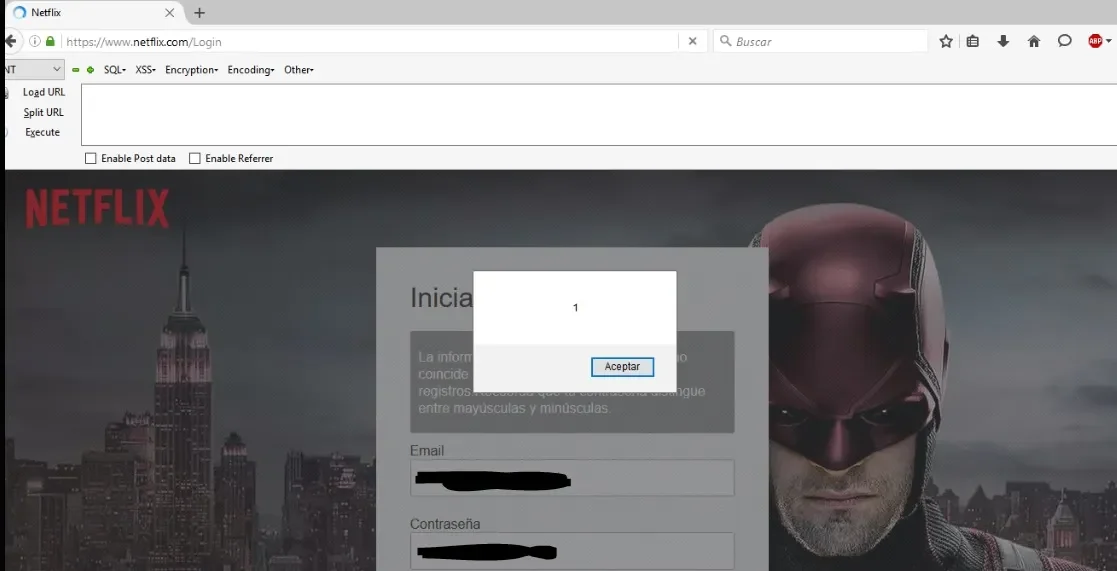
The report links to the Netflix Hall of Fame page. It gives no bounty amount, no severity rating, no CVSS score and no description of the fix.
Root cause
The payload closes an existing </script> element and opens a new <script> block containing alert(1). The payload suggests the value may have landed inside a script context, but the report does not show where. The report does not show the parameter, endpoint or response body, so the exact sink is not documented; the context is inferred from the payload itself.
Impact
With the payload executing, an attacker could run JavaScript in the context of the affected page. In a reflected case that means crafting a link that runs script for whoever opens it; in a stored case it means script running for every visitor of the affected view.
How this kind of bug works
Cross-site scripting happens when data controlled by the user reaches the browser as executable markup rather than as inert text. The classic mistake is context confusion: output encoding that is correct for one part of a document is applied where a different parsing context applies. Inside an HTML element, escaping <, > and & is enough. Inside an attribute, quotes matter. Inside a <script> block the browser is in JavaScript mode, and the sequence </script> ends the block regardless of JavaScript string syntax, so an attacker who can inject there can break out and add a new script element. The same applies to event handler attributes, javascript: URLs and CSS contexts, each with its own escaping rules.
Defences are context-aware output encoding at the point of rendering, a strict Content Security Policy that blocks inline script, and avoiding the practice of writing user data into inline scripts at all, for example by passing values through data- attributes or JSON endpoints instead. Framework auto-escaping helps only where it is actually used; manual string concatenation into templates bypasses it.
How to test for it
- Map every place where input is reflected or stored: query parameters, path segments, form fields, headers that appear in responses, and values echoed into pages after a POST.
- Identify the context of each reflection: HTML body, attribute value, script block, style block, URL. The payload must match the context.
- Send a benign marker first, such as a unique alphanumeric string, and locate it in the response to confirm reflection and see the surrounding syntax.
- For a script context, try breaking out of the block and of any string literal around the injection point, then check whether the browser executes the result. For attribute contexts, try closing the attribute with a quote. For HTML body contexts, try a tag that fires an event.
- Confirm execution in a real browser rather than by string matching in the response, since encoding and browser parsing decide the outcome.
A positive result is script running in the page origin, visible as a dialog, a DOM change or a callback to a listener you control. Common false positives are payloads that appear in the response but are HTML-encoded, reflections inside JSON responses served with a non-HTML content type, input that lands in a context where the browser never parses it as markup, and self-XSS that only triggers when the victim pastes the payload themselves.
How it is fixed
Apply output encoding appropriate to the exact context at render time, and prefer templating engines with automatic contextual escaping. Do not interpolate user data into inline <script> blocks; pass it as JSON with correct content type or via data attributes. Add a Content Security Policy that disallows inline script and restricts script sources, and set the HttpOnly flag on session cookies so that script execution cannot read them. Validate input on the server as defence in depth, but treat encoding as the primary control.
Hunting notes
Script-context XSS tends to hide where developers build pages by concatenating strings: analytics and tracking snippets, configuration objects initialised with server data, localisation strings, and error pages that echo the failing input. Single-page applications that serialise initial state into the HTML are a frequent source. Recon signals include reflected parameters that appear inside <script> tags, responses where your marker sits next to quotes or braces, and endpoints that return HTML with a text/html content type while embedding request data.
To make a report accepted, show the full request and response, the exact injection point, and a browser screenshot or recording of execution. Demonstrate a realistic consequence where you can, such as reading a value the page exposes, rather than only a dialog. State clearly whether the issue is reflected or stored and who is affected.
What happened, in plain words
This is a beginner's account of a first bug bounty finding. The researcher chose Netflix from the public Bugcrowd list of bug bounty programs, a directory of companies that invite people to test their systems and report problems.
Before sending anything, the researcher studied how the web page behaved, using several tools to capture the request and check the response. A request is what your browser sends to a server when you open a page or submit a form; the response is what the server sends back. Capturing them means recording both sides so you can read exactly what went over the network, the way you might keep a copy of a letter and its reply.
The whole of the technical detail is one payload, a short piece of text sent while probing the page:
</script><script>alert(1);</script>
The researcher reports that this worked ("and bingo"). The screenshots below accompany the test.
The report links to the Netflix Hall of Fame page: https://help.netflix.com/en/node/6657. No bounty amount, severity rating, CVSS score or description of the fix is given.
Why that payload matters
A web page is built from HTML, a language of tags such as <script>, which marks a block of JavaScript, the code a browser runs. The browser reads the page from top to bottom and switches mode depending on the tag it is inside.
</script>closes a script block that is already open. The browser treats this sequence as the end of the block no matter what JavaScript code surrounds it.<script>opens a brand new script block.alert(1);</script>is JavaScript that shows a small pop-up box containing the number 1, then closes the block again.
The payload suggests the value may have landed inside a script block, but the report does not show where. If the page had placed the text somewhere harmless, the browser would have shown it as plain text and nothing would have run. The report does not show the parameter, endpoint or response body, so the exact spot where the value landed is not documented; the context is inferred from the payload itself.
What it could mean
With the payload executing, someone could run JavaScript in the context of the affected page. If the value is reflected, meaning it comes back in the response to a crafted link, the script runs for whoever opens that link. If it is stored, meaning it is saved and shown to others later, it runs for every visitor of the affected view.
In general, how this kind of bug works
This class of bug is called cross-site scripting, usually shortened to XSS. It happens when data controlled by the user reaches the browser as executable markup rather than as inert text. A useful comparison is a form letter: if someone can type a new instruction into the middle of your template, the reader may follow the instruction instead of reading it as words.
The classic mistake is context confusion: output encoding that is correct for one part of a document is applied where a different parsing context applies. Encoding means rewriting special characters so the browser shows them instead of acting on them. Inside an HTML element, escaping <, > and & is enough. Inside an attribute, quotes matter. Inside a <script> block the browser is in JavaScript mode, and the sequence </script> ends the block regardless of JavaScript string syntax, so anyone who can inject there can break out and add a new script element. The same applies to event handler attributes, javascript: URLs and CSS contexts, each with its own escaping rules.
Defences are context-aware output encoding at the point of rendering, a strict Content Security Policy (a header that tells the browser which scripts may run) that blocks inline script, and avoiding the practice of writing user data into inline scripts at all, for example by passing values through data- attributes or JSON endpoints instead. Framework auto-escaping helps only where it is actually used; manual string concatenation into templates bypasses it.
How to test for it
- Map every place where input is reflected or stored: query parameters, path segments, form fields, headers that appear in responses, and values echoed into pages after a POST.
- Identify the context of each reflection: HTML body, attribute value, script block, style block, URL. The payload must match the context.
- Send a benign marker first, such as a unique alphanumeric string, and locate it in the response to confirm reflection and see the surrounding syntax.
- For a script context, try breaking out of the block and of any string literal around the injection point, then check whether the browser executes the result. For attribute contexts, try closing the attribute with a quote. For HTML body contexts, try a tag that fires an event.
- Confirm execution in a real browser rather than by string matching in the response, since encoding and browser parsing decide the outcome.
A positive result is script running in the page origin, visible as a dialog, a DOM change or a callback to a listener you control. Common false positives are payloads that appear in the response but are HTML-encoded, reflections inside JSON responses served with a non-HTML content type, input that lands in a context where the browser never parses it as markup, and self-XSS that only triggers when the victim pastes the payload themselves.
How it is fixed
Apply output encoding appropriate to the exact context at render time, and prefer templating engines with automatic contextual escaping. Do not interpolate user data into inline <script> blocks; pass it as JSON with correct content type or via data attributes. Add a Content Security Policy that disallows inline script and restricts script sources, and set the HttpOnly flag on session cookies so that script execution cannot read them. Validate input on the server as defence in depth, but treat encoding as the primary control.
Hunting notes
Script-context XSS tends to hide where developers build pages by concatenating strings: analytics and tracking snippets, configuration objects initialised with server data, localisation strings, and error pages that echo the failing input. Single-page applications that serialise initial state into the HTML are a frequent source. Recon signals include reflected parameters that appear inside <script> tags, responses where your marker sits next to quotes or braces, and endpoints that return HTML with a text/html content type while embedding request data.
To make a report accepted, show the full request and response, the exact injection point, and a browser screenshot or recording of execution. Demonstrate a realistic consequence where you can, such as reading a value the page exposes, rather than only a dialog. State clearly whether the issue is reflected or stored and who is affected.
Glossary
- Bug bounty program: an invitation from a company for outside people to test its systems and report problems, sometimes for a reward.
- Request: the message your browser sends to a server when you open a page or submit a form.
- Response: the message the server sends back, containing the page or data.
- Payload: the short piece of text an attacker sends to try to trigger a bug.
- HTML: the language of tags that describes the structure of a web page.
- Tag: a marked-up instruction in HTML, such as
<script>, that tells the browser what a section is. - JavaScript: the programming language browsers run to make pages interactive.
- Script block: a section of a page between
<script>and</script>where JavaScript runs. - Context: the part of a document a value lands in (body, attribute, script, style, URL), which decides how the browser reads it.
- Encoding (escaping): rewriting special characters so the browser displays them instead of acting on them.
- Cross-site scripting (XSS): a bug where user-controlled data reaches the browser as executable markup.
- Reflected XSS: the payload comes back in the response to a crafted link and runs for whoever opens it.
- Stored XSS: the payload is saved and later shown to other visitors.
- Self-XSS: a payload that only runs when the victim pastes it themselves.
- Content Security Policy: a response header that tells the browser which scripts are allowed to run.
- HttpOnly: a cookie flag that stops JavaScript from reading the cookie.
- Cookie: a small piece of data a site stores in your browser, often to keep you logged in.
- False positive: a result that looks like a bug but is not exploitable.
- CVSS: a standard scoring system for rating the severity of a vulnerability.
- Hall of Fame: a public page where a company lists people who reported valid issues.





