[Netflix][Smart TV] — Chaining Self-XSS with Session poisoning.
A stored self-XSS in the Netflix TV sign-in page allowed an attacker to inject JavaScript via the TV device name, and a cookie injection flaw let the attacker set the flwssn cookie through a URL parameter, enabling the payload to be delivered to unauthenticated victims. This could lead to account compromise if the victim logs in within the exploit window.
 Published on ltsirkov.medium.com
I’d like to share my experience of discovering an interesting vulnerability on Netflix while using their TV application.
The full write-up lives on its author's site
It belongs to its author, so we link to it rather than copy it. The other two tabs are our own rewrites, checked against it.
Context
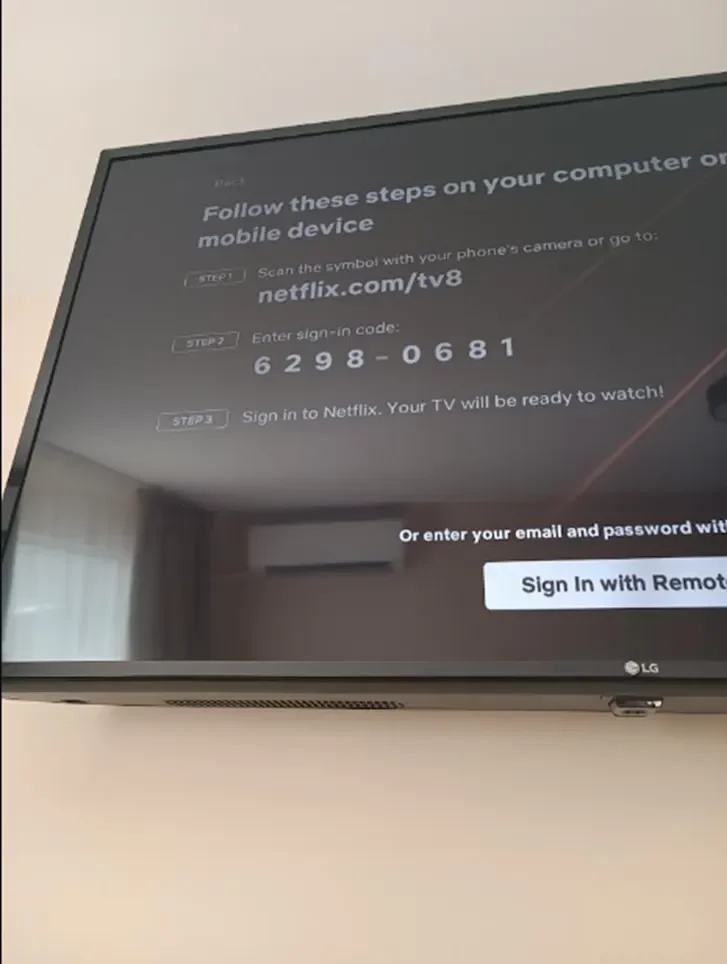
Netflix's Smart TV application offers a sign-in flow called "Sign in on this TV from a web browser". The TV generates a short sign-in code, and you enter that code in a browser on your phone or computer at www.netflix.com/tv8 to authenticate the TV. The feature exists so that typing a password with a TV remote is unnecessary.
The write-up describes two issues found in that flow: a stored self-XSS through the TV device name, and a cookie injection that lets an attacker assign the flwssn cookie to a victim through a GET parameter. Chained, they turn a self-XSS into something an attacker can deliver with a link. Netflix rated the overall issue P3 (Medium), handled it through Bugcrowd, and the fix has been rolled out.
Setup
The researcher used the Netflix application on an LG Smart TV and a phone web browser. No special tooling is described beyond the browser and the ability to inspect requests. The relevant preconditions are:
- The TV app can generate a sign-in code, and the device name of the TV is user-controllable.
- The victim must be unauthenticated for the payload to render, because the device name is only displayed on the login page in an unauthenticated state.
- The TV sign-in code is only valid for 10 minutes.
Finding it
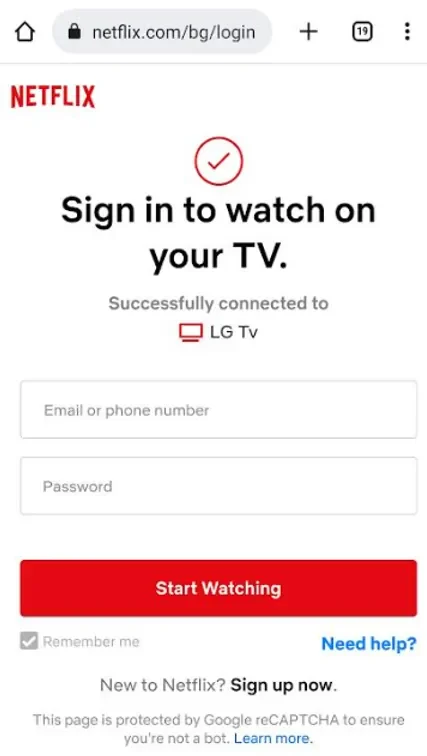
After entering the code generated on the TV at www.netflix.com/tv8, the next page displayed the TV's device name, in this case "LG Tv". That told the researcher there was user-controllable input reflected on the page, so the device name became the obvious injection point.
Exploitation
Step 1: inject JavaScript into the device name
The researcher took these steps:
- [TV] Cleared the cache of the Netflix application.
- [TV] Changed the device name of the TV to
<script>alert(1);</script>. - [TV] Generated a new sign-in code.
- [Phone Browser] Accessed
www.netflix.com/tv8as an unauthenticated user. - [Phone Browser] Typed the code from the TV into the
www.netflix.com/tv8endpoint.
The result was that the script executed:
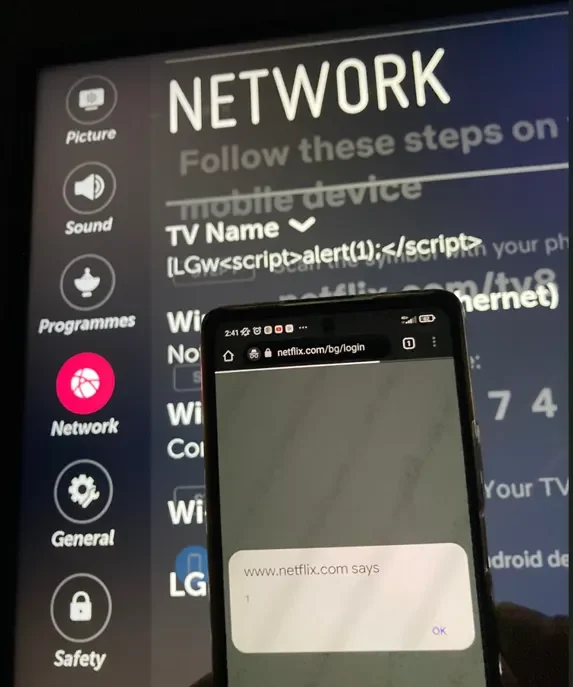
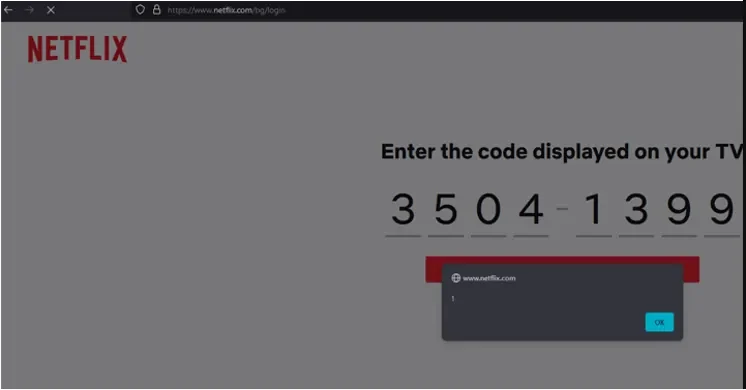
The device name was not properly sanitised, so the payload was stored on the backend when the TV code was generated and triggered when the code was submitted through the browser. The script only executes if the code is entered at www.netflix.com/tv8 as an unauthenticated user. For authenticated users the device name is not displayed on the login page, so the JavaScript does not run.
At this point the researcher could not attack other users: the payload could only be triggered by visiting www.netflix.com/tv8 and entering a TV code manually, and the form was protected against CSRF. It was a self-XSS with limited impact, but the researcher reported it to Netflix anyway and continued investigating.
Step 2: find the flwssn cookie
While inspecting the request that submits the code to www.netflix.com/tv8, the researcher identified a cookie named flwssn.
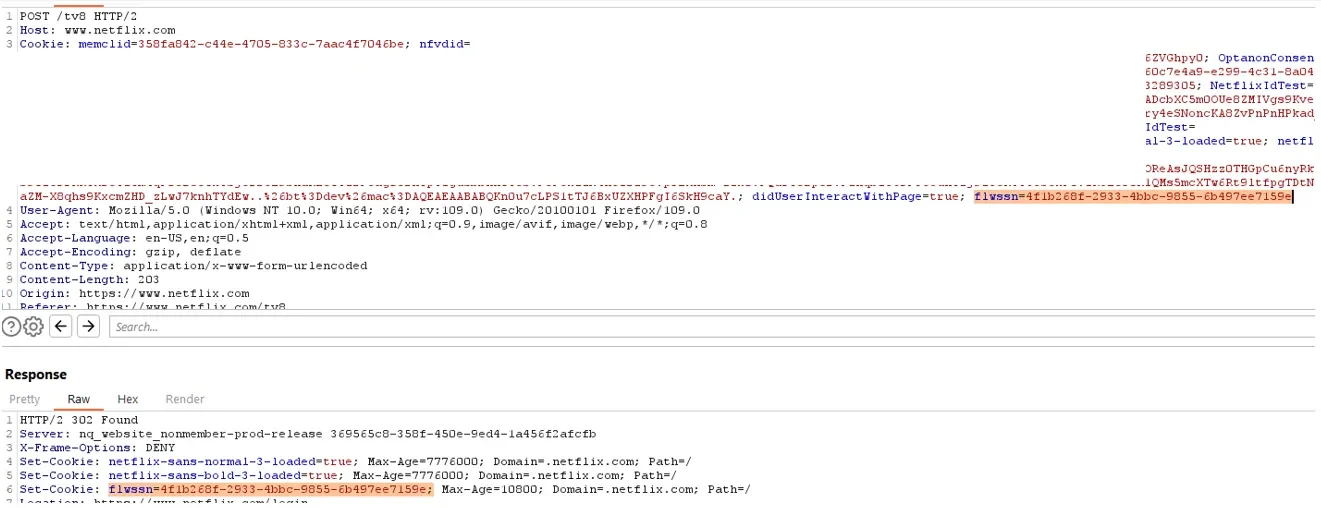
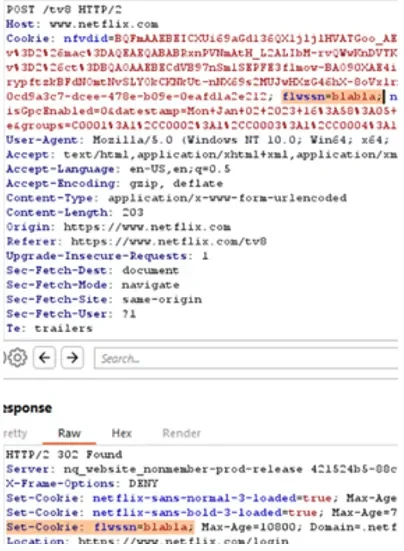
Normally, when you type a valid TV code at www.netflix.com/tv8, your flwssn value is connected to the TV. The value is usually a UUID, but a custom value is also accepted and reflected back to the user. The cookie holds the information about the TV for which the code was submitted, so flwssn=4f1b268f-2933-4bbc-9855-6b497ee7159e represents the researcher's TV. If that cookie is set manually in another browser, the login form containing the device name is presented, which is the self-XSS again.
To give the issue real impact, the cookie had to be assigned to the victim's browser automatically.
Step 3: assign the cookie through a GET parameter
The researcher found that adding flwssn as a GET parameter assigns the cookie automatically once the URL is opened. They entered the TV code at www.netflix.com/tv8, took the flwssn UUID value from the request, and crafted this URL:
https://www.netflix.com/?flwssn=4f1b268f-2933-4bbc-9855-6b497ee7159e
Opening it in an incognito window and then navigating to www.netflix.com/login produced alert(1).

So if an attacker can get a user to visit that URL, the victim is assigned the flwssn cookie containing the value that represents the exploit code. From then on, every visit to the /login page serves the malicious JavaScript, until the TV code and the cookie expire. The URL itself contains nothing suspicious, so it can simply be sent to the victim directly.
Step 4: extend the 10-minute window
The payload was only valid for a 10-minute window, because the code shown on the TV screen is active for 10 minutes before a new one is generated, which invalidates the previous code and deletes the payload from the cookie.
The researcher found that when submitting a code at www.netflix.com/tv8, any flwssn value can be supplied and the malicious payload assigned to it. Every time a new code appears on the screen, resending the request to the tv8 endpoint with the same flwssn value and the new code extends the payload's validity.
A second method is to poison a previously generated flwssn cookie. The flwssn cookie is assigned on a user's first visit to www.netflix.com, is not httpOnly, and has a scope of .netflix.com. If an attacker can obtain someone's flwssn, they can generate a code from their own TV and assign the victim's flwssn on the /tv8 endpoint. The next time the victim visits the login page, they are presented with the malicious JavaScript.
Step 5: authenticated users
For authenticated users the payload is not displayed, because it only appears on the login page. To reach them, the researcher sent the following request to the victim:
This logs the victim out and assigns them a new cookie, but it also deletes the payload from the provided UUID. The payload can be regained by sending a request to www.netflix.com/tv8 as described above.
Separately from the XSS, once the victim is assigned the flwssn cookie of the attacker's TV, the next time they log in their account is automatically logged in on the attacker's TV.
Root cause
Two design mistakes combine here. First, the TV device name is stored and later rendered on the login page without proper sanitisation, so a device name containing a script tag becomes stored JavaScript. Second, the flwssn cookie, which identifies the TV session, can be set from a GET parameter on www.netflix.com, so an attacker can plant a chosen value in a victim's browser with a link. The cookie is not httpOnly and is scoped to .netflix.com.
The self-XSS alone was contained by the CSRF protection on the tv8 form and by the requirement that a code be entered manually. The cookie injection removed the need for the victim to type anything, which is what made the chain work.
Impact
An attacker can craft a seemingly harmless URL with a flwssn GET parameter containing a UUID that represents malicious JavaScript, and external JavaScript can be loaded as well. If the user authenticates themselves, it could result in compromising their credentials. The attacker can also cause the victim's next login to land on the attacker's TV.
The exploit only affects unauthenticated users and does not work for users who are already logged in, because the payload is only displayed on the login page. Keeping it alive requires constantly extending the TTL of the flwssn cookie or TV code by resending the request to /tv8, which the researcher demonstrated manually as a proof of concept. The second issue, setting a custom flwssn for the end user through a GET parameter, is what allows the two vulnerabilities to be chained and increases the impact.
Fix
The report states that the vulnerability has been patched and the fix rolled out, without describing the change. The report does not describe what the fix changed.
Variants to test
- Device name fields on TV and console pairing flows. Set the device name to
<script>alert(1);</script>, generate a pairing code, and submit it from an unauthenticated browser. A positive result is the script executing on the page that shows the device name. - Session cookies set from GET parameters. Look for cookies that identify a device or pairing session and try supplying them as query parameters. A positive result is the cookie being set in a fresh browser from the URL alone.
- Cookies without
httpOnlyon shared parent domains. Check whether a session-identifying cookie is readable from JavaScript and scoped to a parent domain. A positive result is being able to read and reuse it across subdomains. - Sign-out endpoints that accept extra parameters. Try passing a session identifier to a logout URL. A positive result is the victim being logged out and given a cookie value you chose.
- Pairing code lifetime. Check whether a pairing code can be kept alive by resubmitting it with the same session value before it expires. A positive result is the payload surviving past the nominal window.
What happened, in plain words
A security researcher found a way to make a Netflix login page run JavaScript code that an attacker chose, and to deliver that code to someone else just by sending them a link. The trick combined two smaller problems: a TV device name that was displayed on a web page without being cleaned up, and a cookie that could be set from the address of a web page.
Neither problem on its own was very dangerous. The first one only worked if you attacked yourself, because you had to type a code from your own TV into the website by hand. The second one let an attacker plant a value in someone else's browser. Put together, they let an attacker send a link that, when opened, quietly prepared the victim's browser so that the next time the victim visited the login page, the attacker's JavaScript ran.
Netflix rated the overall issue P3 (Medium), handled it through their bug bounty programme on Bugcrowd, and the fix has been rolled out. The researcher published the write-up with Netflix's permission.
Before going further, a few words that will come up constantly.
- JavaScript is the programming language that web pages use to make things happen in your browser: buttons reacting, pages updating, and so on. If an attacker can get their own JavaScript to run inside a page you trust, that is called cross-site scripting, or XSS. It is dangerous because the code runs with the same trust the page has, so it can read what the page can read and do what the page can do.
- A cookie is a small piece of text that a website asks your browser to store and to send back on every later request to that site. Think of it as a wristband you get at an event: the staff do not ask your name every time, they just look at the wristband. Cookies are how websites remember who you are between page loads.
- A GET parameter is the part of a web address after the question mark, like
?name=value. It is data the browser sends to the server as part of asking for a page. Because it lives in the address, anyone can put anything there, and it is easy to share by sending the whole link. - A UUID is a long random-looking identifier, for example
4f1b268f-2933-4bbc-9855-6b497ee7159e. It is used when you need a name for something that is very unlikely to clash with any other name.
The feature being tested
Netflix's Smart TV application has a sign-in flow called "Sign in on this TV from a web browser". Typing a password with a TV remote is painful, so instead the TV shows a short sign-in code on screen. You open a browser on your phone or computer, go to www.netflix.com/tv8, and type that code in. The TV then gets logged in.
The screenshot shows the Netflix app on the TV offering the sign-in code option.
The researcher was poking around this flow on an LG Smart TV, with a phone browser, and nothing more specialised than the ability to look at the requests the browser makes. Three conditions matter for everything that follows:
- The TV app can generate a sign-in code, and the name of the TV (the device name) can be changed by the user.
- The victim has to be logged out (unauthenticated) for the payload to appear, because the device name is only shown on the login page when nobody is logged in.
- The sign-in code from the TV is only valid for 10 minutes.
Finding the first problem
After entering the code from the TV at www.netflix.com/tv8, the next page displayed the TV's device name, in this case "LG Tv". That is a small but important observation: the page is showing something the user controls. If the site does not clean that text before putting it on the page, the user can put more than a name there.
The screenshot shows the page after the code was submitted, with the TV's device name displayed.
Step 1: putting JavaScript into the device name
The researcher changed the TV's device name to a piece of JavaScript and then walked through the normal sign-in flow:
- [TV] Cleared the cache of the Netflix application.
- [TV] Changed the device name of the TV to
<script>alert(1);</script>. - [TV] Generated a new sign-in code.
- [Phone Browser] Accessed
www.netflix.com/tv8as an unauthenticated user. - [Phone Browser] Typed the code from the TV into the
www.netflix.com/tv8endpoint.
The payload is this:
<script>alert(1);</script>
Line by line: <script> is the HTML tag that tells a browser "everything until the closing tag is JavaScript, please run it". alert(1) is the simplest possible instruction: it makes the browser pop up a small box showing the number 1. </script> closes the tag. The number 1 is meaningless; the point is only to prove that code chosen by the researcher actually executed. If a box appears, the browser ran the code.
Why clear the cache first? The TV app may have remembered the old device name locally. Clearing the cache forces it to fetch fresh data, so the new name is what gets sent to Netflix's servers. Why generate a new code? Because the code is what ties the TV to the browser session; a fresh code makes sure the new device name is the one stored alongside it.
The result was that the script executed:
The two screenshots show the alert box appearing on the page that displays the device name.
What this means: the device name was not properly sanitised. Here that cleaning did not happen, so the name was stored on Netflix's backend when the TV code was generated, and it was rendered as live JavaScript when the code was submitted through the browser.
Two limits were already visible. The script only runs if the code is entered at www.netflix.com/tv8 while logged out. For a logged-in user the device name is not displayed on the login page at all, so the JavaScript never runs. And the researcher could not attack anyone else at this stage: the payload could only be triggered by visiting www.netflix.com/tv8 and typing a TV code by hand, and the form was protected against CSRF.
CSRF, or cross-site request forgery, is when a malicious site makes your browser send a request to another site using your existing login, without you meaning to. The usual defence is a secret value that the real page includes in the form and a foreign site cannot guess. Because that defence was in place, an attacker could not simply make a victim's browser submit the code form. So this was a self-XSS: a cross-site scripting bug you can only trigger against yourself. It had limited impact, but the researcher reported it to Netflix anyway and kept digging.
Step 2: finding the flwssn cookie
While inspecting the request that submits the code to www.netflix.com/tv8, the researcher noticed a cookie named flwssn.
The screenshots show the request and the flwssn cookie in the browser's developer tools.
Normally, when you type a valid TV code at www.netflix.com/tv8, your flwssn value gets connected to the TV. The value is usually a UUID, but a custom value is also accepted and reflected back to the user. The cookie holds the information about which TV the code was submitted for. So flwssn=4f1b268f-2933-4bbc-9855-6b497ee7159e represents the researcher's TV.
That is interesting because it means the cookie is a handle on a stored payload. If you set that cookie by hand in another browser, the login form containing the device name is presented, and the self-XSS fires again. The problem was still delivery: to have real impact, the cookie had to end up in the victim's browser automatically, without the victim doing anything technical.
Step 3: setting the cookie from the address
The researcher found that adding flwssn as a GET parameter sets the cookie automatically as soon as the URL is opened. To build the link, they entered the TV code at www.netflix.com/tv8, took the flwssn UUID value from the request, and crafted this URL:
https://www.netflix.com/?flwssn=4f1b268f-2933-4bbc-9855-6b497ee7159e
Reading it piece by piece: https:// is the normal secure web protocol. www.netflix.com/ is the site. ? starts the query string, the part of the address that carries data. flwssn= is the name of the parameter, matching the cookie name. 4f1b268f-2933-4bbc-9855-6b497ee7159e is the UUID that identifies the researcher's TV and therefore the stored payload. Nothing in this address looks unusual to a person; it looks like an ordinary Netflix link with a tracking code.
Opening it in an incognito window and then navigating to www.netflix.com/login produced alert(1).
The screenshot shows the alert box on the login page after visiting the crafted URL.
An incognito window is useful here because it starts with no cookies, so it behaves like a fresh victim's browser. The sequence proves the whole chain: open the link, the cookie is planted, then visit the login page and the attacker's JavaScript runs.
So if an attacker can get a user to visit that URL, the victim is assigned the flwssn cookie containing the value that represents the exploit code. From then on, every visit to the /login page serves the malicious JavaScript, until the TV code and the cookie expire. The URL itself contains nothing suspicious, so it can simply be sent to the victim directly, for example in a message.
Step 4: stretching the 10-minute window
The payload was only valid for a 10-minute window. The code shown on the TV screen is active for 10 minutes before a new one is generated, which invalidates the previous code and deletes the payload from the cookie. Ten minutes is a narrow window for an attacker to get a victim to click.
The researcher found that when submitting a code at www.netflix.com/tv8, any flwssn value can be supplied and the malicious payload assigned to it. So every time a new code appears on the TV screen, resending the request to the tv8 endpoint with the same flwssn value and the new code extends the payload's validity. In everyday terms: the wristband normally expires after ten minutes, but you can keep renewing it at the desk as long as you keep coming back.
A second method is to poison a previously generated flwssn cookie. The flwssn cookie is assigned on a user's first visit to www.netflix.com, it is not httpOnly, and it has a scope of .netflix.com.
Two terms there. httpOnly is a flag a site can put on a cookie that stops JavaScript from reading it; without the flag, any script running on the page can read the cookie's value. Scope (or domain) is which sites the browser will send the cookie to; .netflix.com means the cookie is sent to www.netflix.com and to other subdomains of netflix.com.
If an attacker can obtain someone's flwssn, they can generate a code from their own TV and assign the victim's flwssn on the /tv8 endpoint. The next time the victim visits the login page, they are presented with the malicious JavaScript. This is called session poisoning: putting a value of your choosing into someone else's session so that their later actions use your value.
Step 5: what about logged-in users
For authenticated users the payload is not displayed, because it only appears on the login page. To reach them, the researcher sent the following request to the victim:
Line by line: www.netflix.com/SignOut is the address that logs a user out. ? starts the query string. flwssn= is the cookie name again. <maliciousuuid> is a placeholder for the UUID that represents the attacker's payload; the angle brackets are not part of a real value, they just mark where it goes.
This logs the victim out and assigns them a new cookie, but it also deletes the payload from the provided UUID. The payload can be regained by sending a request to www.netflix.com/tv8 as described above.
Separately from the XSS, once the victim is assigned the flwssn cookie of the attacker's TV, the next time they log in their account is automatically logged in on the attacker's TV. That is a second consequence of the same cookie: it does not just carry the payload, it also ties the browser to a particular TV.
Why it worked
Two design mistakes combine here.
First, the TV device name is stored and later rendered on the login page without proper sanitisation, so a device name containing a script tag becomes stored JavaScript. Stored means the malicious value is saved on the server and served to whoever later views the page, rather than being reflected only in the attacker's own request.
Second, the flwssn cookie, which identifies the TV session, can be set from a GET parameter on www.netflix.com, so an attacker can plant a chosen value in a victim's browser with a link. The cookie is not httpOnly and is scoped to .netflix.com.
The self-XSS alone was contained by the CSRF protection on the tv8 form and by the requirement that a code be entered manually. The cookie injection removed the need for the victim to type anything, which is what made the chain work.
Impact
An attacker can craft a seemingly harmless URL with a flwssn GET parameter containing a UUID that represents malicious JavaScript, and external JavaScript can be loaded as well. If the user authenticates themselves, it could result in compromising their credentials. The attacker can also cause the victim's next login to land on the attacker's TV.
The exploit only affects unauthenticated users and does not work for users who are already logged in, because the payload is only displayed on the login page. Keeping it alive requires constantly extending the TTL of the flwssn cookie or TV code by resending the request to /tv8, which the researcher demonstrated manually as a proof of concept. TTL, or time to live, is simply how long something stays valid before it expires. The second issue, setting a custom flwssn for the end user through a GET parameter, is what allows the two vulnerabilities to be chained and increases the impact.
Fix
The report states that the vulnerability has been patched and the fix rolled out, without describing the change. The report does not describe what the fix changed.
Variants to test
If you want to look for similar problems in other products, these are the same ideas applied elsewhere. Each one is a question you can answer with a browser.
- Device name fields on TV and console pairing flows. Set the device name to
<script>alert(1);</script>, generate a pairing code, and submit it from an unauthenticated browser. A positive result is the script executing on the page that shows the device name. - Session cookies set from GET parameters. Look for cookies that identify a device or pairing session and try supplying them as query parameters. A positive result is the cookie being set in a fresh browser from the URL alone.
- Cookies without
httpOnlyon shared parent domains. Check whether a session-identifying cookie is readable from JavaScript and scoped to a parent domain. A positive result is being able to read and reuse it across subdomains. - Sign-out endpoints that accept extra parameters. Try passing a session identifier to a logout URL. A positive result is the victim being logged out and given a cookie value you chose.
- Pairing code lifetime. Check whether a pairing code can be kept alive by resubmitting it with the same session value before it expires. A positive result is the payload surviving past the nominal window.
Glossary
- JavaScript: the programming language browsers run to make web pages interactive; if an attacker's JavaScript runs in a page you trust, that is cross-site scripting.
- XSS (cross-site scripting): getting code chosen by an attacker to run inside a web page, with the trust that page has.
- Self-XSS: an XSS bug that you can only trigger against yourself, because it requires you to type or paste something into your own browser.
- Stored XSS: XSS where the malicious value is saved on the server and served to whoever later views the page.
- Cookie: a small piece of text a website asks your browser to store and send back on later requests, used to remember who you are.
- Session: the period during which a site recognises you as a particular logged-in or logged-out user, usually tracked by a cookie.
- Session poisoning: putting a value of your choosing into someone else's session so their later actions use your value.
- GET parameter: the
?name=valuepart of a web address, sent to the server as part of the request and easy to share in a link. - UUID: a long random-looking identifier, very unlikely to clash with another one.
- Endpoint: a specific address on a server that does one job, such as
www.netflix.com/tv8for submitting a TV code. - Payload: the piece of code or data an attacker wants to get executed or stored.
- CSRF (cross-site request forgery): tricking a victim's browser into sending a request to another site using their existing login; usually blocked by a secret value in the form.
- httpOnly: a cookie flag that stops JavaScript from reading the cookie.
- Scope (cookie domain): which sites a browser will send a cookie to;
.netflix.comincludes subdomains. - TTL (time to live): how long something stays valid before it expires.
- Incognito window: a browser window that starts with no stored cookies, useful for testing as a fresh visitor.
- Proof of concept (PoC): a demonstration that a vulnerability can actually be exploited.
- P3 (Medium): a severity rating in a bug bounty programme, below the most severe levels.
- Bug bounty programme: a scheme where a company pays researchers for reporting security problems.
- Bugcrowd: the platform Netflix used to handle this report.