Netflix — Bypassing Multi-Factor Authentication (MFA)
An alternative endpoint for creating credentials did not enforce multi-factor authentication, allowing an attacker with stolen credentials to change the account email and password without completing MFA. This could lead to full account takeover.
 Published on ltsirkov.medium.com
During my participation in Netflix Bug Bounty Program, I discovered a vulnerability that allowed me to bypass their Multi-Factor Authentication (MFA) implemented on the “Change Email” endpoint.
The full write-up lives on its author's site
It belongs to its author, so we link to it rather than copy it. The other two tabs are our own rewrites, checked against it.
Context
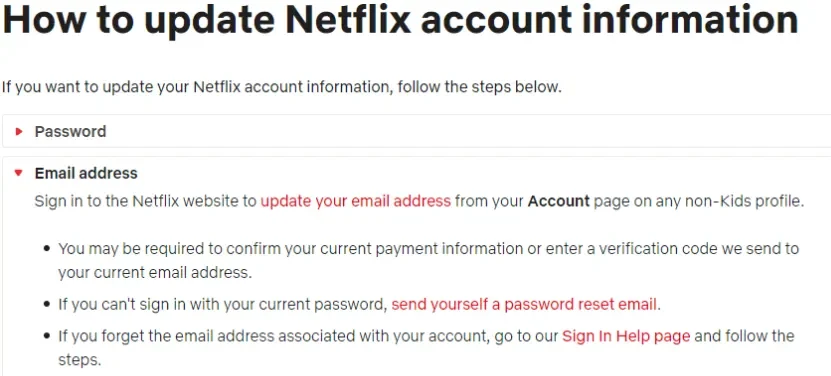
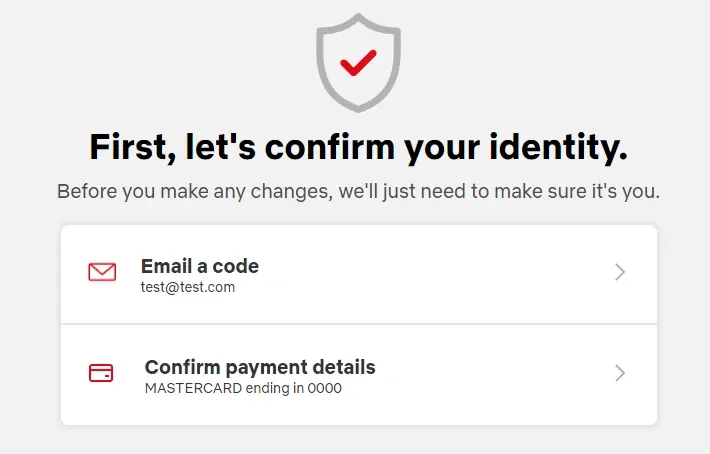
Netflix accounts let you change the email address associated with the account at https://netflix.com/email. Visiting that URL redirects you to the /mfa endpoint, which requires identity verification before any change can be made. The verification options are a code sent by email, a code sent by phone number, or the credit card number associated with the account.
help.netflix.com
The practical consequence is that stolen credentials alone are not enough to take over an account: an attacker who has the password still has to clear the MFA step before the email address can be changed.
The researcher tested the usual MFA and 2FA bypass techniques against that endpoint:
- Response manipulation.
- Direct request to the endpoint.
- Missing 2FA code integrity validation.
- Lack of brute-force protection or rate limiting.
- 2FA code leakage in the response.
None of them worked, so the MFA endpoint was considered secured at that stage. The finding came from somewhere else: an alternative endpoint, /extramember/create-credentials, which changed the email address and password without any MFA. It was rated P3 in Bugcrowd, and the vulnerability has been patched with the fix rolled out.
Setup
Netflix releases some features only in specific countries, so the strategy was to read the Help Center to learn which features exist and where they are available. The researcher built some automation that walked Netflix Help Center pages and examined their titles to surface interesting features. One title stood out: "Extra Member", documented at https://help.netflix.com/en/node/123279/cl.
At the time of testing, Extra Member was available only in Peru, Chile and Nepal. Getting access meant registering from one of those countries and paying for a subscription. The researcher tried IP addresses from all three countries and successfully registered a new account, but could not find a way to buy a gift card for those countries, and none of the payment methods worked, so the subscription was abandoned.
A few weeks later, on 08 February 2023, Netflix published an article at https://about.netflix.com/en/news/an-update-on-sharing:
"So over the last year, we've been exploring different approaches to address this issue in Latin America, and we're now ready to roll them out more broadly in the coming months, starting today in Canada, New Zealand, Portugal and Spain. Our focus has been on giving members greater control over who can access their account."
The article said the feature was additionally available in Canada, New Zealand, Portugal and Spain. It was still not available in the researcher's own country, so the plan was to register from one of those countries and pay again.
Registration through a well-known VPN service can be difficult, because the VPN's IP address may have been used for many registrations and ended up on a blocklist; in that case registering on Netflix.com returns "Something went wrong". The researcher had an IP from Spain that was not from a well-known VPN service. That alone was not enough: after registering with an IP from one of these countries, payment has to be made by one of the following methods:
- PayPal
- Debit card
- Gift card
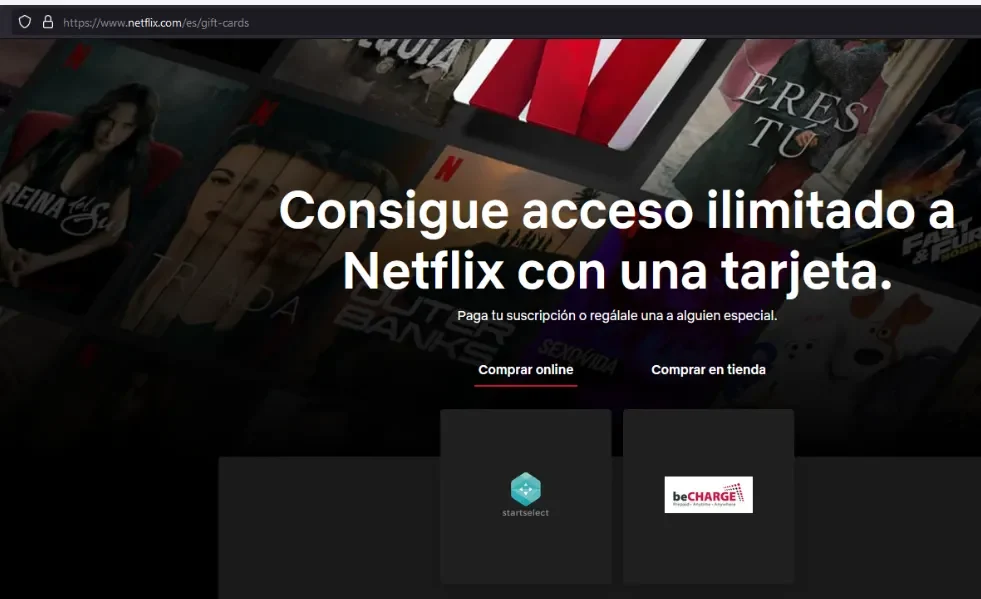
PayPal and a few debit cards both failed with "Something Went Wrong". The gift card route worked. With a Spanish IP, the Netflix gift card page points to startselect.com as a place to buy one. Buying gift cards depends on the country; for Spain, startselect.com was available.
https://www.netflix.com/es/gift-cards
The researcher opened https://startselect.com/es-es/tarjeta-regalo-netflix-variable/42228 and registered.
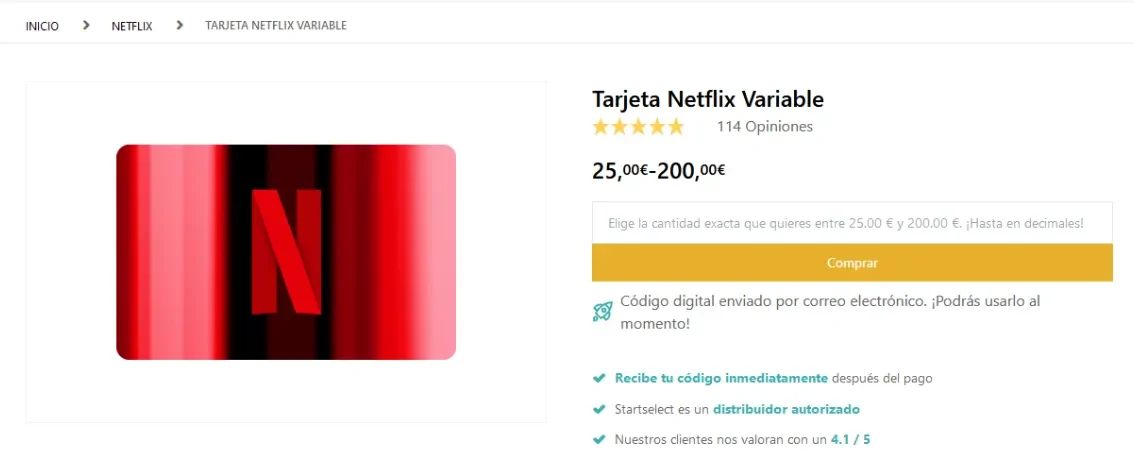
Buying Voucher from StarSelect.com
Registration on startselect.com was not enough on its own: the site required a verification check, which involved taking a selfie holding a sheet of paper with "Netflix.com" written on it and the amount of the voucher, 25 Euro in this case. The researcher completed it to get access to the feature.
With a Spain IP and the Spain gift card, the Extra Member feature was unlocked.
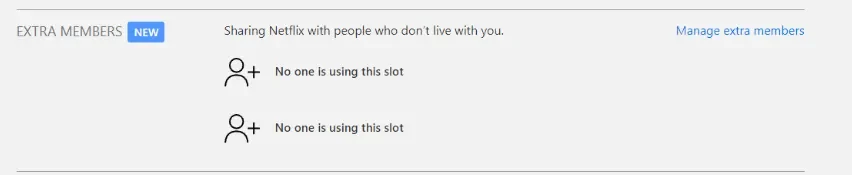
Extramember feature.
Finding it
With the feature available, the next step was to enumerate every endpoint related to it. Inspecting the main JavaScript files revealed a block of Extra Member routes:
)), (0, M.default) (j, J, (H = { }, (0, M.default) (H, et.ADD_ON_DECLINE_INVITE, '/extramember/declineinvitation'), (0, M.default) (H, et.ADD_ON_DECLINE_CONFIRM, '/extramember/declineconfirmed'), (0, M.default) (H, et.ADD_ON_ACTIVATE_ERROR, '/extramember/error'), (0, M.default) (H, et.ADD_ON_ACTIVATE_INVITE_ACCEPTED_ERROR, '/extramember/accepted-error'), (0, M.default) (H, et.ADD_ON_ACTIVATE_INVITE_INVALID_ERROR, '/extramember/invalid-error'), (0, M.default) (H, et.ADD_ON_CLAIM_REGISTRATION_CONTEXT_ERROR, '/extramember/claim-error'), (0, M.default) (H, et.ADD_ON_ACTIVATE_CONTEXT, '/extramember/activate'), (0, M.default) (H, et.ADD_ON_PASSWORD_CONTEXT, '/extramember/context'), (0, M.default) (H, et.ADD_ON_LOGIN_CREDENTIALS_SETUP_CONTEXT, '/extramember/activate-credentials'), (0, M.default) (H, et.ADD_ON_CLAIM_REGISTRATION_SETUP_CONTEXT, '/extramember/claim'), (0, M.default) (H, et.ADD_ON_PASSWORD_CREATION, '/extramember/createpassword'), (0, M.default) (H, et.ADD_ON_LOGIN_CREDENTIALS_SETUP, '/extramember/create-credentials'), (0, M.default) (H, et.ADD_ON_CLAIM_REGISTRATION_SETUP, '/extramember/claim-setup'), (0, M.default) (H, et.ADD_ON_REGISTRATION, '/extramember/registration'), (0, M.default) (H, et.ADD_ON_PROFILE_SELECTION, '/extramember/profileselection'), (0, M.default) (H, et.PASSWORD_ENTRY, '/extramember/nameprofile'), (0, M.default) (H, et.ADD_ON_WELCOME_BACK, '/simpleSetup/welcomeback'), (0, M.default) (H, et.ADD_ON_PROFILE_CREATION, '/simpleSetup/createprofile'), (0, M.default) (H, et.ENTER_PASSWORD_RESET, '/loginhelp'), H)), (0, M.default) (j, $, (L = { }, (0, M.default) (L, et.DEMO_ADS_OPT_OUT, '/settings/demographics/demographicAdsOptOut'), (0, M.default) (L, et.BEHAVIORAL_ADS_OPT_OUT, '/settings/demographics/behavioralAdsOptOut'), (0, M.default) (L, et.EDIT_GENDER, '/settings/demographics/editGender'), L)), (0, M.default) (j, ee, (_ = { }, (0, M.default) (_, et.NOTIFICATION_SETTINGS, '/notificationsettings'), (0, M.default) (_, et.NOTIFICATION_SETTINGS_EMAIL, '/notificationsettings/email'), (0, M.default) (_, et.NOTIFICATION_SETTINGS_TEXT, '/notificationsettings/text'), (0, M.default) (_, et.NOTIFICATION_SETTINGS_PUSH, '/notificationsettings/push'), _)), j); t.MONEYBALL_PATHS = er
This is a route table: each entry maps a constant such as ADD_ON_LOGIN_CREDENTIALS_SETUP to a path such as /extramember/create-credentials. The same object also lists unrelated routes under /settings/demographics, /notificationsettings and /simpleSetup, which shows the table covers more than the Extra Member flow.
After checking all of the endpoints, one behaved oddly. Visiting /create-credentials presented this page:
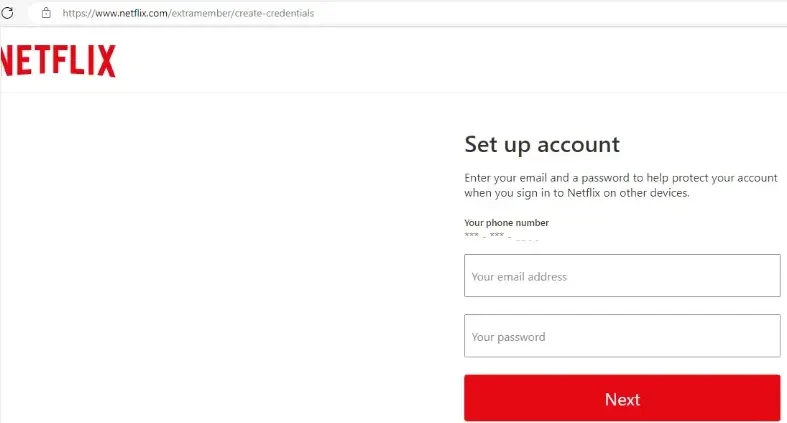
Entering a new email and password changed the current email and password and redirected to /youraccount. No MFA was required, so MFA was bypassed. At first the researcher thought the endpoint was reachable only for Extra Member users, but it turned out to work for all Netflix users.
Exploitation
Step 1: Reach the normal change-email flow
Navigate to https://www.netflix.com/YourAccount and select "Change Email".
Step 2: Observe the MFA gate
You land on the MFA page at https://www.netflix.com/mfa. This is the control that is supposed to stand between a stolen password and a full account takeover.
Step 3: Go to the alternative endpoint instead
Visit:
https://www.netflix.com/extramember/create-credentials
This is the route registered in the JavaScript as ADD_ON_LOGIN_CREDENTIALS_SETUP. It serves a credentials form rather than redirecting to /mfa.
Step 4: Submit new credentials
Complete the form with the new email address and password, then click Next. The form takes the new email address and password.
Step 5: Confirm the change
You are redirected to https://netflix.com, and the email address and password are updated without requiring MFA. The account's email address and password have both been replaced.
Root cause
The /mfa gate is applied to the change-email flow at https://netflix.com/email, but the Extra Member credentials setup endpoint /extramember/create-credentials performs the same sensitive operation, updating the account's email address and password, without requiring the MFA step. The endpoint performed the same sensitive operation without requiring the MFA step, and it was not restricted to Extra Member users either: it worked for all Netflix users. The report does not describe the server-side implementation, so the exact reason the check was missing is not stated;
The standard bypass techniques listed earlier all failed because the MFA endpoint itself was sound. The weakness was a second path to the same state change, which is why response manipulation, direct requests, code integrity checks, rate limiting and response leakage were irrelevant here.
Impact
An attacker who has stolen a victim's credentials could change the account's email address and password without completing MFA, and so take over the account completely. The precondition is possession of valid credentials; the MFA control that normally makes stolen credentials insufficient is what gets bypassed. The endpoint worked for all Netflix users, not only those with the Extra Member feature, so the exposure was not limited to the countries where the feature was sold. The finding was rated P3 in Bugcrowd.
Fix
Netflix patched the vulnerability and rolled out the fix. The report does not describe the change that was made.
Variants to test
- Enumerate route tables in JavaScript bundles for endpoints that write credentials, email or password, then request each one directly while logged in and see whether it renders a form or accepts a submission without an MFA challenge. A positive result is a credentials form served without a redirect to the MFA page, or a successful change with no verification step.
- Take a feature that is gated by country or plan, such as Extra Member, and test its onboarding endpoints from an account that does not have the feature. A positive result is the endpoint working for an ordinary account, as happened here.
- Compare every path that can change the account identifier or secret against the protected flow: change email, change password, add or claim a member, recovery settings. A positive result is any of them completing the change without the verification the main flow demands.
- Subscribe to the target's newsroom and release notes, then retest newly launched features in the countries where they first appear. A positive result is a newly exposed endpoint with weaker checks than the established equivalent.
- Spend money on paid features, as the researcher recommends, since they are less tested. A positive result is any paid-only flow whose endpoints skip controls enforced elsewhere.
What happened, in plain words
Netflix lets you log in with an email address and a password. If someone steals those two things, they could normally take over your account by changing the email address to one they control, then resetting the password. To stop that, Netflix puts a second check in front of the change-email screen: before the email can be changed, you must prove you are really you, for example by entering a code sent to your email or phone, or the number of the credit card on the account. That second check is called Multi-Factor Authentication, or MFA (also called 2FA, two-factor authentication).
The researcher in this report found a different page on Netflix, built for a feature called Extra Member, that also lets you set a new email address and password. That page did not ask for the MFA check at all. So anyone who already had a stolen password could skip the second check entirely by using that page instead of the normal one. The report calls this an MFA bypass. The finding was rated P3 in Bugcrowd (Bugcrowd is the platform Netflix runs its bug bounty programme on; P3 is a middle severity rating). The vulnerability has since been patched and the fix rolled out.
A bug bounty programme is a scheme where a company pays independent researchers for finding and reporting security problems in its products, instead of those problems being sold or used quietly.
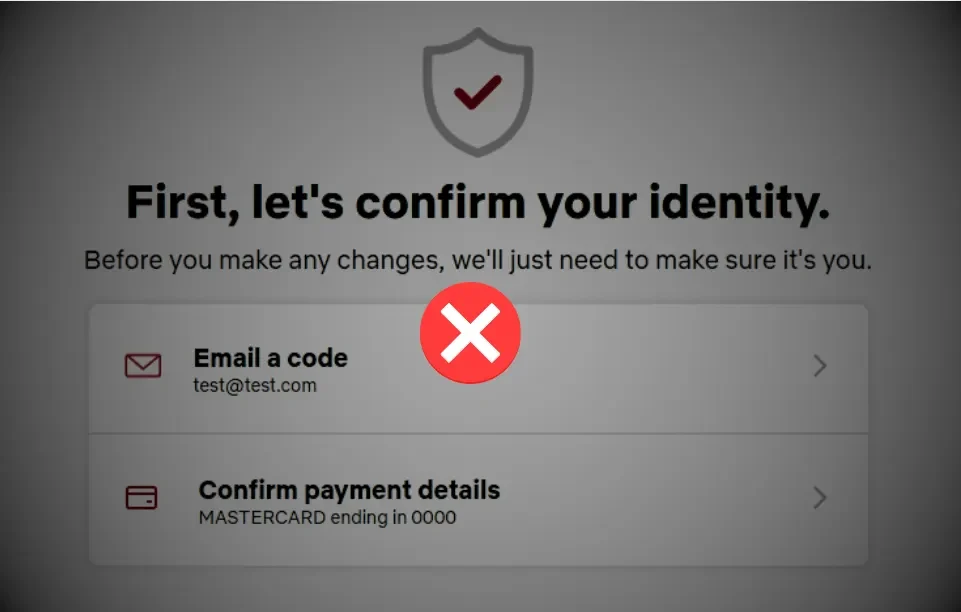
Understanding Netflix MFA
When you are logged into your Netflix account, you can change the email address at this address (a URL, the address you type in a browser):
https://netflix.com/email
If you visit that URL, Netflix does not show you the change-email form straight away. It sends you to a different page, /mfa, which asks you to prove your identity before anything can be changed. The verification options are: a code sent by email, a code sent by phone number, or the credit card number associated with the account.
help.netflix.com
The point of this is simple. If an attacker steals your password, the password alone is not enough: they still have to get past the MFA step before they can change the email address and take the account over completely.
There are well-known tricks for getting around MFA, and the researcher tried the usual ones against that /mfa page:
- Response manipulation: changing what the browser receives back from the server (for example, editing the reply so a failed check looks like a success).
- Direct request to the endpoint: skipping the screens and sending the request straight to the server, hoping the server forgets to check.
- Missing 2FA code integrity validation: seeing whether the server accepts a code it should not, for example a code belonging to a different account or a code that was never issued.
- Lack of brute-force protection or rate limiting: trying many codes in a row to see whether the server ever blocks you. Brute force means guessing over and over; rate limiting is the server refusing to answer after too many attempts.
- 2FA code leakage in the response: looking in what the server sends back to see whether the secret code is hidden somewhere in it.
None of these worked. Because of that, the researcher considered the MFA page secured at that stage of the testing. The finding came from somewhere else entirely: a second page, /extramember/create-credentials, which changed the email address and password without any MFA at all.
TL;DR
In short: an alternative endpoint, /extramember/create-credentials, on Netflix lacked MFA, which made it possible to change an email address without completing any additional verification steps. An endpoint is a specific address on a server that does a specific job, like a particular counter in a large office: you go to that counter for that service. The normal change-email counter asks for your ID; this other counter did the same job without asking.
Reported steps to reproduce
These are the steps the researcher gave to Netflix so its engineers could see the problem for themselves:
- Navigate to
https://www.netflix.com/YourAccountand select "Change Email". - You will encounter the MFA page at
https://www.netflix.com/mfa. - To bypass this, visit
https://www.netflix.com/extramember/create-credentials. - Complete the form using the new email address and password, then click Next.
- You will be redirected to
https://netflix.com, and your email address and password will be updated without requiring MFA.
Step 1 and 2 are there to show the normal, protected behaviour. Step 3 is the trick: instead of the protected page, you open the Extra Member page. Step 4 fills in the two values that decide who owns the account: the login name (email) and the secret (password). Step 5 confirms that the change went through with no verification at all.
Discovering phase: the long path
Netflix offers certain features only to specific countries. So the researcher's strategy was to read Netflix's Help Center (the public support pages that explain every feature) to collect information about which features exist and which countries they are available in. Reading documentation before testing is a common first step: it tells you where the newer, less familiar parts of a product are.
At this stage the researcher wrote some automation: a small program that visits pages by itself instead of a person clicking. It walked over Netflix Help Center pages and looked at their titles, to spot any interesting feature quickly. One title stood out: "Extra Member". The documentation link was:
https://help.netflix.com/en/node/123279/cl
At the time of testing, this feature was available only in the following countries:
- Peru
- Chile
- Nepal
That means that to get access to the functionality, you had to register from one of those countries and pay for a subscription. A subscription is the paid plan that keeps the account active. To test it, the researcher tried IP addresses from all three countries and successfully registered a new account. An IP address is the numeric label your internet connection carries, roughly like a return address on an envelope; websites use it to guess which country you are in. Changing it usually means routing your connection through a server in another country, which is what a VPN (virtual private network) does.
To pay for the subscription, for some countries it is also possible to buy gift cards from a third-party website and use them during the payment process in Netflix. A gift card here is a code worth a fixed amount of money that you can redeem on the account. But for those three countries the researcher did not find a way to buy any gift card. Eventually the attempt to pay was abandoned, because none of the payment methods worked.
Company announcement: a few weeks later
While taking part in a bug bounty programme, it helps to subscribe to the company's newsroom (the page where a company publishes its official announcements), so you receive news about recent changes and newly introduced features. New features are interesting to a tester precisely because they are new: fewer people have used them, and mistakes are more likely.
In Netflix's case, the researcher noticed that the following article was released on 08 February 2023:
https://about.netflix.com/en/news/an-update-on-sharing
The article said:
"So over the last year, we've been exploring different approaches to address this issue in Latin America, and we're now ready to roll them out more broadly in the coming months, starting today in Canada, New Zealand, Portugal and Spain. Our focus has been on giving members greater control over who can access their account."
An update regarding the Extra Member feature was introduced in the article. It said the feature was additionally available in the following countries:
- Canada
- New Zealand
- Portugal
- Spain
It still was not available in the country where the researcher was located. But with that new information, the plan was to try to register from one of those countries and pay for a subscription again.
Registering an account. If you try to use a well-known VPN service, registering a new account may prove difficult, because the VPN's IP address may have been used for numerous registrations and ended up on a blocklist (a list of addresses a site refuses to serve). In that scenario, attempting to register on Netflix.com would result in an error message: "Something went wrong".
In this case the researcher had an IP from Spain which was not from any well-known VPN service. Unfortunately that was not enough, because once you register with an IP from some of these countries, you need to use one of the following methods to pay for the subscription:
- PayPal
- Debit card
- Gift card
PayPal and a few debit cards were tried, but payment failed again with the error "Something Went Wrong".
Finally the researcher decided to use the gift card method. In Netflix, when you use an IP from Spain and go to the gift card page, you will notice that you can buy a gift card from the following website: startselect.com.
Note: buying gift cards depends on the country as well. For Spain, it seems that startselect.com is available.
https://www.netflix.com/es/gift-cards
What the researcher did was open the following page and register:
https://startselect.com/es-es/tarjeta-regalo-netflix-variable/42228
Buying Voucher from StarSelect.com
Unfortunately, having a registration on startselect.com was not enough. The researcher needed to go through a verification check on that website, which included taking a selfie holding a sheet of paper on which was written "Netflix.com" and the amount of the voucher, 25 Euro in this case. The researcher did it anyway, for the sake of getting hands on that feature.
Ready to use the gift card
Finally, the researcher registered with a Spain IP and used the recently bought Spain gift card. The following feature was unlocked:
Extramember feature.
Finding it
With access to the functionality, the next step was to find all possible endpoints related to it. To do that, the researcher inspected the main JavaScript files. JavaScript is the programming language that runs inside web pages; the browser downloads these files to make the page work, and they are readable by anyone. Modern web apps often keep a list of their internal page addresses inside those files, which makes them a good place to look for endpoints you would not otherwise know about.
That inspection revealed multiple endpoints related to Extra Member:
)), (0, M.default) (j, J, (H = { }, (0, M.default) (H, et.ADD_ON_DECLINE_INVITE, '/extramember/declineinvitation'), (0, M.default) (H, et.ADD_ON_DECLINE_CONFIRM, '/extramember/declineconfirmed'), (0, M.default) (H, et.ADD_ON_ACTIVATE_ERROR, '/extramember/error'), (0, M.default) (H, et.ADD_ON_ACTIVATE_INVITE_ACCEPTED_ERROR, '/extramember/accepted-error'), (0, M.default) (H, et.ADD_ON_ACTIVATE_INVITE_INVALID_ERROR, '/extramember/invalid-error'), (0, M.default) (H, et.ADD_ON_CLAIM_REGISTRATION_CONTEXT_ERROR, '/extramember/claim-error'), (0, M.default) (H, et.ADD_ON_ACTIVATE_CONTEXT, '/extramember/activate'), (0, M.default) (H, et.ADD_ON_PASSWORD_CONTEXT, '/extramember/context'), (0, M.default) (H, et.ADD_ON_LOGIN_CREDENTIALS_SETUP_CONTEXT, '/extramember/activate-credentials'), (0, M.default) (H, et.ADD_ON_CLAIM_REGISTRATION_SETUP_CONTEXT, '/extramember/claim'), (0, M.default) (H, et.ADD_ON_PASSWORD_CREATION, '/extramember/createpassword'), (0, M.default) (H, et.ADD_ON_LOGIN_CREDENTIALS_SETUP, '/extramember/create-credentials'), (0, M.default) (H, et.ADD_ON_CLAIM_REGISTRATION_SETUP, '/extramember/claim-setup'), (0, M.default) (H, et.ADD_ON_REGISTRATION, '/extramember/registration'), (0, M.default) (H, et.ADD_ON_PROFILE_SELECTION, '/extramember/profileselection'), (0, M.default) (H, et.PASSWORD_ENTRY, '/extramember/nameprofile'), (0, M.default) (H, et.ADD_ON_WELCOME_BACK, '/simpleSetup/welcomeback'), (0, M.default) (H, et.ADD_ON_PROFILE_CREATION, '/simpleSetup/createprofile'), (0, M.default) (H, et.ENTER_PASSWORD_RESET, '/loginhelp'), H)), (0, M.default) (j, $, (L = { }, (0, M.default) (L, et.DEMO_ADS_OPT_OUT, '/settings/demographics/demographicAdsOptOut'), (0, M.default) (L, et.BEHAVIORAL_ADS_OPT_OUT, '/settings/demographics/behavioralAdsOptOut'), (0, M.default) (L, et.EDIT_GENDER, '/settings/demographics/editGender'), L)), (0, M.default) (j, ee, (_ = { }, (0, M.default) (_, et.NOTIFICATION_SETTINGS, '/notificationsettings'), (0, M.default) (_, et.NOTIFICATION_SETTINGS_EMAIL, '/notificationsettings/email'), (0, M.default) (_, et.NOTIFICATION_SETTINGS_TEXT, '/notificationsettings/text'), (0, M.default) (_, et.NOTIFICATION_SETTINGS_PUSH, '/notificationsettings/push'), _)), j); t.MONEYBALL_PATHS = er
What is this block? It is a route table: a list that pairs a name with a web address. Each entry maps a constant such as ADD_ON_LOGIN_CREDENTIALS_SETUP to a path such as /extramember/create-credentials. A constant is just a fixed label used in code so the programmer does not have to type the address repeatedly. The same object also lists unrelated routes under /settings/demographics, /notificationsettings and /simpleSetup, which shows the table covers more than the Extra Member flow. Reading it line by line:
ADD_ON_DECLINE_INVITEpoints to/extramember/declineinvitation: the page for declining an invitation to become an extra member.ADD_ON_DECLINE_CONFIRMpoints to/extramember/declineconfirmed: the confirmation page after declining.ADD_ON_ACTIVATE_ERRORpoints to/extramember/error: an error page for the activation step.ADD_ON_ACTIVATE_INVITE_ACCEPTED_ERRORpoints to/extramember/accepted-error: an error page when an invitation was already accepted.ADD_ON_ACTIVATE_INVITE_INVALID_ERRORpoints to/extramember/invalid-error: an error page when an invitation is invalid.ADD_ON_CLAIM_REGISTRATION_CONTEXT_ERRORpoints to/extramember/claim-error: an error page for claiming a registration.ADD_ON_ACTIVATE_CONTEXTpoints to/extramember/activate: the activation page.ADD_ON_PASSWORD_CONTEXTpoints to/extramember/context: a context page for the password step.ADD_ON_LOGIN_CREDENTIALS_SETUP_CONTEXTpoints to/extramember/activate-credentials: the context page for setting up login credentials.ADD_ON_CLAIM_REGISTRATION_SETUP_CONTEXTpoints to/extramember/claim: the page for claiming a registration.ADD_ON_PASSWORD_CREATIONpoints to/extramember/createpassword: the page for creating a password.ADD_ON_LOGIN_CREDENTIALS_SETUPpoints to/extramember/create-credentials: the page for setting up login credentials. This is the one that matters later.ADD_ON_CLAIM_REGISTRATION_SETUPpoints to/extramember/claim-setup: the setup page for claiming a registration.ADD_ON_REGISTRATIONpoints to/extramember/registration: the registration page.ADD_ON_PROFILE_SELECTIONpoints to/extramember/profileselection: the page for choosing a profile.PASSWORD_ENTRYpoints to/extramember/nameprofile: the page for entering a name and profile.ADD_ON_WELCOME_BACKpoints to/simpleSetup/welcomeback: a welcome-back page in a simpler setup flow.ADD_ON_PROFILE_CREATIONpoints to/simpleSetup/createprofile: a profile creation page in that same flow.ENTER_PASSWORD_RESETpoints to/loginhelp: the login help page.- The second group maps
DEMO_ADS_OPT_OUTto/settings/demographics/demographicAdsOptOut,BEHAVIORAL_ADS_OPT_OUTto/settings/demographics/behavioralAdsOptOutandEDIT_GENDERto/settings/demographics/editGender: these are privacy and profile settings, unrelated to Extra Member. - The third group maps
NOTIFICATION_SETTINGSto/notificationsettingsand its sub-pages for email, text and push notifications: again unrelated. - At the end, the whole table is stored under the name
MONEYBALL_PATHS.
After checking all of the endpoints, one had weird behaviour. Upon visiting /create-credentials, the following page was presented:
If you enter a new email and password, your current email and password would be changed and you would be redirected to the /youraccount page. That endpoint did not require any MFA, which means MFA was bypassed. At this step the researcher thought the endpoint was accessible only for Extra Member users, but eventually it turned out to work for all Netflix users.
Exploitation
Step 1: Reach the normal change-email flow
This is the ordinary, documented way to change the address, and it is the baseline: it shows what the protected behaviour looks like.
Step 2: Observe the MFA gate
You land on the MFA page at https://www.netflix.com/mfa. This is the control that is supposed to stand between a stolen password and a full account takeover. Seeing it here confirms the protection exists on the normal path.
Step 3: Go to the alternative endpoint instead
Visit:
https://www.netflix.com/extramember/create-credentials
This is the route registered in the JavaScript as ADD_ON_LOGIN_CREDENTIALS_SETUP. It serves a credentials form rather than redirecting to /mfa. In other words, the same kind of sensitive action is offered at a second address, and that address does not send you to the identity check.
Step 4: Submit new credentials
Complete the form with the new email address and password, then click Next. The form takes the new email address and password.
Step 5: Confirm the change
You are redirected to https://netflix.com, and the email address and password are updated without requiring MFA. The account's email address and password have both been replaced.
Root cause
The /mfa gate is applied to the change-email flow at https://netflix.com/email, but the Extra Member credentials setup endpoint /extramember/create-credentials performs the same sensitive operation, updating the account's email address and password, without requiring the MFA step. The endpoint performed the same sensitive operation without requiring the MFA step, and it was not restricted to Extra Member users either: it worked for all Netflix users. Authorisation is the server deciding whether this particular user is allowed to do this particular thing.
The report does not describe the server-side implementation, so the exact reason the check was missing is not stated.
The standard bypass techniques listed earlier all failed because the MFA endpoint itself was sound. The weakness was a second path to the same state change, which is why response manipulation, direct requests, code integrity checks, rate limiting and response leakage were irrelevant here. This is a useful lesson: when one door is locked properly, look for another door into the same room.
Impact
An attacker who has stolen a victim's credentials could change the account's email address and password without completing MFA, and so take over the account completely. The precondition is possession of valid credentials; the MFA control that normally makes stolen credentials insufficient is what gets bypassed. The endpoint worked for all Netflix users, not only those with the Extra Member feature, so the exposure was not limited to the countries where the feature was sold. The finding was rated P3 in Bugcrowd.
Fix
Netflix patched the vulnerability and rolled out the fix. The report does not describe the change that was made.
Variants to test
These are ideas for testing similar products, written for someone starting out:
- Enumerate route tables in JavaScript bundles for endpoints that write credentials, email or password, then request each one directly while logged in and see whether it renders a form or accepts a submission without an MFA challenge. A positive result is a credentials form served without a redirect to the MFA page, or a successful change with no verification step. To enumerate means to list systematically; a JavaScript bundle is the file of code the browser downloads.
- Take a feature that is gated by country or plan, such as Extra Member, and test its onboarding endpoints from an account that does not have the feature. A positive result is the endpoint working for an ordinary account, as happened here.
- Compare every path that can change the account identifier or secret against the protected flow: change email, change password, add or claim a member, recovery settings. A positive result is any of them completing the change without the verification the main flow demands.
- Subscribe to the target's newsroom and release notes, then retest newly launched features in the countries where they first appear. A positive result is a newly exposed endpoint with weaker checks than the established equivalent.
- Spend money on paid features, as the researcher recommends, since they are less tested. A positive result is any paid-only flow whose endpoints skip controls enforced elsewhere.
Glossary
- MFA (Multi-Factor Authentication): a second proof of identity, beyond the password, required before a sensitive action. Also called 2FA.
- 2FA (Two-Factor Authentication): the same idea as MFA, using two factors: something you know (password) and something you have or are (a code, a card).
- MFA bypass: getting past or around the second check without completing it, for example by using a different page that does not ask for it.
- Bug bounty programme: a scheme where a company pays independent researchers for reporting security problems.
- Bugcrowd: the platform Netflix runs its bug bounty programme on.
- P3: a middle severity rating on that platform.
- URL: the address of a page or resource on the web, such as
https://netflix.com/email. - Endpoint: a specific address on a server that performs a specific job.
- Route table: a list in code that pairs a name with a web address.
- Constant: a fixed label used in code so a value does not have to be typed repeatedly.
- JavaScript: the programming language that runs inside web pages in your browser.
- JavaScript bundle: the file of JavaScript code a website sends to your browser.
- Automation: a program that performs repetitive actions, such as visiting pages, without a person clicking.
- Help Center: a company's public support pages explaining its features.
- Newsroom: a company's page for official announcements and press releases.
- IP address: the numeric label of an internet connection, used by sites to guess location and to block abusers.
- VPN (Virtual Private Network): a service that routes your connection through a server elsewhere, so sites see that server's IP address.
- Blocklist: a list of addresses a site refuses to serve.
- Subscription: the paid plan that keeps an account active.
- Gift card: a code worth a fixed amount of money that can be redeemed on an account.
- PayPal: an online payment service.
- Debit card: a bank card that pays directly from an account.
- Brute force: guessing repeatedly, for example trying many codes in a row.
- Rate limiting: a server refusing to answer after too many attempts in a short time.
- Response manipulation: editing or faking what the server sends back to the browser so a failure looks like a success.
- Integrity validation: checking that a value, such as a code, is genuine and belongs where it is used.
- Response leakage: a secret appearing in what the server sends back to the browser.
- Authorisation: the server deciding whether this user is allowed to do this action.
- Account takeover: an attacker gaining full control of someone else's account, usually by replacing the email and password.
- Credentials: the pair of login name (email) and password.
- Root cause: the underlying reason a vulnerability exists.
- Impact: what an attacker could actually do because of the vulnerability.
- Patch: a fix applied to the software.
- Enumerate: to list things systematically, one by one.
- Onboarding flow: the sequence of pages a new user goes through to set up an account or feature.