User nickname
The Netflix Party Chrome extension inserted a user's nickname into the chat HTML without escaping, so a nickname containing HTML/JavaScript would execute in every party member's browser. An attacker could change chat history or show a fake Netflix login page to steal credentials.

One late night playing some World of Warcraft, my friend and I decided we wanted to watch a Netflix show together, so we went ahead and installed the new Netflix Party Chrome add-on that is all over the news and social media. We start up a party, and out of curiosity I start looking around to see what we can do with…
The full write-up lives on its author's site
It belongs to its author, so we link to it rather than copy it. The other two tabs are our own rewrites, checked against it.
Netflix Party is a Chrome extension that lets people watch Netflix shows and movies together, synchronising playback and adding a chat panel to the side of the player. This write-up covers two stored cross-site scripting bugs I found in it: one in the user nickname, one in the user icon. The first was fixed in version 1.7.7; the second was reported and, at the time of writing, had not been answered.
Context
The extension runs in the context of netflix.com and adds a party feature: a host starts a session, other members join, and everyone's playback is kept in step. Alongside the video there is a chat bar on the right where members exchange messages. Each message is rendered together with the sender's nickname, and each member is represented by an icon chosen from a fixed list of images bundled with the extension.
Two pieces of user-controlled data therefore end up in the page: the nickname, which the user types in, and the icon, which the user picks from the list. Both are rendered into the chat area.
Setup
No special tooling was needed to find the first bug. The precondition was simply a party: the payload fires on the clients of all party members. For the second bug the precondition was the ability to write to the extension's local storage, which is possible from the context of NetflixParty itself.
Finding it
One evening a friend and I installed the extension to watch a show together. We started a party and, out of curiosity, I looked around the interface. I spotted a set user nickname field and, as a shot in the dark, tried the simplest thing I could think of:
<script>alert(1)</script>
Nothing happened. Then I paused the video and a popup appeared. The trigger was not the nickname field itself but any of the events that cause the nickname to be written into the chat bar: pausing or playing the video, sending a message, joining or leaving a party. On each of those, my nickname was rendered into the chat on the right and the JavaScript executed on all members of the party.
Exploitation
Step 1: confirm execution
Setting the nickname to the payload above and then pausing the video was enough to fire it. The same happened on play, on sending a message, and on joining or leaving. Because the nickname is broadcast to the party, the script runs in every member's client, not just the attacker's.
Step 2: rewrite the chat history
Starting with something harmless: the payload can change the messages and usernames of all party members. Set it as your nickname and the chat is rewritten for everyone.
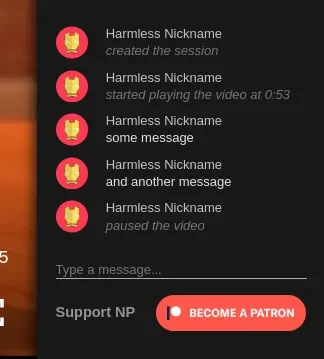
Users exchange messages (just me right now, very lonely)
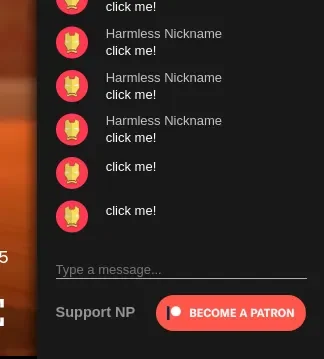
After changing the nickname to the payload, all the messages are changed.
Step 3: full-screen phishing
A more severe use of the same injection is a convincing phishing page. By setting the nickname to a payload that creates a full-screen iframe covering the page, the attacker can load their own page inside it, for example a fake Netflix login saying "Your session has expired, Please Login again". Credentials entered there are sent to the attacker. All of this happens without the victim ever leaving netflix.com.
Root cause
Looking through the extension's JavaScript, the vulnerable code sits in the addMessage() function. The developers escaped the input string for the message variable, but the userNickname variable was inserted into the HTML without any filtering. Any HTML tags in the nickname are therefore parsed by the browser, which is the XSS.
Fix
I reported the vulnerability to the developers. After a couple of days with no response I chased them up, and they fixed it within one week. In version 1.7.7 the userNickname variable is escaped as well.
Second bug: XSS via the user icon
Finding it
While reviewing the fix for the first bug I noticed another user input field I had forgotten about: the user icon. A good tip here is to look for the same vulnerability in the places you have not checked yet.
Root cause
Users cannot upload icons; they choose one from a list of files stored locally by the extension, and the code then prints the chosen value to the page. The value is built with chrome.runtime.getURL('img/' + newicon). newIcon cannot be edited directly from the extension's interface, but the value is stored in and fetched from Chrome's local storage, which can be edited. The $userIcon variable is not filtered, so a simple payload works:
x" onerror=alert(1)// which turns into<img src="chrome-extension://.../img/x" onerror="alert(1)">// this can be stored by (while in context of NetflixParty)chrome.[redacted].set({"userIcon": 'x" onerror=alert(1)'});
The payload closes the src attribute and adds an onerror handler. It is stored with:
chrome.[redacted].set({"userIcon": 'x" onerror=alert(1)'});
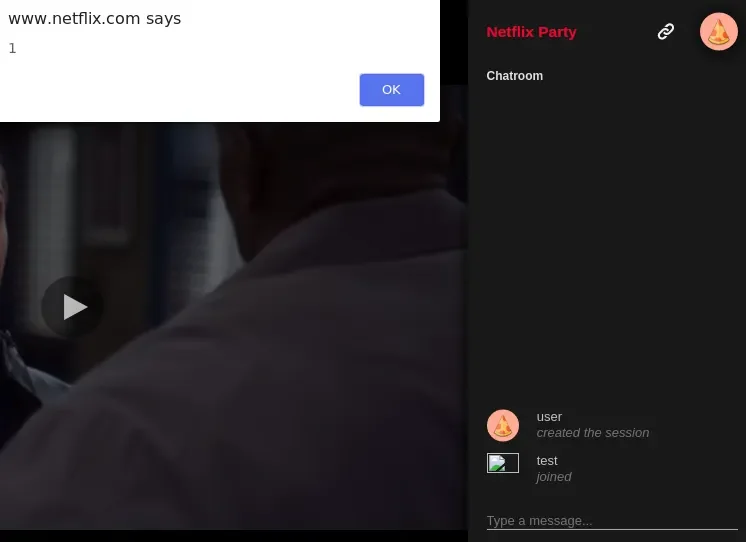
The user can then join any party, or have members join theirs, and the JavaScript executes instantly.
Exploits
The exploits are the same as for the nickname bug, but they need to be tweaked slightly: the payload is not inside <script> tags but part of the onerror function.
Fix
I reported this bug and chased it up a couple of times over a few weeks, but got no response. Handing it to the community, I hoped, would make the developers notice.
Impact
The vulnerability does not affect the developer's own assets, such as their servers or any information stored on their side. It puts their users at risk: an attacker in a party can execute script in every other member's browser in the context of netflix.com, rewrite the chat, or overlay a full-screen phishing page without the victim leaving the site. At the time of writing the extension had over 8 million downloads and was being promoted by large media outlets,
Extra: exploiting without a Netflix account
Out of curiosity, and to practise programming, I reverse engineered the application and wrote a full exploit tool in Python. The application uses unprotected, unauthenticated web sockets (another vulnerability for another time), so anyone with the details of a Netflix Party (npSessionId, npServerId) can talk to the server and interact with it. An attacker can therefore exploit the XSS above without even needing a Netflix account: they join a session by providing the payload in the JSON parameter of the request.
The code is messy, apologies:
https://github.com/kr-b/netflixparty_exploit
Variants to test
- Other fields rendered into chat. Look for every place a user-supplied string is concatenated into HTML in the chat or member list. A positive result is a nickname, status or similar field that executes when a chat event fires.
- Locally stored values used in markup. Inspect
chrome.[redacted]and any other client-side store for values that are later interpolated into attributes. A positive result is a value such asx" onerror=alert(1)that breaks out of an attribute and fires on load. - Event-triggered rendering. Set a payload in a field that appears inert, then trigger the events that redraw it (play, pause, send, join, leave). A positive result is execution on a state change rather than on input.
- Unauthenticated session channels. Check whether party or session identifiers alone are enough to join and send messages. A positive result is interacting with a session without an account.
What happened, in plain words
Netflix Party was a Chrome extension that let people watch Netflix together: one person starts a party, friends join, and the video pauses and plays in step for everyone. A chat panel sits on the right of the player so the group can talk while watching. I found two bugs in it that let an attacker run their own code inside other people's browsers. Both bugs are a type called cross-site scripting, or XSS for short. In plain terms, XSS means a website or app takes something a user typed and puts it into the page in a way that the browser treats as instructions rather than as harmless text. The browser cannot tell the difference between instructions the app meant to give it and instructions an attacker slipped in, so it runs the attacker's code as if the app had written it.
A useful comparison is a noticeboard where anyone can pin a note. If the person who runs the board copies whatever is pinned onto the official letterhead without checking it, someone can pin a note that says "pay this person" and it will look like an official instruction. Here, the "note" is a nickname or an icon choice, and the "official letterhead" is the Netflix Party chat panel inside netflix.com.
The first bug was in the nickname you type for yourself. The second was in the little icon that represents you in the chat. The first was fixed in version 1.7.7. The second was reported and, at the time of writing, had not been answered.
The Netflix Party Chrome extension, which lets you watch Netflix shows and movies with your friends.
Background you need
Before the details, a few ideas that come up constantly.
- Browser extension: a small program you install into Chrome. It can add buttons, change how pages look, and read or modify the pages you visit. Netflix Party adds a chat panel and synchronised playback to netflix.com.
- Running "in the context of" a site: when a script runs in the context of netflix.com, the browser treats it as part of netflix.com. It can read what the page can read and do what the page can do. That is why an XSS in an extension that works on netflix.com matters: the attacker's code inherits the trust the browser gives to netflix.com.
- HTML and tags: web pages are written in HTML. Text in angle brackets, like
<b>or<img>, is a tag: an instruction to the browser to make something bold, show an image, and so on. Ordinary text is not a tag. The whole game in XSS is getting your text treated as a tag. - Escaping (also called encoding): turning characters that would otherwise be read as HTML into plain text. For example, turning
<into<so the browser shows a literal less-than sign instead of starting a tag. If a value is escaped before it goes into the page, it cannot become an instruction. - JavaScript: the programming language browsers run.
alert(1)is the classic harmless test: it makes a small popup with the number 1. If you see that popup, you know your JavaScript ran. - Stored XSS: XSS where the malicious input is saved somewhere (a nickname, a profile field, a local storage entry) and then shown to other people later. The attacker does not need to trick each victim into clicking a special link; the payload sits in the saved value and fires whenever it is displayed.
- Local storage: a small storage area a browser gives to an extension or website, a bit like a notepad that survives page reloads. In Chrome extensions,
chrome.[redacted]is that notepad. It is not visible in the normal page interface, but it can be read and written by code running in the extension's context. - iframe: a way to embed one web page inside another, like a picture-in-picture frame. A full-screen iframe can cover the real page completely, so the user sees only what the attacker put inside it.
- WebSocket: a two-way connection between a browser and a server that stays open, used for live chat and real-time updates. Unlike a normal web request, either side can send a message at any time.
- Session ID: a short identifier, like a ticket number, that names a particular party or connection. If knowing the ticket number is enough to join, then the ticket number is effectively the password.
The setup
No special tools were needed for the first bug. The only precondition was a party, because the payload fires on the browsers of all party members, not only on the sender's. For the second bug, the precondition was being able to write to the extension's local storage, which is possible from the context of NetflixParty itself.
Finding the first bug
One evening a friend and I installed the extension to watch a show together. We started a party and, out of curiosity, I looked around the interface. I spotted a field to set your user nickname and, as a shot in the dark, tried the simplest thing I could think of:
<script>alert(1)</script>
Line by line:
<script>is an HTML tag that tells the browser "everything until</script>is JavaScript, run it".alert(1)is the JavaScript instruction: show a popup containing 1.</script>closes the script block.
If the nickname were inserted into the page as raw HTML, the browser would see a script tag and run the popup. If it were escaped, the browser would show the literal text <script>alert(1)</script> and nothing would happen.
Nothing happened. Then I paused the video and a popup appeared. The trigger was not the nickname field itself but any of the events that cause the nickname to be written into the chat bar: pausing or playing the video, sending a message, joining or leaving a party. On each of those, my nickname was rendered into the chat on the right and the JavaScript executed on all members of the party.
That is an important lesson for beginners: a field can look inert because nothing happens while you type. The value may only be used later, when some other action causes the page to redraw. Always try the actions the app offers after entering a test value.
Exploiting the first bug
Step 1: confirm execution
Setting the nickname to the payload above and then pausing the video was enough to fire it. The same happened on play, on sending a message, and on joining or leaving. Because the nickname is broadcast to the party, the script runs in every member's browser, not just the attacker's. That is what makes it stored XSS: the payload is saved as the nickname and shown to everyone in the party.
Step 2: rewrite the chat history
Starting with something harmless: the payload can change the messages and usernames of all party members. Set it as your nickname and the chat is rewritten for everyone.
Users exchange messages (just me right now, very lonely).
After changing the nickname to the payload, all the messages are changed.
Why this works: the chat panel builds each line of chat by gluing together the sender's nickname and the message text. If the nickname contains HTML, the browser obeys it.
Step 3: full-screen phishing
A more severe use of the same injection is a convincing phishing page. By setting the nickname to a payload that creates a full-screen iframe covering the page, the attacker can load their own page inside it, for example a fake Netflix login saying "Your session has expired, Please Login again". Credentials entered there are sent to the attacker. All of this happens without the victim ever leaving netflix.com.
Phishing means tricking someone into typing their username and password into a fake page. The iframe trick is powerful because the address bar still shows netflix.com. The victim has no easy way to tell that the login form is not Netflix's.
Root cause of the first bug
Looking through the extension's JavaScript, the vulnerable code sits in the addMessage() function. The developers escaped the input string for the message variable, but the userNickname variable was inserted into the HTML without any filtering. Any HTML tags in the nickname are therefore parsed by the browser, which is the XSS.
In other words: the developers remembered to escape one value and forgot the other. This is extremely common. When a page is built by joining several pieces of text, every piece needs the same treatment. One missed piece is enough.
The fix for the first bug
I reported the vulnerability to the developers. After a couple of days with no response I chased them up, and they fixed it within one week. In version 1.7.7 the userNickname variable is escaped as well.
Second bug: XSS via the user icon
Finding it
While reviewing the fix for the first bug I noticed another user input field I had forgotten about: the user icon. A good tip here is to look for the same vulnerability in the places you have not checked yet. If one field was unsafe, the others built by the same developers at the same time are worth a second look.
Root cause
Users cannot upload icons; they choose one from a list of files stored locally by the extension, and the code then prints the chosen value to the page. The value is built with chrome.runtime.getURL('img/' + newicon). newIcon cannot be edited directly from the extension's interface, but the value is stored in and fetched from Chrome's local storage, which can be edited. The $userIcon variable is not filtered, so a simple payload works:
x" onerror=alert(1)// which turns into<img src="chrome-extension://.../img/x" onerror="alert(1)">// this can be stored by (while in context of NetflixParty)chrome.[redacted].set({"userIcon": 'x" onerror=alert(1)'});
This block is dense, so let us unpack it piece by piece.
x" onerror=alert(1)//is the value the attacker wants to store as the icon name.- The extension builds an image tag by pasting that value into a template. The template looks like
<img src="chrome-extension://.../img/followed by the icon name, followed by">. - With the payload, the result is
<img src="chrome-extension://.../img/x" onerror="alert(1)">. - The
"after thexcloses thesrcattribute early. Everything after it is read as new attributes on the image tag. onerror=alert(1)is an event handler: "when this image fails to load, runalert(1)". When the image fails to load, the handler runs.//starts a comment in JavaScript, so anything after it is ignored. It is there to swallow the rest of the template so the HTML stays valid.- The final part,
chrome.[redacted].set({"userIcon": 'x" onerror=alert(1)'});, is the instruction that saves the payload into the extension's local storage under the keyuserIcon.
The payload closes the src attribute and adds an onerror handler, so the broken image URL triggers the script. It is stored with:
chrome.[redacted].set({"userIcon": 'x" onerror=alert(1)'});
Line by line:
chrome.[redacted]is the extension's local notepad..set({...})writes the given key and value into it."userIcon"is the key the extension reads when it draws your icon.'x" onerror=alert(1)'is the value, the payload from above.
Why this matters: the icon picker in the interface only lets you choose from a fixed list, so it looks safe. But the interface is not the only way to write to local storage. Code running in the extension's context can write anything there, and the extension trusts what it reads back. This is a general lesson: "the user cannot type that" is not the same as "that value cannot be attacker-controlled".
The user can then join any party, or have members join theirs, and the JavaScript executes instantly.
Exploits
The exploits are the same as for the nickname bug, but they need to be tweaked slightly: the payload is not inside <script> tags but part of the onerror function. In practice, instead of writing <script>...</script> as the nickname, you write the JavaScript you want as the body of the onerror handler.
Fix
I reported this bug and chased it up a couple of times over a few weeks, but got no response. Handing it to the community, I hoped, would make the developers notice.
Impact
The vulnerability does not affect the developer's own assets, such as their servers or any information stored on their side. It puts their users at risk: an attacker in a party can execute script in every other member's browser in the context of netflix.com, rewrite the chat, or overlay a full-screen phishing page without the victim leaving the site. At the time of writing the extension had over 8 million downloads and was being promoted by large media outlets,
Extra: exploiting without a Netflix account
Out of curiosity, and to practise programming, I reverse engineered the application and wrote a full exploit tool in Python. The application uses unprotected, unauthenticated web sockets (another vulnerability for another time), so anyone with the details of a Netflix Party (npSessionId, npServerId) can talk to the server and interact with it. An attacker can therefore exploit the XSS above without even needing a Netflix account: they join a session by providing the payload in the JSON parameter of the request.
A few terms here:
- Reverse engineering means taking something apart to understand how it works.
- Unauthenticated means the server does not check who you are before accepting your messages. If you know the session identifiers, you are in.
- JSON is a simple text format for structured data, like a form with labelled fields. Sending a payload "in the JSON parameter" means putting it in one of those fields.
The code is messy, apologies:
https://github.com/kr-b/netflixparty_exploit
Variants to test
If you want to practise on a similar app, these are the directions the report points to.
- Other fields rendered into chat. Look for every place a user-supplied string is concatenated into HTML in the chat or member list. A positive result is a nickname, status or similar field that executes when a chat event fires.
- Locally stored values used in markup. Inspect
chrome.[redacted]and any other client-side store for values that are later interpolated into attributes. A positive result is a value such asx" onerror=alert(1)that breaks out of an attribute and fires on load. - Event-triggered rendering. Set a payload in a field that appears inert, then trigger the events that redraw it (play, pause, send, join, leave). A positive result is execution on a state change rather than on input.
- Unauthenticated session channels. Check whether party or session identifiers alone are enough to join and send messages. A positive result is interacting with a session without an account.
Glossary
- Stored XSS: XSS where the malicious value is saved (in a nickname, a profile, local storage) and shown to other users later.
- Browser extension: a small program installed into a browser that can modify or interact with the pages you visit.
- Context (of a site): the trust boundary of a web page. Code running in the context of netflix.com can do what netflix.com can do.
- HTML: the language web pages are written in, made of tags in angle brackets.
- Tag: an HTML instruction such as
<img>or<script>. - Attribute: a setting on a tag, such as
srcon an image oronerroron an element. - Escaping (encoding): converting characters like
<into harmless text so they are displayed rather than interpreted. alert(1): a JavaScript command that shows a popup with the number 1, used as a harmless test that code ran.- Event handler: code attached to an element that runs when something happens, such as
onerrorwhen an image fails to load. onerror: an event handler that fires when a resource, such as an image, fails to load.- iframe: an embedded web page inside another page; a full-screen iframe can cover the real page.
- Phishing: tricking someone into entering credentials into a fake page.
- Local storage (
chrome.[redacted]): a small persistent storage area available to an extension, editable by code running in its context. - WebSocket: a persistent two-way connection between a browser and a server, used for live features such as chat.
- Unauthenticated: accepting requests without checking who the sender is.
- Session ID (
npSessionId,npServerId): identifiers that name a particular party or server connection. - JSON: a text format for structured data made of labelled fields.
- Reverse engineering: taking a program or its traffic apart to understand how it works.
- Version 1.7.7: the release in which the nickname bug was fixed by escaping
userNickname.



