[GITLAB] — Server Side Request Forgery in “Project Import” page.
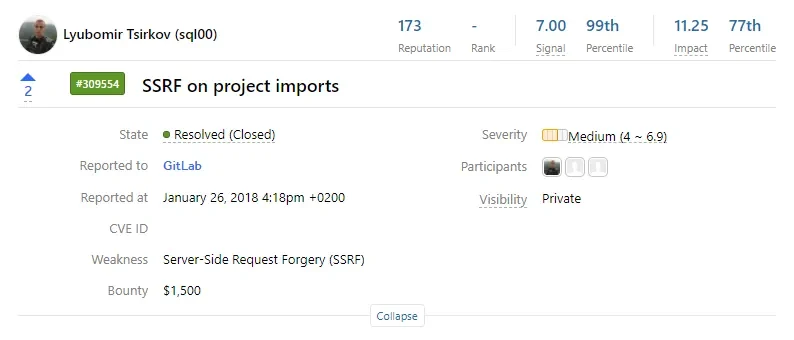
The GitLab 'Project Import' feature was vulnerable to server-side request forgery (SSRF) because it followed HTTP redirects, allowing an attacker to bypass previous fixes that blocked localhost notations. An attacker could use a redirect to make the GitLab server send requests to internal addresses, enabling port scanning and access to internal services.
 Published on ltsirkov.medium.com
I decided to share a story about my first bug bounty earned in HackerOne. It’s about SSRF vulnerability that had been previously exploited by other h1 members.
The full write-up lives on its author's site
It belongs to its author, so we link to it rather than copy it. The other two tabs are our own rewrites, checked against it.
Context
GitLab's Project Import feature lets a user create a new project by pointing GitLab at a remote repository URL. The GitLab server itself fetches that URL, which makes the feature a natural SSRF surface: the request originates from the GitLab host and can therefore reach addresses that the user submitting the URL cannot reach directly, such as loopback and internal network services.
This write-up covers a bypass of the fix that GitLab applied after an earlier report by edoverflow (https://hackerone.com/reports/215105). In that earlier report the author had already shown that the import page could be used for SSRF even after a patch, because alternative representations of localhost were still accepted. The reporter quoted the finding as follows:
"You have blocked the usage of
http://[redacted],http://localhost/, etc. buthttp://0177.1/andhttp://0x7f.1/, for instance, can still be used to scan internal ports."Edoverflow
To resolve that issue, the reporter suggested:
"Block decimal, octal and hex localhost notation."
GitLab implemented several patches in response. The question this write-up answers is whether those patches were sufficient. They were not: the latest fix could be bypassed.
Setup
The researcher needed two things:
- Access to GitLab sufficient to create a project and use Import Project, Repo by URL.
- A VPS under the researcher's control, hosting a small PHP file, plus the ability to run a listener on the GitLab server to observe incoming connections.
The listener was started on the GitLab server itself so that a connection arriving on the chosen port would prove that the server had followed the redirect to loopback:
nc -lvvp 1339
This opens port 1339 and waits for a connection.
Finding it
Reading the earlier report, the researcher noticed that the previous bypasses relied on alternative notations for the loopback address (octal, hex, decimal). The suggested remediation was to block those notations. That raised a different question: what would happen if the URL submitted to the import feature pointed at an external host that itself responded with a redirect to [redacted]?
The researcher wondered whether GitLab would follow a redirect from an external URL to loopback. The researcher set out to test exactly that.
Exploitation
Step 1: Host a redirector on the VPS
The researcher hosted a file called redirect.php on the VPS. The URL was HTTP://<IP>/redirect.php, and the file contained:
<?php header("Location: http://[redacted]:1339"); ?>
This is a single response header: any request to the file is answered with a redirect to http://[redacted]:1339, the loopback address and the port where the listener is waiting.
Step 2: Start the listener on the GitLab server
As described in the setup, nc -lvvp 1339 was executed on the GitLab server to open port 1339 and confirm whether SSRF was possible.
Step 3: Create a project and import by URL
The researcher reproduced the same steps as the earlier report:
- Create a new project.
- Import Project, Repo by URL.
- Fill in the URL field with my VPS url
http://<IP>/redirect.php. - Click Create Project.
The URL submitted to GitLab is the external VPS address, not a loopback address. The redirect to loopback happens afterwards, when GitLab fetches the URL.
Step 4: Observe the connection
After creating the project, a connection arrived on the listener:
root@debian:/home/test# nc -lvvp 1339 listening on [any] 1339 ...connect to [[redacted]] from localhost [[redacted]] 39282 GET / HTTP/1.1 Host: localhost:1339 User-Agent: git/2.14.3 Accept: */* Accept-Encoding: gzip Pragma: no-cach
The important parts of this output:
connect to [[redacted]] from localhost [[redacted]] 39282: the connection reached the listener over loopback, from the GitLab server itself. This is the proof of SSRF.GET / HTTP/1.1: the GitLab server issued an HTTP GET to the redirect target.Host: localhost:1339: the request was addressed to the loopback host and the chosen port.User-Agent: git/2.14.3: the request came from the Git client library used by the import process, not from the researcher's browser.
It turned out that Server-Side Request Forgery was still possible with the redirection technique.
Root cause
The import feature fetched the URL, and the fetch followed the redirect to loopback. The validation therefore applied to the first URL only, while the request that actually reached the network could be sent to a completely different destination chosen by the redirect response. Blocking decimal, octal and hex localhost notation, as the earlier report recommended, does nothing against this: the submitted URL contains no localhost notation at all.
The report does not describe the internal implementation, so the exact point at which the redirect was followed is not stated; what the evidence shows is that the fetch followed the redirect to loopback.
Impact
Any user with regular access to GitLab can leverage this to access the internal network, perform port scanning and so on. Any user with regular access to GitLab can leverage this. Because the request originates from the GitLab server, it can reach the internal network and be used for port scanning.
Fix
To remediate the issue, the report recommends disabling the Follow Redirection property until any security patches are applied. That is, the import feature should not automatically follow redirects.
One year later, GitLab's board decided to reward the researcher $1,500.
Variants to test
When reviewing a feature that fetches a user-supplied URL, the following are worth trying. Each is a variation on the same idea: make the validated URL differ from the URL actually contacted.
- Redirect to loopback. Host a script that returns
Location: http://[redacted]:<port>and submit its URL to the fetch feature. A positive result is a connection arriving on a listener bound to loopback on the target server, as in the output above. - Redirect to an internal host. Replace
[redacted]with an internal hostname or address. A positive result is a response or connection behaviour that differs from what an external host would produce, indicating the internal address was reached. - Redirect chains. Return a redirect to another external URL that in turn redirects to loopback. A positive result is the same loopback connection, showing that the validation is not re-applied at each hop.
- Redirect to non-HTTP schemes. Try
Locationvalues for other schemes the client may support. A positive result is a connection or error that shows the client attempted the scheme rather than rejecting it. - Port scanning through the redirector. Point the redirect at successive loopback ports. A positive result is a measurable difference between open and closed ports (connection success versus refusal or timeout), which turns the feature into a port scanner.
In every case, the key check is whether the destination that receives the request is the one that was validated, or a different one chosen by the server's response.
What happened, in plain words
GitLab is a platform where teams keep and share their code. One of its features lets you create a new project by giving it a link to code that lives somewhere else on the internet. GitLab's own server then goes and fetches that link for you. That is convenient, but it also means the server can be tricked into visiting places you, sitting at your own computer, could never reach.
This is a story about a security researcher who found a way to make GitLab's server visit a place on its own machine that should have been private. The trick was simple: instead of giving GitLab the private address directly, he gave it the address of a page he controlled, and that page told GitLab to go to the private address instead. GitLab followed the instruction. The researcher reported it, and a year later GitLab's board decided to reward him $1,500 for the finding.
Before we go further, a few ideas from zero.
What is a server? A server is just a computer that stays switched on and answers requests from other computers. When you open a website, your browser asks a server for a page, and the server sends it back. GitLab runs on servers like this.
What is an IP address? Every computer on a network has a number that identifies it, a bit like a postal address. [redacted] is a special address that always means "this same computer". If a program on a server sends a request to [redacted], the request never leaves that machine: it goes straight back to the server itself. People call this the loopback address, or localhost.
What is a port? One computer can run many services at once, so each service listens on a numbered channel called a port. A web server might listen on port 80 or 443, for example. If you know a port number, you can try to talk to the service behind it.
What is SSRF? SSRF stands for Server-Side Request Forgery. It means tricking a server into making a request on your behalf, to a destination you choose. The danger is that the server can often reach things you cannot: internal machines, private services, and the server's own loopback address. It is like asking a building's receptionist to fetch something from a locked room: you cannot go in, but the receptionist can.
What is a redirect? When you visit a web page, the server can answer with a message that says "not here, go to this other address instead". Your browser then automatically goes to the new address. This is called a redirect. It is used all the time on the web, for example when a site moves to a new domain.
What is a VPS? A Virtual Private Server is a computer you rent on the internet and control completely. You can put files on it and run programs, and it has its own address that anyone can reach.
What is PHP? PHP is a programming language often used for websites. A .php file on a web server is run when someone requests it, and whatever it outputs is sent back to the visitor.
What is nc? nc (short for netcat) is a small command-line tool that can open a port and wait for connections, printing whatever arrives. Security researchers use it as a simple listener: if something connects, you see it.
Now the story itself.
The earlier report
The researcher starts by pointing to an earlier report by someone called edoverflow, at https://hackerone.com/reports/215105. HackerOne is a website where security researchers report bugs to companies, and companies sometimes pay a reward, called a bounty, for useful reports.
In that earlier report, edoverflow had already shown that GitLab's Project Import page could be abused for SSRF, even after GitLab had tried to fix it. The problem was that there are several ways to write the loopback address, and GitLab had only blocked some of them. The researcher quotes the finding:
"You have blocked the usage of
http://[redacted],http://localhost/, etc. buthttp://0177.1/andhttp://0x7f.1/, for instance, can still be used to scan internal ports."Edoverflow
What does that mean? [redacted] is the usual way to write the loopback address. localhost is a name that also means the same thing. But computers can understand the same number written in other ways: 0177.1 uses an old octal style, and 0x7f.1 uses hexadecimal, another way of writing numbers. To a computer, all of these point at the same place. GitLab had blocked the first two spellings but not the others, so an attacker could still reach loopback by writing the address differently.
To fix that, the reporter suggested:
"Block decimal, octal and hex localhost notation."
In plain words: block every way of writing the loopback address, not just the common ones. GitLab then applied several patches, meaning several rounds of fixes, to close the hole.
The question the researcher asked
Reading all this, the researcher had a thought. The earlier bypasses all relied on writing the loopback address in a clever way. GitLab's fix was to block those spellings. But what if the address GitLab sees is not a loopback address at all?
That is where the redirect comes in. Imagine you give GitLab the address of a normal page on your own VPS. GitLab fetches that page, and your page answers with a redirect. But when GitLab actually fetches that page, your page answers with a redirect: "go to [redacted] instead". If GitLab follows redirects automatically, it will now send a request to its own loopback address, even though the address you submitted was never a loopback address.
It is like a bouncer checking your invitation at the door, then you handing the invitation to a friend inside who walks into the private room instead. The check happened, but at the wrong moment.
So the researcher set out to test whether GitLab's latest patch could be bypassed this way.
Setting up
To test the idea, the researcher needed two things:
- Access to GitLab sufficient to create a project and use Import Project, Repo by URL.
- A VPS under his control, hosting a small PHP file, plus the ability to run a listener on the GitLab server to see incoming connections.
The listener was started on the GitLab server itself. That detail matters: if a connection arrives on that listener, it proves the GitLab server itself made the request to its own loopback address. The command was:
nc -lvvp 1339
Line by line:
ncis the netcat tool.-ltells it to listen, that is, to wait for incoming connections rather than make outgoing ones.-vvmeans very verbose: print as much detail as possible about what happens.-p 1339says to use port 1339.
So the whole command opens port 1339 on the GitLab server and waits.
Step 1: Host a redirector on the VPS
The researcher put a file called redirect.php on his VPS. Its address was HTTP://<IP>/redirect.php, where <IP> stands for the VPS's address. The file contained:
<?php header("Location: http://[redacted]:1339"); ?>
Line by line:
<?phpand?>mark the start and end of PHP code inside the file.header("Location: http://[redacted]:1339");sends a single response header back to whoever requested the file. The header is calledLocation, and it is the standard way to tell a browser or program "go to this address instead". The address given ishttp://[redacted]:1339: the loopback address, on port 1339, which is exactly where the listener is waiting.
So any request to this file is answered with a redirect to the GitLab server's own loopback address. The file is a redirector: it does nothing else.
Step 2: Start the listener on the GitLab server
As described above, nc -lvvp 1339 was run on the GitLab server to open port 1339 and confirm whether SSRF was possible. Without the listener, there would be nothing to receive the redirected request, and no way to tell whether the trick worked.
Step 3: Create a project and import by URL
The researcher then reproduced the same steps as the earlier report:
- Create a new project.
- Import Project, Repo by URL.
- Fill in the URL field with my VPS url
http://<IP>/redirect.php. - Click Create Project.
Why does this work? The URL submitted to GitLab is the external VPS address, not a loopback address. The redirect to loopback happens afterwards, when GitLab fetches the URL. The check and the actual request are looking at two different addresses.
Step 4: Observe the connection
After creating the project, a connection arrived on the listener:
root@debian:/home/test# nc -lvvp 1339 listening on [any] 1339 ...connect to [[redacted]] from localhost [[redacted]] 39282 GET / HTTP/1.1 Host: localhost:1339 User-Agent: git/2.14.3 Accept: */* Accept-Encoding: gzip Pragma: no-cach
This is the output of the listener, all on one line. The important parts:
root@debian:/home/test# nc -lvvp 1339is the command prompt and the command that was run, the same listener as before.listening on [any] 1339 ...means the listener opened port 1339 and is waiting.connect to [[redacted]] from localhost [[redacted]] 39282is the proof. A connection arrived, and it came from[redacted], that is, from the GitLab server itself over loopback. The number39282is just the random port the connecting side used; it is not important.GET / HTTP/1.1is the request that arrived: an HTTP GET, the standard request a program makes when it wants to fetch a page.Host: localhost:1339shows the request was addressed to the loopback host on port 1339.User-Agent: git/2.14.3tells us which program made the request. A user agent is a label a program sends to identify itself. Here it saysgit/2.14.3, meaning the request came from the Git client library used by the import process, not from the researcher's browser.Accept: */*,Accept-Encoding: gzipandPragma: no-cachare ordinary headers a client sends to say what it can accept and how it would like the response handled.
It turned out that Server-Side Request Forgery was still possible with the redirection technique.
Why the fix did not work
The import feature fetched the URL, and the fetch followed the redirect to loopback. So the check applied to the first URL only, while the request that actually reached the network could be sent to a completely different destination chosen by the redirect response. Blocking decimal, octal and hex localhost notation, as the earlier report recommended, does nothing against this: the submitted URL contains no localhost notation at all.
The report does not describe the internal implementation, so the exact point at which the redirect was followed is not stated; what the evidence shows is that the fetch followed the redirect to loopback.
What an attacker could do
Any user with regular access to GitLab can leverage this to access the internal network, perform port scanning and so on. Any user with regular access to GitLab can leverage this. Because the request originates from the GitLab server, it can reach the internal network and be used for port scanning.
Port scanning, in plain words, means trying ports one by one to see which ones answer. If a port answers, something is running there; if it refuses or times out, nothing is. Doing this from the GitLab server lets an attacker map out services that outsiders are not supposed to see.
The recommended fix
To remediate the issue, the report recommends disabling the Follow Redirection property until any security patches are applied. That is, the import feature should not automatically follow redirects. If GitLab refuses to follow the redirect, the request never reaches loopback, and the trick fails.
One year later, GitLab's board decided to reward the researcher $1,500.
Other variations worth trying
When reviewing a feature that fetches a URL supplied by a user, the following are worth trying. Each is a variation on the same idea: make the validated URL differ from the URL actually contacted.
- Redirect to loopback. Host a script that returns
Location: http://[redacted]:<port>and submit its URL to the fetch feature. A positive result is a connection arriving on a listener bound to loopback on the target server, as in the output above. - Redirect to an internal host. Replace
[redacted]with an internal hostname or address. A positive result is a response or connection behaviour that differs from what an external host would produce, indicating the internal address was reached. - Redirect chains. Return a redirect to another external URL that in turn redirects to loopback. A positive result is the same loopback connection, showing that the validation is not re-applied at each hop.
- Redirect to non-HTTP schemes. Try
Locationvalues for other schemes the client may support. A positive result is a connection or error that shows the client attempted the scheme rather than rejecting it. - Port scanning through the redirector. Point the redirect at successive loopback ports. A positive result is a measurable difference between open and closed ports (connection success versus refusal or timeout), which turns the feature into a port scanner.
In every case, the key check is whether the destination that receives the request is the one that was validated, or a different one chosen by the server's response.
Glossary
- Bounty: a reward, usually money, paid by a company to a researcher who reports a security bug.
- Cookie: a small piece of data a website stores in your browser so it can recognise you on later requests.
- Follow Redirection: a setting that tells a program to automatically go to the new address when a server answers with a redirect.
- GET: the standard HTTP request a program makes when it wants to fetch a page or resource.
- GitLab: a website and service where teams store and share code and manage projects.
- HackerOne: a website where security researchers report bugs to companies and companies run bounty programmes.
- Header: an extra piece of information sent along with a web request or response, such as
LocationorUser-Agent. - Hexadecimal: a way of writing numbers using sixteen symbols (0 to 9 and a to f).
- Host: the name or address of the computer a request is addressed to.
- HTTP: the language browsers and servers use to exchange pages and requests.
- IP address: a number that identifies a computer on a network, like a postal address.
- Listener: a program that opens a port and waits for incoming connections, printing what arrives.
- localhost: a name that means "this same computer", the same as
[redacted]. - Loopback: the special address
[redacted], which always points back at the same computer. - nc (netcat): a command-line tool that can open a port and wait for connections, or make them.
- Octal: a way of writing numbers using eight symbols (0 to 7).
- PHP: a programming language often used to build websites.
- Port: a numbered channel on a computer that a particular service listens on.
- Port scanning: trying ports one by one to discover which services are running.
- Project Import: a GitLab feature that creates a new project by fetching code from a URL you supply.
- Redirect: a server response that tells the client to go to a different address instead.
- Repo by URL: the GitLab import option where you give a URL to a repository instead of uploading files.
- Server: a computer that stays on and answers requests from other computers.
- SSRF (Server-Side Request Forgery): tricking a server into making a request to a destination you choose, often one you cannot reach yourself.
- User agent: a label a program sends to identify itself in a request.
- VPS (Virtual Private Server): a computer you rent on the internet and control completely.