[file-browser] Inadequate Output Encoding and Escaping
The file-browser module failed to properly encode and escape filenames when rendering them in the browser, allowing an attacker to embed malicious JavaScript in a filename. When a user browsed to the file server, the script executed in the context of the user's browser.
 Originally disclosed on HackerOne
- Triaged in 4 days
- Fixed in 10 months
- Disclosed after 11 months
I would like to report stored xss in file-browser module It allows an attacker to embed malicious js code as filenames,which get executed once browsed to the file over the web browser
Module
module name: file-browser version: 0.0.5 npm page: https://www.npmjs.com/package/file-browser
Module Description
file-browser is a utility to browse files on your file system using your browser. Its equivalent of creating a file share that can be accessed over http. Using this you can share files between different machines, and across different operating systems.
Vulnerability Description
due to improper output encoding and escaping ,it was possible for an attacker to embed malicious js code as filenames,which get executed once browsed to the file over the web browser
Steps To Reproduce:
- npm -g install file-browser
2.now running below command will start a file server on the specified port: file-browser
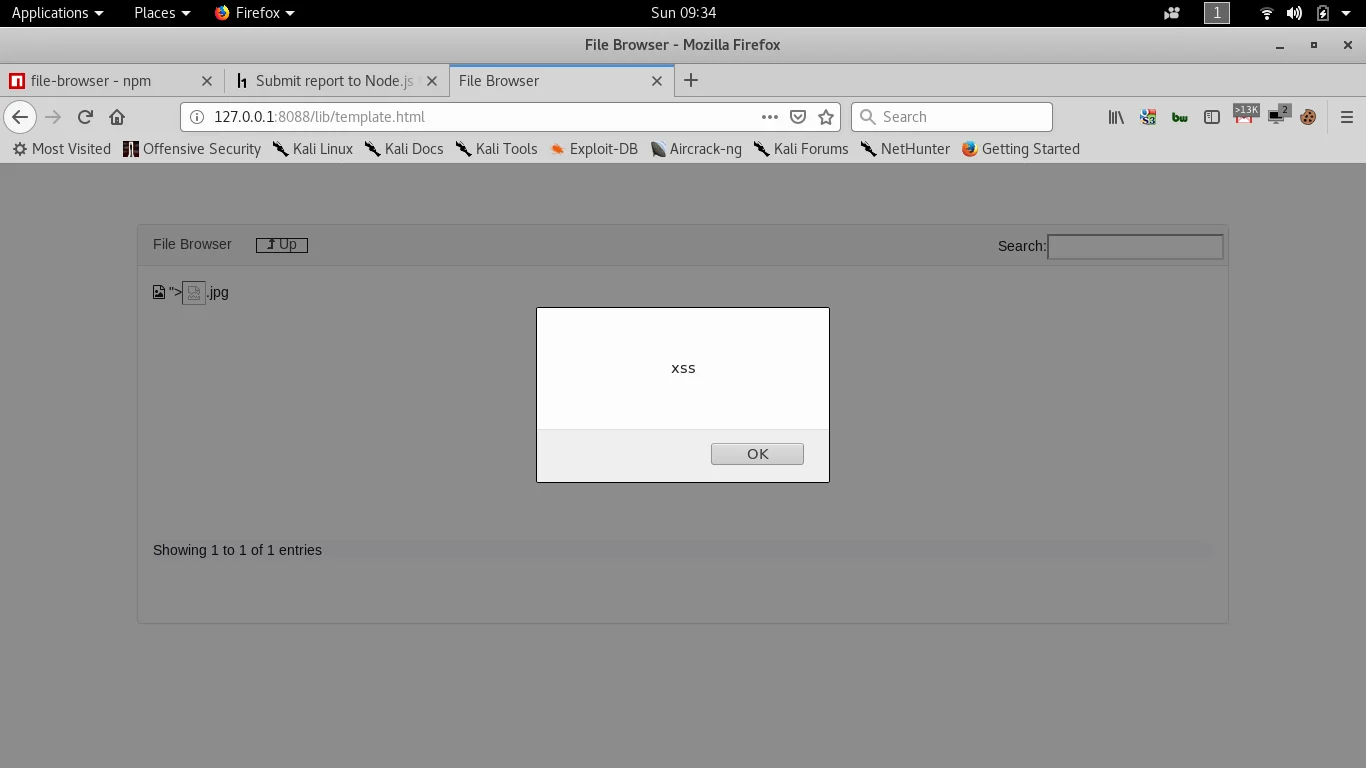
3.now create a file with xss payload as filename in current dir
touch '"><img src=x onerror=alert("xss")>.jpg'
4.now goto url at which the file server is running
http://127.0.0.1:8088/lib/template.html
now xss will popup
Supporting Material/References:
- [OPERATING SYSTEM VERSION] Kali linux
- [NODEJS VERSION] 11.8.0
- [NPM VERSION] 6.5.0
Wrap up
Select Y or N for the following statements:
- I contacted the maintainer to let them know: [N]
- I opened an issue in the related repository: [N]
Impact
this could have enabled an attacker to execute malicous js code which might lead to session stealing,hooking up browser with frameworks like beef and so on
Attachments
Not written yet. The AI write-up for this report has not been written yet. The Original tab links to the source.
How it worked
Root cause
Likely the application inserted filenames into HTML without proper output encoding or escaping.
Impact
This could have enabled an attacker to execute malicious JavaScript code, which might lead to session stealing or hooking the browser with frameworks like BeEF.
What the attacker needed
Attacker can create a file with a malicious name; victim browses the file server
How it was found
- Install the file-browser module globally using npm.
- Start the file server by running the file-browser command.
- Create a file in the current directory whose name contains an XSS payload.
- Visit the file server's URL to trigger the XSS.
Explained by bugbounty.wiki with AI from the original and checked against quotes from it; it can still be wrong. Read the original before relying on a detail.
Not written yet. The AI write-up for this report has not been written yet. The Original tab links to the source.
When a web page shows a list of files, it must treat filenames as plain text, not as code. Here, the file-browser tool inserted filenames directly into the page without cleaning them, so a filename containing HTML and JavaScript was run by the browser. This is called stored cross-site scripting (XSS) because the malicious code is saved (as a filename) and later runs when someone views the page.
What is XSS?
Script an attacker supplies runs in another user's browser, on the target's origin, with that user's session.




