Ribose IDOR with simple CSRF bypass unrestrcited changes and deletion to other photo profile
The application allowed an attacker to delete or change another user's profile photo by replacing their own user ID with the victim's user ID in the request, while still using their own session and CSRF token. This was possible because the server did not verify that the user ID in the request belonged to the authenticated user.

Please kindly visit this simple paper directly to looking this release in simple:
The full write-up lives on its author's site
It belongs to its author, so we link to it rather than copy it. The other two tabs are our own rewrites, checked against it.
Context
Ribose is a social media style platform where users build a profile: they can upload a profile photo, set a first and last name, add contact information and more. This write-up looks at two of those profile features, deleting your own photo profile and uploading a new one, and shows that the server did not tie either action to the account that owned the photo.
The issue was reported to Ribose, fixed, and published with Ribose's permission. The author is YoKo Kho (@YokoAcc).
Two things about Ribose's design matter for the rest of the article. First, user IDs are not simple numbers or usernames: they are long, automatically generated identifiers that are hard to guess. Second, those identifiers are not secret. Any user can see another user's ID simply by visiting their profile.
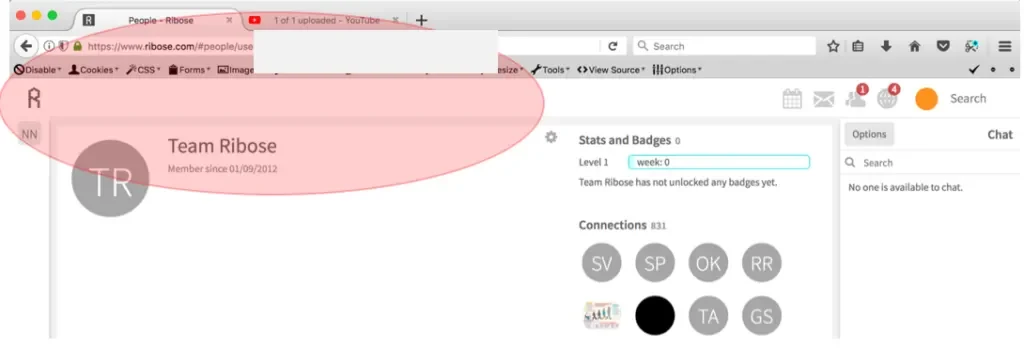
Figure 1 shows the user ID of the Team Ribose account on its profile page. In the report the Team Ribose ID is written as eeeeeeee-ffff-gggg-zzzz-z1z1z1z1z1z1, and the author's own example account, created with the email [redacted], received an ID of the form 0b03d802-3e29-4564-xxxx-x1x1x1x1x1x1.
Setup
The precondition for the attack is that the attacker has a valid session on Ribose and can learn a victim's user ID, which the platform exposes on profile pages. The precondition for the attack is simply that the attacker has a valid session on Ribose and can learn a victim's user ID, which the platform exposes on profile pages.
To make victim discovery easy, the report notes that Ribose sends an automatic friend invitation from the "Team Ribose" account. Accepting it and visiting the Team Ribose profile exposes a list of connections, which is effectively a list of candidate victims.
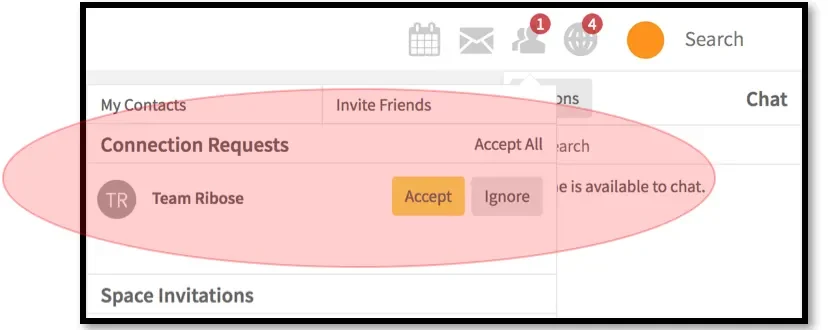
Figure 3 shows the automatic connection request sent by Team Ribose.
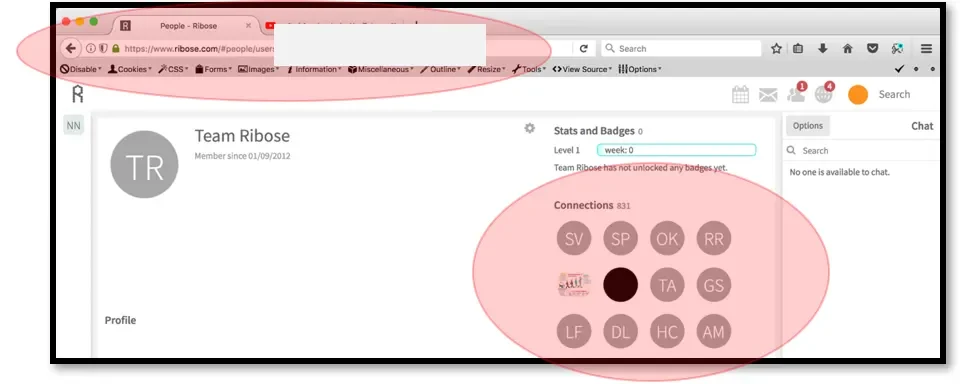
Figure 4 shows Team Ribose's connections, the friend list from which victims can be chosen. The author's point is that this removes the need to guess the complex generated user IDs.
Finding it
The researcher looked at what the browser sends when a user deletes their own photo profile. The application issues a DELETE request to the server carrying the user ID and a CSRF token, which the system uses to decide whether the process is executed by an authorised user. The captured request looks like this:
DELETE /people/users/0b03d802-3e29-4564-xxxx-x1x1x1x1x1x1/avatar?_rr=indigolocal_3BFA8A3E8&_rv=52dde6a5 HTTP/1.1Host: www.ribose.comUser-Agent: Mozilla/5.0 (Macintosh; Intel Mac OS X 10.11; rv:56.0) Gecko/20100101 Firefox/56.0Accept: application/json, text/javascript, */*; q=0.01Accept-Language: en-US,en;q=0.5Accept-Encoding: gzip, deflateContent-Type: application/x-www-form-urlencoded; charset=UTF-8X-CSRF-Token: <very long CSRF Token overhere>X-CSRF-Param: authenticity_tokenX-Requested-With: XMLHttpRequestReferer: https://www.ribose.com/Content-Length: 1Cookie: _r=<cookies_over_here>DNT: 1Connection: close
Table 1 in the report is this deletion request. The important parts are the user ID in the path (/people/users/<user ID>/avatar), the X-CSRF-Token header holding the CSRF token, and the X-CSRF-Param header naming authenticity_token as the parameter the token belongs to. The request is sent with the session cookie _r.
In theory this should not be abusable: an attacker should not be able to delete another user's photo profile without knowing the victim's CSRF token, which should be restricted to each session. The researcher's observation was that the user ID in the path is the only thing that decides whose photo is affected. The CSRF token proves that the request comes from a valid session, but it does not appear to be checked against the user ID in the path.
The same pattern appears in the upload flow. When a user uploads a picture as their profile photo, the application sends a POST request carrying the user ID, an authenticity token and a CSRF token.
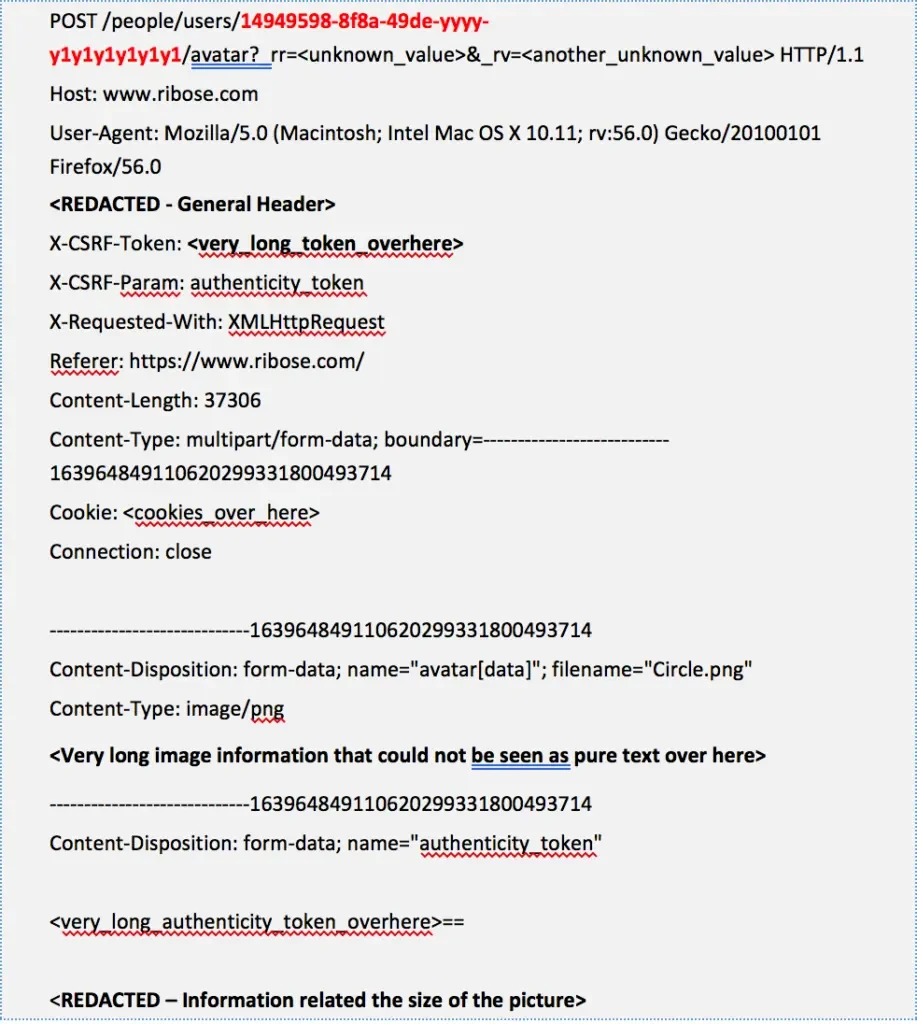
Figure 2 shows the upload request of a user's photo profile. As with deletion, the theory says an attacker cannot upload into another user's photo profile without the victim's CSRF token and authenticity token. In practice, changing only the sent user ID to the victim's user ID still causes the upload to be executed by the system.
Exploitation
Step 1: find the victim's user ID
Visit the victim's profile, or accept the automatic Team Ribose friend invitation and browse Team Ribose's connections to pick a target. Either way the user ID is visible, so the complex generated identifiers do not protect anything.
Step 2: capture your own deletion request
Delete your own photo profile and capture the request the application sends to the server.
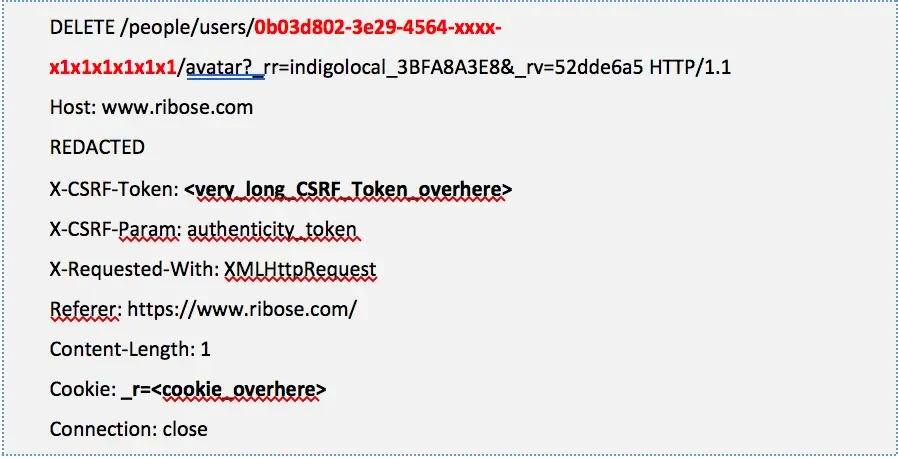
Figure 5 shows the deletion request of a user's photo profile. The server answers with a success response.
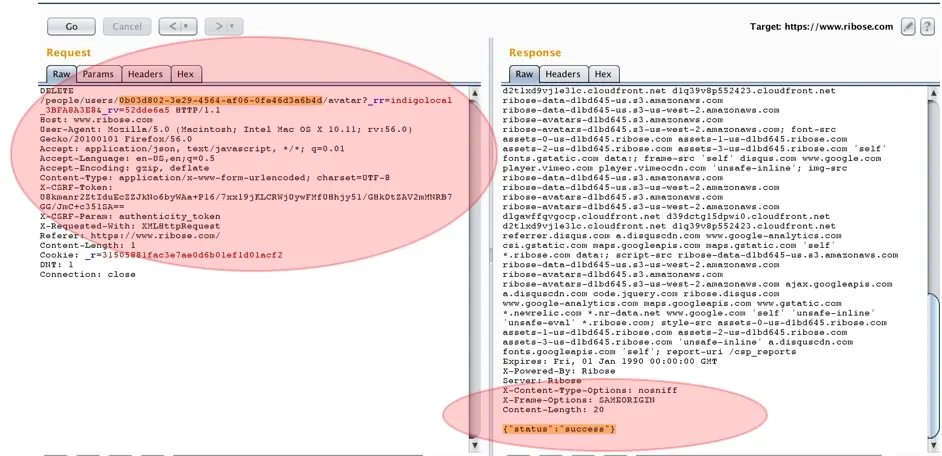
Figure 6 shows the valid request from the researcher's own session deleting their own photo profile.
Step 3: replay the deletion against the victim
Replace your own user ID in the request with the victim's user ID and send it with your own session. Nothing else changes: the CSRF token and the rest of the request stay as they were.
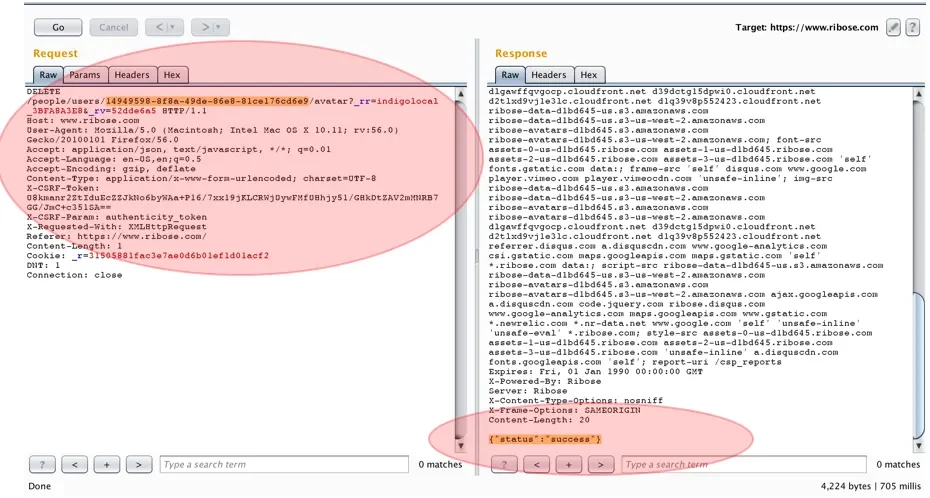
Figure 7 shows the deletion of the photo using the attacker's user ID in place of the victim's. The attacker's session was successfully used to delete another user's photo profile.
Step 4: capture your own upload request
For the second issue, upload a photo to your own profile and capture the resulting POST request.
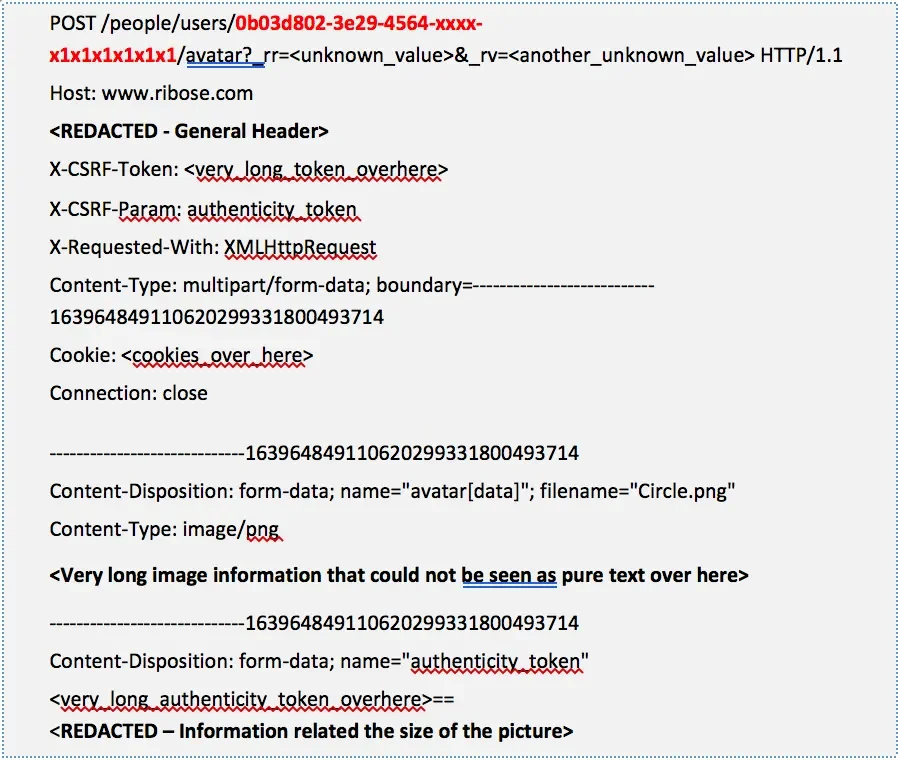
Figure 8 shows the upload request of a user's photo profile.
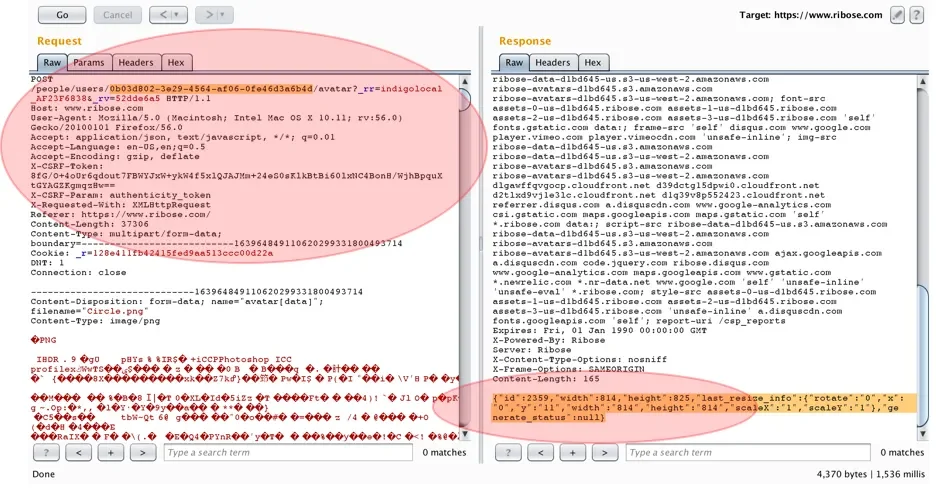
Figure 9 shows the valid request from the researcher's own session uploading their own photo profile.
Step 5: replay the upload against the victim
Replace your own user ID with the victim's user ID in the captured upload request and send it with your own session.
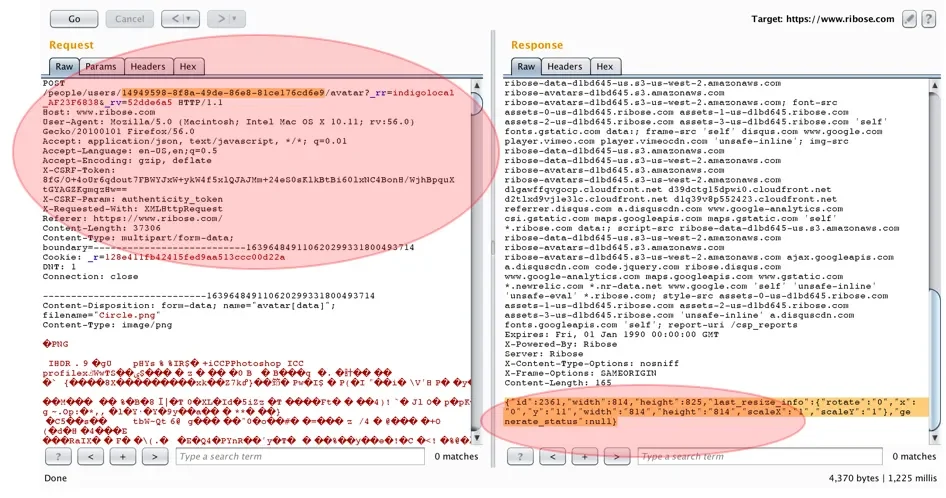
Figure 10 shows the upload of a photo using the attacker's user ID in place of the victim's. The attacker's session was successfully used to upload a picture into another user's photo profile.
The report also links two proof of concept videos:
- Unrestricted Deletion to other Photo Profile: https://youtu.be/dxv6Uj9_xsw
- Unrestricted Changes to other Photo Profile: https://youtu.be/ItlQg4lulnw
Root cause
The CSRF token proves the request comes from a valid session, but it does not appear to be checked against the user ID being acted on. The user ID in the request path is the only thing that decides whose photo is affected, so any authenticated user can point it at another user. This is a classic IDOR: the object reference is user controlled and the authorisation check is missing.
The existing defences did not stop it. Ribose used long, automatically generated user IDs, a CSRF token in a header, and a custom X-CSRF-Param header naming the authenticity token parameter. That combination looks hard to bypass, but the CSRF token only proves the request came from some valid session; it is not bound to the user ID being acted on. The complex user ID does not help either, because the ID is displayed on profiles and the Team Ribose connection list hands out candidates.
Impact
An attacker with any valid Ribose session can delete or replace the photo profile of any other user whose user ID they can see, which in practice is any user reachable through profiles and the Team Ribose connection list. The action is performed with the attacker's own session and does not require the victim's CSRF token or any interaction from the victim. The report describes the effect as the ability to delete or change all of the user's photo that exist at the system.
Fix
Ribose fixed the issue quickly, around one month according to the report, although the deploy needed more time. The report does not describe the code change. The recommendation given is to ensure that every session only functions for its own account and cannot be used by other users, which in practice means checking that the user ID in the request matches the session owner before acting on the photo.
Variants to test
- Change the user ID in a request path or body while keeping your own session and CSRF token.
- Remove the CSRF token entirely and resend.
- Replace the victim's CSRF token with your own CSRF token.
- Look for object identifiers that are exposed on public pages or in lists such as friend or connection lists, which removes the need to guess them.
The report points to a collection of CSRF bypass methods at https://haiderm.com/10-methods-to-bypass-cross-site-request-forgery-csrf/ for further techniques.
What happened, in plain words
Ribose is a website where people create a profile, a bit like a social network. On your profile you can put a photo, set your first and last name, add contact details, and so on. This article is about two of those profile actions: deleting your own profile photo and uploading a new one.
The researcher found that changing only the user ID in the request let them delete or replace someone else's photo. If you were logged in to Ribose, you could take the request your browser sends when you delete or upload your own photo, change one value in it (the user ID, a long code that identifies an account), and the server would happily delete or replace someone else's photo. You did not need the other person's password, and you did not need them to click anything.
The problem was reported to Ribose, fixed, and published with Ribose's permission. The author is YoKo Kho (@YokoAcc).
Before going further, two ideas need explaining, because the whole story depends on them.
What a user ID is. Every account on a website needs an internal name so the site can tell accounts apart. That internal name is the user ID. On many sites it is a simple number (user 1, user 2, user 3) or your username. On Ribose it is a long string that is generated automatically when you sign up, and it is designed to be hard to guess. The author's own example account, created with the email [redacted], received an ID of the form 0b03d802-3e29-4564-xxxx-x1x1x1x1x1x1. The Team Ribose account's ID is written in the report as eeeeeeee-ffff-gggg-zzzz-z1z1z1z1z1z1.
What a session and a cookie are. When you log in, the server gives your browser a small piece of data called a session cookie. Your browser sends it back with every request, and that is how the server knows the request is coming from you and not from a stranger. Think of it like a wristband you get at an event: the staff check the wristband at the door, and as long as you wear it you are treated as a guest who has already shown their ticket. The cookie in this report is named _r.
A second idea appears right away: the user ID is not secret. Any logged-in user can see another user's ID just by visiting that person's profile page. So the long, hard-to-guess ID does not actually protect anything, because it is printed in public.
Figure 1 shows the user ID of the Team Ribose account on its profile page, which is exactly how any visitor can read it.
Setup
The only precondition for the attack is that you are logged in to Ribose and you can find out a victim's user ID, which the site shows on profile pages anyway.
To make finding victims even easier, the report notes that Ribose automatically sends a friend invitation from the "Team Ribose" account. If you accept it and open the Team Ribose profile, you see a list of that account's connections. That list is effectively a ready-made list of candidate victims, so there is no need to guess the long generated IDs at all.
Figure 3 shows the automatic connection request sent by Team Ribose.
Figure 4 shows Team Ribose's connections, the friend list from which a victim can be picked.
Finding it
Looking at the delete request
The researcher started by watching what the browser sends when a user deletes their own profile photo. To do this kind of watching yourself, you open your browser's developer tools (usually with F12), go to the Network tab, and perform the action on the site; every request the page makes appears in a list, and you can click one to see exactly what was sent.
When you delete your photo, the application sends a DELETE request to the server. DELETE is one of the standard HTTP methods, the verbs a browser uses to talk to a server: GET asks for a page, POST sends data, and DELETE asks for something to be removed. The request carries the user ID and a CSRF token, which the system uses to decide whether the process is executed by an authorised user. The captured request looks like this:
DELETE /people/users/0b03d802-3e29-4564-xxxx-x1x1x1x1x1x1/avatar?_rr=indigolocal_3BFA8A3E8&_rv=52dde6a5 HTTP/1.1Host: www.ribose.comUser-Agent: Mozilla/5.0 (Macintosh; Intel Mac OS X 10.11; rv:56.0) Gecko/20100101 Firefox/56.0Accept: application/json, text/javascript, */*; q=0.01Accept-Language: en-US,en;q=0.5Accept-Encoding: gzip, deflateContent-Type: application/x-www-form-urlencoded; charset=UTF-8X-CSRF-Token: <very long CSRF Token overhere>X-CSRF-Param: authenticity_tokenX-Requested-With: XMLHttpRequestReferer: https://www.ribose.com/Content-Length: 1Cookie: _r=<cookies_over_here>DNT: 1Connection: close
Table 1 in the report is this deletion request. Here is what each part means, in plain words:
- The first line,
DELETE /people/users/0b03d802-3e29-4564-xxxx-x1x1x1x1x1x1/avatar?..., says which verb is used (DELETE), which address on the server is being called, and which user's photo is being targeted. The long code in the middle of the address is the user ID. The part after the?is extra data attached to the address. Host: www.ribose.comsays which website the request is for. One server can host many sites, so the request has to name the one it wants.User-Agentdescribes the browser that sent the request. Here it is Firefox 56 on a Mac.Accept,Accept-LanguageandAccept-Encodingtell the server what kind of answer the browser can handle and in which language, and that it can be compressed to save bandwidth.Content-Typesays how the body of the request is formatted. Here it is the classic web form format.X-CSRF-Tokenholds the CSRF token. A CSRF token is a long random value that the site puts into its pages and expects back with actions, so that a request coming from somewhere else (for example, a page on another site that tries to make your browser act) cannot succeed. It is like a one-time stamp on a form: the office only accepts forms that carry the stamp it issued.X-CSRF-Param: authenticity_tokennames the parameter that the token belongs to. It is a custom header, meaning a header the site invented for itself rather than one defined by the web standards.X-Requested-With: XMLHttpRequestis a common marker saying the request came from JavaScript inside the page rather than from typing an address in the address bar.Referersays which page the request was made from.Content-Length: 1says the body is one byte long.Cookie: _r=<cookies_over_here>is the session cookie described earlier. This is the wristband: it is what tells the server who you are.DNTandConnectionare minor housekeeping headers.
In theory this should not be abusable. An attacker should not be able to delete another user's photo profile without knowing the victim's CSRF token, and that token should be restricted to each session. The researcher's observation was that the user ID in the address is the only thing that decides whose photo is affected. The CSRF token proves that the request comes from a valid session, but it does not appear to be checked against the user ID in the address. In other words, the stamp on the form proves the form came from the office, but nobody checks that the name written on the form matches the person who collected the stamp.
Looking at the upload request
The same pattern appears in the upload flow. When a user uploads a picture as their profile photo, the application sends a POST request carrying the user ID, an authenticity token and a CSRF token. POST is the HTTP verb used when you are sending data to the server to create or change something, which is exactly what an upload does.
Figure 2 shows the upload request of a user's photo profile. As with deletion, the theory says an attacker cannot upload into another user's photo profile without the victim's CSRF token and authenticity token. In practice, changing only the sent user ID to the victim's user ID still causes the upload to be executed by the system.
Exploitation
Step 1: find the victim's user ID
Visit the victim's profile, or accept the automatic Team Ribose friend invitation and browse Team Ribose's connections to pick a target. Either way the user ID is visible, so the complex generated identifiers do not protect anything. This step exists because the whole attack depends on knowing the victim's ID, and the point of the step is to show that this knowledge is freely available.
Step 2: capture your own deletion request
Delete your own photo profile and capture the request the application sends to the server. You do this with your own account on purpose: you are allowed to delete your own photo, so the request you capture is a perfectly legitimate one, complete with a valid session cookie and a valid CSRF token. That legitimate request is the template you will later reuse.
Figure 5 shows the deletion request of a user's photo profile. The server answers with a success response.
Figure 6 shows the valid request from the researcher's own session deleting their own photo profile.
Step 3: replay the deletion against the victim
Replace your own user ID in the request with the victim's user ID and send it with your own session. Nothing else changes: the CSRF token and the rest of the request stay as they were. This is the heart of the bug. The server sees a valid session and a valid token, so it lets the action through, and it takes the user ID from the request to decide whose photo to delete. Because that ID is now the victim's, the victim's photo is deleted.
Figure 7 shows the deletion of the photo using the attacker's user ID in place of the victim's. The attacker's session was successfully used to delete another user's photo profile.
Step 4: capture your own upload request
For the second issue, upload a photo to your own profile and capture the resulting POST request. The reasoning is identical to step 2: you capture a legitimate request made with your own account so that you have a working template.
Figure 8 shows the upload request of a user's photo profile.
Figure 9 shows the valid request from the researcher's own session uploading their own photo profile.
Step 5: replay the upload against the victim
Replace your own user ID with the victim's user ID in the captured upload request and send it with your own session. Again, the session and token are yours and are valid; only the ID that says whose profile is being changed has been swapped.
Figure 10 shows the upload of a photo using the attacker's user ID in place of the victim's. The attacker's session was successfully used to upload a picture into another user's photo profile.
The report also links two proof of concept videos:
- Unrestricted Deletion to other Photo Profile: https://youtu.be/dxv6Uj9_xsw
- Unrestricted Changes to other Photo Profile: https://youtu.be/ItlQg4lulnw
Root cause
The CSRF token proves the request comes from a valid session, but it does not appear to be checked against the user ID being acted on. The user ID in the request address is the only thing that decides whose photo is affected, so any logged-in user can point it at another user. This is a classic IDOR. IDOR stands for Insecure Direct Object Reference: the site lets you name an object directly (here, a user's photo, named by the user ID) and forgets to check that you are allowed to touch that particular object. A simple comparison: a hotel that hands out room keys by room number without checking that the guest actually booked that room.
The existing defences did not stop it. Ribose used long, automatically generated user IDs, a CSRF token in a header, and a custom X-CSRF-Param header naming the authenticity token parameter. That combination looks hard to bypass, but the CSRF token only proves the request came from some valid session; it is not bound to the user ID being acted on. The complex user ID does not help either, because the ID is displayed on profiles and the Team Ribose connection list hands out candidates.
Impact
An attacker with any valid Ribose session can delete or replace the photo profile of any other user whose user ID they can see, which in practice is any user reachable through profiles and the Team Ribose connection list. The action is performed with the attacker's own session and does not require the victim's CSRF token or any interaction from the victim. The report describes the effect as the ability to delete or change all of the user's photo that exist at the system.
Fix
Ribose fixed the issue quickly, around one month according to the report, although the deploy needed more time. The report does not describe the code change. The recommendation given is to ensure that every session only functions for its own account and cannot be used by other users, which in practice means checking that the user ID in the request matches the session owner before acting on the photo.
Variants to test
- Change the user ID in a request address or body while keeping your own session and CSRF token.
- Remove the CSRF token entirely and resend.
- Replace the victim's CSRF token with your own CSRF token.
- Look for object identifiers that are exposed on public pages or in lists such as friend or connection lists, which removes the need to guess them.
The report points to a collection of CSRF bypass methods at https://haiderm.com/10-methods-to-bypass-cross-site-request-forgery-csrf/ for further techniques.
Glossary
- API: the set of addresses and rules a website exposes so that a browser (or another program) can ask it to do things, such as fetch a profile or delete a photo.
- Authenticity token: a hidden value the site puts into its forms and expects back, used to confirm that a request really came from the site's own pages. In this report it is the parameter named by
X-CSRF-Param. - Cookie: a small piece of data a website stores in your browser and your browser sends back with every request. The session cookie is how the server recognises you after you log in.
- CSRF (Cross-Site Request Forgery): an attack where a page on another site tries to make your browser perform an action on a site where you are logged in. CSRF tokens exist to stop it.
- CSRF token: a long random value issued by the site and required with actions, so that a request forged elsewhere cannot succeed.
- Custom header: an HTTP header invented by the site itself rather than defined by web standards, such as
X-CSRF-Paramhere. - DELETE: the HTTP method (verb) used to ask a server to remove something.
- Developer tools / Network tab: the built-in panel in a browser (usually opened with F12) that shows every request the page makes and exactly what was sent.
- Header: an extra line of information attached to a request or response, such as the browser name or a token.
- HTTP method: the verb at the start of a request that says what kind of action is wanted, for example
GET,POSTorDELETE. - IDOR (Insecure Direct Object Reference): a bug where the site lets you name an object directly (by its ID) and does not check that you are allowed to access that object.
- POST: the HTTP method used to send data to the server to create or change something, such as uploading a photo.
- Request: the message your browser sends to a server asking it to do something.
- Response: the message the server sends back, for example a page, some data, or a success or error status.
- Session: the period during which the server remembers that you are logged in, kept track of through your session cookie.
- Session cookie: the specific cookie that identifies your logged-in session, named
_rin this report. - User ID: the internal identifier a site uses for an account. On Ribose it is a long automatically generated string, but it is visible on profile pages.
- X-Requested-With: a header commonly used to mark a request as coming from JavaScript inside the page rather than from the address bar.